Super Assistant for MT4

* Super Assistant is an useful management tool that helps traders perform management tasks on MT4/MT5 account remotely via Telegram such as:
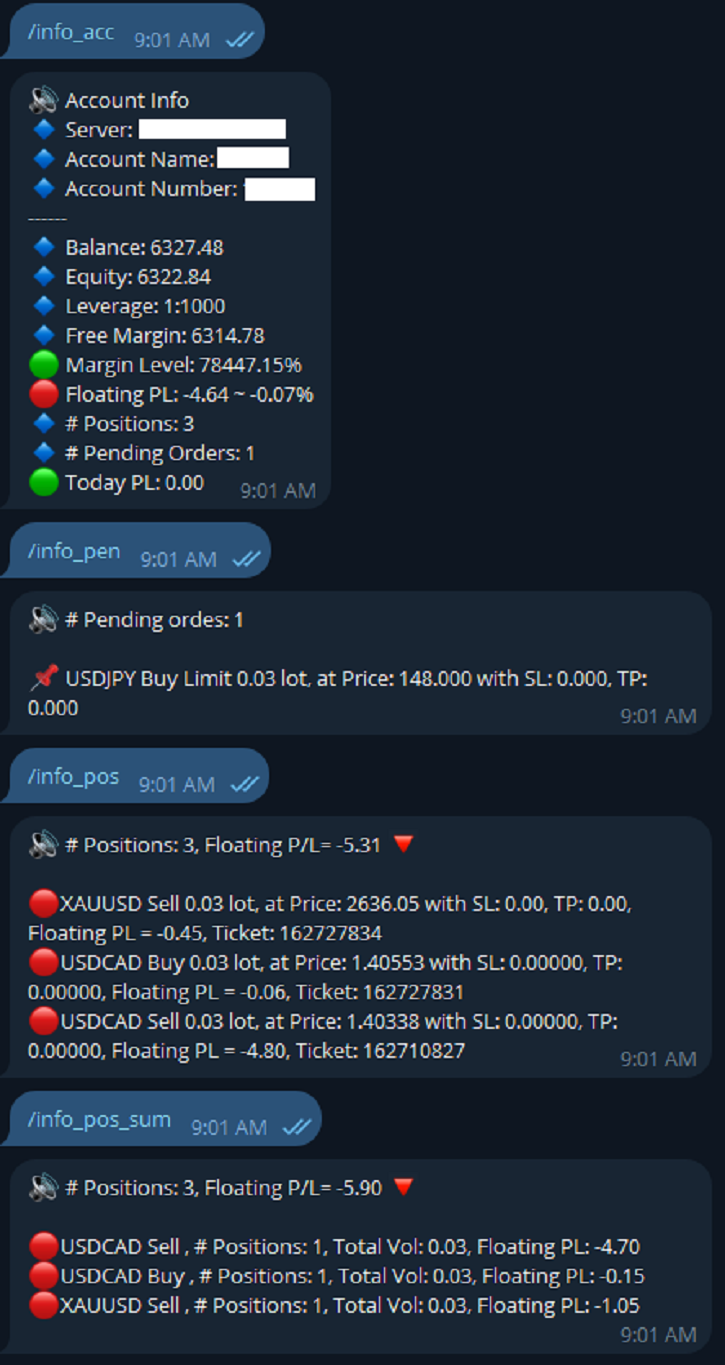
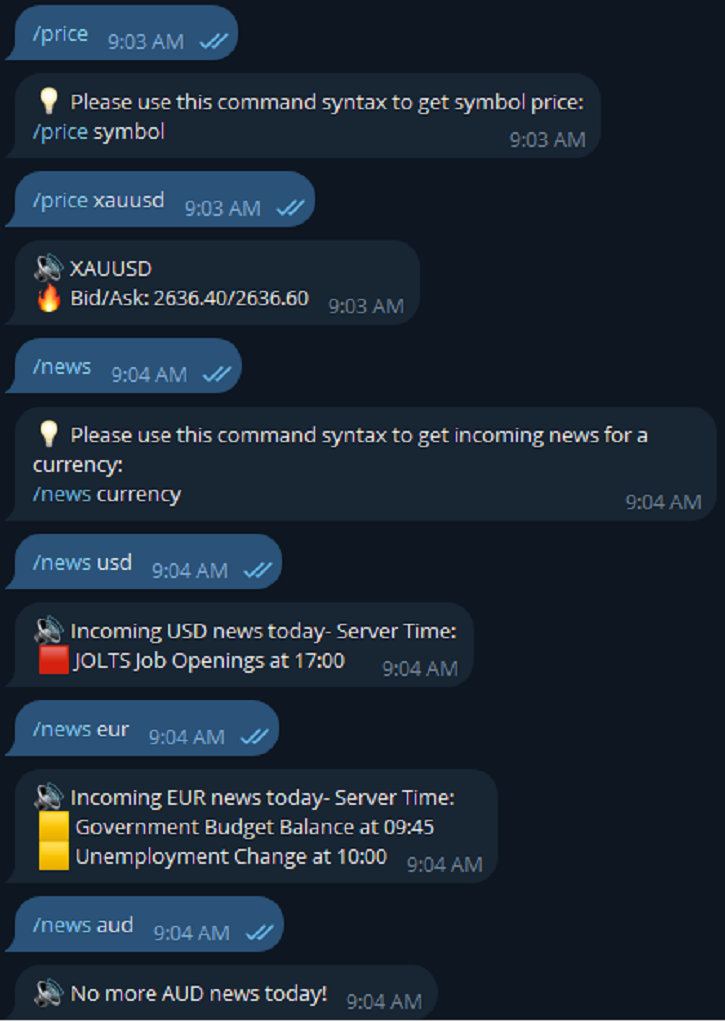
- Get info (account, details of positions, pending orders, floating PL, price, economic news, etc)
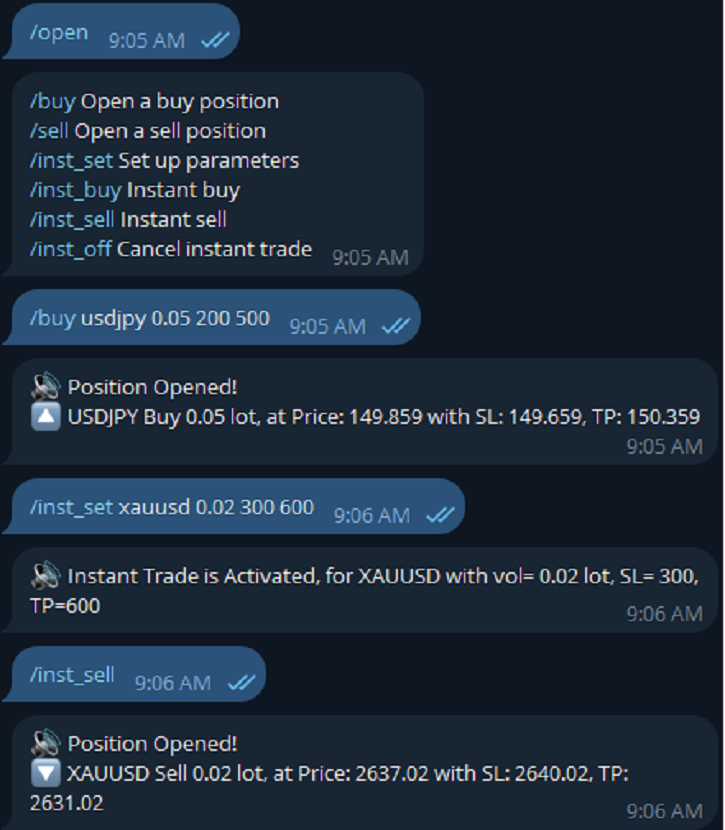
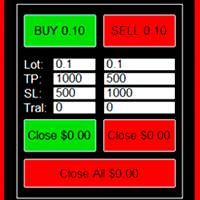
- Open trade (open instantly with preset parameters)
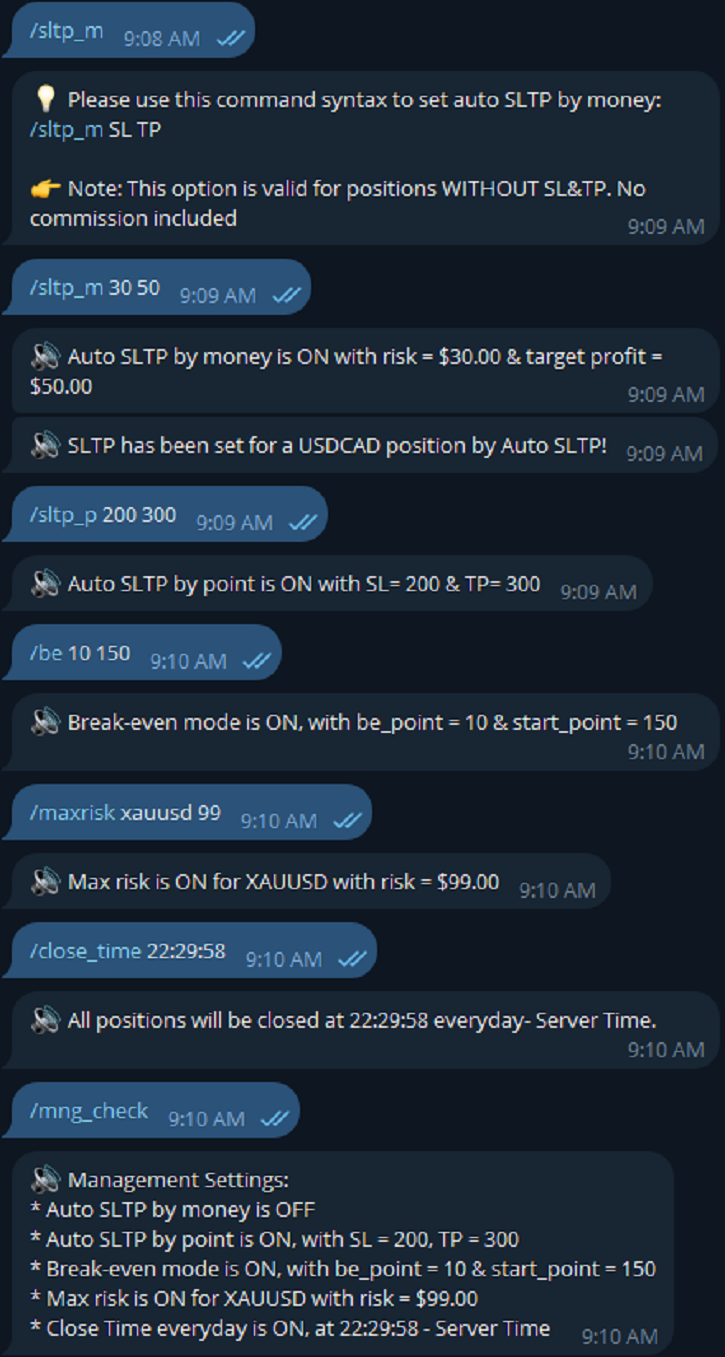
- Manage trade (set SLTP automatically, break-even mode, max risk, close time every day, etc)
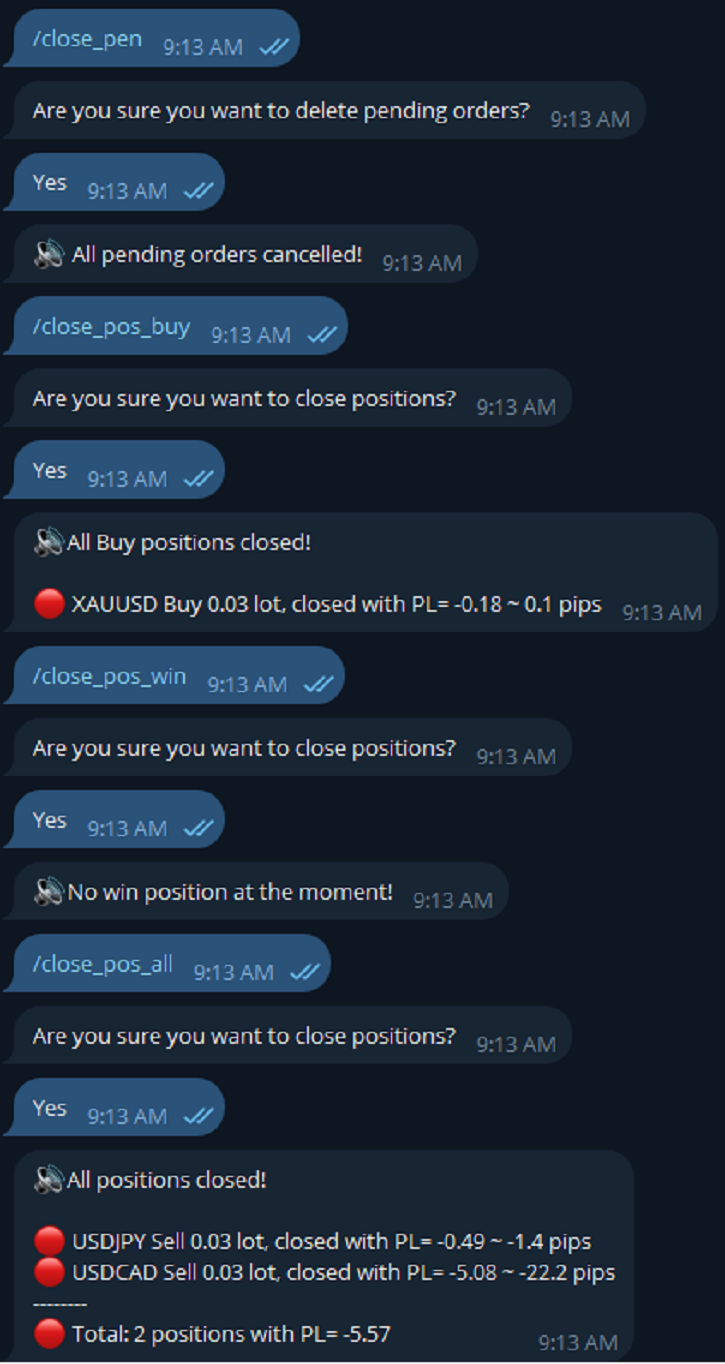
- Close trade (close all, buy, sell, win positions by one click, set awaiting close by PL, time)

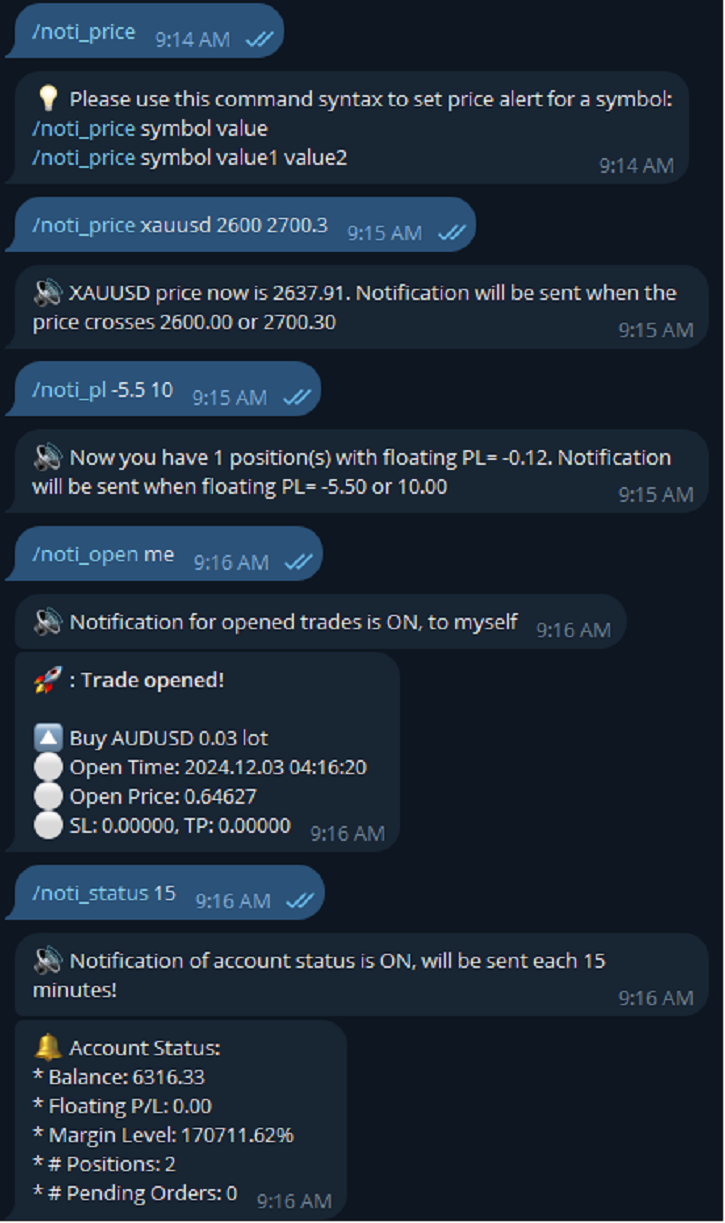
- Set up notifications to Telegram (opened, closed trades, price alert, PL alert, etc.)

* Easy to set up & use! See User Manual & Try Demo version here, thank you!

LIST OF COMMANDS:

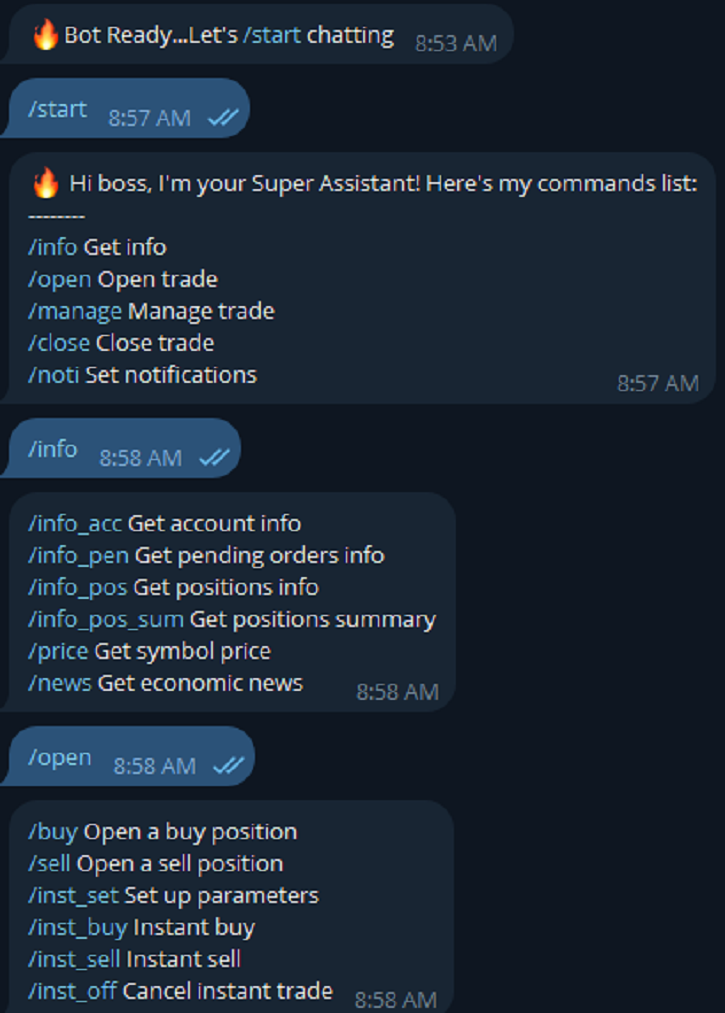
==========GET INFO============

info_acc - Get account info

info_pen - Get pending orders details

info_pos - Get positions details

info_pos_sum - Get positions summary

price - Get symbol price

news - Get economic news (only MT5)

============OPEN TRADE==========

buy - Open a buy position 

sell - Open a sell position 

inst_set - Set up parameters  

inst_buy - Instant buy 

inst_sell - Instant sell 

inst_off - Cancel instant trade

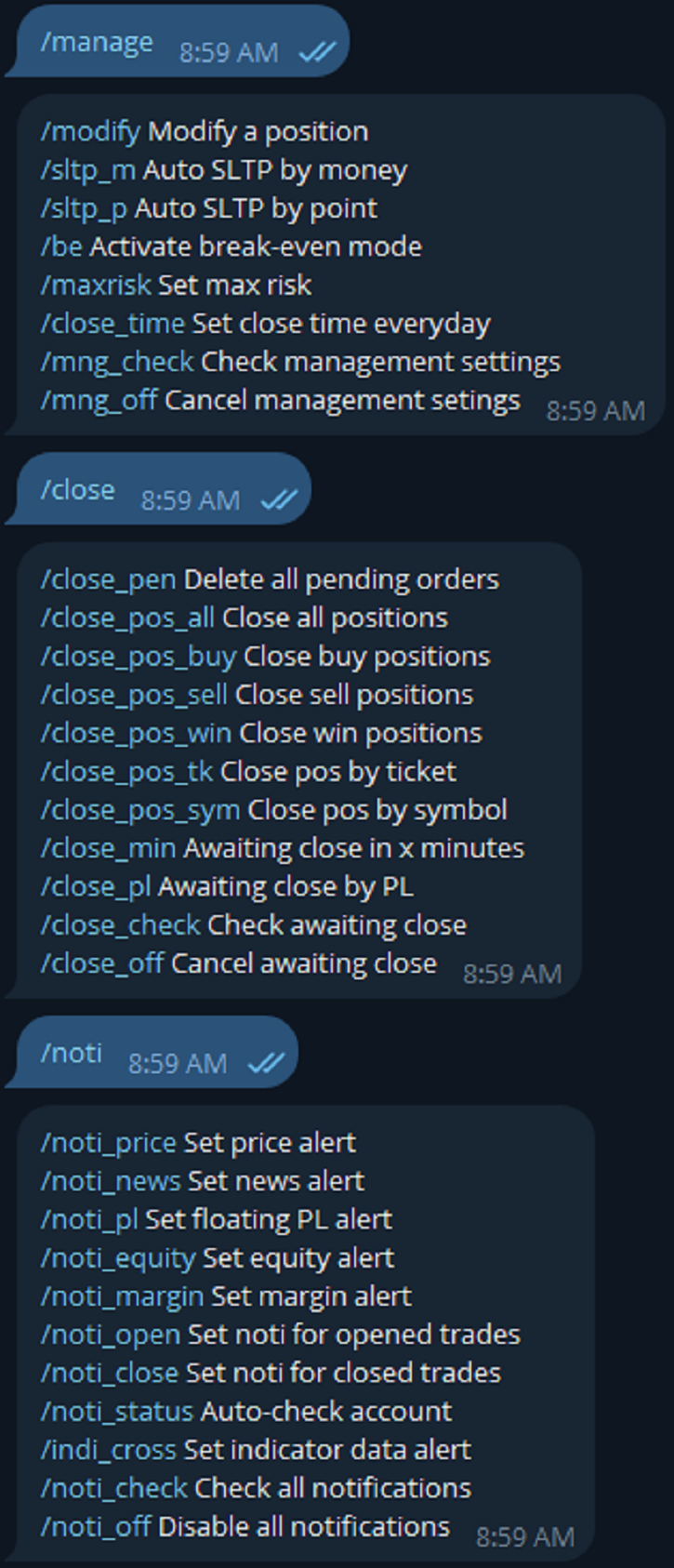
============MANAGE TRADE========

modify - Modify a position 

sltp_m - Auto SLTP by money 

sltp_p - Auto SLTP by point 

be - Activate break-even mode 

maxrisk - Set max risk 

close_time - Set close time everyday 

mng_check - Check management settings 

mng_off - Cancel management setings

============CLOSE TRADE==========

close_pen - Delete all pending orders

close_pos_all - Close all positions

close_pos_buy - Close all Buy positions

close_pos_sell - Close all Sell positions

close_pos_win - Close all Win positions 

close_pos_sym - Close all positions by symbol

close_pos_tk - Close a position by ticket

close_min - Awaiting close in x minutes

close_pl - Awaiting close by floating PL

close_check - Check all awaiting close status

close_off - Cancel all awaiting close

==========NOTIFICATION=============

noti_price - Set price alert 

noti_news - Set news alert (only MT5)

noti_pl - Set floating PL alert 

noti_equity - Set equity alert 

noti_margin - Set margin alert 

noti_open - Set noti for opened trades 

noti_close - Set noti for closed trades 

noti_status - Auto-check account 

indi_cross - Set indicator data alert (only MT5)

noti_check - Check all notifications 

noti_off - Disable all notifications

********************************************************************************************

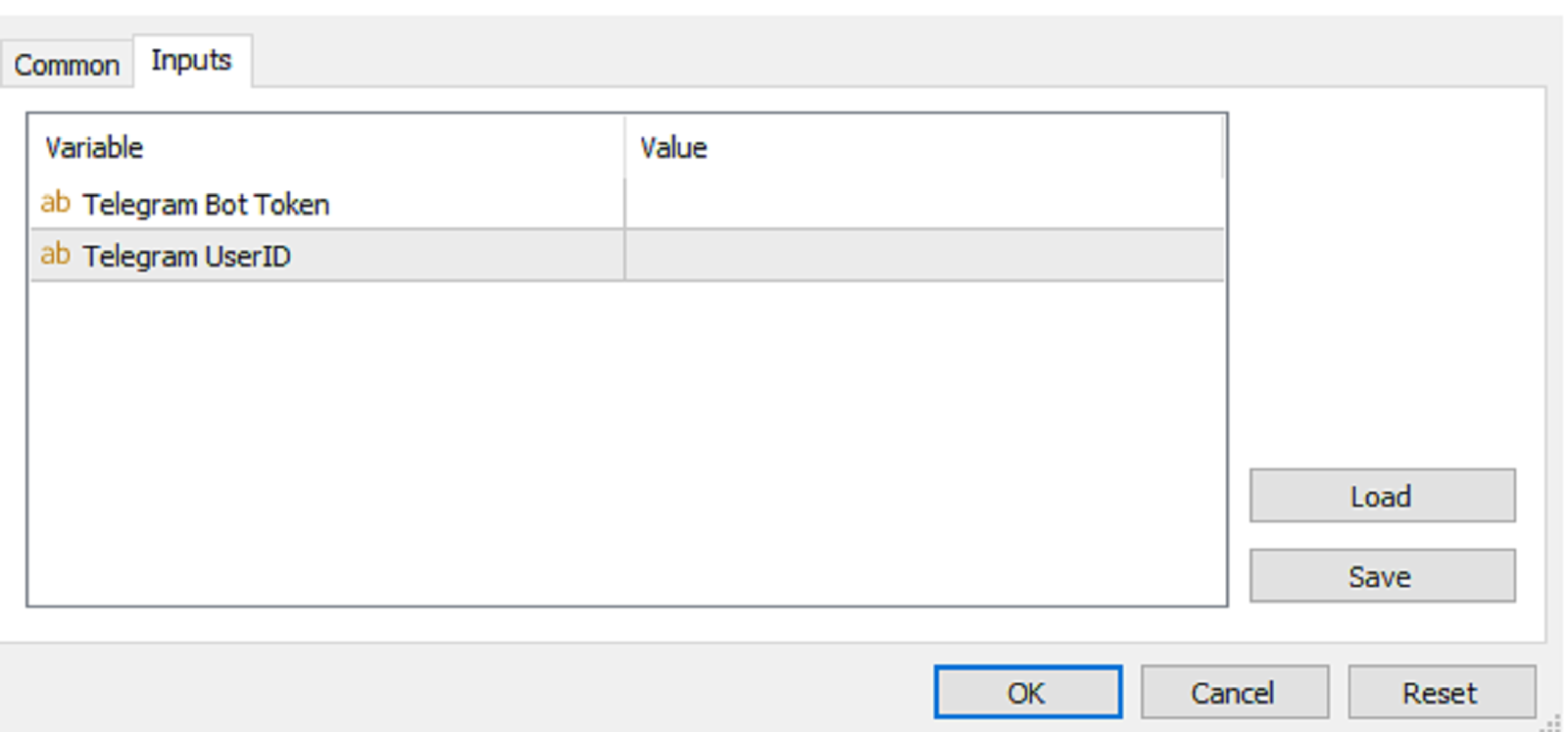
INPUTS:

Telegram Bot Token

Telegram User ID

*********************************************************************************************

HOW TO SET UP?

* Get inputs for EA:

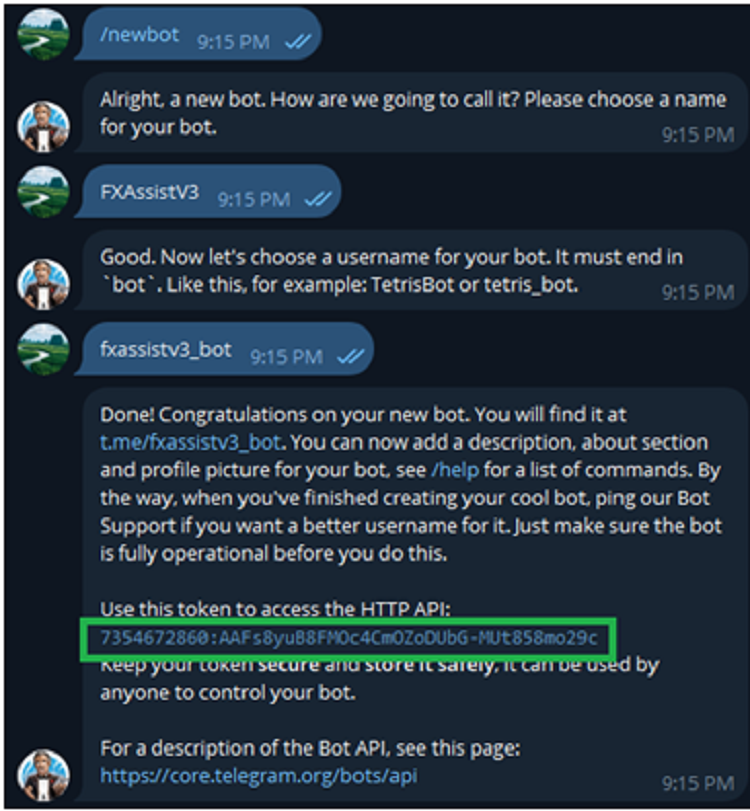
- Create a Telegram bot by @BotFather , and save your Bot Token. Find your bot by username & press "start".

- Get your Telegram User ID by chatting with @userinfobot 

* Setup on your MT4/MT5:

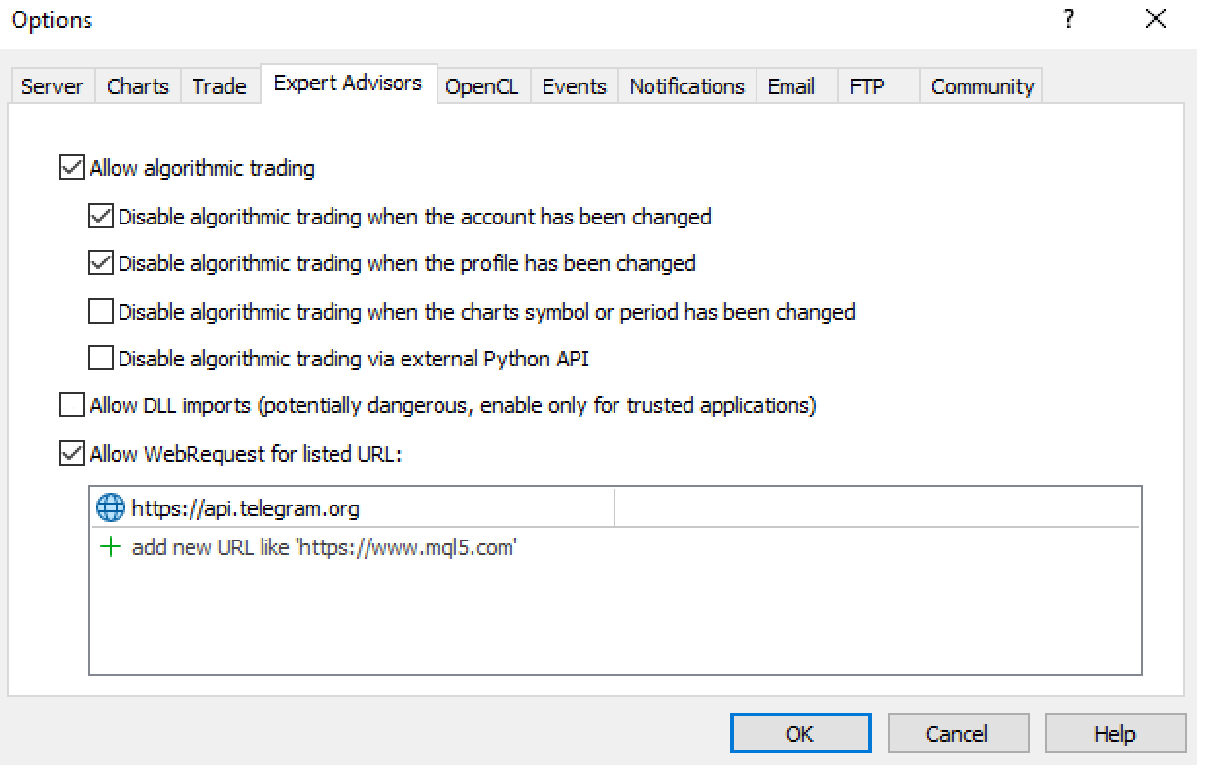
- MT4/MT5 => Tools => Options => Expert Advisors => Tick on Allow Algo Trading & Allow WebRequest, add  API Telegram to WebRequest

- Allow Algo Trading on EA 

* Create a command menu for your Telegram bot:

- Chat with @BotFather => /mybots => Select your bot => Edit Bot => Edit Commands => Copy/Paste command list above (You can set all the commands or just some common commands like start, info_acc, info_pos, close_pos_all)

Рекомендуем также
Скрипт BuyLimit_SellLimit_Grid открывает отложенные ордера BuyLimit и SellLimit. Просто перетащите скрипт на график нужной пары.  Перед установкой всех отложенных ордеров открывается окно ввода входных параметров: LongPos - при TRUE открывается ордер BuyStop. ShortPos - при TRUE открывается ордер SellStop. InitLot - начальный лот. LotCoeff - при 1 все отложенные ордера имеют одинаковый размер лота. InitStep - разница между двумя следующими друг за другом ордерами в пунктах. StepCoeff - коэффицие
HotKeys MT4
Alexey Valeev
3 (1)
Утилита для ручной торговли с помощью "горячих клавиш". Позволяет моментально реагировать на текущую ситуацию на рынке. "Горячие клавиши" можно назначить на открытие позиций по типу, закрытие позиций по типу или всех позиций на текущем графике, удаление всех ордеров на текущем графике. Также можно задать "горячие клавиши" на пять предопределённых торговых объёмов и переключаться между ними в зависимости от ситуации без необходимости периодически менять объём вручную. Так же возможно задать автом
本エキスパートアドバイザ(EA)は、以下の条件をすべて満たした注文が決済された場合に、自動的に同一内容の注文を再設定します。 対象となるのは指値注文または逆指値注文で、必ずテイクプロフィット(TP)とストップロス(SL)が設定されているものです。 そして、その注文がTPまたはSLによって決済された際、同じロット数・価格・TP・SL・有効期限などの条件を引き継いだ注文を自動で再発注します。 これにより、一度設定した戦略を継続的に適用でき、裁量判断なしに取引を繰り返すことが可能となります。 ただし、ブローカーによっては再注文時にスリッページが発生する場合がありますので、必ずご利用環境をご確認の上、自己責任でお使いください。
Manage trades
Makarii Gubaydullin
Управление активными и отложенными ордерами: автоматический безубыток, изменение TP/SL, частичное/полное закрытие, визуальное отображение уровней на графике У меня есть  Многофункциональная утилита : более 66 функций, включая удобное управление сделками   |    Свяжитесь со мной  если у вас есть вопросы 1) Главное окно: для управления ордерами можно указать конкретный символ [Symbol] или выбрать все символы [ALL] Закрыть все активные позиции [ALL] Закрыть все прибыльные сделки [profits] Закрыть в
This EA Automatically sets stop loss and take profit levels on limit orders.  It is fully adjustable : you can set the amount of pips for your SL or TP level Helps limit your risk Automatically Just drag and drop onto your MT4 chart and it start working for you You can save different pip levels to drag onto the chart You only have to drag it onto the chart once and it will automatically set your SL and TP level Every time you enter a Pending Order
HungrySpiderMulti
Aleksandr Hudilainen
HungrySpiderMulti - это удобная мультивалютная торговая панель позволяющая торговать 28 торговых пар в одном окне . Панель также позволяет активировать усреднение, и трейлинг стоп. Используя эту панель трейдер будет получать уведомление о новых событиях. Открытие ордера: Открытие ордера происходит в один клик . Достаточно напротив необходимой валютной пары, в разделе Open нажать на кнопку Sell или Buy . Усреднение: Напротив необходимой пары, имеется кнопка Grid . У кнопки есть два состояния, зе
Auto Trade Manager MT4
Benjamin Yew Loong Thong
Наконец, вы можете оставить сделку работающей, не беспокоясь! Что такое Auto Trade Manager ? Это советник, который не принимает сделки, а управляет активной сделкой; это делается путем автоматического перемещения стоп-лосса в соответствии с указаниями пользователя. Особенности! - Автоматически размещает стоп-лосс на уровне безубыточности (Настройки: пипсы в прибыли,% от TP,% от SL) - Автоматически отслеживает ваш стоп-лосс (настройки: пипсы в прибыли, деньги в прибыли, стоп-лосс по скользящей ср
Price Line EA
Chantal Sala
5 (1)
Price Line EA - это утилита, предназначенная для ручной торговли. Этот советник предлагает возможность автоматически торговать на ваших избранных уровнях. Уровни по умолчанию создаются на графике при загрузке советника, после этого их можно переместить на любой желаемый уровень. Когда рынок достигает ценовых уровней, советник открывает ордера. Этот алгоритм позволяет увеличить риск для увеличения потенциальной прибыли. Утилита открывает сделки согласно стратегии по стопам и разворотам, поэтому р
Itrade Manager MT4
Nestor Smill Soler Olivero
Itrade manager expert advisor (EA) is a type of software that can be programmed to perform a variety of tasks related to managing trades in the financial markets. Some of the ways in which the Itrade manager EA can help you trade better include: Itrade manager EA can automatically modify, and close trades based on predefined rules and conditions, freeing you up to focus on other aspects of your trading strategy. Managing risk: Itrade manager EA can help you manage risk by placing stop-loss and
Advanced Trailing Stop Loss Utility Optimize your trading strategy with the Advanced Trailing Stop Loss Utility , a powerful tool designed to dynamically protect your profits and minimize losses. Whether you're a beginner or an experienced trader, this utility ensures that your trades remain secure while maximizing potential gains. Key Features: Dynamic Stop Adjustment : Automatically adjusts the stop loss level as the market moves in your favor, locking in profits while allowing for market fluc
Risk Control Utility MT4   designed for manual trading. It helps to calculate and control your risks, transfer transactions to breakeven and accompany positions with trailing stop. Easy to set up and use. It can be used for calculating a trading lot, calculating stop loss and take profit levels. Works with currency pairs, CFDs, stocks, indices, futures, cryptocurrencies Displays   volume,   potential loss and profit before   placing an order Ability to set the expiration time of a pending order
Advanced Pending Orders
Fernando Jose Velasco Borea
This EA facilitates sending multiple orders simultaneously. It also facilitates a function designed to be executed in a specific hour, ideal to facilitate its operation during the night, allowing to schedule positions while we are not next to the graph. The system can send direct orders at the market price or pending orders, speeding up the execution of operations with multiple Take Profit as well as controlling the Slippage of each order. The parameters of the system are: •          Broker Info
Waddah Attar Easy Positions Risk Management This EA gives you a full ability to close one position or close all positions . Close buy or sell trades in any position . Close profit or loss position . by clicking on a command button on the chart with confirmation message . Show you  a full information about your positions like : count - lots - average price - points - profit -  profit % - used margin for this position and the risk percent . and also the scrolled table of trades that position has
Данная утилита поможет немедленно закрыть все прибыльные ордера ОДНИМ НАЖАТИЕМ КНОПКИ. Работает очень быстро. Вы можете выбрать один или все символы для закрытия. Быстрая работа утилиты обеспечит более оперативное управление вашей торговлей. Если вы хотите работать со всеми символами, оставьте параметр symbol пустым (как в настройке по умолчанию). Если вы хотите работать с одним символом (например, ордера по EURUSD), укажите symbol =EURUSD (см. скриншот ниже). Это скрипт, а следовательно хранить
Утилита для автоматического выставления стоп-лосс ордеров в соответствии с заданным условием. Условие постановки стопа это два уровня цены: Порог срабатывания - уровень, при достижении которого выставляется ордер; Непосредственно значение стоп-лосс ордера. Есть возможность включить или отключиь тралинг после установки стоплосс. Входные параметры Order type for execution - Определяет тип ордеров под обработку эксперта. Может быть BUY, SELL или auto-select; Trigger Level Points - Уровень, при дос
Добро пожаловать в Trade Manager EA — лучший инструмент для управления рисками, предназначенный для упрощения, точности и эффективности торговли. Это не просто инструмент для размещения ордеров; это комплексное решение для удобного планирования торгов, управления позициями и усиленного контроля над рисками. Независимо от того, начинающий вы трейдер, опытный специалист или скальпер, нуждающийся в быстром исполнении, Trade Manager EA адаптируется к вашим потребностям и работает с любыми активами:
Удобная торговая панель для быстрой торговли. Подходит для любого торгового инструмента. Возможности Ввод данных возможен как в соответствующие поля панели, так и в свойствах утилиты; Реализована возможность включения трейлинг-стопа (если 0 - не работает); Кнопки быстрого открытия бай или селл-сделок; Кнопки закрытия бай и селл по отдельности; Кнопка закрытия всех сделок по текущей цене. Настройки: Buy Lot - Торговый лот для бай-сделки; Sell Lot   - Торговый лот для селл-сделки; TP Buy - Тейк-пр
CloseIfProfitorLoss with Trailing
Vladislav Andruschenko
4.87 (31)
Закрытие позиций в MetaTrader 4 по общей прибыли\убытку с трейлингом прибыли. Включите Режим Виртуальных стопов . Закрытие и расчет отдельно по BUY и SELL позициям . Закрытие и расчет по всем символам или только по текущему . Активируйте трейлинг-стоп прибыли. Закрытие по общей прибыли и убытку в валюте депозита, пунктах или % от баланса . Советник предназначен для использования на любом счёте в паре с любым другим советником или при ручной торговле. Версия MT5 Полное описание + DEMO + PDF Как
Утилита BreakEven Grid для MT4 BreakEven Grid — мощная утилита для ручного управления торговлей на платформе MetaTrader 4. Она предоставляет удобную экранную панель с кнопками, которые помогут вам управлять открытыми позициями одним щелчком мыши. Функции: Установить BE+Profit:   автоматически устанавливает Take Profit на уровень безубыточности + желаемая прибыль в пунктах или деньгах. Закрыть КУПИТЬ/ПРОДАТЬ:   мгновенно закрыть все ордера на покупку или продажу для текущего символа. Закрыть
Grid Trading Manager EA
Ibrahim Mohamed Ibrahim Mohamed Elsahafy
Professional grid management EA with 3-tab GUI, progressive placement, 5 take profit levels (TP1-TP5), basket breakeven protection, and advanced trailing stop. Automatically manages manual trades with intelligent limit order distribution. --- ### KEY FEATURES **3-Tab Interactive GUI** - STATUS: Real-time monitoring, profit tracking, trailing targets - SETTINGS: Runtime configuration without EA restart - TAKE PROFIT: Configure 5 sequential TP levels **Progressive Order Placement** - Wave-
FREE
RiskManager
Roman Zhitnik
5 (4)
Данный робот выступает в роли риск-менеджера, помогающего трейдеру контролировать свою торговлю. В настройках можно задать параметры, при которых риск-менеджер будет принудительно закрывать позиции, а так же, в случае необходимости, принудительно закрывать терминал во избежание открытия "на эмоциях" новых позиций, не соответствующих торговой стратегии. Настройки риск-менеджера Check limit to close - проверка лимита по средствам Limit to close - лимит по средствам, при достижении которого закрыва
One Click Trader - это инструмент для MetaTrader 4, который позволяет поднять вашу торговлю на новый уровень. Он позволяет открывать, управлять и закрывать сделки простым эффективным способом за один щелчок мыши. Стрелка вверх сворачивает панель OCT Стрелка вниз разворачивает панель OCT Стрелка вправо отображает следующую панель с дополнительными функциями Стрелка влево скрывает панель с дополнительными функциями Красная кнопка SELL позволяет открывать короткие рыночные ордера Красная кнопка SEL
Open by Clik
Dariusz Grywaczewski
Open by Clik is a tool that allows you to open positions with two mouse clicks. The place of the click and the direction of clicking decide what position will be opened. Opening of positions is quick and intuitive. If the second click is above the first click, opened are positions Long. If the second click is belowe the first click, opened are positions Short. By clicking in the chart area, opened are Market Order (BUY and SELL). By clicking in the area in front of the chart, opened are Pendin
Pomo Panel is a simple panel to help trader using grid strategy. It is designed with grid strategy in mind.  Its features: Open standard transactions Set up pending transactions Delete all pending transactions Modify multiple Stop-Loss and Target-Profit Calculate Lots of all opened transactions Calculate average Open-Close, High-Low Close All Opened Orders
Советник для полуавтоматической торговли с виртуальным многоуровневым тралом тейк профитов и стоплоссов, тралом целевого профита, функциями мартингейла, ручным открытием ордеров, управлением сторонними ордерами, подсчетом торгующих инструментов, выводом текущей информации и статистики на график. Есть возможность задавать несколько уровней срабатывания трала тейк профита и стоплосса и каждому уровню присваивать процент частичного закрытия ордера. Процент лота при закрытии уровня вычисляется от
Закрывайте   все   сделки  сразу ,   управляя   непосредственно   из   вашего   мобильного  MT4  приложения . Эта  утилита   может   закрывать   9   различных   категорий   сделок. Для   активации   действия   вам  достаточно  разместить   отложенный   ордер   по   предопределенной   цене   (это можно сделать  удаленно   через   мобильное   приложение  MT4). После   этого , утилита   обнаружит   ордер   и   закроет   все   необходимые   сделки. Таким   образом   вы   можете   быстро   управлят
This utility allows you to easily close profit or loss positions. You can close profit or loss positions by clicking each buttons. If profit or loss positions reaches or exceed value specified as pips, they would be closed. This panel would be placed left bottom corner of the chart. If the users want to change the placement and functions contact me. Important :  -Check allow live trading. -Enable Auto Trade trading.
MultiStopOrder
Agus Wahyu Pratomo
MultiStopOrder Tis Script will help us to put multiple stop order with single one click. This is a script not an EA Will place BUYSTOP and SELLSTOP with single click Main Feature 1. Put Multiple Stop Order 2. Specify how much stop orders will make 3. Set distance from current price 4. Set distance for each stop order 5. Set Take Profit dan Stop Loss  6. Use it on MT4 7. Set lot size with minmum 0.01 lots 8. Use with single one clicks
NEWS Telegram is an Utility can get NEWS from Website "calendar fxstreet" and send to yours Telegram Chanel Only attach to Chart then do this step as bellow: In the terminal, open Tools ---> Options ---> Expert Advisors ---> add "calendar fxstreet" to the "Allow WebRequest for listed URL list" field. - SETTING UP THE UTILITY: Tools -> Settings -> Advisers -> Allow WebRequest for the following URLs Create your own bot in Telegram at @BotFather. Remember Token, it looks something like this - 1325
Prop Manager allows you to automatically close trades once the max daily loss or profit target is reached so it's designed for the control and management of PROP FIRM ACCOUNT , but also live accounts. Prop Manager will allow you to manage prop accounts with maximum security, whether you want to do manual trading or algorithmic trading. It was created for people who want to be sure that their trading does not run into daily drawdown or total drawdown problems. The user is left with complete fr
С этим продуктом покупают
ManHedger MT4
Peter Mueller
5 (1)
THIS EA IS A SEMI-AUTO EA, IT NEEDS USER INPUT. Manual & Test Version Please TEST this product before   BUYING  and watch my video about it. Contact me for user support or bug reports, or if you want the MT5 version! MT5 Version I do not guarantee any profits or financial success using this EA. With this Expert Advisor, you can: Implement your own   Zone Recovery   strategy to capitalize on trending markets. Create   Grid   trading strategies, to profit from ranging markets. Place orders easil
The product will copy all telegram signal to MT4   ( which you are member  ) , also it can work as remote copier.  Easy to set up, copy order instant, can work with almost signal formats, image signal, s upport to translate other language to English Work with all type of channel or group, even channel have "Restrict Saving Content", work with  multi channel, multi MT5 Work as remote copier: with signal have ticket number, it will copy exactly via ticket number. Support to backtest signal. How to
Crystal Trade Manager PRO – Продвинутая система контроля рисков и управления сделками для MT4 Бесплатная версия: https://www.mql5.com/en/market/product/150632 Обзор Crystal Trade Manager PRO (CTM) — это полнофункциональная утилита для MetaTrader 4, предназначенная для профессионального управления рисками, автоматизации сделок и обеспечения строгой торговой дисциплины. Система защищает капитал, контролирует дневную просадку, автоматически устанавливает SL/TP, обеспечивает быстрые команды управле
Live Forex Signals предназначен для торговли по сигналам сайта   https://live-forex-signals.com/en  и  https://foresignal.com/en . Live Forex Signals для MetaTrader 5  https://www.mql5.com/ru/market/product/81448 Параметры Username и Password если у вас имеется подписка на сайты  live-forex-signals.com / foresignal.com , тогда вам следует заполнить эти параметры своими учетными данными; если подписки нет, тогда оставьте поля пустыми; Komment комментарий к открываемым сделкам Risk риск в процен
The product will copy all  Discord  signal   to MT4   ( which you are member  ) , also it can work as remote copier.  Easy to set up. Work with almost signal formats, support to translate other language to English Work with multi channel, multi MT4. Work with Image signal. Copy order instant, auto detect symbol. Work as remote copier: with signal have ticket number, it will copy exactly via ticket number. How to setup and guide: Let read all details about setup and download Discord To MetaTrader
Smart Channel M4
Vahidreza Heidar Gholami
The trend in the market can be predicted using trend lines but the problem is you don’t know where exactly the price is going to touch the trend line where you can put your pending orders on. Smart Channel Expert Advisor makes it possible to put an advanced channel around the price data, which can be configured to handle placing orders, opening and closing positions, managing risk per trade, spread, slippage, and trailing stop-loss and take-profit automatically. Features Money Management (Calcul
Custom Alerts AIO: Универсальный сканер рынка — Без настройки Обзор Custom Alerts AIO — это самый быстрый и простой способ отслеживать рыночные сигналы в реальном времени на множестве инструментов без дополнительной настройки и без необходимости покупать другие продукты. В состав входят все необходимые индикаторы от Stein Investments, что делает этот инструмент идеальным решением «всё в одном» для трейдеров, ценящих простоту и эффективность. Просто установите на график и сразу получайте сигнал
Ultimate Extractor - Professional Trading Analytics for MT4 Ultimate Extractor transforms your MetaTrader 4 trading history into actionable insights with comprehensive analytics, interactive charts, and real-time performance tracking. Ability to combine multiple accounts and MT4 and MT5 into a single dashboard. What It Does Automatically analyzes your MT4 trading history across all Expert Advisors and generates detailed HTML reports with interactive visualizations. Tracks live performance metric
Averaging Helper
Sergey Batudayev
5 (2)
Averaging Helper - Это некий разруливатель поможет вам усреднить открытые вами ранее убыточные позиции с помощью двух техник: стандартного усреднения хеджирования с последующим открытием позиций по тренду Утилита имеет возможность разрулить сразу несколько позиций открытых в разных направлениях как на бай так и на селл. К примеру вы открыли 1 позицию на селл и вторую на бай, и они обе в минусе, или одна в минусе а одна в плюсе но недостаточном и вы бы хотели усреднить две эти позиции что-бы зак
With this Expert Advisor, you can seamlessly integrate various channel, arrow, and reversal indicators. It offers the flexibility to use all popular channel trading strategies, while also providing powerful tools to customize your trading conditions and risk management system.   The Expert Advisor opens orders when the price crosses the channel boundaries. Multiple crossing conditions are available for customization: Price touches boundary on re-entry into the channel Price touches boundary on
EASY Insight AIO – Всё-в-одном для умного и простого трейдинга Обзор Представьте, что вы можете просканировать весь рынок — Форекс, золото, криптовалюты, индексы и даже акции — всего за несколько секунд, без ручного просмотра графиков, сложной установки или настройки индикаторов. EASY Insight AIO — это ваш идеальный инструмент экспорта для трейдинга с поддержкой искусственного интеллекта. Он предоставляет полный снимок рынка в одном аккуратном CSV-файле — готовом к мгновенному анализу в ChatGP
Unlimited Trade Copier Pro - это мощный инструмент для удаленного копирования сделок между несколькими счетами MetaTrader 4/MetaTrader 5, расположенными удаленно друг от друга, по сети интернет. Это идеальное решение для провайдеров сигналов, которые хотят поделиться своей торговлей с другими трейдерами по всему миру. Один поставщик может копировать сделки на неограниченное количество счетов-получателей, а один получатель также может копировать сделки неограниченного количества провайдеров. Пост
--------------Welcome to use [MQL5 Signal Analyze Master]------------------  Function: Draw order tracks of MQL5 MT4 and MT5 signal on MT4 chart. [Using guide] 1.Use it as Experts. 2.Download history record from MQL5 signal(MT4 signal or MT5 signal).  3.Paste history record file below "MQL4/Files/" 4.Load [Signal Analyze Master] on the symbol chart what you want to analyze. 5.Paste the history record file name to parameter 'FileName' 6.Select  SignalType  match the history you download on MT4
Strategy Builder offers an incredible amount of functionality. It combines a trade panel with configurable automation (covert indicators into an EA), real-time statistics (profit & draw down) plus automatic optimization of SL, TP/exit, trading hours, indicator inputs. Multiple indicators can be combined into an single alert/trade signal and can include custom indicators, even if just have ex4 file or purchased from Market. The system is easily configured via a CONFIG button and associated pop-up
RedFox Copier Pro
Rui Manh Tien
4.7 (10)
Time saving and fast execution Whether you’re traveling or sleeping, always know that Telegram To Mt4 performs the trades for you. In other words, Our   Telegram MT4 Signal Trader  will analyze the trading signals you receive on your selected Telegram channels and execute them to your Telegram to MT4 account. Reduce The Risk Telegram To Mt4   defines the whole experience of copying signals from   Telegram signal copier to mt4 platforms. Users not only can follow all instructions from the signa
Remote Trade Copier   is an advanced tool designed for efficiently copying trades between accounts in both   local   and   remote   modes. It allows for lightning-fast order replication from a master account to a slave account. In local mode, trades are copied instantly, while in remote mode, the copying process takes a second.  In new version, in remote mode , the copy operation can be performed with a delay of milliseconds or zero . After purchase, ask how to activate it MT4 Version (Only Loc
Trade Copier Pro
Vu Trung Kien
4.57 (14)
Trade Copier Pro - это мощный инструмент для удаленного копирования сделок между несколькими счетами MetaTrader 4/MetaTrader 5, расположенными в разных местах, по сети интернет. Это идеальное решение для провайдеров сигналов, которые хотят поделиться своей торговлей с другими трейдерами по всему миру. Один поставщик может копировать сделки на множество счетов-получателей, а один получатель может копировать торговлю множества провайдеров. Поставщик может указать срока завершения подписки для кажд
Данный советник можно использовать для ручной торговли в качестве фонового советника, либо сочетать с другим советником для открытия сделок. Loss Recovery Trading - это вариант для управления убыточными позициями вместо использования стоп-лосса, устанавливая зону восстановления и целевые уровни для выхода из последовательности шагов. Как он работает? Если цена движется в противоположном направлении от первой позиции на определенное количество пунктов убытка, советник откроет противоположно напр
Trade Copier for MT4   Supports multiple master and slave terminals   Local operation without DLL usage   Optional slow monitoring mode   Compatible with prop firm and personal accounts Trade Copier MT4 To MT4 Advanced Multi-Account Trade Copier for MT4/MT5 – Master & Slave Synchronization This Expert Advisor is a fully automated multi-account trade copying system designed for professional traders who require fast, stable, and flexible synchronization between MT4/MT5 accounts. It supports
This means now you can trade on multiple MetaTrader 4 accounts simultaneously, mirror the trades of any trading bot to your friends and family accounts (even if it is locked to your MT4 account number), create investment portfolios of many MT4 accounts, remove risk of unregulated Forex brokers, turn losing trading strategy into a winner and become an independent account manager immediately without the need to sign any contracts or opening expensive PAMM accounts with the broker. Reverse Trading
Панель FFx Hidden Manager предназначена для управления ордерами прямо на графике. Особенности: Уровни тейк-профит, стоп-лосс и трейлинг-стоп скрыты Для каждого ордера на графике есть отдельная линия Перетащите необходимую линию, чтобы изменить уровни тейк-профит/стоп-лосс Функция автоматического перетаскивания уровня стоп-лосс в безубыток, когда достигнут йровень тейк-профит 1 Возможность выбора типа тейк-профита/стоп-лосса (в пунктах или по цене) Возможность выбора типа трейлинг-стопа (в пунк
Панель FFx Risk Calculator поможет вам легко рассчитать размер ваших трейдов, стоп-лоссов или риска прямо на графике. Особенности продукта: Параметры для расчета: Risk (риск), Stop Loss (стоп-лосс) или Lot Size (размер лота) Панель показывает, допустимо ли использовать данный размер лота при текущем значении свободной маржи на счете Кнопка для свертывания/развертывания панели Возможность перетащить панель в любое место на графике Применение Выберите параметр для расчета. Расчет будет основан на
News Trader Pro
Vu Trung Kien
4.38 (16)
News Trader Pro - это уникальный робот, который позволяет торговать по новостям. Он загружает все новости с нескольких популярных сайтов Forex. Вы можете выбрать любую новость и заранее задать стратегию торговли. News Trader Pro начнет торговать в соответствии с выбранной стратегией автоматически, как только выйдет новость. Выход новости дает возможность заработать, поскольку изменения в цене в этот момент могут быть значительными. С появлением данного инструмента торговать по новостям стало про
FFx Watcher PRO - панель для отображения на одном графике текущего направления стандартных индикаторов (до 15 одновременно) на нескольких таймфреймах (до 9). Панель работает в двух режимах: 1. Режим Watcher: Мульти-индикаторный Пользователь может выбрать до 15 индикаторов для отображения Пользователь может выбрать до 9 таймфреймов для отображения 2. Watcher mode: Мультивалютный Пользователь может выбрать любое количество символов Пользователь может выбрать до 9 таймфреймов для отображения В это
Копирует сделки между терминалами МТ4. Возможности: быстрый запуск копирования минимальные нагрузки на процессор прямое и обратное (реверсное) копирование. копирование уровней Take Profit и Stop Loss копирование отложенных и их изменений копирование сделок  один ко многим копирование сделок  многие к одному только локальное копирование Внимание: Продукт предназначен для копирования сделок только внутри одного ПК или VPS с доступом к рабочему столу. На встроенном в терминал виртуальном хостинге п
Эта гибко настраиваемая панель для торговли вручную также позволяет автоматизировать некоторые торговые действия, такие как оповещения, открытие, закрытие и частичное закрытие сделок, доливки, установка отложенных ордеров, настройки стоп-лосса, тейк-профита и многое другое. Предусмотрены интерактивные элементы управления на графике, такие как поля для галочек и кнопки. Советник включает функции управления капиталом, новостных событий, скрытый стоп-лосс, тейк-профит и отложенные ордера, трейлинг-
Программа Binary Options Copier Remote позволяет копировать сделки по бинарным опционам между разными счетами MetaTrader 4, установленных на разных компьютерах. Это идеальное решение для провайдеров сигналов, которые хотят поделиться своей торговлей с другими трейдерами по всему миру. Провайдер может выдать до 10 бесплатных лицензий на получение сигналов. Это означает, что 10 пользователей могут копировать сигналы провайдера, используя бесплатный продукт Binary Options Receiver Free . Начиная с
Price Action Dashboard - это инновационная утилита для помощи трейдерам в контролировании большого числа финансовых инструментов. Эта утилита предназначена автоматически предлагать сигналы и ценовые условия. Dashboard анализирует все основные таймфреймы, предлагая условия ценовых действий с помощью графических элементов. Dashboard может подсказать вам силу тренда, определяющего направление движения, это незаменимый инструмент для тех, кто хочет самостоятельно открывать позиции, используя индикат
Elliott Wave Counter — это панель для быстрой и удобной ручной разметки волн Эллиотта. Можно выбрать цвет и уровень оценок. Также есть функции для удаления последней разметки и всей разметки, сделанной инструментом. Разметка производится в один клик. Нажмите пять раз - будет пять волн! Счетчик волн Эллиотта станет отличным инструментом как для начинающих, так и для профессиональных аналитиков волн Эллиотта. Руководство по установке и вводу волнового счетчика Эллиотта если ты хочешь получить    
Если вы хотите рисовать линии Поддержки и Сопротивления, просматривать: дневные уровни открытия рынка, классические уровни разворота, уровни разворота Фибоначчи, трендовые линии, уровни Фибоначчи, время до закрытия свечи, а также текущий спред. Если вы хотите выставлять ваши ордера с точным лотом, который отвечает вашему желаемому риску стоп-лосса. Если вы хотите делать все это и много другое всего одним кликом, тогда это идеальный инструмент для вас. Этот инструмент позволит вам чувствовать себ
Другие продукты этого автора
Auto SLTP Pro
Tuan Nghia Phan
5 (1)
Auto SLTP Pro can help you setSL & TP automatically for positions & pending orders * 2 modes: - Points - USD * Symbol Filter:  Select All or a specific symbol * For pending orders: Select true to set SLTP for pending orders Note: Only valid for positions (pending orders) without SL&TP! Join my channel here for more useful management tools: * Remote Tools via Telegram: Super Assistant, Master Close, Master Control, Master Notify * Free Tools: Tele Notify, Price Alert, Quick Close
FREE
Master Notify via Telegram can help you perform some management tasks on MT4/MT5 remotely via your Telegram by one click, easy to set up & use. Demo here (see more Master Close   Master Control ) ************************************************************************************ LIST OF COMMANDS: info_acc -  Get account info info_pos -   Get positions details price -   Get symbol price noti_price   - Set price alert  noti_pl   - Set floating PL alert noti_equity - Set equity alert  noti_margin
Master Notify via Telegram can help you perform some management tasks on MT4/MT5 remotely via your Telegram by one click, easy to set up & use. Especially now this tool can work with indicator & send alert to Telegram. Demo here (see more Master Close   Master Control ) ************************************************************************************ LIST OF COMMANDS: info_acc -  Get account info info_pos -   Get positions details price -   Get symbol price news -   Get economic news noti_pri
Price Aler t can help you send notifications to your personal Telegram when the price crosses a preset value. Additionally, you can check your MT4/5 account info anytime from your Telegram by simple command: /check.  Get more free useful EAs  here ! HOW TO SET UP?   * Get inputs for EA: - Telegram Bot Token: Create a Telegram bot by   @BotFather   ,   and save your Bot Token. Find your bot by username & press "start". - Telegram User ID: Use your User ID by chatting with @ userinfobot   * Setup
FREE
Auto SLTP Pro for MT4
Tuan Nghia Phan
3.33 (3)
Auto SLTP Pro can help you setSL & TP automatically for positions & pending orders * 2 modes: - Points - USD * Symbol Filter:  Select All or a specific symbol * For pending orders: Select true to set SLTP for pending orders Note: Only valid for positions (pending orders) without SL&TP! Join my channel   here   for more useful management tools: * Remote Tools via Telegram: Super Assistant, Master Close, Master Control, Master Notify * Free Tools: Tele Notify, Price Alert, Quick Close 
FREE
Quick Close Pro by one click: * Close Buy positions * Close Sell positions * Close Win positions * Close All positions * Close All pending orders To close all positions by one click from your Telegram, please refer  Master Close . Thank you! Join my channel   here   for more useful EAs: - Tele Notify, Price Alert, Equity Alert, Remote Algo OnOff - Auto SLTP, Close Timer
FREE
Break-Even Pro  * 3 BE modes:    - RewardRisk_Single for single trade (only valid for positions with SL)    - Points_Single for single trade    - Points_DCA for multiple DCA trade * Start Value: value of RR or # points to start SL moving * Offset: distance in points between BE level & entry  * Symbol Filter: Select All or a specific symbol * Partial Close (%): Close % initial volume when moving SL to BE (0 for no partial close) Join my telegram channel here  for more useful free EAs. Thank you!
FREE
Tele Notify can help you send notifications for opened & closed trades to a Telegram channel or your personal Telegram. (see Master Notify for more options of notifications: price, equity, profit, etc. Get more EAs here ) Update: Now you can check your account info anytime from your Telegram by simple command: /check. This option is only valid when you use your Telegram User ID on EA inputs ******************************************************************************************** HOW TO SET U
FREE
Equity Aler t can help you send notifications to your personal Telegram when your account equity reaches/ drops below a preset value. Additionally,   you can check your MT4/5 account info anytime from your Telegram by simple command: /check .    Get more free useful EAs  here ! HOW TO SET UP?   * Get inputs for EA: - Telegram Bot Token: Create a Telegram bot by   @BotFather   ,   and save your Bot Token. Find your bot by username & press "start". - Telegram User ID: Use your User ID by chatting
FREE
Tele Notify can help you send notifications for opened & closed trades to a Telegram channel or your personal Telegram. (see Master Notify for full options of notifications/alerts: indicator data, price, news, etc. Get more EAs  here ) Update: Now you can check your account info anytime from your Telegram by simple command: /check. This option is only valid when you use your Telegram User ID on EA inputs *******************************************************************************************
FREE
Quick Close Pro by one click: * Close Buy positions * Close Sell positions * Close Win positions * Close All positions * Close All pending orders * Close All by Mobile: Select true to close all positions quicky from your Mobile by closing any position on Mobile. To close all positions by one click from your Telegram, please refer  Master Close . Join my channel here for more useful EAs.  Thank you!
FREE
Price Aler t can help you send notifications to your personal Telegram when the price crosses a preset value. Additionally,   you can check your MT4/5 account info anytime from your Telegram by simple command: /check .    Get more free useful EAs  here ! HOW TO SET UP?   * Get inputs for EA: - Telegram Bot Token: Create a Telegram bot by   @BotFather   ,   and save your Bot Token. Find your bot by username & press "start". - Telegram User ID: Use your User ID by chatting with @ userinfobot   *
FREE
Break-Even Pro   * 3 BE modes:    - RewardRisk_Single for single trade (only valid for positions with SL)    - Points_Single for single trade    - Points_DCA for multiple DCA trade * Start Value: value of RR or # points to start SL moving * Offset: distance in points between BE level & entry  * Symbol Filter: Select All or a specific symbol * Partial Close (%): Close % initial volume when moving SL to BE (0 for no partial close) Join my telegram channel   here  for more useful free EAs. Thank yo
FREE
Equity Aler t can help you send notifications to your personal Telegram when your account equity reaches/ drops below a preset value. Additionally,   you can check your MT4/5 account info anytime from your Telegram by simple command:   /check .    Get more free useful EAs  here ! HOW TO SET UP?   * Get inputs for EA: - Telegram Bot Token: Create a Telegram bot by   @BotFather   ,   and save your Bot Token. Find your bot by username & press "start". - Telegram User ID: Use your User ID by chatti
FREE
IndiSig by Buffer Detect Signals from a Custom Indicator by Buffer & Send notifications to Telegram Channel or Open orders * Buy/Sell Buffer: You may get this info on MT4/5 Data Window (CTRL + D) * MT5 version: Add the indicator first, then the EA * MT4 version: Only works properly with default settings of the indicator Join  https://t.me/fxassistant_vn for more useful EAs!
FREE
IndiSig by Buffer Detect Signals from a Custom Indicator by Buffer & Send notifications to Telegram Channel or Open orders * Buy/Sell Buffer: You may get this info on MT4/5 Data Window (CTRL + D) * MT5 version: Add the indicator first, then the EA * MT4 version: Only works properly with default settings of the indicator Join https://t.me/fxassistant_vn for more useful EAs!
FREE
Master Close via Telegram can help you perform some management tasks on MT4/MT5 remotely via your Telegram by one click, easy to set up & use. Demo here (see more Master Notify   Master Control  ) ************************************************************************************ LIST OF COMMANDS: info_acc -  Get account info info_pen -   Get pending orders details info_pos -   Get positions details info_pos_sum -   Get positions summary close_pen -   Delete all pending orders close_pos_all -
Master Control via Telegram can help you perform some management tasks on MT4/MT5 remotely via your Telegram by one click, easy to set up & use. Demo here (see more Master Close   Master Notify  ) ************************************************************************************ LIST OF COMMANDS: info_acc -   Get account info info_pos -   Get positions details price -   Get symbol price buy  -   Open a buy position sell  -   Open a sell position inst_set  -   Set parameters for instant trade i
Copy signals from Telegram channel to MT4/MT5 (Telegram bot must be added as an Admin in the channel)  Input * Telegram bot token: Get your bot token by chatting with @BotFather * Multi- order for multi-tp signals * Signals filter by "not included text" * Option to Modify/Close by Reply message * Range Entry Mode: No open order if the price is out of range  Setup on your MT4/MT5: - MT4/MT5 => Tools => Options => Expert Advisors => Tick on Allow Algo Trading & Allow WebRequest, add  API Telegram

Master Close via Telegram can help you perform some management tasks on MT4/MT5 remotely via your Telegram by one click, easy to set up & use. Demo here (see more Master Notify   Master Control ) ************************************************************************************ LIST OF COMMANDS: info_acc -  Get account info info_pen -   Get pending orders details info_pos -   Get positions details info_pos_sum -   Get positions summary close_pen -   Delete all pending orders close_pos_all -  

Master Control via Telegram can help you perform some management tasks on MT4/MT5 remotely via your Telegram by one click, easy to set up & use. Demo here (see more  Master Close     Master Notify  ) ************************************************************************************ LIST OF COMMANDS: info_acc -  Get account info info_pos -   Get positions details price -   Get symbol price buy  -   Open a buy position sell  -   Open a sell position inst_set  -   Set parameters for instant trade
* Super Assistant is an useful management tool that helps traders perform management tasks on MT4/MT5 account remotely via Telegram such as: - Get info (account, details of positions, pending orders, floating PL, price, economic news, etc) - Open trade (open instantly with preset parameters) - Manage trade (set SLTP automatically, break-even mode, max risk, close time every day, etc) - Close trade (close all, buy, sell, win positions by one click, set awaiting close by PL, time) - Set up notifi
TeleCopy
Tuan Nghia Phan
Copy signals from Telegram channel to MT4/MT5 (Telegram bot must be added as an Admin in the channel) Input * Telegram bot token: Get your bot token by chatting with @BotFather * Multi- order for multi-tp signals * Signals filter by "not included text" * Option to Modify/Close by Reply message * Range Entry Mode: No open order if the price is out of range  Setup on your MT4/MT5: - MT4/MT5 => Tools => Options => Expert Advisors => Tick on Allow Algo Trading & Allow WebRequest, add  API Telegram  
Фильтр:
Нет отзывов
Ответ на отзыв