Analytics Window
- Utilitários
-
Leon Mackintosh
 I have been actively trading foreign exchange and market indices since 2017, with a focus on structured, data-driven approaches to analysis and execution.
- Versão: 2.41
- Ativações: 5
Analytics Window — Account Performance & Prop Limit Dashboard for MetaTrader 5
Overview
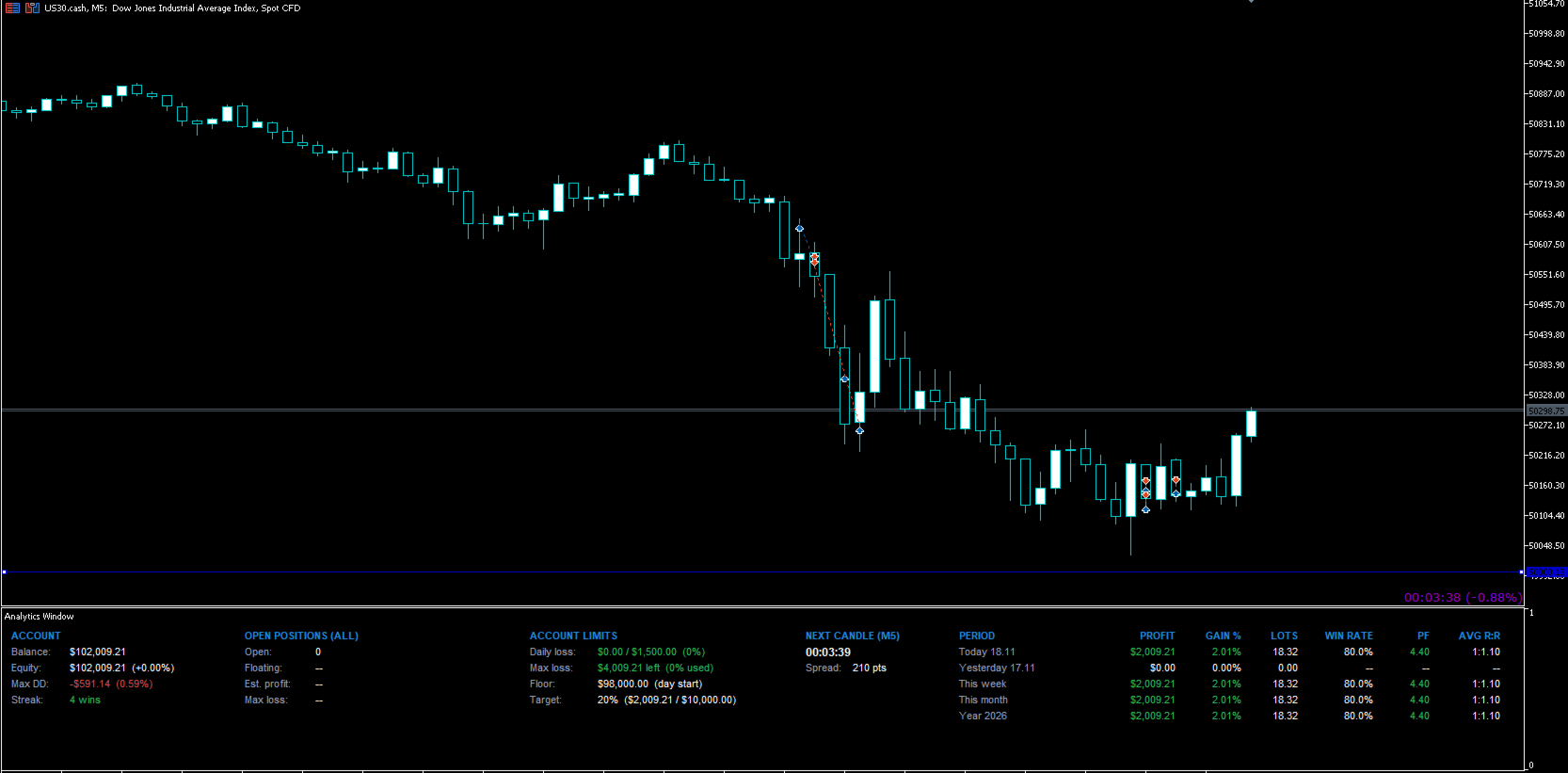
Analytics Window is a clean, compact dashboard that sits in its own resizable window beneath your chart. It shows everything you need to manage an account at a glance: balance, equity, drawdown, open-trade risk, your prop firm or personal account limits, and a full performance history, without the clutter of traditional trade-info panels.
It runs as an indicator, not an EA, so it works alongside any Expert Advisor or trade panel on the same chart. Drag the window divider to resize it, or pull it down beneath the time axis to tuck it away. It’s always one drag from view and never in the way.
Account Overview
- Balance and Equity, with equity change shown as a %.
- Max Drawdown in currency and %, combining your closed-trade history with live equity drawdown. Deposits and withdrawals are excluded, so they never count as drawdown.
- Win/Loss Streak: your current run of consecutive winning or losing trades.
Open Positions
- Number of open positions and total floating P&L.
- Estimated profit if all take profits are hit.
- Max loss if all stop losses are hit.
- Shown as currency, % of balance, or both.
- Flags any position without a TP or SL, so the totals are never misleading.
- Monitors every symbol on the account, or only the chart’s symbol.
Account Limits (built for prop traders)
Set your firm’s rules once and always know exactly where you stand:
- Daily loss: today’s loss measured from the day’s starting balance to current equity, shown against your limit.
- Max loss: remaining room before your account limit, with a choice of how the floor is measured:
- Initial balance: a fixed floor that never moves.
- Day start balance: resets every day.
- Highest balance (trailing): the floor trails your highest closed balance. It only moves up when you bank profit, never on open-trade swings. An optional setting stops trailing once the floor reaches your initial balance.
- Floor: the exact equity level you must stay above.
- Profit target: progress towards your target in % and currency.
- Colour-coded warnings: green when well within limits, amber at 50% used, red at 80% used.
- Every limit can be set as a % or a fixed amount, and the section title can be renamed (e.g. “Prop Limits” or “Account Rules”).
Performance History (account-wide)
Reads your full account history the moment it’s loaded, across every symbol. It works instantly on new charts and templates, even for trades closed before it was added.
- Periods: Today, Yesterday, This Week, Last Week, This Month, Last Month and This Year, each switchable on or off.
- Columns: Profit, Gain %, Lots, Win Rate, Profit Factor and Average R:R.
- Updates automatically within seconds of each closed trade.
Next Candle Countdown & Spread
- Countdown to the next candle, adapting automatically to the chart’s timeframe.
- Live spread of the current symbol.
Designed for Every Screen
- Responsive layout: on narrower screens and laptops, sections automatically wrap onto a second line instead of overlapping or running off screen. Resize your terminal and it rearranges instantly.
- Panel Scale and Text Scale settings, plus automatic adjustment for high-DPI displays.
- Show or hide entire sections to keep only what you need.
Customisable Inputs
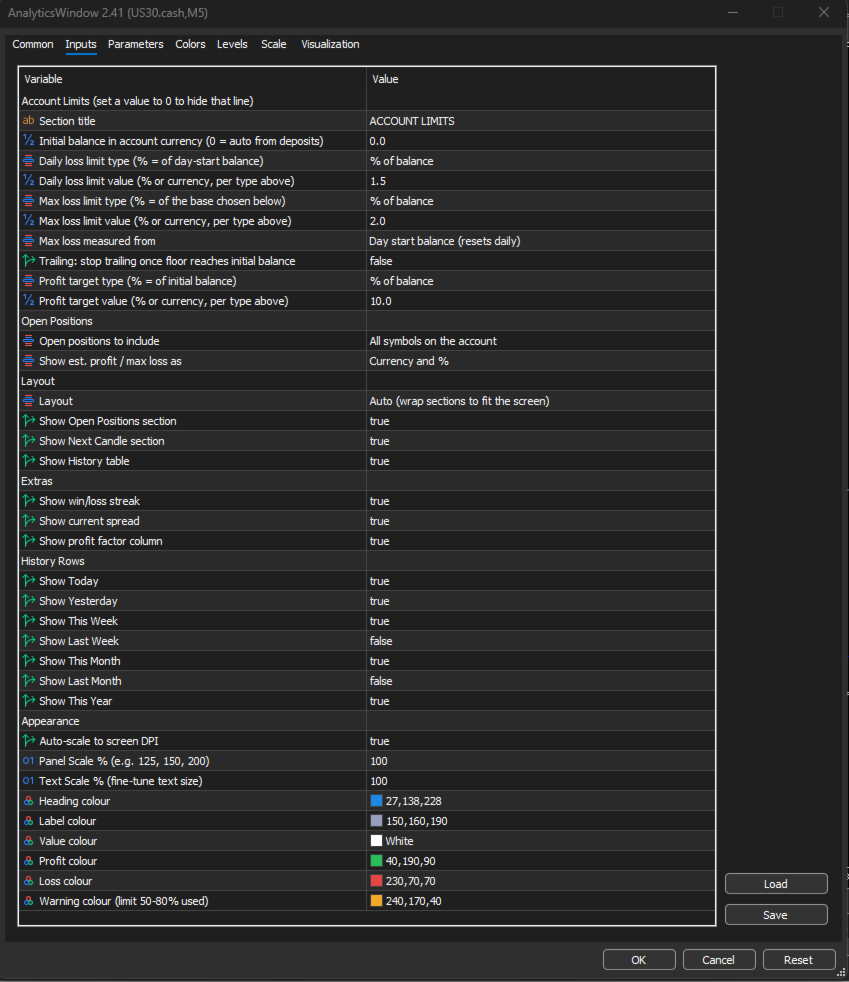
- Account Limits: section title; initial balance (auto-detected or manual); daily loss, max loss and profit target as % or currency; max loss base (initial, day start or trailing); trailing lock at initial balance.
- Open Positions: all symbols or chart symbol only; currency, % or both.
- Layout: auto-wrap or single row; show/hide Open Positions, Next Candle and History sections.
- Extras: show/hide streak, spread and profit factor.
- History Rows: show/hide each period individually.
- Appearance: auto DPI scaling, panel scale, text scale, and colours for headings, labels, values, profit, loss and warnings.
Why Use Analytics Window?
- Protect your funded account: see your remaining daily and overall loss room before every trade, not after a breach.
- Know your real edge: win rate, profit factor and R:R together show whether results come from accuracy or from letting winners run.
- Trade with less noise: everything important in one compact window that hides when you don’t need it.
- Works with your existing tools: add it alongside any EA or trade panel.
Notes
- Daily loss is measured from the day’s starting balance using broker server time. Prop firm rules vary (some use the higher of balance or equity at the day’s start), so check your firm’s exact rules and keep a margin.
- This is a monitoring tool. It does not place, modify or close trades.
Requirements
- MetaTrader 5
- Any broker, any symbol, any timeframe
💬 Enjoyed this tool? Please take 30 seconds to leave a rating and review. Your feedback directly shapes future updates — requested features get prioritised based on what the community asks for. Every review helps other traders find this tool and keeps development active. Thank you for your support! 🙏