
Analytics Window

Analytics Window — Account Performance & Prop Limit Dashboard for MetaTrader 5

Overview

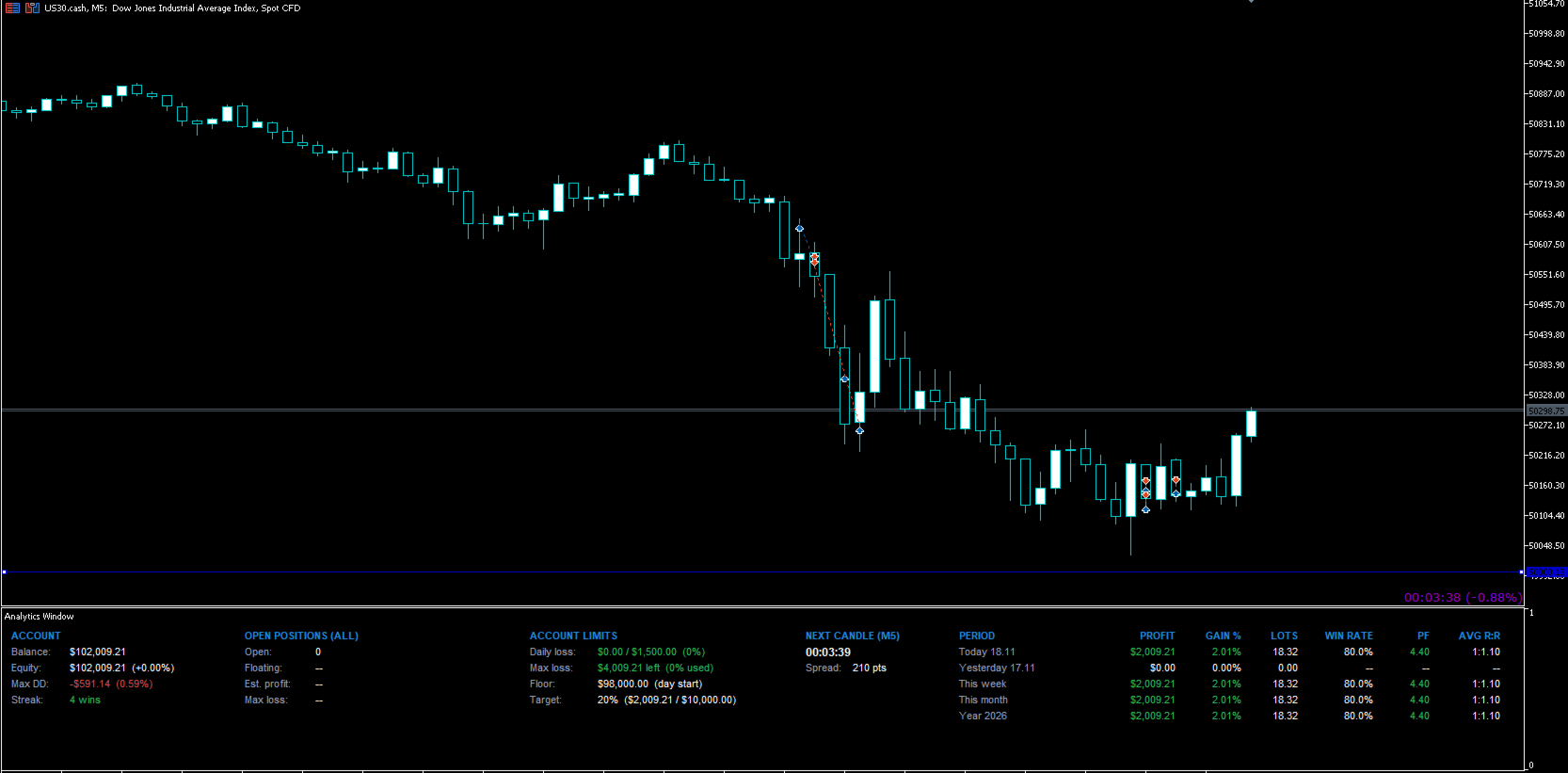
Analytics Window is a clean, compact dashboard that sits in its own resizable window beneath your chart. It shows everything you need to manage an account at a glance: balance, equity, drawdown, open-trade risk, your prop firm or personal account limits, and a full performance history, without the clutter of traditional trade-info panels.

It runs as an indicator, not an EA, so it works alongside any Expert Advisor or trade panel on the same chart. Drag the window divider to resize it, or pull it down beneath the time axis to tuck it away. It’s always one drag from view and never in the way.

Account Overview

  • Balance and Equity, with equity change shown as a %.
  • Max Drawdown in currency and %, combining your closed-trade history with live equity drawdown. Deposits and withdrawals are excluded, so they never count as drawdown.
  • Win/Loss Streak: your current run of consecutive winning or losing trades.

Open Positions

  • Number of open positions and total floating P&L.
  • Estimated profit if all take profits are hit.
  • Max loss if all stop losses are hit.
  • Shown as currency, % of balance, or both.
  • Flags any position without a TP or SL, so the totals are never misleading.
  • Monitors every symbol on the account, or only the chart’s symbol.

Account Limits (built for prop traders)
Set your firm’s rules once and always know exactly where you stand:

  • Daily loss: today’s loss measured from the day’s starting balance to current equity, shown against your limit.
  • Max loss: remaining room before your account limit, with a choice of how the floor is measured:
    • Initial balance: a fixed floor that never moves.
    • Day start balance: resets every day.
    • Highest balance (trailing): the floor trails your highest closed balance. It only moves up when you bank profit, never on open-trade swings. An optional setting stops trailing once the floor reaches your initial balance.
  • Floor: the exact equity level you must stay above.
  • Profit target: progress towards your target in % and currency.
  • Colour-coded warnings: green when well within limits, amber at 50% used, red at 80% used.
  • Every limit can be set as a % or a fixed amount, and the section title can be renamed (e.g. “Prop Limits” or “Account Rules”).

Performance History (account-wide)
Reads your full account history the moment it’s loaded, across every symbol. It works instantly on new charts and templates, even for trades closed before it was added.

  • Periods: Today, Yesterday, This Week, Last Week, This Month, Last Month and This Year, each switchable on or off.
  • Columns: Profit, Gain %, Lots, Win Rate, Profit Factor and Average R:R.
  • Updates automatically within seconds of each closed trade.

Next Candle Countdown & Spread

  • Countdown to the next candle, adapting automatically to the chart’s timeframe.
  • Live spread of the current symbol.

Designed for Every Screen

  • Responsive layout: on narrower screens and laptops, sections automatically wrap onto a second line instead of overlapping or running off screen. Resize your terminal and it rearranges instantly.
  • Panel Scale and Text Scale settings, plus automatic adjustment for high-DPI displays.
  • Show or hide entire sections to keep only what you need.

Customisable Inputs

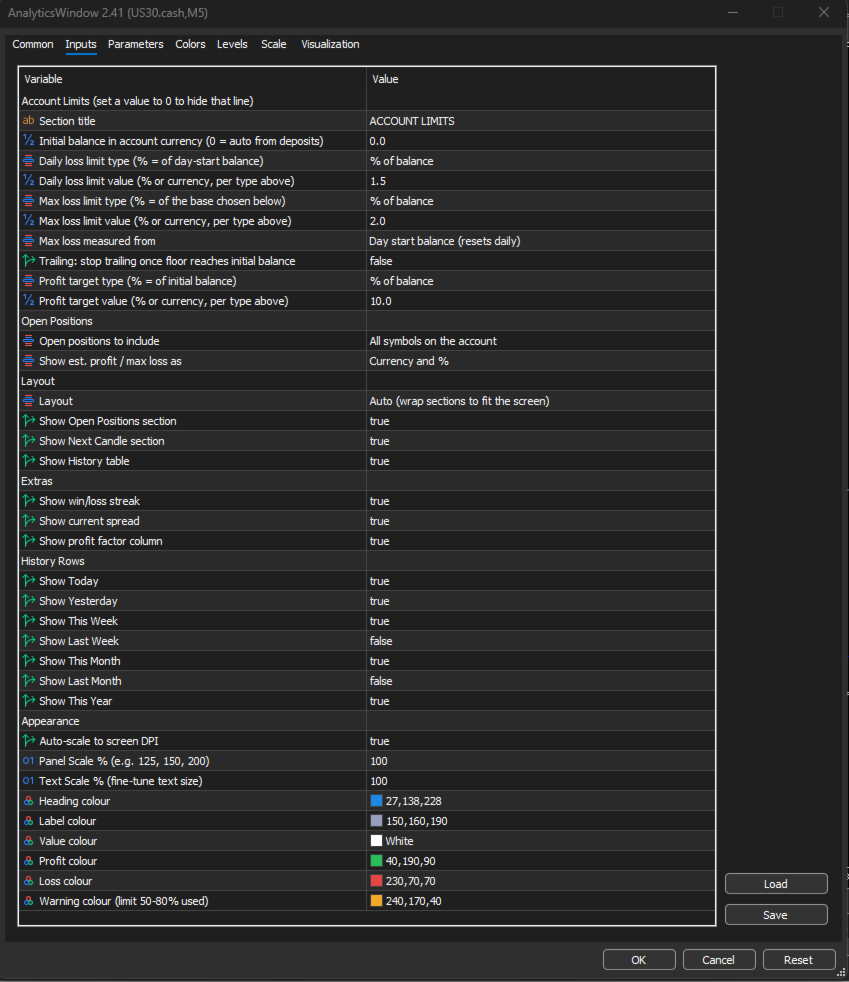
  • Account Limits: section title; initial balance (auto-detected or manual); daily loss, max loss and profit target as % or currency; max loss base (initial, day start or trailing); trailing lock at initial balance.
  • Open Positions: all symbols or chart symbol only; currency, % or both.
  • Layout: auto-wrap or single row; show/hide Open Positions, Next Candle and History sections.
  • Extras: show/hide streak, spread and profit factor.
  • History Rows: show/hide each period individually.
  • Appearance: auto DPI scaling, panel scale, text scale, and colours for headings, labels, values, profit, loss and warnings.

Why Use Analytics Window?

  • Protect your funded account: see your remaining daily and overall loss room before every trade, not after a breach.
  • Know your real edge: win rate, profit factor and R:R together show whether results come from accuracy or from letting winners run.
  • Trade with less noise: everything important in one compact window that hides when you don’t need it.
  • Works with your existing tools: add it alongside any EA or trade panel.

Notes

  • Daily loss is measured from the day’s starting balance using broker server time. Prop firm rules vary (some use the higher of balance or equity at the day’s start), so check your firm’s exact rules and keep a margin.
  • This is a monitoring tool. It does not place, modify or close trades.

Requirements

  • MetaTrader 5
  • Any broker, any symbol, any timeframe

💬 Enjoyed this tool? Please take 30 seconds to leave a rating and review. Your feedback directly shapes future updates — requested features get prioritised based on what the community asks for. Every review helps other traders find this tool and keeps development active. Thank you for your support! 🙏
제작자의 제품 더 보기
Basket Take-Profit Utility Pro   is the full-featured upgrade to the free Lite version A professional on-chart trade management tool for MetaTrader 5 that monitors and closes groups of trades the moment their   combined profit or loss target   is reached. All settings are configured directly from the interactive panel on your chart via dropdowns, toggle buttons, and keyboard input — no inputs window required. What's new in Pro vs Lite (free): Feature Lite (Free) Pro Single basket Panel-d
Floating Profit Dashboard   is a real-time on-chart P/L monitor for MetaTrader 5 — built for traders who want instant visibility of their account performance without constantly checking the Toolbox. The panel displays live floating profit and loss directly on the chart, updating on every tick and every second, with intelligent colour coding — green when you're in profit, red when in drawdown. Features:   Live Floating P/L   — Total profit displayed in your account currency (£, $, €, ¥ and mor
FREE
Candle Timer displays a real-time countdown to the next candle close, directly on your chart. Perfect for traders who need precise timing for entries, exits, or news events — without constantly watching the clock. FEATURES • Millisecond precision countdown (100ms refresh via EventSetMillisecondTimer) • Works on all timeframes: M1 through Monthly • Colour warning system — timer changes colour as the candle nears close → Orange
FREE
Precision Risk Manager and Multi-Order Controller for MT5 — Version 2 This utility provides risk-based lot size calculation, one-click order execution, and batch trade modification from a single collapsible panel. It is designed for manual traders who manage multiple entries on the same symbol. Features Lot Size Calculator: Enter a risk percentage and stop-loss price, then click Calculate Lot Size to receive the exact lot size for that risk amount. Order Execution: Click Buy or Sell to execute
FREE
Daily Drawdown Protector Lite   is a lightweight, zero-configuration prop firm safety utility for MetaTrader 5. Designed specifically for traders on FTMO, MyFundedFx, The Funded Trader, and all other prop firm challenges, it silently monitors your account in the background and acts the moment your daily loss limit is breached — closing all trades and disabling the EA automatically. Features: Configurable daily loss limit (% of balance) Floating equity stop loss protection Auto-closes all positio
FREE
Emergency Close All   is a one-click panic exit utility for MetaTrader 5 — designed for traders who need to exit the market instantly during volatile events, news shocks, or unexpected price moves. Drop it on any chart alongside your existing EA or manual strategy. It runs independently and never interferes with other scripts or advisors. Features:   Big Panic Button   — A large, high-visibility close button directly on the chart. One click (or two with confirmation enabled) closes all matchi
FREE
Basket Take-Profit Utility Lite   is a free on-chart trade management tool for MetaTrader 5 that lets you close groups of trades the moment their   combined profit target   is reached — something MetaTrader cannot do natively. All settings are controlled directly from the interactive panel on your chart. No need to detach and re-attach the EA to change your target. Features: Group trades   by: All open positions · Specific symbol · Magic number Three target types   selectable from the panel: - F
FREE
Trading Utility Panel – V3.00   Manual Trade Execution & Risk Management Panel for MetaTrader 5 Overview Trading Utility Panel is a lightweight, fully collapsible, on-chart control panel designed for manual traders who want fast, accurate trade execution with built-in risk management tools. No automated strategies — just a clean, responsive interface that puts the tools you actually need within one click. What's New in V3.00 V3 consolidates and upgrades the lot calculation system introduced in V
Reality Engine Standard | Live Spread · Slippage · Latency Monitor What is Reality Engine? Reality Engine is a non-invasive monitoring utility that simulates and logs the real-world execution conditions your algorithmic strategies actually face — spread widening, slippage, and network latency — in real time, on any symbol, for any EA running on your terminal. It does not place trades. It does not interfere with your existing strategies. It attaches silently to a separate chart and watches everyt
Reality Engine Pro   | Advanced Execution Quality Monitor for MetaTrader 5 Reality Engine Pro is a passive, zero-interference MQL5 utility that attaches to any chart and silently monitors every trade execution in real time. It simulates the true cost of trading — spread, slippage, and latency — using intelligent broker profile presets, a live economic event calendar, and directional slippage bias curves. Every deal is captured the moment it fills, analysed, costed in your account currency, and
Reality Engine Elite — v3.00 MQL5 Utility | Execution Intelligence Platform - HUGE UPGRADES Description Reality Engine Elite is the most advanced execution quality monitor available for MetaTrader 5. Built for traders who demand complete visibility into the hidden costs of every trade — spread, slippage, latency, and session-driven volatility — Elite goes beyond simple logging to deliver a full analytical intelligence layer directly on your chart. Whether you are a retail forex trader, a crypto
Daily Drawdown Protector Pro   is the complete prop firm risk enforcement suite for MetaTrader 5 — a significant upgrade over the free Lite version, built for serious funded traders who need precise, multi-layered protection across all market conditions. ️   Everything in the free Lite version, plus: ️ Advanced Risk Rules Trailing Drawdown Floor — automatically raises your protection floor as equity grows Daily Profit Target Lock — closes trading when your profit target is hit, locking in a w
Trade Information
Leon Mackintosh
TradeInfo Pro is a comprehensive, real-time account and trade management dashboard for MetaTrader 5. Displayed as a clean, draggable panel directly on your chart, it gives you instant visibility of everything that matters — without switching windows. Features include:   Account   — Balance, Equity, Margin, Free Margin, Leverage and Swap rates   Positions   — Live running P/L, Drawdown, Spread, Long/Short/Total breakdown with lots and profit   Range   — Today, Yesterday, This Week, Last
Trading Utility Panel Pro – V4.00 Live Risk Lot Calculator & Trade Manager for MetaTrader 5 Overview Trading Utility Panel is a lightweight, fully collapsible, on-chart control panel for manual traders who want fast, accurate trade execution with built-in risk management. There are no automated strategies, just a clean, responsive interface with the tools you actually need one click away. What’s New in V4.00 V4 makes lot sizing fully live. The Calculate button is gone: your lot size now updates
필터:
리뷰 없음
리뷰 답변