KTS Killtheshow EA
- Experts
- Versão: 1.31
- Ativações: 10

1. Point A Detection (Market Structure Identification)
-
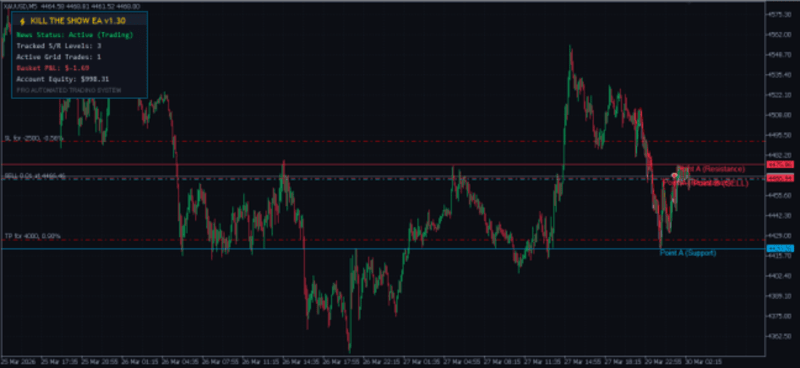
Swing High / Low Scanning: The EA scans past price action using the InpSwingDepth parameter. If a central bar is higher (or lower) than InpSwingDepth bars to its left and right, it establishes a key Support or Resistance level (Point A).
-
Level Tracking: The EA tracks up to InpMaxActiveLevels simultaneously, plotting dynamic support lines in blue and resistance lines in red directly on your chart.
2. Point B Retest Execution (Initial Trade Entry)
-
Tolerance Zone: When the current Ask or Bid price approaches a tracked Point A level within InpTolerancePoints , it flags a Point B retest.
-
Order Generation:
-
Support Bounce: Opens a BUY order.
-
Resistance Bounce: Opens a SELL order.
-
-
Visual markers highlight the exact trigger location on the chart.
3. Dynamic Grid Expansion
If price breaks through the level instead of bouncing immediately:
-
Distance Threshold: Once price moves against the open position by InpGridDistancePoints , the EA opens additional grid trades.
-
Lot Sizing Multiplier: Grid positions scale using InpLotMultiplier (e.g., $1.5\times$ base lot) to lower the average break-even point for the overall position basket.
-
Max Grid Cap: Trades are capped at InpMaxGridTrades to prevent over-exposure.
Profit Drivers & Performance Factors
The system relies on several core mechanics to maximize profitability while mitigating account drawdown:
1. Basket Target Profit & Max Loss Protection
Instead of managing trades solely on individual Stop Loss / Take Profit pips, the EA evaluates the total net equity of all open orders combined (including spread, commission, and swap):
-
Basket Profit Target ( InpBasketProfitUSD ): When net profit reaches the designated dollar amount (e.g., +$20.00), all open positions close instantly.
-
Basket Max Loss ( InpBasketLossUSD ): If price trends heavily against the grid, all positions close at the hard dollar limit (e.g., -$100.00) to protect account capital.
2. Built-in Economic News Filter
-
Uses MT5's native MqlCalendar database to query high-impact events for the currency pair being traded.
-
Pauses trade entries InpNewsPauseBefore minutes prior to news releases and resumes InpNewsPauseAfter minutes post-release to avoid high-slippage volatility spikes.
3. Adaptive Money Management
-
Auto-Lot Mode: Dynamically scales lot sizes relative to account equity (e.g., 0.01 lots per $1,000 equity).
-
Automatically validates minimum/maximum broker volume limits and volume steps prior to order execution.
On-Chart Visual Suite
-
AI Matrix Canvas Background: A vector grid drawn via CCanvas featuring custom opacity controls ( InpCanvasOpacity ) and dynamic node points.
-
Branded Graphic Overlay: Renders custom background graphics directly on chart space via MQL5 resource loading ( ::Images\ktspovertykiller.bmp ).
-
Real-time Heads-Up Dashboard: Displays real-time updates for:
-
Active trading status / News pause state
-
Tracked S/R level count
-
Open grid trade count
-
Total Basket P&L in USD
-
Current Account Equity
-