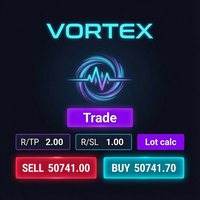
Vortex Precision Sizer
- Experts
- Versão: 2.10
- Ativações: 5

A complete on-chart trading cockpit: one-click execution, automatic position sizing, staged take-profits, trailing, break-even, and three switchable themes.
Why use Vortex?
Make trading life easy ! The answer is that simple !!
See below advanced features !
Key features
- Four-tab interface: Trade / Close / Settings / Info
- One-click market, limit, and stop orders with auto SL/TP
- Reward-to-risk (R/TP : R/SL) take-profit calculation
- Risk-% position sizing with a Lot calc button
- Selectable capital base: Balance, Equity, or Custom amount
- In-parts entry splitting with staggered take-profits
- On-chart Entry / SL / TP preview lines
- Trailing stop and break-even management
- Rich Close panel: all, 50%, 25%, profits only, losses only, buys, sells, delete pending
- Live account Info tab (balance, equity, margin, floating P/L, spread)
- Symbol switcher and live server clock
- Three themes: Midnight, Frost, Teal
How it works
- Attach Vortex to any chart and symbol.
- Set your risk — enter a Risk % and choose your capital base (Settings).
- Set your stop — type the SL in points; the panel uses your R/TP : R/SL ratio to set the take-profit automatically.
- Calculate the lot — press Lot calc; the volume is sized so a stop-out equals your chosen risk.
- (Optional) Preview — press Lines to draw Entry, SL, and TP on the chart, or In parts to split the entry into staged positions.
- Execute — click BUY or SELL. SL/TP are normalized to the symbol and attached.
- Manage — turn on Trailing or Break-even, or use the Close tab to exit by profit, loss, direction, or percentage.
The panel in detail
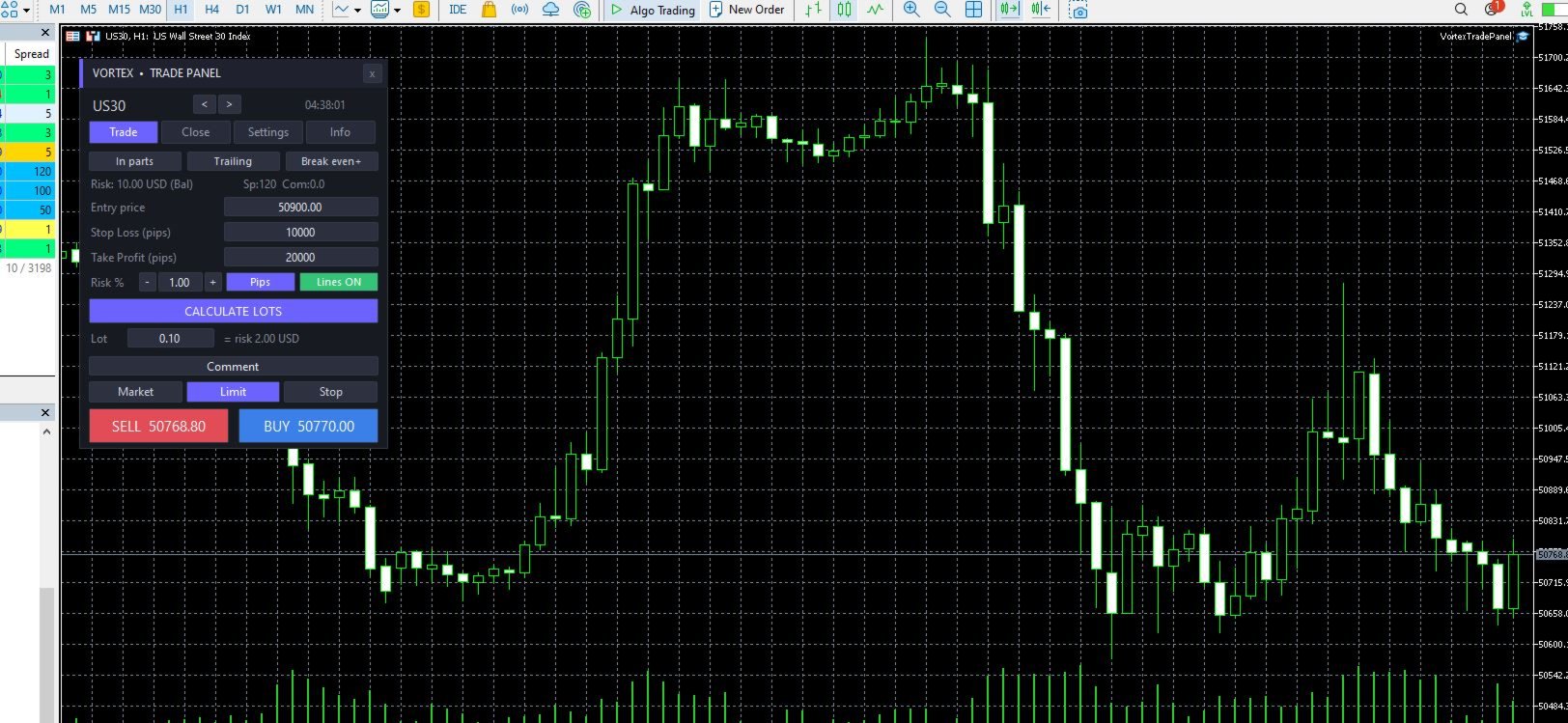
Trade tab — your main workspace. Top row toggles In parts, Trailing, and Break even. Below sit the R/TP and R/SL ratio fields with steppers, the Risk % field, Lot calc, and Lines. Then a Comment field; Lot and Entry; TP, Price, and SL; a Market / Limit / Stop selector; and the large SELL and BUY buttons showing live Bid and Ask.
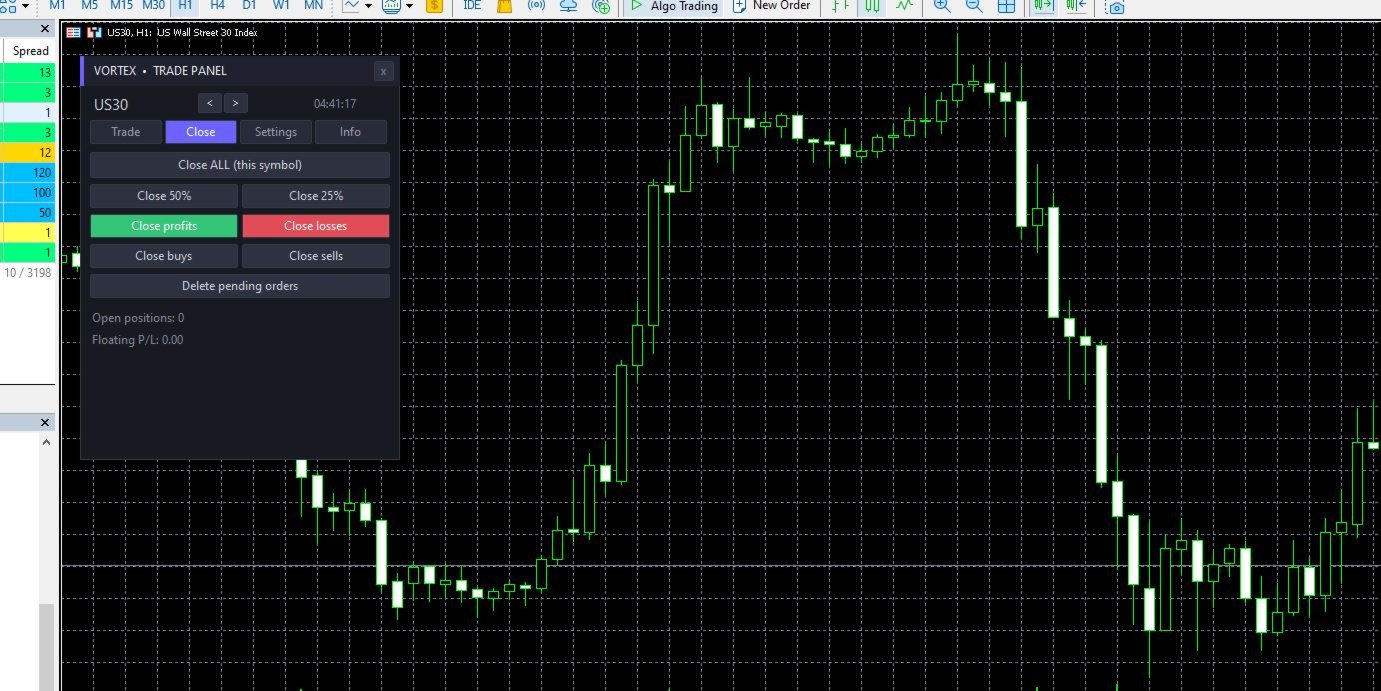
Close tab — close all positions on the symbol, close 50% or 25% of each, close only winners or only losers, close only buys or only sells, and delete pending orders. Live open-position count and floating P/L are shown.
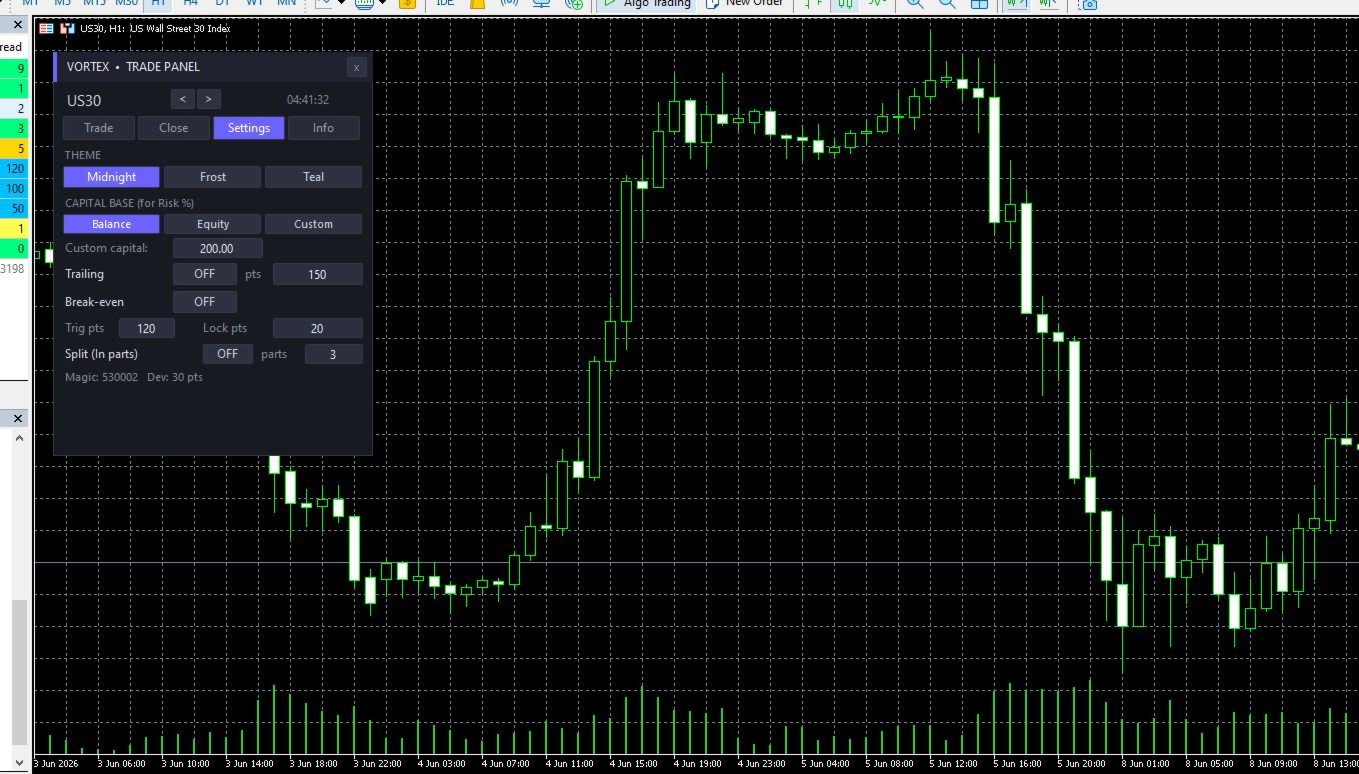
Settings tab — theme switcher; capital base selector with custom-capital field; trailing on/off with distance; break-even on/off with trigger and lock distances; in-parts on/off with parts count; and a read-out of your magic number and deviation.
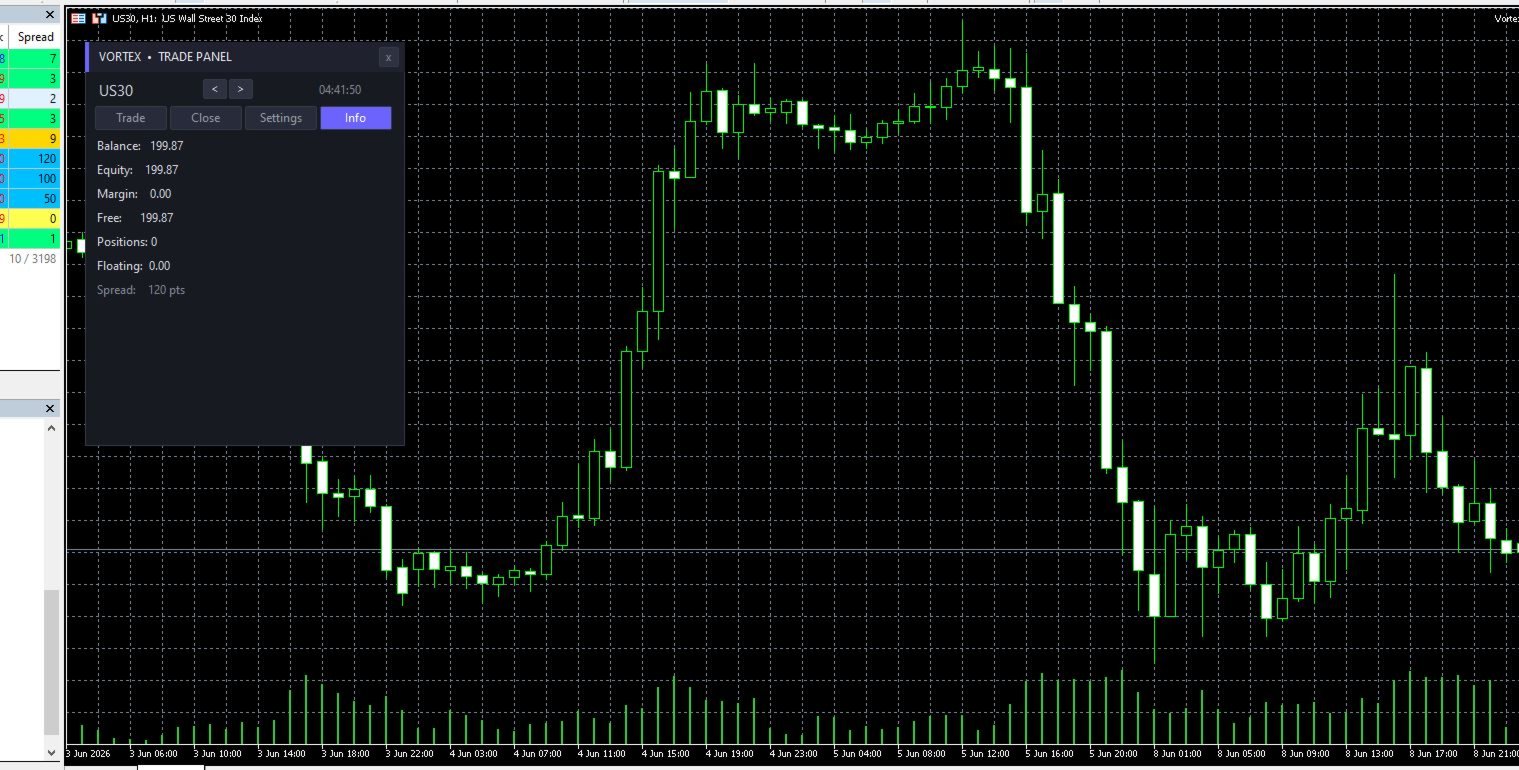
Info tab — live account snapshot: balance, equity, margin, free margin, open positions, floating P/L, and current spread.
Settings explained in detail
Input parameters (set when you attach the EA)
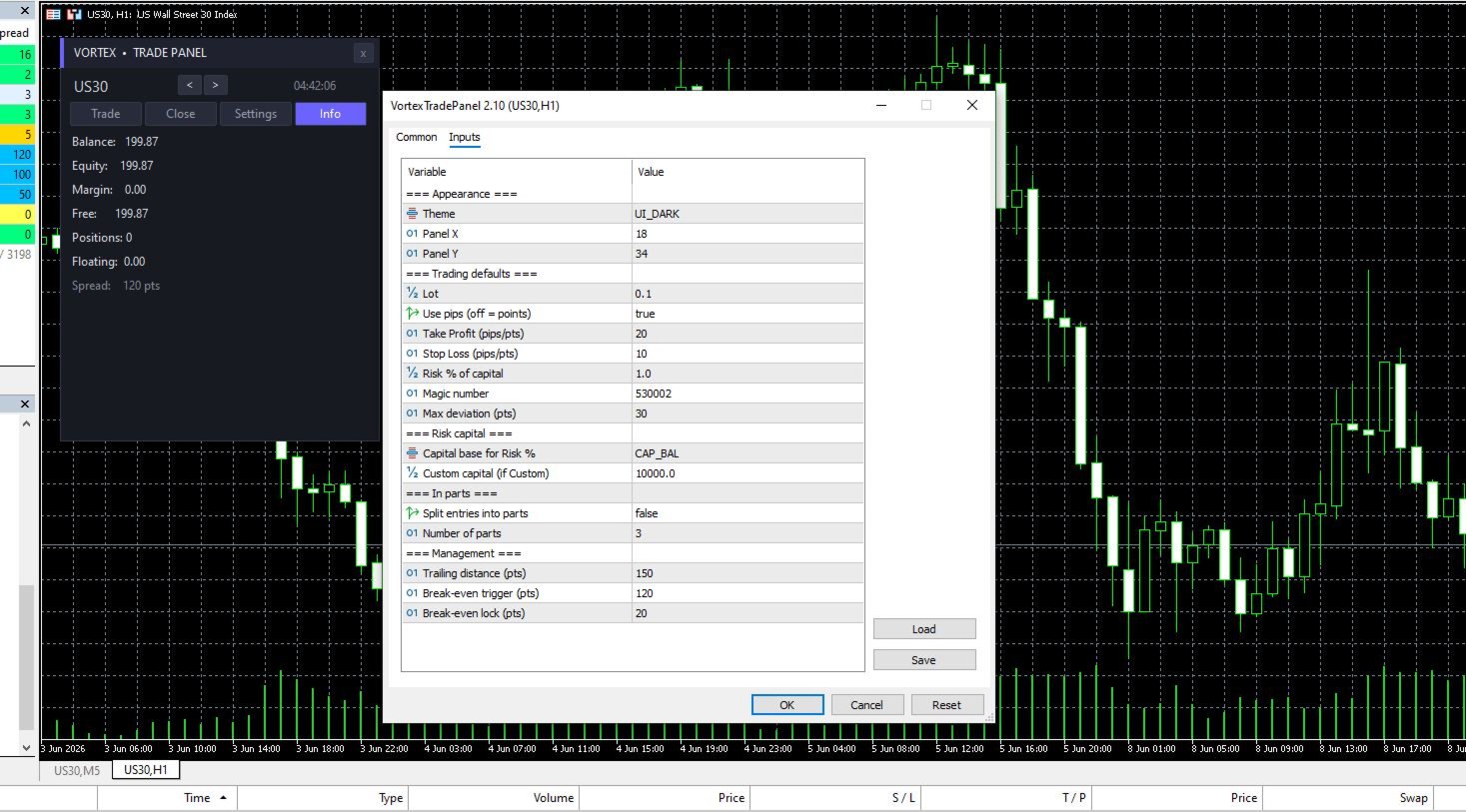
Appearance
- Theme — the start-up look: Midnight (dark), Frost (white), or Teal. Switchable any time from the panel.
- Panel X / Panel Y — the on-chart pixel position of the panel's top-left corner.
Trading defaults
- Lot — the default trade volume shown in the Lot field.
- Take Profit (pts) — default take-profit distance in points. Set 0 to trade without a TP.
- Stop Loss (pts) — default stop-loss distance in points. Set 0 to trade without an SL.
- Reward ratio (R/TP) — the reward side of your reward-to-risk ratio.
- Risk ratio (R/SL) — the risk side of the ratio. The take-profit distance is calculated as SL × (R/TP ÷ R/SL) . Example: SL 50 points with R/TP 2 and R/SL 1 produces a 100-point TP (a 2:1 trade).
- Risk % of capital — the percentage of your capital base used by the Lot calc button to size each trade.
- Magic number — the identifier stamped on every order Vortex places. Trailing and break-even only manage trades carrying this number, so Vortex never touches positions opened by other tools.
- Max deviation (pts) — the maximum slippage allowed on market execution.
Risk capital
- Capital base for Risk % — what the Risk % is measured against:
- Balance — your live account balance (the most common choice).
- Equity — balance plus floating profit/loss, so sizing adapts to open trades.
- Custom — a fixed figure you define, ignoring the real account size. Use this to risk against only a portion of a larger account.
- Custom capital — the fixed amount used when the base is set to Custom.
In parts
- Split entries into parts — turns the In-parts mode on by default.
- Number of parts — how many separate positions one entry is split into.
Management
- Trailing distance (pts) — how far behind price the stop trails once the trade is in profit.
- Break-even trigger (pts) — the profit distance, in points, at which the stop is moved to break-even.
- Break-even lock (pts) — how many points beyond the entry the stop locks when break-even activates (a small positive value secures a tiny profit).
On-panel controls
- R/TP, R/SL (+/–) — adjust your reward-to-risk ratio; the TP field updates instantly.
- Risk % (+/–) — fine-tune the risk percentage.
- Lot calc — sizes the Lot field from your Risk %, capital base, and SL distance.
- Lines — toggles Entry / SL / TP preview lines on the chart.
- Price — switches the panel to pending-order mode so the Entry field is used.
- Market / Limit / Stop — selects the order type; the active type is highlighted.
- In parts — toggles staged-entry splitting (mirrors the Settings switch).
- Trailing / Break even+ — toggle the two management features.
- SELL / BUY — execute, showing the live price on the button.
- Symbol < > — step through your Market Watch symbols.
- Close tab buttons — exit positions by all, percentage, profit, loss, or direction; delete pending orders.
- Theme buttons — switch Midnight / Frost / Teal live.
Understanding risk sizing and In-parts
Risk sizing. When you press Lot calc, Vortex reads your capital base (Balance, Equity, or your Custom figure), multiplies it by your Risk %, then divides by the money value of your stop-loss distance for the current symbol. The result is the lot whose stop-out loss equals your target risk. Because it uses the instrument's real tick value, sizing is accurate across Forex, metals, indices, and crypto CFDs.
In-parts. With In-parts on, your total lot is divided into the number of parts you set and opened as separate positions, each with a staggered take-profit — the first part targets the nearest level and the final part your full TP. The stop-loss is shared across all parts. This lets you take partial profit early and let the rest run, mirroring a TP1 / TP2 / TP3 exit plan, while keeping each part individually manageable from the Close tab.
Pricing
(Suggested structure — set the final figures against the Utilities listings you compete with.)
| Option | Suggested price |
|---|---|
| Monthly rent | $30 |
| Purchase (lifetime updates) | $70 |
| Demo | Free |
A free demo is effectively expected for utilities on MQL5 and strongly lifts conversions. Position Vortex slightly below the most expensive comparable panel until you have reviews, then raise it as your rating grows. These figures are starting points, not fixed prices.
Requirements
- MetaTrader 5 with Algo Trading enabled
- Works on any symbol and any timeframe
Support
Questions and feature requests are welcome — you'll get a prompt reply. Planned updates: custom take-profit per part, a percent-of-balance auto-refresh, and a draggable panel header.
Jay