PreciseTradingExAdvisor
- Experts
- Versão: 3.3
- Atualizado: 20 julho 2026
- Ativações: 5

PreciseTradingEA
PreciseTradingEA trading strategy is based on identifying trend on higher time frame and opening trades on lower time frame when there is a correction or trend change.
Our EA doesn't use Grid, Martingale, or Averaging techniques. So risk of losing your funds is very low.
Our EA provides multiple levels of protection, you can open hedging positions or you can lock the positions by opening buy or sell order and close the open trades in profit after studying the market.
PreciseTradingEA works with all pairs except gold and silver. With our EA you can disable only the trades with high impact news release and enable other pairs to trade normally. It will open 5-20 trades in each pair each month.
https://www.mql5.com/en/signals/2389462
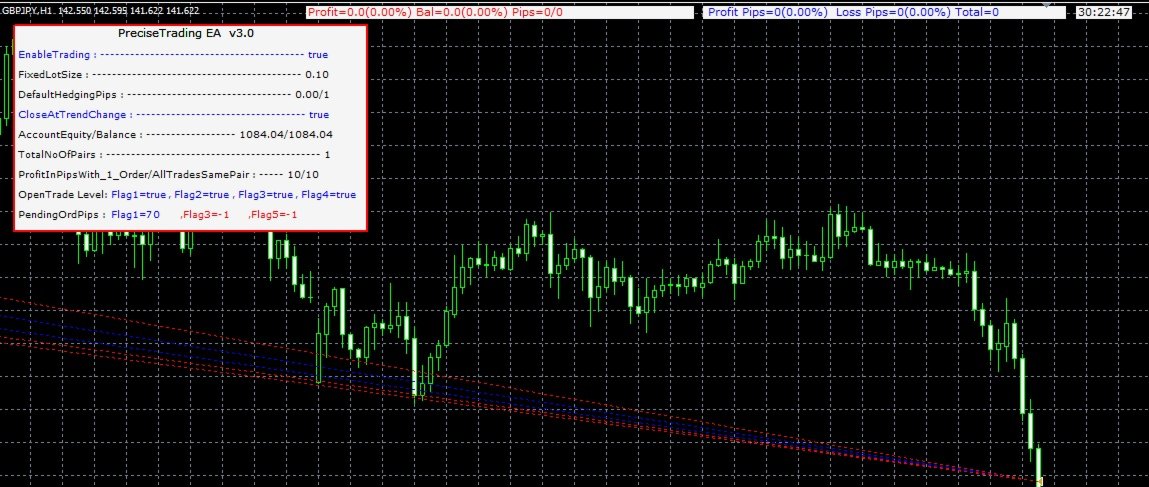
To use PreciseTradingEA attach the EA to all the charts on any time frame and input recommended settings parameter.
Recommended lot size
If Account Balance is 150 USD, lot size is 0.01 (low risk)
If Account Balance is 100 USD, lot size is 0.01 (medium risk)
If Account Balance is 50 USD, lot size is 0.01 (high risk)
Setting parameter
1. EnableTrading : Trading can be enabled for the particular chart attached. During news release you can disable the trade for the pair attached. For ex .During fed interest rate news release, you can disable all the US pair trades and enable all other pairs.
2. StopLoss : Stop loss in pips for trade to close in loss.
3. TakeProfit : Take profit in pips for the trade to close in profit.
4. BreakEvenPips : Take profit pips is set by BreakEvenPips_TakeProfit. For ex. When 50 pips is specified as BreakEvenPip, when the trade reaches 50 profit pips, take profit is set at value specified by BreakEvenPips_TakeProfit.
5.BreakEvenPips_TakeProfit : Given pips will be set as take profit when trade reaches BreakEvenPips specified value.
6.MaxSpread : Trade will be opened only when spread is less than or equal to MaxSpread. For Ex. when 2 is specified trade will be opened when its spread is 2 or less than 2.
7.CloseAllTrades_AtProfit_In_Percent : All opened trade will be closed in profit when specified value is reached.
8. CloseAllTrades_AtLoss_In_Percent : All opened trade will be closed in loss when specified value is reached.
9. CloseAllTrades_AtProfit_In_Pips : All opened trade will be closed in profit when specified pips value is reached.
10. CloseAllTrades_AtLoss_In_Pips : All opened trade will be closed in loss when specified pips value is reached.
11. CloseOneTradesAtProfitInPipsWithManualOrder : All trades will be closed when specified pip is reached. For Ex. If EURUSD trade is opened, Trade will be closed when specified pip is reached. You can manually open any number of EURUSD trades . Trades will be closed when all combined EURUSD trade pips reaches the specified value.
12. CloseAllTradesOnePairsAtProfitInPips : All trades in same pair will be closed when specified pip is reached. For Ex. If EURUSD buy order is opened and if OpenOrderFlag1 parameter is set to TRUE, On trend change or correction, 2 EURUSD sell order will be opened. Again if OpenOrderFlag3 is set to true another 2 buy order will be opened on trend change or correction. Now if 10 pip is set for this parameter All EURUSD trades will be closed will trade reaches positive 10 pips (1 EURUSD buy and 2 EURUSD sell (or) 1 EURUSD buy and 2 EURUSD sell and 2 EURUSD buy combined).
13. OpenNewOrderOnClosePosition : When this parameter is set to true, trade will open immediately on closing the current open trade.
14. TotalNoOfPairs : When this parameter is set, it will open specified number of pairs. For Ex. if 1 is set only one trade will be opened. if 2 is set max 2 pairs will be opened. If EURUSD trade is opened , 2nd trade opened will be other than EUR and USD ex CADJPY pair will be opened . If 3 is set EURISD, CADJPY and 3rd pair other than EUR, USD, CAD, JPY will be opened. Ex. NZDCHF.
15. DefaultHedgingPips : Hedging position will be opened specified by this parameter. For Ex. for EURUSD buy trade is opened and this parameter is set to 100, EURUSD sell trade will be opened pip reaches -100. This will protect your account high DD and loss.
16. DefaultHedgingPips_Open2 : If this parameter is set to true, 2 hedge trade will be opened. For Ex. if EURUSD buy trade is opened, 2 EURUSD sell trade will be opened.
17. OpenOrderFlag1 : When this parameter is set to true, hedging position will be opened.
18. OpenOrderFlag2 : when this parameter is set to true it will open 3rd trade. For ex. If EURUSD buy trade is opened. OpenOruerderFlag1 set to true will open 1 or 2 sell trade. if 1 EURUSD sell trade is opened , 3rd EURUSD sell trade will be opened on setting the parameter to true. if instead of opening 1 EURUSD sell trade , if 2 EURUSD sell trade is opened, this parameter has no effect.
19. OpenOrderFlag3 : Setting this parameter to true will open another 4th position in the opposite direction on trend change.
20. OpenOrderFlag4 : Setting this parameter to true will open 5th trade on the trend direction.
21. PendingOrderPips Flag1 : Specify the number of pips a pending order will be opened when there is 1 open positions.
22. PendingOrderPips Flag3 : Specify the number of pips a pending order will be opened when there are 3 same pair open positions.
23. PendingOrderPips Flag5 : Specify the number of pips a pending order will be opened when there are 5 same pair open positions.
24. LockAtTrendChange : when this parameter is set to true, opened position will locked by opening buy or sell trade. For ex. if EURUSD buy order is opened and another 2 EURUSD sell trade will be opened on OpenOrderFlag1 parameter set to true. if this parameter is set to true. one EURUSD buy trade will be opened and trades will locked with EURUSD 2 buy and 2 sell positions. You can always close the opened trades in profit after studiying market by opening 1 buy or sell EURUSD trade manually.
25. CloseAtTrendChange : This parameter when set to true will work in the same way as LockAtTrendChange parameter except that it will be close in loss instead locking the position. This parameter is usually used for testing purpose.
26. FixedLot : This parameter when set to true will specify the lot size given in FixedLotSize value.
27. FixedLotSize : Specifies the fixed lot size to open.
28. CustomLotSizePer0_01 : This parameter species the custom lot size when lot size parameter is false. For Ex. if this value is set to 200 , means 0.01 lot size for account balance of 200, if the account balance is 1000 it will calculate the lot size to 0.05 and if the account balance is 5000 , lot size will be 0.25.
29. MagicNumber : You can specify unique magic number so that you can use any other EA in your trading platform.
30.Settings_Show : This parameter will show or hide the settings parameters in the chart window.
31. Settings_Text_color : You can specify settings text color.
32. Settings_Bk_color : You can specify settings background color.
33. TradingMode : This parameter should always set to true for PreciseTradingEA to work.