Trendscout

Experience the ultimate trendline auto-trading solution! Our expert advisor/utility allows you to effortlessly place one or more trendlines from different timeframes - it places a trade in the breakout direction.

 1.    AUTO TRADING / MANUAL TRADING

Trendscout can place orders for you automatically. You have to enable “Auto trading” and also check the “Enable live trading” box at the parameter window. When price crosses a trend lines for the first time two massages are sent to your mobile phone or to your email as the case may be. One message is for line crossing notification while the other message is a trade notification. Trade or notification are executed only when the last bar of the execution frequency timeframe (say, M30) completes beyond the trendline.

To place orders manually you need to turn off either the "Auto Trading" button on the trading platform or disable (uncheck) the "Allow live trading" box at the "Common" tab of the parameter window. In this case only line crossing notification would be sent to your mobile phone. Be sure to enable the Trendscout network access before or after setting up the trendlines.

 3.  MULTIPLE OPEN POSITIONS

One position can be placed at a time per instrument via auto trading method. If you wish to place multiple open positions you can only do it manually.

 4.  CLOSING ALL OPEN TRADES

Use the “Close All” buttons to close all open trades in the account when “Auto trading” is enabled and also when the “Enable live trading” box at the parameter window is checked.

 5.  PUSH AND EMAIL NOTIFICATIONS

Trendscout can send push notification to your mobile phone when price crosses a trend line, be sure to enter your MetaQuote ID at the "Notification" tab of the "Option" settings of the "Tools" menu. Also, check the "Enable Push Notifications" box. Trendscout can also send email notification to your email address. All you need do is enter your email parameters at Menu\Tools\Options\Email. Also check the "Enable" check box.

6.  PARAMETER WINDOW'S SETTING

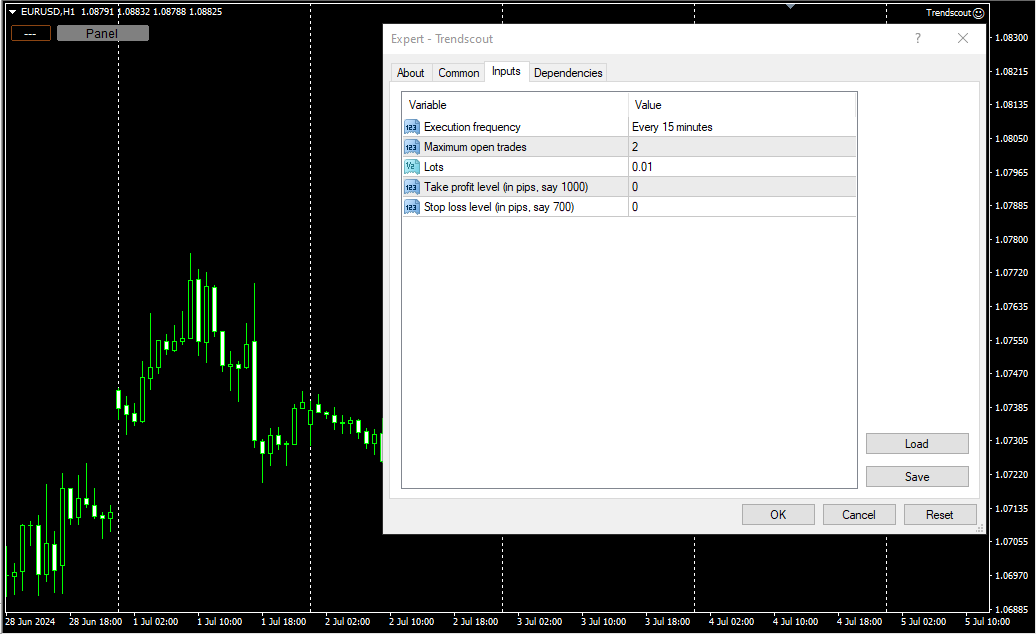
The following are the windows parameter settings available:

(i)    Execution frequency: This is the interval or duration of time in which Trendscout has to wait before searching for a breakout. Hence, the EA does not depend on the timeframe of the chart upon which it is attached. Popular execution frequencies are hourly, every thirty minutes and every fifteen minutes for intraday traders. Larger execution frequencies can be used for longer term traders.

(ii)   Maximum open trades: This is the maximum number of trades Trendscout can place during auto trading. The default number of open trades is 2. You can increase this value by entering a value of your choice.

(iii)   Lots: This is the lot size of a trade. The default lot size is 0.01. This value can be increased by entering the lot size of your choice directly.

(iv)   Take profit level (in pips): Set your desired take profit level in percentage in points. If you do not wish to set the take profit level enter zero in this field.

(v)    Stop loss level: (in pips): Set your desired stop loss level in percentage in points. If you do not wish to set the stop loss level enter zero in this field.

7.   PANEL/EXIT BUTTONS

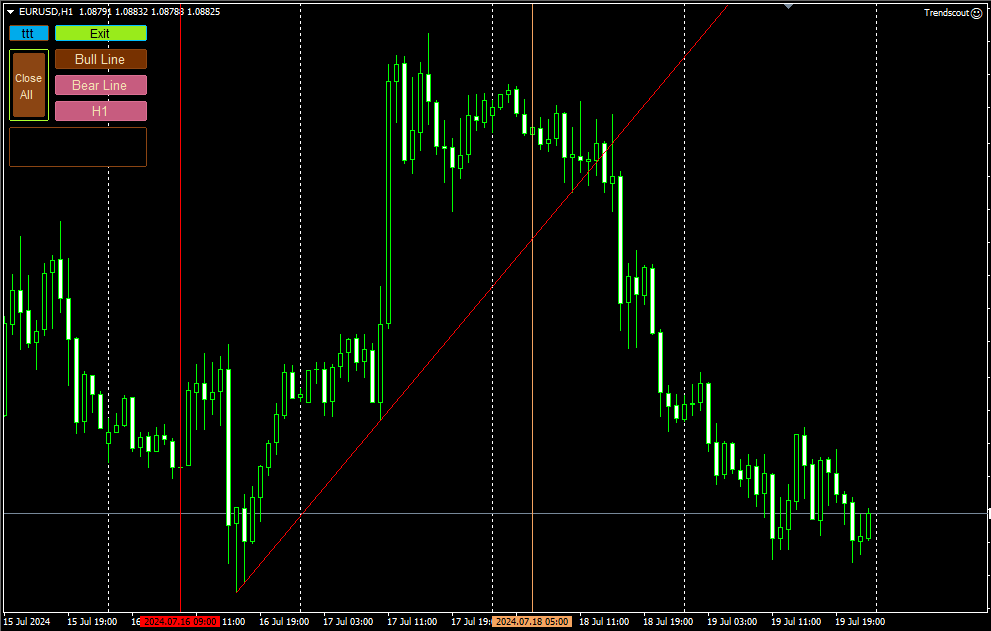
Click the panel button to display the operating buttons. Use the "Exit" button to clear all operating buttons.

8.    ATTACHING TRENDSCOUT TO MULTIPLE CHARTS

The Expert/utility can be attached to as many charts as are open on the trading platform. You can use the "ttt" ("---") button to block Trendscout from accessing network on the charts in which you are not ready to place trend lines at the moment. The symbol "ttt" indicates that network is accessible by Trendscout while "---" indicates that network is not accessible by Trendscout.

 9.    TREND LINE TYPES

Two types of trend lines are available based on the selected chart type. When using candlesticks or bar charts, the trend line will switch to price high/low mode automatically. When using line charts, the trend line will switch to close mode without additional action required.

 10.    ADDING MULTIPLE TRENDLINES IN THE SAME DIRECTION

To trigger a stronger trading opportunity you can require that price breaks two or more trend lines of different timeframes in the same direction. To do this navigate to the timeframe for which you want to add a trend line and click "Bull Line" or "Bear Line" button. Next, navigate to the timeframe for which you want to add the second trend line. Click on the "Bull Line" or "Bear Line" button twice. This will place the second trend line based on the current timeframe without deleting the first trend line. You can do this for as many timeframes as needed.

 A trading opportunity will be triggered or an order for the instrument will open only when price breaks all the trend lines in the direction they are placed. A trend line timeframe is identified by the name of the timeframe that appears on the tooltip of each trend line and its handles.

 11.    PLACING TWO OPPOSITE TRENDLINES FOR ONE TIMEFRAME SIMULTANEOUSELY

Use the "Trend Lines" button to place bull and bear trend lines to the current timeframe. This button does not append new trend lines to existing ones, even if you switch to another timeframe.

 12.    TIMEFRAME HOPPING (REVISITING A TIMEFRAME FOR TREND LINE READJUSTMENT)

If you have a trend line in one timeframe and switch to another timeframe, you can modify the trend line for the previous timeframe using the handles, only when you return to that timeframe. You can also delete and re-add it using the appropriate "Bull Line" or "Bear Line" button. In other words, you CANNOT modify the trend lines whose timeframe you are not currently on.

 13.    DELETING ALL TRENDLINES

To remove all placed trend lines on the chart simultaneously, click the "Trend Lines" button when the button caption displays a timeframe name.

 14.  USING THE DATE ANCHOR AND DATE ANCHOR BUTTON

The “Date Anchor” can be useful for the following reasons:

(i)     View the date, time and bar position on the “Date anchor button” as well as on the tooltip of the "Date anchor line".

(ii)    The date anchor time is in the trading server's time zone and also of type am/pm as against the server’s traditional 24 hour type. This is an added advantage.

(iii)   The date anchor of all charts are at synch with one another.

 (iv)   The date anchor allows you to compare and analyze data across multiple charts from a reference date/time.

N.B.: Trendscout works on live and demo accounts, but not on strategy tester.
Produtos recomendados
Vizzion
Joel Protusada
Vizzion is a fully automated scalping Expert Advisor that can be run successfully using GBPJPY currency pair at H1 timeframe. Very Important This Expert Advisor can not run with any EAs in the same account. As part of the money management plan, it calculates and monitors the Margin Level % and assumes that all open trades are created by it. If you want an Expert Advisor that trades in a daily basis, this EA is not for you because using this requires a patience to wait for a few days or weeks on
| Fully-automated Smart Money Concept (ICT) inspired trading solution with multi-strategy capabilities | Built by a grid trader >> for grid traders.  This is MT4 version, click  here  for  Blue CARA MT5  (settings and logics are same in both versions)     Real monitoring signal  -->  Cara Gold Intro Blue CARA EA   ('CARA') - short for  C omprehensive  A lgorithmic R esponsive A dvisor is a next-gen  multi-currency    multi-timeframe  EA base on the widely known (and perhapse most popular) Inn
H4 GBPUSD Trend Scalper is a trend signal scalper The EA trades according to the trend strategy using original built-in indicator for opening and closing orders. The external inputs for limiting trading on Fridays and Mondays are available. The purpose of the strategy is to use the current trend with the most benefit. According to the results of testing and working on demo and real accounts, the best results achieved by using the Н4 timeframe on the GBP/USD pair Works on MetaTrader 4 Build 971+
Jet Punch
Didit Haryadi Saputra
Jet Punch is another best expert advisor for MT4,  can help you make money while you sleep by automatically entering and exiting trades. It trades by opening trades every day and closing them at the right time to ensure you always earn a profit. The software is very simple and can be used by both beginner and experienced traders.  Jet Punch was tested and has successfully passed the stress test with slippage and commission approximate to the real market condition. Recommendations: Currency pair:
By :ForextraderEanow   Green Mower 10.0                                                                                                                                                                                                                                                                                                        This EA is Famous Grid Strategy that open grid of trades with the same size (not martingale)  and make PROFIT even when the Forex price moves in the WRONG Direction
How the EA works (simple explanation) Trades on   M5   timeframe Uses   H1 timeframe   to analyze global market context Analyzes   2 or 3 timeframes simultaneously On each timeframe: Checks price position relative to one or two Moving Averages Evaluates MA angle and distance between price and MA Entry logic is based on   trend + volatility conditions , not on random signals The full algorithm is illustrated in the screenshots. Recommended usage Symbol:   EURUSD Timeframe:   M5 Trading
Tigergrid EA
Dorian Baranes
2.5 (2)
Tiger Grid EA is an expert advisor using trading strategy  which has been developed by using machine learning concepts. It has passed 14 years of backtest of real tick data and real variable spread (with commission) from 2004 to 2018. The entries are usually accurate and in case if the trend signal has a delay the positions will be managed by a smart grid system.  This system uses a grid of orders which increases lot size. A new order is added into the grid only if the EA notice a potential reve
This Multicurrency Expert Advisor is a unique author's implementation of full automation of the classic trading strategy of trading in the direction of candles using the RSI and SCI indicators as filters. The Forex Multi Universal Direction Trading Expert Advisor  carries out full automatic trading simultaneously with 28 currency pairs on Forex around the clock. At the same time, in a convenient multifunctional multicurrency panel, the trader is also given the opportunity to independently open
Exotic Adv
Ivan Simonika
Exotic Bot   is a multi -cream multifunctional adviser working on any time frame and in any market conditions. The robot’s work is taken as a system of averaging with the non -geometric progression of the construction of a trading grid. Built -in protection systems: special filters, spreading, internal restriction of trading time. Building a trading grid, taking into account important internal levels. The ability to configure trading aggressiveness. Work postponed orders with trailing orders. T
SPECIAL INTRODUCTORY PRICE!! MACD Momentum Pro is a professional, fully-customisable Expert Advisor that uses closed-bar MACD crossovers, confirms trend with HMA/WMA, and filters with ADX . It’s simple to run in the MetaTrader 4 Strategy Tester, so you can backtest, optimise, and find parameters that suit any symbol and timeframe. Packed with features ATR-based SL & TP – Adapts to volatility; no more one-size-fits-all levels. Currency or % risk – Set a fixed cash amount or a percent; lots auto-c
Virtual Collider Manual   is a trading assistant with a built-in panel for manual trading. It automatically moves a position opened by a trader in profit using innovative adaptive grid algorithm of averaging and adaptive pyramiding Know-how of the grid algorithm of averaging and pyramiding of the   Virtual Collider Manual   trading robot is based on fully automatic adaptation of all characteristics of dynamically build order grid and pyramid with actual price movement with no need for adjusting
Classic Market Surfer EA - A Timeless, Proven Strategy for Gold Trading For years, this powerful trading strategy has been hidden from the public-reserved for a select few. Now, for the first time, the Classic Market Surfer EA is available to traders like you.   Built on pure, time-tested trading principles, this EA doesn't rely on trendy gimmicks like AI or machine learning. Instead, it harnesses a classic, robust strategy that has consistently delivered results over the years. This is not a "g
The algorithm of the adviser's work: When the Expert Advisor is launched at a specified distance from the price (first_step), BuyStop and SellStop orders are placed. Further, depending on which way the price went, one of them becomes market, and the other begins to crawl after the price. When the price rolls back, it also becomes market. If we have reached a set profit in some direction, the order is closed and a creeping pending order of the same direction is placed again. If the profit is no
DynamicGrid
Paranchai Tensit
Key concepts of Dynamic grid trading system -Dynamic Grid uses a simple grid basis from dynamic grid development, the number of orders that vary according to data. -Take advantage of the volatility of the product.  -Use volatility to help in zone consolidation and manage position sizes. -Trading grids according to price directions can use the advantage to adjust costs and can reduce the increase of drawdown. -Not stoploss is a zone management. -Do not need a martingale, double lot. -Can trade
Aurum Syna
Dmitriq Evgenoeviz Ko
AURUM SYNA is a professional algorithmic trading system designed specifically for gold (XAUUSD). The robot's architecture is focused on the H1 timeframe, where gold exhibits the most structured and reproducible price patterns. The system is based on multilayer neural network logic with adaptive memory, which analyzes the market not by individual signals, but as a single dynamic space. The algorithm evaluates momentum strength, market phase, internal volatility, and the likelihood of continued mo
Vortex Turbo EA MT4
Stanislav Tomilov
5 (9)
Vortex Turbo — “Negocie a tempestade — controle o vórtice” O Vortex Turbo representa o próximo estágio evolutivo na negociação inteligente — um desenvolvimento único que combina arquitetura de IA de ponta, lógica de mercado adaptativa e controle de risco preciso. Construído sobre princípios algorítmicos comprovados, ele integra múltiplas estratégias em um ecossistema unificado de alta velocidade, impulsionado por um novo nível de inteligência preditiva. Projetado como um especialista em scalpin
Micron
Ivan Simonika
We present to you a fully automated Expert Advisor designed for trading major currency pairs. The bot uses a set of its own trading algorithms and has protection against crashes. Attention! The bot only works correctly when the spread is less than 6 pips! I ask you to weigh this fact, and if you do not have the appropriate conditions for trading, this bot will not work for you! The robot controls the volume of trading positions, slippage, spread, maintains and protects open orders, can work wit
The Infinity Expert Advisor is a scalper. When the resistance and support levels are broken, trades are opened in the direction of the price movement. Open positions are managed by several algorithms based on the current market situation (fixed stop loss and take profit, trailing stop, holding positions in case of trend indication, etc.). Requirements for the broker The EA is sensitive to spread, slippages and execution quality. It is strongly recommended not to use the EA for currencies with s
Grid and MACD
Volodymyr Hrybachov
This is a grid Expert Advisor. It has several trading strategies based on the MACD indicator. The virtual trailing stop, stop loss, take profit levels can be set pips, in the deposit currency or as a percentage of the balance. Depending on the settings, different orders may be opened for diversifying risks. Their closure can be either an oppositely directed or unidirectional basket of orders. The orders grid is adaptive, only market orders are used in it. If the price moves the distance of Order
ZonePulse Smart Trader
Alex Amuyunzu Raymond
ZonePulse Smart Trader – AI-Powered Daily Zone Detection EA Next-Generation Zone & Fibonacci Precision Trading ZonePulse Smart Trader is a professional, AI-inspired MetaTrader 4 Expert Advisor designed to automate the detection and trading of high-probability daily support and resistance zones. Built with Fibonacci precision, intelligent risk management, and a smart trailing system, it offers both discretionary traders and fully automated systems a reliable edge in trending and ranging markets.
EA Black Lion
Mohamed Hassan
5 (4)
Huge 70% Halloween Sale for 24 hours only!  EA BLACK LION  is an expert advisor that is the true definition of a scalper where it's able to spot real divergence movements in the forex market. It is highly sophisticated because it can spot potential reversal or continuation patterns. The real-time divergence patterns are visually shown to you on your MT4 chart. (This is game changing because you actually see the strategy in front of you)  It uses a sophisticated system that has been successfull
Master Gold Reaper EA - Automated Gold Trading Solution Introduction Master Gold Reaper is a powerful automated trading advisor designed specifically for XAUUSD (Gold) traders who want to simplify their trading and take advantage of opportunities around the clock. Built on advanced algorithms and tested in multiple market conditions, this EA helps traders automate entries, manage risks, and secure profits with minimal manual intervention. The Problem Traders Face Trading gold can be highly pro
Utility, which draws buy or sell trendlines, which can also become support or resistances able to close any position on the screen Algorithm that calculates the gain of the position, at the touch closure of the line.   The benefits you get: Works on forex and CFD, timeframe from M1 to Weekly. Easy to use screen control panel. Audible warning messages at the touch of the line. Easy to use.
Karman
Vladislav Filippov
Karman is a fully automated trading advisor working on a М30 timeframe. The settings of the advisor are based on the safe trading, the essence of which is to close the transaction, while achieving a positive profitability dynamism of several points, which allows the user to reduce the costs of opening losing trades. The Expert Advisor is multi-functional and does not require a specific type of account for the normal operation of all functions embedded in it. The advisor’s manual involves encapsu
Live Signal (Real Trading Data)  https://www.mql5.com/zh/signals/2341050 Live Signal (Real Trading Data) : https://www.mql5.com/zh/signals/2346893 Smart Trend and Range EA Smart Trend and Range EA is an automated trading program designed to operate based on market structure analysis under different market conditions. The EA analyzes price behavior and market structure to apply different trading logic in trending markets and ranging markets. It does not use martingale, grid, averaging, or recover
EA Gold EZIndy
Mr Kraisit Chompungam
Advantages of EA Gold EZIndy: You get profit from trading every day It can work with other EAs and trading systems The EA has a trading panel that allows the trader to open trades manually. All trades, opened through the trading panel, are managed by the EA and are closed with profit automatically How to set up EA Gold EZIndy: Simply add the EA to the XAUUSD 4H chart and activate the auto-trading function in the Expert Advisor and in the MetaTrader terminal To activate the news filter, you n
Expert Grid rsi Pro
Mykhailo Zakervashevych
General Description Grid RSI Pro v3.1 is an advanced trading Expert Advisor for MetaTrader 4 that uses a grid strategy with RSI indicator filtering. The EA automatically opens orders at specified levels, creating a grid of orders to capture market fluctuations. Version 3.1 includes enhanced risk management features and improved signal filtering systems. Key Features 1. Trading Strategies RSI Strategy : Position opening when RSI reaches overbought (80) or oversold (20) levels Fixed Points : Posit
The Super scalper universal is a fully automated scalping Expert Advisor, which uses five indicators. Each open position is protected by a hidden stop order managed by an advanced modification algorithm. When searching for the suitable signals, the EA uses the integrated indicator in conjunction with the trend and time filters, as well as the volatility filter. It use dynamic position closure, which considers the location where the order had been opened and the subsequent price action. Profit is
BBMA Grid Combination
Kahfi Pangariduwan
5 (1)
BBMAGC   BBMAGC  is an automatic trading system with a work strategy obtained from famous BBMA indicator combine with advance grid system . This EA use dangerous trading systems like martingale and grid so please understand the risk before using this EA Time Frame: H1 Symbol: best result on EUR/USD, GBPUSD, GBPCAD VPS recommended 4/5 digit broker Min Deposit 1000$ Low spread always better Since you using Grid system, always trade using money that you are willing to lose. When you use an expert a
Financial Radar GFX
Yasir Mohammed Sachit Sachit
Gold Trend Rider – Automated Expert Advisor for XAUUSD Trading Disclaimer : Trading Gold (XAUUSD) involves significant risk. Past performance does not guarantee future results. Test on a demo account and apply proper risk management before live trading. Overview Gold Trend Rider is a fully automated Expert Advisor specifically designed for Gold trading. It leverages the Parabolic SAR indicator to detect trend direction and open trades accordingly. Its trailing stop mechanism manages positions d
Os compradores deste produto também adquirem
The product will copy all telegram signal to MT4   ( which you are member  ) , also it can work as remote copier.  Easy to set up, copy order instant, can work with almost signal formats, image signal, s upport to translate other language to English Work with all type of channel or group, even channel have "Restrict Saving Content", work with  multi channel, multi MT5 Work as remote copier: with signal have ticket number, it will copy exactly via ticket number. Support to backtest signal. How to



ManHedger MT4
Peter Mueller
5 (2)
THIS EA IS A SEMI-AUTO EA, IT NEEDS USER INPUT. Manual & Test Version Please TEST this product before   BUYING  and watch my video about it. Contact me for user support or bug reports, or if you want the MT5 version! MT5 Version I do not guarantee any profits or financial success using this EA. With this Expert Advisor, you can: Implement your own   Zone Recovery   strategy to capitalize on trending markets. Create   Grid   trading strategies, to profit from ranging markets. Place orders easil
Ultimate Extractor - Professional Trading Analytics for MT4 Ultimate Extractor transforms your MetaTrader 4 trading history into actionable insights with comprehensive analytics, interactive charts, and real-time performance tracking. Ability to combine multiple accounts and MT4 and MT5 into a single dashboard. What It Does Automatically analyzes your MT4 trading history across all Expert Advisors and generates detailed HTML reports with interactive visualizations. Tracks live performance metric
The product will copy all  Discord  signal   to MT4   ( which you are member  ) , also it can work as remote copier.  Easy to set up. Work with almost signal formats, support to translate other language to English Work with multi channel, multi MT4. Work with Image signal. Copy order instant, auto detect symbol. Work as remote copier: with signal have ticket number, it will copy exactly via ticket number. How to setup and guide: Let read all details about setup and download Discord To MetaTrader
Crystal Trade Manager PRO – Sistema Avançado de Gestão de Risco e Controle de Operações para MT4 Versão Gratuita: https://www.mql5.com/en/market/product/150632 Visão Geral Crystal Trade Manager PRO (CTM) é uma ferramenta profissional de execução de ordens e gestão de risco desenvolvida para MetaTrader 4. Foi projetada para traders que necessitam de disciplina, forte proteção de capital e automação inteligente dentro do MT4. O sistema controla o risco, protege o patrimônio da conta, aplica limite
Unlimited Trade Copier Pro is a tool to copy trade remotely to multiple MT4, MT5 and cTrader accounts at different computers/locations over internet. This is an ideal solution for you if you are a signal provider and want to copy your trades to other receivers globally on your own rules. One provider can copy trades to multiple receivers and one receiver can get trade from multiple providers as well. The provider can even set the subscription expiry for each receiver, so that receiver will not b
--------------Welcome to use [MQL5 Signal Analyze Master]------------------  Function: Draw order tracks of MQL5 MT4 and MT5 signal on MT4 chart. [Using guide] 1.Use it as Experts. 2.Download history record from MQL5 signal(MT4 signal or MT5 signal).  3.Paste history record file below "MQL4/Files/" 4.Load [Signal Analyze Master] on the symbol chart what you want to analyze. 5.Paste the history record file name to parameter 'FileName' 6.Select  SignalType  match the history you download on MT4
Custom Alerts AIO: Monitoramento inteligente de múltiplos mercados – pronto para uso, sem configuração Visão geral Custom Alerts AIO é uma ferramenta avançada de varredura de mercado que funciona imediatamente após a instalação — sem necessidade de configurar indicadores adicionais. Inclui internamente todos os principais indicadores da Stein Investments (FX Power, FX Volume, FX Dynamic, FX Levels e IX Power), permitindo que você monitore facilmente todas as principais classes de ativos: Forex
EasyInsight AIO MT4
Alain Verleyen
4 (2)
EASY Insight AIO – A solução tudo-em-um para trading inteligente e sem esforço Visão geral Imagine analisar todo o mercado — Forex, Ouro, Cripto, Índices e até Ações — em segundos, sem precisar examinar gráficos manualmente, instalar indicadores ou lidar com configurações complicadas. EASY Insight AIO é sua ferramenta definitiva de exportação para trading com IA, pronta para usar. Ela oferece um panorama completo do mercado em um único arquivo CSV limpo — pronto para análise imediata no ChatGP
Strategy Builder offers an incredible amount of functionality. It combines a trade panel with configurable automation (covert indicators into an EA), real-time statistics (profit & draw down) plus automatic optimization of SL, TP/exit, trading hours, indicator inputs. Multiple indicators can be combined into an single alert/trade signal and can include custom indicators, even if just have ex4 file or purchased from Market. The system is easily configured via a CONFIG button and associated pop-up
Dashboard.mq4 - Gerenciador de Trading Simples Projetado para aqueles que apreciam o trading manual e desejam uma ferramenta que torne a gestão das operações mais fácil, este robusto utilitário MQL4 melhora a eficiência do trading fornecendo um painel de controle em tempo real para gerenciar suas operações. Ele se integra perfeitamente ao MetaTrader, calcula o tamanho das posições e acompanha as métricas de risco sem esforço. Características principais: Exibição de Risco e Margem : Cálculo em te
RedFox Copier Pro
Rui Manh Tien
4.7 (10)
Time saving and fast execution Whether you’re traveling or sleeping, always know that Telegram To Mt4 performs the trades for you. In other words, Our   Telegram MT4 Signal Trader  will analyze the trading signals you receive on your selected Telegram channels and execute them to your Telegram to MT4 account. Reduce The Risk Telegram To Mt4   defines the whole experience of copying signals from   Telegram signal copier to mt4 platforms. Users not only can follow all instructions from the signa
Smart Channel M4
Vahidreza Heidar Gholami
The trend in the market can be predicted using trend lines but the problem is you don’t know where exactly the price is going to touch the trend line where you can put your pending orders on. Smart Channel Expert Advisor makes it possible to put an advanced channel around the price data, which can be configured to handle placing orders, opening and closing positions, managing risk per trade, spread, slippage, and trailing stop-loss and take-profit automatically. Features Money Management (Calcul
Live Forex Signals é projetado para negociação em sinais do site   https://live-forex-signals.com/en   e   https://foresignal.com/en . Live Forex Signals for MetaTrader 5  https://www.mql5.com/ru/market/product/81448 Parâmetro Nome de usuário e senha se você tiver uma assinatura para sites live-forex-signals.com/foresignal.com. então você deve preencher esses parâmetros com suas credenciais; se não houver assinatura, deixe os campos em branco; Comment Comentário sobre transações abertas Risk r
Telegram To MT4 Receiver
Levi Dane Benjamin
3.67 (6)
Copie sinais de qualquer canal do qual seja membro (incluindo privados e restritos) diretamente para o seu MT4.  Esta ferramenta foi projetada com o usuário em mente, oferecendo muitos recursos que você precisa para gerenciar e monitorar as negociações. Este produto é apresentado em uma interface gráfica fácil de usar e visualmente atraente. Personalize suas configurações e comece a usar o produto em minutos! Guia do Usuário + Demonstração  | Versão MT5 | Versão Discord Se você quiser experime
O painel FFx Hidden Manager vai ajudar facilitando o gerenciamento de suas ordens diretamente no gráfico. Abaixo a descrição de todos os recursos: TP, SL e Trailing Stop ficam ocultos Cada ordem tem a sua própria linha no gráfico Arrasta e solta (Drag & Drop) qualquer linha para alterar o TP/SL, conforme sua necessidade Opção para mover automaticamente a linha SL no empate (breakeven) quando TP # 1 for atingido Opção para escolher o tipo de TP/SL (por pips ou preço) Opção para escolher o tipo de
FFx Risk Calculator panel will help you to calculate very easily your trades size, SL or the risk directly on the chart. All features are described below: Option to select which parameter to calculate: Risk, Stop Loss or Lot Size The panel will show if the lot size is allowed according to the current account free margin Button to maximize/minimize the panel Drag and Drop the panel anywhere on the chart How to use it? Select the parameter you want to be calculated. It will be based on the 2 other
Trade Copier Pro
Vu Trung Kien
4.57 (14)
Trade Copier Pro é uma ferramenta poderosa para copiar remotamente comércio entre multi-contas em diferentes locais mais internet. Esta é uma solução ideal para provedor de sinais, que querem compartilhar seu comércio com os outros no mundo todo em suas próprias regras. Um provedor pode copiar comércios de multi-receptores e um receptor pode obter comércio de multi-fornecedores também. Provedor e receptor pode gerenciar sua lista de parceiros com potência sistema de gestão de banco de dados buil
News Trader Pro
Vu Trung Kien
4.38 (16)
News Trader Pro é um robô único que permite a negociação com notícias pela sua estratégia pré-definida. Ele carrega pedaços de notícias de vários sites populares de Forex. Você pode escolher qualquer notícia e programar a estratégia para negociar, então o News Trader Pro vai operar com essa notícia através de uma estratégia selecionada automaticamente quando a notícia for publicada. As notícias dão a oportunidade de ter pips desde que o preço tenha um grande movimento com a publicação. Agora, co
FFx Watcher PRO
Eric Venturi-Bloxs
The FFx Watcher PRO is a dashboard displaying on a single chart the current direction of up to 15 standard indicators and up to 9 timeframes. It has 2 different modes: 1. Watcher mode: Multi Indicators User is able to select up to 15 indicators to be displayed User is able to select up to 9 timeframes to be displayed 2. Watcher mode: Multi Pairs User is able to select any number of pairs/symbols User is able to select up to 9 timeframes to be displayed This mode uses one of the standard indicat
Transaction Repeater Full
Alexandr Bryzgalov
5 (4)
Baixe uma copiadora de negócios fácil de usar e personalizar. Nada supérfluo, tudo é apenas o mais necessário. Pode fazer cópias para frente e para trás (reversa). Com a cópia direta, ele assume o controle de Stop Loss e Take Profit de cada pedido. Repete as modificações do mercado e limita os pedidos colocados na conta principal. É possível copiar nos modos "um para muitos" e "muitos para um". Atenção: O produto destina-se a copiar transações apenas dentro de um PC ou VPS com acesso ao desktop.
The product combines a manual trade panel with the ability to perform actions automatically in a highly configurable way. Actions include capturing indicator values and then based on those values raising alerts, open/close or partially close trades, scale-in, setting up pending orders, adjusting stop loss, take profit and more. On-chart controls can be configured, such as tick boxes and buttons, so can be fully interactive. The EA also handles money management, news events, hidden stop loss, tak
Binary Options Copier Remote is an EA that allows to copy binary options trades between MT4 accounts at different computers. This is an ideal solution for signal provider, who want to share his trade with the others globally on his own rules. Provider can give free bonus license to 10 receivers. That means those 10 receivers can copy from provider by using Binary Options Receiver Free (no cost). From 11th one, receiver have to buy Binary Options Receiver Pro (paid version) in order to copy from
The Price Action Dashboard is an innovative tool to help the trader to control a large number of financial instruments. This tool is designed to automatically suggest signals and price conditions. The Dashboard analyzes all major Time Frame suggesting price action conditions with graphic elements. The Dashboard can suggest you the strength of the trend identifying directional movement, it is an indispensable tool for those who want to open position themselves using market trends identifiers. The
Elliott Wave Counter é um painel para marcação manual rápida e fácil de usar das ondas Elliott. Pode-se selecionar uma cor e um nível de marcas. Também existem funções para remover a última marcação e toda a marcação feita pela ferramenta. A marcação é feita com um clique. Clique cinco vezes - tenha cinco ondas! O Elliott Wave Counter será um ótimo instrumento tanto para iniciantes quanto para analistas profissionais de ondas Elliott. Guia de instalação e entradas do Elliott Wave Counter se você
If you wish to draw Support and Resistance lines, view: daily market opening, classical pivot levels, Fibonacci pivot levels, trend lines, Fibonacci levels, the remaining time to candle closing, and current spread. If you seek to place your orders with the exact lot that meets your desired stop loss risk. If you wish to do all this and more with just one click, then this is the perfect tool to use. This tool will allow you to feel more relaxed when deciding to open orders, as well as predicting
O Partial Close Expert   é uma ferramenta que combina diversas funções em um sistema automatizado. Este EA pode ajudar os traders a gerenciar suas posições com mais eficiência, oferecendo diversas opções para gerenciar riscos e maximizar ganhos potenciais. Com o Partial Close Expert, os comerciantes podem definir um       fechamento parcial       nível para garantir lucros, um       parada móvel       nível para proteger lucros e limitar perdas, um       empatar       nível para garantir que a
Master Trend Dashboard is a new generation indicator, compact, light and efficient. Each element of this Dashboard is designed to return specific signals as: Price Action, Breakout, Net Change (performance of the instrument), algorithmic studies, correlations and statistical calculations. This tool will change your way of trading allowing you to receive important information. See the Graphic Signals to understand every single signal below: Graphic Signals Symbol name and arrow color Green = Cur
Trade Copier Agent é projetado para copiar negociações entre várias contas/terminais MetaTrader(4/5). Com esta ferramenta, você pode atuar como provedor (origem) ou receptor (destino). Todas as ações de negociação serão copiadas do provedor para o destinatário sem demora. Esta ferramenta permite que você copie negociações entre vários terminais MetaTrader no mesmo computador com velocidades de cópia ultrarrápidas de menos de 0,5 segundos. Guia de instalação e entradas do Trade Copier Agent Apli
Unlimited Binary Options Copier Remote is a powerful tool to copy binary options trades remotely between multiple accounts at different locations over internet. This is an ideal solution for signal provider, who want to share his binary options trades with the others globally on his own rules. One provider can copy trades to unlimited receivers and one receiver can get trade from unlimited providers as well. The provider can set the subscription expiry for each receiver, so that receiver will no
Mais do autor
Receive notifications for multi-trendline or single trendline breakout. Yes! You heard us right!  You will be notified the moment price crosses any and all the timeframe trendlines that you have chosen.  1.    ADDING MULTIPLE OR SINGLE TRENDLINES IN THE SAME DIRECTION To trigger a stronger trading opportunity you can require that price breaks one or more trend lines of different timeframes in the same direction. To do this navigate to the timeframe for which you want to add a trendline and click
Experience the ultimate trendline auto-trading solution! Our expert advisor/utility allows you to effortlessly place one or more trendlines from different timeframes - it places a trade in the breakout direction.   1.    AUTO TRADING / MANUAL TRADING Trendscout can place orders for you automatically. You have to enable “Auto trading” and also check the “Enable live trading” box at the parameter window. When price crosses a trend lines for the first time two massages are sent to your mobile phon
Receive notifications for multi-trendline or single trendline breakout. Yes! You heard us right!  You will be notified the moment price crosses any and all the timeframe trendlines that you have chosen.  1.    ADDING MULTIPLE OR SINGLE TRENDLINES IN THE SAME DIRECTION To trigger a stronger trading opportunity you can require that price breaks one or more trend lines of different timeframes in the same direction. To do this navigate to the timeframe for which you want to add a trendline and click
Filtro:
Sem comentários
Responder ao comentário