Know Your Symbols

5

Introduction

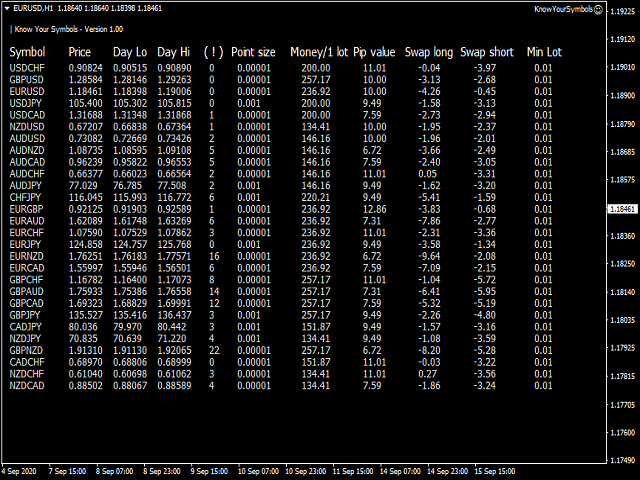
Utility informer 'Know Your Symbols' quickly and easy let you know important information about your symbol. This utility covers any symbol i guess, attach it to one chart (time frame and symbol does not matter) and select what symbols you need information about and voila...Equipped with inputs for symbol prefix/suffix if they have such.

Informs about;

  1. Current price
  2. Day high price
  3. Day low price
  4. Spread points
  5. Point size
  6. Money required for 1 lot
  7. Pip value in quote currency
  8. Swap for a buy order
  9. Swap for a sell order
  10. Minimum permitted amount of a lot

      리뷰 1
      Tran The Dinh
      341
      Tran The Dinh 2020.09.16 06:52 
       

      It's a good forex tool and it's free.

      추천 제품
      PZ Order History MT4
      PZ TRADING SLU
      4.25 (4)
      전략 테스터의 시각적 모드와 매우 유사한 라이브 차트의 거래/주문 내역을 표시하는 범용 지표입니다. 교육, 개선, 리버스 엔지니어링 또는 진단 목적으로 특정 기호의 실제 거래 내역을 조사할 수 있습니다. 마스터 비밀번호와 투자자 비밀번호 모두 성공적으로 사용할 수 있습니다. [ 설치 가이드 | 업데이트 가이드 | 문제 해결 | 자주하는 질문 | 모든 제품 ] 몇 가지 주요 기능은 다음과 같습니다. 방향 분석 모든 거래에 대한 손익 레이블 사용자 정의 가능한 색상 및 크기 이익 계수의 계산 요일 및 시간별 거래 활동 내역 입력 매개변수 구매 화살표: 구매 화살표의 색상 판매 화살표: 판매 화살표의 색상 구매 화살표 크기: 구매 및 판매 화살표의 크기 닫기 구매: 구매 주문 마감 색상 마감 매도: 매도 주문 마감 색상 닫기 화살표 크기: 닫기 주문 화살표의 크기 Winning Trade Line: 수익성 있는 거래를 표시하는 라인의 색상 손실 트레이드 라인: 손실 트레이드를 표시하
      FREE
      Email Drawdown Alert
      Roman Starostin
      5 (12)
      Free informative Indicator-helper. It'll be usefull for traders who trade many symbols or using grid systems (Averaging or Martingale). Indicator counts drawdown as percent and currency separate. It has a number of settings: Count deposite drawdown according equity value and send e-mail or notifications to user if DD more than set; Sending e-mail when max open orders reached; Shows price and remaining pips amount before MarginCall on current chart and Account generally; Display summary trade lot
      FREE
      Position Selective Close MT4
      Francisco Manuel Vicente Berardo
      The Position Selective Close is a multi-symbol multi-timeframe script used to close simultaneously various positions.  General Description   The Position Selective Close   possesses   three operation modes (Intersection,   Union   and All) that control the way   as   four position features (symbol, magic number,   type   and profit) are used. The modes, available through the Selection Mode input parameter, relate to the features, available through the “Select by Feature” and “Feature” input pa
      FREE
      Free automatic fibonacci
      Tonny Obare
      4.67 (49)
      Free automatic Fibonacci is an indicator that automatically plots a Fibonacci retracement based on the number of bars you select on the BarsToScan setting in the indicator. The Fibonacci is automatically updated in real time as new highest and lowest values appears amongst the selected bars. You can select which level values to be displayed in the indicator settings. You can also select the color of the levels thus enabling the trader to be able to attach the indicator several times with differe
      FREE
      Change Timeframe for All
      Mohamed Amine Talbi
      5 (1)
      The script changes the timeframe of all open charts on the MetaTrader platform in a simple click without having to do it manually by going through all the open charts and changing them one by one, it is handy when there are many open charts. The script lets you choose which timeframe to apply to the open charts. The timeframes available in the dropdown menu are the ones already available on the MetaTrader platform : M1, M5, M15, M30, H1, H4, D1, W1, MN1.
      FREE
      Trend Mate Scanner
      ANGEL CALLE CRUZ
      5 (1)
      This product is based on the single indicator TREND MATE. Link: https://www.mql5.com/es/market/product/50082 The aim of this EA is to watch for all pairs in a single panel in order to have a quick view of changes or new uptrends/downtrends. It is possible to watch from your mobile by sending push notifications when changes appear. If you want to have all push notifications for even exit trends you may receive multiple messages.
      FREE
      Scalping Day Trading Support Utility Scalping One MT4 free One position is displayed with one button. View P & L, Lot, and Point in real time. It is possible to switch the display of positions of only chart currencies and all currency pairs.  (The free version has only 3 positions) Supports automatic identification in Japanese and English   Account currency notation corresponds to dollar, euro, pound, yen (automatic identification) The timeline drawing function can be linked with the clock disp
      FREE
      LT Watermark MT4
      Thiago Duarte
      5 (5)
      This indicator draw a watermark on the chart, with the timeframe and symbol name. You can change everything, including add a aditional watermark. Functions: Symbol watermark: Size -  text size. Font -  text font. Color -  text color. Background text -  watermark at foreground or background mode. Horizontal correction -  x correction in pixels. Vertical correction -  y correction in pixels. Separator period X symbol -  what will separate the period from symbol. Aditional watermark: Enable custom
      FREE
      This is a simplified version of Advanced Trade Simulator for trying it out. You can trade NZDCHF. With the full version, you can trade anything and no time limit. You can find it here: https://www.mql5.com/en/market/product/61670 Description... It is an indicator you can attach to any chart and then buy and sell the given symbol virtually. No actual trading takes place.  You can attach it to multiple charts. Then you can buy/sell multiple symbols. Features: - buy and sell immediately on the give
      FREE
      Larger Price Time Crosshair Data
      John Louis Fernando Diamante
      5 (6)
      This utility indicator provides accessibility and readability, by displaying a larger price scale, time scale, crosshair, and symbol name/tf/ohlc information. All features are sizeable and can be styled separately, and are optional to show. All Features optional to use font, size and color options Price Scale option to hide the default MT4 price scale option to show horizontal lines at price levels prices drawn can be at round numbers (ie automatic rounding to multiples of 5/10/20/25 points),
      FREE
      This simple but useful script calculates the lot in % of the deposit. It is indispensable for risk management. There is only one customizable parameter: MaxRisk - risk in % for lot calculation. The product works as a standard script. Launch it once on an appropriate chart and start trading using the calculated lot value. Genious is simplicity! Happy trading!

      FREE
      Buffer Finder Tool
      Afsal Meerankutty
      4.75 (4)
      CyberZingFx Buffer Finder Tool Developed for Finding Buffers of Indicator to use in Universal Indicator EA . This is Not an Indicator or EA CyberZingFx Buffer Finder Tool is utility tool designed specifically for MetaTrader 4 (MT4) users. It is a standalone application that helps you easily find the buffers of any MT4 indicator, allowing you to use them in your Universal Indicator EA. With the Buffer Finder Tool, you no longer have to search through the data window to find the buffers you need.
      FREE
      The Saz_Timer indicator belongs to the Saz_Forex suite of professional indicators designed by Traders, for Traders. This indicator will show minutes and seconds of real time on the chart window. The indicator uses the OnTimer() event so it can update even while no ticks received on the chart. The text is shown toward the bottom right of the chart, encircled red in the screenshot. Inputs: Text Colour, allows selection of the colour for the text.
      FREE
      Multi Divergence Indicator for MT4 - User Guide Introduction Overview of the Multi Divergence Indicator and its capabilities in identifying divergences across multiple indicators. Importance of divergence detection in enhancing trading strategies and decision-making. List of Indicators RSI CCI MACD STOCHASTIC AWSOME MFI ACCELERATOR OSMA MOMENTUM WPR( Williams %R) RVI Indicator Features Indicator Selection:  How to enable/disable specific indicators (RSI, CCI, MACD, etc.) for divergence detectio
      FREE
      Indicator measures strength of each currency in your list. Main idea: It simply iterates through all combinations of pairs and adds difference between open and close in percent. Parameters: List of currencies - what currencies will be calculated (maximum is 8) Calculation type - from which data will be strength calculated Calculation data input - used as input related to calculation type Symbol suffix - used in case of suffix on symbols, e.g: when your symbols look like EURUSDm, EURUSDmicro etc
      FREE
      MaSonic MT4
      Tadanori Tsugaya
      Quickly search for matching Moving Averages (MAs) at any point you click on the chart! By instantly displaying the MAs that pass through any selected point, it’s excellent for identifying trend peaks and supporting better trading decisions. Features: Simple Operation: Click on any point where you want to find the MA. Instant Results: Displays matching MAs if found. Sleep Function: Hide buttons when not in use for a cleaner interface. Manual Control: Adjust MAs manually with on-screen buttons. Fi
      FREE
      ZoomIN
      Maxim Polishchuk
      4.5 (2)
      The ZoomIN indicator is designed for quickly viewing the selected bar on the smaller timeframes in a pop-up window. Once launched, the indicator works in the background, does not take up space on the chart and does not consume system resources. When the indicator is activated by the Shift + i combination (can be changed in the settings), a pop-up window with a chart of a smaller timeframe is created. The displayed timeframe can be changed by a left-click on the magnifying glass icon. To hide the
      FREE
      Demo version of the paid product - Copy MT4 copier , limited to lot size of 0.01 Universal copier of deals from MetaTrader 4 to MetaTrader 4 ( MT5<->MT5 version is available ; with both versions, you can copy MetaTrader 5<->MetaTrader 4, MetaTrader 4<->MetaTrader 5, MetaTrader 5<->MetaTrader 5, MetaTrader 4<->MetaTrader 4). Spread filter. Select the best price (start copying positions with a profit or loss). Configure the lot size, fixed or ratio-based (provider signals can be copied with an inc
      FREE
      Rainbow MT4
      Jamal El Alama
      Rainbow MT4 is a technical indicator based on Moving average with period 34 and very easy to use. When price crosses above MA and MA changes color to green, it’s a signal to buy. When price crosses below MA and MA changes color to red, it’s a signal to sell. The Expert advisor ( Rainbow EA MT4) based on Rainbow MT4 indicator, as you can see in the short video below is now available here .
      FREE
      Ut Bot Indicator
      Menaka Sachin Thorat
      Evolutionize Your Trading with the UT Alert Bot Indicator for MQL4 The UT Alert Bot Indicator is your ultimate trading companion, meticulously designed to give you an edge in the fast-paced world of financial markets. Powered by the renowned UT system, this cutting-edge tool combines advanced analytics, real-time alerts, and customizable features to ensure you never miss a profitable opportunity. Whether you’re trading forex, stocks, indices, or commodities, the UT Alert Bot Indicator is your k
      FREE
      Follow The Line
      Oliver Gideon Amofa Appiah
      3.94 (16)
      FOLLOW THE LINE GET THE FULL VERSION HERE: https://www.mql5.com/en/market/product/36024 This indicator obeys the popular maxim that: "THE TREND IS YOUR FRIEND" It paints a GREEN line for BUY and also paints a RED line for SELL.  It gives alarms and alerts of all kinds. IT DOES NOT REPAINT and can be used for all currency pairs and timeframes. Yes, as easy and simple as that. Even a newbie can use it to make great and reliable trades. NB: For best results, get my other premium indicators for more
      FREE
      Dear Friends, Market Inforamtion Downloader is a simple utilities program to download the market informations in a separate excel file with the name of the current chart you are using with same time frame. You needed to enter the number of periods. example. I'm in EURUSD, Day time frame. I choose to download the data last 50 candles(50 days) then I will enter 50 in the periods. After you getting the data, you use it for various analysis. Regards, Sankar Ganesh 
      FREE
      Trendline indicator
      David Muriithi
      2 (1)
      Are you tired of drawing trendlines every time you're analyzing charts? Or perhaps you would like more consistency in your technical analysis. Then this is for you. This indicator will draw trend lines automatically when dropped on a chart. How it works Works similar to standard deviation channel found on mt4 and mt5. It has 2 parameters: 1. Starting Bar 2. Number of bars for calculation The   starting bar   is the bar which drawing of the trend lines will begin, while the   number of bars for c
      FREE
      -It deletes all graphical objects on a chart. You choose the chart  , then you execute the script on the chart. After the execution, all objects will disappear. Objects can be lines: trend lines, horizontal lines, vertical lines. They can be buttons, texts, labels , rectangles, edit boxes... parts of a panel. It executes fast within  a second. You can use as many times as you want.
      FREE
      Period Change Button
      Rainer Albrecht
      3 (1)
      Fastest way to change the period. Suitable for traders who use many charts and timeframes. Size, shape and color can be customized. Inputs Parameters Corner — Choose corner placement Standart is "Right lower chart corner" Color — Background color of the button ColorText — Text color of the button ColorOn — Background color of the button for the current period ColorOnText — Text color of the button for the current period Font — Arial, Verdana... FontSize — Size of the font in pixels DistanceX —
      FREE
      EA Scalping Expert
      Gerard Valldosera Gomez
      3 (1)
      This is a fully automated scalping Expert Advisor that can be run successfully using EURUSD currency pair at H1 timeframe. This EA can't run in the same account. If you want an Expert Advisor that trades daily this is not because it requires patience to wait for a few days or weeks on the right opportunity for it to trade. It takes advantage of the volatility of the price movement.
      FREE
      SMA Indicator
      Nitu Brijesh Yadav
      Arrow Indicator (Buy/Sell Alerts) – Simple Yet Powerful Tool!             Product Version: 1.01           Indicator Type: Trend Reversal Signals           Timeframes Supported: All (Recommended: H1, H4, D1)           Key Features: Buy Signal: Green upward arrow () appears below the candle  Sell Signal : Red downward arrow () appears above the candle Accurate Trend Reversal Detection – Based on tried and tested SMA strategy. ️ Clean Chart View – Minimalist, non-i
      FREE
      PZ Penta O MT4
      PZ TRADING SLU
      2.33 (3)
      The Penta-O is a 6-point retracement harmonacci pattern which usually precedes big market movements. Penta-O patterns can expand and repaint quite a bit. To make things easier this indicator implements a twist: it waits for a donchian breakout in the right direction before signaling the trade. The end result is an otherwise repainting indicator with a very reliable trading signal. The donchian breakout period is entered as an input. [ Installation Guide | Update Guide | Troubleshooting | FAQ | A
      FREE
      Account Info EA It is a tool that presents on the graph all the positions of the account, and specific information concerning the positions, but also the account. It enables the user to have an image of his account at a glance. Use like any expert advisor. You can't attach it in the same chart with other expert advisor. It does not have the ability to open or manage positions. You can attach it on any chart and any timeframe.
      FREE
      Real-time spread tracking and monitoring software Displays spread values in form of histograms on current timeframe of chart Convenient for analyzing spread changes, as well as for comparing trading conditions of different brokers By placing on desired chart, the spread changes at different trading times are displayed Additionally Fully customizable Works on any instrument Works with any broker
      FREE
      이 제품의 구매자들이 또한 구매함
      Local Trade Copier EA MT4
      Juvenille Emperor Limited
      4.96 (104)
      Local Trade Copier EA MT4 를 사용하여 매우 빠른 거래 복사 경험을 해보세요. 1분 안에 간편하게 설정할 수 있으며, 이 거래 복사기를 사용하면 Windows 컴퓨터 또는 Windows VPS에서 여러 개의 MetaTrader 터미널 간에 거래를 0.5초 미만의 초고속 복사 속도로 복사할 수 있습니다. 초보자든 전문가든 Local Trade Copier EA MT4 는 다양한 옵션을 제공하여 사용자의 특정 요구에 맞게 맞춤 설정할 수 있습니다. 이는 수익 잠재력을 높이려는 모든 사람을 위한 최고의 솔루션입니다. 지금 사용해보시고 이것이 왜 시장에서 가장 빠르고 쉬운 무역용 복사기인지 알아보세요! 팁: 여기 에서 데모 계정에서 Local Trade Copier EA MT4 데모 버전을 다운로드하여 사용해 볼 수 있습니다. 다운로드한 무료 데모 파일을 MT4 >> File >> Open Data Folder >> MQL4 >> Experts 폴더에 붙여넣고 터미널
      Trade Assistant MT4
      Evgeniy Kravchenko
      4.42 (192)
      거래당 위험 계산, 라인을 사용한 손쉬운 신규 주문, 부분 청산 기능을 통한 주문 관리, 7가지 유형의 트레일링 스탑 및 기타 유용한 기능을 제공합니다. 추가 자료 및 지침 설치 지침 - 애플리케이션 지침 - 데모 계정용 애플리케이션 평가판 라인 기능       - 차트에 개시선, 손절매, 차익실현을 표시합니다. 이 기능을 사용하면 새로운 주문을 쉽게 하고 개봉 전에 추가 특성을 볼 수 있습니다. 위기 관리       -       위험 계산 기능은 설정된 위험과 손절매 주문의 크기를 고려하여 새 주문의 볼륨을 계산합니다. 이를 통해 손절매 크기를 설정하고 동시에 설정된 위험을 존중할 수 있습니다. 로트 계산 버튼 - 위험 계산을 활성화/비활성화합니다. 필요한 위험 값은 위험 필드에 0에서 100 사이의 백분율 또는 예금 통화로 설정됩니다. 설정 탭에서 위험 계산 옵션을 선택합니다. $ 통화, % 잔액, % 지분, % 자유 마진, % 사용자 정의, % AB 이전 일, % AB
      Trade Manager EA에 오신 것을 환영합니다. 이 도구는 거래를 보다 직관적이고 정확하며 효율적으로 만들기 위해 설계된 궁극적인 리스크 관리 도구 입니다. 단순한 주문 실행 도구가 아닌, 원활한 거래 계획, 포지션 관리 및 리스크 제어를 위한 종합 솔루션입니다. 초보자부터 고급 트레이더, 빠른 실행이 필요한 스캘퍼에 이르기까지 Trade Manager EA는 외환, 지수, 상품, 암호화폐 등 다양한 시장에서 유연성을 제공합니다. Trade Manager EA를 사용하면 복잡한 계산은 이제 과거의 일이 됩니다. 시장을 분석하고 진입, 손절 및 익절 수준을 차트의 수평선으로 표시한 후 리스크를 설정하면, Trade Manager가 이상적인 포지션 크기를 즉시 계산하고 SL 및 TP 값을 실시간으로 표시합니다. 모든 거래가 간편하게 관리됩니다. 주요 기능: 포지션 크기 계산기 : 정의된 리스크에 따라 거래 크기를 즉시 결정합니다. 간단한 거래 계획 : 진입, 손절, 익절을 위한
      MT4 to Telegram Signal Provider 는 사용하기 쉽고 완전히 사용자 정의가 가능한 도구로, 텔레그램으로 신호를 보내어 계정을 신호 제공자로 변환할 수 있습니다. 메시지 형식은 완전히 사용자 정의가 가능합니다! 그러나 간단한 사용을 위해 미리 정의된 템플릿을 선택하고 메시지의 특정 부분을 활성화하거나 비활성화할 수도 있습니다. [ 데모 ]  [ 매뉴얼 ] [ MT5 버전 ] [ 디스코드 버전 ] [ 텔레그램 채널 ]  New: [ Telegram To MT5 ] 설정 단계별 사용자 가이드 가 제공됩니다. 텔레그램 API에 대한 지식이 필요 없으며, 개발자가 필요한 모든 것을 제공합니다. 주요 기능 구독자에게 보낸 주문 세부 정보를 사용자 정의할 수 있는 기능 예를 들어 브론즈, 실버, 골드와 같은 계층 구독 모델을 만들 수 있습니다. 골드 구독은 모든 신호 등을 받게 됩니다. ID, 심볼 또는 코멘트별 주문 필터링 주문이 실행된 차트의 스크린샷을 포함 보낸
      TradePanel MT4
      Alfiya Fazylova
      4.84 (89)
      Trade Panel은 다기능 거래 보조원입니다. 이 애플리케이션에는 수동 거래를 위한 50개 이상의 거래 기능이 포함되어 있으며 대부분의 거래 작업을 자동화할 수 있습니다. 전략 테스터에서는 애플리케이션이 작동하지 않습니다. 구매하기 전에 데모 계정에서 데모 버전을 테스트할 수 있습니다. 데모 버전 여기 . 전체 지침 여기 . 거래. 한 번의 클릭으로 거래 작업을 수행할 수 있습니다: 자동 위험 계산을 통해 지정가 주문 및 포지션을 엽니다. 한 번의 클릭으로 여러 주문과 포지션을 열 수 있습니다. 주문 그리드를 엽니다. 그룹별 대기 주문 및 포지션을 마감합니다. 포지션 반전(매수 청산 후 매도 개시 또는 매도 청산 후 매수 개시). 포지션 고정(매수 포지션과 매도 포지션의 양을 동일하게 하는 추가 포지션 개설). 한 번의 클릭으로 모든 포지션을 부분 청산합니다. 모든 포지션의 이익실현과 손절매를 동일한 가격 수준으로 설정합니다. 모든 포지션에 대한 손절매를 해당 포지션의 손익 분기
      Copy Cat More Trade Copier MT4 (복사 고양이 MT4) 는 단순한 로컬 트레이드 카피어가 아니라, 오늘날의 거래 환경을 위해 설계된 완전한 리스크 관리 및 실행 프레임워크입니다. Prop Firm 챌린지부터 개인 계좌 관리까지, 강력한 실행력, 자본 보호, 유연한 설정, 고급 거래 처리 기능을 통해 모든 상황에 적응합니다. 이 카피어는 Master(송신자) 와 Slave(수신자) 모드 모두에서 작동하며, 실시간으로 시장가/지정가 주문, 거래 수정, 부분 청산, Close By 작업을 동기화합니다. 데모 및 실계좌 모두 호환되며, 거래용 비밀번호 또는 투자자 비밀번호로도 사용할 수 있습니다. Persistent Trade Memory 기술을 통해 EA, 터미널, VPS가 재시작되더라도 거래가 복원됩니다. 여러 Master와 Slave를 동시에 관리할 수 있으며, 브로커 간 차이는 접두사/접미사 자동 감지 또는 심볼 매핑으로 처리됩니다. 매뉴얼/설정: Copy C
      Exp COPYLOT CLIENT for MT4
      Vladislav Andruschenko
      4.69 (65)
      MetaTrader 4용 트레이드 복사기.       모든 계정의 외환 거래, 포지션, 주문을 복사합니다. 그것은 최고의 무역 복사기 중 하나입니다       MT4 - MT4, MT5 - MT4       위해       카피롯 MT4       버전(또는       MT4 -  MT5   MT5 - MT5       위해       카피롯 MT5       버전). MT5 버전 전체 설명   +DEMO +PDF 구입 방법 설치하는 방법     로그 파일을 얻는 방법     테스트 및 최적화 방법     Expforex의 모든 제품 복사기   버전         MetaTrader 5   터미널 (   МТ5 - МТ5, МТ4 - МТ5   ) -   Copylot Client MT5 고유한 복사 알고리즘은 마스터 계정에서 고객 계정으로 모든 거래를 정확하게 복사합니다. 이 제품은 또한 높은 작동 속도에서 높은 오류 처리로 유명합니다. 강력한 기능 세트. 프로그램은 여러 터
      Custom Alerts AIO: 다중 시장을 동시에 모니터링 – 설정 없이 즉시 사용 가능 개요 Custom Alerts AIO 는 복잡한 설정 없이 즉시 사용할 수 있는 통합 시장 모니터링 도구입니다. FX Power, FX Volume, FX Dynamic, FX Levels, IX Power 등 필요한 모든 지표가 내장되어 있어 별도의 설치나 구성 없이 알림 기능을 바로 사용할 수 있습니다. 차트 그래픽 없이 작동하며, Forex, 금속, 지수, 암호화폐 등 주요 자산군을 모두 지원합니다. 주식(Symbols)은 별도로 입력하여 추가할 수 있으나, MetaTrader에서는 일반적으로 제한적으로만 사용됩니다. 1. 왜 Custom Alerts AIO를 선택해야 하나요? 추가 라이선스가 필요 없습니다 • 모든 Stein Investments 지표가 내장되어 있어 별도 구매가 필요 없습니다. • 즉시 알림 기능을 시작할 수 있어 빠르고 간편합니다. 모든 시장을 하나의 도구로
      Risk/Reward Tool은 MetaTrader 4에서 거래를 계획, 시각화 및 실행하는 방식을 혁신하도록 설계된 전문가급 Expert Advisor입니다. 정밀한 리스크 관리를 중시하는 재량 트레이더이든, 거래 설정을 시각적으로 테스트해야 하는 전략 개발자이든, 이 도구는 우아하고 직관적인 인터페이스에서 필요한 모든 것을 제공합니다. 기본적인 포지션 계산기와 달리, Risk/Reward Tool은 시각적 거래 계획을 즉각적인 실행 기능, 실시간 손익 모니터링 및 포괄적인 거래 관리 기능과 결합합니다. 이 도구는 MT4 전략 테스터와 완전히 호환되어 실제 자본을 위험에 빠뜨리지 않고 거래 전략을 연습하고 접근 방식을 개선할 수 있습니다. 도구의 전체 매뉴얼은 여기에서 확인할 수 있습니다: https://www.mql5.com/en/blogs/post/766244 MT5 version:  https://www.mql5.com/en/market/product/158601 주요 기능
      Trade copier MT4
      Alfiya Fazylova
      4.55 (31)
      Trade Copier는 거래 계정 간의 거래를 복사하고 동기화하도록 설계된 전문 유틸리티입니다. 복사는 공급자의 계정/단말기에서 동일한 컴퓨터 또는 vps에 설치된 수신자의 계정/단말기로 발생합니다. 구매하기 전에 데모 계정에서 데모 버전을 테스트할 수 있습니다. 데모 버전 여기 . 전체 지침 여기 . 주요 기능 및 이점: 복사기는 "МТ4> МТ4", "МТ4> МТ5", "МТ5> МТ4" 복사를 지원합니다. 복사기는 데모 계정 > 실 계정, 실 계정 > 데모 계정, 데모 계정 > 데모 계정 및 실제 계정 > 실 계정 복사를 지원합니다. 복사기는 읽기 전용 암호가 적용된 투자자 계정에서 복사를 지원합니다. 하나의 공급자 터미널은 여러 수신 터미널로 트랜잭션을 보낼 수 있고 하나의 수신 터미널은 여러 공급자 터미널에서 트랜잭션을 수신할 수 있습니다. 복사기는 귀하 또는 귀하의 고문이 거래하는 동일한 터미널에서 작동할 수 있습니다. 높은 복사 속도(0.5초 미만). 복사기에는 간편
      거래하고자 하는 주요 영역을 파악한 후 자동으로 거래 지원 및 저항 또는 공급 및 수요 구역을 설정합니다. 이 EA를 사용하면 한 번의 클릭으로 매수 및 매도 구역을 그린 다음 가격이 바뀔 것으로 예상되는 정확한 위치에 배치할 수 있습니다. 그런 다음 EA는 해당 구역을 모니터링하고 구역에 대해 지정한 가격 액션에 따라 자동으로 거래를 수행합니다. 초기 거래가 수행되면 EA는 대상 구역이 되는 반대 구역에서 이익을 얻습니다. 그런 다음 거래를 종료하고 진입할 새 구역을 그리거나 이익을 얻고 즉시 반대 방향으로 거래를 역전하여 "항상 시장" 스타일 전략을 만드는 두 가지 선택이 있습니다. 입력 및 전략이 포함된 전체 매뉴얼은 여기에 있습니다: https://www.mql5.com/en/blogs/post/760256 이 EA는 시장에서 고정 또는 하드 스톱 로스를 사용하지 않는 포지션 트레이더 또는 달러 비용 평균 거래 전략을 위해 설계되었습니다. 대신, 다음에 가능한 지지 또는
      복사기->편리하고 빠른 인터페이스 상호작용으로 사용자가 바로 사용 가능       ->>>> Windows 컴퓨터 또는 VPS Windows에서 사용하는 것이 좋습니다. 특징: 다양하고 개인화된 복사 거래 설정: 1. 다양한 신호 소스에 대해 다양한 로트 모드를 설정할 수 있습니다. 2. 다양한 신호 소스를 포워드 및 리버스 복사 거래에 대해 설정할 수 있습니다. 3. 신호는 주석으로 설정할 수 있습니다. 4. 계약 로트에 따라 로트를 교정할지 여부 다양하고 개인화된 복사 주문 설정 2: 1. 다양한 품종에 대해 다양한 로트 모드를 설정할 수 있습니다. 2. 정방향 및 역방향 복사 주문에 대해 다양한 품종을 설정할 수 있습니다. 3. 주석으로 신호를 설정할 수 있습니다. 4. 계약 로트에 따라 로트를 교정할지 여부 댓글 필터링, MAGIC 필터링, 시그널 로트 필터링, 로컬 제품 필터링 근무시간 설정 역동기화 SLAVE 닫힘 주문 바인딩 기능: 모든 주문은 설정된 신호 소스 주문
      The product will copy all telegram signal to MT4   ( which you are member  ) , also it can work as remote copier.  Easy to set up, copy order instant, can work with almost signal formats, image signal, s upport to translate other language to English Work with all type of channel or group, even channel have "Restrict Saving Content", work with  multi channel, multi MT5 Work as remote copier: with signal have ticket number, it will copy exactly via ticket number. Support to backtest signal. How to
      Trade Dashboard MT4
      Fatemeh Ameri
      4.96 (53)
      Tired of complex order placement and manual calculations? Trade Dashboard is your solution. With its user-friendly interface, placing orders becomes effortless, by a single click, you can open trades, set stop loss and take profit levels, manage trade lot size, and calculate risk to reward ratios, allowing you to only focus on your strategy. Say goodbye to manual calculations and streamline your trading experience with Trade Dashboard. Download  Demo Version  right now. You can find  Details of
      The News Filter
      Leolouiski Gan
      5 (25)
      이 제품은 뉴스 시간 동안 모든 전문가 어드바이저 및 수동 차트를 필터링하여 수동 거래 설정이나 다른 전문가 어드바이저가 입력한 거래가 파괴될 수 있는 급격한 가격 상승으로부터 걱정하지 않아도 됩니다. 이 제품은 또한 뉴스 발표 전에 열린 포지션과 대기 주문을 처리할 수 있는 완전한 주문 관리 시스템이 함께 제공됩니다. The News Filter  를 구매하면 더 이상 내장 뉴스 필터에 의존할 필요가 없으며 이제부터 모든 전문가 어드바이저를 여기서 필터링할 수 있습니다. 뉴스 선택 뉴스 소스는 Forex Factory의 경제 캘린더에서 얻어집니다. USD, EUR, GBP, JPY, AUD, CAD, CHF, NZD 및 CNY와 같은 어떤 통화 기준으로 선택할 수 있습니다. Non-Farm (NFP), FOMC, CPI 등과 같은 키워드 식별을 기준으로 선택할 수도 있습니다. 저, 중, 고 영향을 가지는 뉴스를 필터링할 수 있도록 선택할 수 있습니다. 차트와 관련된 뉴스만 선택하
      Trading History MT4
      Siarhei Vashchylka
      5 (9)
      Trading History - A program for trading and money management on the history of quotes in stratagy tester. It can work with pending and immediate orders, and is equipped with trailing stop, breakeven and take profit functions. Very good for training and testing different strategies. Manual (Be sure to read before purchasing) Advantages 1. Allows you to test any trading strategy in the shortest possible time 2. An excellent simulator for trading training. You can gain months of trading experience
      If you need an advisor on any arrow indicator signals - this utility will definitely help you.  You will be able, with the help of this utility to form an unlimited number of EAs on YOUR signals , with your set of settings, with your copyright and complete source code . You will be able to use the resulting EAs unlimitedly , including adding them to the Market and other resources. Free simple version of the generation script to help you understand how it works - here What does the utility do? 
      X2 Copy MT4
      Liubov' Shkandrii
      혁신적인 X2 Copy MT4로 즉각적인 트레이드 복사를 발견하세요. 단 10초의 설정만으로 단일 Windows 컴퓨터 또는 VPS에서 MetaTrader 터미널 간에 전례 없는 속도(0.1초 미만)로 트레이드를 동기화하는 강력한 도구를 얻을 수 있습니다. 여러 계정을 관리하든, 신호를 따르든, 전략을 확장하든, X2 Copy MT4는 비교할 수 없는 정밀도와 제어로 여러분의 워크플로우에 적응합니다. 기다림을 멈추세요 — 시장을 선도하는 속도와 신뢰성으로 복사를 시작하세요. 지금 체험판 을 다운로드하세요. *중요: MT5 터미널 작업에는 별도의 X2 Copy MT5 버전이 필요합니다 X2 Copy MT4/5 설정 및 기능 설명 | X2 Copy 체험판 설치 방법 주요 기능 고속 복사 — 0.1초 미만의 트레이드 전송 모든 복사 유형에 대한 범용 지원: MT4>MT4, MT4>MT5, MT5>MT4, MT5>MT5 직관적인 인터페이스로 10초 만에 즉시 설정 연중무휴 안정적 작동 —
      VirtualTradePad mt4 Extra
      Vladislav Andruschenko
      4.86 (58)
      한 번의 클릭으로 거래할 수 있는 거래 패널.   위치 및 주문 작업!   차트 또는 키보드에서 거래. 거래 패널을 사용하면 차트에서 클릭 한 번으로 거래하고 표준 MetaTrader 컨트롤보다 30배 빠르게 거래 작업을 수행할 수 있습니다. 거래자의 삶을 더 쉽게 만들고 거래자가 훨씬 빠르고 편리하게 거래 활동을 수행할 수 있도록 도와주는 매개변수 및 기능의 자동 계산. 차트의 무역 거래에 대한 그래픽 팁 및 전체 정보. MT5 버전 전체 설명   +DEMO +PDF 구입 방법 설치하는 방법     로그 파일을 얻는 방법     테스트 및 최적화 방법     Expforex의 모든 제품 열기 및 닫기, 반전 및 잠금, 부분 닫기/오토로트. 가상/실제 손절매/이익 실현/후행 정지/손익분기점, 주문 그리드 .... MetaТrader 4   의 주요 요청 거래 제어판   : 구매, 판매, 구매 중지, 구매 제한, 판매 중지, 판매 제한, 닫기, 삭제, 수정, 후행 중지, 손절매,
      Averaging Helper
      Sergey Batudayev
      5 (2)
      평균화 도우미 - 이러한 종류의 거래 도우미 도구는 두 가지 기술을 사용하여 이전에는 수익성이 없었던 포지션의 평균을 맞추는 데 도움이 됩니다. 표준 평균화 추세에 따라 포지션을 이후 오픈하여 헤지 이 유틸리티는 매수 및 매도 포지션 모두 여러 방향의 여러 미결제 포지션을 한 번에 정리할 수 있습니다   . 예를 들어, 하나는 매도 포지션이고 다른 하나는 매수 포지션인데, 두 포지션 모두 수익이 없거나, 하나는 수익이 없고 하나는 수익이지만 수익이 충분하지 않은 경우, 두 포지션의 평균을 계산하여 더 높은 수익률로 거래를 마감하려는 경우, 이 유틸리티는 평균화 도우미(Averaging Helper)를 사용하는 데 도움이 될 것입니다. 평균화 도우미 유틸리티를 사용하면 다음 포지션의 크기, 주문 가격, 포지션을 평균화하고 지정한 이익 실현 크기에 맞춰 포지션을 마감하는 방향을 자동으로 계산할 수 있습니다. 이 유틸리티는 매수 및 매도 버튼을 사용하여 포지션을 오픈할 수 있도록 지원합니
      With this Expert Advisor, you can seamlessly integrate various channel, arrow, and reversal indicators. It offers the flexibility to use all popular channel trading strategies, while also providing powerful tools to customize your trading conditions and risk management system.   The Expert Advisor opens orders when the price crosses the channel boundaries. Multiple crossing conditions are available for customization: Price touches boundary on re-entry into the channel Price touches boundary on
      This is a simple utility which will put Automatic Stop Loss and Take Profit. It also has Trailing Stop Loss and Break Even features. The input value of the Stop Loss and Take Profit is in Pips. Whenever you open a trade it will put stop loss and take profit in pips automatically. *If you need a more practical stop loss and take profit for your trades then you may like this ATR based stop loss utility,  Here! Inputs: 1. SL and Trailing SL - This is the Stop Loss value in Pips. Also used as Traili
      DESCRIPTION: The EA is a trade manager for managing manual or other trades by EA. It can place Stoploss, Takeprofit, Trailing, and Martingale/Average all open positions. Make sure to just place 1 type of open orders for each symbols   (Examples: 1 Buy or 1 Sell). The EA will not open the initial trades, but can be backtested to see how it works. FEATURES: Multicurrency or Single Pair Mode. Placing Stoploss / Takeprofit. Auto Martingale / Average Positions. Trailing for All Open Positions (Singl
      일별 및 주별 마감 거래 내역, 현재 진행 중인 거래, 외환 노출을 한 차트에서 즉시 확인하세요! 히트맵을 사용하여 수익성 있는 거래와 거래 포트폴리오 내에서 현재 하락이 있는 위치를 파악하세요. 빠른 마감 버튼 빠른 마감 버튼을 사용하여 단일 심볼에 대한 모든 거래를 마감하거나, 개별 거래를 전체적으로 마감하거나, 버튼을 클릭하여 일부 수익 또는 손실을 실현하세요. 더 이상 목록에서 거래를 찾아 거래의 일부를 마감하는 방법을 알아낼 필요가 없습니다. 대시보드는 외환 쌍을 거래하는 동안 각 통화 심볼에 대한 현재 노출도 표시하므로 주요 뉴스 이벤트에 앞서 과도하게 노출될 수 있는 영역을 파악하는 데 도움이 됩니다. 버튼을 사용하여 뉴스가 나오기 전에 노출을 즉시 빠르게 줄이거나, 이미 뉴스가 발생하여 수익을 창출한 경우 클릭 한 번으로 빠르게 수익을 확보할 수 있습니다! 진행 중인 거래 히트맵 거래 히트맵은 달러 비용 평균화를 사용하여 거래의 확장 및 축소를 수행하는 포지션 거
      Fast Trade MT4
      Alexey Valeev
      4.8 (5)
      This trading panel has been developed for fast and comfortable operation of the financial markets. It is equipped with the necessary functions for manual and semi-automated trading. Due to the presence of the order trailing feature, trailing stop and automatic closure by equity, profit, time. You can use it to automate your trading system. All you have to do is open a position and set the parameters for maintenance, everything else will be handled by the EA. If you want to limit your losses, set
      News Filter EA: Advanced Algo Trading Assistant News Filter EA is an advanced algo trading assistant designed to enhance your trading experience. By using the   News Filter EA , you can integrate a Forex economic news filter into your existing expert advisor, even if you do not have access to its source code. In addition to the news filter, you can also specify   trading days   and   hours   for your expert. The News Filter EA also includes   risk management   and   equity protection   features
      This EA is fully automated , it is built based on  the method of catching the pop-up Alert event and Open Market Orders (BUY/SELL) . Download trial version here:  https://www.mql5.com/en/blogs/post/751340 ***NOTE:   It is recommended to remove the available filter settings, only install the filter for your indicator. Parameters of the EA: -------- <EA Settings> -------- Magic Number:   The identifying (magic) number of the currently selected order. Allow Open trade:   Enable/ Disable Open Trade
      Remote Trade Copier   is an advanced tool designed for efficiently copying trades between accounts in both   local   and   remote   modes. It allows for lightning-fast order replication from a master account to a slave account. In local mode, trades are copied instantly, while in remote mode, the copying process takes a second.  In new version, in remote mode , the copy operation can be performed with a delay of milliseconds or zero . After purchase, ask how to activate it MT4 Version (Only Loc
      Trade Copier Pro
      Vu Trung Kien
      4.57 (14)
      Trade Copier Pro is a tool to copy trade remotely to MT4, MT5 and cTrader accounts at different computers/locations over internet. This is an ideal solution for you if you are a signal provider and want to copy your trades to other receivers globally on your own rules. One provider can copy trades to multiple receivers and one receiver can get trade from multiple providers as well. The provider can even set the subscription expiry for each receiver, so that receiver will not be able to receive t
      This EA helps to Close all Positions opened. It saves you the time of closing multiple positions manually. Parameters: Buy:  Close Buy Positions Only Sell:  Close Sell Positions Only Buy & Sell: Close Buy & Sell Positions Pending: Close Pending Orders More Advanced MT4 version available at:   https://www.mql5.com/en/market/product/93468?source=Unknown%3Ahttps%3A%2F%2Fwww.mql5.com%2Fen%2Fmarket%2Fmy More Advanced MT5 version available at:  https://www.mql5.com/en/market/product/93301?source=Unk
      제작자의 제품 더 보기
      Dynamic Grid M5
      Kenneth Parling
      4.13 (8)
      Introduction Dynamic grid M5 expert  for those who have grid systems as their favorite. Relatively very simple algorithm that can trade on most common Forex majors and minors on any time frame. There are no guarantees that the algorithm lives up to high expectations or that any positive historical results achieved in the strategy tester guarantee the same in the live/demo future trading.  Traded time frame and symbol Any time frame Forex majors and minors Characteristic features Volume (lots) a
      FREE
      Plot History Mt5는 전문 고문이 수행하는 거래 터미널 및 계정의 거래 기록을 분석하는 거래자에게 없어서는 안될 스크립트입니다. 분석 방법은 스크립트가 실행되는 기호 다이어그램과 매직 넘버, 한 명 이상의 전문가가 사용하는 모든 매직의 특정 또는 완전한 분석을 기반으로 합니다. 스크립트는 거래 데이터를 분석하고 차트에 플롯하고 전문가 로그에 자세한 거래 정보를 인쇄하고 분석된 데이터를 csv로 내보낼 수 있습니다 스크립트의 장점 계정에 사용된 하나 또는 모든 마법을 분석하는 기능 모든 거래 데이터를 csv 파일로 내보내기 차트에 모든 거래, 진입 및 퇴장을 표시합니다. 이것은 무엇을 플롯할지 여부와 같이 설정할 수 있습니다. 전문가 로그에 자세한 거래 정보 인쇄 계정 거래 분석을 수행하는 방법 먼저 분석하려는 기호를 선택한 다음 특정 매직 넘버링으로 분석을 수행해야 하는지 아니면 계정에 사용된 모든 매직에 대한 완전한 분석을 수행해야 하는지 선택합니다. 메모; 이것은 전
      소개 피보나치 레벨 프로페셔널 지표는 거래 설정과 시장이 움직이는 경향을 더 잘 확인하기 위해 다른 지표를 보완하는 일일 거래를 위한 훌륭한 도구입니다. 이 표시기는 설정하기 쉽고 모든 통화 쌍 및 시간 프레임에서 작동합니다. M15-W1이 권장됩니다. 이 지표의 목적은 피보나치 수준을 차트, 일일, 상단 및 하단 라인에 표시하는 것입니다. 추가 기능으로 이 표시기는 차트에 되돌림 및 확장 선을 그리고 일 고점, 저점, 범위 및 스프레드에 대해 알려줍니다. Fibonacci Levels Pro 표시기는 전날의 고가와 저가를 사용하여 계산된 선을 ​​그립니다. 이것은 모든 거래자에게 꼭 필요한 도구입니다! 특징 간편한 설정, 복잡한 설정 없음 깨끗하고 부드러운 차트 라인과 읽기 쉬운 모든 통화 쌍 및 시간 프레임에서 작동 피보나치 선에 대한 조정 가능한 색상 설정 조정 가능한 대시보드 색상 계정 정보가 있는 대시보드 지표 매개변수 UpperFiboColor - 상위 피보나치 레벨의
      다중 차트 새로 고침 Mt4는 하나의 동일한 차트에서 동시에 여러 차트를 새로 고칠 수 있게 해주는 빠르고 매끄럽게 필수적인 스크립트입니다. 새로 고칠 기호를 미리 선택할 수 있으므로 멀티태스킹이 가능합니다. 메타 트레이더 5 버전 대신 mt5 버전을 선호하는 경우 https://www.mql5.com/en/market/product/28796 어떻게 작동합니까? 차트를 열고 네비게이터에서 스크립트를 끌어 차트에 놓습니다. 원하는 기호를 설정하고 확인을 클릭하면 완료됩니다! 이것은 스크립트이며 전문 조언자가 아니므로 작업이 완료되면 프로그램이 차트에서 자체적으로 제거됩니다. 어떤 기호가 원하는 만큼의 막대로 업데이트되고 어떤 기호가 업데이트되지 않았는지에 대한 자세한 정보가 터미널 저널에 인쇄됩니다. 이보다 쉬울 수 없다! 스크립트 메뉴 설정 기호 선택 - 원하는 기호 설정 기호 접두어 - 기호 접두어가 있으면 입력하십시오. 접두어만 있습니다! 기호 접미사 - 기호 접미사가
      Plot History Mt4는 전문 고문이 수행하는 거래 터미널 및 계정의 거래 기록을 분석하는 거래자에게 없어서는 안될 스크립트입니다. 분석 방법은 스크립트가 실행되는 기호 다이어그램과 매직 넘버, 한 명 이상의 전문가가 사용하는 모든 매직의 특정 또는 완전한 분석을 기반으로 합니다. 스크립트는 거래 데이터를 분석하고 차트에 플롯하고 전문가 로그에 자세한 거래 정보를 인쇄하고 분석된 데이터를 csv로 내보낼 수 있습니다. 메타 트레이더 5 버전 대신 mt5 버전을 선호하는 경우   https://www.mql5.com/en/market/product/27038 스크립트의 장점 계정에 사용된 하나 또는 모든 마법을 분석하는 기능 모든 거래 데이터를 csv 파일로 내보내기 차트에 모든 거래, 진입 및 퇴장을 표시합니다. 이것은 무엇을 플롯할지 여부와 같이 설정할 수 있습니다. 전문가 로그에 자세한 거래 정보 인쇄 계정 거래 분석을 수행하는 방법 먼저 분석하려는 기호를 선택한 다음
      H4 Trend
      Kenneth Parling
      5 (1)
      소개 H4 Trend Forex 거래 로봇 - 추세 움직임을 포착하기 위해 H4 차트를 거래하도록 설계된 사용하기 쉽고 완전 자동화된 거래 로봇입니다. 이동 평균 지표를 교차하여 생성된 매수/매도 신호. 주문은 항상 가상 손절매, 이익실현 및 후행 정지 및 자금 확보를 위해 서버 연결 손실이 발생할 경우에 대비하여 다음과 같은 강제 정지를 사용합니다. 특징 마틴게일, 헤징 등의 위험한 기술을 사용하지 않음 낮은 드로다운 안전한 안정적인 거래 최적화하기 쉽고, TP/SL 및 후행 레벨과 표시기에 초점을 맞춥니다. 가상 이익 실현, 손실 정지 및 후행 정지 수준 ATR(Average True Range) 계산된 이익 실현 및 후행 정지 위험 평가 - 고정 로트 또는 동적 포지션 크기 비율로 거래(동적 항상 권장) ADX 추세 강도 필터 낮은 초기 예치금 - 계정 레버리지 1:400-1:500에 기반한 센트 계정의 경우 $200/$20 EURUsd H4에서 사용할 수 있는 기본 설정 최
      소개 Forex Martingale Multi Swap, 포지티브 스왑 비율에 중점을 둔 전문가. 이 전문가는 음수 요금을 피하기 위해 양수 스왑 방향으로만 거래하며 이는 주문이 오버나이트 스왑 이자 수수료에 노출될 경우 항상 양수가 될 것이며 이로부터 추가 이익을 얻을 수 있음을 의미합니다. 전문가는 다중 거래 유형이며 하나의 다이어그램에서 한 번에 최대 28개의 Forex 메이저/마이너 기호를 처리하므로 매우 효율적이고 읽기 쉽습니다. Relative Strength 지수 과매수/과매도 가격이 있는 모델은 초기 주문에 대한 진입 신호로 사용되며 초기 주문이 잘못된 방향으로 손실을 입을 경우 평균(mg/martingale)으로 구성된 복구 시스템으로 사용됩니다. Forex Martingale Multi Swap에는 거래된 기호에 대한 자체 대기열 시스템이 있으며 이것이 활성화되면 전문가가 한 번/신호에서 1개의 기호를 거래하고 예를 들어 부하를 줄이는 데 유리하게 사용될 수 있음
      Virtual OCO Pending
      Kenneth Parling
      5 (1)
      소개 '가상 OCO 보류' - 위험 평가 기능이 있는 반자동 주문 관리 유틸리티 도구(전문가 고문)로 OCO 보류 규칙(One Cancel 다른). 시각적으로 쉽게 확인할 수 있도록 차트에 시각적 수준을 표시합니다. 하나의 차트에서 이 유틸리티를 사용하여 원하는 다른 기호에 대해 주문을 보낼 수 있습니다. 메뉴 설정에서 주문할 기호를 지정할 때 해당 차트(선택 사항)에 첨부할 필요가 없습니다. 시각적 가상 레벨 이는 연결된 현재 공개 차트 유틸리티에만 그려지며 '거래 기호' 설정과 일치해야 합니다. 즉, 'EURUSD'를 설정하고 유틸리티를 차트 EURUSD에 첨부하면 이 수준은 시각적이지 않습니다. 전략 테스터 전략 테스터에서 이 유틸리티를 실행하면 목적을 보여주기 위해 무작위로 주문을 엽니다. 유틸리티 이점 동적 위험 평가 또는 고정 로트 동적(ATR) 또는 고정 이익 및 손절매 수준 가상 주문 관리 끄기 가능성 - 경고, 이 모드는 가상 손절매를 설정하거나 모니터링하거나
      Simple RSI Unlimited
      Kenneth Parling
      5 (1)
      소개 전문가 '심플 RSi 언리미티드' - 단순? 네! 초보자 상인과 전문가 모두에게 적합합니다. 잘 알려져 있고 인기 있는 상대 강도 지수에 의한 진입 신호. 후행 정지 및 손익분기점을 갖추고 있어 포지션 이익을 확보할 수 있습니다. 위험한 거래 기술을 사용하지 않으며 이 전문가는 동일한 계정에서 실행할 수 있는 다른 전문가를 절대 간섭하지 않습니다. 기본 전문가 사전 설정 EURUSD에서만 테스트된 모든 시간대 및 가장 일반적인 Forex 기호에서 작동합니다. 거래하는 기호에 대해 만족스러운 안정적인 결과를 얻으려면 정기적으로 매개변수를 조정해야 합니다. '공개 가격'으로 빠르고 쉽게 최적화 수행 장점 모든 계정 유형, 레버리지 및 기간 낮은 초기 보증금, 500:1 레버리지를 기준으로 최소 $20-100 권장 이익/손절매 - 자동화, 입력 정의 또는 완전히 꺼짐(꺼짐은 진입 신호 변경에 의해 할당됨을 의미) 스프레드 필터 완전히 조정 가능한 인덱스 역 인덱스 모드 위험 평가
      Endurance M4
      Kenneth Parling
      소개 MetaTech Algo Invest는 최첨단 플래그십인 Endurance M4를 소개합니다. 트리플 모듈 적응형 마틴게일 시스템 기술을 갖춘 혁신적이고 안정적이고 신뢰할 수 있는 전문 조언자입니다. 거래 신호는 과매수 및 과매도 시장 가격 모델을 사용하여 생성됩니다. 약 40개월의 안정적인 거래 이력과 1.9 이상의 이익률을 입증했습니다. Endurance M4는 무엇보다도 3단계 안전 시스템을 사용하여 최대한 안정적이고 원활한 거래를 제공합니다. Endurance M4는 시스템과 기호가 공생하여 작동하므로 Forex 쌍 EURUSD를 위해 특별히 개발되었으며 이는 시스템이 EURUSD에서만 작동하고 거래된다는 것을 명심하십시오. 전문가는 설정이 거의 없고 직접 사용할 수 있으며 어떤 방식으로든 최적화할 필요가 없으므로 사전 지식이 필요하지 않습니다. 수년에 걸쳐 조정되어야 할 유일한 것은 GMT 오프셋입니다. 제품 라이브 거래 신호  https://metatech-alg
      소개 Meta trader 4를 위한 Forex Martingale Multi M4 전문가는 상대 강도 지수 과매수/과매도 가격 모델을 기반으로 한 거래 신호를 갖춘 마틴게일 기반 알고리즘입니다. 보안은 최선의 방법으로 완전히 전멸에 대응하기 위한 마틴게일 알고리즘의 필수 요소이며, 물론 이것이 포함됩니다. 마틴게일의 사용이 완전히 위험이 없는 것은 아니며 MetaTech Algo Invest가 자본 손실에 대해 책임을 지지 않기 때문에 매우 심각하게 받아들여야 한다는 점을 지적하고 사용자가 이해하는 것이 중요합니다. 이 전문가는 하나의 동일한 차트에서 여러 기호를 거래할 수 있는 능력을 갖고 있으므로 거래하려는 다른 기호에 설치할 필요가 없습니다. Forex Martingale Multi M4 전문가의 정확한 특징은 무엇입니까? 볼륨이 두 배 지수인 마틴게일 권장 거래 기간 - m5 또는 M15 3가지 기능 중 하나의 위험 평가 기능. 자신이 정의한 고정 거래량, 백분율 거래량 또
      Randomizer MT4
      Kenneth Parling
      5 (1)
      소개 Meta Trader 4를 위한 Expert Randomizer - 순수한 무작위성을 기반으로 하는 거래 로봇. 지표가 없고 전혀 없습니다. 순수한 임의성만이 매수 또는 매도 거래를 열 수 있습니다. 그러니 스스로에게 물어보십시오. 오늘이 당신의 운이 좋은 날입니까? 당신은 정말로 알 수 없습니다. 그것은 카지노에 걸어들어가서 검은색이나 빨간색에 베팅하는 것과 같습니다. 당신은 매우 운이 좋고 정말로 좋은 이익을 얻거나 ....매우 운이 좋지 않고 느슨할 수 있습니다. 당신이 느슨한 경우 울지 마십시오, 당신은 경고했습니다! Randomizer는 거래 작업에서 어떤 종류의 위험한 거래 기술도 사용하지 않으며, 주문은 항상 입력 정의된 손절매로 미리 설정되어 있으며, 사용하더라도 이익을 얻고 추가로 중단됩니다. 행운을 빕니다! 어떻게? 모든 예금 및 계좌 Forex 테스트, 내가 모르는 다른. 모든 시간 프레임 및 레버리지 멋진 결과를 기대하는 백 테스트는 무작위성으로
      소개 Forex Martingale M4 전문가는 이름 그대로 모든 Forex 메이저/마이너 기호에 사용할 수 있는 마틴게일 시스템입니다. 다른 많은 제품과 다른 점은 설정과 감수할 위험을 직접 결정한다는 것입니다. 즉, 자신에게 유리하도록 원하는 설정을 설정/최적화할 수 있다는 것입니다. 그러나 함께 제공되는 전문가 사전 설정은 의도된 모든 Forex 주요/부 기호에서 작동한다는 보장은 없습니다. 전문가는 주문 중지 손실을 갖추고 있으며 거래 신호는 상대 강도 지수의 과매수 및 과매도 가격 구역 모델로 구성됩니다. 전문가의 특징 지원되는 기호는 Forex 메이저 및 마이너입니다. 어떤 시간대에도 거래 가능 주문손절매 기능을 갖추고 있습니다. 사이클 컨트롤러 스프레드, 거래 시간 및 요일 필터 두 가지 이익 목표 설정(초기 주문용 및 복구 주문 프로세스용) 터보 단계 감소 모드 - 간단히 3단계로 회복 위치 사이의 단계(간격)를 감소시킵니다. 이 기능은 주의해서 사용해야 한다는
      소개 가상 TPSL 마감 M4 주문 관리 유틸리티 도구(전문 고문)는 귀하가 사용하는 다른 전문 고문이 만든 기존 오픈 포지션이나 수동으로 개설된 주문을 관리하고 가상 이익실현 및 손절매 수준으로 마감합니다. Adviser는 완전한 가상 모드에서 작동하며, 모니터링된 위치가 닫혀 있을 때 그려지는 색상 화살표 개체 이상의 시각적 레벨은 존재하지 않으며, 하나가 열려 있고 연결된 유틸리티와 함께 표시되는 경우 차트에 닫는 위치를 표시하기 위해 손익 여부에 관계없이 표시됩니다. 이 유틸리티를 사용하는 방법은 무엇입니까? 간단하고 차트를 엽니다. 하나의 단일 차트에서만 모니터링을 제어하므로 모든 차트와 기간이 괜찮습니다. 이 어드바이저를 부착하고 모니터링하려는 기호 및 매직 넘버(수동 주문의 경우 0)와 포지션 유형을 지정하세요. - 매수, 매도 또는 둘 다를 지정하고 포지션이 종료되지 않도록 원하는 가상 이익 실현 수준을 설정하세요. . 정지 손실 수준을 모니터링하는 것도 가능합니
      소개 마이티 앨리게이터(Mighty Alligator) - 금융 시장과 개별 증권의 추세는 전체 시간의 15~30%에 불과하고 나머지 70~85%의 시간에는 횡보한다는 전제를 따르는 추세 추종 지표입니다. 마이티 앨리게이터(Mighty Alligator) 지표는 5개, 8개, 13개의 기간으로 설정된 3개의 평활 이동 평균을 사용하며 이는 모두 피보나치 수입니다. 초기 평활 평균은 단순 이동 평균(SMA)으로 계산되며 지표 회전 속도를 늦추는 평활 평균을 추가합니다. 그 특징 팝업 메시지, 알림, 이메일 등 알림 기능 탑재 세 가지 이동 평균은 악어의 턱, 이빨, 입술로 구성되며 진화하는 추세와 거래 범위에 반응하여 시가와 종가가 결정됩니다. 조(파란색 선) - 13바 SMMA로 시작하고 후속 값에서 8바만큼 평활화됩니다. 톱니(빨간색 선) - 8바 SMMA로 시작하고 이후 값에서 5바만큼 평활화됩니다. 입술(녹색 선) - 5바 SMMA로 시작하고 이후 값에서 3바만큼 평활화됩니
      VR Mfi Expert M4
      Kenneth Parling
      소개 VR MFI Expert M4 - Money Flow 지수를 기반으로 하는 안전하고 안정적이며 매우 간단한 거래 로봇입니다. 가상(VR) 테이크 프로핏을 갖추고 갑작스러운 시장 움직임이 잘못된 방향으로 발생할 경우 자금을 확보하기 위해 브로커 서버와 단말기 사이의 연결이 끊길 경우를 대비해 항상 초기 중지 손실(ISL)이 설정된 주문입니다. 또한 포지션 이익을 확보하기 위해 추적 중지가 가능합니다. 어떻게 작동하나요? 모든 Forex 메이저/마이너(금속 또는 기타 없음) 기호는 최적화 후에 거래될 수 있으며 이는 공개 가격에 의해 수행됩니다. 레버리지 500을 기준으로 최저 $50부터 시작할 수 있습니다. 귀하의 계정에서 동시에 실행할 수 있는 다른 전문가를 방해하지 않습니다. 브로커/스프레드에 민감합니까? - 아니요 장점 완전히 조정 가능한 인덱스 스프레드 필터 위험 평가 - 고정 크기 랏 또는 % 크기 랏으로 거래하세요 후행 중지 전문가 메뉴 카테고리 설정 스크린샷 참고
      다중 차트 새로 고침 Mt5는 하나의 동일한 차트에서 여러 차트를 동시에 새로 고칠 수 있게 해주는 빠르고 매끄럽게 필수적인 스크립트입니다. 새로 고칠 기호를 미리 선택할 수 있으므로 멀티태스킹이 가능합니다. 어떻게 작동합니까? 차트를 열고 네비게이터에서 스크립트를 끌어 차트에 놓습니다. 원하는 기호를 설정하고 확인을 클릭하면 완료됩니다! 이것은 스크립트이며 전문 조언자가 아니므로 작업이 완료되면 프로그램이 차트에서 자체적으로 제거됩니다. 어떤 기호가 원하는 만큼의 막대로 업데이트되고 어떤 기호가 업데이트되지 않았는지에 대한 자세한 정보가 터미널 저널에 인쇄됩니다. 이보다 쉬울 수 없다! 스크립트 메뉴 설정 기호 선택 - 원하는 기호 설정 기호 접두어 - 기호 접두어가 있으면 입력하십시오. 접두어만 있습니다! 기호 접미사 - 기호 접미사가 있으면 입력하십시오. 접미사뿐입니다! 막대 수로 차트를 새로 고치시겠습니까? - 새로고침/차트할 막대 수 설정
      Price Average Mt5
      Kenneth Parling
      가격 관찰에 대한 상식적인 접근 가격이 상승할 때 매수하고 가격이 하락할 때 매도 가격이 상승할 때 매수하거나 가격이 하락할 때 매도한다는 위의 진술은 너무 광범위할 수 있으므로 몇 가지 지침과 규칙이 필요할 수 있습니다. 이것이 3 Duck's가 작동하는 곳입니다. 가격 평균 Mt5 지표는 마지막 상승 추세 방향의 매수 기회와 마지막 하락 추세 방향의 매도 기회를 식별하는 데 도움이 됩니다. 제목의 'duck's'는 'to have all your ducks aligned'라는 말에서 유래한 것으로 모든 것이 올바른 순서로 정렬되어 있다는 의미입니다. 세 개의 오리가 있으며 첫 번째 오리는 마지막 상승 또는 하락 추세를 식별하는 데 도움이 되고 두 번째 오리는 추세의 방향을 확인하는 데 도움이 되며 세 번째 오리는 추세 방향으로 매수 또는 매도 기회를 식별하는 데 도움이 됩니다. 이 지표는 4시간 차트(첫 번째 오리), 1시간 차트(두 번째 오리) 및 5분 차트(세 번째 오리)
      ROC 가격 히스토그램 경고는 현재 가격과 특정 기간 전 가격 사이의 가격 변동률을 측정하는 모멘텀 기반 기술 지표입니다. ROC는 0에 대한 히스토그램으로 표시되며, 가격 변동이 상승하면 지표가 양의 영역으로 위쪽으로 이동하고 가격 변동이 하락하면 음의 영역으로 이동합니다. ROC 기간을 계산하는 주요 단계는 '계산된 기간' 입력 설정입니다. 단기 거래자는 9 또는 12와 같은 작은 값을 선택할 수 있습니다. 장기 투자자는 200과 같은 더 높은 값을 선택할 수 있습니다. '계산된 기간'은 현재 가격이 비교되는 기간입니다. 값이 작을수록 ROC가 가격 변화에 더 빠르게 반응하지만 이는 잘못된 신호가 더 많이 나타날 수도 있음을 의미합니다. 값이 클수록 ROC가 더 느리게 반응하지만 신호가 발생할 때 더 의미가 있을 수 있습니다. 이러한 유형의 기술 지표에는 긍정적인 측면과 부정적인 측면이 모두 있습니다. 긍정적인 ROC 가격 오실레이터는 기술 분석에 사용되는 무한 모멘텀 지
      소개 Forex Martingale M5 전문가는 이름 그대로 모든 Forex 메이저/마이너 기호에 사용할 수 있는 마틴게일 시스템입니다. 다른 많은 제품과 다른 점은 설정과 감수할 위험을 직접 결정한다는 것입니다. 즉, 자신에게 유리하도록 원하는 설정을 설정/최적화할 수 있다는 것입니다. 그러나 함께 제공되는 전문가 사전 설정은 의도된 모든 Forex 주요/부 기호에서 작동한다는 보장은 없습니다. 전문가는 주문 중지 손실을 갖추고 있으며 거래 신호는 상대 강도 지수의 과매수 및 과매도 가격 구역 모델로 구성됩니다. 전문가의 특징 지원되는 기호는 Forex 메이저 및 마이너입니다. 어떤 시간대에도 거래 가능 주문손절매 기능을 갖추고 있습니다. 사이클 컨트롤러 스프레드, 거래 시간 및 요일 필터 두 가지 이익 목표 설정(초기 주문용 및 복구 주문 프로세스용) 터보 단계 감소 모드 - 간단히 3단계로 회복 위치 사이의 단계(간격)를 감소시킵니다. 이 기능은 주의해서 사용해야 한다는
      필터:
      Tran The Dinh
      341
      Tran The Dinh 2020.09.16 06:52 
       

      It's a good forex tool and it's free.

      리뷰 답변