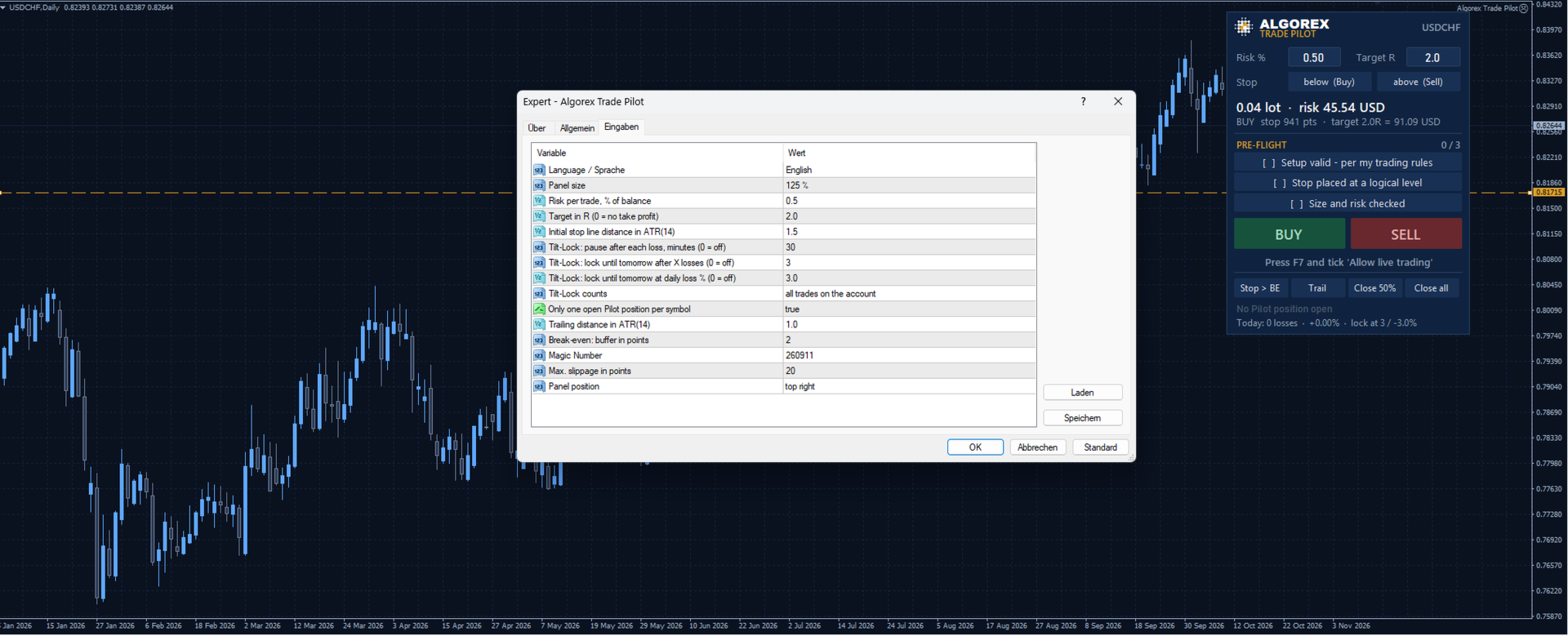
Algorex Trade Pilot MT4

  • 유틸리티
  • Daniel Schwoerer
    Daniel Schwoerer
    Algorex Trading Solutions, 2013년 설립, 취리히 소재. 선물, 지수, 금을 위한 규칙 기반 트레이딩 시스템, 인디케이터 및 도구. 트레이더가 만들고 출시 전에 검증합니다.
    현재 작업: 세션 유동성, 오프닝 레인지, 모멘텀에 기반한 시스템과 매일의 화면 작업을 위한 도구. MetaTrader 5, 4 및 TradingView 지원. 코칭과 맞춤 개발은 문의 바랍니다.
  • 버전: 1.13

Algorex Trade Pilot은 제 자신을 위해 만들었습니다. 충동적인 매매와 복수 매매로 여러 번 크게 데였습니다. 계획 없는 성급한 진입, 손실, 그리고 만회하려고 들어가는 다음 매매. 처음보다 더 크고, 결과는 더 나쁩니다.

Trade Pilot은 충동과 클릭 사이에 짧고 정직한 점검을 넣고, 제가 매매할 상태가 아닐 때는 주문 버튼을 빼앗습니다. 스스로 거래를 여는 일은 절대 없습니다. 모든 주문에는 사용자의 클릭이 필요합니다.

리스크, 랏과 라인

  • 거래당 리스크를 잔고 대비 퍼센트로 입력
  • 차트의 빨간 스톱 라인을 드래그: 가격 아래면 BUY, 위면 SELL
  • 랏 크기와 리스크 금액을 실시간으로 계산
  • 리스크의 배수(R)로 설정하는 선택적 초록 목표 라인
  • 호박색 진입 라인을 가격에서 떼어 놓으면 시장가 대신 지정가 또는 스톱 주문이 됩니다. 가격으로 되돌리면 시장가로 돌아갑니다

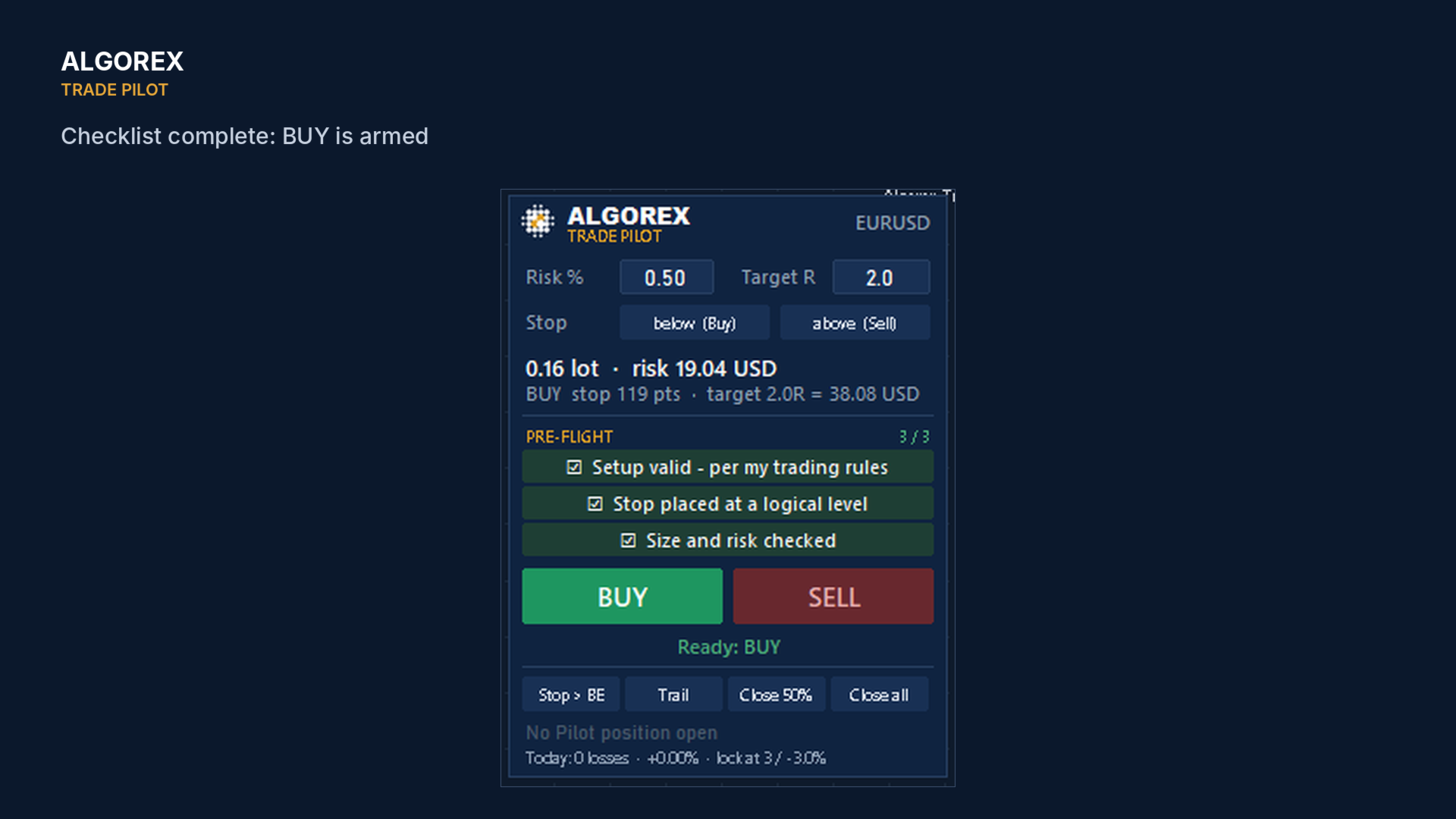
Pre-Flight 체크리스트

  • 내 매매 규칙에 맞는 셋업
  • 논리적인 위치에 스톱 설정
  • 랏과 리스크 확인

세 항목을 모두 체크할 때까지 BUY와 SELL은 잠겨 있습니다. 체크리스트는 거래마다 초기화됩니다.

Tilt-Lock의 작동 방식

  • Trade Pilot 패널 수준에서 작동합니다. 잠금이 활성화된 동안 패널의 BUY와 SELL 버튼이 비활성화되고 스톱 라인이 사라집니다
  • 현재 브로커 거래일(서버 시간)의 청산된 거래를 읽습니다. 기본값은 계좌의 모든 거래(수동 거래와 다른 EA의 거래 포함)이며, 선택하면 Trade Pilot 거래만 셉니다
  • 손실 거래 후마다 일시 정지: 설정한 시간(기본 30분) 동안 버튼이 잠기고 패널에 카운트다운이 표시됩니다
  • 손실 거래가 설정 횟수(기본 3회)에 이르거나 일일 손실이 잔고의 설정 비율(기본 3%)에 이르면 다음 브로커 거래일까지 잠금
  • 잠금은 다음 브로커 거래일이 시작되면 저절로 풀립니다. 더 일찍 풀려면 EA를 제거하거나 설정을 바꿔야 합니다. 반사적 행동이 아닌 의도적인 한 걸음입니다
  • 정직한 한계: Trade Pilot은 MetaTrader 자체 주문 창, 원클릭 매매, 다른 EA를 막지 않습니다. 패널을 통해 매매하기로 한 트레이더를 위한 브레이크이지, 우리가 아닙니다

거래 관리

  • 작은 버퍼를 둔 본전 스톱, ATR 기반 트레일링 스톱
  • 50 % 청산, 전체 청산 (대기 주문도 취소)
  • 포지션 보유 중 패널에 랏, 진입가, 스톱, 목표 표시

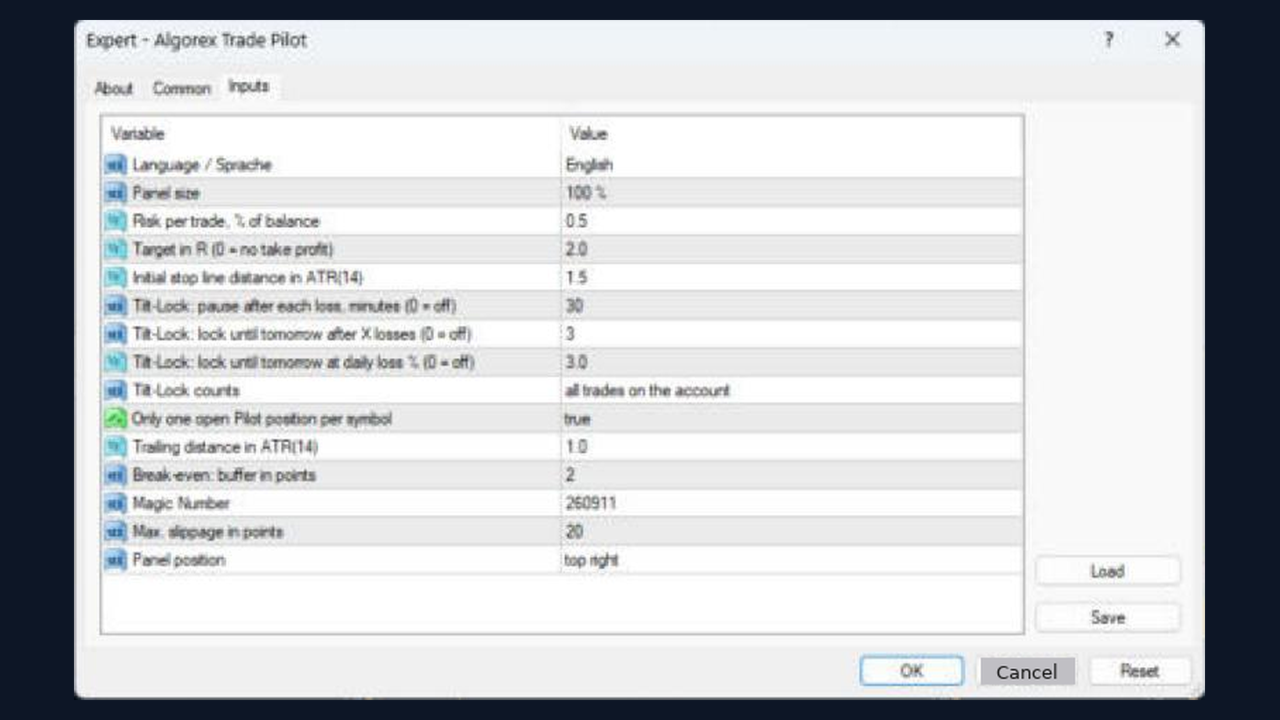
입력 항목

  • 언어, 패널 크기, 패널 위치
  • 거래당 리스크, R 단위 목표, ATR 단위 초기 스톱 거리
  • Tilt-Lock 설정, 심볼당 한 포지션, 트레일링 거리, 본전 버퍼, 매직 넘버, 슬리피지

거래에는 손실 위험이 따릅니다. 먼저 데모 계좌에서 테스트하세요.

추천 제품
SilvMAT
MARC ALBRECHT SCHMID
4.55 (11)
SilvMAT EA - XAGUSD 실버 자동 트레이딩 EA SilvMAT EA는 Marc Albrecht Trading이 XAGUSD 전용으로 개발한 Expert Advisor로 Automatic Cycle Trading, Neural Entry Logic, Configurable Grid, Profit Protection, Account-Level Risk Controls를 결합합니다. 최적화 Symbol: XAGUSD Timeframe: M15 권장 환경: RoboForex ProCent + KXTL Live MAT Trading Account MQL5 Signal을 통해 Live MAT Trading Account 중 하나를 확인할 수 있습니다: https://www.mql5.com/ko/signals/2389532 XAGUSD 전용 설계 SilvMAT EA는 실버 전용이며 일반 Multi-Symbol System이 아닙니다. XAGUSD 특유의 Volatility, Spr
FREE
MATrader AI
MARC ALBRECHT SCHMID
4.52 (147)
MATrader AI - XAUUSD용 고급 AI 골드 트레이딩 MATrader AI는 Marc Albrecht Trading의 대표 XAUUSD Expert Advisor로, 10년이 넘는 자동매매 시스템 개발 및 실전 경험을 바탕으로 만들어졌습니다. MQL5에 공개하기 전까지 10년 이상 전략을 테스트하고 개발하며 계속 다듬었습니다. 현재 MATrader는 AI로 보정한 MAT Trend / Momentum 엔진, 자체 MAT 알고리즘, 상위 타임프레임 추세 분석, dynamic cycle trading, 고급 recovery 로직, 설정 가능한 grid 관리, 다양한 수익·리스크 보호 기능을 하나의 EA에 통합합니다. 최적화 심볼: XAUUSD 기본 타임프레임: M1 권장 기준 환경: RoboForex ProCent + KXTL 실시간 MAT 트레이딩 결과 MQL5 Signal에서 MAT 실시간 트레이딩 결과를 확인할 수 있습니다: https://www.mql5.com/en/s
FREE
PZ Goldfinch Scalper EA
PZ TRADING SLU
2.7 (44)
This is the latest iteration of my famous scalper, Goldfinch EA, published for the first time almost a decade ago. It scalps the market on sudden volatility expansions that take place in short periods of time: it assumes and tries to capitalize of inertia in price movement after a sudden price acceleration. This new version has been simplified to allow the trader use the optimization feature of the tester easily to find the best trading parameters. [ Installation Guide | Update Guide | Troublesh
FREE
Trade Lines
Aleksey Semenov
4.91 (11)
The Trade Lines EA is an auxiliary Expert Advisor for automated trading based on levels. The EA opens deals at the specified lines when the price crosses them on the chart - the lines are active, they can and must be moved for the EA to operate with the greatest efficiency. The EA also includes the averaging, trailing stop and take profit setting functions. For the EA to work, it is necessary to select the required number of lines and the type of lines for the EA to trade. It is possible to enab
FREE
Rua TrailingStop BreakEven Little
PHAM KIM QUY RuaCoder
4.5 (2)
Rua TrailingStop BreakEven Little The EA not for Real Account. You can EA for Real Account with link:   https://www.mql5.com/en/market/product/47635 Uses of EA - Trailingstop: Move stoploss continuously. - Breakeven: Move the stoploss once. Custom parameters: All OrderOpenTime:     + true: acts on all order     + false: only affect the order opened since EA run All OrderType:     + true: acts on all order.     + false: only the order is running (Buy, Sell) TraillingStop: true (Use), false (do n
FREE
CommunityPower MT4
Andrey Khatimlianskii
4.88 (40)
CommunityPower EA — is the Expert Advisor for MetaTrader 4/5, created by community and for community. It is free, versatile and very powerful, and allows to trade a wide range of strategies. The idea is simple Your suggestions + my code = a win-win for everyone! Is it a ready-to-use money-making machine? No, it is definitely not. It is a tool, which allows you to create and run your own trading strategy, and it is up to you to find profitable settings and take the responsibility for your tradi
FREE
TP Exposure Matrix (MT4) --- Compatibility Platform: Meta Trader 4 Timeframes: All Symbols: Any (Forex, Gold, Crypto, Indices, etc.) --- Version 1.0 Highlights Clean sub-window layout Grouped symbol display (Buy/Sell) Multiple totals modes Optional live P/L view Complete color and spacing customization Automatic object cleanup. For any inquiries please contact me in MQL5.com
FREE
이 무료 도구가 마음에 드셨다면 별점 5점을 남겨주세요! 정말 감사합니다 :) "위험 관리 어시스턴트" 전문가 자문 컬렉션은 다양한 시장 상황에서 효과적으로 위험을 관리하여 거래 전략을 강화하도록 설계된 포괄적인 도구 모음입니다. 이 컬렉션은 평균화, 전환, 헤지 전문가 자문의 세 가지 핵심 요소로 구성되어 있으며, 각 요소는 다양한 거래 상황에 맞춰 고유한 장점을 제공합니다. 이 EA는 시중에 나와 있는 표준 위험 관리 전략을 기반으로 개발되었습니다. https://www.mql5.com/en/blogs/post/756961 1. "평균화 어시스턴트" EA: MT4: https://www.mql5.com/en/market/product/115468 MT5: https://www.mql5.com/en/market/product/115469 2. "스위칭 어시스턴트" EA: MT4: https://www.mql5.com/en/market/product/115478 MT5: ht
FREE
CryptoTrend
Paulo Martins Barbosa
4 (2)
<h3>CryptoTrend</h3> <p> <b>CryptoTrend</b> is the free edition of a rule-based cryptocurrency Expert Advisor created for traders who want to test the product philosophy and core execution style before using the full version. </p> <h3>Overview</h3> <p> This EA is designed around the idea of participating in relevant crypto price trends through structured rules and controlled execution. It avoids dangerous recovery methods and focuses on practical automated trading. </p> <p> There is no marti
FREE
CloseOrderProfitMoney
Catur Sulistiyanto A Md Tem
Metatrader 4 protection EA that limits profit Ways of working: * Aktif this EA to any pair in metatrader 4, you can start trade manual * Close all open orders if you have profit equity in money according to settings "Will close all open buy and sell orders regardless of profit or loss" * The EA/robot does not open orders, only closes orders if the settings are reached, this could be more or less due to market movements. For example, setting a profit of 5 $, the estimated profit can be 4.8 $ or
FREE
It is so very disappointing when the price does not have enough points to achieve Take Profit and makes a reversal. This EA sets virtual levels near the TakeProfit levels. This EA sets virtual levels next to TakeProfit orders. If these levels are reached by price, breakeven or trailing stop is applied for an order. This is a free version of the EA. It works only on NZDUSD. Features This EA does not set new orders. The aim of this EA is to manage stop losses of existing orders that are set by an
FREE
SAAD TrendTracker
Adnan Iqbal
4.03 (34)
SAAD TrendTracker is a fully automated EA. It is based on mathematical algorithms Trend Tracker indicator and SAADScalper. The EA scalps pips by its strong Entry strategy based on SAADScalper. Trades that are not successful to scalp are handled in a different way of uniquely designed algorithm based on Trend Tracker indicator. EA is designed for M1, M5, M15 and M30. It consults daily chart for successful trading accuracy. It consults H1 to handle unsuccessful trades using Trend Tracker Indicator
FREE
Dual MA Cross Robot MT4
Duc Hoan Nguyen
5 (1)
저의 모든 MT4 및 MT5용 로봇과 지표를 무료로 받아보세요 — 방법 확인하기 EA 사용자 가이드 — 전체 6부 각 설정의 작동 방식을 이해한 다음, 6부의 참고 구성을 활용하여 자신만의 거래 방법을 만드세요. 1부: 설치 및 위험 관리 2부: 거래 관리 — Grid 및 Hedging 3부: 기술적 필터 및 뉴스 필터 4부: 제어 패널 및 테스트 5부: 메시지 및 문제 해결 6부: 참고 방법 및 설정 예시 MT5 버전 보기: Dual MA Cross MT5 MT4 버전 보기: Dual MA Cross MT4 다른 제품 보기: 전체 제품 또는 거래 지표, 특별 혜택 및 신제품 개요 이 EA는 단기 MA와 장기 MA를 각각 설정할 수 있는 두 이동평균선 교차 전략 을 자동으로 거래합니다. 두 평균선은 Buy/Sell 신호의 기준이 됩니다. 각 선의 적용 가격, 계산 방식, 기간을 조정하여 검증하려는 교차 동작을 설정할 수 있습니다. 진입 신호가 형성되는 방식 Buy: 단기 MA가 장
FREE
Account Protector MT4
Vladimir Mametov
4.5 (10)
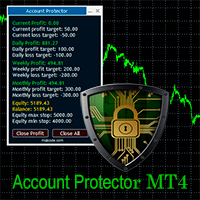
The Expert Advisor is designed to protect the account, fix profit (loss) and display current information about the account. Trading account protection is carried out by closing all open orders in the terminal and/or closing all charts. When running the Expert Advisor with default parameters, it will only display your account information and will be reduced in size. Next, you can set the conditions under which your trading account will be protected. Profit and loss limits can be set for daily pro
FREE
PZ CCI Trader EA
PZ TRADING SLU
4 (10)
This EA trades using the CCI Indicator. It offers many trading scenarios and flexible position management settings, plus many useful features like customizable trading sessions, a martingale and inverse martingale mode. [ Installation Guide | Update Guide | Troubleshooting | FAQ | All Products   |  Get Help ]  Easy to use and supervise It implements three different entry strategies Customizable break-even, SL, TP and trailing-stop Works for ECN/Non-ECN brokers Works for 2-3-4-5 digit symbols
FREE
Trailing Stop Manager with Break Even is a MetaTrader 4 utility that moves your stop loss automatically to protect profit as price advances. Unlike the platform's single-mode trailing stop, it offers four professional methods plus break-even handling, and it manages all matching positions on any symbol. Features Four trailing modes for different conditions: Fixed Pips, ATR-based, Step, and Break-even plus Trail (two-phase). Fixed Pips: classic trail that starts after a set profit and follows at
FREE
AI Advisor – AI가 당신의 실제 트레이딩 세계를 보게 만드는 도구 AI Advisor는 당신의 실제 계좌 정보를 바탕으로 고품질 프롬프트를 자동 생성해, 어떤 AI 채팅창이든 바로 붙여넣어 쓸 수 있게 해줍니다. 계좌 현황을 빠르게 정리하고, 현재 종목 구조를 이해하며, 위험 지점을 파악하고, 잠재적인 수익 기회를 탐색할 수 있도록 도와줍니다. 즉, AI가 아무 근거 없이 추측하는 것이 아니라,   당신의 실제 트레이딩 상황 을 기반으로 생각하도록 만드는 도구입니다. 빠른 링크 Download:      AI Advisor v1.02.ex4      AI Advisor   v1.02.ex5 Installation guide AI Advisor  Version Overview FAQ & troubleshooting 사용 방법 – 3단계면 충분합니다 분석하고 싶은 종목 차트에서 AI Advisor를 실행합니다. 오른쪽 목록에서 현재 질문에 맞는 “AI Advisor 모드”(
FREE
QueenBeta
Marius Ovidiu Sunzuiana
QueenBeta — Free Trial Edition QueenBeta is a powerful swing‑trading algorithm built for precision and adaptability. Designed with advanced neural logic, it identifies high‑probability setups and reacts dynamically to market volatility — making it ideal for traders seeking consistent performance across major pairs and gold. Execution chart period timeframe must be H4. For a limited period , QueenBeta is available completely free for testing. This is your chance to experience its power, analyze i
FREE
Trend Analizer Bot
Pavel Predein
4.67 (3)
Automatic trading Advisor .This is a free version of the expert Advisor "Trend Analyzer Pro" https://www.mql5.com/ru/market/product/42792.В the robot is based on 2 strategies: at the intersection of moving averages and Bollinger bands indicator .In the paid version, three strategies are available, which increases profitability several times .Designed for the EURUSD H1 currency pair.It is possible to use it on other tools after optimization.Test only on tick data. ** Does not use such dangerous
FREE
Morning Luck
Pavel Predein
4.8 (5)
Automatic trading system based on the morning Flat indicator, puts pending orders on the borders of the night channel .All trades have a fixed stop loss and take profit .The traded pair GBPUSD H1, can be used on other instruments after optimization. The EA contains a switchable flat indicator . The robot's operating time in the input parameters corresponds to (+2GMT). when switching to daylight saving time,you need to adjust the time manually. * Use default settings  * Does not use dangerous
FREE
ZGold
Mr Jack Joseph Wilson
3.57 (7)
zGold  is an Expert Advisor built, designed and configured to be used with Gold/XAUUSD . The system uses custom Trend algorithms to find key entry points into the market and executes them once the right criteria is met and it uses a mixture of Indicators and Price Action. The Expert Advisor also has a custom filtering algorithm to disregard false signals and work around possible market reversals. To combat spread related issues the closing strategy is based around account profits, totals and cur
FREE
Smart Squid EA
Abdallah Moustafa Hamdy Ahm Abdelrazek
저희는 MQL마켓에서만 판매하는 제품입니다, 싼 가격에 재판매하는 곳을 본 적이 있다면   가짜 버전임에 틀림없습니다.       성능이 실제가 아님을 100% 확신합니다.       . 또한 당사에서 지원하지 않습니다.   나는 우리 게임에 참여하게 되어 감사하고 위조된 버전   에 대해 한 푼도 위험을 무릅쓰지 않습니다. 성능 향상   이 가능합니다. 지표 및 일일 분석의 무료 버전을 얻는 방법에 대해 구입 후 저에게 연락하십시오. 모든 쌍으로 4.0을 업그레이드하여 사용하는 것도 좋습니다. 당신이 당신의 능력을 향상시키고 싶다면       수동 거래 기술       , YOLO는 수동 거래를 훈련하는 데 좋은 도구입니다. 결정이 너무 끔찍하지 않은 경우 YOLO가 TP를 돕고 다음 결정을 시작할 수 있습니다. 표시기의 무료 버전 구매 후 저에게 PM 조작법 : 여기 신호 모니터:       여기     표시기와 가장 잘 일치하는 항목:   여기 YOLO의 개념: 귀하의 결정
FREE
Proftrader Free
Alexander Nikolaev
4 (3)
This Expert Advisor analyzes the last candles and determines whether there will be a reversal or a large correction. Also, the readings of some indicators are analyzed (their parameters can be adjusted). Is a free version of Proftrader . Unlike the full version, in the free version of the adviser the initial lot cannot be higher than 0.1, trading pair only EURUSD and also it has fewer configurable parameters. Input parameters Lots - lot size (at 0, the lot will be calculated from the percentage
FREE
Vik Standart
Ivan Kopchuk
4.43 (7)
Features: 1. Your constructor strategies. 2. Large selection of standard indicators. 3. Exact market entry according to your strategy. 4. Slip filter. 5. Support for four and five characters. 6. Trend trading. 7. Trading in flat. 8. Minimum deposit. 9. Aggressive or quiet trade. 10. Limit the lot. 11. Position tracking. 12. Restoring balance after loss. Input parameters    Lot - fixed lot size.    StopLot - lot restriction.    UseVxod - enable / disable login pattern.    UseStop -
FREE
DowJonesBlinder
Fawwaz Abdulmantaser Salim Albaker
Dear Friends .. As I promised you , this is a demo version of my Expert Advisor that works only on Daw Jones (US30) It works on simple strategy , Scalper and trend EA . It use the manual lot size that you put in parameters and use the trailing stop to minimize the lost value  as much as it dose ,, So u need to put the lot size ( usually it 0.1 minimum in most companies ) and put your Trailing stop value  (if you want to cancel the trailing just put 0 in the parameter )  (for DJ try to multiply
FREE
Ultra Scalper Pro
Vadim Korolyuk
4.4 (10)
Scalping Expert Advisor trades from daily support and resistance levels. Trading expert does not use indicators. Recommended use a broker with 5 signs and a low spread. To protect the account from trading during spread expansion, added parameter: "MaxSpread", in which you specify the maximum allowable spread (15-20 pips). A month opens 16-18 deals on average. Benefits: Expert always uses Takeprofit, Stoploss and Traillingstop; Expert does not use a grid or martingale system; Expert can work with
FREE
Free Spike Finder MT4
Pier Gaetano Novara
3 (2)
Same behavior of https://www.mql5.com/en/market/product/25552 but fixed lot 0.01 The EA waits for a spike according to a specific logic and opens a position in spike direction setting stop loss and take profit. When positions are in profit they are managed with smart trailing mechanism based also on elapsed time from opened position. It works with 5-digit and 4-digit broker. Must be used on the M1 chart. Does not need historical data. It does not use Martingale Grid Hedge Parameters spikeFilte
FREE
FXO BROKER SPREAD INFORMATION Floating spreads are harmful for your trading strategy, even with Raw spread account. it makes a lot difference. Floating spread goes too high when it's news time or daily or weekend rollovers. this can affect trades's Expert Advisors, Pending orders and Stop losses. Therefore this tool is created to find right information about spread while rollovers. How to use :  download/paste the program file to Expert Advisor folder,  Open a chart of any instrument, Lo
FREE
New version based on the product: Trade History MT4 To Excel  Hello Traders! I have received many comments on my product " Trade History MT4 To Excel " which I have decided to create a new more complete version based on your suggestions. The result is fantastic, you will not find anything like it anywhere, I know because I have checked :-) WARNING:  To give you an unique product I had to modify the standard mql4 files. Before to run the interface you need to load this file in the directory. You
Lucifer HFT Gold
Hossein Davarynejad
4.06 (16)
//// LUCIFFER HFT GOLD  /// Ultra-Fast Scalping EA for XAUUSD (M1)                    Link of Best Broker for HFT GOLD        https://vtm.pro/QJjeIz LUCIFFER HFT GOLD is a high-frequency trading robot designed for scalping gold (XAUUSD) on the M1 timeframe. It is built for speed, precision, and consistency in both calm and volatile markets. This EA is developed for traders who require stable, real-world performance. LUCIFFER HFT GOLD performs best when used on a low-latency VPS connected
FREE
이 제품의 구매자들이 또한 구매함
Trade Manager EA에 오신 것을 환영합니다. 이 도구는 거래를 보다 직관적이고 정확하며 효율적으로 만들기 위해 설계된 궁극적인 리스크 관리 도구 입니다. 단순한 주문 실행 도구가 아닌, 원활한 거래 계획, 포지션 관리 및 리스크 제어를 위한 종합 솔루션입니다. 초보자부터 고급 트레이더, 빠른 실행이 필요한 스캘퍼에 이르기까지 Trade Manager EA는 외환, 지수, 상품, 암호화폐 등 다양한 시장에서 유연성을 제공합니다. Trade Manager EA를 사용하면 복잡한 계산은 이제 과거의 일이 됩니다. 시장을 분석하고 진입, 손절 및 익절 수준을 차트의 수평선으로 표시한 후 리스크를 설정하면, Trade Manager가 이상적인 포지션 크기를 즉시 계산하고 SL 및 TP 값을 실시간으로 표시합니다. 모든 거래가 간편하게 관리됩니다. 주요 기능: 포지션 크기 계산기 : 정의된 리스크에 따라 거래 크기를 즉시 결정합니다. 간단한 거래 계획 : 진입, 손절, 익절을 위한
Exp COPYLOT CLIENT for MT4
Vladislav Andruschenko
4.69 (65)
MetaTrader 4용 전문 트레이드 복사기 MetaTrader 4 용 빠르고 안정적이며 전문적인 트레이드 복사기입니다. COPYLOT 은 MetaTrader 4 와 MetaTrader 5 터미널 간에 Forex 거래를 복사할 수 있으며, 다양한 계좌 유형과 운용 방식에 맞춰 유연한 동기화 환경을 제공합니다. COPYLOT MT4 버전 지원 방식: MetaTrader 4 → MetaTrader 4 MetaTrader 5 Hedge → MetaTrader 4 MetaTrader 5 Netting → MetaTrader 4   MT5 버전 상세 설명 + DEMO + PDF 구매 방법 설치 방법 로그 파일 확인 방법 테스트 및 최적화 방법 Expforex의 모든 제품 MetaTrader 5 버전 을 사용하면 MetaTrader 5 → MetaTrader 5 및 MetaTrader 4 → MetaTrader 5 복사도 지원됩니다: COPYLOT CLIENT for MT5 COPYLOT 은
Local Trade Copier EA MT4
Juvenille Emperor Limited
4.96 (111)
Local Trade Copier EA MT4는 동일한 Windows 컴퓨터 또는 Windows VPS에서 여러 MetaTrader 4 계정 간에 거래를 복사하고 관리할 수 있는 빠르고 유연한 거래 복사기입니다. 로컬 거래 동기화 기능과 함께 Receiver 측에서 로트 크기, 리스크 관리, 거래 필터링, 심볼 매핑, 거래 관리 및 계정 보호를 독립적으로 설정할 수 있습니다. Transmitter와 Receiver 터미널을 약 1분 안에 설정하고, 동일한 브로커 또는 서로 다른 브로커의 계정 간에 수동 거래 또는 EA 거래를 복사할 수 있습니다. 적절한 조건에서는 로컬 MetaTrader 터미널 간의 거래 정보가 0.5초 이내 에 동기화될 수 있습니다. 실제 체결 속도는 브로커 지연 시간, 네트워크 상태, 컴퓨터/VPS 성능 및 터미널 부하에 따라 달라집니다. 구매 전에 무료 데모를 사용해 보세요 MT4 데모 계정에서 Local Trade Copier EA MT4의 모든 기능을
Grid Manual MT4
Alfiya Fazylova
4.71 (17)
"Grid Manual"은 주문 그리드 작업을 위한 거래 패널입니다. 이 유틸리티는 보편적이며 유연한 설정과 직관적인 인터페이스를 제공합니다. 그것은 손실을 평균화하는 방향뿐만 아니라 이익을 증가시키는 방향으로 주문 그리드와 함께 작동합니다. 거래자는 주문 그리드를 만들고 유지할 필요가 없으며 유틸리티에서 수행합니다. 거래자가 주문을 시작하는 것으로 충분하며 "Grid Manual"는 자동으로 그를 위한 주문 그리드를 생성하고 거래가 마감될 때까지 그와 동행할 것입니다. 전체 설명 및 데모 버전 여기 . 유틸리티의 주요 기능: 모바일 터미널을 포함하여 어떤 방식으로든 열린 주문과 함께 작동합니다. "제한" 및 "중지"의 두 가지 유형의 그리드와 함께 작동합니다. 고정 및 동적(ATR 표시기 기반)의 두 가지 유형의 그리드 간격 계산과 함께 작동합니다. 오픈 오더 그리드의 설정을 변경할 수 있습니다. 차트에서 각 주문 그리드의 손익분기점 수준을 표시합니다. 각 주문 그리드에 대한 이익
Trade Indicator Assistant is a powerful MT4 utility designed to turn indicators into automated trading systems. Its main feature is the ability to automatically detect an indicator’s   BUY and SELL signal buffers , without requiring you to know the buffer numbers, search through indicator settings, or modify the indicator source code. Bonus Indicator: After purchasing Trade Indicator Assistant, contact me to receive Trade Signal Pro completely free as a bonus indicator. [Download Demo Version]
TradePanel MT4
Alfiya Fazylova
4.84 (95)
Trade Panel은 다기능 거래 도우미입니다. 이 애플리케이션에는 50개 이상의 수동 거래 기능이 포함되어 있으며 대부분의 거래 작업을 자동화할 수 있습니다. 앱 사용 설명서 : https://www.mql5.com/en/blogs/post/756482 데모 계정용 앱 체험판: https://www.mql5.com/en/blogs/post/750865 앱 설치 방법: https://www.mql5.com/en/blogs/post/756239 시각 모드에서 앱 테스트 방법: https://www.mql5.com/en/blogs/post/770277 VPS MetaTrader에 앱 설치 방법: https://www.mql5.com/en/blogs/post/770190 거래. 한 번의 클릭으로 거래를 수행할 수 있습니다: 리스크 자동 계산과 함께 예약 주문 및 포지션 열기. 한 번의 클릭으로 여러 주문 및 포지션 열기. 주문 그리드 열기. 예약 주문 및 포지션을 그룹별로 닫기. 포지션
Trade Assistant MT4
Evgeniy Kravchenko
4.43 (197)
거래당 위험 계산, 라인을 사용한 손쉬운 신규 주문, 부분 청산 기능을 통한 주문 관리, 7가지 유형의 트레일링 스탑 및 기타 유용한 기능을 제공합니다. 추가 자료 및 지침 설치 지침 - 애플리케이션 지침   라인 기능       - 차트에 개시선, 손절매, 차익실현을 표시합니다. 이 기능을 사용하면 새로운 주문을 쉽게 하고 개봉 전에 추가 특성을 볼 수 있습니다. 위기 관리       -       위험 계산 기능은 설정된 위험과 손절매 주문의 크기를 고려하여 새 주문의 볼륨을 계산합니다. 이를 통해 손절매 크기를 설정하고 동시에 설정된 위험을 존중할 수 있습니다. 로트 계산 버튼 - 위험 계산을 활성화/비활성화합니다. 필요한 위험 값은 위험 필드에 0에서 100 사이의 백분율 또는 예금 통화로 설정됩니다. 설정 탭에서 위험 계산 옵션을 선택합니다. $ 통화, % 잔액, % 지분, % 자유 마진, % 사용자 정의, % AB 이전 일, % AB 이전 주, % AB 이전 월.
지원이 필요하신가요? 설정 방법이 궁금하신가요? 질문이 있으신가요? 여기에 고객님의 언어로 문의하세요, 빠른 답변: https://www.mql5.com/en/market/product/139089/comments 작동 체험판 다운로드 Copy Cat More (카피캣) MT4 트레이드 카피어 (Trade Copier) 는 단순한 로컬 트레이드 카피어가 아닙니다. 오늘날의 트레이딩 과제를 위해 설계된 완전한 리스크 관리 및 실행 프레임워크 (risk management and execution framework) 입니다. 프롭 펌 (prop firm) 챌린지부터 개인 포트폴리오 관리까지, 견고한 실행, 자본 보호, 유연한 설정, 고급 트레이드 처리의 조합으로 모든 상황에 적응합니다. 이 카피어는   마스터 (Master, 송신측) 와 슬레이브 (Slave, 수신측)   두 모드 모두에서 작동하며, 시장가 주문과 대기 주문, 트레이드 수정, 부분 청산, 상호 청산 (Close B
Trade copier MT4
Alfiya Fazylova
4.62 (37)
Trade Copier는 거래 계정 간의 거래를 복사하고 동기화하도록 설계된 전문 유틸리티입니다. 복사는 공급자의 계정/단말기에서 동일한 컴퓨터 또는 vps에 설치된 수신자의 계정/단말기로 발생합니다. 구매하기 전에 데모 계정에서 데모 버전을 테스트할 수 있습니다. 데모 버전 여기 . 전체 지침 여기 . 주요 기능 및 이점: 복사기는 "МТ4> МТ4", "МТ4> МТ5", "МТ5> МТ4" 복사를 지원합니다. 복사기는 데모 계정 > 실 계정, 실 계정 > 데모 계정, 데모 계정 > 데모 계정 및 실제 계정 > 실 계정 복사를 지원합니다. 복사기는 읽기 전용 암호가 적용된 투자자 계정에서 복사를 지원합니다. 하나의 공급자 터미널은 여러 수신 터미널로 트랜잭션을 보낼 수 있고 하나의 수신 터미널은 여러 공급자 터미널에서 트랜잭션을 수신할 수 있습니다. 복사기는 귀하 또는 귀하의 고문이 거래하는 동일한 터미널에서 작동할 수 있습니다. 높은 복사 속도(0.5초 미만). 복사기에는 간편
Telegram to MT4 Coppy
Sergey Batudayev
4.09 (11)
Telegram에서 MT4로:   최고의 신호 복사 솔루션 최첨단 유틸리티인   Telegram to MT4를   사용하여 거래를 간소화하세요. DLL 없이도 Telegram 채널과 채팅에서 MetaTrader 4 플랫폼으로 거래 신호를 직접 복사할 수 있습니다. 이 강력한 솔루션은 탁월한 정밀도와 맞춤 설정 옵션을 통해 원활한 신호 실행을 보장하여 시간을 절약하고 효율성을 높여줍니다. [ Instructions and DEMO ] 주요 특징 직접 Telegram API 통합 전화번호와 보안 코드를 통해 인증하세요. 사용자 친화적인 EXE 브리지를 사용하여 채팅 ID를 손쉽게 가져오고 관리하세요. 여러 채널/채팅을 추가, 삭제, 새로 고침하여 동시에 신호를 복사합니다. 고급 필터를 사용한 신호 파싱 사용자 정의 예외 단어(예: "보고서", "요약")가 포함된 원치 않는 신호를 건너뜁니다. 유연한 SL 및 TP 형식을 지원합니다: 가격, 핍 또는 포인트. 신호가 가격 대신 지점을 지정


News Filter EA: Advanced Algo Trading Assistant News Filter EA is an advanced algo trading assistant designed to enhance your trading experience. By using the   News Filter EA , you can integrate a Forex economic news filter into your existing expert advisor, even if you do not have access to its source code. In addition to the news filter, you can also specify   trading days   and   hours   for your expert. The News Filter EA also includes   risk management   and   equity protection   features
DoIt Trade Manager - Risk Panel and EA Position Manager for MT4 Finding an entry is only half the job. Many execution mistakes happen in position sizing, partial exits, breakeven, trailing and account protection. DoIt Trade Manager puts the complete workflow on the chart. Plan the risk before entry, execute the order and apply consistent management rules to your manual trades and selected positions opened by other EAs. Full setup guide + how the free version works and where PRO starts :  https:/
The product will copy all telegram signal to MT4   ( which you are member  ) , also it can work as remote copier.  Easy to set up, copy order instant, can work with almost signal formats, image signal, s upport to translate other language to English Work with all type of channel or group, even channel have "Restrict Saving Content", work with  multi channel, multi MT5 Work as remote copier: with signal have ticket number, it will copy exactly via ticket number. Support to backtest signal. How to
PZ Trade Pad Pro MT4
PZ TRADING SLU
3.67 (3)
Effortlessly calculate lot sizes and manage trades to save time and avoid costly errors The Trade Pad Pro EA is a tool for the Metatrader Platform that aims to help traders manage their trades more efficiently and effectively. It has a user-friendly visual interface that allows users to easily place and manage an unlimited number of trades, helping to avoid human errors and enhance their trading activity. [ Installation Guide | Update Guide | Troubleshooting | FAQ | All Products ] One of the k
The program is use to copy trading from MT4   to MT4 and MT5  on same Windows   PC or VPS .   Now you can easy copy trades to any MT4 account or MT5 account. Instants copy, speed smaller 0.1 seconds, easy to setup. Need run EA as Signal provider on one MT4 account, other MT4 / MT5 will run EA as Trade copier. You can download and try demo version on demo account Copi Trade MT4 demo   version   here   Copi Trade MT5 demo   version  here  
This is the simplest Lot Multiplier to manage trades open by signal, expert or manually.   How The Program Works: When a new trade is open in the terminal from any source (advisor, manually, signal), the program opens an additional trade (duplicates / copies the source with the specified parameters) in the same terminal and controls it as per source, when the source trade parameters (SL, TP) change, the program will automatically change the parameters of additional trade as well, when closing th
Az OrderGun
Jose Antonio Valle Magana
AZ_OrderGun MT4 - Professional 1-Click Trading Panel AZ_OrderGun is the all-in-one panel to execute and manage your trades without wasting time setting up SL/TP. KEY FEATURES: 1. 4 INSTANT ENTRIES: Buy SLL - Buy with SL on Low of previous candle Sell SLH - Sell with SL on High of previous candle Buy SLO / Sell SLO - SL on Open of previous candle > Fully configurable % Risk 2. ADVANCED VISUAL MANAGEMENT: Draggable lines for Pending and Market orders Auto calculation of Lot Size, $ Ri
Trade Manager Pro MT4
Bryan Djoufack Nguessong
This is an Utility to make your trading easier by putting at   one click or a few clicks   time-consuming tasks as order management and risk management. Contact for a free trial. Features Risk Management   Calculates automatically lots based on risk specified in either   % or $  in the risk field and let you enter just   by placing lines for SL TP   etc and display   real-time Risk Reward . TrueRisk   so   it includes commissions when calculating lot size on FX pairs only so you risk 1% with
Trading History MT4
Siarhei Vashchylka
5 (9)
Trading History - A program for trading and money management on the history of quotes in stratagy tester. It can work with pending and immediate orders, and is equipped with trailing stop, breakeven and take profit functions. Very good for training and testing different strategies. Manual (Be sure to read before purchasing) Advantages 1. Allows you to test any trading strategy in the shortest possible time 2. An excellent simulator for trading training. You can gain months of trading experience
CloseIfProfitorLoss with Trailing
Vladislav Andruschenko
4.88 (32)
이익 추적 기능으로 총 이익/손실에 도달하면 MetaTrader 4에서 포지션을 청산합니다. 가상 정지 (별도 주문) 을 활성화할 수 있습니다. BUY 및 SELL 포지션을 별도로 계산하고 마감합니다 (BUY SELL 별도). 모든 심볼 또는 현재 심볼 만 닫고 계산합니다 (모든 심볼). 이익을 위해 후행 추적 을 활성화합니다 (후행 이익). 예금 통화, 포인트, 잔액의 %에 대한 총 손익을 마감합니다. 이 애플리케이션은 다른 EA와 함께 또는 수동 거래와 함께 모든 계정에서 사용하도록 설계되었습니다. MT5 버전 전체 설명 + DEMO + PDF 구입 방법 설치하는 방법 로그 파일을 얻는 방법 테스트 및 최적화 방법 Expforex의 모든 제품 일부 쌍 또는 모든 쌍의 총 거래 잔액이 설정에서 지정된 값보다 크거나 같으면 모든 포지션이 닫히고 주문이 삭제됩니다. 이 버전은 지정된 이익 수준에서 포지션을 마감할 수 있을 뿐만 아니라 더 나은 결과를 위해 이익을 추적할 수도 있습니다
Shepherd Safety EA
AW Trading Software Limited
4.92 (13)
AW Shepherd Safety EA는 열린 포지션을 관리하는 EA입니다. 첫 주문은 트레이더가 패널에서 열고, 이후에는 EA가 바스켓을 직접 관리합니다: 추세 필터를 거쳐 복구 주문을 추가하고, TakeProfit, 트레일링 또는 손절로 해당 측을 청산하며, 청산 수준을 차트에 표시합니다. 매수와 매도는 따로 관리되며 양 측을 동시에 열어 둘 수 있습니다. 복구 주문은 가격 간격만으로 열리지 않고, Parabolic SAR, 두 개의 MA 또는 캔들 색상 기준으로 포지션 방향으로의 반전이 확인된 뒤에 열립니다. Orders Magic number가 일치하면 수동으로 또는 다른 EA가 연 포지션도 EA가 넘겨받아 관리합니다. EA가 포지션을 관리하는 방식: 1 트레이더가 Open Buy 또는 Open Sell 버튼으로 Order Size 필드의 거래량만큼 첫 주문을 엽니다. 2 가격이 포지션에 불리한 방향으로 Minimal step between recovery orders만큼 움
Trade Assistant Pro 36 in 1
Makarii Gubaydullin
4.76 (21)
다기능 거래 도구: 로트 계산기, 그리드 주문, 위험/보상 비율, 거래 관리자, 수급 구역, 가격 행동 분석 등 데모 버전   |   사용자 설명서 트레이딩 어시스턴트 는 전략 테스터에서 작동하지 않습니다: 이 유틸리티 를 테스트하려면 데모 버전을 여기서 다운로드하세요. 질문 /개선 아이디어/버그 발견 시 저에게 연락 하세요 MT5 버전이 필요하시면, 여기서 사용 가능합니다 거래 프로세스 를 단순화, 가속화, 자동화하세요. 이 대시보드 로 표준 터미널 기능을 확장합니다. 트레이딩 패널 은 모든 거래 상품에서 작동합니다: 외환, 주식, 지수, 암호화폐 등. 1. 새로운 거래 열기 : 로트/위험/위험보상비 계산: 수동 거래의 위험 관리 로트 계산기 (위험 크기 기반 거래량 계산) 위험 계산기 (로트 크기 기반 위험 금액) 위험 보상 비율 그리드 주문: + 동적 거리 옵션 및 분할 로트 옵션 주문 활성화 트리거, + Buy StopLimit/Sell StopLimit: Mt4에서도 가능
RS Trade Copier - 진짜 그래픽 인터페이스를 갖춘 초고속 로컬 트레이드 카피어입니다. 계좌번호를 일일이 입력하지 마세요. 200개가 넘는 복잡한 입력 파라미터 목록은 이제 끝입니다. 여러 MT4와 MT5 터미널 간 거래 작업을 복사하기 위한 안정적이고 유연한 도구입니다. 이 도구는 경험 많은 트레이더, 신호 서비스, 개인 투자자 모두에게 적합합니다. 하나 또는 여러 시그널 소스(Provider)에서 하나 또는 여러 리시버(Client)로 트레이딩을 동기화 하여 높은 정밀도와 최소 지연 시간을 제공합니다. 간단한 자동 설정부터 고급 수동 구성까지 지원합니다. 수동 또는 다른 EA로 열린 주문에 간섭하지 않습니다. 모든 작업이 MT4 내부에서 로컬로 처리 되며 외부 서버 의존성 없이 실행됩니다. RS Trade Copier와 다른 솔루션 비교 RS Trade Copier 다른 솔루션 설정 시각적 단계별 마법사. 설정에 약 1분 소요. 200개 이상의 불분명한 입력 매개변수.
Telegram to MT4 Multi-Channel Copier   는 Telegram 및 Discord 채널의 트레이딩 시그널을 MetaTrader 4로 자동 복사합니다. 봇도, 브라우저 확장도, 수동 복사도 필요 없습니다. Telegram이나 Discord에 시그널이 도착하면 EA가 몇 초 안에 터미널에서 주문을 실행합니다. 그리고 채널을 복사하기 전에, 내장 백테스터가 그 채널이 내 계좌에서 어떤 결과를 냈을지 보여줍니다. 제품은 두 가지 구성 요소로 이루어집니다: Telegram 채널을 수신하는 Windows 애플리케이션과, MT4 터미널에서 시그널을 실행하는 본 EA입니다. MT5 버전도 제공됩니다   여기 . 구매 전에 사용해 보세요:   애플리케이션은 무료로 다운로드할 수 있습니다. 본인의 채널을 연결하고 각 시그널이 어떻게 읽히는지 확인하세요. Backtest 탭과 실제 거래에는 구매하거나 임대한 EA가 필요합니다. 이 페이지의 무료 데모는 전략 테스터에서만 실행되며
Rhino Chart Drawing Tools 는 MetaTrader 4에서 TradingView 스타일 의 차트 드로잉 환경을 제공합니다. 54개의 드로잉 도구 , 사용자 지정 가능한 툴바, 즐겨찾기, 빠른 스타일 설정, 객체 설정, 템플릿 및 객체 관리자를 제공합니다. 사용자 매뉴얼: 제품 사용 방법 무료 데모 버전: 데모 다운로드 MetaTrader 5 버전: Rhino Drawing Tools for MT5 드로잉 도구 그룹 객체 목록 라인 추세선, 레이, 연장선, 수평선, 수직선, 수평 레이, 교차선, 추세 각도, 화살표, 경로, 폴리라인 및 정보선. 채널 평행 채널, 회귀 채널, 플랫 채널, 분리 채널 및 피치포크. 피보나치 되돌림, 확장, 채널, 속도 팬 및 시간대. 간 간 박스 및 간 팬. 도형 사각형, 회전 사각형, 타원, 원, 삼각형 및 폴리라인. 주석 텍스트, 메모, 콜아웃, 가격 라벨, 표지판, 플래그 및 화살표 마크. 패턴 XABCD, ABCD, Cyphe
MT4 to Telegram Signal Provider 는 사용하기 쉽고 완전히 사용자 정의가 가능한 도구로, 텔레그램으로 신호를 보내어 계정을 신호 제공자로 변환할 수 있습니다. 메시지 형식은 완전히 사용자 정의가 가능합니다! 그러나 간단한 사용을 위해 미리 정의된 템플릿을 선택하고 메시지의 특정 부분을 활성화하거나 비활성화할 수도 있습니다. [ 데모 ]  [ 매뉴얼 ] [ MT5 버전 ] [ 디스코드 버전 ] [ 텔레그램 채널 ]  New: [ Telegram To MT5 ] 설정 단계별 사용자 가이드 가 제공됩니다. 텔레그램 API에 대한 지식이 필요 없으며, 개발자가 필요한 모든 것을 제공합니다. 주요 기능 구독자에게 보낸 주문 세부 정보를 사용자 정의할 수 있는 기능 예를 들어 브론즈, 실버, 골드와 같은 계층 구독 모델을 만들 수 있습니다. 골드 구독은 모든 신호 등을 받게 됩니다. ID, 심볼 또는 코멘트별 주문 필터링 주문이 실행된 차트의 스크린샷을 포함 보낸
Multi Account Local Trade Copier 는 MetaTrader용 빠른 로컬 트레이드 카피어입니다: 동일한 Windows PC 또는 VPS의 MT4/MT5 터미널 간에, 하나의 마스터 계좌에서 여러 리시버 계좌로 거래를 복사하세요 — 본인의 실계좌, 데모 계좌, 프랍펌 계좌로. 같은 브로커든 다른 브로커든 상관없습니다. 이벤트 기반 으로 작동합니다: 마스터는 각 거래를 발생하는 순간 즉시 게시하고, 리시버는 모든 복사의 실제 지연 시간을 측정하고 기록 합니다 — 일반적으로 50-150ms 입니다. DLL 없음, 인터넷 브리지 없음, 설정 파일 없음. 단계별 설정 가이드: Multi Account Local Trade Copier — 설정 가이드 하나의 EA, 두 가지 모드 원본 터미널에는 MASTER 로, 각 대상 터미널에는 RECEIVER 로 부착하세요. Master ID = AUTO 이면 리시버가 활성 마스터를 스스로 찾습니다: 드래그, 드롭, 끝. 하나의 마스
Equity Protect Pro: 안심 거래를 위한 종합 계좌 보호 전문가 계좌 보호, 자산 보호, 포트폴리오 보호, 다중 전략 보호, 수익 보호, 수익 확보, 거래 보안, 위험 관리 프로그램, 자동 위험 관리, 자동 청산, 조건부 청산, 예약 청산, 동적 청산, 추적 손절매, 원클릭 종료, 원클릭 청산, 원클릭 복원 등의 기능을 찾고 있다면 Equity Protect Pro가 바로 필요한 프로그램입니다. 설정이 간편하고 사전 설정된 조건이 충족되면 모든 차트를 닫을 수 있으며 신호 구독 취소도 지원합니다(이는 모든 거래 프로그램도 중지됨을 의미합니다). 이 시점에서 새로운 주문이 생성되지 않으며 최종적으로 모든 주문이 종료되어 예상치 못한 손실을 효과적으로 방지하고 안심하고 거래할 수 있습니다. Equity Protect Pro (Technical Manual) Equity Protect Pro Demo Version for yo u to test   Equity Protect
The indicator has three main tools: Magnifier (Zoom chart), Ruler  ( Time and Price scales ),   and Crosshair. You can move it all around with your mouse and customize different formats for  displaying , customize   size and color of each element. The Magnifier (zoom chart) allows you to display candles from any time frame and at different scales. Hotkeys: 'Q' - higher timeframe, 'A' - lower timeframe, 'W' - decrease candle size, 'S' - increase candle size, 'Z' - show/hide zoom chart You can
Automatic Trailing Stop Based on Take Profit Percentage with Profit Lock EA MT4   Lock in your profits and "let your winners run" past your 100% take profit target with this EA.  This Expert Advisor automatically adjusts your Stop Loss based on up to 4 user-defined Take Profit Target Percentages, locking in your profit.  If price pushes past your 100% take profit target, the EA will automatically trail the price by user-defined pips, so you won't miss that runaway train again.   EA Features The
제작자의 제품 더 보기
Algorex Market Board는 그날 트레이딩의 분위기를 결정하는 주요 시장을 차트 위의 컴팩트한 보드 하나에 보여줍니다: 다우존스, 나스닥 100, S&P 500, 금, WTI 원유, 달러 인덱스, VIX. 각 시장별 표시 항목 - 현재 가격 - 오늘의 변동률 - 뉴욕 개장 이후 변동률 (뉴욕 시간 09:30) - 오늘의 변동폭이 평균 일일 변동폭(ADR)에서 차지하는 비율 - 추세 화살표 (H1 종가와 H1 EMA 20 비교) 리스크 표시등 보드는 주식, 미국 달러, VIX를 비교합니다. - RISK-ON: 주식 상승, 달러와 공포 지수 하락 - RISK-OFF: 주식 하락, 달러와 공포 지수 상승 - MIXED: 시장들의 방향이 엇갈림 모든 브로커에서 작동 심볼 이름은 브로커마다 다릅니다 (US30, DJ30, WS30, US30Cash 등). 보드가 자동으로 찾아냅니다. 심볼을 직접 입력할 수도 있습니다. 브로커에 달러 인덱스가 없으면 보드가 EURUSD, USD
FREE
Algorex FVG Marker는 Fair Value Gap(세 개의 캔들로 이루어진 불균형)을 차분하고 읽기 쉬운 영역으로 표시합니다. 상승 갭과 하락 갭을 서로 다른 색으로 표시 일부만 메워진 갭은 아직 열려 있는 부분으로 줄어들고 색이 옅어집니다 완전히 메워진 갭은 차트에서 제거됩니다 각 영역 안에 50% 라인 표시(선택 사항) ATR 기준 최소 갭 크기 설정으로 작은 노이즈 갭은 무시 색상은 어떤 차트 배경과도 어울리며 차트 테마를 바꾸면 자동으로 맞춰집니다 가격이 열린 영역에 닿을 때 알림(선택 사항) 모든 영역을 표시하거나 숨기는 작은 전환 버튼 입력 매개변수 언어 뒤로 검색할 봉의 수, 방향별 최대 열린 영역 수 ATR(14) 기준 최소 크기 50% 라인 표시, 터치 알림 상승·하락 색상, 불투명도 전환 버튼 표시 패널 크기 100 % ~ 150 %
FREE
Algorex FVG Marker
Daniel Schwoerer
Algorex FVG Marker는 Fair Value Gap(세 개의 캔들로 이루어진 불균형)을 차분하고 읽기 쉬운 영역으로 표시합니다. 상승 갭과 하락 갭을 서로 다른 색으로 표시 일부만 메워진 갭은 아직 열려 있는 부분으로 줄어들고 색이 옅어집니다 완전히 메워진 갭은 차트에서 제거됩니다 각 영역 안에 50% 라인 표시(선택 사항) ATR 기준 최소 갭 크기 설정으로 작은 노이즈 갭은 무시 색상은 어떤 차트 배경과도 어울리며 차트 테마를 바꾸면 자동으로 맞춰집니다 가격이 열린 영역에 닿을 때 알림(선택 사항) 모든 영역을 표시하거나 숨기는 작은 전환 버튼 입력 매개변수 언어 뒤로 검색할 봉의 수, 방향별 최대 열린 영역 수 ATR(14) 기준 최소 크기 50% 라인 표시, 터치 알림 상승·하락 색상, 불투명도 전환 버튼 표시 패널 크기 100 % ~ 150 %
FREE
Algorex Theme Switcher는 정성껏 조율한 여섯 가지 색상 테마와 직접 만든 테마를 위한 여섯 개의 슬롯을 차트 모서리의 컴팩트한 패널에 담았습니다. 클릭 한 번으로 이 차트 또는 열려 있는 모든 차트의 색상이 바뀝니다. 템플릿을 불러오는 것과 달리 색상만 바뀌므로 EA, 지표, 그리기 도구는 그대로 남습니다. 기본 테마 Zurich Snow: 슬레이트색 캔들의 밝은 테마 Amber Terminal: 검은 배경에 호박색 캔들 Midnight: 짙은 남색 배경에 파란 캔들 Forest: 짙은 녹색 배경에 모래색 캔들 Sepia: 눈이 편한 부드러운 종이 색조 High Contrast: 흰 배경에 선명한 초록과 빨강 나만의 테마 원하는 대로 차트 색상을 설정하고(F8, 색상 탭) 빈 슬롯에서 Save를 클릭 여섯 개의 슬롯, 각각 입력 항목에서 이름 지정 테마를 지우려면 작은 x를 두 번 클릭 저장한 테마는 재시작 후에도 유지되며 같은 컴퓨터의 모든 MetaTrader 4
FREE
Algorex Market Board는 그날 트레이딩의 분위기를 결정하는 주요 시장을 차트 위의 컴팩트한 보드 하나에 보여줍니다: 다우존스, 나스닥 100, S&P 500, 금, WTI 원유, 달러 인덱스, VIX. 각 시장별 표시 항목 - 현재 가격 - 오늘의 변동률 - 뉴욕 개장 이후 변동률 (뉴욕 시간 09:30) - 오늘의 변동폭이 평균 일일 변동폭(ADR)에서 차지하는 비율 - 추세 화살표 (H1 종가와 H1 EMA 20 비교) 리스크 표시등 보드는 주식, 미국 달러, VIX를 비교합니다. - RISK-ON: 주식 상승, 달러와 공포 지수 하락 - RISK-OFF: 주식 하락, 달러와 공포 지수 상승 - MIXED: 시장들의 방향이 엇갈림 모든 브로커에서 작동 심볼 이름은 브로커마다 다릅니다 (US30, DJ30, WS30, US30Cash 등). 보드가 자동으로 찾아냅니다. 심볼을 직접 입력할 수도 있습니다. 브로커에 달러 인덱스가 없으면 보드가 EURUSD, USD
FREE
Algorex Candle Timer는 매번 진입하기 전에 확인하는 정보를 차트 위의 컴팩트한 패널 하나에 모두 보여줍니다. 현재 캔들 마감까지의 카운트다운을 금색으로 표시하며, 마감 직전에는 빨간색으로 바뀝니다 (M1: 마지막 10초, M5: 마지막 30초, M15 이상: 마지막 1분) 진행 중인 캔들 옆에도 카운트다운 표시 스프레드를 포인트와 핍으로 표시 오늘의 변동폭과 평균 일일 변동폭(ADR)을 얼마나 사용했는지 차트 타임프레임의 ATR 뉴욕 시간, 현지 시간, 서버 시간 (서머타임 자동 처리) 현재 세션: 아시아, 런던, 런던 / 뉴욕 프리마켓, 뉴욕 오전 및 오후, 주말 캔들 마감 몇 초 전 선택적 알림 입력 항목 언어 패널 위치 진행 중인 캔들 옆 카운트다운 ADR 일수, ATR 기간 캔들 마감 전 알림 초 (0 = 끔) 현지 시계 이름과 기준 (중앙유럽 시간 또는 컴퓨터 시계) 패널 크기 100 %에서 150 %
FREE
Algorex Theme Switcher는 정성껏 조율한 여섯 가지 색상 테마와 직접 만든 테마를 위한 여섯 개의 슬롯을 차트 모서리의 컴팩트한 패널에 담았습니다. 클릭 한 번으로 이 차트 또는 열려 있는 모든 차트의 색상이 바뀝니다. 템플릿을 불러오는 것과 달리 색상만 바뀌므로 EA, 지표, 그리기 도구는 그대로 남습니다. 기본 테마 Zurich Snow: 슬레이트색 캔들의 밝은 테마 Amber Terminal: 검은 배경에 호박색 캔들 Midnight: 짙은 남색 배경에 파란 캔들 Forest: 짙은 녹색 배경에 모래색 캔들 Sepia: 눈이 편한 부드러운 종이 색조 High Contrast: 흰 배경에 선명한 초록과 빨강 나만의 테마 원하는 대로 차트 색상을 설정하고(F8, 색상 탭) 빈 슬롯에서 Save를 클릭 여섯 개의 슬롯, 각각 입력 항목에서 이름 지정 테마를 지우려면 작은 x를 두 번 클릭 저장한 테마는 재시작 후에도 유지되며 같은 컴퓨터의 모든 MetaTrader 4
FREE
Algorex Candle Timer는 매번 진입하기 전에 확인하는 정보를 차트 위의 컴팩트한 패널 하나에 모두 보여줍니다. 현재 캔들 마감까지의 카운트다운을 금색으로 표시하며, 마감 직전에는 빨간색으로 바뀝니다 (M1: 마지막 10초, M5: 마지막 30초, M15 이상: 마지막 1분) 진행 중인 캔들 옆에도 카운트다운 표시 스프레드를 포인트와 핍으로 표시 오늘의 변동폭과 평균 일일 변동폭(ADR)을 얼마나 사용했는지 차트 타임프레임의 ATR 뉴욕 시간, 현지 시간, 서버 시간 (서머타임 자동 처리) 현재 세션: 아시아, 런던, 런던 / 뉴욕 프리마켓, 뉴욕 오전 및 오후, 주말 캔들 마감 몇 초 전 선택적 알림 입력 항목 언어 패널 위치 진행 중인 캔들 옆 카운트다운 ADR 일수, ATR 기간 캔들 마감 전 알림 초 (0 = 끔) 현지 시계 이름과 기준 (중앙유럽 시간 또는 컴퓨터 시계) 패널 크기 100 %에서 150 %
FREE
Algorex Trade Pilot은 제 자신을 위해 만들었습니다. 충동적인 매매와 복수 매매로 여러 번 크게 데였습니다. 계획 없는 성급한 진입, 손실, 그리고 만회하려고 들어가는 다음 매매. 처음보다 더 크고, 결과는 더 나쁩니다. Trade Pilot은 충동과 클릭 사이에 짧고 정직한 점검을 넣고, 제가 매매할 상태가 아닐 때는 주문 버튼을 빼앗습니다. 스스로 거래를 여는 일은 절대 없습니다. 모든 주문에는 사용자의 클릭이 필요합니다. 리스크, 랏과 라인 거래당 리스크를 잔고 대비 퍼센트로 입력 차트의 빨간 스톱 라인을 드래그: 가격 아래면 BUY, 위면 SELL 랏 크기와 리스크 금액을 실시간으로 계산 리스크의 배수(R)로 설정하는 선택적 초록 목표 라인 호박색 진입 라인을 가격에서 떼어 놓으면 시장가 대신 지정가 또는 스톱 주문이 됩니다. 가격으로 되돌리면 시장가로 돌아갑니다 Pre-Flight 체크리스트 내 매매 규칙에 맞는 셋업 논리적인 위치에 스톱 설정 랏과 리스크 확
FREE
필터:
리뷰 없음
리뷰 답변