RangeState Sovereign ORB
- 지표
- 버전: 2.1

RangeState Sovereign ORB
RangeState Sovereign ORB brings the Opening Range Breakout setup from the RangeState Sovereign strategy onto your MetaTrader 4 chart.
It builds the opening range from a configurable broker-time window, marks the range high and low, and highlights potential bullish or bearish breakouts when the selected conditions are met.
You can choose between candle-close confirmation and calculated pending-order levels. An optional higher-timeframe EMA filter can also be used to keep setups aligned with the broader market direction.
The indicator is designed for chart analysis and alerts. It does not place or manage trades.
Primary market and timeframe
The supplied reference configuration is designed around:
- Market: XAUUSD / Gold
- Chart timeframe: M15
- Opening range: 08:00–09:00 broker server time
- Trend filter: H1 EMA 50
- Entry mode: Close Confirm
M15 provides four completed candles during the default one-hour opening range, giving the indicator enough detail to calculate the range while keeping the chart clear.
The indicator can be used on other intraday timeframes and symbols, but the supplied pip-based values are calibrated for XAUUSD. Forex pairs, indices, cryptocurrencies and broker-specific symbol variants may use different price precision and volatility.
Settings for other markets should therefore be treated as custom research configurations and tested independently before use.
Default starting configuration
When attached to an XAUUSD M15 chart, the indicator starts with:
- Range window: 08:00–09:00
- Entry mode: Close Confirm
- Buy setups: Enabled
- Sell setups: Enabled
- Breakout buffer: 500 pips
- Minimum valid range: 1,000 pips
- Maximum valid range: 500,000 pips
- Maximum breakout distance: 2,500 pips
- One breakout per session: Enabled
- Trend filter: Enabled
- Trend timeframe: H1
- Trend EMA period: 50
- Pending-level expiry: 3 bars
- Historical lookback: 20 sessions
- Status panel: Enabled
- Popup, push and sound alerts: Disabled by default
Pip values depend on the symbol precision supplied by your broker. Review the displayed range size and adjust the range, buffer and distance settings when using a different symbol or broker.
What the indicator displays
The indicator can show:
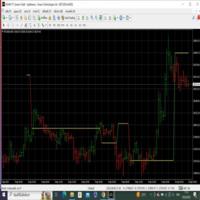
- Opening-range high and low
- Buy and sell trigger levels
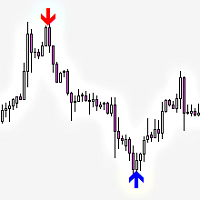
- Bullish and bearish setup arrows
- Historical ORB sessions
- Current trend bias
- Latest setup for the active broker day
- Range state and countdown
- Broker server time
- Range size and validation result
A range can be shown as forming, ready or rejected. Rejected ranges have failed the configured minimum or maximum size filter.
Entry modes
Close Confirm
Close Confirm waits for a completed candle to close beyond the opening range.
A setup is displayed only after the candle has closed and the active range, distance and trend conditions have been satisfied. This mode is useful for traders who prefer confirmation before considering a breakout.
Pending Stop
Pending Stop calculates a buy-stop or sell-stop trigger level after a valid setup becomes available.
The level remains visible for the configured number of expiry bars. The indicator displays the level for planning purposes but does not place the pending order.
Trend confirmation
The optional trend filter compares price with a configurable EMA on a higher timeframe.
With the reference configuration:
- Bullish setups require bullish H1 EMA 50 alignment.
- Bearish setups require bearish H1 EMA 50 alignment.
The trend filter can be disabled or adjusted from the indicator inputs.
Status panel
The RangeState panel keeps the important session information together:
- Symbol and chart timeframe
- Selected entry mode
- Broker server time
- ORB window and countdown
- Current range state
- Range high, low and size
- Higher-timeframe trend bias
- Latest ORB setup
The panel uses the RangeState navy, gold and cyan design and safely contains longer symbols and status messages.
Its chart corner and horizontal or vertical position can be adjusted. A unique instance ID allows more than one indicator instance to be used without panel-object conflicts.
Alerts
The indicator supports:
- MetaTrader popup alerts
- Mobile push notifications
- Sound alerts
Alert channels are disabled by default and can be enabled individually.
Freshness protection prevents an old historical signal or previous-session setup from producing a new live alert when the indicator is attached or refreshed.
Push notifications require MetaTrader notification settings to be configured correctly.
Historical display
The lookback setting controls how many previous broker-day sessions are calculated and displayed.
The default is 20 sessions, with an internal maximum of 250 sessions to keep chart calculations controlled.
Historical arrows show where the configured ORB conditions were satisfied. They do not represent executed trades or include trading costs.
Indicator buffers
Six stable buffers are available for custom integrations:
- Buffer 0: Range high
- Buffer 1: Range low
- Buffer 2: Buy trigger
- Buffer 3: Sell trigger
- Buffer 4: Buy setup arrow
- Buffer 5: Sell setup arrow
These buffers can be read through standard MetaTrader indicator integration methods.
Getting started
- Attach the indicator to an XAUUSD M15 chart.
- Confirm that the displayed broker time matches the session you want to analyse.
- Start with the supplied 08:00–09:00 range.
- Choose Close Confirm or Pending Stop.
- Enable the required alert channels.
- Review the displayed range size before changing pip-based filters.
- Test any changes using historical charts or a demo environment.
Broker time
All range and session calculations use the broker’s server time.
The indicator does not automatically translate London, New York or local computer time into broker time. Check your broker’s server timezone and account for daylight-saving changes when choosing the range window.
Important information
RangeState Sovereign ORB is an indicator, not an Expert Advisor. It does not open, modify or close trades.
It evaluates the ORB-specific conditions shown on the chart. It does not apply spread limits, account protection, position sizing, trading-hour restrictions or other EA-level safety controls.
Signals and historical arrows are analytical information only. They do not guarantee future results. Test the indicator with your broker’s symbol specification and use appropriate risk management before making live trading decisions.