EccRk Trade Manager
- 유틸리티
- 버전: 1.0
- 활성화: 5

Product Overview & Advantages
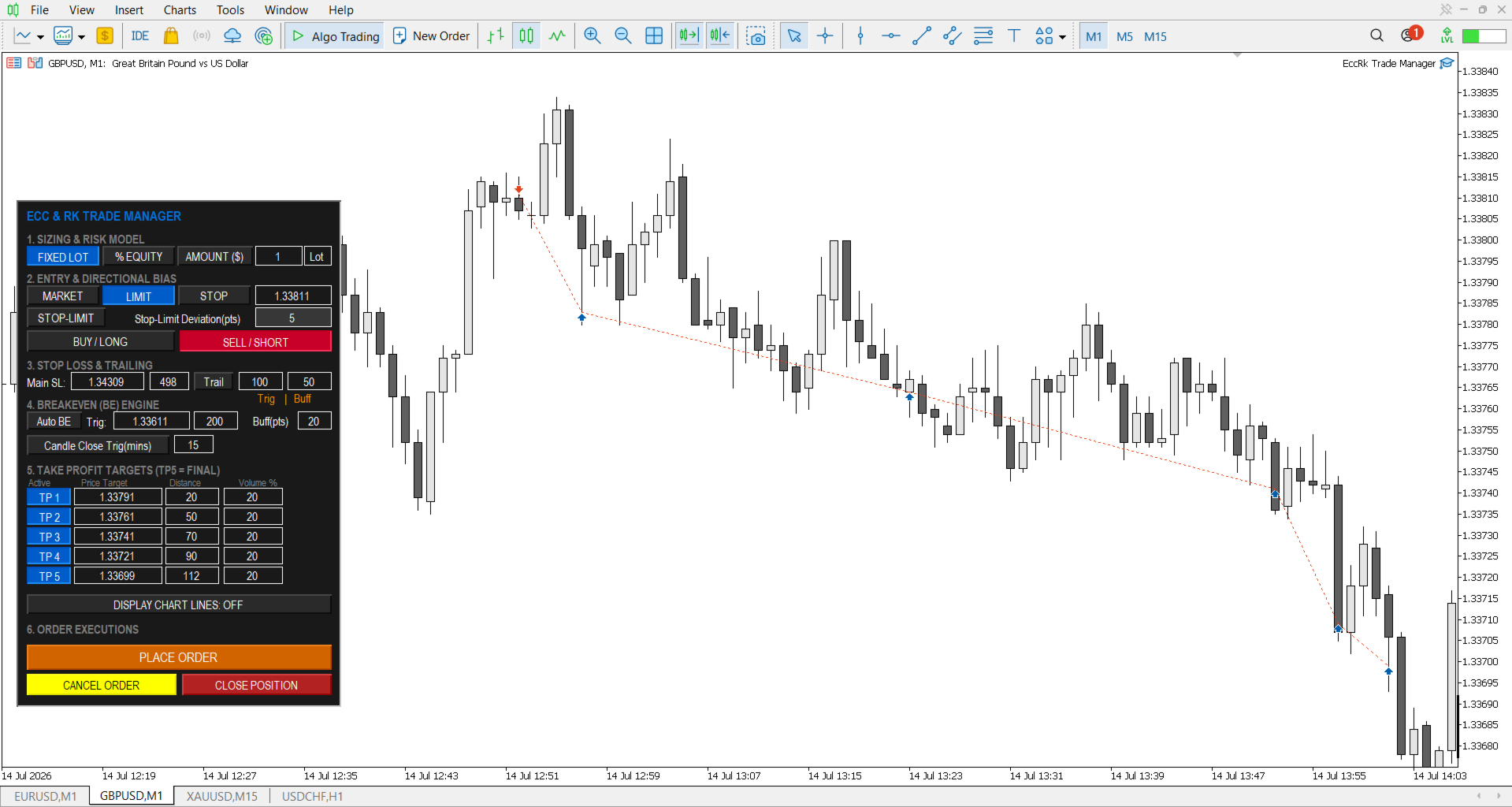
The ECC RK Trade Manager operate as an interactive risk and trade management utility tool for the MetaTrader 5 (MT5) platform. The application offers several core operational advantages:
-
Real-Time Interactive Interface: Features a draggable, interactive dashboard that locks onto your chart and fully syncs in real-time with your MT5 broker server.
-
Visual Control: Allows you to control your trade parameters by dragging lines directly on the chart, which instantly updates the dashboard and sends modifications to the broker.
-
Robust Safety Guards: Includes built-in protection logic to block invalid risk configurations and over-leveraging.
-
Slippage Gurads: (Bad-Fill Protection)
-
Market Order Entry: The EA acts as a strict gatekeeper during high-impact news or low liquidity. If the broker's available price slips beyond your user-defined point limit, the trade is automatically aborted to prevent worst-case execution prices.
-
Retest-Driven Partial Take Profits: For scaling out of positions, if a volatile spike moves the market past your TP faster than it can be cleanly executed, the EA refuses to accept the slipped price beyond your user-defined point limit. Instead, it safely pauses the order and waits to execute the partial close dynamically once the price retests your exact target level.
-
-
Crash Recovery System: Built to continuously manage your active trades and pending orders even if your terminal or VPS reboots unexpectedly.
Core Features
1. Sizing & Risk Model
This section determines how your trade volume is calculated:
-
Fixed Lot: Executes the precise lot volume you type into the input box.
-
% Equity: Dynamically calculates your lot size by risking a specific percentage of your current account equity.
-
Amount ($): Calculates your lot size based on a fixed monetary value you are willing to risk.
-
Fatal Risk Guard: If you use % Equity or Amount ($) without setting a Stop Loss higher than zero, the EA completely aborts the trade execution instead of guessing your risk.
-
Broker Minimums Protection: If your calculated risk lot size is lower than your broker's minimum volume, the EA aborts the trade entirely to prevent rounding up and over-leveraging your account.
-
Note: Precision risk scaling for % Equity and Amount ($) automatically includes your broker's commission costs.
2. Entry & Directional Bias
-
Order Type Toggle: Easily switch between Market, Limit, Stop, and Stop-Limit orders for both Buy/Long and Sell/Short directions.
-
Dynamic Price Controls: You can manually type your entry price or drag the physical entry line on your chart. Dragging the line on another device will automatically sync the entry price on the dashboard.
-
Operational Security: The entry price window automatically switches to read-only whenever a Market order is selected, a pending order is active, or a trade is running.
-
Stop-Limit Deviation: Allows you to define the exact point distance between a stop trigger and the limit execution price.
3. Stop Loss (SL) & Trailing
-
Dual Configuration: Set your main Stop Loss by entering a specific price or by entering a point distance. Changing one automatically updates the other.
-
Automated Trailing Stop: Toggle the "Trail" feature to automatically trail your SL behind the active price. It requires a Trigger distance (where trailing begins) and a Buffer distance (how far behind the price the SL stays).
4. Breakeven (BE) Engine
-
Auto Breakeven: Automatically moves your SL to the entry price (plus a defined buffer) once the market hits your target point distance or price.
-
Candle Close Trigger: A specialized protection mode that ignores volatile wicks and only triggers a breakeven if a candle closes past your target distance.
-
Timeframe Fallback Rule: If you input an unsupported timeframe for the candle close trigger (e.g., 17 minutes), the system automatically defaults to the nearest valid MT5 timeframe (e.g., M20).
5. Take Profit (TP) Targets
-
5-Tier Matrix: Allows you to set up to 5 distinct take-profit price levels to scale out of your position safely.
-
Auto-Calculated Volume Locking: The volume percentage field of your highest active TP tier is locked. The system automatically forces the final tier to absorb the remaining volume so that your total closed position equals exactly 100%.
-
Slippage Guard: During periods of extreme market volatility, the system automatically requotes to protect you from bad fills.
6. Visuals & Executions
-
Display Chart Lines: Toggles all interactive horizontal chart lines (Entry, SL, BE, and TPs) on or off.
-
One-Click Actions: Quick buttons to Place Order, Cancel Order (for pending orders), or Close Position (to instantly exit a running trade).
-
Execution Locks: To maintain order, the Place Order button and Entry Price box automatically lock and turn gray if a trade or pending order managed by the EA is already active.
-
Requirement: The EA must always maintain an active internet connection to manage these parameters.
⚠️ Important Operational Note: Multi-Chart Setup
To maintain high fidelity precision and prevent order confusion, this trade manager enforces a strict single-execution rule per chart window:
-
One Trade Per Chart: The EA is engineered to manage exactly one active trade or pending order per chart window at a time.
-
Automatic Control Locking: The moment a trade is executed or a pending order is placed, the dashboard's "Place Order" button and entry fields will automatically lock and turn gray. You cannot place another trade or order on this specific chart until the current position/order is closed or cancelled.
-
Managing Multiple Positions: If your trading strategy requires you to scale into multiple separate positions, run simultaneous grids, or hedge trades (even on the exact same currency pair), you must open a new, separate chart window for every individual trade you want to take and load the EA onto each one. The user can open upto 20 charts per MT5 installation
Global Input Parameters
When loading the EA onto your MT5 chart, you can customize its global behavior using the following parameters:
| Input Parameter | Default Value | Description |
| InpSlippagePoints | 10 | The maximum allowable slippage in points for market order executions. The broker will not execute trades above this to prevent bad fills. |
| InpMaxTPDeviation | 10 | The maximum allowable slippage in points for partial take profits. If slippage exceeds this, execution pauses and waits to close once price retests the level, avoiding bad fills. |
| InpTrailStep | 10 | The step increment (in points) by which the Trailing Stop moves. |
| InpBrokerCommission | 7.00 | Your broker's round-turn commission cost per 1.0 standard lot. Used to perform precise risk sizing calculations. |
| InpTheme | THEME_DARK | Switches the visual look of the on-chart dashboard between Dark or Light mode. |
| InpFontScale | 1.1 | Adjusts text sizing. Can be reduced to 0.6 - 0.8 if text overlaps on Mac or high-resolution displays. |
| InpDashboardScale | 1.0 | Multiplier scale for the entire dashboard UI size; increase this for Mac or 4K/high-resolution screens. |
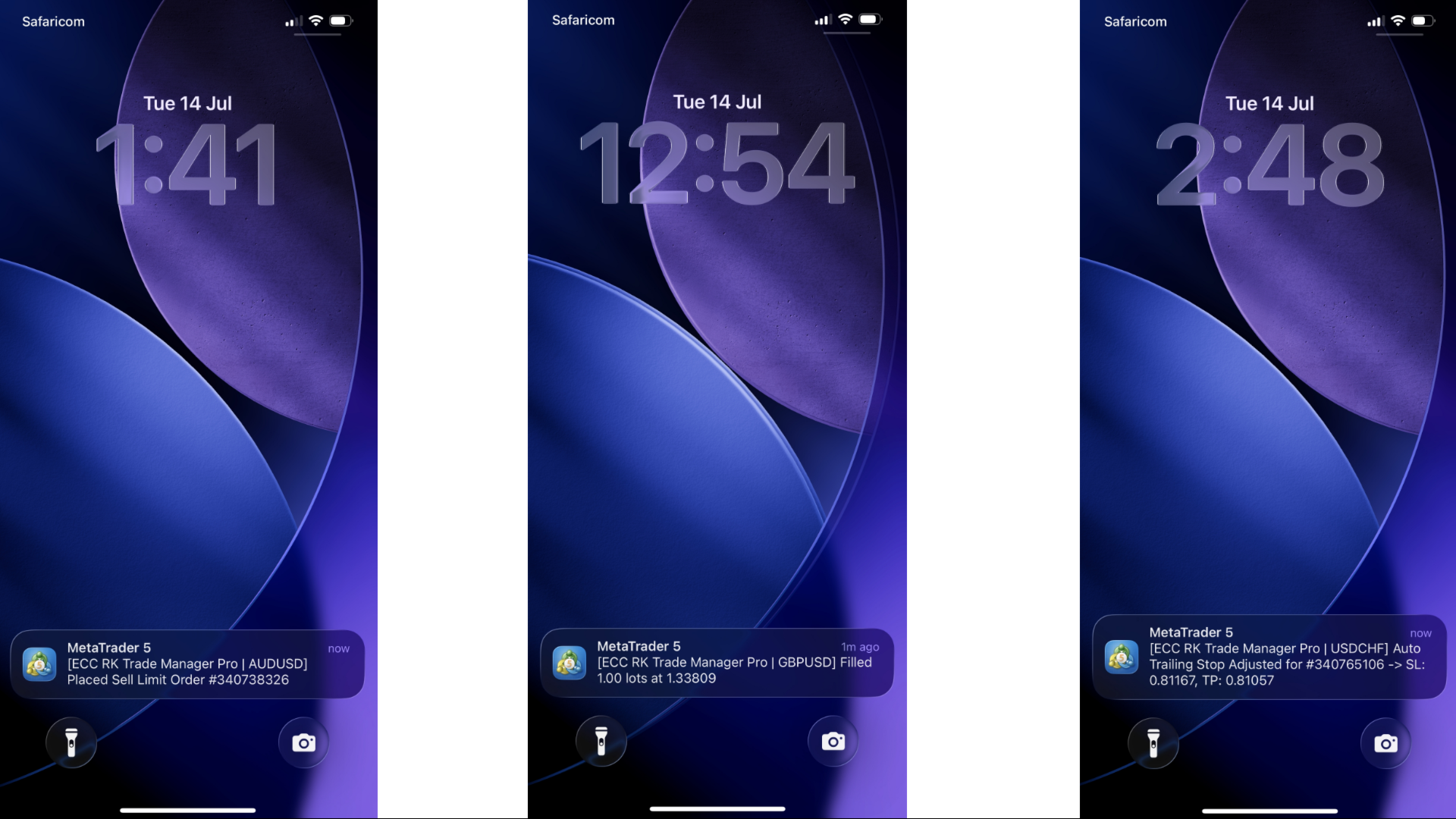
| InpUsePushNotifications | true | Toggles mobile push notifications and live chart alerts for trade events. |