ForexVisibleMT4

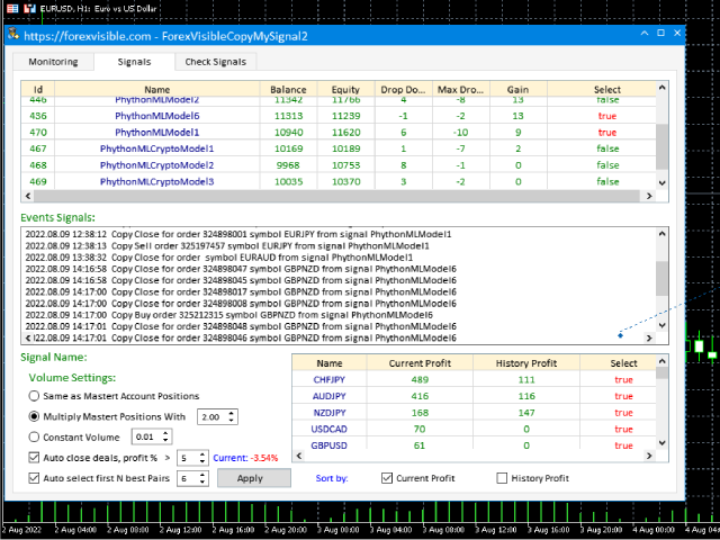
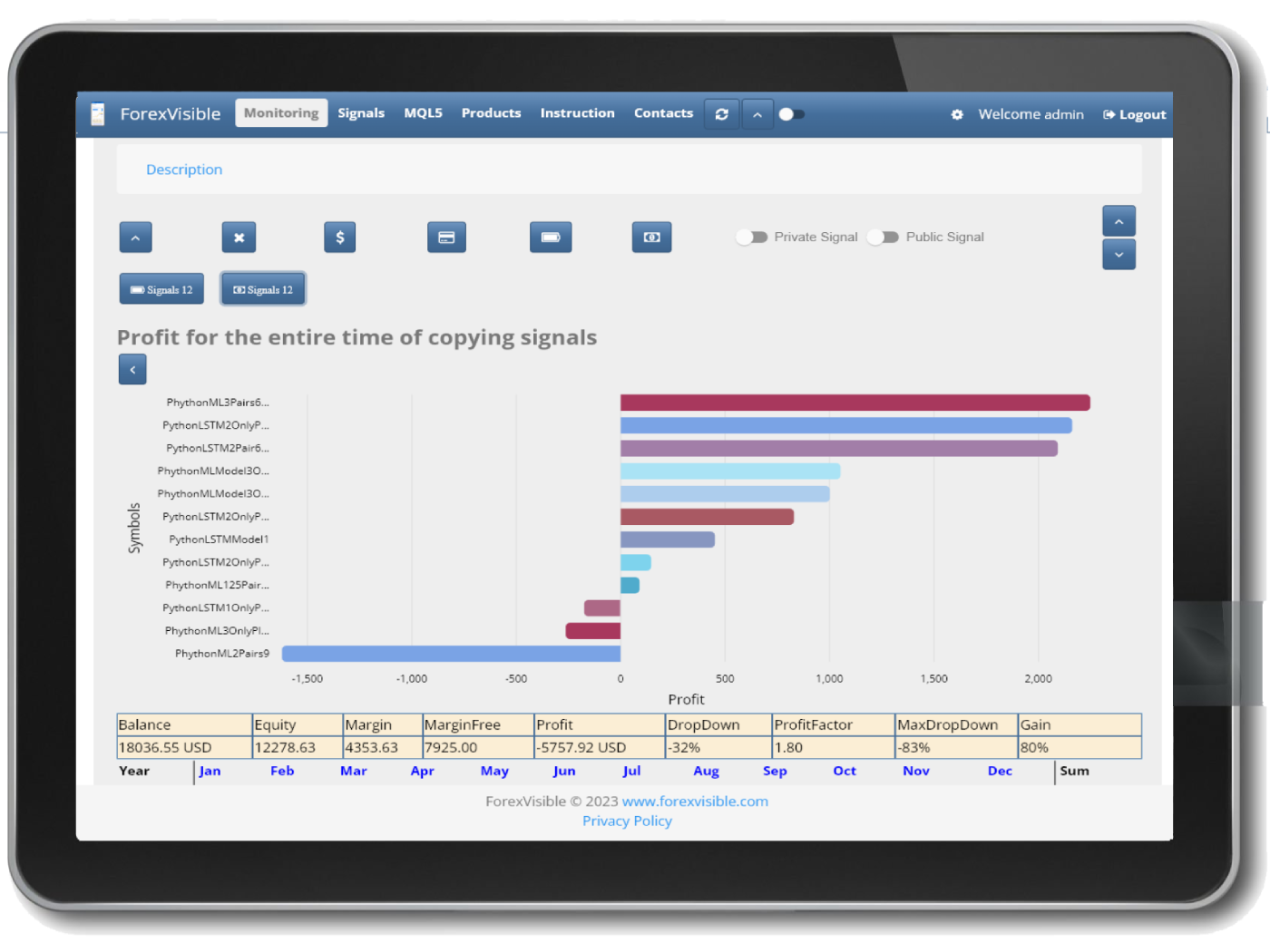
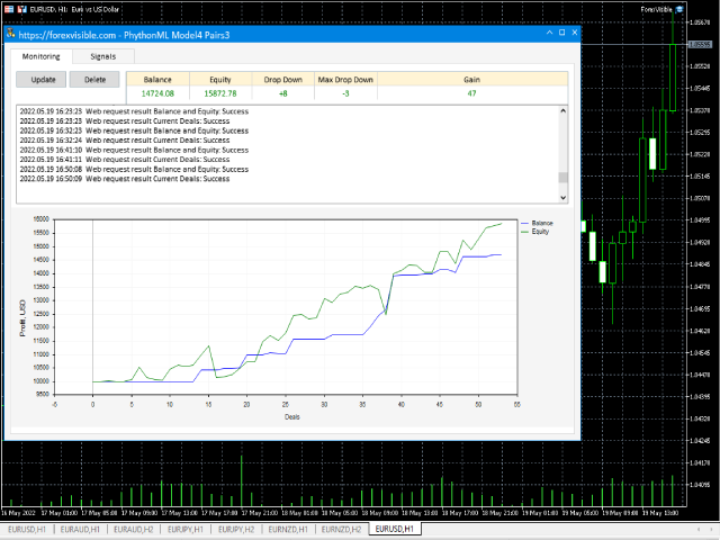
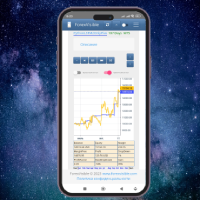
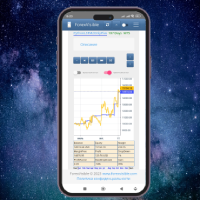
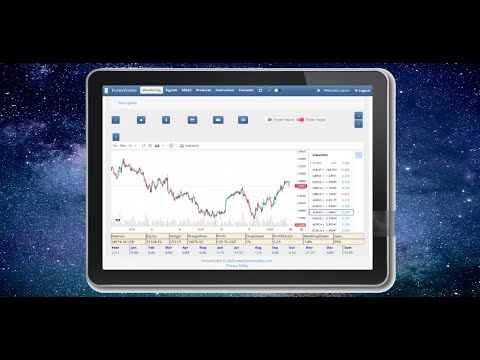
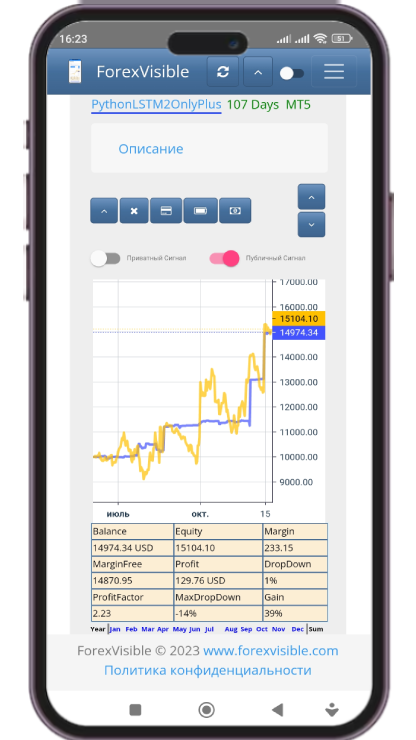
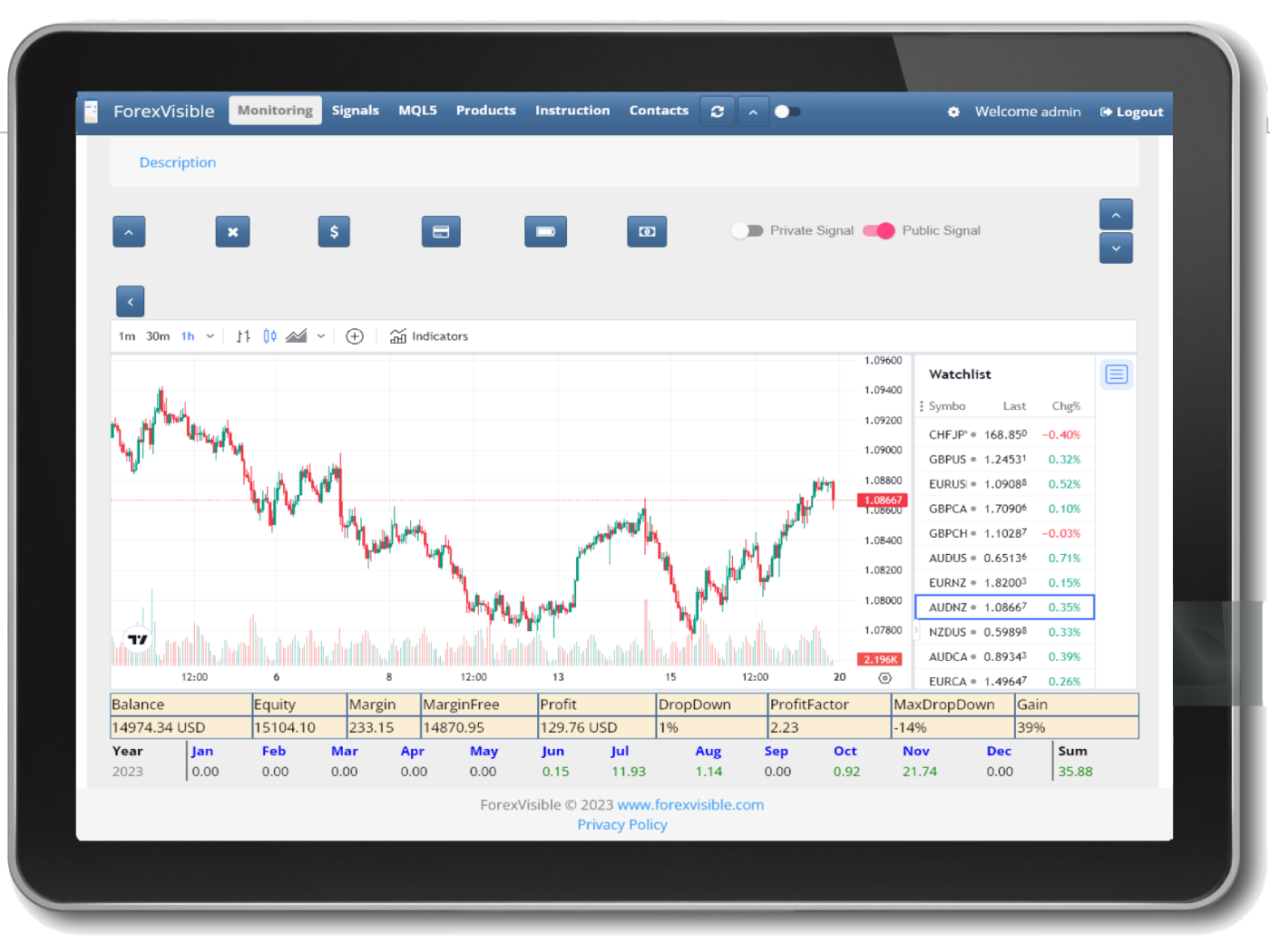
This client utility is intended for sharing and copying signals, as well as for monitoring your Expert Advisor on the site https://forexvisible.com.

The Android version of the site can be downloaded here

The version for the MT4 terminal can be downloaded here https://www.mql5.com/en/market/product/106509

There are many reasons to use this application in your trading, and these are:

1. If you have many trading advisors and many accounts, it is very difficult to track them and monitor everything in one place, with this application it will be easy to do

2. Since the data on the site is updated every second, it is easy to notice which of the trading advisors has stopped working

3. You will be able to post your signals freely available to other users

4. You can copy signals from other future users completely free of charge

5. You will be able to copy several signals at once to one account in metatrader

6. You will be able to select the best currency pairs for each signal separately

7. You will be able to select the best currency pairs of each signal automatically at certain intervals, sorting them, for example, by profitability for the entire trading period or sorting by the current profit of an open trade of this currency pair

8. You will be able to copy transactions within your accounts in any order from the terminal MT5 -> MT5, MT4 -> MT5, MT5 -> MT4, MT4 -> MT4 and at the same time clearly monitor this process on your smartphone

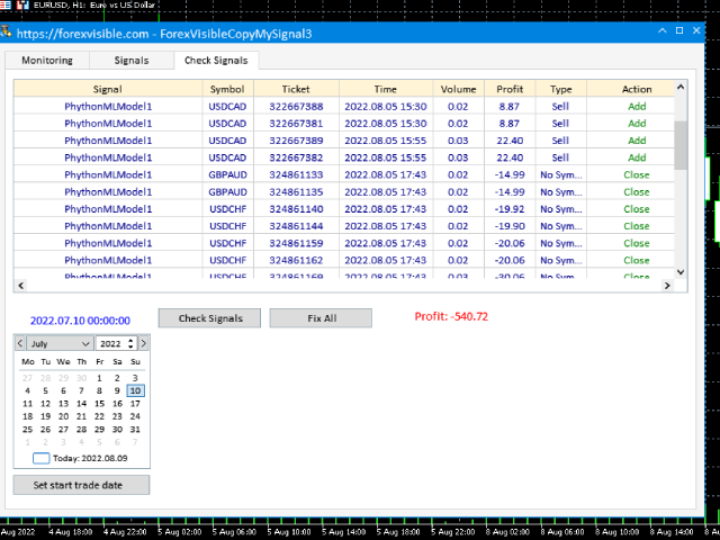
9. Control of missed transactions, for example due to an Internet failure, is also taken into account, you will not miss more than one transaction

Since I am creating robots based on artificial intelligence, free signals of my 2 best robots are displayed by default. Each signal has a link to a real signal on the website myfxbook.com/members/MUSBREATH , as proof that these signals actually working.

After registering in the application or web site on the monitoring page, my signals will disappear, now only your signals will be there, which you can easily monitor from the website, phone or tablet

For client use:

  • register on the site and remember your login and password
  • add the link in the MetaTrader 5 terminal to allowed - Settings -> Expert Advisors -> Allow WebRequest for the following URLs: -> https://forexvisible.com
  • put the client as a regular adviser on any available or new open chart where there is no other adviser, specifying your username and password for registering on the site in the User and Password parameters ,by default, when you first launch the utility, you are on a general test account User: Test Password: 123456

Description of parameters:

  • Name - optional parameter, the name of the account or advisor, displayed on the site
  • Url - an optional parameter, a link to the EA's signal, if any
  • User - required parameter, registration login on the site
  • Password - a required parameter, password for registration on the site
  • TimeUpdateProfitSec - time to update the balance, funds, etc., by default every 10 second
  • TimeUpdateBalanceSec - time to update charts on the site, by default every 300 seconds. The value must be at least 300 seconds to limit the load on the site, with a large number of users
추천 제품
This Tool Allow you close all open Orders automatics when Equity reach to specific value:  - When Equity is less than  specific value - When Equity is greater than  specific value - And Allow you close all open orders in manual - It will notification to MT4 Mobile app when it execute close all orders. __________________________________________ It very helpful for you when you trade with prop funds. Avoid reach daily drawdown and automatics close all orders when you get target.



FREE
Demo version of the paid product - Copy MT4 copier , limited to lot size of 0.01 Universal copier of deals from MetaTrader 4 to MetaTrader 4 ( MT5<->MT5 version is available ; with both versions, you can copy MetaTrader 5<->MetaTrader 4, MetaTrader 4<->MetaTrader 5, MetaTrader 5<->MetaTrader 5, MetaTrader 4<->MetaTrader 4). Spread filter. Select the best price (start copying positions with a profit or loss). Configure the lot size, fixed or ratio-based (provider signals can be copied with an inc
FREE
Account Info AS는 MetaTrader 4용 강력한 정보 스크립트로, 거래 계좌에 대한 모든 정보를 차트에 직접 표시해 줍니다. 이 스크립트는 계좌 분석, 위험 관리 및 거래 의사 결정에 필요한 모든 데이터를 제공합니다. 주요 기능 완전한 재무 정보 계좌 유형 (데모/실계좌/경연 대회) 잔액, 자산 및 마진 현금 및 비율로 표시되는 사용 가능 마진 마진 레벨 현재 손익 위험 관리 마진콜 및 손절매 레벨 현재 심볼 1랏에 대한 마진 계산 인기 거래 상품 마진 거래 정보 미체결 포지션 (수량, 방향, 총 수익) 유형별 대기 주문 현재 심볼 정보: 랏 크기 (최소/최대/단계) 핍 단위 스프레드 스왑 크기 기술 데이터 현재 서버 시간 회사 및 서버 이름 계좌 번호 및 고객 정보 설정 스크립트는 세 가지 간단한 매개변수를 사용합니다. Line_spacing - 가독성 향상을 위해 데이터 사이에 빈 줄 추가 ShowAllSymbolsInfo -
FREE
this tool draws 4 groups of horizontal lines starting from a 4 prices you specify in the Inputs. you can draw Horizontal lines above or below or (both sides) the starting prices. Based on (The Quarters Theory by Ilian Yotov), this tool displays colored lines at fixed intervals which you can change from the inputs. you can use many sets of Horizontal lines each set of Horizontal lines has its own color and style.
FREE
You can check out comment #1 how does it work This is a very useful tool, enter the currency charts you need to open, use the symbol "/" to distinguish them, and select the periodicity /TF of the chart, press the button and they will open the charts for you in batches without you having to manually open them each! Because some EA use multiple currency pairs strategy, but do not support one chart to support all currency pairs, so I developed this tool, hope you like it, if you are satisfied with
FREE
StarBot Demo
Dmitry Bondarenko
The StarBot Demo utility works with open Sell and Buy orders, partially closes profit when the specified level is passed. There are three levels for partially closing the Sell and Buy orders. The utility also transfers Stop Loss to breakeven when the specified level is passed. It works on all currency pairs and timeframes. The demo version is limited to trading only on the EURUSD currency pair and with the initial lot limited to 0.04. The full version can be purchased here: https://www.mql5.com/
FREE
Rua TrailingStop BreakEven Little
PHAM KIM QUY RuaCoder
4.5 (2)
Rua TrailingStop BreakEven Little The EA not for Real Account. You can EA for Real Account with link:   https://www.mql5.com/en/market/product/47635 Uses of EA - Trailingstop: Move stoploss continuously. - Breakeven: Move the stoploss once. Custom parameters: All OrderOpenTime:     + true: acts on all order     + false: only affect the order opened since EA run All OrderType:     + true: acts on all order.     + false: only the order is running (Buy, Sell) TraillingStop: true (Use), false (do n
FREE
This is a fully functional evaluation version for working on "CADCHF". Full version - Risk Controller If there are active deals on the account when the robot is launched, then all of them except CADCHF will be closed! Risk controller is a tool allowing you to automatically control orders, losses and emotionally motivated actions. Main advantages Limitation of the total account loss. When the MinimalDepo value is reached, any trade will be closed. Limitation of losses per day. Limitation of los
FREE
1. 이 주문 시스템 은 로 컬 주문 시스템 입 니 다. 즉, 발사 단 과 수신 단 은 반드시 같은 컴퓨터 에서 조작 해 야 합 니 다. MT4 / 5 계 정 은 여러 대의 컴퓨터 에서 동시에 로그 인 할 수 있 기 때문에 계 정 비밀번호 만 읽 고 고객 에 게 보 내 면 주문 할 수 있 습 니 다.로 컬 주문 서 는 네트워크 주문 과 관련 이 없 기 때문에 속도 가 빠 르 고 매우 안정 적 입 니 다. 2. 현재 수신 단 입 니 다. 도표 에 불 러 올 때 입력 매개 변수 에서 "senderAccount" 을 발신인 mt4 / mt5 계 정 으로 바 꾸 면 정상적으로 작 동 할 수 있 습 니 다. 또한 발사 단 을 설치 해 야 합 니 다. 3. 하나 가 많 고 하나 가 많 으 며 하나 가 많 음 을 지원 합 니 다. 컴퓨터 가 여러 개의 MT4 / MT5 를 실행 할 수 있다 면 몇 개의 주문 서 를 실행 할 수 있 습 니 다. 같은 플랫폼 은 설 치 된 폴 더 를 복사 하여
FREE
This program calculates the average opening price for sell and buy positions separately. Program allows you to modify the stop loss value to the calculated breakeven price, this value could also be modified by a user-defined integer value in points. All you have to do is press the button. You can also choose Logs_Display_Enable input value if you need to get some additional, useful informations. Enjoy using !!!
FREE
Confirmation Entry
Fawwaz Abdulmantaser Salim Albaker
Dear Valuable Friends ,   This New Free EA works as below : - waiting the M15 diagram to show the reverse or continuing of the trend - confirm  signal on H4 Diagram . - wait till the entry strategy is being extremely true  - put direct entry point (sell or Buy ) and put Pending Orders (P.O) in grid   All these will be Active after manually set in common parameters that u fully controlled . Check the pics to recognize .. for any Question write to me directly .. Best Luck  Best Luck  
FREE
Left4Trade MT4 Script  A script allows displaying the closure of a trade on the current chart. It helps to see where the trade was opened and closed and how it affects the overall trading result. When using this script, arrows indicating the opening and closing of trades are displayed on the chart. They can be configured with different colors according to your preferences. One of the main advantages of using this script is the ability to quickly analyze trading operations, which allows you to
FREE
The utility is designed to close several types of orders. Closing is done by pressing the hot key. How to place and delete orders by voice using the utilities of this type, see the video below the description.  https://www.youtube.com/channel/UCTpVWJkEic6TzoXr0qc9RIw/featured Provided closing options: KEY "1" DELETE BUY STOP. KEY "2" DELETE SELL STOP. KEY "3" DELETE BUY AND SELL STOP. KEY "4" DELETE BUY LIMIT. KEY "5" DELETE SELL LIMIT. KEY "6" DELETE BUY AND SELL LIMIT. KEY "7" DELETE ALL PEND
FREE
AQ RiskOptimizer
HIT HYPERTECH INNOVATIONS LTD
5 (1)
Risk Optimizer is the absolute solution for applying risk management on your account. Bad risk management is the main reason that causes traders to lose money. Risk Optimizer calculates and suggests the correct lot size for each position according to your personal, customized risk profile. You can give directly your preferred risk as percentage (%) for each position or you can trust our algorithms to calculate and optimize according to your risk category selection. But it is not only that! Selec
FREE
VirtualProfitLossTrailEA
Nikolaos Pantzos
4.75 (4)
This Utility is a tool to manage level of profits or losses for each order without using stop loss or take profit. The Utility applies virtual levels to close orders in profit or loss. You can use the robot to manage manually opened orders or manage orders opened by another EA. You can to get the source code from here . Parameters OrdersManage - orders to manage (all orders of all symbols or orders on the current chart). Stop Loss Pips - virtual stop loss level. Take Profit Pips - virtual take
FREE
This is a free version of our Great tool with limited functions. The ChartChanger is a great utility tool to reduce the number of open charts on your terminal. There is three section to it: Symbols, Time frames and Templates. You need only one chart to be open and still you can scroll up to multiple ones. Symbols: With the push of a button you can change from one symbol to another, and your applied indicators will stay on the next chart. For the symbols there is an auto detection mode, or you ca
FREE
Heartbeat Agent is a comprehensive monitoring system for MetaTrader 4 terminals, designed to detect critical issues before they impact your trading. Compatible with both Windows and Linux, it continuously monitors your terminal's health and alerts you immediately when problems arise. Key Features: Trading Permissions Monitoring: Detects when AutoTrading is disabled, preventing your Expert Advisors from executing trades. Alerts if your account is in Investor Mode (read-only) or if your broker has
FREE
Alerts
Maxim Polishchuk
3.5 (2)
Alerts utility issues notifications when orders are opened, closed and removed, as well as when the price touches the selected graphical objects on the chart. The utility supports all graphical objects used in graphical analysis and features a simple graphical interface. Once launched, the indicator works in the background, does not take up space on the chart and does not consume system resources. Tracking order status. If tracking order status is enabled, the utility automatically checks order
FREE
Price Alert EA for MT4 – Customizable Alert System with Intuitive Chart Interface The CFN  Price Alerts EA is a powerful yet easy-to-use Expert Advisor designed for traders who want full control over price level alerts directly from their MT4 charts. No need to manually set alerts through MT4’s native system – this EA gives you an on-chart interface to quickly set, view, and remove price alerts with flexibility. Key Features: Set unlimited price alerts directly on your chart. Visual display
FREE
It computes BUY and SELL lot sizing in either % of balance or in fixed intervals. In market orders, this EA contains the adaptive slippage, logs tickets for instant confirmation of opening trades, and contains every market symbol at a glance. Real-time balance/equity display keeps margin health in view without tab-switching, toggling spread if needed for liquidity checks. Compact left-panel layout minimizes screen real estate, empowering blind trades where speed trumps overanalyze—perfect for
FREE
Wise Men Indicator demo
Bohdan Kasyanenko
3 (2)
The indicator displays signals according to the strategy of Bill Williams on the chart. Demo version of the indicator has the same features as the paid, except that it can work only on a demo account . Signal "First Wise Man" is formed when there is a divergent bar with angulation.  Bullish divergent bar - with lower minimum and closing price in the upper half. Bearish divergent bar - higher maximum and the closing price at the bottom half. Angulation is formed when all three lines of Alligator
FREE
EA send order’s information in MT4 to Telegram channels Alert MT4 to Telegram by RedFox     is an easy to use fully customizable utility that allows sending of specified signals to Telegram’s chat, channel or group, making your account a  signal provider. Key Feature Telegram Channel IDs : Send to many group, channel. Ex.  -100xxxxx Add Footer Content: Add signature for content Send Pips Running: Send pips run when hit 20, 40, 80 pips Send screenshot: Send signal include screenshot Template Fil
FREE
This is a MetaTrader 4 script. It helps to summarize all trades into every symbol. Input Select Period: This is 7-option input. It includes Last Month, This Month, Last Week, This Week, Today, All History, and Date Specified. Specify Starting Date: Enter a date if you selected Date Specified in "Select Period" input. Specify Ending Date: Enter a date if you selected Date Specified in "Select Period" input. The summary is saved into a file in MQL4\Files folder. Also, there is pop-up window for a
FREE
My Trades in Pips
Bernhard Schweigert
4.83 (18)
놓치고 싶지 않은 거래 도구. 표시기는 차트의 모든 거래/거래에 첨부 된 기호로 표시됩니다. 이익 또는 손실의 핍 수를 인쇄합니다. 선택에 따라 더 나은 분석을 위해 하위 창을 통해 수직선을 인쇄합니다. 여기에서도 확인하십시오 : My Trade History Pro https://www.mql5.com/en/market/product/50206 또한 예금 통화의 거래 결과 및 총 PIP에 대한 정보를 추가합니다. 당신은 오늘의 거래 만 보여 주거나 여러 막대 내에서 거래 만 보여 주도록 선택할 수 있습니다. 지정된 마법 번호로 거래를 표시 할 수 있습니다. 값이 0으로 설정되면 표시기는 모든 거래를 표시합니다. 전문가 고문의 마법 수를 지정하면 EA의 거래 만 표시됩니다. 입구 오버 엔트리 화살표에는 주문 번호, 댓글 및 마법 번호가 표시됩니다. 이 표시기는 주로 통화 강도의 다른 특수 지표 중 하나와 함께 사용됩니다. https://www.mql5.com/en/blog
FREE
MT4 Alert Sender is a free ea tool that help you send the alert messengers in MT4 program for many different purpose with ease. Very simple and effective, you only need to input the alert content in a input box, then click a "Send Alert" button. The EA will send alert message. An alert pop-up shows your content in a new window pop-up. You can combine of using MT4 Alert Sender EA with any other tools out there for your need. Thanks for your trust in my product.
FREE
BackTester FX
Mikhail Nazarenko
BackTester FX — симулятор  ручной торговли MetaTrader 4 . Позволяет моделировать рыночные условия на исторических данных в тестере стратегий, вручную открывать и закрывать сделки, анализировать торговые стратегии без рисков потерять. Ключевые возможности Эмуляция ручной торговли в визуальном тестере стратегий Совместимость с любыми инструментами и таймфреймами Быстрое управление ордерами (открытие/закрытие) Настройки объема сделки, Stop Loss, Take Profit Работает как в тестере стратегий так и на
FREE
Risk manager x2 free
Andrii Malakhov
5 (1)
Советник риск-менеджер с огромным арсеналом возможностей защиты вашего депозита. Для инвесторов, которые решили передать капитал в доверительное управление. Когда у трейдера нет доступа к настройкам - нивелирует торговые риски. А также для трейдеров, которые осознали необходимость стороннего контроля за их торговлей для улучшения торговых результатов.  Для максимальных результатов - должен стоять на отдельном VPS сервере и у трейдера не должно быть возможности менять настройки в торговый период.
FREE
Fast Trade Copier
Volodymyr Hrybachov
4.2 (5)
The trade copier is designed for a fast and accurate copying of orders between the MetaTrader 4 terminals. The trade copier copies trades from the Master account to the Slave account by writing information to the total file, which is located in the common directory of the MetaTrader 4 terminals. This allows the trade copier to either customize various schemes for receiving and transmitting trade signals by changing the file name. Reading and writing the copier file is performed by timer. The tra
Position Manager Pro v1.0 (MT4) Dual Magic Number Independent Group Manager with Live P&L Dashboard Overview Position Manager Pro is a powerful trade management Expert Advisor for MetaTrader 4 that operates as an overlay manager — it does not open positions itself, but instead manages and monitors positions opened by other EAs or manually by the trader. The core concept is two fully independent groups , each identified by a unique Magic Number . Each group has its own Take Profit, Stop Loss, and
FREE
One Click Close All Script
Joaquin Nicolas Metayer
5 (1)
One Click Close All is a script that when thrown on any chart will automatically close all orders regardless of the asset or what type of orders they are, it will close everything much faster than a human could. You will find paid versions of the same style of this script, but read carefully and you will see that it performs the same function ... here you have it for free, enjoy it.
FREE
이 제품의 구매자들이 또한 구매함
Local Trade Copier EA MT4
Juvenille Emperor Limited
4.96 (109)
Local Trade Copier EA MT4 를 사용하여 매우 빠른 거래 복사 경험을 해보세요. 1분 안에 간편하게 설정할 수 있으며, 이 거래 복사기를 사용하면 Windows 컴퓨터 또는 Windows VPS에서 여러 개의 MetaTrader 터미널 간에 거래를 0.5초 미만의 초고속 복사 속도로 복사할 수 있습니다. 초보자든 전문가든 Local Trade Copier EA MT4 는 다양한 옵션을 제공하여 사용자의 특정 요구에 맞게 맞춤 설정할 수 있습니다. 이는 수익 잠재력을 높이려는 모든 사람을 위한 최고의 솔루션입니다. 지금 사용해보시고 이것이 왜 시장에서 가장 빠르고 쉬운 무역용 복사기인지 알아보세요! 팁: 여기 에서 데모 계정에서 Local Trade Copier EA MT4 데모 버전을 다운로드하여 사용해 볼 수 있습니다. 다운로드한 무료 데모 파일을 MT4 >> File >> Open Data Folder >> MQL4 >> Experts 폴더에 붙여넣고 터미널
Trade Manager EA에 오신 것을 환영합니다. 이 도구는 거래를 보다 직관적이고 정확하며 효율적으로 만들기 위해 설계된 궁극적인 리스크 관리 도구 입니다. 단순한 주문 실행 도구가 아닌, 원활한 거래 계획, 포지션 관리 및 리스크 제어를 위한 종합 솔루션입니다. 초보자부터 고급 트레이더, 빠른 실행이 필요한 스캘퍼에 이르기까지 Trade Manager EA는 외환, 지수, 상품, 암호화폐 등 다양한 시장에서 유연성을 제공합니다. Trade Manager EA를 사용하면 복잡한 계산은 이제 과거의 일이 됩니다. 시장을 분석하고 진입, 손절 및 익절 수준을 차트의 수평선으로 표시한 후 리스크를 설정하면, Trade Manager가 이상적인 포지션 크기를 즉시 계산하고 SL 및 TP 값을 실시간으로 표시합니다. 모든 거래가 간편하게 관리됩니다. 주요 기능: 포지션 크기 계산기 : 정의된 리스크에 따라 거래 크기를 즉시 결정합니다. 간단한 거래 계획 : 진입, 손절, 익절을 위한
Trade Assistant MT4
Evgeniy Kravchenko
4.43 (195)
거래당 위험 계산, 라인을 사용한 손쉬운 신규 주문, 부분 청산 기능을 통한 주문 관리, 7가지 유형의 트레일링 스탑 및 기타 유용한 기능을 제공합니다. 추가 자료 및 지침 설치 지침 - 애플리케이션 지침 - 데모 계정용 애플리케이션 평가판 라인 기능       - 차트에 개시선, 손절매, 차익실현을 표시합니다. 이 기능을 사용하면 새로운 주문을 쉽게 하고 개봉 전에 추가 특성을 볼 수 있습니다. 위기 관리       -       위험 계산 기능은 설정된 위험과 손절매 주문의 크기를 고려하여 새 주문의 볼륨을 계산합니다. 이를 통해 손절매 크기를 설정하고 동시에 설정된 위험을 존중할 수 있습니다. 로트 계산 버튼 - 위험 계산을 활성화/비활성화합니다. 필요한 위험 값은 위험 필드에 0에서 100 사이의 백분율 또는 예금 통화로 설정됩니다. 설정 탭에서 위험 계산 옵션을 선택합니다. $ 통화, % 잔액, % 지분, % 자유 마진, % 사용자 정의, % AB 이전 일, % AB
Copy Cat More Trade Copier MT4 (복사 고양이 MT4) 는 단순한 로컬 트레이드 카피어가 아니라, 오늘날의 거래 환경을 위해 설계된 완전한 리스크 관리 및 실행 프레임워크입니다. Prop Firm 챌린지부터 개인 계좌 관리까지, 강력한 실행력, 자본 보호, 유연한 설정, 고급 거래 처리 기능을 통해 모든 상황에 적응합니다. 이 카피어는 Master(송신자) 와 Slave(수신자) 모드 모두에서 작동하며, 실시간으로 시장가/지정가 주문, 거래 수정, 부분 청산, Close By 작업을 동기화합니다. 데모 및 실계좌 모두 호환되며, 거래용 비밀번호 또는 투자자 비밀번호로도 사용할 수 있습니다. Persistent Trade Memory 기술을 통해 EA, 터미널, VPS가 재시작되더라도 거래가 복원됩니다. 여러 Master와 Slave를 동시에 관리할 수 있으며, 브로커 간 차이는 접두사/접미사 자동 감지 또는 심볼 매핑으로 처리됩니다. 매뉴얼/설정: Copy C
Exp COPYLOT CLIENT for MT4
Vladislav Andruschenko
4.65 (66)
MetaTrader 4용 전문 트레이드 복사기 MetaTrader 4 용 빠르고 안정적이며 전문적인 트레이드 복사기입니다. COPYLOT 은 MetaTrader 4 와 MetaTrader 5 터미널 간에 Forex 거래를 복사할 수 있으며, 다양한 계좌 유형과 운용 방식에 맞춰 유연한 동기화 환경을 제공합니다. COPYLOT MT4 버전 지원 방식: MetaTrader 4 → MetaTrader 4 MetaTrader 5 Hedge → MetaTrader 4 MetaTrader 5 Netting → MetaTrader 4   MT5 버전 상세 설명 + DEMO + PDF 구매 방법 설치 방법 로그 파일 확인 방법 테스트 및 최적화 방법 Expforex의 모든 제품 MetaTrader 5 버전 을 사용하면 MetaTrader 5 → MetaTrader 5 및 MetaTrader 4 → MetaTrader 5 복사도 지원됩니다: COPYLOT CLIENT for MT5 COPYLOT 은
VirtualTradePad mt4 Extra
Vladislav Andruschenko
4.85 (61)
한 번의 클릭으로 거래할 수 있는 거래 패널.   위치 및 주문 작업!   차트 또는 키보드에서 거래. 거래 패널을 사용하면 차트에서 클릭 한 번으로 거래하고 표준 MetaTrader 컨트롤보다 30배 빠르게 거래 작업을 수행할 수 있습니다. 거래자의 삶을 더 쉽게 만들고 거래자가 훨씬 빠르고 편리하게 거래 활동을 수행할 수 있도록 도와주는 매개변수 및 기능의 자동 계산. 차트의 무역 거래에 대한 그래픽 팁 및 전체 정보. MT5 버전 전체 설명   +DEMO +PDF 구입 방법 설치하는 방법     로그 파일을 얻는 방법     테스트 및 최적화 방법     Expforex의 모든 제품 열기 및 닫기, 반전 및 잠금, 부분 닫기/오토로트. 가상/실제 손절매/이익 실현/후행 정지/손익분기점, 주문 그리드 .... MetaТrader 4   의 주요 요청 거래 제어판   : 구매, 판매, 구매 중지, 구매 제한, 판매 중지, 판매 제한, 닫기, 삭제, 수정, 후행 중지, 손절매,
The News Filter
Leolouiski Gan
5 (25)
이 제품은 뉴스 시간 동안 모든 전문가 어드바이저 및 수동 차트를 필터링하여 수동 거래 설정이나 다른 전문가 어드바이저가 입력한 거래가 파괴될 수 있는 급격한 가격 상승으로부터 걱정하지 않아도 됩니다. 이 제품은 또한 뉴스 발표 전에 열린 포지션과 대기 주문을 처리할 수 있는 완전한 주문 관리 시스템이 함께 제공됩니다. The News Filter  를 구매하면 더 이상 내장 뉴스 필터에 의존할 필요가 없으며 이제부터 모든 전문가 어드바이저를 여기서 필터링할 수 있습니다. 뉴스 선택 뉴스 소스는 Forex Factory의 경제 캘린더에서 얻어집니다. USD, EUR, GBP, JPY, AUD, CAD, CHF, NZD 및 CNY와 같은 어떤 통화 기준으로 선택할 수 있습니다. Non-Farm (NFP), FOMC, CPI 등과 같은 키워드 식별을 기준으로 선택할 수도 있습니다. 저, 중, 고 영향을 가지는 뉴스를 필터링할 수 있도록 선택할 수 있습니다. 차트와 관련된 뉴스만 선택하
The product will copy all telegram signal to MT4   ( which you are member  ) , also it can work as remote copier.  Easy to set up, copy order instant, can work with almost signal formats, image signal, s upport to translate other language to English Work with all type of channel or group, even channel have "Restrict Saving Content", work with  multi channel, multi MT5 Work as remote copier: with signal have ticket number, it will copy exactly via ticket number. Support to backtest signal. How to
Telegram to MT4 Coppy
Sergey Batudayev
3.89 (9)
Telegram에서 MT4로:   최고의 신호 복사 솔루션 최첨단 유틸리티인   Telegram to MT4를   사용하여 거래를 간소화하세요. DLL 없이도 Telegram 채널과 채팅에서 MetaTrader 4 플랫폼으로 거래 신호를 직접 복사할 수 있습니다. 이 강력한 솔루션은 탁월한 정밀도와 맞춤 설정 옵션을 통해 원활한 신호 실행을 보장하여 시간을 절약하고 효율성을 높여줍니다. [ Instructions and DEMO ] 주요 특징 직접 Telegram API 통합 전화번호와 보안 코드를 통해 인증하세요. 사용자 친화적인 EXE 브리지를 사용하여 채팅 ID를 손쉽게 가져오고 관리하세요. 여러 채널/채팅을 추가, 삭제, 새로 고침하여 동시에 신호를 복사합니다. 고급 필터를 사용한 신호 파싱 사용자 정의 예외 단어(예: "보고서", "요약")가 포함된 원치 않는 신호를 건너뜁니다. 유연한 SL 및 TP 형식을 지원합니다: 가격, 핍 또는 포인트. 신호가 가격 대신 지점을 지정
Trade copier MT4
Alfiya Fazylova
4.58 (33)
Trade Copier는 거래 계정 간의 거래를 복사하고 동기화하도록 설계된 전문 유틸리티입니다. 복사는 공급자의 계정/단말기에서 동일한 컴퓨터 또는 vps에 설치된 수신자의 계정/단말기로 발생합니다. 프로모션 - 이미 "Trade copier MT5"를 구매하셨다면, "Trade copier MT4"를 무료로 받으실 수 있습니다 (MT4 → MT5 및 MT4 ← MT5 복사용). 조건에 대한 자세한 정보를 원하시면, 개인 메시지를 통해 저희에게 문의해 주시기 바랍니다! 구매하기 전에 데모 계정에서 데모 버전을 테스트할 수 있습니다. 데모 버전 여기 . 전체 지침 여기 . 주요 기능 및 이점: 복사기는 "МТ4> МТ4", "МТ4> МТ5", "МТ5> МТ4" 복사를 지원합니다. 복사기는 데모 계정 > 실 계정, 실 계정 > 데모 계정, 데모 계정 > 데모 계정 및 실제 계정 > 실 계정 복사를 지원합니다. 복사기는 읽기 전용 암호가 적용된 투자자 계정에서 복사를 지원합니다. 하
Trading History MT4
Siarhei Vashchylka
5 (9)
Trading History - A program for trading and money management on the history of quotes in stratagy tester. It can work with pending and immediate orders, and is equipped with trailing stop, breakeven and take profit functions. Very good for training and testing different strategies. Manual (Be sure to read before purchasing) Advantages 1. Allows you to test any trading strategy in the shortest possible time 2. An excellent simulator for trading training. You can gain months of trading experience
Riskless Pyramid
Snapdragon Systems Ltd
5 (1)
Introduction This powerful MT4 trade mangement EA offers a way potentially to aggressively multiply trade profits in a riskfree manner. Once a trade has been entered with a defined stoploss and take profit target then the EA will add three pyramid add-on trades in order to increase the overall level of profit. The user sets the total combined profit target to be gained if everything works out. This can be specified either as a multiple of the original trade profit or as a total dollar amount. Fo
Equity Protect Pro: 안심 거래를 위한 종합 계좌 보호 전문가 계좌 보호, 자산 보호, 포트폴리오 보호, 다중 전략 보호, 수익 보호, 수익 확보, 거래 보안, 위험 관리 프로그램, 자동 위험 관리, 자동 청산, 조건부 청산, 예약 청산, 동적 청산, 추적 손절매, 원클릭 종료, 원클릭 청산, 원클릭 복원 등의 기능을 찾고 있다면 Equity Protect Pro가 바로 필요한 프로그램입니다. 설정이 간편하고 사전 설정된 조건이 충족되면 모든 차트를 닫을 수 있으며 신호 구독 취소도 지원합니다(이는 모든 거래 프로그램도 중지됨을 의미합니다). 이 시점에서 새로운 주문이 생성되지 않으며 최종적으로 모든 주문이 종료되어 예상치 못한 손실을 효과적으로 방지하고 안심하고 거래할 수 있습니다. Equity Protect Pro (Technical Manual) Equity Protect Pro Demo Version for yo u to test   Equity Protect
Coppy Master MT4
Sergey Batudayev
4 (3)
카피 마스터 MT4       MetaTrader 4 및 MetaTrader 5 터미널용 트레이딩 복사 도구입니다. 양방향 복사를 지원합니다. MT4에서 MT5로, MT5에서 MT4로, 그리고 동일 유형의 계정 간 MT4에서 MT4로. 올바르게 작동하려면 모든 터미널이 동일한 PC나 VPS에서 실행되어야 합니다. [ Instruction  and Demo ]  MetaTrader 4에 복사하려면 별도 버전이 필요합니다.       카피마스터 MT5       — 필수입니다. 주요 특징: 복사 모드 마스터 및 리시버 역할을 모두 지원합니다. 거래 송수신을 위한 유연한 설정이 가능합니다. 주문 관리 시장가 및 보류 주문을 복사합니다. 동기화 및 부분 마감, 매매 반전, 손절매/실현가 수정을 지원합니다. 심볼 처리 접두사와 접미사를 지원합니다. 특정 기호를 제외하거나 포함하고, 자산에 사용자 지정 이름을 지정할 수 있습니다. 위험 관리 및 한도 일일 거래 한도, 최대 손실 한도,
Auto Trade Copier
Vu Trung Kien
4.76 (84)
Auto Trade Copier is designed to copy trades to multiple MT4, MT5 and cTrader accounts/terminals with 100% accuracy. The provider and receiver accounts must be on the same PC/VPS. With this tool, you can copy trades to receiver accounts on the same PC/VPS. All trading actions will be copied from provider to receiver perfectly. This version can be used on MT4 accounts only. For MT5 accounts, you must use Auto Trade Copier for MT5 . Reference: - For MT4 receiver, please download Trade Receiver Fre
TradePanel MT4
Alfiya Fazylova
4.84 (94)
Trade Panel은 다기능 거래 도우미입니다. 이 애플리케이션에는 50개 이상의 수동 거래 기능이 포함되어 있으며 대부분의 거래 작업을 자동화할 수 있습니다. 주의! 할인은 시간 제한이 있으며, 매주 화요일마다 가격이 5달러씩 인상됩니다. (최대 90달러까지). 구매하기 전에 데모 계정에서 데모 버전을 테스트할 수 있습니다. 데모 계정용 애플리케이션 체험판 다운로드: https://www.mql5.com/en/blogs/post/750865 . 전체 지침 여기 . 거래. 한 번의 클릭으로 거래를 수행할 수 있습니다: 리스크 자동 계산과 함께 예약 주문 및 포지션 열기. 한 번의 클릭으로 여러 주문 및 포지션 열기. 주문 그리드 열기. 예약 주문 및 포지션을 그룹별로 닫기. 포지션 방향 전환 (Buy 닫기 > Sell 열기, Sell 닫기 > Buy 열기). 포지션 잠금 (부족한 포지션을 열어 Buy와 Sell 포지션의 수량을 동일하게 만들기). 모든 포지션 한 번의 클릭으로 부분
RSI Divergence Scanner is a multi-timeframe and multi-symbol dashboard and alert that checks all timeframes and symbols to find divergences between price chart and RSI indicator. This divergence scanner is integrated with support and resistance zones so you can check the RSI divergences in the most important areas of the chart to find trend reversals in the price chart. Download demo version   (works on M 1,M5,M30,W1 timeframes) Full description of scanner parameters ->   click here . How to get
Local Trade Copier EA 는 외부 소스에서 거래 신호를 실행해야 하거나 MAM 또는 PAMM 계정 없이 동시에 여러 계정을 관리해야 하는 개인 거래자 또는 계정 관리자를 위한 솔루션입니다. 최대 8개의 마스터 계정에서 무제한 슬레이브 계정으로 복사합니다. [ 설치 가이드 | 업데이트 가이드 | 문제 해결 | 자주하는 질문 | 모든 제품 ] 100% 자체 호스팅 설치 및 사용이 간편함 설치 프로그램, 구성 파일, 서버, 메모리 파이프 또는 DLL이 사용되지 않음 EA를 영원히 사용하기 위한 1000번의 활성화 로컬 실행, 네트워크 대기 시간 없음 필요한 모든 기능을 구현합니다. 최대 8개의 마스터 계정 및 무제한 슬레이브 계정 모든 브로커 및 DD/NDD/ECN/STP 실행과 함께 작동 다른 계정 통화를 사용하는 계정에서 작동 라이브 계정과 데모 계정 간에 구분 없이 작동 마스터 및 슬레이브 계정에서 기호 이름의 접미사 지원 매직 넘버 및 주문 댓글로 필터링 다른 거래
Trade Reverse Copie4
Chukwuemeka Kingsley Anyanwu
Feel free to contact me for any extra features :) [SEE MT5 VERSION  https://www.mql5.com/en/market/product/128846 The Local Reverse Copier is an Expert Advisor designed to synchronize positions between a Master account and a Slave account with a twist: it reverses the trades. When a buy position is opened on the Master account, the EA opens a sell position on the Slave account, and vice versa. This allows for a unique form of trade copying where positions are mirrored in opposite directions bet
Elevate Your Trading Signals with Our Advanced Telegram Bridge EA It’s time to captivate your audience with real-time trading updates that are both professional and visually appealing. Contact me to receive a trial and see the demo channel! We have significantly invested in user friendly features that create a unique experience for customers and providers.  SIGNAL BRIDGE is able to deliver 100% COPIER FRIENDLY SIGNALS for all business cases, even bypassing Metatrader logics where other EAs stru
MT4 to Telegram Signal Provider 는 사용하기 쉽고 완전히 사용자 정의가 가능한 도구로, 텔레그램으로 신호를 보내어 계정을 신호 제공자로 변환할 수 있습니다. 메시지 형식은 완전히 사용자 정의가 가능합니다! 그러나 간단한 사용을 위해 미리 정의된 템플릿을 선택하고 메시지의 특정 부분을 활성화하거나 비활성화할 수도 있습니다. [ 데모 ]  [ 매뉴얼 ] [ MT5 버전 ] [ 디스코드 버전 ] [ 텔레그램 채널 ]  New: [ Telegram To MT5 ] 설정 단계별 사용자 가이드 가 제공됩니다. 텔레그램 API에 대한 지식이 필요 없으며, 개발자가 필요한 모든 것을 제공합니다. 주요 기능 구독자에게 보낸 주문 세부 정보를 사용자 정의할 수 있는 기능 예를 들어 브론즈, 실버, 골드와 같은 계층 구독 모델을 만들 수 있습니다. 골드 구독은 모든 신호 등을 받게 됩니다. ID, 심볼 또는 코멘트별 주문 필터링 주문이 실행된 차트의 스크린샷을 포함 보낸
Risk Manager for MT4
Sergey Batudayev
4.6 (10)
MT4의 Expert Advisor Risk Manager는 매우 중요하며 제 생각에는 모든 거래자에게 필요한 프로그램입니다. 이 Expert Advisor를 사용하면 거래 계정의 위험을 제어할 수 있습니다. 위험 및 이익 통제는 금전적 측면과 백분율 측면에서 모두 수행될 수 있습니다. Expert Advisor가 작동하려면 통화 쌍 차트에 첨부하고 예금 통화 또는 현재 잔액의 %로 허용되는 위험 값을 설정하기만 하면 됩니다. 어드바이저 기능 이 위험 관리자는 위험을 제어하는 ​​데 도움이 됩니다. - 거래를 위해 - 하루 - 일주일 동안 - 한 달 동안 당신은 또한 제어할 수 있습니다 1) 거래 시 최대 허용 랏 2) 1일 최대 주문 수 3) 하루 최대 수익 4) 지분 인수 이익 설정 그게 다가 아닙니다. 설정에서 자동 설정을 지정하면 고문이 기본 SL 및 TP를 설정할 수도 있습니다. 상담원은 각 이벤트에 경고와 함께 동행하며 주문을 삭제하는 이유를 설명합니다.
MetaTrader 4 Trade Copier (MT4 Version) This Expert Advisor is developed for copying trading operations between MetaTrader terminals. This version is intended for use on MetaTrader 4. For copying operations involving MetaTrader 5, please use the corresponding MT5 version available in the Market.  https://www.mql5.com/en/market/product/161757 Supported platform combinations: MT5 to MT5 MT4 to MT4  (This Version) MT4 to MT5 MT5 to MT4 The copier transfers market orders according to the selected
Trade Copier Global
Laszlo Tormasi
5 (15)
Trade Copier Global: The name speaks for itself. This copier allows you to copy orders between MT4 terminals even if they are not installed on the same computer. Features Copying trades between MT4 terminals around the world with a short delay. Automatically recognizes symbol prefixes. Can connect many Slaves to the same Master. Supports pending and market orders. Supports partial order close (with limitations, see below) Can send messages and notifications to the Slaves from the Master Several
MT4 to Discord Signal Provider 는 Discord로 직접 거래 신호를 보내는 데에 설계된 사용자 친화적이고 완전히 맞춤화할 수 있는 유틸리티입니다. 이 도구는 귀하의 거래 계좌를 효율적인 신호 제공자로 변환합니다. 귀하의 스타일에 맞게 메시지 형식을 사용자 정의하세요! 사용 편의성을 위해 사전에 디자인된 템플릿을 선택하고 포함하거나 제외할 메시지 요소를 선택할 수 있습니다. [ 데모 ] [ 매뉴얼 ] [ MT5 버전 ] [ Telegram 버전 ]  New: [ Telegram To MT5 ] 설정 간편한 설정을 위해 저희의 상세한 사용자 가이드 를 따르세요. Discord API에 대한 사전 지식이 필요 없습니다; 필요한 모든 도구를 제공합니다. 주요 기능 구독자 업데이트를 위한 주문 세부 정보를 사용자 정의합니다. 각 계층이 다른 수준의 신호 접근을 제공하는 브론즈, 실버, 골드와 같은 계층적 구독 모델을 구현합니다. 주문이 실행된 차트의 스크린샷을 첨
Drawdown Detective Overview: Drawdown Detective is a utility script for MetaTrader 4 designed to help traders analyze their open and closed positions. It calculates key metrics including open position risk, potential profit/loss, the number of trades without Stop Loss or Take Profit, as well as monthly performance statistics such as net profit and maximum drawdown. Key Features: Open Trade Analysis: Automatically detects all currently traded instruments. Calculates net lot exposure per symbol. E
Trade Manager MT4 DaneTrades
Levi Dane Benjamin
4.09 (11)
거래 관리자는 위험을 자동으로 계산하는 동시에 거래를 빠르게 시작하고 종료하는 데 도움을 줍니다. 과잉 거래, 복수 거래 및 감정 거래를 방지하는 데 도움이 되는 기능이 포함되어 있습니다. 거래를 자동으로 관리할 수 있으며 계정 성과 지표를 그래프로 시각화할 수 있습니다. 이러한 기능은 이 패널을 모든 수동 거래자에게 이상적으로 만들고 MetaTrader 4 플랫폼을 향상시키는 데 도움이 됩니다. 다중 언어 지원. MT5 버전  |  사용자 가이드 + 데모 트레이드 매니저는 전략 테스터에서 작동하지 않습니다. 데모를 보려면 사용자 가이드로 이동하세요. 위기 관리 % 또는 $를 기준으로 위험 자동 조정 고정 로트 크기 또는 거래량과 핍을 기반으로 한 자동 로트 크기 계산을 사용하는 옵션 RR, Pips 또는 Price를 사용한 손익분기점 손실 설정 추적 중지 손실 설정 목표 달성 시 모든 거래를 자동으로 마감하는 최대 일일 손실률(%)입니다. 과도한 손실로부터 계정을 보호하고 과도한
ManHedger MT4
Peter Mueller
5 (2)
THIS EA IS A SEMI-AUTO EA, IT NEEDS USER INPUT. Manual & Test Version Please TEST this product before   BUYING  and watch my video about it. Contact me for user support or bug reports, or if you want the MT5 version! MT5 Version I do not guarantee any profits or financial success using this EA. With this Expert Advisor, you can: Implement your own   Zone Recovery   strategy to capitalize on trending markets. Create   Grid   trading strategies, to profit from ranging markets. Place orders easil
A script to open and Close  charts of  multiple pairs instantly with custom template $30 for the next 25 downloaders, next price: $45 Features: Chart Opener : Open chart(s) of multiple pairs simultaneously Template Opener : Load any User specified template (.tpl) to the opened chart(s) Chart Closer : Close chart(s) of multiple pairs simultaneously Disclaimer: Any loss involving this trading tool is the sole responsibility of the User, and not the responsibility of the Creator of this trading
Pointer synchronization is an indicator with which the pointer can be synchronized in all the visible charts of the terminal. It shows a crossed cursor in all the visible charts of the terminal, in position relative to the cursor of the active chart. To activate the indicator, simply press the button that appears in one of the corners of the chart once the indicator is added to the chart. To deactivate the indicator, simply press the button again. Once the indicator has been deactivated, the cr
제작자의 제품 더 보기
ForexVisible
Yevhen Chystiukhin
5 (1)
This client utility is intended for sharing and copying signals, as well as for monitoring your Expert Advisor on the site https://forexvisible.com . The Android version of the site can be downloaded here The version for the MT4 terminal can be downloaded here  https://www.mql5.com/en/market/product/106509 There are many reasons to use this application in your trading, and these are: 1. If you have many trading advisors and many accounts, it is very difficult to track them and monitor everythin
FREE
PhythonML MT4
Yevhen Chystiukhin
This multicurrency Expert Advisor uses 28 currency pairs. For predictions, the advisor uses models trained by the machine learning algorithm in the Python language environment. All signals of this advisor in real time and download settings for it can be downloaded from my website forexvisible.com - copy and paste into the browser This version for the MT4 terminal can work with one time interval H1, the version for MT5 can work with two time intervals H1 and H2, it can be downloaded here https:
MultiBolbands
Yevhen Chystiukhin
4 (11)
This multicurrency Expert Advisor uses 28 currency pairs. The predictions are based on two indicators: Bollinger Bands and DEMA.myfxbook.com/members/MUSBREATH Settings for MultiBolbands The default settings are for the EURUSD H1 Algorithm1. Optimization from 2016 year Before testing in the strategy tester or installing the EA on a chart, if you want to speed up the testing process, set the ShowTradePanel advisor setting to false In the strategy tester, set the "Open prices only" trading mode, t
PhythonML
Yevhen Chystiukhin
2.8 (5)
This multicurrency Expert Advisor uses 28 currency pairs. For predictions, the advisor uses models trained by the machine learning algorithm in the Python language environment. All signals of this advisor in real time and settings for it can be downloaded from my website forexvisible.com - copy and paste into the browser The Expert Advisor can work with two time intervals H1 and H2 together or separately parameters in the Use Time Intervals group The profitability of currency pairs can be view
PythonLSTM
Yevhen Chystiukhin
This multi-currency Expert Advisor uses 28 currency pairs. For forecasts, the EA uses recurrent neural networks of the LSTM type, models trained in the python language environment, and imported into the EA using a new function in mql5 to load ONNX models Finally it happened, mql5 developers have recently introduced the ability to load ONNX models in the mql5 language. And this format supports most modern libraries for training neural networks, and this now opens up an unlimited number of possibi
QBotAI
Yevhen Chystiukhin
QBotAI is a trading robot designed to automate trading in financial markets. It uses a reinforcement learning technique called Q-learning to optimize its trading strategies. Q-learning allows the robot to learn from experience through trial and error. The robot constantly interacts with the trading environment, makes trade transactions and receives a reward or penalty depending on the result of the transaction. Over time, QBotAI learns to choose the optimal actions to maximize the reward receive
IntervalAI
Yevhen Chystiukhin
This multi-currency expert advisor uses 28 currency pairs. For predictions, the advisor uses recurrent neural networks of the LSTM type, models trained in the Python language environment, and imported into the advisor using a new function in MQL5 for loading ONNX models. The algorithm of the advisor works simultaneously with two timeframes H15 and H1. Separate neural network models have been trained for each of the 28 pairs for both timeframes. The idea is that the advisor places orders only whe
OmegaAI
Yevhen Chystiukhin
5 (3)
This multicurrency expert uses 29 currency pairs. For forecasts, the advisor uses recurrent neural networks of the LSTM type, models trained in the Python language environment using the reinforcement learning algorithm. You can view and download the advisor's performance results and signal settings here: forexvisible.com and myfxbook.com/members/MUSBREATH The advisor uses 4 different packages of neural network models trained for 29 pairs, the first two models work on the H1 interval and the oth
AlphaAI
Yevhen Chystiukhin
AlphaAI — Multi-Currency AI Expert Advisor for MetaTrader AlphaAI is a multi-currency trading expert advisor using LSTM neural networks trained with reinforcement learning to analyze market data and generate trading decisions. The advisor can trade 29 currency pairs simultaneously, distributing trading activity and reducing dependence on a single market. The models were trained in Python using financial time series analysis. AlphaAI Advantages LSTM machine learning models Trading with 29 cur
BetaAI
Yevhen Chystiukhin
BetaAI — Multi-Currency AI Expert Advisor for MetaTrader BetaAI is a multi-currency trading expert advisor that uses machine learning models to analyze market data and generate trading decisions. The advisor can simultaneously work with 29 currency pairs , allowing trading activity to be distributed across multiple instruments and reducing dependence on the behavior of a single market. The system is based on machine learning models built with XGB (gradient boosting) . The models were trained in
필터:
리뷰 없음
리뷰 답변