 MetaTrader 5
 Experts
 지표
지표 라이브러리
라이브러리 유틸리티
유틸리티 위젯
위젯 규칙
규칙MetaTrader 4용 새 트레이딩 유틸리티 - 26
 다음은 MetaTrader 4에서 외환 거래를 단순화하는 거래 프로그램입니다. 아래 목록의 유틸리티 위로 마우스를 가져가면 해당 설명과 용도를 읽을 수 있습니다.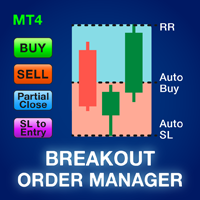
대부분의 소매 거래자는 위험을 관리하고 과도한 위험을 감수하거나 과도한 거래로 계정을 날릴 수 없습니다. 이 도구는 드로다운 및 위험 관리를 완전히 자동화하여 트레이더가 항목에만 집중할 수 있도록 합니다. 브레이크 아웃 또는 풀백 거래에 이상적입니다. 매도 거래의 고점 위나 매수 거래의 저점 아래에 손절매를 배치하여 위험을 계산하기 위해 이전에 마감된 캔들 높이를 사용합니다. Stoploss 배치는 기간별로 사용자 지정할 수 있습니다. 드로다운에 있을 때; 사전 정의된 손절매 비율로 부분 포지션을 자동으로 마감하여 위험을 관리합니다. 위험 보상 또는 핍 값으로 여러 테이크 이익 수준을 설정합니다.
모든 진입 방법과 거래 스타일에 사용할 수 있습니다. 스캘핑, 일중 또는 스윙 거래.
특징: 고유한 "주문 유형" 설정으로 브레이크아웃과 풀백을 모두 거래할 수 있습니다. 가장 최근에 마감된 캔들 높이를 사용하여 모든 지정가 또는 중지 주문에 대한 위험을 자동으로 계산합니다. Stop

변동성에 적응,거래 위치를 보상 할 수있는 잠재적 인 위험은 평균 실제 범위에 따라 표시됩니다. 위험 보상-'구매 또는 판매'버튼을 클릭하면 상자가 표시됩니다! 아트리움 계산의 유틸리티,거래를 종료 할 때 어려운 결정의 일부가 아닌 문제로 기뻐. 이 문제는 위험 관리 결정에 도움이 될 것입니다.
사양: 평균 진정한 범위는 핍 또는 가격에 시장의 변동성을 측정하는 일반적으로 사용되는 지표입니다. 진정한 범위는 가장 낮은 거래 가격과 촛대의 가장 높은 거래 가격의 차이입니다,주어진 기간에. 평균 실제 범위는 모두"이전"기간의 이러한 최고치와 최저치를 평균화합니다. 예를 들어,기본 설정은 우리에게 14 일 기간을 제공합니다. 14 일로 나눈 핍 값에서 최고치와 최저치를 수집합니다.
그러나 물론 이것은 일반적인 지표를 넘어서는 것입니다. 문제 사실,세 가지 완전히 다른 주가는 전적으로 다른 핍 소비를 위해 자신의 시간대에 의존합니다. 촛대의 규칙은 각 기간에 기술적으로 다르다. 그래
FREE

현재 주요 시장 세션과 다음 시작까지 남은 시간을 표시합니다.
시장
뉴욕 런던 프랑크푸르트 도쿄 시드니 맞춤 이름, 시작 및 종료 시간이 포함된 추가 세션 1개
시계 시간
GMT/UTC 로컬(컴퓨터에서) 브로커(서버 시간) 설정의 기본 시간은 GMT입니다. 로컬 또는 브로커 시간으로 변경한 후 선택한 시간 유형에 따라 각 세션 시작 및 종료 시간을 수동으로 조정해야 합니다. 개장 및 폐장 시간을 조정할 수 있습니다
그래픽 설정 각 세션을 개별적으로 표시하거나 숨길 수 있습니다. 여기에는 다음이 포함됩니다. 오픈 바의 세션 이름 세션이 종료될 때까지 그리는 시가 라인 배경색 세션 배경색에는 2가지 모드가 있습니다
분리자로 유용한 첫 번째 막대 열린 시간부터 닫은 시간까지 전체 세션 기간
* 겹침이 있는 경우 세션 색상이 혼합됩니다. 이렇게 하면 차트에 새로운 특정 색상이 생성되며, 소원은 과거 데이터에서 쉽게 겹치는 부분을 찾는 데 유용합니다. * 차트에 함께 그려진 세션이
FREE

Supper Trading Assistant is a state-of-the-art system that has already stably used and generated profit for our funds for years. We respect imperfection, and there is no risk-free trading strategy in the financial markets. The Risk Master is designed as the heart of the system to manage account drawdown, optimize taking profit and smart stop loss trailing. The system can automatically preserve your profit by optimizing its allocation to future trades. Advanced statistics are applied to increase

** Automatically Adds to your existing trades that you open ** KFX Dashboard EA monitors Price Action using Candle Direction + Moving Average on Multiple currency pairs (selected by you) and on Multiple Timeframes (selected by you). The dashboard also reveals Currency Strength of pairs based on your Moving Average selection. KFX Dashboard EA option to set Stop Loss(SL) and Take Profit(TP) based on your selected Timeframe and ATR / Points settings. Trailing stop by ATR / Points also available (s
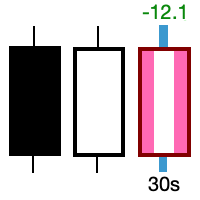
Take control of the most important candle on your chart. Customise and supercharge the active candle. "LastCandle" is a unique indicator. There is no other indicator that is so laser-focused on just the active candle. Set different colors and make it stand out from all the other candles. (This makes sure you never mistake an active candle from a closed one. Even if this happens once it could save you the cost of the software.) When you zoom out, you get a super-sized version of the candle so y
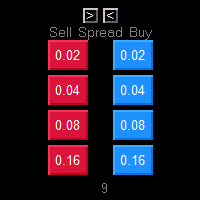
One Click market orders with different lot sizes, partial closing and break even line. Also it shows current setups profit or loss, with partial exits included in total setups PnL. Great tool for manual trading, when different lot sizes needed as per grid or martingale strategies. Major future is different symbol category detection. Due different instruments categories there is a need to use different pre determined lot sizes for different risk profiles. So EA has auto detection of different

Ever took a trade and when you come back to the termainal to check on the status of the position, you realized the market has gone so far in the opposite direction or it has hit your stoploss. Well this system is here to help manage those moments price doesn't go in your desired direction. Consider this to be the insurance your account needs for your trading business. This tool manages manual trades and e.a. triggered trades. However be aware that some e.a.s are programmed to override other e.a.

This is the HFT Flame Ea....This is a complex Expert Advisor that basically pick trades from price movements, it is also a none-martingale mechanism with netting strategy that makes this Ea more interested and profitable throughout your trading journey. The HFT Flame EA can be super consistent on profits depending on the inputs selected for your style of trading. This is a hand free trading robot that can trade your way to success while you are away from the charts, another perfect advantage abo

흠(수평 마크 업)은 수평 레벨의 수동 마킹을 위해 설계되었습니다. 마크 업에는 레벨 및 가격 값이 포함됩니다. 라인의 두께와 색상 및 가격 값은 설정에서 설정됩니다. 레벨은 시간대에 로컬로 배치하거나 모든 시간대에 대해 공개적으로 설정할 수 있습니다.
그의 작업은 매우 간단합니다:
1)-당신이 수준을 표시하는 설정에서 설정 한 키를 누릅니다;
2–-우리는 원하는 위치에 라인을 가지고;
3)-마우스 오른쪽 버튼을 클릭하고 레벨이 연결되어 있습니다.
앞으로 이러한 수준을 이동하고 조정할 수 있습니다.
차트에서 제거 된 후,표시기는 자체에 대한 수준을 청소하지 않습니다. 그들은 수동으로 제거해야 할 것입니다.
가장 효과적인 응용 프로그램은 한 번에 선택한 거래 상품에 다른 설정과 여러 흠을 사용하는 것입니다.
입력:
선 스타일-선 스타일
선 폭-선 간격
마크 스타일-가격 태그의 크기
오프셋 표시–픽셀)-화면 왼쪽 가장자리를 기준으로 오프셋 표시
선 색상
FREE

50% Off Today Only! Price Goes Back Up at 11 PM (EST)
Marketkeys Trade Manager EA for MT5: Your Pathway to Forex Trading Mastery
What Traders Are Saying: " I just bought the product and I like it ..." – AntonioBorrero " Very good EA I would 100% recommend.. ." – Vijohn Efficiency and precision are paramount in Forex trading. Marketkeys Trade Manager EA for MT5 offers just that - a seamless interface combined with robust risk management tools. It's designed to be your essential trading compan

Good old snake with various options.
You can play directly on the chart. And you can play in a separate window.
You can not play at all, but set her speed of movement and run it on the machine, the snake itself will chase and devour apples.
You can turn on different sounds of eating apples, or you can completely turn off all sounds.
You can set the maximum length of the snake, and you can also set the number of dice on the game board.
In short - a lot of things are possible. Enjoy.. )
FREE

PRICE WILL BE RAISED EVERY MONTH... Scalp Assistant is a support EA that simplifies trading process. - Place multiple order at desired position - Auto pending order chasing to price current - Auto Trailing Stop - Auto TP on profit - Set TP and SL at one click - Simplified Information - Get started easily I will post more assistant series EA in the future, drop me a message if you have any question or suggestion at pipsstalker1507@gmail.com

Is your trade at a loss? Does not matter ! You can use this Extra martingale tool. In the set loss of your trade or your EA's trade , this tool will open another trade at a better price. It can also open multiple trades at different distances and with different lot sizes. Each trade will be assigned a TakeProfit. This tool has a lot of settings. You can set variable lot sizes, variable trade distances, variable TakeProfit sizes, maximum total profit or loss in money. You can also close trades

The auxiliary adviser is designed to transfer profitable positions without loss. The adviser does not trade itself, it opens two oppositely directed positions in the tester to demonstrate the work.
Settings:
Start no loss (>size) - after how many points does it start without a loss.
Size no loss (<start) - size without loss. (size without loss must be less than start)

This expert has a simple and efficient panel for transactions. It also has capital and risk management tools. in part of Run(2-6) Built-in automated trading robots. All of them can be used with updates. And there is no need to spend more. Many indicators are used in this expert for low-risk automatic trading. Refer to the guide for details. See the performance of each episode. Pay attention to the guide in the photos. Help panel: Lot=Volume TP=Take Profit SL=Stop Loss C.A.B=Close All Buy C.A.S=

TRADING PANEL - CHART OVERLAY with: PARTIAL TAKE PROFIT ("virtual TP") % RISK LOT SIZE TRAILING STOP LOSS Fast and simple control of your trades this is DEM0 VERISON (for DEM0 acc.) of TRADING OVERLAY with PARTIAL take profit ("virtual TP") and % risk lot size
--- full version available on my 'seller page' as well as version for MT5
Easy lot size calculation with easy SL/TP setting. Your trading will be much more comfortable with this tool !
Works like any EA, add it
FREE

RISK CALCULATOR - TRADING PANEL - CHART OVERLAY with:
PARTIAL TAKE PROFIT ("virtual TP") % RISK LOT SIZE TRAILING STOP LOSS Fast and simple control of your trades Easy lot size calculation with easy SL/TP setting. Your trading will be much more comfortable with this tool!
Works like any EA, add it to selected chart and trade !
Features: start trade with calculated lot based on % of account balance * that you want to risk/ or based on how much money you want to risk *r
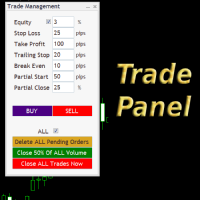
Simple but convenient trade panel that will allow you to place market orders and manage your positions. Can be used to; Place a stop loss and take profit order. Move your stop loss to break even. Move your trailing stop. Reduce your position after price has moved X pips/points in your favor. Delete and close all your open positions. Can be used on any financial asset and time frame. It works on all brokers.

This utility is for opening and closing orders. The panel shows the number of opened Sell/Buy orders, Sell/Buy profit, chart profit and account profit. You can close Sell orders, Buy orders, chart profit and account profit in one click. You can setup magic number for orders opened by this utility.
Settings Base Lot size Use automatic TP and SL in your currency - set for calc automatic TP and SL TP and SL - in pips or your broker currency Take Profit - pips/currency Stop Loss - pips/currency

If you found this EA, it's probably because you want to get a funded account with a prop firm, but you see a rule that most of traders fear : Maximum Daily Drawdown. I've been through this problem myself as I'm a prop firm trader and I've made a bot to solve this rule, and you can get it to solve this problem too.
How does it work ?
When you first setup this EA, you need to input the initial deposit which corresponds to the size of your funded account. For exemple if you get a 10k$ f

EA is based on the advanced martingale strategy.
Here are the key functions:
The lot increment is derived from the variety of selection, multiplier, addition form input, addition of last two trades, and from a lot list. You can initiate the trade manually or from another EA. This EA will take care of different types of martingale. Test it by starting with two trades when there are no trades available (use live input and backtest).
Message me about the settings. I believe the best settings ar
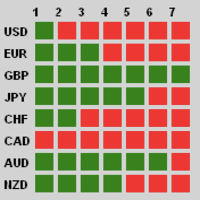
Description
Traders, this is one of very few powerful and consistent Currency Strength Meters/Gauges on the market today.
This Currency Strength Meter EA uses proven statistical quantitative formulas across all 28 major and minor currencies to arrive at strength score and then show it to the user on their MT4 chart. The system is super smart and consistent, and its efficacy/or accuracy is not affected by any sort of market condition. The system allows for the user to measure currency strength

대부분의 소매 거래자는 위험을 관리하고 과도한 위험을 감수하거나 과도한 거래로 계정을 날릴 수 없습니다. 이 도구는 드로다운 및 위험 관리를 완전히 자동화하여 트레이더가 항목에만 집중할 수 있도록 합니다. 가격이 거래에 반대할 때 부분 포지션을 자동으로 청산하는 Aggressive Risk Control 기능과 함께 가격 조치를 사용하는 최초이자 유일한 거래 관리자입니다. 이렇게 하면 손실이 항상 승리보다 작게 유지됩니다.
모든 입력 방법 및 거래 스타일과 함께 사용할 수 있습니다. 스캘핑, 일중 또는 스윙 거래.
특징: 모든 주문 유형에 사용하십시오. 시장가 주문, 중지 주문 및 지정가 주문. 경고가 있는 Aggressive Risk Control(ARC) - 가격이 거래에 반하는 경우 손실을 줄입니다. 당신이 취하는 거래의 수를 제한합니다 - 과잉 거래를 줄입니다. 자동 로트 크기 계산. 자동 또는 수동으로 손절매 및 여러 이익실현 수준을 설정합니다. 자동 또는 수동으로
트레이더를 위한 궁극적인 유틸리티 Local Trade Copier Pro MT4을 소개합니다. 이 도구는 다양한 MT4 계정 간에 거래를 효율적으로 복사하려는 트레이더를 위해 설계되었습니다. 이 강력한 도구는 여러 계정을 원활하게 활용하여 거래 전략을 자동화하고 성과를 향상시키고자 하는 트레이더를 위해 만들어졌습니다. 최소한의 지연으로 실시간 거래 복사의 이점을 경험하여 수익성 있는 기회를 놓치지 않도록 합니다. 여러 계정을 관리하든 다양한 브로커와 작업하든, Local Trade Copier Pro MT4은 귀하의 거래 요구에 맞춘 비할 데 없는 유연성과 사용자 정의를 제공합니다. MQL 제품 설치 가이드 | 구매한 MQL 제품 업데이트 MT4/MT5 | 일반 문제 해결 가이드 | 지표 설정 / 가이드 주요 기능 팝업 알림: 신호 이벤트에서 MetaTrader 알림 팝업을 발생시켜 거래 설정을 놓치지 않도록 합니다. 푸시 알림: 이동 중 모니터링을 위해 MetaTrader 모바일

This EA helps traders in the following benefits : - show the entry point for sell or buy orders that you makes. -show the TP & SL levels on chart - control the lot size - control the TP & SL level in points - works on all chart period - rising algo trading rank in your signal - closing all deals in one click - closing only profitable deals - closing only losable traders enjoy
FREE

Big Promo 40%!
Introducing Autolot 2.0: The Revolutionary Trading Utility is Now Even MORE POWERFUL and EFFICIENT! We're proud to announce the launch of Autolot 2.0, the upgrade that takes your trading to a whole new level! We've listened to your feedback and improved the utility to make it even more versatile and user-friendly. Here are the key features we've added: Fixed Risk: Now you can set a fixed risk for your trades, regardless of the balance percentage. For example, in the settings, yo

Itrade manager expert advisor (EA) is a type of software that can be programmed to perform a variety of tasks related to managing trades in the financial markets. Some of the ways in which the Itrade manager EA can help you trade better include: Itrade manager EA can automatically modify, and close trades based on predefined rules and conditions, freeing you up to focus on other aspects of your trading strategy. Managing risk: Itrade manager EA can help you manage risk by placing stop-loss and
FREE
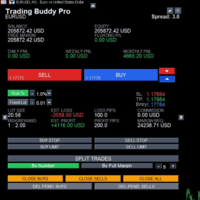
This is a tool to place instant trades with risk management. Never worry about calculating lot size again. Just drag lines and click the button! The tool displays Risk Reward to allow you to decide on the best entry point. You can place instant orders and pending orders. Please refer to the following youtube video on how to use the tool https://youtu.be/XqEvb81F9wA
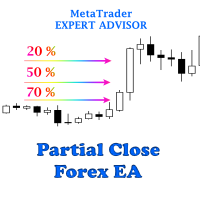
The easiest to use Partial Close Forex EA
How Partial Close EA works?
this is an automated MT4 EA to handle the management of trades for my system of “Take Profits”, “Stop Losses” and “Partial Closes”. The EA should be attached to each of trading charts. The EA can also be control via mobile MT4. When you place a market trade, the EA will setup a grid (hidden from broker) on the chart showing TP1, TP2, TP3 and SL (which can be seen). The SL will be based on the price you set on my mobile MT4
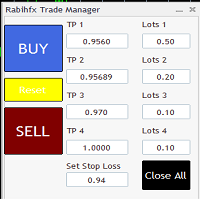
Rabihfx Trade Manager 2
Rabihfx trade manager V2 is an utility Expert advisor that will manage your trades automatically just click sell or buy buttom and ilt will do the work at each level of take profit Contact us after purchase for a free trading system Easyly Manage your trades and automate it from 1 dashbord
You signal provider or yourself if you have 3 take profits inesert it in our trade manager and click sell/buy and let rabihfx trade manager protect and automate your open trades

안녕하세요 여러분
트레이더를 위한 또 다른 무료 도구입니다.
보상 대비 위험 비율:
좋은 거래인지 아닌지 판단할 수 있도록 이익의 크기와 관련된 손실의 크기를 계산하는 것은 모든 거래자에게 편리합니다. 또한 손실과 이익을 핍과 백분율로 표시합니다.
원하는 각 부분의 색상을 설정할 수 있습니다. 이 패널과도 거래가 가능하다면?! 아래 링크 참조 Trader Assistant Mini MT4 아래 링크에서 MT5 버전을 확인할 수 있습니다.
Risk to Reward Ratio MT5
이 도구의 보다 전문적인 버전에 대한 내 새 제품을 볼 수 있습니다.
Pro Risk Management Panel MT5
즐기시기 바랍니다 ;)
마침내:
여러분의 생각과 피드백을 공유해 주시기 바랍니다.
거래자가 필요하다고 생각하는 정보를 제공하는 것이 중요합니다.
작가:
저는 MQL 언어 프로그래머로 3년 동안 다양한 프로젝트를 진행해 왔습니다.
저는 전기 엔지니어이고 어려운
FREE
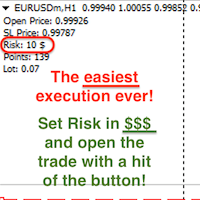
Attention! If necessary, the expert can be reprogrammed for MetaTrader 5. Please remember to watch the explanatory YouTube video after you read the description below.
My Lot Calculator is a very simple utility for lightning-fast and super-accurate* manual trade execution based on the risk in the account currency. It works as an Expert Advisor on any MT4 Chart. All you need to do in Settings is just specify the risk per trade in money and commission per 1 lot (if any). Then just add a Horizontal

OTRX Fimathe Backtest is a tool for the Trader or Enthusiast who uses the Fimathe technique created by Trader Marcelo Ferreira to carry out his training and validate if he can obtain profitability.
In this tool you will be able to:
1. Define whether you are looking for a buy or sell entry. (Trend).
2. Define by clicking twice on the horizontal lines where your Reference Zone and your Neutral Zone will be.
3. Monitor the entry, subcycle and exit of the trade.
4. Trading Summary, Daily, Week
FREE

Blow Stopper EA V3 – Your Ultimate Trading Edge Ready to elevate your trading game? Introducing Blow Stopper EA V3 , the cutting-edge trading tool meticulously crafted to turn market uncertainty into opportunity. Designed by the visionary Tsietsi Gladson Nyathi , this groundbreaking Expert Advisor delivers unmatched precision, unparalleled risk management, and consistent profitability across EURUSD, NZDUSD, AUDUSD, EURJPY, GBPUSD, USDJPY, USDCHF, USDCAD, EURCHF, and XAUUSD (GOLD) . Why Blow Sto

Reward Multiplier is a semi-automatic trade manager based on pyramid trading that opens additional orders with the running profit of your trades to maximize return exponentially without increasing the risk. Unlike other similar EAs, this tool shows potential profit/loss and reward to risk ratio before even entering the first trade! Download full version here ( In the mini version. Starting lot is fixed at 0.01 (or minimum allowed lot size ) Guide + tips here MT5 version here You only open the
FREE

One Click Close MT4 is an EA which allows you close orders quickly. EA display on chart two buttons. The first button "Close All Positions" is using to close all opened orders. The second button "Close Profit Positions" is using to close only profitable orders. EA is closing orders for all available symbols, not only for chart symbol. In EA params you can set distance from upper chart frame (Y Offset) and from left chart frame (X Offset). For installation EA it is only need to copy One Click Clo
FREE
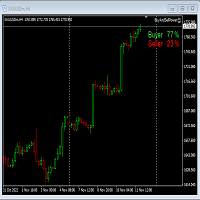
This Expert Advisor will not place any trade.
This Expert Advisor will only show the buyer and the seller power in percentage on the upper right corner of the selected chart. The percentage of the Buyer and Seller is calculated based on the Open, Close, High and Low price of the selected candle. Candle can be selected using the shift on the Input Tab where 0 means the current candle, 1 means previous 1 candle before the current candle.

Mt4ToTelegramAlter is an app that communicates with a Telegram bot to share your orders flow and report open orders from Metatrader 4 terminal to a Telegram group or channel. Features Telegram channel, group, chat compatible Easy to use Report open order Configuration 1. Service -> Settings -> Expert Advisors -> Allow WebRequest for the following URLs (Add URL: https://api.telegram.org ); 2. Create your own bot on Telegram at @BotFather. Remember Token, it looks something like this - xxxx:yy

EA send order’s information in MT4 to Telegram channels Alert MT4 to Telegram by RedFox is an easy to use fully customizable utility that allows sending of specified signals to Telegram’s chat, channel or group, making your account a signal provider. Key Feature
Telegram Channel IDs : Send to many group, channel. Ex. -100xxxxx Add Footer Content: Add signature for content Send Pips Running: Send pips run when hit 20, 40, 80 pips Send screenshot: Send signal include screenshot Template Fil
FREE

For more info, questions and problems join to discord.gg/reitakfx
Very informative and detailed tool for your account. - pairs, number of trades, lot size, profit, lose, nett p/l, net pips - profit growth chart
Instalation : - open chart and delete every other indicator on it - put this report on chart
Setting : - magic number - filters (comment, symbols, currencies) - date (today, week, month custom) - Start / End date (this is for custom date) - report type (open - only active trades wi
FREE

This EA helps to Close all Positions opened. It saves you the time of closing multiple positions manually.
Parameters: Buy: Close Buy Positions Only Sell: Close Sell Positions Only Buy & Sell: Close Buy & Sell Positions Pending: Close Pending Orders
More Advanced MT4 version available at: https://www.mql5.com/en/market/product/93468?source=Unknown%3Ahttps%3A%2F%2Fwww.mql5.com%2Fen%2Fmarket%2Fmy More Advanced MT5 version available at: https://www.mql5.com/en/market/product/93301?source=Unk

The utility displays in a convenient form the historical trades made on the account. You can filter trades by magic or comcent, display only profitable or losing trades, and only buy or sell trades. Using this utility, you can see trade entry and exit points, stop loss and take profit levels, trade profit, magic number and comment, order ticket and order size - you only need to run the utility on the chart of the currency pair you want information on get and customize the input parameters. MT5

DG Equity Monitor is a useful tool that keeps track of the daily transactions made on the account. The EA automatically and instantly closes all the trades running based on two conditions: 1. If the daily profit target is hit. 2. If the maximum drawdown is reached. An alert is sent immediately one of the above conditions are met.
Parameters: Show Account Info -Choose whether or not to display the Account Info on the chart.
Show Pop Up Alert -Show alert on chart when either condition 1 or 2 are
FREE

사용 지침: https://www.mql5.com/zh/blogs/post/754946 MT4 버전: https://www.mql5.com/zh/market/product/88205 MT5 버전: https://www.mql5.com/zh/market/product/88204 ------------------------------------- 1. 12개의 마스터 계정에서 100개의 슬레이브 계정으로 주문을 복사합니다. 슬레이브 계정의 수는 12에서 100까지 사용자 지정할 수 있습니다. 2. MT4에서 MT4, MT4에서 MT5, MT5에서 MT4, MT5에서 MT5를 지원합니다. 3. EURUSD, EURUSDm, EURUSDk와 같은 다양한 플랫폼에서 거래 종류의 접미사를 식별합니다. 4. XAUUSD=GOLD와 같은 사용자 정의 통화 일치. 5. 모든 거래를 복사하거나 BUY, SELL, CLOSE 지침만 복사할 수 있습니다. 6. 손절매 복사 여부를 선택할 수 있습니다.

This is a tool that enables you to know account information in real time by sending email alerts.
Alerts function as follows:
1. Floating profit and loss alerts, once the profit and loss amounts you have set are reached, EA will automatically send you an email with details of the alert.
2. Order open and close alerts, once your account has an open and close position, EA will automatically send you detailed alerts by email.
3. Multiple Symbol quote alerts, once the quote has up or down a

This MT4 Script is for Trading News releases.
You drop this script onto the currency pair that you are trading one minute before the news release and set lot size, TP and stop loss level and just wait to close orders.
You will be trading this Following Events:
AUD Interest rate. AUD Retail Sales.
EUR Interest Rate. GBP Interest Rate.
USD Interest Rate. CAD Interest Rates.
GBP multiple Events(Services, Construction, Manufacturing PMIs)
NZD Electronic Card Retail Sales
USD CPI, this is a money

The utility is designed to control all account orders with the ability to automatically close them by: profit, breakeven or trailing profit in points separately for each order separately profit, breakeven or trailing profit in points for buy orders of each symbol profit, breakeven or trailing profit in points for sell orders of each symbol profit, breakeven or trailing profit in points for buy+sell orders of each symbol profit, breakeven or trailing profit in points for the entire account as a
简介 Trading Toolbox Pro是一个辅助性交易工具,包含快速下单,快速设置止损止盈,划线止损,追踪止损,划线下单,消息策略,多货币指标信号,自动交易模块等。 程序运行环境 :MetaTrader 4。 功能简介: 常规: 一键下单,一键挂单,一键反手,自动设置止盈止损。 一键平仓,一键平多单(空单),一键删除挂单。 一键反手,一键锁单,设置自动追踪止损。 根据画线追踪止损 非农: 消息突破单,可在非农或其他重大消息时使用,在消息行情爆发前在当前价格上方挂BUYSTOP,下面挂SELLSTOP。订单自动设置止盈止损。 划线下单: 支持最多 四 根做多趋势线 或者 做空趋势线并存。价格到达趋势线自动开单。 支持每根下单趋势线设置不同的仓位。 每根下单趋势线可以设置不同的止损趋势线,止盈趋势线。 支持止损止盈趋势线进行止损止盈追踪移动。 支持趋势线的“时效性”,如果价格运行到开单(止损,止盈)趋势线的右方仍未订单成交,则价格将永远不会接触到趋势线,策略无效。如需要请延长趋势线 杂项: 支持历史订单轨迹显示,可在图表显示历史记录中所有订单的下单轨迹,显示开仓价,平仓价,单量。
Risk Calculator Pro is a simple and useful utility for MT4 to calculate your stop loss risk and open orders with accurate lot size . --- Contact me in messages for free gift after purchase! ---
How It Work?
Determine your entry price manually OR tick "current Price" . Determine your Stop Loss price. Determine your Risk Percentage (based on your account balance). Finally your Lot Size show on the green box. Advantage of Risk Calculator Pro: Simple & clean dashboard Diagnose wide SL & big ris

一键平仓小工具,可以针对买单、卖单和挂单进行批量操作,可以操作当前图表订单和所有订单,简单高效。 第一行第一个按钮是关闭当前图表 品种 所有买单,第二个按钮是关闭当前图表品种的所有卖单,第三个按钮是关闭当前图表 品种 的所有订单; 第二行 第一个按钮是删除当前图表 品种 所有买单挂单,第二个按钮是 删除 当前图表品种的所有卖单 挂单 ,第三个按钮是 删除 当前图表 品种 的所有 挂单 ; 第三行第一个按钮是关闭所有 品种的全部买单,第二个按钮是关闭所有 品种的全 卖单,第三个按钮是关闭所有 品种的全部订单; 第四行第一个按钮是删除所有 品种全部买单挂单 ,第二个按钮是 删除 全部品种 的全部卖单挂单 ,第三个按钮是删除 全部品种 的全部挂单 。 希望此程序能对您有用
FREE
Summary of Features: This EA is for traders who want to limit the amount of money they want to risk on a particular trade. The horizontal stop loss line(SL) is used to calculate the maximum amount that can be lost on the trade. The user can then use the "Risk to Reward Ratio" to input their risk to reward ratio i. e.g. 1means 1:1 risk to reward. 2 means 1:2, i.e. if the risk is $100 the reward will be $200. How to enter a trade: Press the" Draw Stop Loss Button", this will create a hor

This is an Utility to make your trading easier by putting at one click or a few clicks time-consuming tasks as order management and risk management. Contact for a free trial.
Features
Risk Management
Calculates automatically lots based on risk specified in either % or $ in the risk field and let you enter just by placing lines for SL TP etc and display real-time Risk Reward . TrueRisk so it includes commissions when calculating lot size on FX pairs only so you risk 1% with
Once you purchase product please drop the review in order to receive invitation to the new community.
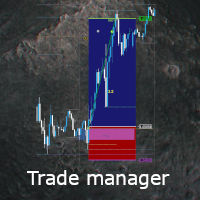
Flexible trade manager is a simple and effective trading tool for setting new order by pressing B as Buy or S as Sell on keyboard. All with ability to see additional characteristics before opening with predefined risk and observation of the risk and potential profit. Set and manipulate order levels straight from the charts or or place them right as pending orders
Additional buttons helps to
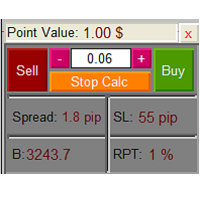
The Lot Calculation FJD is an expert for risk management for Meta Trader 4. This expert calculates the value of lot size for every position based on Trader’s given balance, Risk, and Stop loss. This expert is really user friendly, and calculates lot size with just a few clicks which helps traders specially the scalpers to open a position as quick as possible with respect to the Risk management.
The following inputs can be changed by the user: 1. Percentage of Risk per Trade (RPT %) 2. Balance
FREE

Strategy creation : Create lines of stop loss, entry and take profit. Live parameters such as lot size, gap in pip from SL to TP, Risk/Reward ratio are update whenever lines of SL and Entry move. This function allows traders to clarify their strategy before making any orders. Risk management - The risk calculation function calculates the volume for a new order taking into account the set risk and the distance from the Stoptloss to Entry Line. In addition, maximum risk (%), RR value are
FREE

Basic Trade Buttons is a tool to help you to quickly open and close trades, place take profit and stop loss points by clicking on the button of each job that you preferred. Once you attached this tool to mt4 chart, the program will calculate a trade volume(Lots size) automatically to prepare to send to the trade server when you click on 'Buy' or 'Sell' button. Click on 'TP', 'SL' or 'Close' button to place take profit, stop loss based on the predefined levels or to close all open positions respe

Plain — Semi-Automatic Trading, Your Direction
Plain keeps you in control: you choose the direction, and the EA handles the execution automatically. A clean, semi-automatic Expert Advisor for traders who want to call the bias and let automation do the rest.
What it does for you You set the direction: the EA opens and manages trades the way you decide. Hands-off execution: automation handles the mechanics once you've chosen the bias. Simple and transparent: no black box — you stay in charge. Fu
FREE
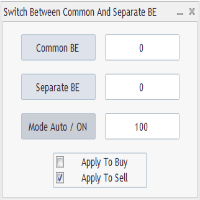
Advanced Auto BE. Program for switching between common and separate breakeven stop loss. Levels can be modified with user-defined point values The program also offers auto mode, where common/separate BE levels are switching depending on whether all positions are profitable. Calculation includes open prices . It can be used for BUY/SELL positions separately or together. HOWEVER I HAVE NEVER TESTED SITUATION, WHERE I HAD BOTH SELL AND BUY POSITIONS PROFITABLE ( I Mean AUTOMODE pyramyds) . Rememb
FREE
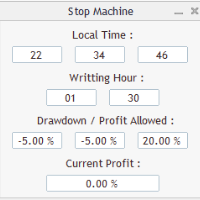
Close all orders immediately: if account balance is less/greater than allowed. PROGRAM USES ACCOUNT BALANCE, NOT EQUITY. Initial balance is calculated once a day if writting hour/minute comes ( local time is using ). It is also reset each restart program ( program does not read account balance from the past! ) Program is developed for VPS running purposes, to prevent from attempts of trading after daily DD limit is reached. I made decision to share this for free. It is not developed for commerci
FREE

Are you an intraday trader or do you want to close your open positions at a certain time each day? Problems with the time zone? use our tools and after specifying the time we will close the order for you.
How to use it:
1) Just insert our tools into your chart.
2) Enable auto trading
3) Expert Options enter TIMECLOSE (time to close operations)
If you need more information, do not hesitate to contact us privately.
FREE
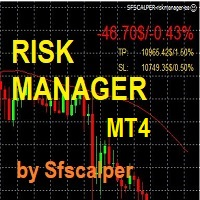
RISK CONTROL MANAGER
Now You can have the same control over risk management as big trading rooms, institutional investors and hedge funds. Managing risk is a fundamental operation for your brokerage. Choose your maximum desired risk exposure in percentage to Your account, set it on the RISK CONTROL MANAGER, the EA will check and make sure that You'll never exceed that. When You ignore the trading risk, and you leave your operations open, that potentially could lead to catastrophic trade expos
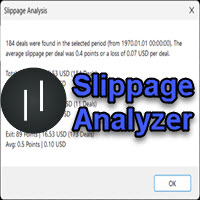
If you are using scalping strategies (or any strategy that uses stop loss orders for position closing) you need to know your slippage. Slippage is the difference between your order price and the price that your brokers uses to execute your order. This can be really different and depends on the broker as well as on the market conditions (news, trading hours, etc..) With this small script you can calculate the slippage you "paid" in points and also in your account currency. You also get average va
FREE
This trading bot automates order execution based on areas of interest drawn on the chart, such as supply and demand zones identified through order flow and institutional trading strategies.
It’s a multi-chart bot, meaning you only need to drag it onto one of your open charts—it will monitor all of them simultaneously. How does it work? Open the charts you want to trade. Drag the bot onto just one of the open charts. Set your preferences for Risk, Stop Loss Ratio, or Take Profit Ratio. Enable an
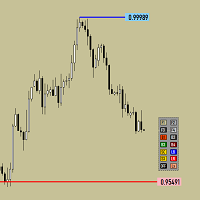
Утилита предназначена для изменения фона графика ,одним нажатием кнопки. Помимо изменения фона ,утилита также может менять цвет баров и свечей на графике.Из дополнительных опций ,это изменение размера графика а также линии с ценовой меткой.Панель можно включить и выключить,что дает возможность не захламлять график.Кнопка B2 помимо изменения цвета баров ,снимает выделение со всех объектов на графике.
FREE

Simply clock. Local time as default. There are possible to Select: Local Time /Server Time /GMT Time as input. Please take into account that the local time is the most accurate. However ,this clock always uses local time seconds, even If GMT / Server Time Is selected. I solved it this way to get more accuracy. Delays can occur when changing minutes or hours, if local time is not selected.
FREE

FREE UNTIL FEBRUARY 14, 2023
SPEND MORE TIME WITH YOUR FAMILY. ENJOY LIFE… DO NOTHING. This version is only auto set of Takeprofit and StopLoss
Main Version of TropangFX: MT4 Version | MT5 Version Recommended timeframe: H1 Supported currency pairs: GBPUSD, EURUSD, EURCHF , USDCAD, USDCHF , AUDCAD, EURCAD, EURAUD and many more...
Requirements
The EA requires good brokerage conditions: low spread and slippage during the rollover time. I advise using a really good ECN brok
FREE

Idea Pro Trend Premium This EA is a Semi-auto Trading Panel with a variety of strategic settings, such as those listed below. It is excellent for scalping or long-term trading by traders. This EA is simple and convenient to trade and attach to the chart with the default settings on AUDUSD, EURUSD, GBPUSD and NZDUSD.
How to use You can trade based on the trend that is displayed on the left-hand side of Info Panel. If the trend are" 2 Up Trend" and "2 Down Trend", please do not trade. Simply pro

As traders, we all know that risk management is the most important aspect of profitable trading. So, we need to determine the lot size, every time we need to open a new trade. The FX lot size calculator is a simple tool that will help you to determine your lot size easily without using any third-party service but you will be able to do that by your MetaTrader terminal. LIMITED TIME OFFER: 30$ FOR 10 ACTIVATION.
Inputs:
Maximum_Risk_Prc: To determine your preferred risk%. For example, if your ris
FREE

The Auto Percentage SL TP is not taking any trade! It was made especially for Proptrading Challenges like FTMO, Myforexfunds, Fundednext and many more. Most Propfirms ban your funded Live-Account if you do not set SL and TP soon after the trade. It is a tool to help setting automatically TP and SL based on given percentage in settings. You can add e.g. 1% risk for a trade and it sets the stop loss to 1% from your balance. Same with stop loss, which is default also 1%. But these values can be cha
MetaTrader 마켓 - 트레이더를 위한 로봇 및 기술 지표는 거래 터미널에서 바로 사용할 수 있습니다.
The MQL5.community 결제 시스템은 MQL5.com 사이트의 모든 등록된 사용자가 MetaTrader 서비스에서 트랜잭션을 수행할 수 있습니다. 여러분께서는 WebMoney, 페이팔, 또는 은행 카드를 통해 자금을 예치하거나 인출하실 수 있습니다.
