 MetaTrader 5
 Experts
 지표
지표
 라이브러리
라이브러리
 유틸리티
유틸리티
 위젯
위젯
 규칙
규칙
MetaTrader 4용 무료 트레이딩 유틸리티 - 6
 다음은 MetaTrader 4에서 외환 거래를 단순화하는 거래 프로그램입니다. 아래 목록의 유틸리티 위로 마우스를 가져가면 해당 설명과 용도를 읽을 수 있습니다.
SmartClose(Close All Orders) helps you close all your trades. You can use it on any symbol. You can also set a warm value to manage the risk. With these functions: Close Open Orders : Close all open trades in the trading account. You don't need to set a value for the "value" parameter. Close by Profit : Close trades when profit reaches a specific predefined level. You need to set a value for the "value" parameter. Close by Percentage : Close trades based on a certain percentage of the balance.
FREE

A "simple design" trading panel, which is characterized by small byte size, low CPU usage, simple steps, and quick operation, 1 to 2 clicks to complete a functional operation,
saving time and increasing efficiency . The panel is easy to use, and it is not complicated to set parameters, which is in line with traders' habits. At the same time, its compact-
design, clear at a glance, and comprehensive functions are a powerful tool for manual trading! Key features of the panel:
Click "Bid Price"
FREE

Find Your Fibonacci Entry Levels Automatically Fibonacci Entries is a FREE trading utility that automatically displays key Fibonacci entry levels from the selected candle—so you can quickly identify potential pullback areas without manually drawing Fibonacci levels. KEY FEATURES Automatic Fibonacci Entries
Automatically calculate and display Fibonacci levels from the selected candle. Key Entry Levels
Displays: 23.6% • 38.2% • 50.0% Last Candle Analysis
Use the previous candle as
FREE

The panel for the MT4 terminal is designed to help the trader quickly set pending orders for a breakout of the previous bar.
The utility calculates the order lot itself at the specified stop loss price and maximum loss percentage.
The panel also has a button for converting to breakeven. When you click, the stop loss of an open position is converted to the order opening price.
FREE

Script to create arrows and lines on chart of history positions traded on account for the symbol where you launch the application. From inputs you can select: - Magic number (default is -1; -1 = all magics number) - "From" date and time (default is 1970.01.01 00:00; all positions) - "To" date and time (default is 1970.01.01 00:00; all positions) - Color for buy open positions (arrows and lines between open and close) - Color for buy closing positions (arrows) - Color for sell open positions (arr
FREE

you can close all your positions in profit or lost when you use this robot. 1.you set your max profit and max lost for all your positions. 2.the robot show you in a window beside your chart. 3.when your equity reach your target close all your positions. 4.you can use one of them or both (profit or lost)togather. 5.this robot close all your positions. ((if you have any idea or want somthing i can help you)) i hope you win in all your times of life. best regard
FREE

Terminal Shutdown Timer closes the MetaTrader 4 terminal at a time you choose. That is all it does. It does not trade. It does not analyse the market. It does not send signals. It never opens, modifies or closes an order. What it does At the hour and minute you set, the terminal is closed. An optional on-chart warning appears before that, so the shutdown is never a surprise. The chart also shows the scheduled time and the time remaining. How to use it 1. Attach it to any chart. 2. Set the shutdo
FREE

Индикатор "Стрелки" (Arrow Drawing Tool) Краткое описание: Удобный инструмент для рисования стрелок на графике с помощью кнопки и мыши. Позволяет визуально отмечать направления движения цены, уровни поддержки/сопротивления и важные ценовые зоны. Основные возможности: Простое управление - кнопка "Стрелка" для активации режима рисования Автоматическая окраска - зеленые стрелки для движения вверх, красные для движения вниз Настраиваемый дизайн - регулируемая длина и угол наконечника стрелки Г
FREE

Pairs Navigator is a simple and easy-to-use tool that allows you to view all of your charts in a single window. This eliminates the need to open multiple charts from the Market Watch window, saving you time and effort. Pairs Navigator is also very lightweight, so it will not put a strain on your RAM or cause your MT4/5 platform to hang. To use Pairs Navigator, simply drag and drop the currency pairs you want to view into the Pairs Navigator window. You can then easily switch between charts by c
FREE

Free TrendLine EA opens trades whenever the price on the chart interacts with or crosses your trend line. You simply draw the trend line manually then let the EA do the trading automatically according to the rules you give it. The settings available in the EA are explained below: Lots : The lot size for trading. RiskPercentage : Set a value other than zero to activate lot sizing by use of percentage of margin. TrendLineName: The name of the line to track. You can either * rename the trend line t
FREE

MT4 vAccount Protector Basic Account Protector Basic is a streamlined risk management tool for MetaTrader 4 (MT4) that helps traders safeguard their accounts with clear, customizable limits.
Designed for simplicity and reliability, it ensures that trading remains disciplined and capital is protected. This EA closes all trades once the maximum loss is reached either in value or account percentage. It is especially useful for those trading prop funds account. Key Features:
Loss Selection You can
FREE

This is an ON CHART trade management panel. In other words, ON CHART Lot Size, Buy, Sell, Stop Loss, Take Profit, Close Buy, Close Sell and Close All buttons! *IMPORTANT NOTE: Input settings are NOT usable. You can change or insert Stop Loss and Take Profit values only on the chart panel. (See the below video!) This one is MT4 version!
BUTTONS List: 1. Lot Size - (0.01) is default click on it and insert the lot size with which you want to open a trade. 2. Stop Loss - (0.0) is default click on i
FREE

Protectron — Account Protection System A utility that monitors account equity in real time and closes all open positions automatically when a defined upper or lower threshold is reached. Works alongside any Expert Advisor or manual trading strategy without interfering with their logic. Overview Protectron attaches to a chart and monitors total account equity continuously — including floating positions. When equity reaches a configured threshold in either direction, all open positions are closed
FREE

a Perfect TradingPanel for who wants to have entry in a RANGE .
Join my channel ===> https://t.me/Ash_TheTrader
For example : You have a zone and you don't know where of the zone will be your entry so , you will use this Tool , to separate your risk per position and it will automatically calculate your LOT SIZE . Total risk base on martingale rules or Grid input . You can choose how many positions you want to have and it will calc the Lot size for you .
Features :
Enter in a range of p
FREE

Descripción del Asesor Experto "Mr. Beast Analyze" Nombre del Robot: Mr. Beast Analyze Descripción General: El Asesor Experto (EA) Mr. Beast Analyze está diseñado para proporcionar una visión completa y detallada del mercado a través de la visualización de información clave en la pantalla de MetaTrader 4 (MT4). Aunque el EA no realiza operaciones automáticamente, ofrece una amplia gama de datos útiles y gráficos que pueden ayudar a los operadores a tomar decisiones informadas. El EA se enfoca en
FREE

Range Analyzer calculates the Average True Range (ATR) values for different timeframes in pips to give a fast and simple overview about the volatility of the chosen symbol. Settings are very easy: bars for calculation: Choose the number of bars for calculation or use the default value (14 periods). from bar: Choose the youngest bar to start the calculation or use the default setting (0 = current bar). You can use it for forex, crypto, indices, commodities or for what ever you want.This expert is
FREE

Description Simple Trailing Manager is a professional MetaTrader 4 Expert Advisor that automatically manages trailing stops for your open positions. It provides a clean, visually intuitive interface showing exactly where your trailing stops will activate, helping you monitor your risk management strategy at a glance. Unlike standard trailing stop features, this tool gives you a visual preview of where your trailing stops will be placed before they activate, allowing you to plan your trades more
FREE

Utility for order reversal. Closes orders on the chart on which it is launched and opens orders with the opposite direction instead of them. Has a simple and intuitive graphical interface. It is also possible to automatically reverse newly opened orders. MT5 version of the utility - https://www.mql5.com/en/market/product/74770 If you like this utility, take a look at my other products - https://www.mql5.com/en/users/nina_yermolenko/seller
FREE
The utility manages other EAs' orders as well as the ones opened manually. It is capable of trailing the price (trailing stop function), set a stop loss and take profit if they have not been set before. When configuring the utility for an EA having no trailing stop function, place it to the new window with the same currency pair specifying the same Magic value (as for the EA orders the stop loss is to be applied to). You can set any timeframe. It does not affect the utility operation. Set Magic
FREE

MSMO Lot Pilot MT4는 MetaTrader 4용 사전 거래 로트 크기 계산기이자 정보 패널입니다. 수동 거래를 시작하기 전에 다음과 같은 실용적인 질문에 답할 수 있도록 도와줍니다. 선택한 위험 수준에 맞는 적절한 로트 크기는 얼마인가? Risk Percent, 심볼 포인트 기준의 예정 Stop Loss 거리, 그리고 Account Base를 설정하면 MSMO Lot Pilot MT4가 브로커가 제공하는 심볼 사양을 사용해 로트 크기를 계산하고, 최종 정규화된 거래량에 대한 추정 Actual Risk를 표시합니다. MSMO Lot Pilot MT4는 계산 및 정보 표시 전용 유틸리티입니다. 거래를 열거나 닫거나 수정하거나 관리하지 않으며, 매수 또는 매도 신호도 제공하지 않습니다. 주요 기능 위험 기반 로트 크기 계산 Balance, Equity, Lower B/E 또는 Higher B/E를 Account Base로 선택 가능 추정 Actual Risk를 금액과 퍼센트로
FREE

The goal of this indicator is to give you a quick & comprehensive view of your current profit. IceFX’s ProfitInfo is a utility indicator which displays the profit which is calculated from the actual trades on the chart(s). The indicator displays on a daily / weekly / monthly and yearly breakdown and shows the profit in pips / currency and percentage.
Main features: You can easily adjust IceFX’s ProfitInfo to display profit on the current open chart / current trade or even the profit of the enti
FREE

Close All Profit Orders for MT4 script - closes absolutely all orders, whether pending or market ones.
Orders are closed at the current profit/loss indicators at the time of closing.
The script is suitable for moments when you need to quickly close all orders at the current indicators.
The script is very easy to use, just drag the script onto the chart and it will do its job.
Add me as a friend, I have many other useful products.
FREE

Simple Grid Dynamic Engine – Expert Advisor for Automated Grid Trading Simple Grid Dynamic Engine is a flexible grid-based trading Expert Advisor designed for traders who want structured order management and dynamic position expansion in trending or ranging markets. Signal https://www.mql5.com/en/signals/2364992 Important Note: This is ideally to be used with a trade pad which will close the positions and if needed accrue a basket to TP/SL at a profit.
Compatibility with manual trade panels suc
FREE

This application is now replaced by Ofir Notify Light Edition (Free) or Ofir Notify (paid).
Thank all for your positive feedbacks.
Ofir Notify is a tool which send alerts on trades to Telegram Alert on any event concerning a position : Opening, Closing, modification (SL, TP) Send alerts to Chats, Groups and Channel Alert on Equity change Display Risk, Reward and progress of profit/lost for each position Customization of alerts ( only in full edition ) Sending charts screenshots with alerts
FREE

Ultimate MT4 to Telegram Public Channel sends controlled trades (via symbol, magic, comment) to a public telegram channel. It sends open and closed trades, including pending orders and TP/SL modifications, along with chart screenshots, to this public telegram channel. Additionally, you can send trade reports of open trades and summary profit/pip reports for day, week, or month. You can customize the design of the trade actions or reports with variables and emoticons.
A beautiful panel allows
FREE

Exaado Capital care If you've been searching for ways to manage Drawdown control, Drawdown Control, Balance protection, or Daily Drawdown Limit related to trading with Prop Firms, FTMO, My Forex Fund, or Funded accounts, then you've come to the right place. Additionally, if you're looking to safeguard your trading account, we can help. Do you struggle with managing your drawdown while trading funded accounts? Our EA is designed specifically for those in your position. Many prop firms have a "Tra
FREE

FOREXBOB AUTO CLOSER is a very handsome tool for manual traders who doing :- Scalping Correlation Hedging Those who use averaging methods etc. As this utility tool will help you by closing all your running trades when the universal floating P/L reaches a certain value that you will put in inputs. You may enable and disable the alert message on your mobile phone when auto closer close all the running deals on specified profit. You may add any message you want in notification. This tool consid
FREE

This indicator is designed to provide all useful information about symbol, account, positions and profit. It is developed for improving trader's money management.
Parameters Calc can be divided to separate blocks. Each block is possible to hide, set its own color and other properties. Block symbol: This block displays information about actual SPREAD, POINT VALUE (in deposit currency for 1 lot), SWAP LONG and SHORT. Show symbol info - display/hide this block Color of symbol info - color of this
FREE

Close All SELL Orders for MT4 script - closes absolutely all orders, whether pending or market ones.
Orders are closed at the current profit/loss indicators at the time of closing.
The script is suitable for moments when you need to quickly close all orders at the current indicators.
The script is very easy to use, just drag the script onto the chart and it will do its job.
Add me as a friend, I have many other useful products.
FREE

Close All BUY Orders for MT4 script - closes absolutely all orders, whether pending or market ones.
Orders are closed at the current profit/loss indicators at the time of closing.
The script is suitable for moments when you need to quickly close all orders at the current indicators.
The script is very easy to use, just drag the script onto the chart and it will do its job.
Add me as a friend, I have many other useful products.
FREE

Professional grid management EA with 3-tab GUI, progressive placement, 5 take profit levels (TP1-TP5), basket breakeven protection, and advanced trailing stop. Automatically manages manual trades with intelligent limit order distribution.
---
### KEY FEATURES
**3-Tab Interactive GUI** - STATUS: Real-time monitoring, profit tracking, trailing targets - SETTINGS: Runtime configuration without EA restart - TAKE PROFIT: Configure 5 sequential TP levels
**Progressive Order Placement** - Wave-
FREE

로고 MT4 버전: https://www.mql5.com/en/market/product/121289 MT5 버전: https://www.mql5.com/en/market/product/121290
워터마크 MT4 버전: https://www.mql5.com/en/market/product/120783 MT5 버전: https://www.mql5.com/en/market/product/120784
"로고" 스크립트는 MetaTrader 4(MT4)의 거래 차트에 사용자 지정 로고 또는 이미지를 배경으로 표시하도록 설계되었습니다. 이 스크립트를 사용하면 트레이더가 로고 또는 기타 원하는 이미지를 사용하여 차트를 개인화할 수 있습니다.
작동 방식:
이미지 준비: 먼저 차트에 로고로 표시할 이미지를 선택하세요. 이미지 편집 소프트웨어를 사용하여 이미지를 비트맵 파일 형식(.bmp)으로 변환하세요. 이미지 저장: 변환이 완료되면 .bmp 이미지 파일을 MT4 설치 경로의 다음 디렉
FREE

A complete copy trading EA suite that automatically replicates trades across MT4 and MT5 platforms. Supports all four combinations — MT4→MT4, MT4→MT5, MT5→MT4, and MT5→MT5 — in a single package. Uses the FILE_COMMON shared folder method for fast, reliable signal delivery within the same PC or VPS.
Overview
CopyTrading EA Suite is a utility package that automatically replicates trades between MetaTrader 4 and MetaTrader 5 platforms. A single Sender EA can broadcast signals to multiple Receive
FREE

This EA is literally a reverse of Recovery Zone Assistance, as its name says ... It is an assistant, an expert advisor that monitors all the orders for the asset in which it has been placed, no matter if that order was by some other expert advisor or by the trader placed on the Manually, he will start his work after each order that is negative. Find Recovery Zone Assistance on https://www.mql5.com/en/market/product/68909 This Expert Advisor is based on this sistem on video "Recovery Zone" on
FREE

Artemis Prop Guard Pro Artemis Prop Guard Pro is a professional risk-control utility for MT4, built for manual traders who want a disciplined, rule-based trading environment. It does not generate signals, predict market direction, or automate strategy logic. Its sole purpose is protecting account equity from avoidable rule breaks, over-risking, emotional trading, and unmanaged exposure. Why account discipline matters Most traders do not lose accounts in a single trade. They lose them through a c
FREE

The Parabolic SAR Trailing Stop will trail the Stop Loss price of your selected orders following the PSAR indicator, so you don't have to worry about having to change it manually.
How does it work? The Expert Advisor sets and moves the Stop Loss price of the selected orders following the value of the PSAR Indicator. You can filter the Orders by Symbol Comment Magic Number Buy/Sell
Parameters PSAR Step - The Step of the PSAR PSAR Max Step - The Max Step of the PSAR PSAR Shift - The Shift of the
FREE

CurrencyStrength – 실시간 통화 강도 순위 표시 CurrencyStrength 는 8대 주요 통화(USD, EUR, JPY, GBP, CHF, AUD, CAD, NZD)의 강도를 실시간으로 수치화하고, 등락률을 기반으로 시각적으로 순위화해 패널에 표시하는 유틸리티 EA입니다.
초 단위로 통화 강도를 자동 시각화하여, 수동·자동 거래자 모두에게 통화쌍 선택과 매매 판단의 정확도를 크게 높여줍니다. 주요 기능 8개 주요 통화의 강도를 실시간 계산 및 자동 갱신(기본값: 1초마다) 각 통화의 등락률을 최근 종가와 이전 종가의 차이로 산출하여, 순위 패널로 표시 통화명과 등락률(예: USD +0.23) 표시, 강한 통화는 상위, 약한 통화는 하위에 배치 이전(1봉 전) 순위도 동시에 표시되어, 통화별 흐름과 변화를 한눈에 파악 가능 상위 3개 통화는 녹색, 하위 3개 통화는 빨간색, 중간 통화는 흰색 또는 회색으로 표시해 가독성 강화 패널 위치, 크기, 시간 주기, 글꼴 크기
FREE

This tool automatically sets stop loss and take profit when opening orders.
The information is displayed in the lower right corner of the terminal and displays the lot size, stop loss and take profit levels, as well as the current profit/loss in points for each open order.
It is possible to close orders. to do this, double-click the desired order in the lower right corner and simply move it to the left.
It also displays recommendations for the current instrument in the form of OPEN BUY, KEEP
FREE

New version 1.22. Partagas
The AG algorithm is an element of a comprehensive trading system for trading a basket of currencies across 8 major currencies across all 28 currency pairs. The algorithm serves as a signal block for determining entry/exit from a position. To collect initial values, AG uses data from the CSS Currency Slope Strength cluster indicator. This indicator was not chosen by chance - it performed very well during testing of the algorithm. A. AG determines the width of the e
FREE

Rick FX Academy Professional Trading Template MT4 Upgrade your MetaTrader 4 workspace with a clean and professional trading template designed for Forex, Gold, and Silver traders. The Rick FX Academy Professional Trading Template provides a modern black trading environment that helps traders focus on price action, market structure, and technical analysis. Designed for manual traders, strategy developers, and EA users who want a professional chart setup without spending hours customizing MT4. Feat
FREE

Account Info EA It is a tool that presents on the graph all the positions of the account, and specific information concerning the positions, but also the account. It enables the user to have an image of his account at a glance. Use like any expert advisor. You can't attach it in the same chart with other expert advisor. It does not have the ability to open or manage positions. You can attach it on any chart and any timeframe.
FREE

The indicator shows support and resistance levels as horizontal lines. It shows the highs and lows of former days, weeks and month in every chart.
How to work with support and resistance levels show the EA Limit Scalper and the Universal Moving Average Expert Advisor (UniMA EA) .
When the tip of the coursor is on a line (mouseover) it shows the real value of the level and which high or low is shown, see explanation below.
The indicator must be installed like an expert advisor ! To se
FREE

This is a free version of our Great tool with limited functions. The ChartChanger is a great utility tool to reduce the number of open charts on your terminal. There is three section to it: Symbols, Time frames and Templates. You need only one chart to be open and still you can scroll up to multiple ones. Symbols: With the push of a button you can change from one symbol to another, and your applied indicators will stay on the next chart. For the symbols there is an auto detection mode, or you ca
FREE

Telegram Signals Copier is a fully automated software that reads messages from Telegram and inserts them as orders on your MT4 terminal.
It comes with an advanced risk management tool, that can risk based on a % of your balance, fixed loss, and many other options.
You can fully customize how you take the signals, change the TP and SL level.
With an advanced analytics tool, you can see where your favorite signal providers are doing the most profit, and improve the profits even more.
Contact
FREE

Handle orders for different magic -1 for all magic, 0 for manual orders, 1-XXXXXX for EAs For example, if you want to control orders from EA with magic 3333, your manual orders, type 0;3333 Close on exact time, example. close order every XX:15 --> Close all on 00:15, Close all on 11:15, Close all on 12:15... Close on Loss, close the loss for single order, close the loss for the whole magic number.
Parameters Description (-1 for all magic)(0 for manual orders)
List of the magic to check - 0;1;2
FREE

The main purpose of this expert advisor is to protect your hardly gained profits. Once the market goes in your favor, with amount of specified pips [configured via EA inputs], the EA will do the following: Move the Stop-loss of the profitable positions to Breakeven. Lock in some profits, i.e put the SL above/below your entry with specified pips Will close part of position, % of lots, once the EA was triggered. By default, the "Move to Breakeven EA" will modify all opened positions on the termi
FREE

The new version of MirrorSoftware 2021 has been completely rewriten and optimized.
This version requires to be loaded only on a single chart because it can detect all actions on every symbol and not only the actions of symbol where it is loaded.
Even the graphics and the configuration mode have been completely redesigned. The MirrorSoftware is composed of two components (all components are required to work): MirrorController (free indicator): This component must be loaded into the MASTER
FREE
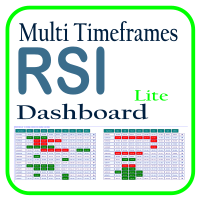
Optimize your trading analysis with the RSI Multitimeframe Dashboard, a powerful tool designed to streamline RSI monitoring across all timeframes and symbols listed in your Market Watch. This dashboard delivers real-time insights and alerts, making it essential for traders who rely on RSI to identify potential market entries and exits. Key features include: Comprehensive RSI Overview : Instantly view RSI values for every timeframe across all Market Watch symbols, making multi-timeframe analysis
FREE

뉴스 필터를 사용하는 데 필요한 스크립트입니다. 이 스크립트는 필터링할 차트를 선택하고 입력을 뉴스 필터 프로그램으로 보냅니다. 모든 입력은 해당 차트에만 적용되므로 차트마다 다른 입력을 유연하게 설정할 수 있습니다. 뉴스 필터(무료 데모)에 대한 링크는 아래에서 확인할 수 있습니다: 뉴스 필터 가이드 + 다운로드 링크
뉴스 선택 뉴스 소스는 Forex Factory의 경제 캘린더에서 얻어집니다. USD, EUR, GBP, JPY, AUD, CAD, CHF, NZD 및 CNY와 같은 어떤 통화 기준으로 선택할 수 있습니다. Non-Farm (NFP), FOMC, CPI 등과 같은 키워드 식별을 기준으로 선택할 수도 있습니다. 저, 중, 고 영향을 가지는 뉴스를 필터링할 수 있도록 선택할 수 있습니다. 차트와 관련된 뉴스만 선택하는 자동 모드가 있습니다. 뉴스 소스는 최신 뉴스 데이터를 보장하기 위해 매 시간 자동으로 새로 고칩니다. 각 뉴스 영향 수준에 대한 별도의 입력이 제공되어
FREE

Supports manual bi-directional orders. Once in floating profit, the system automatically executes partial take-profit based on set parameters, moves the stop-loss to the entry price (breakeven), and continues to hold the remaining position. Fully compatible with Teacher Zhang's trading system. Ideal for those with slower reaction times, seniors, beginners, and students in retraining. The full version features fully adjustable parameters.
FREE

Simple Strategy Checklist Panel, as its name suggests, is a panel that works as a checklist, and can place up to twenty lines of text. This was created for traders who want to have their trading plan or to-do list at hand, a simple but useful product for many.
I will write this pointless paragraph since Metatrader asks me to put a minimum of 6300 characters, so I also explain that the list can also be used to make purchases from the supermarket! Example bread, milk, flour and much more... Enjo
FREE

Simple setting Attach Magic SL TP Trailing to single fresh chart and to manage all orders please set SL TP 0 for other Expert advisor .
This is Free, if you found this useful please give feedback and 5 STAR (if you need more function on this please feel free do DM)
Chart Selection :- if select all chart then EA will manage all chart or if select single chart then EA will manage current chart only
Choose Trailing Method :- you can select trailing method how you want to trail
Choose SL & TP M
FREE

This indicator provides essential information in a simple table about market range and identify whether the market has touched important pivot levels and breakout previous high/low. This version is still in the testing phase and is being offered for free and can only be used for a period of 3 months. We value your feedback to help us improve this application.
FREE

The AllClosedMT4 utility in the form of an expert. The utility is designed for closing all open positions simultaneously based on the total profit (in the deposit currency) of all open positions. The utility can be attached to any chart with any trading instrument.
Parameters Profit - the total positive profit in the deposit currency, at which all open positions are closed (profit). Stop - the total negative profit in the deposit currency, at which all open positions are closed (loss). The valu
FREE

Description: Automatic Equity Manager EA manages the whole account equity. You need to set it up on its own chart. -----------------------------------------------------------------------------------------------------------------------------------------
Parameters: EquityGainPercent = 3 (This automatically closes all trades when your equity shows a gain of X percent.) ---------------------------------------------------------------------------------------------------------------------------------
FREE

It computes BUY and SELL lot sizing in either % of balance or in fixed intervals. In market orders, this EA contains the adaptive slippage, logs tickets for instant confirmation of opening trades, and contains every market symbol at a glance. Real-time balance/equity display keeps margin health in view without tab-switching, toggling spread if needed for liquidity checks. Compact left-panel layout minimizes screen real estate, empowering blind trades where speed trumps overanalyze—perfect for
FREE

Smart Lot-Size Calculator And Trade Assistant for Mobile Trading Overview: This is the tool every trader in the market must have no matter if you are scalper, swing traders, day trader, or long term trader. This On-The-Go trading tool will help you stay disciplined and also stay free from daily trade management chores, Most traders face common problems like 1. Calculation of proper lot-size of a position to take controlled risk 2. Managing every trade and trailing stop-loss if trades goes in
FREE

The Scientific Calculator is a script designed to compute science, engineering and mathematics expressions.
General Description
The expression to calculate must obey syntax rules and precedence order, being constituted by the following elements: Integer and real numbers. Mathematical operators for addition (+), subtraction (-), multiplication (*), division (/) and exponentiation (^). Mathematical and trigonometric functions . Curved parentheses (()) to define the precedence and co
FREE

Panoramica Pending Order Assistant è progettato per automatizzare la creazione di ordini pendenti Buy Stop e Sell Stop su coppie di valute specifiche ( EURUSD, GBPUSD, AUDUSD ). Questo EA consente ai trader di impostare facilmente livelli di entrata strategici senza dover posizionare manualmente gli ordini.
Funzionalità Principali Creazione Automatica di Ordini Pendenti L'EA genera automaticamente 4 ordini Buy Stop e 4 ordini Sell Stop appena viene attivato sul grafico. Gli ordini sono distanzi
FREE

이 무료 도구가 마음에 드셨다면 별점 5점을 남겨주세요! 정말 감사합니다 :) "위험 관리 어시스턴트" 전문가 자문 컬렉션은 다양한 시장 상황에서 효과적으로 위험을 관리하여 거래 전략을 강화하도록 설계된 포괄적인 도구 모음입니다. 이 컬렉션은 평균화, 전환, 헤지 전문가 자문의 세 가지 핵심 요소로 구성되어 있으며, 각 요소는 다양한 거래 상황에 맞춰 고유한 장점을 제공합니다.
이 EA는 시중에 나와 있는 표준 위험 관리 전략을 기반으로 개발되었습니다.
https://www.mql5.com/en/blogs/post/756961
1. "평균화 어시스턴트" EA: MT4: https://www.mql5.com/en/market/product/115468 MT5: https://www.mql5.com/en/market/product/115469 2. "스위칭 어시스턴트" EA: MT4: https://www.mql5.com/en/market/product/115478 MT5: ht
FREE

If you can not create a background image for yourself (photo size and format must be changed), let me know. I make your photo for free. Otherwise, you can read the help file . A tool for chart management You can change the background image You can change the background color Change the color of the candles Volume colors, line charts and everything else You can also enable and disable some items Read the help file for more information
Settings:
Save Changes After Remove Tool
Back Ground Photo
FREE

MT4 Alert Sender is a free ea tool that help you send the alert messengers in MT4 program for many different purpose with ease. Very simple and effective, you only need to input the alert content in a input box, then click a "Send Alert" button. The EA will send alert message. An alert pop-up shows your content in a new window pop-up.
You can combine of using MT4 Alert Sender EA with any other tools out there for your need. Thanks for your trust in my product.
FREE

The Expert Advisor allows to move the stop loss following the price, which gives you the ability to protect the floating profit from sudden price reversals. It is possible to use a simple trailing stop which moves the stop loss at the specified distance from the price, as well as based others based on various indicators.
Parameters Magic - unique magic number for identifying positions, if 0 - no number; Trailing - select the type of trailing stop: Simple, Fractals, ParabolicSar, ZigZag; Trailin
FREE

The Master utility is free, and you can buy/rent the client side utility from : https://www.mql5.com/en/market/product/41923
Now you can trade on multiple MetaTrader 4 accounts simultaneously, mirror the trades of any trading bot to your friends and family accounts (even if it is locked to your MT4 account number), create investment portfolios of many MT4 accounts, remove risk of unregulated Forex brokers, turn losing trading strategy into a winner and become an independent account manager imm
FREE

Simple and unobtrusive utility for displaying weeks, days and hours
Options to control the display of separator lines and labels allow you to customize them to your own taste Display of the separator lines either only in the main chart, or across any indicator windows Automatically reduce intensity of less relevant separator lines and labels for the chart‘s current magnification
FREE

This free MT4 indicator allows you to easily compare as many symbols as you want! Make sure that the input symbol matches the name displayed in the Market Watch ***Please comment, rate and share it to your friends if you like it*** ------------------------------------------------------------------------------ Comparing trading pairs is useful for several reasons, including: Identifying relative strength: Comparing trading pairs can help traders identify which currency or asset is relatively stro
FREE

Trade History Export: The EA retrieves all historical orders using the OrdersHistoryTotal() and OrderSelect() functions. For each order, the following details are exported: Index: Sequential number of the trade. Order Ticket: Unique identifier of the order. Symbol: Trading instrument (e.g., EURUSD). Lot Size: Volume of the trade. Open Time: Time when the trade was opened. Trade Type: Buy or Sell. Open Price: Price at which the trade was opened. Close Time: Time when the trade was closed. Clos
FREE

Stay ahead of market movements with precision and efficiency using DG Price Alerts , a MetaTrader 4 indicator designed for traders who demand accuracy and flexibility. This powerful tool is crafted to provide instant notifications when price levels are touched or breached, ensuring that you never miss a crucial market opportunity. Key Features: User-Friendly Interface: Seamlessly navigate through our intuitive graphical user interface. Effortlessly set up alerts by placing horizontal lines, tren
FREE

This is an **MT4 Indicator called “Elsna Dashboard”**, designed as a **monitoring dashboard**. Its main functions are:
**1. Dashboard Display**
* Shows key account info:
* Balance & Equity * Floating Profit/Loss * Floating Pips * Number of open trades * Spread * Total lot size * Duration of the oldest trade * Automatically positions and color-codes these values.
**2. Trade Alerts**
* Plays a sound when a trade opens or closes.
**3. History Recording**
* Records balance an
FREE

MULTI TRADER TOOL - SUPPORT / RESISTANCE, ONE CLICK CLOSE / OPEN, AUTO CLOSE, GRID ORDERS, ALERTS.
You should use this Panel on FULL SCREEN MODE (F11).
HotKeys: B - Open Market Buy Order with OneClickOpen Settings. S - Open Market Sell Order with OneClickOpen Settings. G - Open Grid Orders with Grid Panel Settings. R - Add Support/Resistance Settings to selected trend and horizontal lines. If you have any questions, ask in a private message or in the comments section.
FREE
MetaTrader 마켓은 거래로봇과 기술지표를 판매하기에 최적의 장소입니다.
오직 어플리케이션만 개발하면 됩니다. 수백만 명의 MetaTrader 사용자에게 제품을 제공하기 위해 마켓에 제품을 게시하는 방법에 대해 설명해 드리겠습니다.
