 MetaTrader 5
 Experts
 지표
지표 스크립트
스크립트 라이브러리
라이브러리 보관함
보관함당사 팬 페이지에 가입하십시오

Professional Close All Positions Panel - MetaTrader 5용 expert

- 조회수:
- 169
- 평가:
- 게시됨:
- 업데이트됨:
-
 이 코드를 기반으로 한 로봇이나 지표가 필요하신가요? 프리랜스로 주문하세요
프리랜스로 이동
이 코드를 기반으로 한 로봇이나 지표가 필요하신가요? 프리랜스로 주문하세요
프리랜스로 이동


원클릭으로 모든 포지션 청산 - 전문 트레이딩 패널
// 전체 소스 코드는 첨부된 MQ5 파일 참조
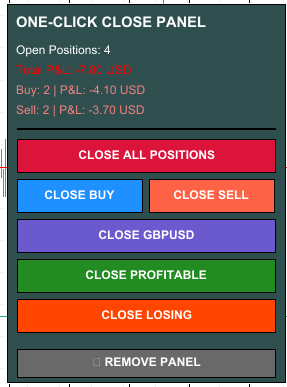
이 강력한 시각적 패널로 비상 포지션 관리가 쉬워졌습니다.
🎯 기능
차트에 세련된 제어판을 추가하여 고급 필터링 옵션으로 즉시 포지션을 청산할 수 있는 전문 트레이딩 어드바이저. 긴급 상황, 뉴스 이벤트 또는 빠른 위험 관리 결정에 적합합니다.
주요 특징
- 한 번의 클릭으로 모든 포지션 즉시 청산
- 매수 포지션만 청산
- 매도 포지션만 청산
- 현재 심볼에 대해서만 포지션 닫기
- 수익성 있는 포지션만 청산
- 손실 포지션만 청산
- 실시간 포지션 카운터 및 손익 표시
- 색상으로 구분된 수익/손실 표시기(녹색=수익, 빨간색=손실)
- 청산 전 손익을 보여주는 안전 확인 대화 상자
- 간편한 패널 제거 버튼
- 완전히 사용자 지정 가능한 색상 및 패널 위치
- 모든 심볼 및 차트주기에 사용 가능
- 즉각적인 실행으로 지연 제로
🛡️ 안전 최우선
모든 청산 작업은 실행 전에 정확한 손익 금액을 보여주는 대화 상자를 통해 확인을 받아야 합니다. 실수로 포지션을 청산하는 일은 절대 없습니다.
💡 완벽한 대상
예상치 못한 뉴스 발생 시 긴급 포지션 종료
목표가 도달 시 빠른 이익 실현
계좌 보호를 위한 신속한 손실 차단
✓ 일중 포지션 정리
✓ 전문적인 리스크 관리
✓ 스캘퍼 및 데이 트레이더
✓ 즉각적인 출구가 필요한 뉴스 트레이더
🎨 풀 커스터마이징
- 패널 위치 선택 (4개 모서리 중 하나)
- 모서리로부터 X 및 Y 거리 사용자 지정
- 모든 색상 변경 (배경, 버튼, 텍스트)
- 전문적인 색 구성표 포함
📊 실시간 정보
패널이 지속적으로 업데이트됩니다:
- 총 오픈 포지션 수
- 계좌 통화로 표시되는 총 손익
- 매수 포지션 수 및 손익
- 매도 포지션 수 및 손익
- 모든 항목을 색상으로 구분하여 명확하게 볼 수 있습니다.
⚙️ 입력 매개변수
모든 설정은 간단하고 잘 설명되어 있습니다:
- 패널 코너 - 디스플레이 위치 선택
- 패널 X/Y 거리 - 위치 미세 조정
- 색상 - 배경, 버튼, 텍스트
- 모든 매개변수에는 명확한 설명이 있습니다.
🚀 매우 사용하기 쉬움
1. EA를 차트에 드래그하세요.
2. 자동 거래 활성화 (도구 모음의 녹색 버튼)
3. 패널이 자동으로 나타납니다.
4. 아무 버튼이나 클릭하여 포지션을 청산합니다.
5. 조치를 확인합니다.
6. 완료! 완료되면 패널 제거
⚡ 고성능
- 초경량 코드
- CPU 오버헤드 또는 메모리 문제 없음
- 즉각적인 버튼 반응
- 100개 이상의 포지션을 손쉽게 처리
- 변동성이 큰 상황에서도 지연 없음
✅ 테스트 및 신뢰성
여러 브로커, 계좌 유형 및 시장 조건에서 철저한 테스트를 거쳤습니다. 포괄적인 오류 처리, 상세 로깅, 스마트 주문 체결 모드(FOK/IOC/RETURN)가 포함되어 호환성을 극대화합니다.
🆓 완전 무료
- 숨겨진 비용 없음
- 포지션 제한 없음
- 만료일 없음
- 평가판 기간 없음
- 평생 100% 무료
📞 뛰어난 지원
질문이나 문제가 있으신가요? 댓글을 남겨주시면 빠르게 답변해드리겠습니다! 사용자가 이 도구를 최대한 활용할 수 있도록 최선을 다해 돕겠습니다.
⭐⭐⭐⭐⭐ 도움이 되었다면 평가해주세요! ⭐⭐⭐⭐⭐
이 EA가 시간이나 비용을 절약해 주었다면 10초만 시간을 내어 평가해 주세요!
귀하의 평가는 다른 트레이더가 이 무료 도구를 발견하는 데 도움이 됩니다.
여러분의 성원에 감사드립니다! 🙏
---
📥 설치 지침
1. 파일 다운로드
2. 메타트레이더 5 열기
3. 메타에디터를 엽니다(F4 또는 도구 → 메타콰이어 언어 편집기 누르기).
4. 파일 → 데이터 폴더 열기
5. EA 파일을 MQL5 → 전문가 폴더에 복사합니다.
6. MT5를 재시작하거나 내비게이터 새로고침(오른쪽 클릭 → 새로고침)
7. 내비게이터 → Expert Advisors에서 "OneClickCloseAll"을 아무 차트에나 드래그합니다.
8. 설정 창에서 "확인"을 클릭합니다.
9. 도구 모음에서 "자동매매" 버튼이 활성화(녹색)되어 있는지 확인합니다.
10. 차트에 패널이 나타나면 사용할 준비가 된 것입니다!
⚠️ 중요 요구사항
- 메타트레이더 5 플랫폼
- 자동매매가 활성화되어 있어야 합니다(녹색 버튼).
- 모든 종목 및 차트주기에서 작동
- 데모 및 실거래 계좌 지원
- 모든 브로커 호환
🔧 문제 해결
버튼이 작동하지 않는 경우
1. 자동매매가 켜져 있는지 확인합니다(녹색 버튼).
2. 도구 → 옵션 → 전문가 조언자 → "자동매매 허용"이 체크되어 있는지 확인합니다.
3. 필요한 경우 EA를 다시 컴파일합니다(메타에디터에서 F7).
4. 전문가 탭에서 오류 메시지를 확인합니다.
💬 피드백 환영
항상 개선점을 찾고 있습니다! 기능 요청이나 제안 사항이 있으시면 의견을 남겨주세요.
---
버전 히스토리
v1.00 - 초기 릴리스
- 6가지 포지션 마감 필터
- 실시간 손익 표시
- 안전 확인
- 전체 사용자 지정
- 전문 GUI
---
🎁 더 많은 무료 도구가 곧 제공될 예정입니다.
더 많은 무료 트레이딩 유틸리티를 사용하려면 팔로우하세요!
MetaQuotes Ltd에서 영어로 번역함.
원본 코드: https://www.mql5.com/en/code/67011
 멀티맥시그널
멀티맥드시그널 인디케이터는 서로 다른 주기의 6가지 MACD 인디케이터 값을 사용하여 현재 추세에 대한 정보를 표시합니다.
간_멀티_트렌드
마이너, 중간 및 메이저 추세 표시기
Candle Time Count Down
현재 캔들 x 시간 후 마감 예정
멀티알비시그널
멀티알비시그널 표시기는 서로 다른 기간의 4개 RVI 표시기 값을 사용하여 현재 추세에 대한 정보를 표시합니다.