Currency Strength Matrix Pro
- インディケータ
- バージョン: 1.0
- アクティベーション: 10

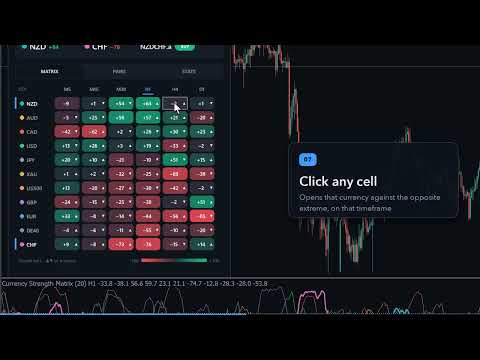
Currency Strength Matrix measures the strength of the 8 major currencies from all 28 pairs, plus gold and any indices you add, and shows it three ways on one chart: a multi-timeframe heatmap (M5 to D1), strength lines in a sub-window, and an automatic strongest-vs-weakest pair picker. Click any cell or pair and the chart switches to it. Closed bars never repaint, and the indicator shows you how its own picks behaved on the history you have loaded.
How strength is measured
- Each currency is compared with the equal-weight basket of the 8 majors, using all 7 of its pairs: the change over the last N bars (20 by default).
- The change is divided by the currency's own volatility (RMS of its one-bar moves over 100 bars), so JPY, CHF and the commodity currencies are on the same scale, then mapped to −100 … +100 and lightly smoothed (EMA 3).
- Gold and indices are measured against the same basket: XAUUSD's change plus the USD basket, US500 / USTEC / DE40 / UK100 / JP225 against the basket of the currency they are quoted in. So they sit in the same table as the currencies.
- Delta of a pair = strength of the base − strength of the quote (−200 … +200).
- No repainting: each closed bar is calculated once from closed data and never changes. Only the forming bar of the lines moves with the market. The matrix, picker, statistics and alerts use closed bars by default.
Dashboard
- Header: strongest and weakest currency and the top pick (for example GBPJPY BUY, delta +128) for the chart timeframe. Click the top pick to open it.
- MATRIX tab: a heatmap of every currency (and gold / indices) on up to 8 timeframes (M5, M15, M30, H1, H4, D1 by default). Green = strong, red = weak, small arrows = rising or falling since the previous bar. Rows are sorted by strength on the chart timeframe, and the two currencies of your chart are marked.
- Click a cell: the chart opens that currency against the opposite extreme on that timeframe (for example NZD on H4 → NZDJPY H4).
- Click a timeframe header: the chart switches to that timeframe.
- Click a currency: opens its best pair on the chart timeframe.
- PAIRS tab (pair picker): the tradable pairs ranked by |delta|, with BUY / SELL, the delta bar and coloured squares for every matrix timeframe that agrees (|delta| ≥ 10 by default), for example 5/6. Click a pair to open it.
- STATS tab: how the top pick moved over the next N bars (10 by default) on the loaded history of your chart, with non-overlapping samples. It shows the hit rate, the average move in the pair's own volatility units, a cumulative curve, the same figures for all pairs as a baseline, and how extreme deltas behaved. 50 % and 0 σ mean no edge.
- Status line: how many of the 28 pairs were found at your broker, which extras are active, the symbol suffix in use, and history-loading progress. When data is missing you see it.
Strength lines
- One line per currency (plus gold / indices) in a fixed −100 … +100 sub-window with ±50 levels.
- The two currencies of the chart symbol are drawn bold. Labels at the right edge are sorted by strength and never overlap.
- Buffers for EAs: one per instrument (0–13), chart-pair delta (14), top-pick id (15: 0–27 pairs in the order EURGBP, EURAUD, EURNZD, EURUSD, EURCAD, EURCHF, EURJPY, GBPAUD … CHFJPY; 28+ = gold / extras) and top-pick delta (16).
Alerts (closed bars only)
- Strength crossover: the base crosses above or below the quote, for the chart symbol or for all pairs.
- Extreme delta: |delta| enters the extreme zone (100 by default), for all pairs or the chart symbol.
- New top pick (optional).
- Popup, push notification, email and sound. One alert per event and bar.
Brokers and symbols
- Automatic symbol resolution: suffixes and prefixes (EURUSD.a, EURUSDm, m.EURUSD …) are found automatically. If both a close-only and a fully tradable variant exist, the tradable one is used. A manual prefix / suffix can be set.
- Missing pairs are skipped; a currency needs at least 3 of its 7 pairs. History is loaded in the background and the dashboard shows the progress.
- Works on any chart symbol and timeframe (forex, gold, indices, crypto) and in the Strategy Tester, so the free demo is the full product.
- Low CPU: the history is calculated once, then one bar at a time. The matrix updates only when a timeframe gets a new bar.
Display
- Modern canvas dashboard with dark and light themes (automatic from your chart colours, or one click).
- Scales with your screen (100–200 % DPI or a fixed %) and shrinks to fit if the chart is small.
- Movable (drag the header), minimisable to one line that still shows the top pick, and it remembers its tab, theme and position per chart.
Validation: what the picks did on 2021–2026 history
We ran the indicator's own engine with its default settings over the IC Markets demo history (28 pairs + gold, closed bars, non-overlapping samples, no costs) and measured how the strongest-vs-weakest pick moved over the next bars. On H1 (35,650 picks since 2021), H4 and M15 the pick's average move over the next 1–12 bars was between −0.04 and +0.02 of the pair's own volatility (σ), and it moved in the pick direction 48–49 % of the time: no follow-through edge. On D1 the pick tended to partly reverse (it moved with the pick only 39–45 % of the time over the next 4–24 days, −0.11 to −0.28 σ, 57–342 samples), and the larger the strength gap, the stronger the reversal. The full tables and charts are on the screenshots.
In short: currency strength describes what has already happened. It is useful context (which pairs are trending, which side is stretched, where an extreme gap may be exhausted), but buying the strongest and selling the weakest currency is not an edge by itself. Use the matrix as context and a filter (which side of which pair), not as a stand-alone entry signal, and check the STATS tab on your own symbol and timeframe. This is an analysis tool. Past behaviour does not guarantee future results.
Main inputs
- Strength period (20), volatility normaliser (100), smoothing (3), matrix timeframes ("M5,M15,M30,H1,H4,D1"), use the forming bar (off), bars of lines and statistics (1500).
- Gold on/off, extra instruments (e.g. "US500,USTEC,DE40,UK100,JP225"), symbol prefix / suffix (empty = automatic), picker includes gold / extras.
- Pairs listed (8), minimum |delta| for a timeframe to agree (10), statistics horizon (10 bars).
- Alerts: crossover + scope, extreme delta + threshold + scope, new top pick, popup / push / email / sound.
- Dashboard on/off, theme, scale %, corner and offsets, font, line labels, line widths.
Quick start
- Attach the indicator to any chart (for example EURUSD H1). Wait a few seconds while the history of the 28 pairs loads; the status line shows the progress.
- Read the header: the top pick is the pair between the strongest and the weakest currency. Check the MATRIX for agreement across timeframes, or the PAIRS tab for the ranked list.
- Click a cell or a pair to open it. Use your own entry and risk rules.
- Enable the alerts you want (push notifications need MetaQuotes ID in Tools → Options → Notifications).