Backtest Verdict MT5

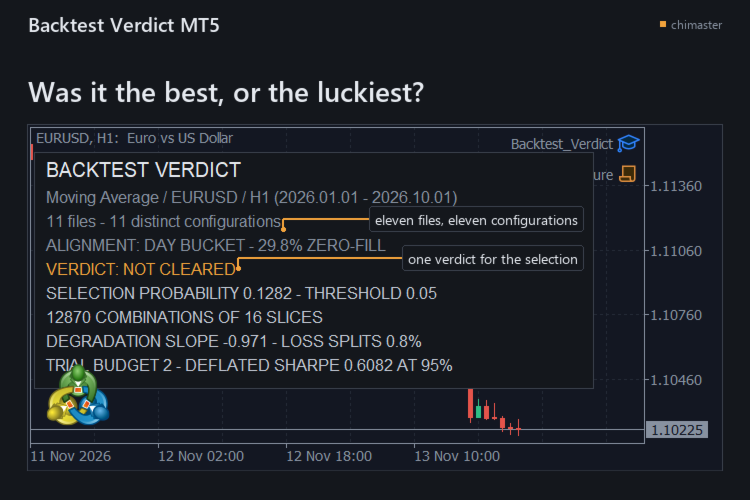
Tells you how likely it is that the best result in your backtest folder was the luckiest, for the trader who kept the winner of a parameter sweep. It re-runs your choice across every split of the closed trades and answers the overfitting question with one selection probability and one verdict.

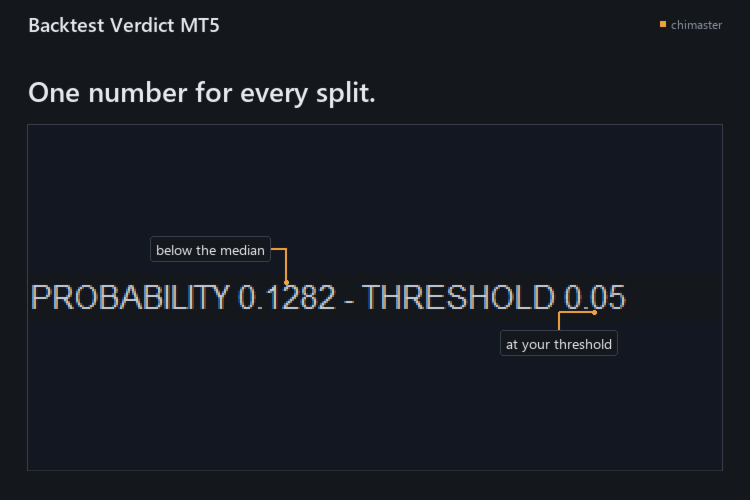
  • See whether the winner held up: the timeline is cut into S slices and every half-and-half split picks the best configuration on one side and ranks it on the other, and the share of splits where it fell below the median is your selection probability.
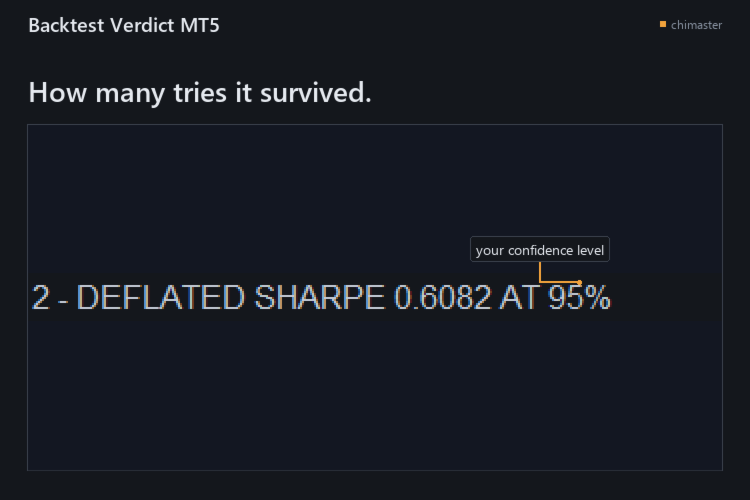
  • Count the tries behind the result: a deflated Sharpe ratio and a trial budget say how many configurations it would have survived at your confidence level.
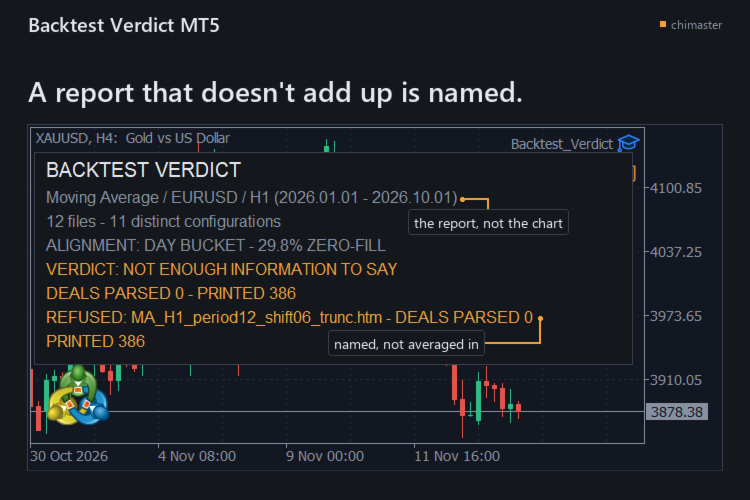
  • Catch a report that does not add up: every deal row must reconcile to the report's printed deal count and net within 0.01, or that file is named and refused instead of averaged in.
  • Read the folder as it is: the .htm and .html files the Strategy Tester wrote are enough, with no tester call, no re-export and no internet connection.
  • Keep the evidence: one text report holds the verdict, the numbers behind it, the settings used, and a SHA-256 fingerprint and deal counts for every report read.
  • Count configurations, not files: two reports with the same closed-operation series count as one configuration, so a copied export does not add a trial you never ran.

HOW IT WORKS

  • Export each configuration's report from the Strategy Tester as HTML into one folder.
  • Attach the tool to any chart, name the folder, and type the number you tried if the folder is missing some.
  • Read the verdict on the chart, then open the text report for the numbers behind it.

SETTINGS

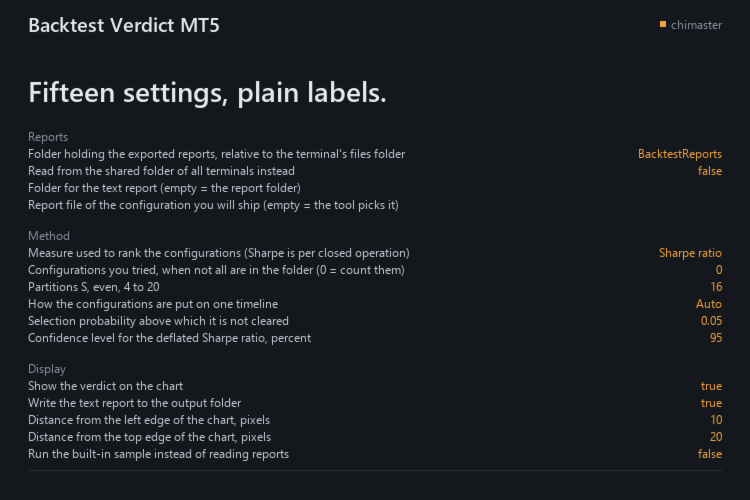
  • Reports folder: where the exported reports sit, relative to the terminal's files folder.
  • Shared folder: read from the shared folder of all terminals instead.
  • Report to ship: the configuration you will ship; empty lets the tool use the best on the whole sample.
  • Configurations you tried: your own count when not all are in the folder.
  • Partitions: how many slices the timeline is cut into, even, from 4 to 20.
  • Ranking measure: Sharpe, net profit or profit factor, with Sharpe per closed operation.
  • Selection probability threshold: above it the verdict is not cleared.
  • Confidence level: for the deflated Sharpe ratio, in percent.

All 15 inputs carry a plain-language label.

GOOD TO KNOW

  • Eleven configurations at minimum: below that it names the count it read and withholds the selection probability, the cleared verdict and the trial budget, and the trial count it can see is the weak point of the answer.
  • English reports only: the fields are read through the labels the Strategy Tester writes in the English interface, and a report from a terminal running another language has not been tested.
  • A verdict is not a forecast: it judges the way you chose a configuration, not what the next trade will do.

The demo runs in the Strategy Tester, whose folder holds none of your exported reports, so the tool prints NOT ENOUGH INFORMATION TO SAY there. A one-month rental runs the full tool on your exported HTML reports.

MetaTrader 5, any broker, netting and hedging accounts.

First reply within two working days.

If you have used it, I would welcome a short review of what worked and what did not.
作者のその他のプロダクト
バーリプレイは、まだ到達していないバーを隠します。このバーリプレイはさらに、仮想のエントリーすべての価格を、そのバーが記録したスプレッドで決め、その試みをRで採点するので、手作業でリプレイするトレーダーは、その判断がどれだけの価値だったかを見られます。 機能 セッションのバーを先読みしません。カバーが、リプレイがまだ到達していないバーを隠します。 バーのスプレッド:仮想の約定はすべて、そのバーに保存されたスプレッドを支払い、入力したスプレッドを使うことはありません。スプレッドがないバーは、成行注文または決済をNO FILL - BAR SPREAD 0で拒否し、そのバーをまたいで開いている取引は開いたままになります。 注文は送信しません:注文はすべて仮想で、ポジションを読み取らず、ファイルも開かないため、口座に作用することも、実際の取引がどうだったかを示すことも、取引記録を残すこともできません。 Rでのスコアは1つ:設定したストップの距離の倍数で、表示される数値はどれも金額ではありません。口座のプロパティを、預金通貨も含めて読まないからです。 ストップのない取引も数に入ります:件数には
FREE
既定では直近300本のバーを走査し、3本のバーでできるフェアバリューギャップをそれぞれボックスで囲み、50パーセント水準を描き、価格が手前の端へ最初に戻った時点を記録します。 機能 強気と弱気のフェアバリューギャップ。どちらも3本目のバーが確定した時点で形成されます。 50パーセントのコンセクエント・エンクローチメント(CE)ライン。InpShowCEがオンのとき、点線で表示されます。 タッチ時:タッチしたバーまで切り詰める、削除する、暗くする、維持する。タッチされていないギャップはInpExtendBars本分延長されます。 そのタッチに対する任意のアラート。ギャップごとに1回です。 パラメータ InpLookbackBars 300; InpMinGapPoints 0.0; InpMitigationMode MITIGATION_TRIM; InpShowCE true; InpExtendBars 20. InpBullishEnabled true; InpBullBorderColor clrMediumSeaGreen; InpBullFillColor C'220,2
FREE
Draws the four main trading session ranges on the chart in GMT, counts the range of each as it forms, and marks its high and low. FEATURES Four ranges: Asian, London Open, New York Open, London Close. Automatic GMT offset detection, with manual override. Session high and low levels, with a live range. HOW TO USE IT 1. Attach it to a chart. Default lookback is five days. 2. Check the detected GMT offset and correct it. 3. Enable or disable each session and set its hours. PARAMETERS InpDaysLookbac
FREE
Swap Cost Per Position は、今夜のロールオーバーに向けて、保有中のポジションを1つの表にまとめ、金額で示します。 夜をまたいで保有するトレーダーのために作りました。これから発生するコストを、すでに記録されたスワップの隣で確認でき、スワップがポイント建てで表示される場合は、プラスキャリーが往復分を回収するのに必要な夜数もわかります。 表示内容 保有ポジション1件につき1行、今夜の分を価格付けします。コストはそのポジションの数量を使い、設定した行数を超えたポジションは最後の行で数えます。 2つの数値、2つの出所:これまでのスワップの列はターミナル自身の数値で、今夜の列は銘柄から計算します。 3倍日は銘柄から決まります:ヘッダーにはチャート銘柄の3倍日と使用した乗数が表示され、各行にはその行が適用した乗数が付きます。 プラスキャリーを夜数で数えます:スワップがポイント建てで、キャリーがプラスのとき、回収夜数には、今日のスプレッドと入力した手数料で往復分を回収するのに必要な通常の夜数が表示されます。 ダッシュで示し、ゼロにはしません:計算できない数値はダッシュで表示し、理
FREE
This library returns the largest lot whose loss at your stop does not exceed the money you allow it to risk, correct for any volume step, tick size and tick value the symbol reports. I wrote it for the MQL5 developer who has pasted a lot-normalising block into every EA and can no longer say which copy is right. One import, one version, and a call that refuses rather than oversizing. WHAT IT DOES It refuses instead of oversizing: when the smallest lot the symbol accepts would risk more than your
FREE
Drag the stop loss line to your level and the panel works out the lot size for the risk you set, from your broker's own contract size. FEATURES Entry, stop loss and take profit lines you drag. Lot size normalised to the broker's minimum, maximum and step. Risk as a percentage of balance or equity, fixed cash, or fixed lot. Live risk to reward ratio. HOW TO USE IT 1. Attach it to a chart and drag the three lines. 2. Set the risk basis and value in the inputs. 3. Read the lot size from the panel.
FREE
Order Entry Panelは、チャートから1クリックで、ストップをあらかじめ付けた成行注文を送信するトレードパネルです。 手動で執行し、判断をチャート上で下したいトレーダーのために作りました。 機能 送信前に注文を確認できます。各リクエスト行には価格、数量、ストップ、ターゲット(ある場合)が表示されます。 すべてのエントリーにはストップが付きます。設定した距離から算出され、送信前に付けられます。 クリック前に証拠金がわかります。その行についてターミナルが算出した額、または不足額が表示されます。 1回のクリックで成行注文を1件送信します。そのリクエストの処理中に2回目のクリックをしても拒否され、再試行は行いません。 ヘッジ口座ではブローカーの制限を確認できます。ストップレベルとフリーズレベル、そしてストップがストップレベル内に入る場合に許容される価格が表示されます。 ヘッジ口座では取引を管理できます。損益分岐点でのロック、ポジションの一部決済、この銘柄でパネルが開いたポジションの全決済に対応します。 送信した内容を読み返せます。リクエスト、サーバーの応答、注文と取引のチケットは、
FREE
Closes your positions and deletes your pending orders when the day's equity drawdown reaches your limit, and closes anything you open for the rest of that day. FEATURES On breach: closes every open position, deletes pending orders, locks the day. Panel: drawdown percentage, equity, state. HOW TO USE IT 1. Enable Allow Algo Trading. 2. Attach it to a chart and set the loss and warning levels. 3. Choose the breach actions. PARAMETERS InpDailyMaxLossPercent, InpDailyWarningPercent, InpAutoCloseOnBr
FREE
Shows the live spread, today's range against the daily ATR, the server time, GMT offset, the countdown and the open sessions. FEATURES Live spread in points and pips, colour coded tight, moderate or wide. Optional push alert. Today's range in pips, the daily ATR share, the server time, GMT offset, the countdown and the sessions. HOW TO USE IT 1. Attach it to any chart. 2. Set the spread limits for the symbol. 3. Choose the ATR period and corner. PARAMETERS InpCorner, InpOffsetX, InpOffsetY, InpS
FREE
Shows what each closed trade earned after commission, swap and fees, by symbol, session, hour, weekday or month. FEATURES Rebuilds each trade from its deals, costs apart from gross. Net result, R, summary, breakdowns, cost alarm, CSV export. HOW TO USE IT 1. Attach it to a chart. 2. Choose the window and table. 3. Read the panel or export the CSV. PARAMETERS InpRange, InpFilterMagic, InpRiskPercent, InpFixedStopPips, InpBreakdown. LIMITATIONS Trades opened before the window are counted, not reco
FREE
フィルタ:
レビューなし
レビューに返信