Quant Owl
- エキスパート
- バージョン: 4.18
- アクティベーション: 10

Quant Owl Flies Higher.
The evergreen EA for gold and currencies.
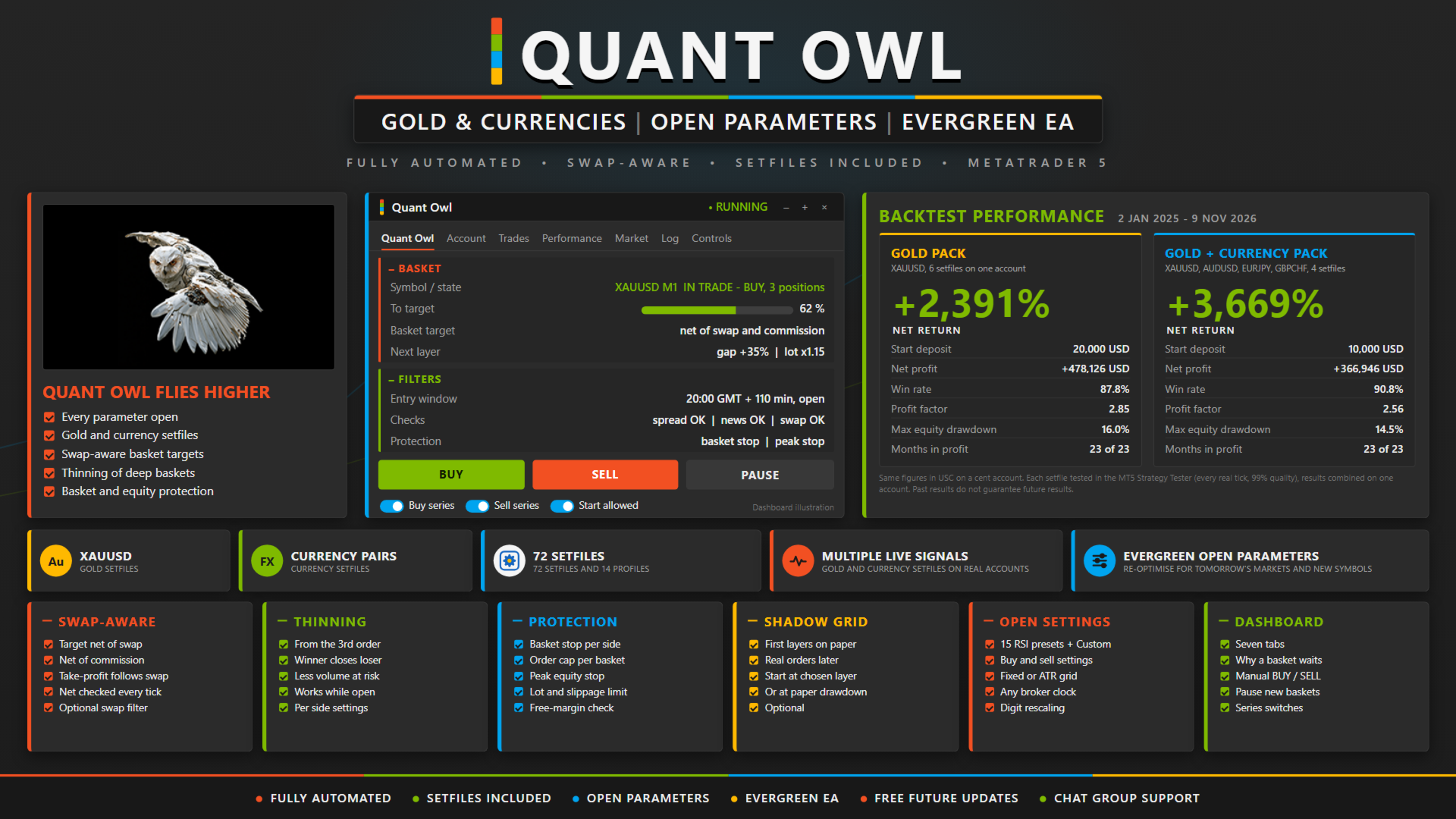
Quant Owl is a fully automated Expert Advisor for MetaTrader 5 that trades gold and currency pairs on the M1 chart. New users can start with a ready-made setfile, every parameter is open, and advanced users can build their own. That is what makes it an evergreen EA: when the market changes, the settings can change with it, so Quant Owl can keep working for a long time.
Live accounts
Live Signal 1
Public Setfiles (buyers will get 72 sefiles)
Open Parameters, Not a Closed Box
Many EAs are sold as a closed box: rigid rules, closed parameters and a fixed setfile that cannot be changed. When the market changes, a closed EA cannot change with it. Quant Owl is built the other way. Every rule is visible and every parameter can be changed: lot size, grid distance and factor, entry window, signal and symbol. Use the supplied setfiles as they are, adjust them to your account, or build your own for a new symbol.
Ready for New Users
No settings knowledge is needed to start. Choose the setfile for your account size, load it on an M1 chart, and Quant Owl runs. Gold setfiles and currency setfiles are provided for different account sizes, as single-chart files or as multi-chart packs with a ready chart profile. Recommended starting account: 1,000 USD on a standard account, or 5,000 USC (50 USD) on a cent account.
What's included
- 72 setfiles for gold and currencies (ask from me after your purchase)
- 14 chart profiles for 7 account sizes, from 1,000 to 100,000 USD or 1,000 to 100,000 USC (ask from me after your purchase)
- User manual
- Free future EA updates
- Community Support Group
Why Traders Choose Quant Owl
- Open parameters. Lot size, grid distance, entry window, signal and symbol are all inputs. Nothing is locked.
- Gold setfiles and currency setfiles are provided. Choose the one for your account size, load it and run.
- Evergreen design. Advanced users can tune the supplied setfiles or build new ones for new market conditions and new symbols.
- Swap-aware baskets. Every basket target is net of swap and commission, and the take-profit moves when swap is booked.
- Thinning. Deep baskets are reduced while still open: the newest winning order closes against the oldest losing one.
- Basket protection. A basket stop for each side, a cap on orders per basket, a peak equity stop, a lot limit, a slippage limit and a free-margin check on every order.
- Several setfiles on one account, with a start rule based on equity (default: equity at least 70% of balance).
- Updates and support from the developer.
Quant Owl does not trade to stay busy.
It waits for its window, then for its signal.
From there it manages every basket until the basket closes as one.
It is built for the quiet hours. That is how it got its name.
How Quant Owl Works
A new basket opens inside the entry window (default 20:00 GMT for 110 minutes, Monday to Friday) on a new M1 bar when the signal fires. A single first order closes at its own target. If price moves against it, the next order opens at the grid step, by default only when the signal agrees again. Each later gap is 35% wider and each volume 1.15 times larger (defaults). From two orders on, the basket closes together at its dollar target, net of all costs. Open baskets are managed around the clock; only new baskets wait for the window.
Features
- 15 RSI-based signal presets plus a Custom mode (RSI, five moving-average types, SuperTrend, STC, RSI hook)
- Separate buy and sell settings
- Grid distance fixed or scaled to the daily ATR
- Shadow Grid: the first layers run on paper, real orders start from a chosen layer
- Optional swap filter, news filter and daily trend filter for new baskets
- Any broker clock: broker time, GMT, local time or GMT+2/+3
- SetfileDigits rescales point settings between symbols
- Seven-tab dashboard that explains in plain words why a new basket is waiting
- Manual order buttons, a pause, and switches for buy series, sell series and starts
Minimum Requirements & Recommendations
- Recommended account: 1,000 USD, or 5,000 USC (50 USD) on a cent account
- Leverage: 1:500 recommended
- Account type: Hedging
- M1 chart, one chart per setfile, each with its own magic number
- VPS recommended, so the EA can manage open baskets 24/5
- Test with your broker first, using every tick based on real ticks, with SetfileDigits and the broker's GMT offsets set
Designed for Traders Who Want Control
Open settings, ready setfiles, and an EA that can follow the market as it changes.
Welcome to Quant Owl.
Risk
Quant Owl is a grid strategy whose orders close together as one basket. Order volumes grow with each layer, so a long one-way move can keep a basket open for days with a large floating loss, and a basket or peak stop, if set, then closes it at a loss. Trading forex and CFDs carries a high level of risk. Past results, including backtests, do not represent future results.
Quant Owl is a fully automated grid Expert Advisor for MetaTrader 5 that trades baskets on the M1 chart. A basket starts with one order inside a short entry window, can grow into several orders in the same direction, and closes as one basket at its target.
The evergreen EA for gold and currencies.
Quant Owl is a fully automated Expert Advisor for MetaTrader 5 that trades gold and currency pairs on the M1 chart. New users can start with a ready-made setfile, every parameter is open, and advanced users can build their own. That is what makes it an evergreen EA: when the market changes, the settings can change with it, so Quant Owl can keep working for a long time.
Live accounts
Live Signal 1
Public Setfiles (buyers will get 72 sefiles)
Open Parameters, Not a Closed Box
Many EAs are sold as a closed box: rigid rules, closed parameters and a fixed setfile that cannot be changed. When the market changes, a closed EA cannot change with it. Quant Owl is built the other way. Every rule is visible and every parameter can be changed: lot size, grid distance and factor, entry window, signal and symbol. Use the supplied setfiles as they are, adjust them to your account, or build your own for a new symbol.
Ready for New Users
No settings knowledge is needed to start. Choose the setfile for your account size, load it on an M1 chart, and Quant Owl runs. Gold setfiles and currency setfiles are provided for different account sizes, as single-chart files or as multi-chart packs with a ready chart profile. Recommended starting account: 1,000 USD on a standard account, or 5,000 USC (50 USD) on a cent account.
What's included
- 72 setfiles for gold and currencies (ask from me after your purchase)
- 14 chart profiles for 7 account sizes, from 1,000 to 100,000 USD or 1,000 to 100,000 USC (ask from me after your purchase)
- User manual
- Free future EA updates
- Community Support Group
Why Traders Choose Quant Owl
- Open parameters. Lot size, grid distance, entry window, signal and symbol are all inputs. Nothing is locked.
- Gold setfiles and currency setfiles are provided. Choose the one for your account size, load it and run.
- Evergreen design. Advanced users can tune the supplied setfiles or build new ones for new market conditions and new symbols.
- Swap-aware baskets. Every basket target is net of swap and commission, and the take-profit moves when swap is booked.
- Thinning. Deep baskets are reduced while still open: the newest winning order closes against the oldest losing one.
- Basket protection. A basket stop for each side, a cap on orders per basket, a peak equity stop, a lot limit, a slippage limit and a free-margin check on every order.
- Several setfiles on one account, with a start rule based on equity (default: equity at least 70% of balance).
- Updates and support from the developer.
Quant Owl does not trade to stay busy.
It waits for its window, then for its signal.
From there it manages every basket until the basket closes as one.
It is built for the quiet hours. That is how it got its name.
How Quant Owl Works
A new basket opens inside the entry window (default 20:00 GMT for 110 minutes, Monday to Friday) on a new M1 bar when the signal fires. A single first order closes at its own target. If price moves against it, the next order opens at the grid step, by default only when the signal agrees again. Each later gap is 35% wider and each volume 1.15 times larger (defaults). From two orders on, the basket closes together at its dollar target, net of all costs. Open baskets are managed around the clock; only new baskets wait for the window.
Features
- 15 RSI-based signal presets plus a Custom mode (RSI, five moving-average types, SuperTrend, STC, RSI hook)
- Separate buy and sell settings
- Grid distance fixed or scaled to the daily ATR
- Shadow Grid: the first layers run on paper, real orders start from a chosen layer
- Optional swap filter, news filter and daily trend filter for new baskets
- Any broker clock: broker time, GMT, local time or GMT+2/+3
- SetfileDigits rescales point settings between symbols
- Seven-tab dashboard that explains in plain words why a new basket is waiting
- Manual order buttons, a pause, and switches for buy series, sell series and starts
Minimum Requirements & Recommendations
- Recommended account: 1,000 USD, or 5,000 USC (50 USD) on a cent account
- Leverage: 1:500 recommended
- Account type: Hedging
- M1 chart, one chart per setfile, each with its own magic number
- VPS recommended, so the EA can manage open baskets 24/5
- Test with your broker first, using every tick based on real ticks, with SetfileDigits and the broker's GMT offsets set
Designed for Traders Who Want Control
Open settings, ready setfiles, and an EA that can follow the market as it changes.
Welcome to Quant Owl.
Risk
Quant Owl is a grid strategy whose orders close together as one basket. Order volumes grow with each layer, so a long one-way move can keep a basket open for days with a large floating loss, and a basket or peak stop, if set, then closes it at a loss. Trading forex and CFDs carries a high level of risk. Past results, including backtests, do not represent future results.
Quant Owl is a fully automated grid Expert Advisor for MetaTrader 5 that trades baskets on the M1 chart. A basket starts with one order inside a short entry window, can grow into several orders in the same direction, and closes as one basket at its target.