High Priestess
- エキスパート
-
Andras Feher
 I develop automated trading systems and Expert Advisors with a strong focus on long-term performance. My approach prioritizes controlled risk, low drawdown, robust strategy design, and consistent returns rather than short-term gains. I continuously test, refine, and monitor my systems under real
- バージョン: 6.32
- アクティベーション: 10
HIGH PRIESTESS — THE SOVEREIGN COUNCIL OF GOLD
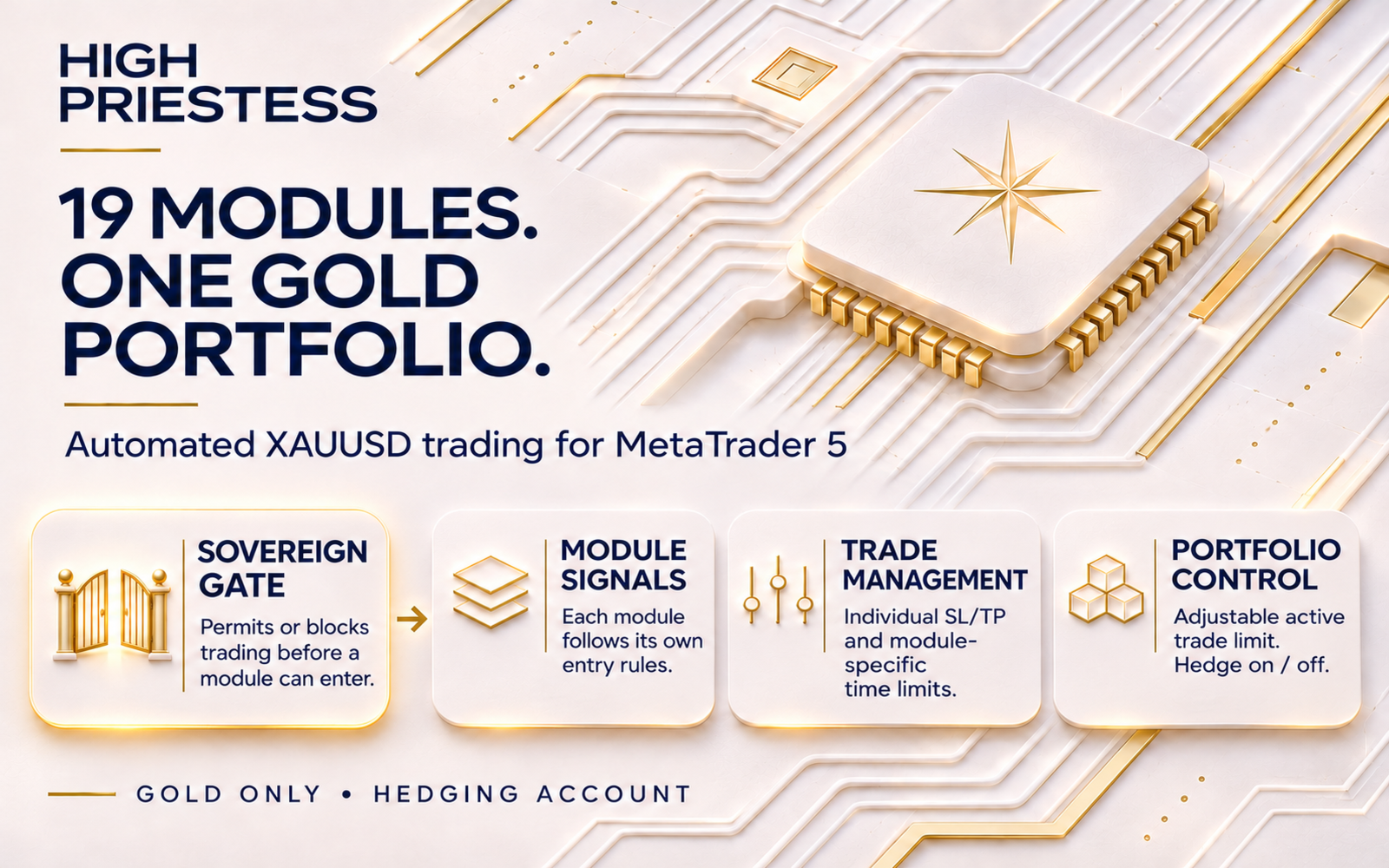
19 strategy modules. One XAUUSD chart. A coordinated gold portfolio.
Individual Stop Loss and Take Profit. One position per module. No recovery grid or martingale lot progression.
Get it now for $99. This price is available for the next 10 copies, then it increases to $149 and won’t return to $99. The final planned price is $799.
High Priestess brings nineteen distinct trading models together in one MetaTrader 5 Expert Advisor. Each member of the Sovereign Council follows its own signals, internal timeframe, entry session and position-management rules. A shared control layer supervises exposure, lot sizing and optional account protection.
From momentum and trend structure to volume, money flow and reversal conditions, the Council approaches gold through several different models. Each module waits for its own setup and the required directional confirmation before entering.
START IN 3 SIMPLE STEPS
- Attach one instance to your broker's XAUUSD / GOLD chart on a MetaTrader 5 hedging account. Enable Algo Trading and allow the required history to load. The strategies use their own internal timeframes.
- Choose your lot size, maximum active trades and Hedge setting. Review the module switches, spread filter and optional protection inputs before enabling live entries.
- Test the exact configuration on your broker's demo account. Keep the terminal running and connected on a stable computer or VPS so automatic management can operate.
MEET THE SOVEREIGN COUNCIL
The nineteen named modules retain separate entry signals and trade management. The portfolio includes several strategy families:
- Trend and momentum
- Volume and money flow
- Price structure and reversals:
- Directional confirmation
Each module can be enabled or disabled separately for new entries. Switching a module off does not abandon its existing positions: they remain under management while the EA is running. Several modules can have exposure at the same time, and different models can still lose together.
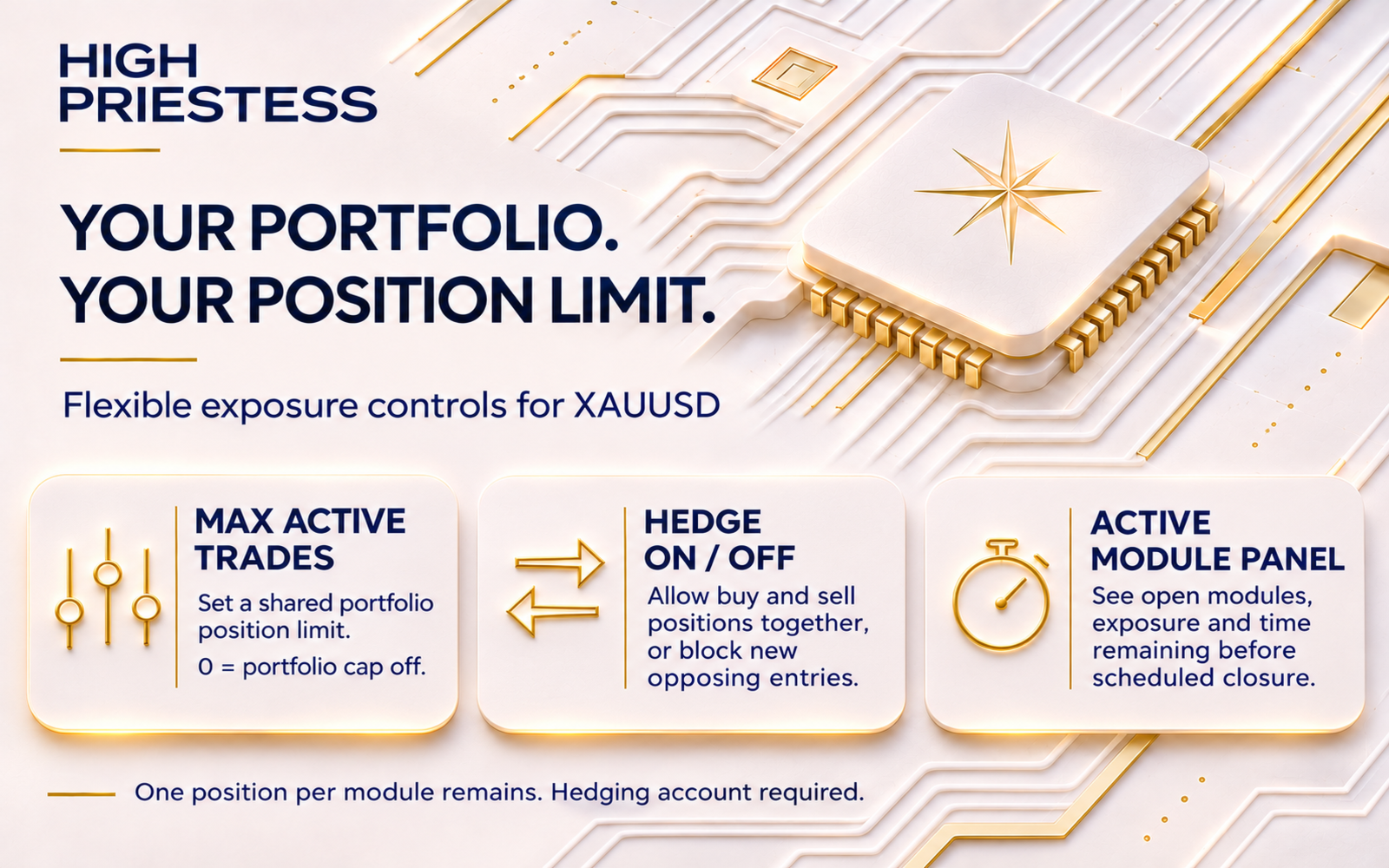
MAXIMUM ACTIVE TRADES AND HEDGE CONTROL
The two primary portfolio controls are placed at the beginning of the input list:
- Max active open trades: choose a positive limit or use 0 = OFF to disable the shared position cap. When enabled, this cap counts account positions and pending orders. The original one-position-per-module rule remains in force.
- Hedge ON: allows qualifying buy and sell positions to coexist.
- Hedge OFF: blocks a new opposite-direction entry while this EA has its own opposite positions or orders on the traded symbol. Changing the switch does not force-close existing trades.
Hedge ON is the default; the shared trade cap defaults to OFF. Separate individual-lot and total-gross-lot limits still apply. Hedge OFF is a directional-entry restriction, not netting-account or FIFO compatibility. The EA requires hedging position accounting.
WHEN DOES HIGH PRIESTESS TRADE?
Each module checks its own signal, original entry window, cooldown and directional conditions. Shared spread, exposure, protection and broker execution checks must also permit the order. A quiet period can be a normal result of these filters; there is no promised number of daily trades.
Trading schedules use broker server time. Optional Friday restrictions add an entry filter; they do not extend any module's original trading hours. Different broker feeds, spreads, symbol specifications, server-time conventions and execution can produce different trades and results.
STOP LOSS, TAKE PROFIT AND AUTOMATIC EXITS
Each module submits its own strategy-based Stop Loss and Take Profit. The modules retain their original trailing, cooldown and holding-time rules. The standard Council also retains its daily 23:30 broker-time closing rule; these management rules can close a trade before its original SL or TP is reached.
Broker-side SL and TP remain subject to broker execution. Trailing, time exits, protection logic and other automatic management require the terminal to remain running and connected. Market closures, missing quotes, gaps and slippage can delay exits or change the realised price.
CHOOSE YOUR TRADE SIZE
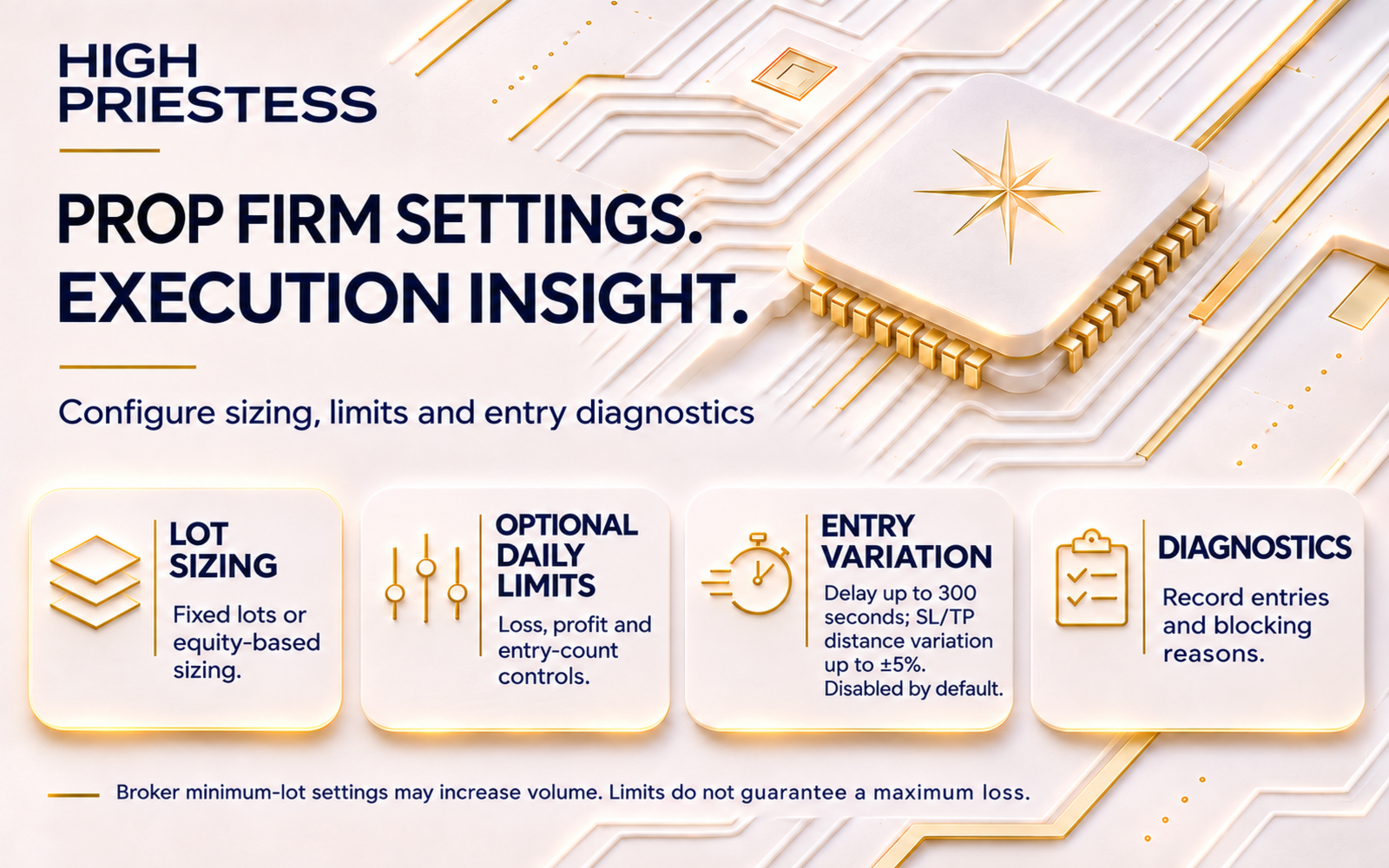
- Fixed lots: apply the selected common volume to each module. The default is 0.01 lot.
- Equity-scaled lots: volume follows account equity using the configured percentage. At 1.00%, the reference is 0.01 lot per 1,000 units of equity, subject to broker and EA limits. This is a volume-scaling formula, not a percentage of equity risked at the Stop Loss.
- Maximum individual and total lots: separate caps restrict one position's volume and simultaneous gross exposure. They remain active even when the shared position-count cap is OFF.
Several module positions can accumulate exposure. Choose volume for the combined portfolio and your broker's contract size, leverage and available margin, rather than treating each module in isolation.
OPTIONAL ACCOUNT PROTECTION AND FRIDAY FILTERS
- Peak-equity drawdown stop: an optional trigger to close this EA's positions and pause new entries for the selected cooldown.
- Daily loss limits: optional percentage and account-currency thresholds.
- Daily equity profit limit: optionally stop new entries after the configured daily equity gain.
- Maximum entries per day: optionally restrict the number of new entries.
- Friday OFF: block new entries throughout Friday while existing trades continue to be managed.
- Friday entry cutoff: optionally block new Friday entries from the selected broker hour; -1 disables this additional cutoff.
Daily profit and loss protection monitors total account equity, including floating results, while its closing actions target this EA's own positions. Other robots and manual trades can therefore affect the trigger. A triggered daily limit blocks new entries until the next broker day.
These additional daily limits and Friday filters are disabled by default. They are configurable protection tools, not guaranteed loss caps or a guarantee of compliance with any particular prop firm's rules.
OPTIONAL EXECUTION VARIATION — DEFAULT OFF
- Random entry delay: optionally delay an eligible entry by up to 300 seconds without blocking existing-position management.
- SL distance variation: optionally vary the original Stop Loss distance by up to ±5%.
- TP distance variation: independently vary the original Take Profit distance by up to ±5%.
SL/TP variation applies to the original distance from entry, not to the full gold price, and respects the broker's tick grid. At delayed release, the EA rechecks the current directional gate, session, cooldown, exposure, hedge, spread and execution conditions. A delayed entry can be cancelled or expire; it is not guaranteed to execute. Restarting or reinitialising the EA cancels queued entry intents.
All three variation settings default to 0 = OFF. Enabling them can change the trade sequence, costs and results.
SPREAD, DASHBOARD AND ENTRY DIAGNOSTICS
The spread filter uses the Ask-minus-Bid gold-price difference. A value of 0 disables that entry filter; it does not change the broker's actual spread. Volume, stop-distance, filling-mode and margin checks can also prevent an order.
The champagne-gold and navy dashboard uses matching sapphire-blue chart colours. It shows account balance and equity, this EA's daily closed net result, floating profit plus swap, exposure, spread, protection state and broker clock. Only modules with open positions appear in the active-module list, with their direction, volume, floating result and closing countdown. The displayed attach drawdown covers the period since attachment.
Built-in CSV diagnostics record entry decisions and blocking reasons, including directional confirmation, module signal, session, cooldown, spread, portfolio limits and broker rejections. They also record optional execution-delay and SL/TP-variation information, helping compare why one setup entered while another did not.
TESTING AND RISK
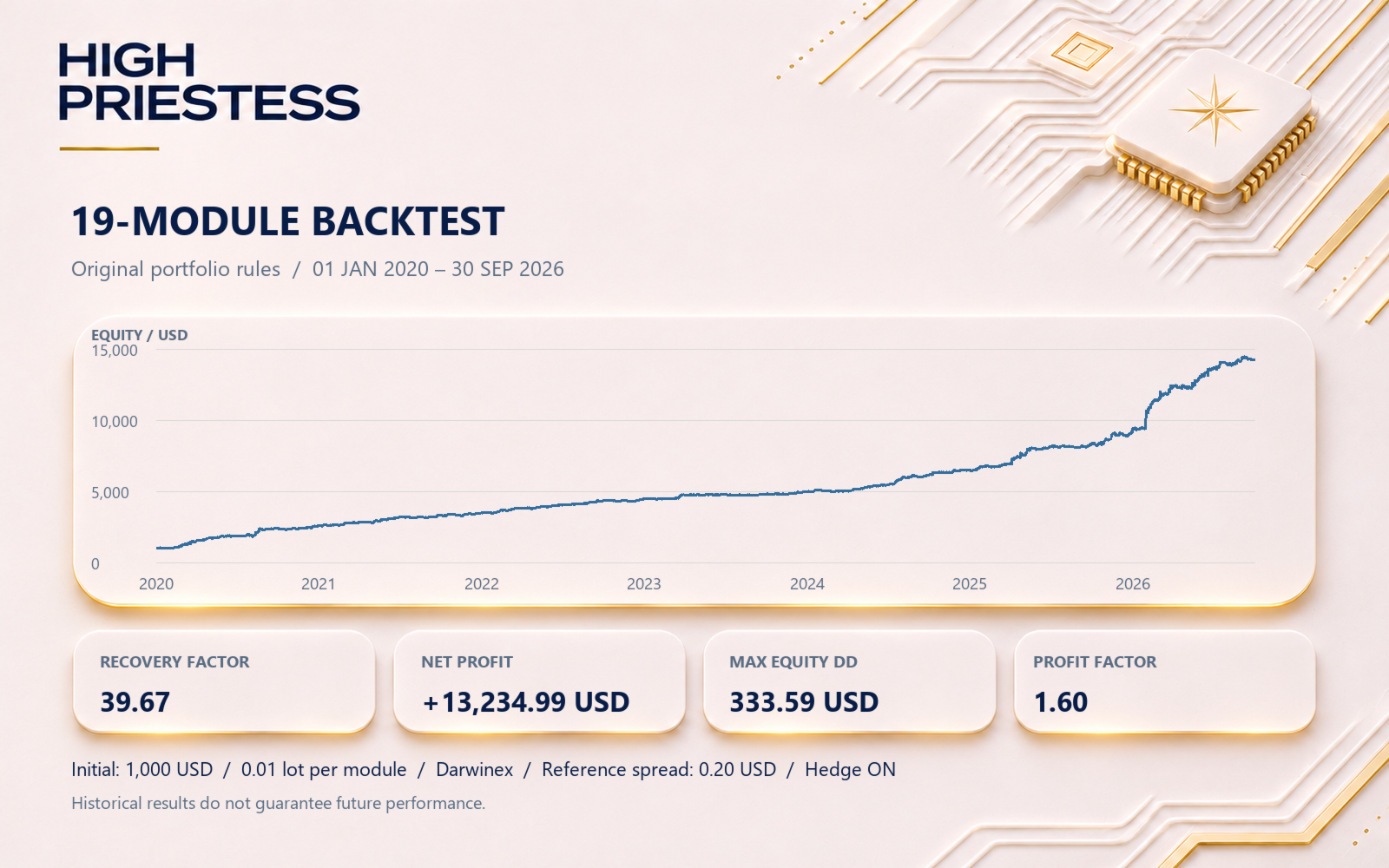
Use realistic broker tick data, spread, commission, symbol specifications and execution assumptions. Check the actual tested date range and data coverage; missing or generated ticks should not be treated as complete real-tick history. Validate the exact EA version, lot size and settings on your broker's demo account before live use.
Leveraged gold trading can result in loss of the full trading capital. Diversification, individual stops and optional protection cannot guarantee profit, low drawdown or a maximum loss. Historical, backtest and demo results do not guarantee future performance.
SUPPORT
Contact me through MQL5 private messages for help with installation, inputs, diagnostics and configuration. When reporting a missed entry, include the EA version, broker server time, settings and the relevant diagnostic records so the conditions can be compared.