Guardian Grid
- エキスパート
- バージョン: 1.3
- アップデート済み: 21 10月 2026
- アクティベーション: 5

Guardian Grid
The first order is opened on a signal from one of 18 entry modules: nine Price Action candlestick patterns and nine indicator rules. If the price moves against the position, the EA adds grid orders with a growing lot to the basket and closes the whole basket at a common target. By default the EA runs two baskets at the same time — a BUY basket and a SELL basket, each with its own first entry, grid orders and exit (TwoSidedMode); with TwoSidedMode = false — one basket at a time.
The EA panel lets you set the lot, grid, exit targets, time (including the broker server time zone), trading direction, which entry modules are enabled, and controls (close all orders, chart button, breakeven lines).
The EA has been tested on EURUSD H1 over 2010–2026 on real Dukascopy ticks with live-account costs: variable spread, commission 5 USD per lot round turn, swap BUY −6.74 / SELL +1.43 points per lot per night (today's rates applied to the whole history). MT4 — Strategy Tester "Every tick" on Tick Data Suite ticks, modelling quality 99.90%, slippage ±5 points. MT5 — "Every tick based on real ticks", the same ticks imported into a custom symbol. A test on your broker's history will give a different result: other ticks, spread and server time.
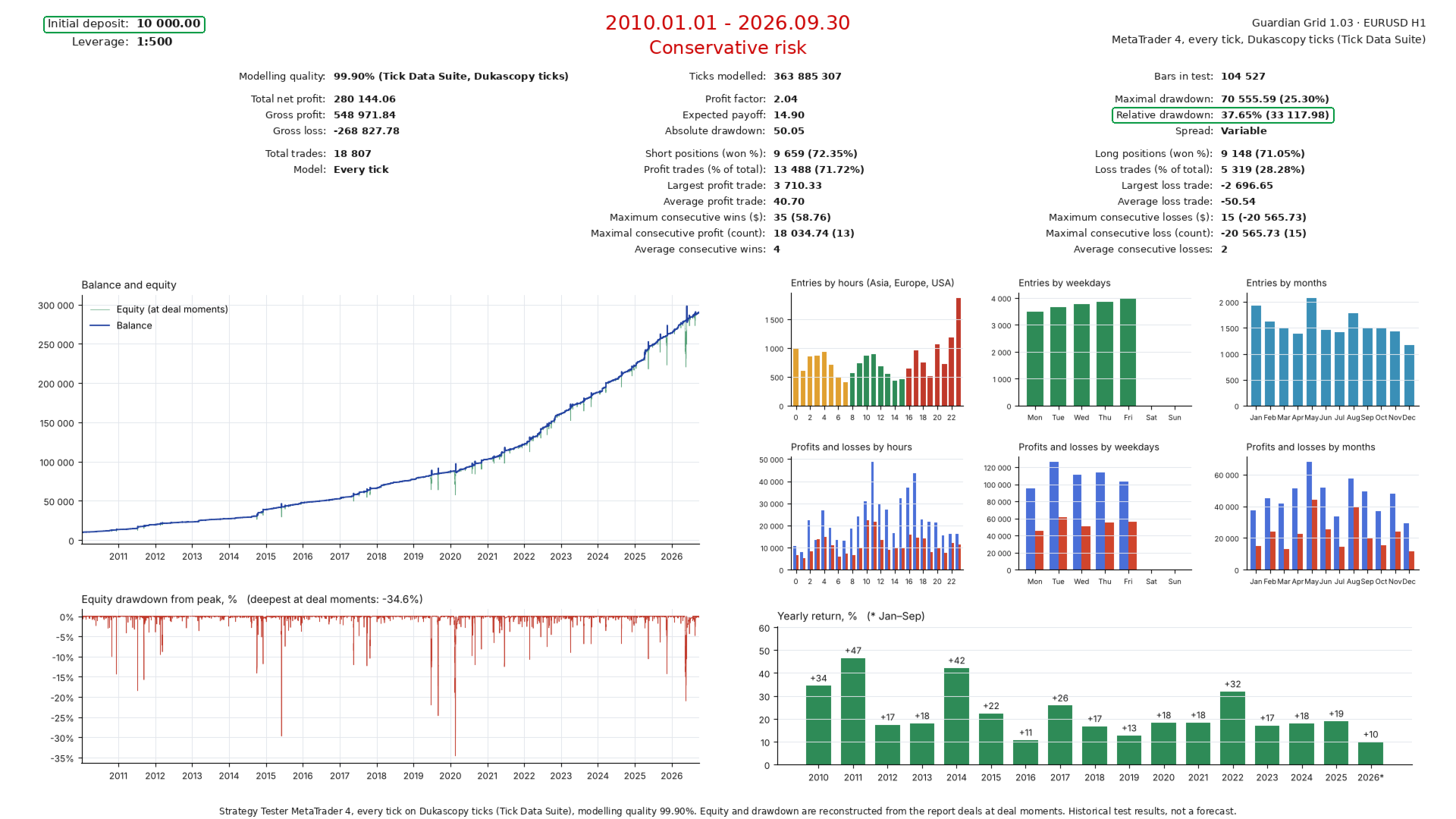
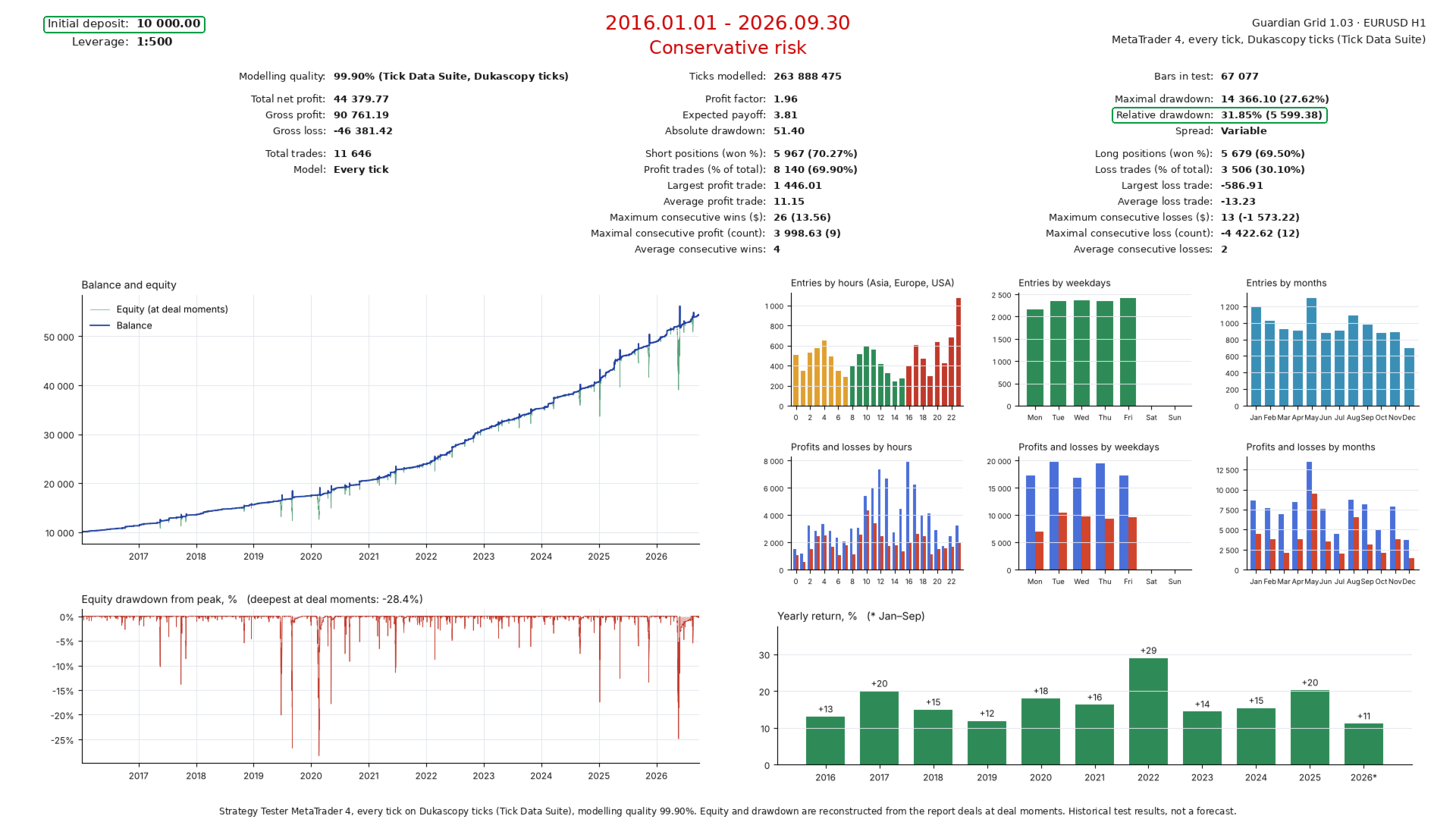
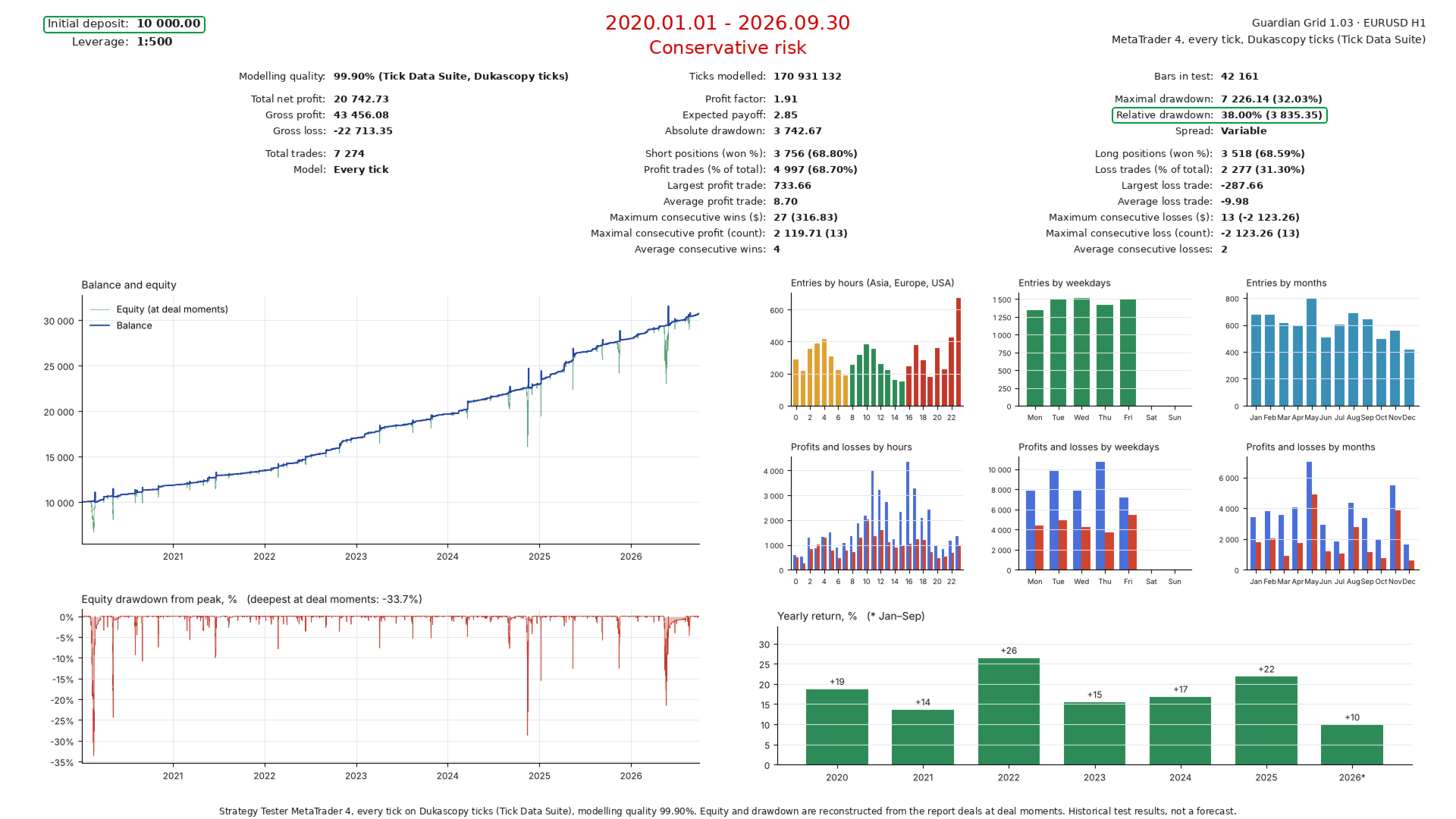
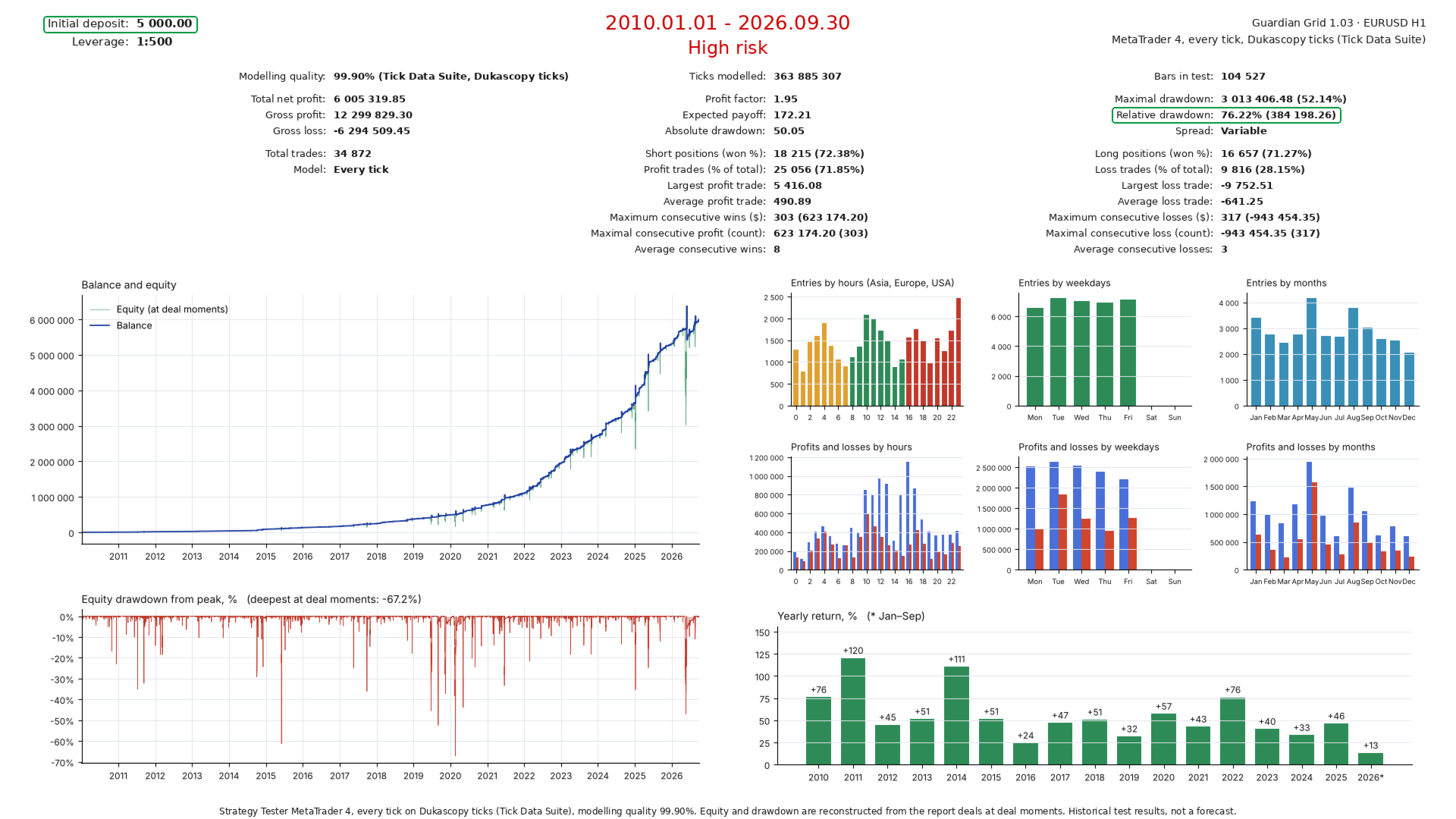
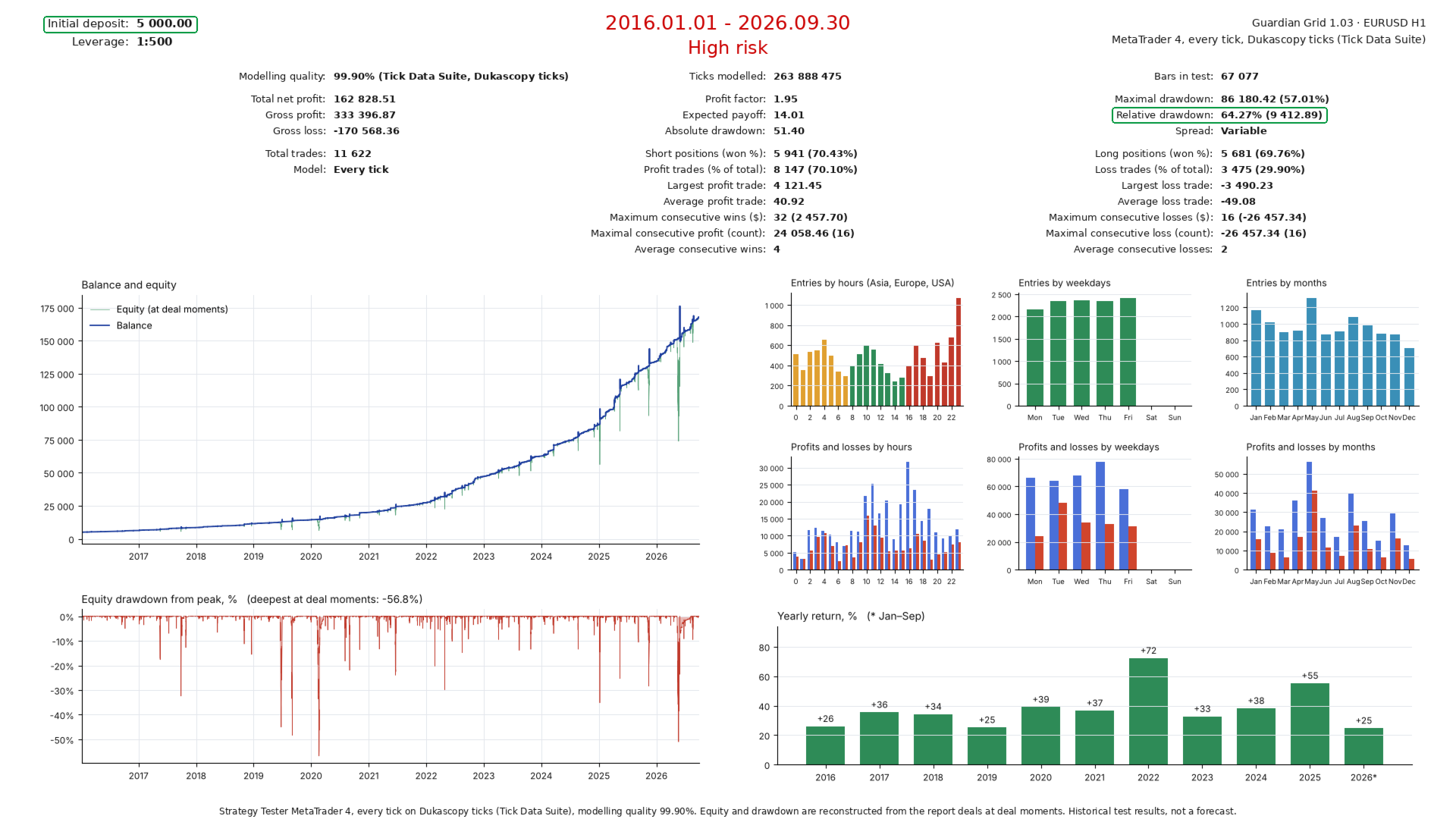
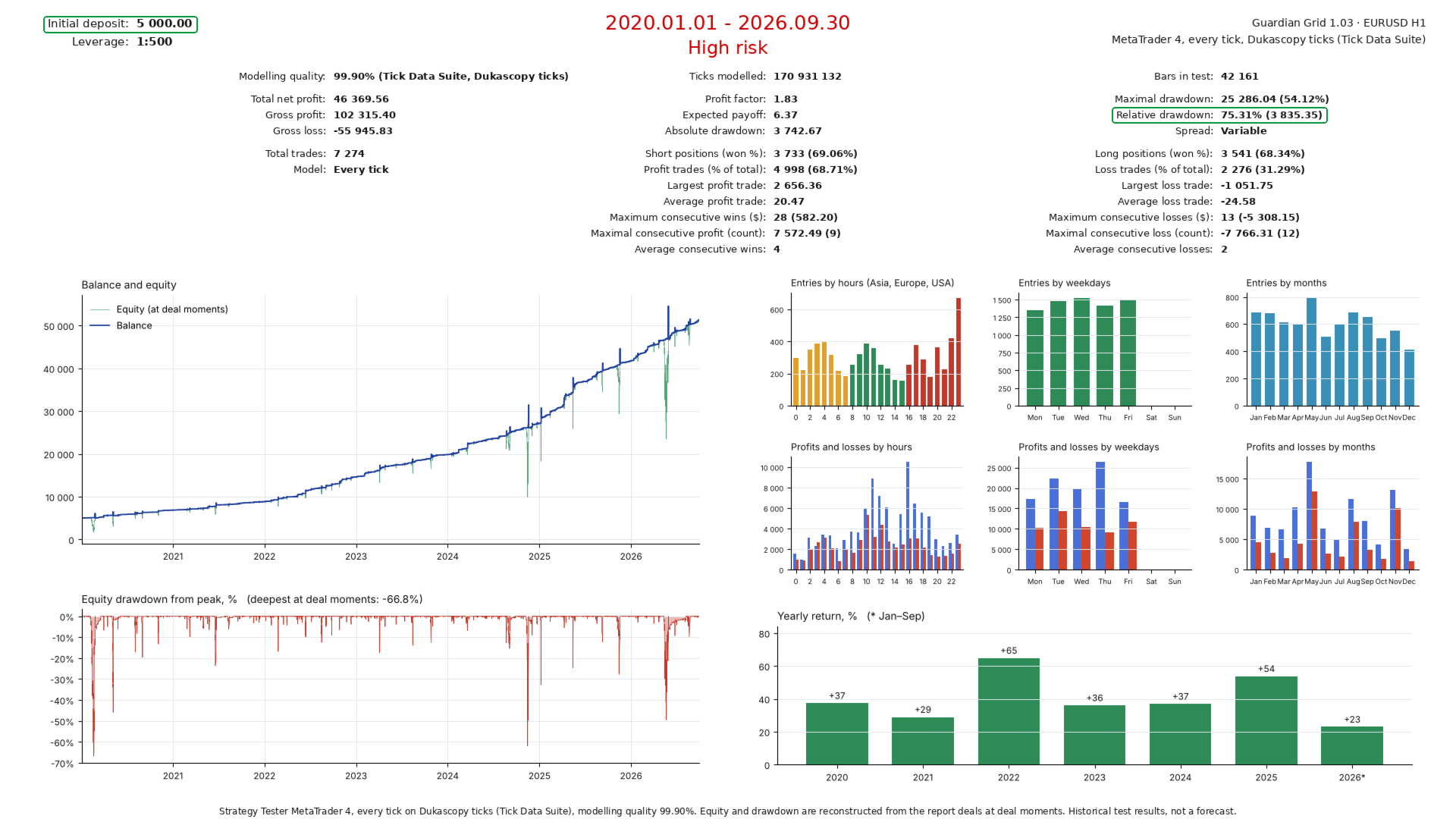
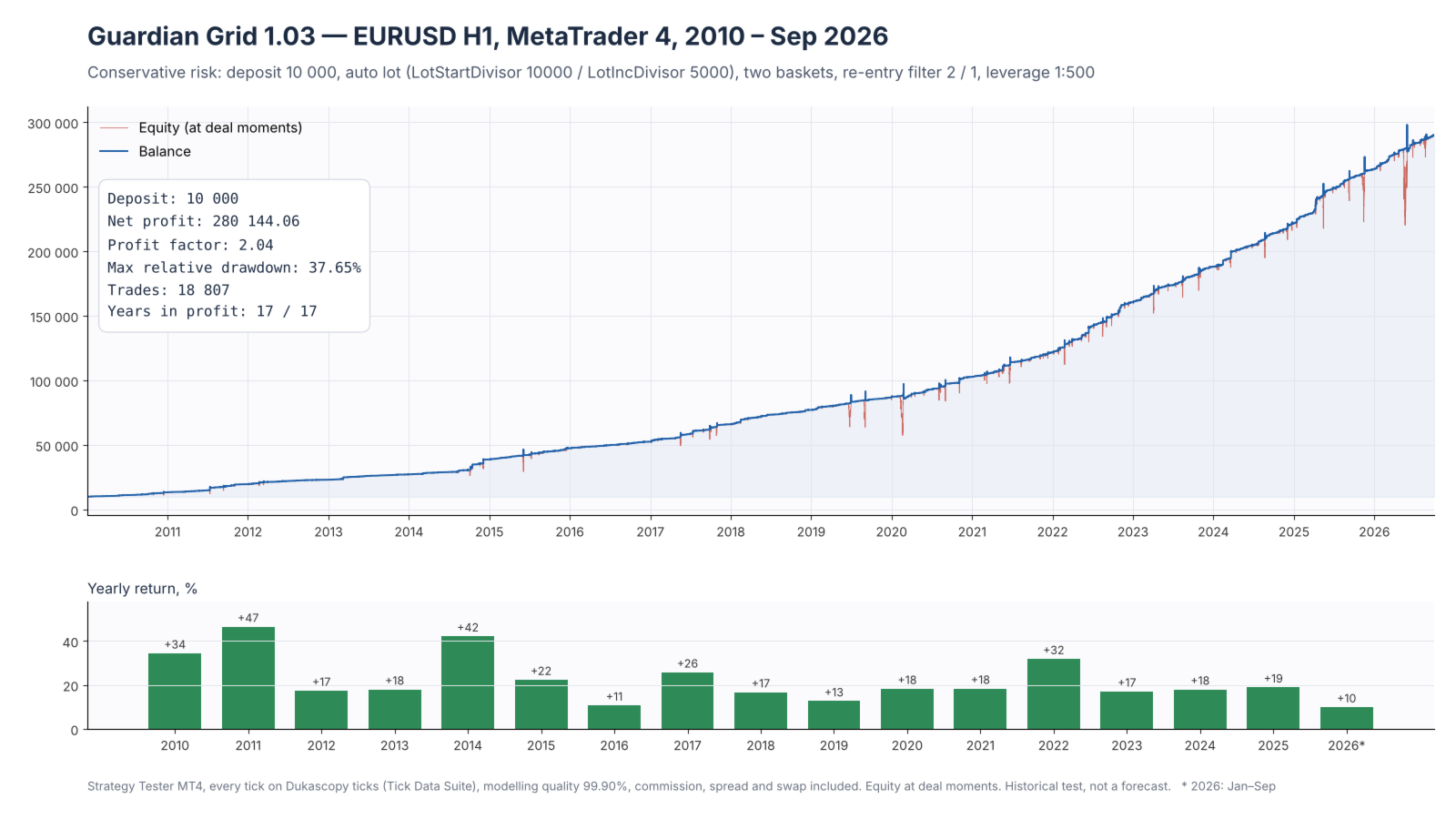
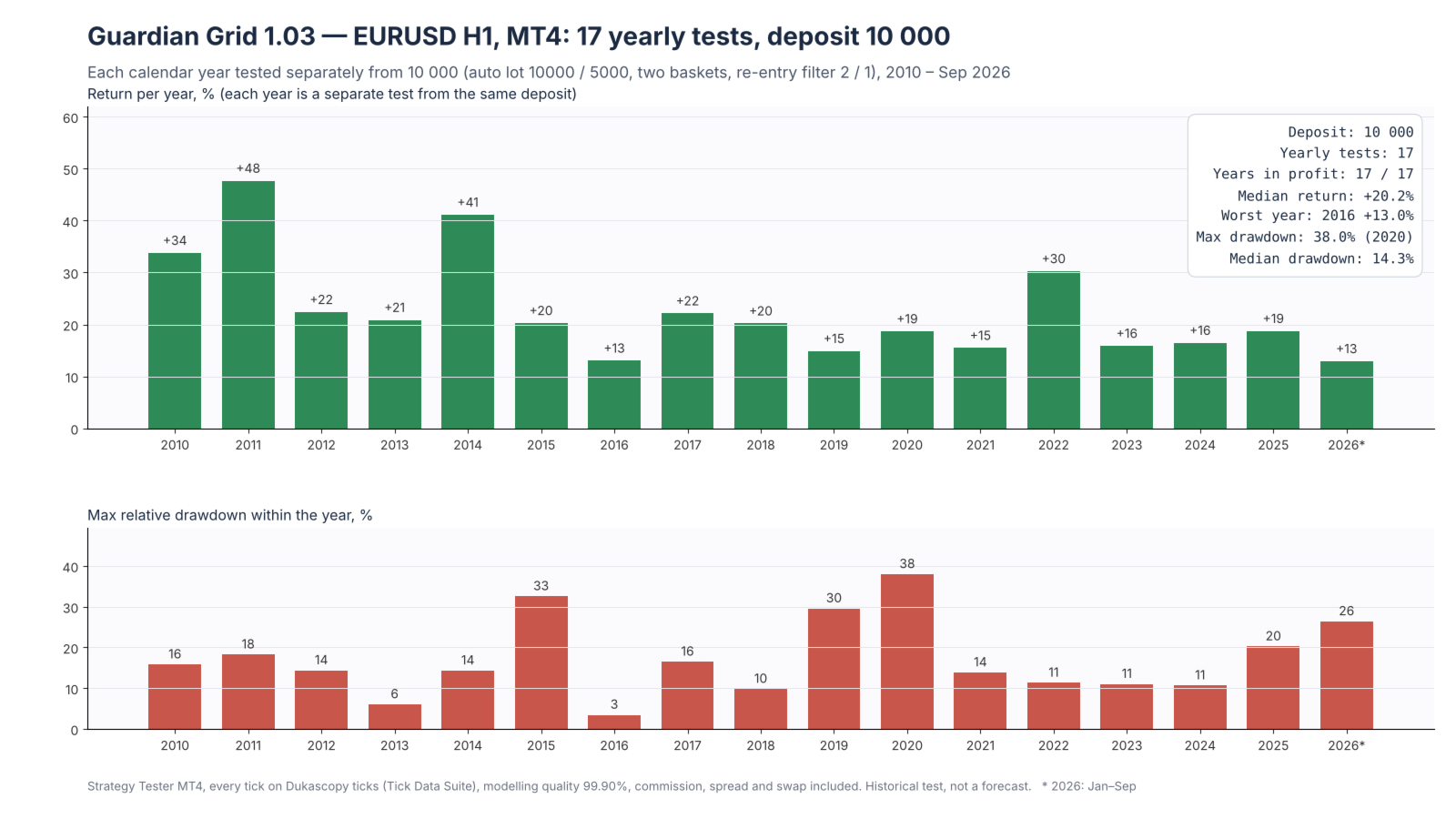
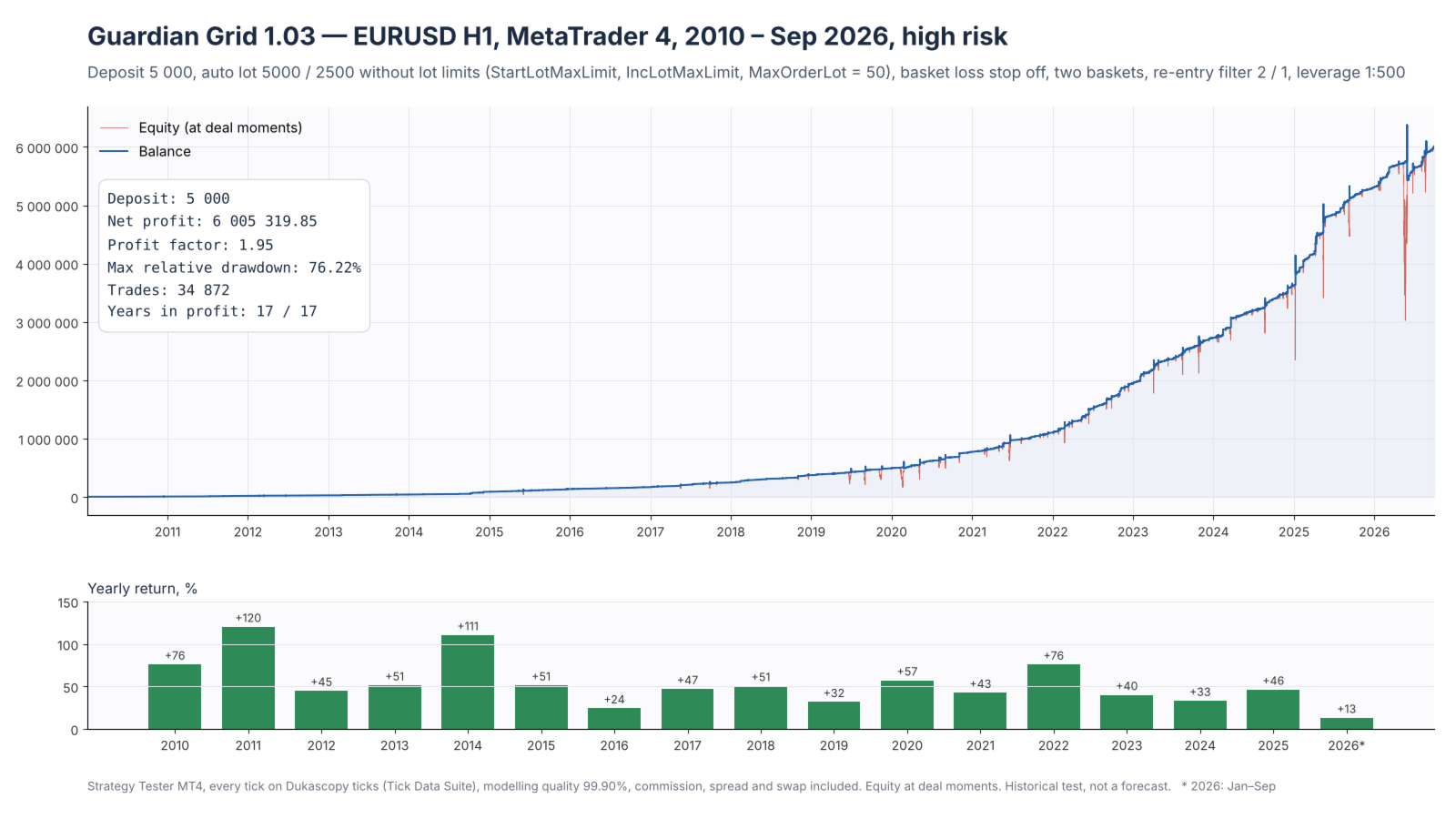
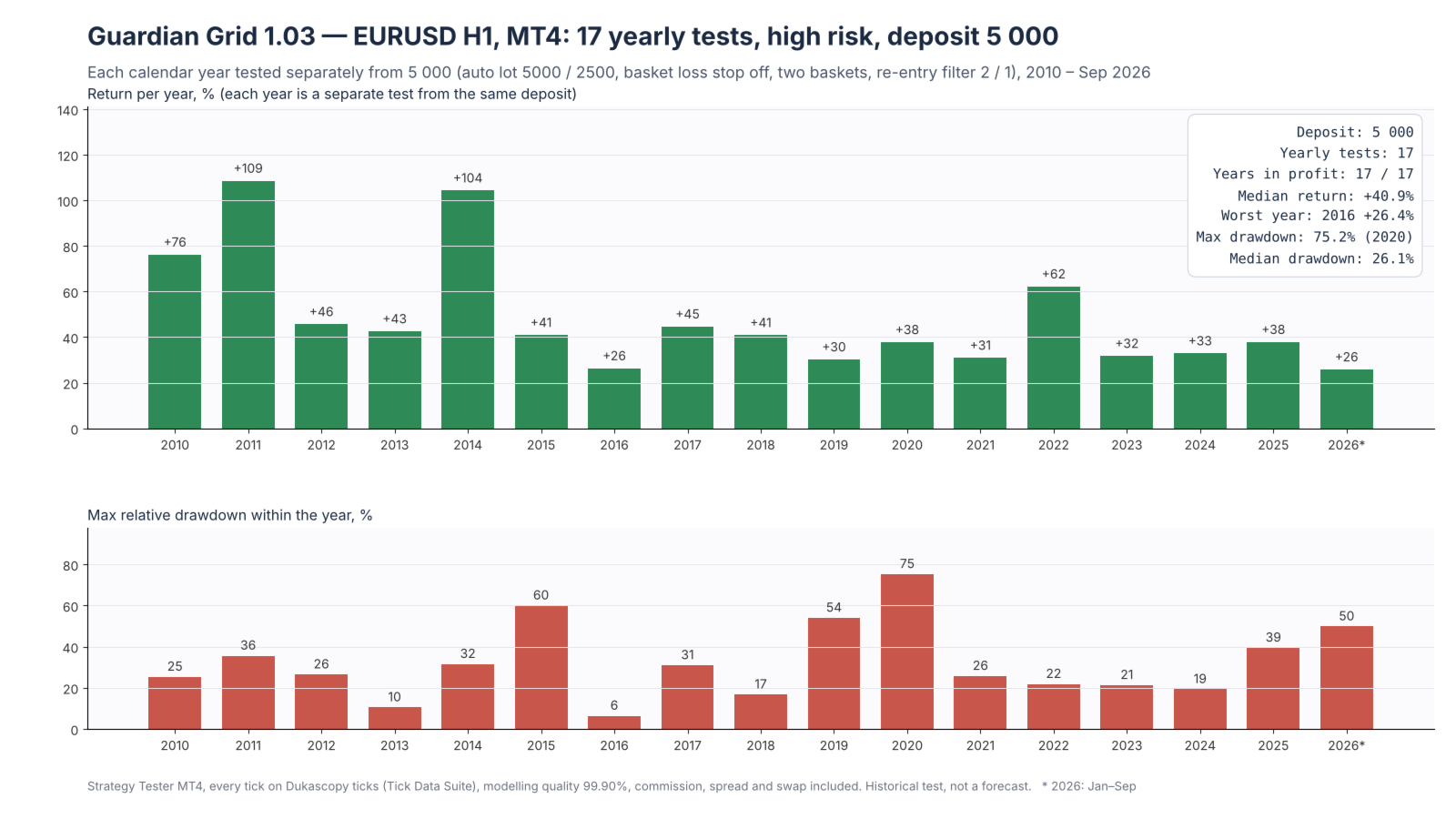
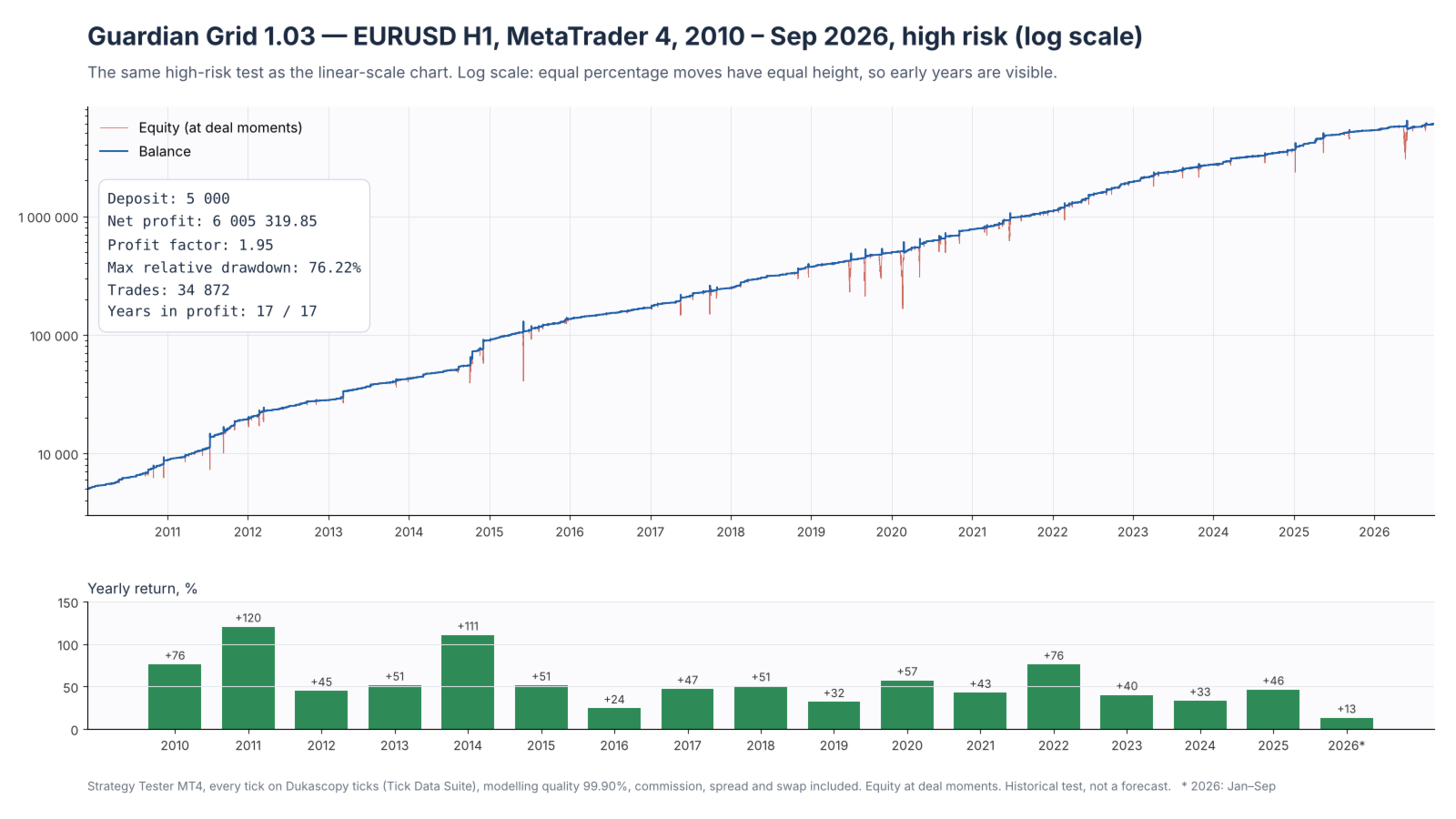
Screenshots: MT4 Strategy Tester reports ("Every tick", modelling quality 99.90%) up to 30.09.2026, leverage 1:500. Conservative risk: deposit 10,000, auto lot (LotStartDivisor = 10000, LotIncDivisor = 5000). High risk: deposit 5,000, auto lot 5000 / 2500, basket loss stop off (EnableLossStop = false), auto-lot limits lifted (StartLotMaxLimit, IncLotMaxLimit and MaxOrderLot = 50) so that the grid keeps the same lot ladder as the balance grows; with the default limits (0.5 / 5 / 5) the lot stops growing from a balance of about 250,000 and the result is noticeably lower. The equity and drawdown charts on the pages are reconstructed from the report deals. With the default settings the lot is fixed and the loss stop is on.
Features:
18 entry modules: Pin Bar, Engulfing, Full Engulfing, Marubozu, Doji, Morning / Evening Star, Gap, Rising Sun / Dark Cloud, Spinning Top, Trending, Keltner, DMI, CCI, RSI, Parabolic SAR, Stochastic, Bollinger Bands, Envelopes.
Entry selection by module priority: if there is a signal in both directions, the side of the higher-priority module is opened.
Grid with a growing lot: each next order is larger than the previous one by an increment — fixed or calculated from the balance (auto lot).
Wider grid step from a set basket order (default — 12 pips from the 9th order): a long move against the position is covered with fewer orders.
Grid order inside the bar (enabled by default): from the 9th basket order the next order is opened on any tick as soon as the price has moved 15 pips, without waiting for a new bar. The first basket orders are placed on the first tick of a bar.
Fixed lot (default: first order 0.01, increment 0.02) or auto lot — the UseAutoLot switch.
Auto lot: the lot is calculated from the balance, with limits on the first lot, the increment, the lot of one order and (optionally) the balance the lot is calculated from. The auto-lot increment is never below MinLotIncrement (0.02 by default): on a small balance the grid stays 0.01 / +0.02.
A grid order above the per-order lot limit (a large order) is opened in parts (enabled by default): a grid order larger than the maximum lot of one order (MaxOrderLot, or the broker's maximum if it is lower) is opened as several orders, so the lot proportions in the basket — and with them the basket target and closing moment — do not depend on the balance size.
Three exit conditions: single-order target (on every tick); common basket target — by price, excluding swap (on the first tick of a bar; from a set basket order on — a lower target, by default 1 pip instead of 5 from the 3rd order); basket profit as a percentage of the balance — 25% by default, this profit includes swap and commission (on every tick).
Basket loss stop (on by default): the basket is closed when its loss, including swap and commission, reaches a set share of the balance — 50% by default; checked on every tick, trading continues after the close.
Tick exit for a large grid (optional): a grid of a set number of orders or more is closed on any tick as soon as the price returns to the basket average price, excluding swap (or moves beyond it into profit by a set number of pips, excluding swap).
Entry filters: market direction, market regime by ADX, monthly hour window for the Trending module (configurable, can be disabled).
Re-entry filter (on by default): after a single order closes at its target, a new basket of the same side on the same candle is opened at most twice (MaxReentryPerBar); after a grid basket closes — not before the next candle (GridReentryPauseBars). The deepest baskets in history grew out of series of same-side re-entries on one candle; 0 / 0 — no filter.
Broker time zone: all hours in the settings are set in base time — GMT+2 in winter and GMT+3 in summer on the US schedule (New York + 7 hours, 00:00 is the New York close). The EA converts the server time to base time itself from the server's winter GMT offset and the broker's summer-time schedule (default: GMT+2 with the European switch) and recalculates the shift when summer time starts or ends. The H4 direction for the Trending and Doji modules is calculated on 4-hour blocks of base time; while there is too little history for them (the first days of a test), the terminal's H4 chart is used.
Delayed trading start on Monday. On Friday at a set time (23:50 by default, before the market closes) the basket is checked: a basket in profit by price is closed, excluding swap; if the price has moved one step against it, a new grid order is opened; no new baskets until Monday.
Trading direction: both sides, BUY only or SELL only.
Account check at startup (the "account check" line in the journal): Expert Advisors must be allowed by the broker on the account — otherwise the EA does not start on a real account; AutoTrading enabled; symbol trade mode; margin of a 21-order basket at the current lot — a warning if at a floating loss of 45% of the balance the margin level is below 150%; leverage, Stop Out level and swaps are written to the journal. MT5 also checks: hedging account (the EA does not start on a netting account; in the tester it runs with single orders, without the grid), market orders allowed for the symbol, the symbol volume limit, the FIFO rule — with it the basket is closed from the oldest positions to the newest.
On the first tick of a real account the EA compares the server time with the time zone settings and warns about a mismatch; in MT4 the first tick also checks that trading in the symbol is open (no false alarm when the EA is started on a weekend, when the market is closed).
Free margin check before every order (for a grid order opened in parts — before each part) and a check of the broker's limit on the number of orders; the basket close is repeated until the basket is fully closed.
Broker trading session: while trading in the symbol is closed (daily break, Friday close, Sunday evening), the EA sends neither new orders nor closes — everything is checked on the first tick inside the session, and instead of server rejections the journal gets one line per bar.
Repeated refusals (no margin, order limit) and send errors are written to the journal.
Close all EA orders and stop trading — with a panel input or with a chart button (with confirmation).
Closing by the FIFO rule (UseFIFOClose): the basket and "close all" close from the oldest orders to the newest — for brokers with this rule; with false, MT5 follows the account property, and MT4 switches to this order itself after a broker refusal (error 150).
Basket lines on the chart: breakeven (including swap and commission), target and tick exit (by price).
Input check at startup; the module that opened the first order is written to the journal.
Recommendations:
Symbol and timeframe: EURUSD H1, both sides.
Settings for EURUSD H1 — the defaults: step 5 pips, from the 9th order 12 pips and an in-bar grid order every 15 pips, target 5 pips, 1 pip from the 3rd order, trading window by the broker, Friday check at 23:50. Lot — fixed (first order 0.01 and increment 0.02 per every 10,000 of deposit) or auto lot: UseAutoLot = true, LotStartDivisor = 10000, LotIncDivisor = 5000.
Time zone: set your broker's server time (see the contract specification or Market Watch): BrokerGMTWinter — the GMT offset in winter, BrokerSummerTime — the summer-time schedule. Examples: GMT+2 / +3 with the European switch — 2 and Europe (default); London — 0 and Europe; GMT+2 / +3 with the US switch equals base time — UseTimeShift can be turned off. The time shift works on M1 … H1 charts; on higher charts the hours are server time.
Trading window — your broker's EURUSD trading session (00:15–23:55 broker time in the tests).
Brokers: ECN brokers, low spread and commission, leverage 1:500 on the whole basket volume. Many brokers lower the leverage for a large open volume (for example, 1:200 above 2 million USD, 1:100 above 7 million USD), and also before weekends and around news. At the worst point of history the basket held about 3.5 lots per every 10,000 of deposit, so for an account above 40,000 check the margin against your broker's table: cap the balance used for the lot (EnableLotBalanceCap, LotBalanceCap) or raise the divisors. The EA writes the margin of a 21-order basket to the journal at startup.
Trading conditions: a ranging market. The main risk is a long one-way move without pullbacks: the basket keeps growing until the price returns. Protection — the basket loss stop (EnableLossStop, 50% of the balance by default).
There is no stop loss or take profit on the orders: the EA closes the basket — at the target, on profit relative to the balance or by the loss stop (a loss of 50% of the balance by default). To close everything manually, use the chart button or the CloseAllAndStop input.
The basket target is calculated by price, excluding swap. The EURUSD BUY swap is negative, so a BUY basket held for weeks may close at its target with a small loss. This is intended: waiting for the price to cover the swap as well keeps the basket open longer and raises the risk.
Minimum deposit:
Conservative risk (recommended): 10,000 per every 0.01 of the first lot and 5,000 per every 0.01 of the increment — fixed lot 0.01 / 0.02 per 10,000, or auto lot LotStartDivisor = 10000, LotIncDivisor = 5000.
High risk: 5,000 per every 0.01 of the first lot and 2,500 per every 0.01 of the increment (LotStartDivisor = 5000, LotIncDivisor = 2500). This is the same grid with twice the lot per dollar of deposit: the trades in money are the same, the profit and the drawdown in percent are twice as large. The loss stop (50% of the balance by default) triggers more often at high risk: on history the high-risk drawdown exceeded 50% in some years.
Deposit below LotStartDivisor: the auto lot runs at the minimum — first order 0.01, increment MinLotIncrement (0.02), i.e. the same grid as a LotStartDivisor deposit; the profit and the drawdown in percent are larger by the ratio of the two. The EA writes a warning to the log at start. Example: 7,000 with divisors 10000 / 5000 — grid 0.01 / +0.02, the risk of a 10,000 account times 1.4.
Parameters:
All switches are true / false; modes with several values are selected from a list: TradeDirection — both directions, BUY only, SELL only; BrokerSummerTime — no summer time, Europe, USA.
SetupName: set name, shown in the first line of the panel, in the journal and on the chart.
LOT
UseAutoLot: auto lot — lot from the balance; false (default) — fixed lot.
FixedFirstLot: fixed lot of the first order (default 0.01).
FixedLotIncrement: fixed increment — how much larger each next grid order is than the previous one (default 0.02).
LotStartDivisor: auto lot — balance amount per every 0.01 lot of the first order.
StartLotMaxLimit: auto lot — maximum lot of the first order.
LotIncDivisor: auto lot — balance amount per every 0.01 lot by which the next grid order is larger than the previous one.
IncLotMaxLimit: auto lot — maximum lot increment to the next grid order.
MinLotIncrement: auto lot — minimum lot increment to the next grid order (0.02 by default): when the increment from the balance is smaller, this one is used; 0.01 — as in previous versions.
MaxOrderLot: maximum lot of one order.
SplitLotAboveMax: a grid order whose lot exceeds the maximum of one order (MaxOrderLot, or the broker's maximum if it is lower) is opened as several orders with one comment: full ones at the maximum, the last one with the remainder. For the basket this is one grid order: the order number, the step, the next order lot and the exit are counted for it as a whole. If disabled, the grid order lot is cut to the maximum, and as the balance grows the last orders of a large basket get a smaller share than the lot ladder intends: the basket average price is farther from the current price, the target is higher, and the basket closes later than it would on a smaller balance. The first order is not split.
EnableLotBalanceCap: auto lot — cap the balance the lot is calculated from.
LotBalanceCap: auto lot — the balance used for the lot is not above this amount if the cap is enabled; for example, when everything above this amount is withdrawn or the broker lowers the leverage for a large volume.
GRID
GridStepPips: grid step — how many pips the price must move against the last basket order for the next one to open.
WideStepFromOrder: basket order number from which the grid step is wider; 0 — off, GridStepPips everywhere.
WideStepPips: grid step from that order on, in pips; for example, with WideStepFromOrder = 9 orders 2–8 are placed at GridStepPips, the ninth and further ones at WideStepPips.
MaxTrades: maximum number of orders in a basket.
MaxSlippagePoints: maximum slippage, in points.
IntraBarKnee: open a grid order on any tick as soon as the price has moved one step; false — only on the first tick of a bar.
IntraBarStepPips: grid step inside a bar, in pips; 0 — the grid step (GridStepPips or WideStepPips).
IntraBarFromOrder: basket order number from which IntraBarKnee applies (2 — from the second).
TickExitOn: tick exit of a large grid inside a bar; false — the grid is closed only on the first tick of a bar.
TickExitFromOrder: basket order number from which the tick exit applies, not less than 2.
TickExitPips: how many pips the price must move beyond the basket average price into profit; 0 — breakeven by price.
EXIT
FirstOrderProfitPips: single-order target, in pips; checked on every tick.
GridBasketProfitPips: grid target — basket profit reduced to the first order lot, in pips; checked on the first tick of every bar.
UseLowerGridTarget: lower grid target from a set basket order; false — GridBasketProfitPips everywhere.
GridDeepFromOrder: basket order number from which the lower grid target applies — 2 or more; 0 — off.
GridDeepProfitPips: lower grid target from that order, pips per first order lot; for example, with GridDeepFromOrder = 3 a basket of two orders closes at GridBasketProfitPips, of three or more — at GridDeepProfitPips. A basket that falls short of its target on the first tick of a bar waits for the next bar; the lower target reduces the risk that during that hour the price starts a long move against the basket.
EnableProfitSpike: close the basket when its profit reaches a set share of the balance.
ProfitSpikePct: basket profit threshold, % of the balance.
EnableLossStop: close the basket when its loss (including swap and commission) reaches a set share of the balance; checked on every tick, trading continues after the close; on by default.
LossStopPct: basket loss threshold, % of the balance (default 50).
UseFIFOClose: close the basket orders and all orders by the button from the oldest to the newest (FIFO rule); false — MT5 follows the account property, MT4 closes as usual and after a broker refusal under the FIFO rule (error 150) — from the oldest to the newest.
TIME & DIRECTION
UseTimeShift: the hours in the settings below are in base time (GMT+2 in winter / GMT+3 in summer on the US schedule), and the EA converts the server time to it; false — the hours are taken as server time as is. Works on M1 … H1 charts; on a chart above H1 the shift does not apply (the hours are server time, a line in the journal).
BrokerGMTWinter: broker server time in winter — GMT plus this many hours (for example, 2 for GMT+2, 0 for London).
BrokerSummerTime: broker server summer time (+1 hour): no summer time — none; Europe — from the last Sunday of March to the last Sunday of October; USA — from the second Sunday of March to the first Sunday of November.
UseTradingWindow: daily trading window — outside it the EA neither opens nor closes orders (broker trading session); the exit and grid order of a bar that started outside the window are checked on the first tick inside it.
TradingStartTime / TradingEndTime: window start and end, HH:MM (end excluded), in base time (server time if UseTimeShift = false); default 00:15–23:55. If the start is later than the end, the window spans midnight.
UseMondayDelay: delayed trading start on Monday — before the start time there are no new entries or grid orders; closing works.
MondayStartTime: Monday start time, HH:MM.
UseFridayStop: basket check on Friday at a set time, as on the first tick of a new bar: a basket in profit by price (the sum of lot × points from the open price is above zero, excluding swap and commission) is closed; otherwise the normal grid exit is checked and, if the price has moved one grid step from the last order, a new grid order is opened; from this time no new baskets are opened until Monday.
FridayStopTime: Friday check time, HH:MM; default 23:50 — 10 minutes before the New York close (24:00 base time). Set it slightly before the symbol's market close at your broker.
TradeDirection: trading direction — both sides, BUY only or SELL only.
TwoSidedMode: two baskets at the same time — BUY and SELL, each on its own magic number (MagicNumber — BUY, MagicNumberSell — SELL), with its own first entry, grid orders and exit; the balance (auto lot) and margin are shared; if both sides have a signal on the same tick, both baskets open. false — one basket at a time: while a basket is open, signals of the other side are skipped. If the broker does not allow opposite positions on a symbol, the second basket opens only when the first one is closed. A SELL basket opened by a previous version (on MagicNumber) is managed to its exit as the SELL basket.
MaxReentryPerBar: after a single order closes at its target — how many times a basket of the same side may be reopened on the same candle (default 2), after that from the next candle on; 0 — no limit.
GridReentryPauseBars: after a grid basket (2 orders or more) closes — how many candles to wait before a new basket of the same side (default 1); 0 — no pause.
UseTrendingHours: monthly hour window for the Trending module; false — Trending at any hour.
TrendingHoursJan … TrendingHoursDec: Trending window for each month in the "from-to" format (base time; server time if UseTimeShift = false); the end hour is not included; "23-01" — across midnight, "00-24" — the whole day, "-" — no window.
ENTRY MODULES (by priority)
UseTrending, UsePinBar, UseEngulfing, UseFullEngulfing, UseMarubozu, UseDoji, UseStar, UseGap, UseRisingSun, UseSpinningTop, UseKeltner, UseDMI, UseCCI, UseRSI, UsePSAR, UseStochastic, UseBollinger, UseEnvelopes: enable the entry module.
CONTROL & CHART
CloseAllAndStop: close all EA orders (this symbol, both baskets) and stop trading until the input is set back to false.
ShowCloseButton: "Close all EA orders" button on the chart: the first click arms it for 5 seconds, the second closes all orders and stops trading, the next one resumes trading; the stop is kept after a terminal restart; the button does not work in the tester.
ShowBasketLines: show the basket lines on the chart: breakeven (the price at which the result including swap and commission is zero), the exit target and the tick exit (by price, excluding swap).
OTHER
MagicNumber: magic number of the EA orders; with two baskets — of the BUY basket.
MagicNumberSell: magic number of the SELL basket (two baskets); must differ from MagicNumber.
LogEntryModule: write to the journal which module opened the first order.
Order comments: GG_1 — the first basket order, GG_2, GG_3… — grid orders; a grid order opened in parts (SplitLotAboveMax) is several orders with one comment.
Quick start
1. Account and chart. EURUSD, H1 chart. Attach the EA to the chart and allow algo trading: the "AutoTrading" button and the checkbox on the "Common" tab.
2. Broker time zone — required. The server time is shown in Market Watch. Set BrokerGMTWinter (the server's GMT offset in winter) and BrokerSummerTime (the summer-time schedule):
• GMT+2 / GMT+3, European switch — 2 and Europe (default);
• GMT+2 / GMT+3, US switch (00:00 server time is the New York close) — 2 and USA, or UseTimeShift = false;
• GMT+0 / GMT+1 (London) — 0 and Europe;
• GMT+3 all year — 3 and no summer time.
On the first tick of a real account the EA compares the server time with these settings and writes to the journal if they do not match.
3. Lot and deposit. Fixed lot by default: first order 0.01, increment 0.02. This is a conservative risk for a 10,000 deposit. For a different deposit, scale the lot proportionally or turn on the auto lot: UseAutoLot = true, LotStartDivisor = 10000, LotIncDivisor = 5000.
4. Protection. The basket loss stop is on by default (EnableLossStop, 50% of the balance). To close everything manually, use the "Close all EA orders" button on the chart or the CloseAllAndStop input.
5. Check after start. Lines with the settings should appear in the top-left corner of the chart: lot, step, server time. The "Experts" journal should show an "account check" line without WARNING; it lists the leverage, Stop Out and the margin of a 21-order basket.
6. Run without breaks. The terminal must run around the clock on trading days, preferably on a VPS. Do not open trades manually on this symbol with the EA magic numbers (MagicNumber, MagicNumberSell). For a second chart on the same account, set other magic numbers.
7. Testing the demo version. Strategy Tester: EURUSD, H1, "Every tick" (MT4), deposit 10,000, default settings. Time zone as on your server (step 2), commission as on your account. The result will differ from the screenshots: they were made on Dukascopy ticks with the auto lot (see the "Screenshots" paragraph); to reproduce them, set UseAutoLot = true, LotStartDivisor = 10000, LotIncDivisor = 5000.