AuxTrade Pro
- エキスパート
-
Joel Brito De Mesquita
 Sou Formado em Matemática, Professor. Comecei a me interessar no mundo do mercado forex e no mql5 e aprendi a criar meus próprios robôs e hoje ocupo boa parte do meu tempo em criar robôs tentando chegar no melhor possível. Sou aberto a novidades e grupos e estou disponível para muitas discussões.
 - バージョン: 2.1
- アップデート済み: 20 9月 2026
- アクティベーション: 5
AuxTrade Pro is an automatic profit protection manager for manually opened positions.
Unlike traditional Expert Advisors that open and close trades on their own, AuxTrade Pro does NOT open trades. You keep full control of your entries. The EA's sole job is to monitor your open positions and protect the profit as soon as it appears.
⚙️ How It Works
-
You open a trade manually (buy or sell) on any symbol.
-
AuxTrade Pro detects the position automatically.
-
When profit reaches your trigger, the EA activates protection.
-
The Stop Loss is moved to guarantee a minimum locked-in profit.
-
The Stop Loss follows the price — always improving, never retreating.
-
If the price reverses, you exit with locked profit instead of a loss.
💡 Key Features
-
Profit-Based Trigger: Set your trigger in account currency ($) — not pips or points. Works on any symbol.
-
Automatic Calibration: The EA reads the symbol's Point, Tick Size, and Tick Value automatically. No manual setup per asset.
-
Breakeven + Trailing: Guarantees a minimum locked profit before trailing begins.
-
Dynamic Trailing Stop: Follows the price at a configurable distance, never retreating.
-
Works with Manual Trades: No need for the EA to open positions — it manages what you open.
-
Multi-Asset Compatible: Works with any symbol your broker offers.
-
Detailed Logging: Every action is logged (detection, trigger, SL move, close) — with optional CSV export.
-
Visual Panel: On-chart panel shows live status of each managed position.
-
No DLLs: 100% pure MQL5 — no external dependencies.
🔧 Input Parameters (Simplified)
Calibration Mode
-
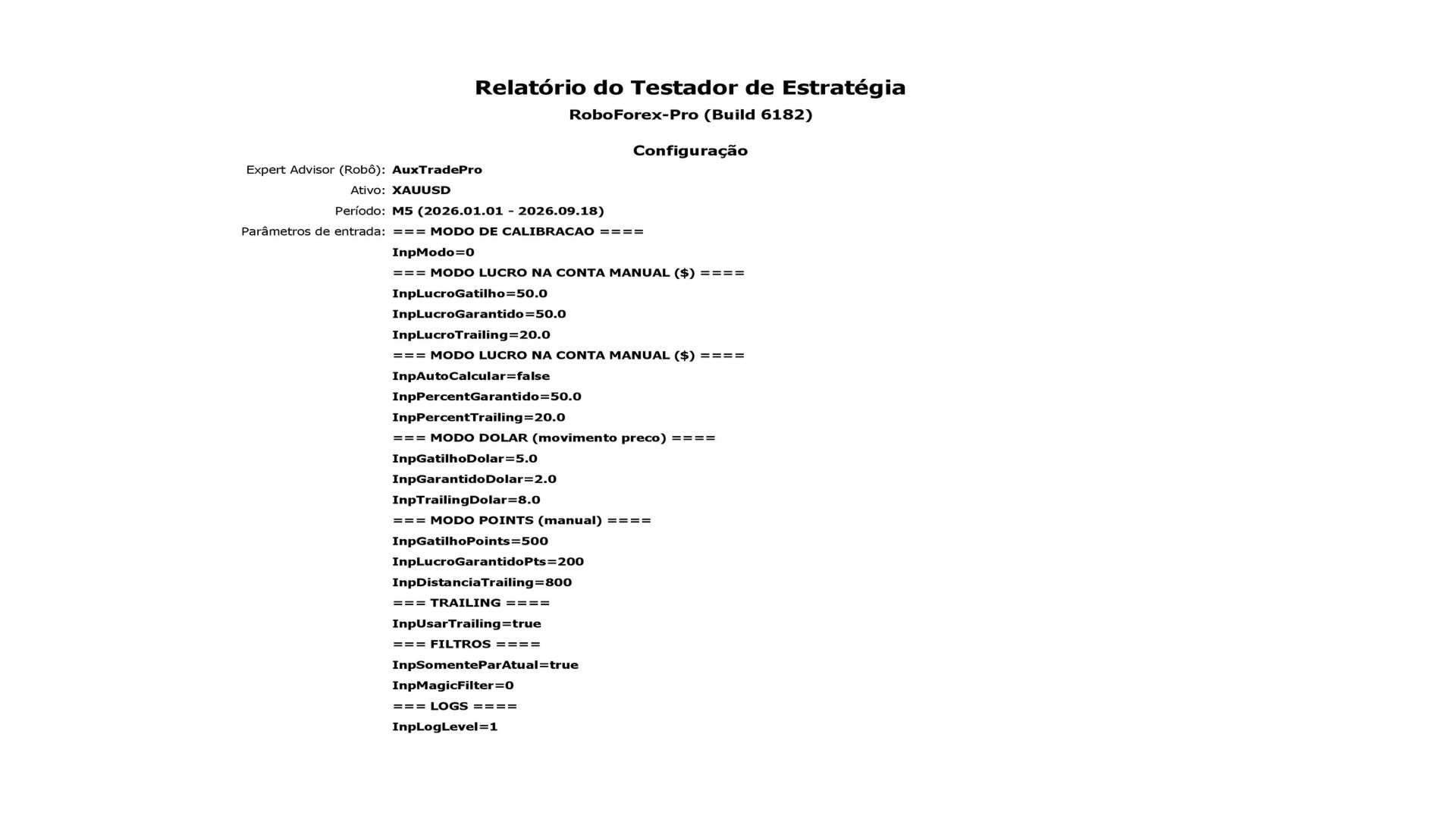
Mode: Choose between: Profit in account ( ) , P r i c e m o v e m e n t ( ),Pricemovement(), or Fixed points.
Profit Mode (Recommended)
-
Profit Trigger ($): The profit amount (in account currency) that activates protection.
-
Guaranteed Profit ($): The minimum profit to lock in when the trigger is hit.
-
Trailing Distance ($): How far the SL follows the price.
-
Auto-Calculate: If true, guaranteed and trailing are calculated as a % of the trigger.
Filters
-
Current Symbol Only: Manages only positions on the chart's symbol.
-
Magic Filter: 0 = manage all positions (including manual ones).
Visual
-
Show Panel: Displays status panel on chart.
⚠️ IMPORTANT: Spread and Commission Warning
AuxTrade Pro is a trade management tool. It does not control the costs charged by your broker.
Before using this EA, you must understand your broker's cost structure:
-
Spread: The difference between the Bid and Ask price. It is a cost embedded in every trade.
-
Commission: A fee charged by some brokers (especially ECN accounts) per lot traded.
If your broker charges a commission, it is deducted from your profit when the trade closes. This means your final profit will be lower than the profit shown in the EA's panel.
Example:
-
The EA locks in a profit of $50.
-
Your broker charges a commission of $15.76 per lot.
-
Your final net profit will be $50 - $15.76 = $34.24.
To use this EA effectively, you must set a trigger that is high enough to cover both the spread and the commission.
📊 Recommended Trigger Settings
The table below shows the minimum recommended trigger for different assets and lot sizes, based on average spreads and commissions.
| Asset | Spread Cost per Lot (Approx.) | Commission per Lot (Approx.) | Minimum Trigger (Lote 0.01) | Minimum Trigger (Lote 0.10) | Minimum Trigger (Lote 1.00) |
|---|---|---|---|---|---|
| EURUSD | $13 | $3.50 | 5 | 10 | 40 |
| GBPUSD | $15 | $3.50 | 5 | 10 | 50 |
| XAUUSD (Gold) | $30 | $7.00 | 5 | 10 | 100 |
| ETHUSD | $22.50 | $15.76 | 5 | 10 | 100 |
| US500 | $1.00 | $0.00 | 2 | 5 | 15 |
⚠️ Note: These values are estimates. Spreads and commissions vary by broker. Always check your broker's specifications and start with a higher trigger to be safe.
🎓 Who Is It For?
-
Manual traders who want to protect profits without staring at the screen.
-
Swing traders who leave positions open for hours or days.
-
Scalpers who need instant protection after entry.
-
Multi-asset traders who operate on forex, crypto, metals, and indices.
⚠️ Important Notes
-
AuxTrade Pro does not open trades. It only manages positions you open manually.
-
The EA does not predict the market. It does not analyze trends or generate signals.
-
Initial risk is not covered. Before the trigger is reached, the position is exposed to normal market risk. We strongly recommend setting an initial manual Stop Loss.
-
The EA protects profits — it does not create them. Profitability depends on the quality of your entries.
-
Always test on a demo account first. Every trading strategy carries risk.
🛠️ Installation
-
Download the EA from the MQL5 Market.
-
Open MetaTrader 5 → Navigator → Expert Advisors → AuxTrade Pro.
-
Drag it onto any chart.
-
Enable "Allow Algo Trading" in the EA settings.
-
Activate Algo Trading in the terminal toolbar.
-
Configure your desired profit trigger.
-
Open trades manually — the EA handles the rest.
📞 Support
For questions, bug reports, or feature requests, contact us through the MQL5 Market messaging system. We respond within 48 hours.