GM Grid Pro
- エキスパート
- バージョン: 1.0
- アクティベーション: 5

GM Grid Pro — Multi-Filter Grid EA | EURUSD M5 Optimized (MT5)
Short Description
Conservative grid EA with triple signal confirmation (Stochastic + ADX + CCI). Pre-optimized for EURUSD M5. Fully customizable for any pair and timeframe.
Full Description
⚡ GM Grid Pro — Intelligent Grid Trading with Multi-Filter Signal Confirmation
GM Grid Pro is a conservative grid Expert Advisor for MetaTrader 5 that combines three independent technical indicators to filter trade entries, then builds a controlled grid of positions in the confirmed direction.
Unlike pure grid EAs that trade blindly in both directions, GM Grid Pro only opens positions when at least two out of three indicators agree — significantly reducing the risk of opening a grid in the wrong direction.
🎯 Pre-Optimized for EURUSD M5 — Out of the Box
The default parameters have been walk-forward optimized for EURUSD on the M5 timeframe. Load the EA on EURUSD M5 and it is ready to trade without any configuration.
Users who wish to trade other pairs or timeframes can run their own optimization in the MT5 Strategy Tester. All parameters are fully exposed and labeled for easy optimization.
🔧 How It Works
Step 1 — Signal Confirmation At each new bar, the EA checks three independent filters:
- Stochastic (H1): oversold/overbought crossover
- ADX (H1): trend strength confirmation
- CCI (H1): momentum confirmation
- Optional MA Filter: trend direction gate
A trade is only opened when at least 2 of 3 filters agree AND no conflicting signals exist in the opposite direction.
Step 2 — Grid Construction Once a position is open in a confirmed direction, the EA can add grid orders at configurable intervals if the price moves against the position. The grid multiplier allows progressive lot sizing (martingale-style) or flat sizing (multiplier = 1.0).
Step 3 — Exit Management The EA closes all positions in a direction when the total basket profit reaches the Take Profit target. Optional trailing stop, breakeven close, and early exit mechanisms are available.
⚙️ Default Parameters (EURUSD M5 Optimized)
| Parameter | Default Value | Notes |
|---|---|---|
| LotPer10k | 0.27 | Auto lot per $10,000 balance |
| DistanceForNextOrder | 3218 pts | Grid step |
| GridMultiplier | 6.4 | Progressive lot sizing |
| MaxGridOrders | 26 | Max grid levels |
| TakeProfit | 900 pts | Basket TP |
| StopLoss | 4300 pts | Per position SL |
| TrailingStop | Disabled | |
| Session | 11:00–21:00 | Active trading hours |
📊 Real-Time Dashboard
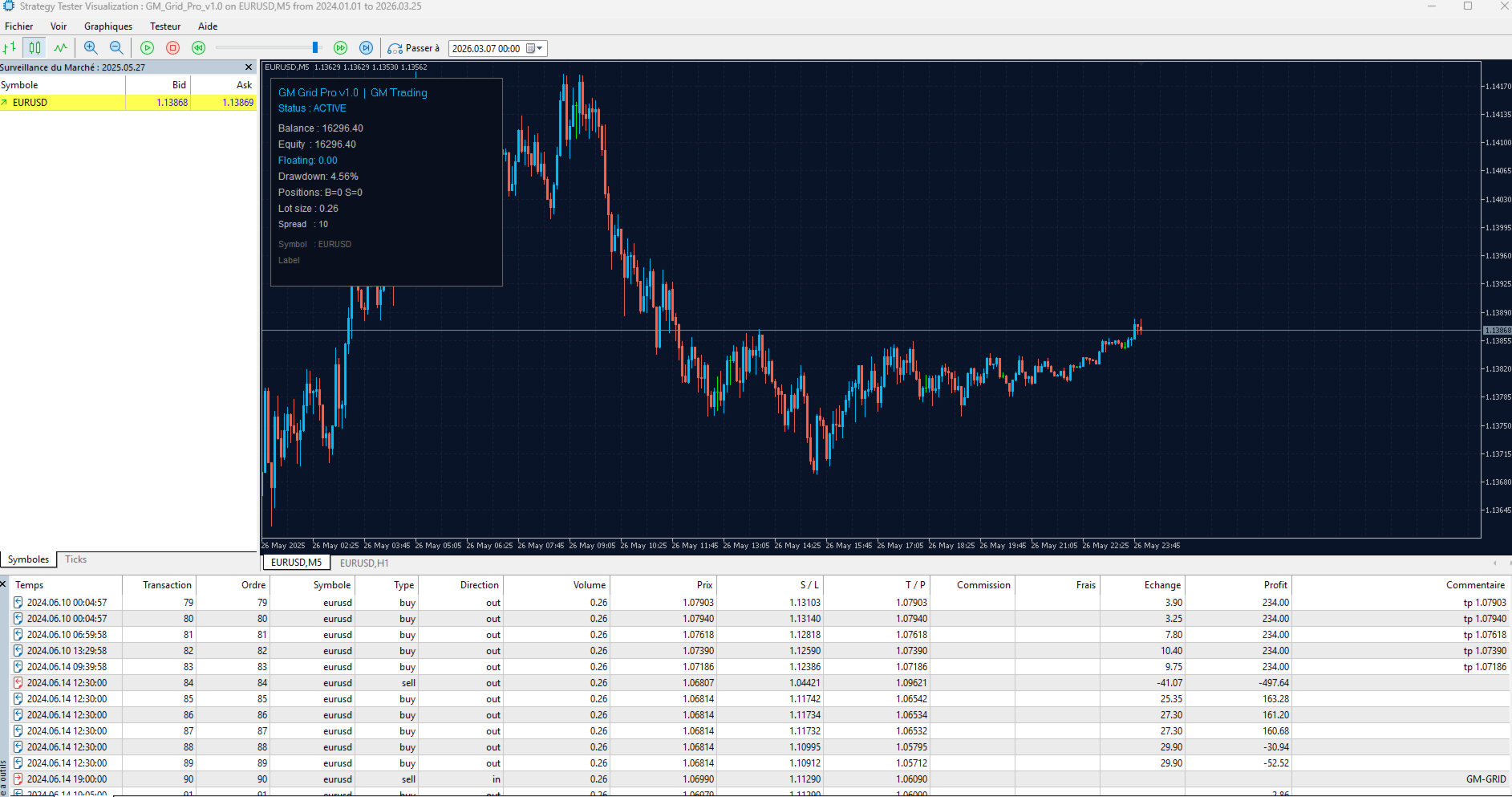
The EA displays a live panel on the chart showing:
- EA status (Active / Stopped)
- Account balance and equity
- Floating P&L
- Current drawdown %
- Open positions (Buy / Sell)
- Current lot size
- Live spread
🛡️ Risk Management Features
- Max Drawdown Stop: EA halts all trading when drawdown exceeds the configured threshold
- Spread Filter: No trades opened above maximum spread
- Session Filter: Trading restricted to defined hours and days
- Early Exit: Optional forced close when loss per position exceeds threshold
- Breakeven Close: Close entire basket at breakeven
🔩 Full Parameter List
Basic Settings: Allow Buy/Sell, Reverse Signals, Max Orders, Magic Number, Max Spread
Lot Sizing: LotPer10k (auto-scales with balance), Fixed Lot, Max Lot Size
Signal Filters: Stochastic (K, D, Slowing, OB/OS levels, Timeframe), ADX (Period, Limit, Timeframe), CCI (Period, Level, Timeframe), MA Filter (Period, Timeframe)
Session: Start/Stop hour, Day of week toggles (Mon–Sun)
Grid: Distance, Multiplier, Max Orders, Bar timeframe
Exit: Take Profit, Trailing Stop, Breakeven, Stop Loss, Early Exit, Max Drawdown
❓ FAQ
Can I use this on other pairs? Yes. The EA works on any symbol available in MT5. Default parameters are optimized for EURUSD M5. For other pairs, run optimization in the Strategy Tester using the labeled parameters.
Is it safe for prop firm accounts? The EA includes a Max Drawdown Stop that halts trading when the drawdown limit is reached. Configure MaxDrawdownPercent to stay safely within your prop firm's drawdown rules. Note: grid strategies carry inherent drawdown risk — always test on demo first.
What is the GridMultiplier? Set to 1.0 for a flat grid (same lot size on each level). Values above 1.0 increase lot size with each grid level (martingale). The default of 6.4 (optimized for EURUSD M5) is aggressive — reduce for a more conservative setup.
Does it trade both Buy and Sell simultaneously? Yes, when OpenBothDirections is enabled. Each direction is managed independently.
📋 Setup Checklist
- Open EURUSD chart, M5 timeframe
- Attach GM Grid Pro EA
- Verify default parameters match your risk tolerance
- Enable AutoTrading
- Monitor first sessions on demo before going live