FlipPro Unlimited

FlipPro Unlimited EA Manual

1. Introduction

FlipPro Unlimited is an Expert Advisor (EA) designed for the MetaTrader 5 (MT5) trading platform. It is a versatile trading tool that allows users to initiate buy or sell positions with customizable stop loss (SL) mechanisms, and it supports automated flipping of trade directions upon hitting SL. The EA includes features like dynamic or fixed SL, trailing to breakeven (BE), martingale pending orders, target profit closure, and a common take profit (TP) level.

Key capabilities:
- Manual initiation of trades via buttons or keyboard.
- Automatic reversal (flip) on SL hits.
- Martingale strategy for hedging losses.
- User-friendly control panel and settings dialog.
- Real-time info labels for trade monitoring.

Important Disclaimer: Trading involves significant risk of loss. This EA does not guarantee profits and should be used with proper risk management. Backtest and demo test before live use. The developer (Roy and Sons Holdings) holds no responsibility for losses incurred.

Version: 1.0  
Copyright: 2024-2025, Roy and Sons Holdings

2. Installation

1. Download the EA: Obtain the "FlipPro Unlimited.ex5" file from the MQL5 Market or provided source.
2. Attach to Chart:
   - Open MT5 and navigate to the Navigator panel (Ctrl+N).
   - Find the EA under "Expert Advisors" and drag it onto a chart of your desired symbol (e.g., EURUSD).
   - In the EA properties window, configure input parameters (see Section 3) and allow live trading if needed.
   - Click "OK" to attach. The control panel should appear on the chart.
3. Permissions: Ensure "Allow live trading" and "Allow DLL imports" are enabled in MT5 settings (Tools > Options > Expert Advisors).
4. Restart Handling: If positions with the EA's MagicNumber exist on startup, the EA will detect and manage them automatically.

Note: The EA uses a control panel that can be dragged by clicking and holding the header. It also responds to chart changes and mouse events.

3. Input Parameters

These are configurable when attaching the EA or via the settings dialog (some parameters are runtime-changeable).

- LotSize (default: 0.1): Fixed lot size for trades (regardless of account balance). Can be changed at runtime via settings as "Initial Lot".
- MagicNumber (default: 1234567): Unique identifier for the EA's trades to avoid conflicts with other EAs.
- SlippageMax (default: 0): Maximum allowed slippage in points for order execution.
- MinTradeInterval (default: 0): Minimum seconds between trades to prevent rapid firing.
- CandleLookbackInput (default: 1): Number of candles to look back for dynamic SL calculation. Can be changed at runtime.
- MartingaleLevelsInput (default: 3): Number of martingale pending orders to place. Can be changed at runtime.
- MartingaleMultiplierInput (default: 2.0): Lot multiplier for each martingale level. Can be changed at runtime.
- CommissionPerLot (default: 0.5): Commission per lot in account currency (adjusts BE calculations).

Other runtime settings (via dialog):
- Fixed SL Pips (default: 10000.0): For fixed SL mode.
- Breakeven Multiplier (default: 1.0): Multiplier for trailing BE threshold (e.g., trail when profit reaches X times initial SL).
- Target Profit (default: 0.0): Total profit level to close all positions (disabled if 0).
- Take Profit Price (default: 0.0): Common TP price for all positions/orders (disabled if 0).
- Initial Lot (overrides LotSize at runtime).

4. User Interface

4.1 Control Panel
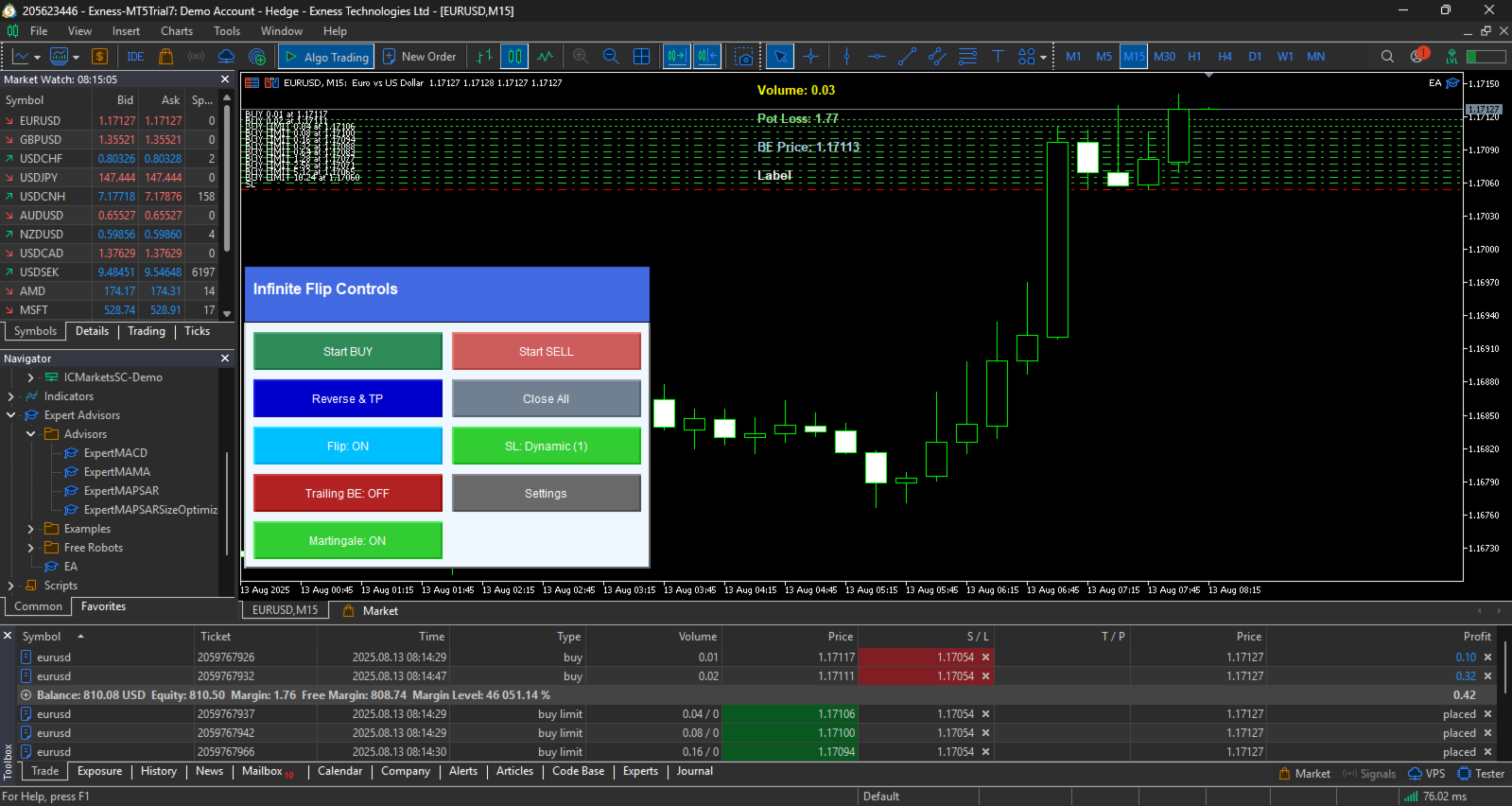
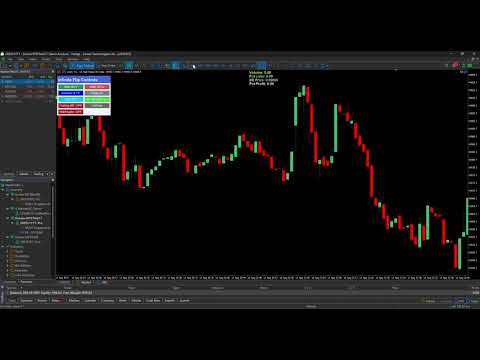
The panel appears on the chart (draggable via header). It includes buttons for trade control and toggles.

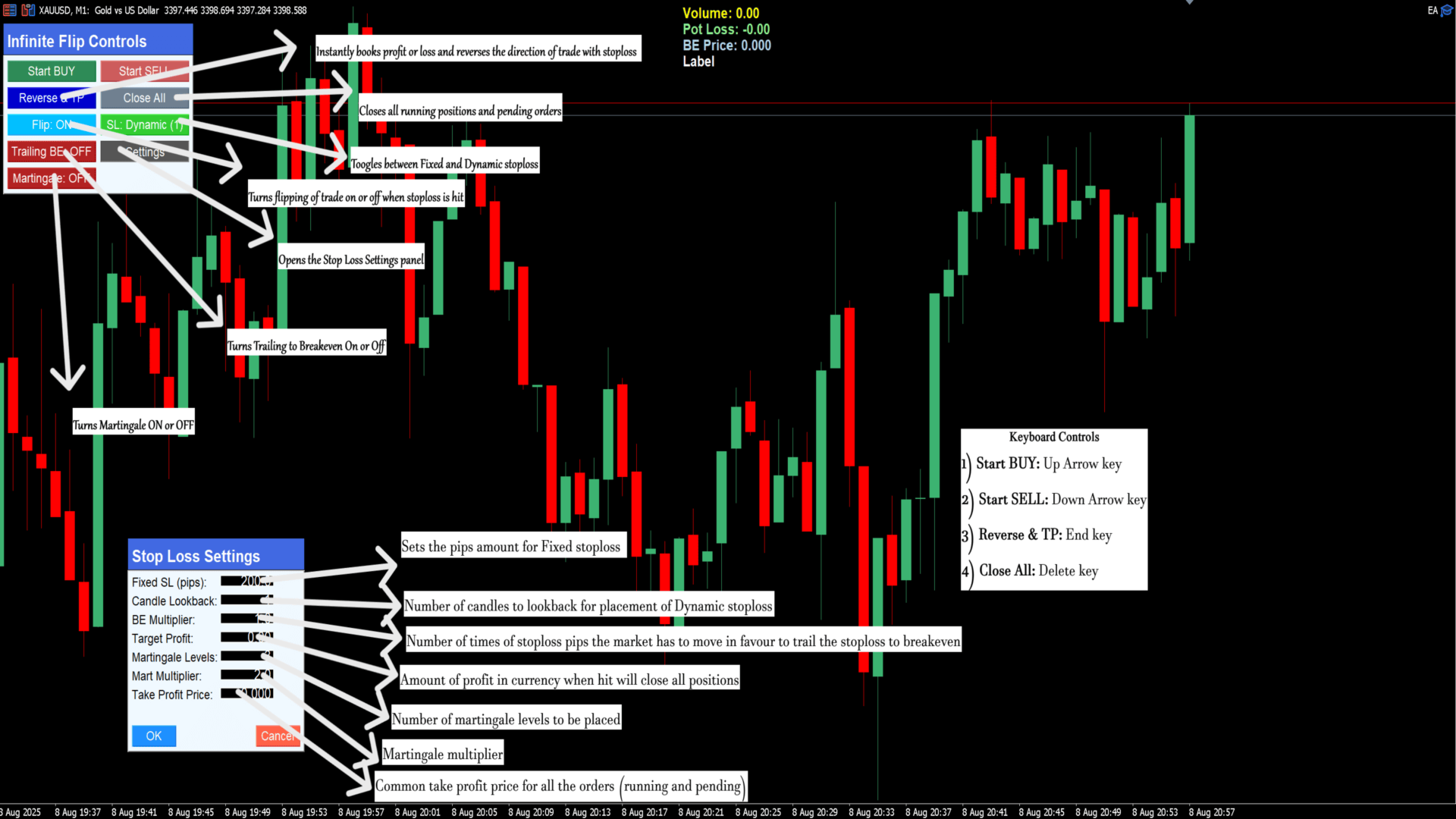
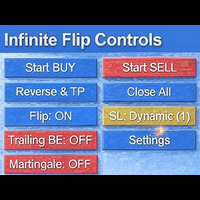
- Header: "Infinite Flip Controls" (blue background).
- Buttons:
  - Start BUY (green): Opens a buy position if no trade is active.
  - Start SELL (red): Opens a sell position if no trade is active.
  - Reverse & TP (blue): Closes all positions/pending orders, flips direction, and opens a new trade (includes martingale if enabled).
  - Close All (gray): Closes all positions and cancels pending orders.
  - Flip: ON/OFF (toggle, sky blue/dark blue): Enables/disables automatic flip on SL hit.
  - SL: Dynamic/Fixed (toggle, green/red): Switches between dynamic SL (based on candles) or fixed pips.
  - Trailing BE: ON/OFF (toggle, green/red): Enables/disables trailing to breakeven.
  - Martingale: ON/OFF (toggle, green/red): Enables/disables martingale pending orders.
  - Settings (gray): Opens the settings dialog.

4.2 Info Labels
Displayed at the top-center of the chart (updates in real-time):
- Volume: Total open volume for EA positions.
- Pot Loss: Potential loss if all SLs are hit (negative value shown as positive loss).
- BE Price: Weighted average entry price (breakeven point).
- Pot Profit: Potential profit if all TPs are hit (shown only if all positions have TP).

4.3 Settings Dialog
Opened via the "Settings" button (draggable via header). Allows runtime changes.

- Header: "Stop Loss Settings".
- Fields:
  - Fixed SL (pips): Set fixed SL distance.
  - Candle Lookback: Candles for dynamic SL.
  - BE Multiplier: Threshold multiplier for trailing BE.
  - Target Profit: Profit level to close all.
  - Martingale Levels: Number of martingale orders.
  - Mart Multiplier: Lot multiplier for martingale.
  - Take Profit Price: Common TP for all.
  - Initial Lot: Starting lot size.
- Buttons:
  - OK (blue): Applies changes and closes dialog. Updates active trades if applicable (e.g., moves SL).
  - Cancel (red): Closes without changes.

Note: Double-click on the chart to set a common TP price (if multiple orders exist).

5. Features Explanation

5.1 Flip Sequence
- When enabled (default: ON), if a position hits SL, the EA automatically flips direction and opens a new trade.
- Disabled: Trades close on SL without flipping.

5.2 Stop Loss Types
- Dynamic SL (default): Based on min/max of recent candles (CandleLookback). For buy: lowest low; for sell: highest high.
- Fixed SL: Fixed pips from entry (default: 10000 pips, adjustable).
- SL respects minimum stop levels and is normalized.

5.3 Trailing Breakeven
- When enabled, trails SL to breakeven (entry price adjusted for commission) once profit reaches Breakeven Multiplier * initial SL pips.
- Skips if already at BE or closer. Checks minimum distance to market.

5.4 Martingale
- When enabled, places pending orders at levels between entry and SL.
- Levels: Divided evenly (step = SL distance / (levels + 1)).
- Lots: Initial lot * multiplier^level.
- Type: Buy limit for buy trades; sell limit for sell.
- Shares SL and TP with main trade.

5.5 Target Profit
- If set (>0), monitors total profit across all EA positions and closes all when reached.

5.6 Common Take Profit
- Set via settings or double-click on chart price.
- Applies to all positions and pending orders (modifies existing).
- Potential profit label shows if all have TP.

5.7 Other Behaviors
- Retries failed order placements every second.
- Handles commission in BE calculations.
- Updates on timer (every second) for trailing, targets, and labels.

6. Keyboard Shortcuts
Active when settings dialog is closed:
- Up Arrow: Start BUY.
- Down Arrow: Start SELL.
- Delete: Close All.
- R or End: Reverse & TP.

7. Risk Management and Disclaimers
- Risks: Martingale can amplify losses. Large lots or high multipliers may lead to margin calls. Dynamic SL may be wider in volatile markets.
- Recommendations: Use small lots (e.g., 0.01). Set reasonable SL and targets. Monitor via info labels. Test on demo accounts.
- Limitations: No TP by default (unless set). Assumes FIFO/netting account types. Debug mode prints logs (enable via #define __MQLDEBUG__).
- Support: Refer to MQL5 Market page or contact developer.

For updates or issues, check the product link. Happy trading!
추천 제품
Short Description Swing Timing Breakout EA is a smart Expert Advisor for MetaTrader 5 that combines trend filtering, momentum timing, and dynamic risk management to capture high-probability swing and breakout opportunities. Full Description Swing Timing Breakout EA is a professional trading robot designed for MetaTrader 5, suitable for traders who want a balance between automation, control, and disciplined risk management. This EA uses a trend-following and momentum confirmation approach ,
Panic Panel MT5
Nikola Miladinovic
Panic Panel is a professional manual trade management tool for MetaTrader 5. It allows traders to control open positions quickly and safely directly from the chart. Main Features: - Symbol-specific position control - One-click Break Even - Manual Stop Loss step adjustment - Partial close: 25% / 50% / 75% - Net profit, position count and volume display - Independent per chart operation The panel works only on the active symbol and does not affect other instruments. This tool does NOT open tr
Flow – Hotkey Tool for Discretionary Traders Take full control of MT5 with your keyboard and mouse. Flow is a powerful hotkey-based assistant designed specifically for discretionary traders who want to place orders, draw tools, and operate charts with speed and precision. No more right-click menus or wasting time. Just trade. Key Features Order Execution Place pending Buy/Sell orders (limit or stop) instantly with just a mouse click. Stop Loss and Take Profit lines are automatically attac
TradeForge AlphaGain AI
Akshay Chunilal Patil
AlphaGain AI – 차세대 AI로 구동되는 정밀한 트레이딩 EA AlphaGain AI는 MetaTrader 5용으로 개발된 고급 인공지능 기반 EA로, 10년 이상의 데이터를 분석하여 시장 변화에 적응하는 전략으로 정확한 진입/청산 신호를 제공합니다. 주요 특징: AI 기반 핵심 알고리즘: 캔들 패턴, 변동성 영역, 모멘텀 분석; 10년 이상의 백데이터 기반 훈련; 지능형 매수/매도 전략: SL/TP, 트레일링 스탑, 손익분기점 설정, 변동성 기반 목표가 설정; 자금 보호 기능: 최대 손실 제한, 잔고 보호, 최대 스프레드 필터, 거래 시간 제어; 완전 자동화: 수동 개입 없이 작동; ECN 환경에 최적화된 저지연 실행. 추천 설정: 거래쌍: EUR/USD 타임프레임: 15분 (M15) 최소 잔고: $100 추천 계정 유형: ECN 또는 Raw Spread 레버리지: 1:100 이상 왜 AlphaGain AI인가요? 바로 사용 가능: .ex5
특별 캔들 당신은 성공적인 이치모쿠 전략을 사용하는 최고의 외환 지표 중 하나를 사용하고 싶습니까? 이치모쿠 전략에 기반한 멋진 지표를 사용할 수 있습니다. MT4 버전은 여기에 있습니다. 첫 번째 전략: 이 전략은 드물게 발생하는 유사한 강력한 교차점을 식별하는 것을 포함합니다. 이 전략에 가장 적합한 시간대는 30분 (30M)과 1시간 (H1)입니다. 30분 봉 차트에서 적합한 기호는 다음과 같습니다. • CAD/JPY • CHF/JPY • USD/JPY • NZD/JPY • AUD/JPY • EUR/USD • EUR/GBP 1시간 봉 차트에서 적합한 기호는 다음과 같습니다. • GBP/USD • GBP/NZD • GBP/AUD • USD/CAD • USD/CHF • USD/JPY • EUR/AUD 두 번째 전략: 이 전략은 추세와 같은 방향으로 발생한 강력한 텐쿤선과 기준선 교차를 식별하는 것을 포함합니다. 이 전략에 가장 적합한 시간대는 1분 (1M)에서 15분 (15M
AxiomSuite SL Locker – Institutional Stop-Loss Protector for MetaTrader 5 AxiomSuite SL Locker is a professional stop-loss integrity module designed for traders who require strict execution rules on MT5. It protects every position opened by manual trading or Expert Advisors by enforcing safe and compliant stop-loss behavior. This module never opens or closes trades. It only supervises SL modifications in real time and corrects any invalid or risky change instantly. Perfect for prop-firm rule
The Expert Advisor will help you forward all alert from  MetaTrader 5 to Telegram channel/ group.  All alert must save to folder <Data folder>MQL5\Files\Alerts\ , text file with format *.txt and screenshot with format *.gif or *.png. Parameters: - Telegram Bot Token: - create bot on Telegram and get token. - Telegram Chat ID:  - input your Telegram user ID,  group / channel ID - Forward Alert: - default true, to forward alert. - Send message as caption of Screenshot: - default false, set true t
Gold trend scanner MT5 a multi symbol multi timeframe dashboard that monitors and analyzes Average True Range indicator value in up to 28 symbols and 9 timeframes  in 3 modes :  It shows the ATR indicator value in all pairs and timeframes and signals when the ATR value reaches a maximum or minimum in a given duration. Short term ATR/Long term ATR ratio: It shows ratio of 2 ATRs with different periods. It's useful in detecting short term volatility and explosive moves. ATR Value/Spread ratio: S
AnaliTick
Aleksandr Prozorov
AnaliTIck is a financial instrument analysis and testing program based on the Metatrader5 platform. The object of analysis is the sequence of changes in the prices of Bid and Ask - ticks. The program may be useful to developers of scalping advisers and strategies, those who work on the news. When the program is loaded, an array of ticks for the financial instrument, on the chart of which the program is installed, is filled for the current period. The analyzed period is 4 trading days. On this pe
이 맞춤형 Ultimate Sniper 대시보드는 원래 Ultimate Sniper 대시보드 지표에 대한 EA 업그레이드입니다. 최대 98개의 서로 다른 알고리즘과 함께 작동하여 작업하는 자산 클래스에 대한 추세의 진정한 특성을 포착합니다. 이는 몇 달 동안 대부분의 고객으로부터 받은 많은 제안과 조언에 대한 직접적인 응답입니다. 이 사용자 정의 버전은 완전히 사용자 정의할 수 있습니다. 98개의 개별 맞춤형 알고리즘으로 구동됩니다. 매우 멋진 시각적 인터페이스로 모든 쌍 또는 기간에 대한 전체 시장 추세를 쉽고 자신 있게 따를 수 있습니다. 텔레그램에 실시간 알림을 보낼 수 있습니다. 거래 쌍에 따라 자신의 인덱스를 만들 수 있습니다. 휴대폰으로 실시간으로 알림을 보낼 수 있으므로 움직임이 설정되고 있음을 알기 위해 PC에 있을 필요가 없습니다. 입력 설정에서 8개의 인덱스를 설정할 수 있습니다. 알림을 받을 인덱스 및 기간을 설정할 수 있습니다. 인터넷 연결이 감지되지 않으면 경
No Need any Set File Just Install and Strategy make True if you are using exness or 5 Digit Broker Just put one more Zero in SL  (Test Data will be same on 1 Min OHLC with 5 Min Chart on all Broker) KS Gold AutoTrade EA is a fully automated Expert Advisor built specifically for trading Gold (XAUUSD) on MetaTrader 5. This EA performance will be high on low spread broker account (We Tested on Exness ICmarket zero slippage)  The EA combines trend filtering , classic reversal candlestick patterns  
THV Keyboard Commander MT5: Fast, precise, and fully keyboard-driven. Built with a simplicity and speed mindset — your ultimate trading assistant. THV Keyboard Commander MT5 is a powerful and intuitive trading assistant that lets you open, close, or delete orders instantly using keyboard shortcuts — no more wasting time with manual clicking. You can place Buy/Sell Limit and Stop orders with one key press, and the EA automatically calculates price levels based on your open or pending trades, ens
지표에 대하여 이 지표는 금융 상품의 종가에 대한 몬테카를로 시뮬레이션을 기반으로 합니다. 몬테카를로는 통계적 기법으로, 이전에 관찰된 결과에 기반한 랜덤 숫자를 사용하여 다양한 결과가 나올 확률을 모델링하는 데 사용됩니다. 어떻게 작동하나요? 이 지표는 과거 데이터를 바탕으로 시간에 따른 랜덤 가격 변화를 모델링하여 특정 종목에 대한 여러 가격 시나리오를 생성합니다. 각 시뮬레이션은 종가 변동을 반영하기 위해 랜덤 변수를 사용하여, 주어진 기간 동안 미래 시장 움직임을 효과적으로 모방합니다. 몬테카를로 시뮬레이션의 장점 - 몬테카를로 시뮬레이션은 다양한 미래 시나리오에 대한 테스트를 통해 여러 거래 전략의 리스크를 분석하는 데 도움을 줍니다. - 희귀한 극단적 사건(꼬리 위험)을 포함하여 다양한 시장 상황에서 전략의 성과를 확인할 수 있습니다. - 단일 예측에 의존하지 않고, 몬테카를로는 관련 확률과 함께 잠재적 결과의 범위를 제공합니다. 이는 수익 또는 손실 가능성을 이해하는
Advanced MT5 Indicator: Precision-Powered with Pivot Points, MAs & Multi-Timeframe Logic Unlock the full potential of your trading strategy with this precision-engineered MetaTrader 5 indicator —an advanced tool that intelligently blends Pivot Points , Adaptive Moving Averages , and Multi-Timeframe Analysis to generate real-time Buy and Sell signals with high accuracy.    If you want to test on Real Market, Let me know. I will give the Demo file to run on Real Account.    Whether you're a scal
Ava 3
Sveinn FRIDFINNSSON
5 (1)
AvA 3 SET files AvA 3 - HELLENIC: Dynamic Multi-Module Trading System AvA 3 - HELLENIC is a sophisticated Expert Advisor meticulously engineered for serious forex traders seeking exceptional versatility and precision in automated trading. This powerful EA integrates multiple trading modules within a flexible framework, delivering a complete trading solution adaptable to diverse market conditions. At its core, AvA 3 - HELLENIC features four specialized trading modules - ALPHA, BETA, GAMMA, and
Overview Auto Fibo Trend Signal is a comprehensive analysis tool designed to support discretionary traders in market environment recognition and trade execution. Featuring an interactive on-chart dashboard, it allows for seamless control over multiple technical indicators and dynamic drawing tools. This indicator eliminates the need to constantly open the properties window, enabling flexible, real-time analysis directly on the chart. Key Features Interactive Dashboard The dedicated control pane
FREE
MQLplus Charting
Dominik Egert
5 (2)
MQLplus Charting  Inspired by good charting solutions available on the web, this utility finally brings some neat features to MT5 to make charting fun again. Current version supports following features: Free floating charts , similar to Tradingview A sophisticated Cross-Hair , with detailed data display Multi-Chart Cross-Hair  sync function Measurement tool , showing account currency, points and period count as results Speed-Scrolling  to move fast through markets history Snail-Scrolling  to p
This tool is used to generate a K - line reflection chart of a currency pair for foreign exchange transactions. For example, if the currency pair is EURUSD, a custom currency pair named EURUSD_ref is generated and a chart for that currency pair is opened. The price of a custom pair of currency is the inverse of the price of the original pair, which is the equivalent of a new pair of currency, the USDEUR. The usage is simple, put it on any chart, the new chart will open, and then draw the corr
Seconds Candles
Mativenga Geoffrey Mativenga
Statistical Arbitrage Spread Generator for Cointegration [MT5] What is Pair Trading? Pair trading is a market-neutral strategy that looks to exploit the relative price movement between two correlated assets — instead of betting on the direction of the market. The idea? When two assets that usually move together diverge beyond a statistically significant threshold, one is likely mispriced. You sell the expensive one, buy the cheap one , and profit when they converge again. It’s a statistica
FREE
Nice Mamma
Pascal Hussenet
MAMMA 표시기는 STOP, 볼륨 또는 위험 수준을 계산하는 고급 트레이더뿐만 아니라 초보자에게도 이상적입니다. 매개 변수를 제어하고 도구를 거래에 적용할 수 있는 조종석이 있습니다. 이 조종석은 필요할 때 이동하거나 간단히 축소하여 확대할 수 있습니다. 3가지 계산 방법이 있습니다. 로트 크기 및 중지 크기로 수행할 계획에 따라 자동으로 위험을 계산할 수 있습니다. 예상 위험 및 스탑 크기를 기반으로 로트 크기를 설정할 수 있습니다. 예상되는 위험과 로트 크기에 따라 이상적인 스탑 크기를 설정할 수 있습니다. 각 계산을 통해 정확한 위험량을 알 수 있으며 계획된 정류장의 위치를 ​​차트에서 직접 볼 수도 있습니다. 계획을 놓치지 않으려면 그날의 목표와 최대 손실을 설정할 수 있습니다. 마지막으로 현재 시장 또는 단순히 현재 요일, 주 및 월에 대한 진행 상황을 종합적으로 볼 수 있습니다. 보너스로 제안된 이상적인 스탑과 함께 각각의 새로운 오픈 포지션에 대한 알림을 받게 됩니다.
# If you have any other requirements or are interested in collaboration, please contact  dev.quantech.london@gmail.com . Flash Trade (FT) Most friendly manual trading tool. Easy operation to secure your funds. Features of FT Click the chart to trade fast FT supports market orders and pending orders Click twice to complete the order and set SL and TP Click trice to complete the pending order and set SL and TP Automatically set the stop-loss amount of each order to a fixed percentage of the bala
PREngulfing
Slobodan Manovski
PR EA - Engulfing Pattern Trading System Automated Engulfing Pattern Detection with MA Confirmation The PR EA is a Meta Trader 5 expert advisor that identifies and trades bullish/bearish engulfing candlestick patterns when confirmed by a moving average filter. Designed for swing trading on 30-minute charts with compatibility for M15 and H1 time frames. Key Features: Pattern Recognition - Detects valid bullish/bearish engulfing candle formations Trend Confirmation - 238-period SMA filter
Overview Harmonic Patterns MT5 is a technical analysis indicator designed for the MetaTrader 5 platform. It identifies and displays harmonic price patterns, such as Butterfly, Cypher, Crab, Bat, Shark, and Gartley, in both bullish and bearish directions. The indicator calculates key price levels, including entry, stop loss, and three take-profit levels, to assist traders in analyzing market movements. Visual elements and customizable alerts enhance usability on the chart. Features Detects six ha
##   ONLY GOLD ##   Тiльки Золото ## **Mercaria Professional Trading Zones - Complete Guide** ## **Mercaria Professional Trading Zones - Повний посібник** ### **How Mercaria Zones Work / Як працюють зони Mercaria** **English:** Mercaria Zones is an advanced trading indicator that identifies high-probability support and resistance areas using ZigZag extremes combined with mathematical zone calculations. The indicator works on multiple timeframes simultaneously, providing a comprehensive view
INVI Hunting Gold
Niruban Chakravarthy R
INVI Hunting Gold is one of the straightforward tool to analysis the volatile market of Gold with demands precision, in-depth analysis, strong risk management and eliminating the need for constant market monitoring. INVI Hunting Gold will hunt the good trade position with precise risk management on all market conditions on Gold.  Hunting Gold  plug-and-play functionality means you can get started with minimal effort, Simply install me and let me handle the rest. We will diligently monitor the m
The Techno Deity — XAUUSD 디지털 도미넌스 프로모션: Cryon X-9000 어드바이저를 선물로 받으실 수 있습니다. 조건 및 액세스 문의는 직접 연락해 주세요. The Techno Deity는 골드 시장의 혼돈 속에서 구조적 질서를 찾는 트레이더를 위한 하이테크 트레이딩 시스템입니다. 가격 추종을 넘어 기관의 관심 구역과 시장 불균형을 식별하는 디지털 직관 알고리즘을 사용합니다. 주요 장점 유동성 지능: 숨겨진 유동성 클러스터를 스캔하여 강력한 임펄스 지점에서 진입합니다. 신경망 트렌드 필터: 노이즈와 가짜 조정을 걸러내고 진정한 추세를 포착합니다. 제로 그리드 철학: 마틴게일이나 그리드 전략을 사용하지 않습니다. 수학적 우위를 바탕으로 한 '원 엔트리-원 엑시트' 원칙을 고수합니다. 기술 사양 종목: 골드 (XAUUSD) 타임프레임: H1 추천 예치금: 500 USD 이상 (최소 200 USD) 실행 타입: 모든 브로커 호환 (낮은 스프레드 권장) 면책 조항
Fortune Pro XAUUSD h1
Raphael Schwietering
Fortune Pro — Smart Precision Trading on XAUUSD H1 Backtested from 2024 to Present | Designed for Live Markets | Prop Firm Ready Fortune Pro is a next-generation Expert Advisor designed for high-performance trading on XAUUSD H1. It combines adaptive strategy logic with strict risk control to deliver consistent results in the gold market. Whether you're trading for yourself or aiming for funding, Fortune Pro is built to deliver. Why Fortune Pro Excels Every trade is secured with a Stop Loss and T
Trade Interface Pro – The Ultimate Visual Trading Platform for MetaTrader 5 This is a All-In-One Trading Tool, but in general it's a Full Expert Advisor but without automated Trade-Execution Trade Interface Pro transforms MetaTrader 5 into a fully automated, interactive trading environment, turning every chart into a real-time intelligence terminal. All market analysis, trade execution, and structure visualization happen directly on the chart — instantly, intuitively, and without menus or delay
GRat Crypto
Ivan Titov
4.5 (2)
Trade on crypto exchanges in MT5! GRat_Crypto is a tool for manual and automated trading , including ANY available EA, ANY  cryptocurrency  on most popular crypto exchanges in the familiar MT5 environment 24/7. Features 1. ALL instruments of the 9 most popular crypto exchanges are available: Binance, BingX, Bybit, Coinbase, CoinEx, Kraken,   KuCoin, MEXC and OKX . 2. The ability to place ANY type of order available in MT5, both market and pending, to modify orders and positions, to delete order

이 제품의 구매자들이 또한 구매함
VERIFIED TRADING RESULTS - Farmed Hedge Yield Axi Copy:  https://www.mql5.com/en/signals/2356376 - Farmed Hedge Yield Exn Copy:   https://www.mql5.com/en/signals/2356404 - Farmed Hedge Yield V Copy:  https://www.mql5.com/en/signals/2357156 Contact me via private message to receive the User Manual and Setup. * Thai Lauguage Support Available Farmed Hedge Yield Farming - Professional Pair Trading Dashboard (Manual - Hybrid - Semi/Automated EA) VERSION 3 - WILD HARVEST UPDATE Trading Approac
YuClusters
Yury Kulikov
4.93 (43)
Attention: You can view the program operation in the free version  YuClusters DEMO .  YuClusters is a professional market analysis system. The trader has unique opportunities to analyze the flow of orders, trade volumes, price movements using various charts, profiles, indicators, and graphical objects. YuClusters operates on data based on Time&Sales or ticks information, depending on what is available in the quotes of a financial instrument. YuClusters allows you to build graphs by combining da
Unlimited Trade Copier Pro MT5 is a tool to copy trade remotely to multiple MT4, MT5 and cTrader accounts at different computers/locations over internet. This is an ideal solution for you if you are a signal provider and want to copy your trades to other receivers globally on your own rules. One provider can copy trades to multiple receivers and one receiver can get trade from multiple providers as well. The provider can even set the subscription expiry for each receiver, so that receiver will n
HINN Lazy Trader
ALGOFLOW OÜ
5 (2)
The core idea: using the user interface, you configure the parameters the chart must meet before entering a position (or positions), choose which entry models to use, and set the rules for when trading and planning should end. Lazy Trader takes over all the routine chart watching and execution.  Lazy Trader  handles the rest. full description  :: 3 key videos [1] ->  [2]   ->  [3] What can it do? - Understands Larry Williams market structure - Understands swing market structure by Michael Hu
Crystal Trade Manager – Advanced MT5 Risk and Trade Control Utility Overview Crystal Trade Manager (CTM) is a professional MetaTrader 5 utility designed for risk management, trade automation, and instant execution control. It provides traders with an integrated system for protecting equity, managing daily drawdowns, controlling lot sizes, and applying automation features such as automatic SL/TP, break-even, and trailing stop. The tool is suitable for manual traders, prop-firm challenge particip
Spot vs Future Arbitrage EA for MT5 Spot vs Future Arbitrage EA is an automated Expert Advisor designed for MetaTrader 5 that operates using price differences between Gold spot and Gold futures instruments. The strategy opens positions on both instruments simultaneously to take advantage of temporary differences between spot and futures prices. Requirements The trading account must provide both Gold spot and Gold futures instruments for trading. Strategy Overview The Expert Advisor opens a hedg
Mt5 To InterativeBrokers Copier allows you to copy deals from MT5 account to Interactive Brokers. With this, you can run your EA strategy on a MT5 Demo/Real Account, then copy all the deals to Interactive Brokers account real time. Features: 1. Copy or Invert-Copy deals Realtime from MT5 to IB Account. 2. Synchronizing positions of both accounts periodicaly, in case any missing copying. 3. You can choose only Buy position or Sell position. Symbols Setup: General Format:  {MT Symbol} -> {IB S
Mentfx Mmanage mt5
Anton Jere Calmes
4.25 (8)
The added video will showcase all functionality, effectiveness, and uses of the trade manager. Drag and Drop Trade Manager. Draw your entry and have the tool calculate the rest. Advanced targeting and close portions of a trade directly available in tool (manage trades while you sleep). Market order or limit order on either side with factored spread. Just draw the entry, the tool does the rest. Hotkey setup to make it simple. Draw where you want to enter, and the stop loss, the tool calculates al
The  Easy Strategy Builder (ESB)  is a " Do It Yourself " solution that allows you to create a wide range of the automated trading strategies without any line of codes. This is the world’s easiest method to automate your strategies that can be used in STP, ECN and FIFO brokers. No drag and drop is needed. Just by set conditions of your trading strategy and change settings on desired values and let it work in your account. ESB has hundreds of modules to define unlimited possibilities of strategi
PineChart
Muhammad Minhas Qamar
Developed by MMQ —  PineChart: Run PineScript Inside MT5 With A Modern Charting Experience An MQL5 Expert Advisor that runs Pine Script indicators and strategies directly inside MetaTrader 5. PineChart includes a full Pine Script interpreter so you can use your existing Pine Script v5/v6 source code without manually rewriting anything in MQL5. Links [  Website  |  Documentation  |  Demo ] NOTE: Downloading demo through MQL5 will give you limited functionality. To experience PineChart fully, dow
Trading Chaos Expert
Gennadiy Stanilevych
5 (11)
This software has no equals in the world and represents a universal trade "console" covering trading signals, automated market entry, setting of Stop Loss and Take Profit, as well as Trailing Profit for multiple trades at the same time in a single open window. Intuitive control of the Expert Advisor in "three clicks" ensures a comprehensive use of all its functions on different computers, including tablets PCs. Interacting with additional signal indicators that mark the chart to give a real mark
Live Forex Signals 사이트 신호에 거래를 위해 설계   https://live-forex-signals.com/en 그리고  https://foresignal.com/en . Live Forex Signal for MetaTrader 4   https://www.mql5.com/en/market/product/81445 매개 변수 사용자 이름 및 암호는 사이트에 가입 한 경우 live-forex-signals.com/foresignal.com 구독이 없으면 필드를 비워 둡니다; 댓글 개설 된 거래에 대한 댓글 위험 위험 거래에 대한 예금의 백분율로,위험=0 인 경우,다음 값 많이 사용됩니다 거래에 대한 많은 고정 볼륨 사이트에서 이익을 가져 가라 웹 사이트에서 정지 손실을 사용 빈도신호업데이트고문의 사이트 방문 빈도 분 최대 스프레드무역에 허용되는 최대 스프레드를 거래합니다.스프레드가 더 높으면 보류 중인 주문 세트가 취소됩니다 사용트레일링 사용 후행 정지 트레일링
Professional Order & Risk Management EA for MT5 An advanced order management tool designed to help traders control risk, position size, and trade management with precision. Features include automatic lot size calculation , risk–reward management , manual & automatic partial closes , breakeven automation , market & pending order support , and hotkey execution — built for traders who value systematic and disciplined risk management . EA Features Automatic Lot Size Calculation Automatically c
Gold instrument scanner is the chart pattern scanner to detect the triangle pattern, falling wedge pattern, rising wedge pattern, channel pattern and so on. Gold instrument scanner uses highly sophisticated pattern detection algorithm. However, we have designed it in the easy to use and intuitive manner. Advanced Price Pattern Scanner will show all the patterns in your chart in the most efficient format for your trading. You do not have to do tedious manual pattern detection any more. Plus you
FiboPlusWaves MT5
Sergey Malysh
5 (1)
FiboPlusWave Series products Ready-made trading system based on Elliott waves and Fibonacci retracement levels . It is simple and affordable. Display of the marking of Elliott waves (main or alternative option) on the chart. Construction of horizontal levels, support and resistance lines, a channel. Superposition of Fibonacci levels on waves 1, 3, 5, A Alert system (on-screen, E-Mail, Push notifications).    Features: without delving into the Elliott wave theory, you can immediately open one of
Best Renko Chart Generator
Mohammad Taher Halimi Tabrizi
5 (1)
This is the Best Renko chart generator ever in the market you can set the box sizes based on ATR or Fixed Size: 1. Fixed Box Size 2. Current ATR Size 3. ATR size of the Chart Start Time. also you can set the Renko chart cut of date and time to start as reference of creating renko charts. you need to attach to a symbol chart that want the renko chart of it, then immediately a new chart will be opened which is based on renko, you can use this generated chart and attach your EA to trade on or you e
如果产品有任何问题或者您需要在此产品上添加功能,请联系我 Contact/message me if you encounter any issue using the product or need extra feature to add on the base version. There is Demo version of this panel Dashboard Babon Scalping System MT5 Demo in my product list, please try it out to get familiar with all functionalities for free. Free version: LINK MT4 version: LINK This system basically utilizes TDI, Heiken Ashi Trend, Price Trend on H1 time-frame and TMA on H1&H4 time-frame to generate the trend (big picture). Then
Equity Gaurd
Eredewei Henry Tiemo
️ Equity Protector EA – Auto SL & Trailing Stop for MT5 Protect your capital. Automate your risk. Maximize your control. The Equity Protector EA is a powerful risk management tool designed for Meta Trader 5 traders who prioritize capital preservation and smart trade automation. Whether you're a scalper, swing trader, or long-term investor, this EA ensures your account stays protected while optimizing trade exits with precision. Key Benefits Drawdown Shield Automatically monitors your accoun
TradePad
Ruslan Khasanov
5 (1)
TradePad는 수동 및 알고리즘 트레이딩을 위한 도구입니다. 여러 거래 상품에 대한 빠른 거래 작업과 포지션 제어를 위한 간단한 솔루션을 제공합니다. 주의, 이 애플리케이션은 전략 테스터에서 작동하지 않습니다! 데모 계정을 위한 애플리케이션의 평가판과 모든 도구에 대한 설명 애플리케이션 인터페이스는 고해상도 모니터에 맞게 조정되었으며 간단하고 직관적입니다. 편안한 작업을 위해 트레이더에게 다음과 같은 도구 세트가 제공됩니다. 거래 작업 관리, 메인 차트 기간 간 전환, TradePad 상품 간 전환을 위한 핫키 관리자; 포지션을 개설하거나 보류 주문을 설정할 때 하락 위험을 평가하고 잠재적 이익을 계산하기 위한 거래 수준 표시 도구; 여러 거래 심볼을 시각적으로 모니터링하고 알고리즘 트레이딩을 위한 거래 신호를 수신하기 위한 MultiCharts 도구. 편의를 위해 거래 쌍 세트를 구성하여 여러 시간대의 가격을 모니터링하고 다중 통화 거래를 수행할 수 있습니다. 확장된 HTML
News Trader Pro is a unique robot that allows you to trade the news by your predefined strategy. It loads every piece of news from several popular Forex websites. You can choose any news and preset the strategy to trade it, and then News Trader Pro will trade that news by selected strategy automatically when the news comes. News release gives opportunity to have pips since the price usually has big move at that time. Now, with this tool, trading news becomes easier, more flexible and more exciti
Elliott Wave Counter는 Elliott 파동의 빠르고 사용자 친화적인 수동 마크업을 위한 패널입니다. 색상과 마크 수준을 선택할 수 있습니다. 도구에서 만든 마지막 마크업과 전체 마크업을 제거하는 기능도 있습니다. 한 번의 클릭으로 마크업이 이루어집니다. 5번 클릭 - 5개의 웨이브가 있습니다! Elliott Wave Counter는 Elliott 파동의 초보자와 전문 분석가 모두에게 훌륭한 도구가 될 것입니다. Elliott Wave Counter 설치 및 입력 가이드 당신이 얻고 싶다면       EA 추가 URL(   http://autofxhub.com   ) MT5 터미널에 대한   알림   (스크린샷 참조). MT4 버전   https://www.mql5.com/en/market/product/14016 MT5 버전   https://www.mql5.com/en/market/product/15081 일반 입력: 웨이브 유형 버튼:   이 버튼을 사용하면 차트
If you wish to draw Support and Resistance lines, view: daily market opening, classical pivot levels, Fibonacci pivot levels, trend lines, Fibonacci levels, the remaining time to candle closing, and current spread. If you seek to place your orders with the exact lot that meets your desired stop loss risk. If you wish to do all this and more with just one click, then this is the perfect tool to use. This tool will allow you to feel more relaxed when deciding to open orders, as well as predicting
The new version of  MirrorSoftware 2021  has been completely rewriten and optimized.  This version requires to be loaded only on a single chart because  it can detect all actions on every symbol and not only the actions of symbol where it is loaded. Even the  graphics and the configuration mode  have been completely redesigned. The MirrorSoftware is composed of two components (all components are required to work):  MirrorController  (free indicator): This component must be loaded into the MASTER
ClusterSecond
Rafil Nurmukhametov
4.78 (32)
The utility allows you to build different types of graphs: Seconds chart from 1 second to 86400 seconds Tick chart from 1 tick and above The volume chart Delta chart Renko chart Range chart Demo version of the utility https://www.mql5.com/ru/channels/clustersecond Built-in indicators for volumetric analysis: daily market profile and market profile of the selected timeframe, Cluster Search Imbalance VWAP Dynamic POC, VAH, VAL the profile depth of the market vertical volume with various display op
The script displays info about the share's corporate reports and dividends. The data is downloaded from   investing.com : Report date Profit per share (EPS) Revenue Market capitalization Amount of dividends Date of payment of dividends Dividend income The product cannot be tested in the tester (since it is not possible to receive data from the Internet). Before launching:  Add 2   URL   https://ru.investing.com/earnings-calendar/Service/getCalendarFilteredData  and   https://ru.investing.com/di
Telegram Publisher Agent는   거래자가 Telegram 채널 및 그룹에 실시간으로 신호를 보낼 수 있는 추가 기능입니다. 사용자 정의 가능한 메시지, 차트 스크린샷 및 기타 기능을 통해 이 도구는 트레이더가 트레이딩 통찰력과 전략을 팔로워와 공유할 수 있도록 도와줍니다. 이 도구는 또한 밝고 어두운 테마 스위치가 있는 아름다운 디자인을 특징으로 하여 사용자에게 미적 및 기능적인 거래 경험을 제공합니다. Telegram 게시자 에이전트는 모든 거래를 채널 및 그룹의 신호로 게시하도록 설계되었습니다. 거래를 제공하기만 하면 Telegram 게시자 에이전트가 버튼 클릭 한 번으로 거래 채널이나 그룹에 거래 신호를 보내는 모든 어려운 작업을 수행합니다. 텔레그램 게시자 에이전트       설치 및 입력 가이드 EA 추가 URL(   http://autofxhub.com   ) MT4/MT5 터미널(스크린샷 참조)   에 대한 알림을 받으려면   . MT4 버전   htt
Telegram Notify MT5 Telegram Notify MT5 is an utility tool to bridge your MetaTrader 5 activities to your Telegram chat/channel. It is useful for monitoring your MetaTrader 5 account by sending a notification to your particular Telegram chat/channel when someone/EA is placing trades, modifying order's TP/SL, closing trades and etc. This EA does not place any trade for your account. This EA also could be a convenient tool for monitoring other's EA trading activities or a tool for publishing your
Telegram ChartSnap MT5 is an utility tool to bridge your MetaTrader 5 activities to your Telegram chat/group/channel. It will screen shot your MetaTrader 5 chart and send it to your dedicated Telegram chat/group/channel through a Telegram bot. The whole process will keep repeating based on a time cycle that predetermined by the user. It is a convenient tool for those who like to get access to their favorite system/dashboard that only available at MetaTrader Desktop. Beside that, trader can easi
Virtual Grid MT5
Volodymyr Hrybachov
반자동 거래를 위한 유틸리티. 브로커에게 보이지 않는 스탑 오더, 손절매, 이익 실현 및 트레일링 스탑 설정을 위한 동적 수준을 적용합니다. FIFO 요구 사항이 있는 미국 중개인을 포함하여 모든 중개인과 작업하는 데 적합합니다. 어드바이저 링크의 MT4 버전 버튼이나 라인을 사용하여 거래를 열 수 있습니다. 어드바이저가 선을 따라 포지션을 열려면: 차트에 선을 그리고 이름을 바꿉니다. 가격이 이를 초과하면 EA가 해당 명령을 실행합니다. OPEN_SELL - 판매 주문 열기 CLOSE_SELL - 모든 판매 주문 마감 OPEN_BUY - 구매 주문 열기 CLOSE_BUY - 모든 구매 주문 마감 명령이 실행된 후 "OK"라는 주석이 작성되고 행은 명령을 한 번만 실행합니다. 차트는 수신된 이익, 현재 오픈 포지션(주문 수, 로트 수 및 이익), 오픈 주문 버튼, 실행 속도 및 슬리피지에 대한 정보를 표시합니다. 옵션: MAGIC_NUMBER - 매직 넘버; LOT_
Quick operation, quick purchase, sale, empty operation. Provide three buttons: Buy, Sell, empty. Buy: Quickly place more orders after clicking, default 1 hand, profit point and stop-loss point are 110 points, after successful order can be manually modified. Sell: Quickly place an empty order after clicking, default 1 hand, profit point and stop-loss point are 110 points, can be manually modified after the order is successful. Empty: Quickly clear all orders, including purchase and s
필터:
리뷰 없음
리뷰 답변