Weekend Gap Exposure Guard
- ユーティリティ
- バージョン: 1.0
- アクティベーション: 5

STOPS THE WEEKEND GAP FROM JUMPING STRAIGHT OVER YOUR STOP LOSS: PROTECTS OPEN POSITIONS MINUTES BEFORE THE FRIDAY CLOSE.
Built for traders who hold positions into Friday evening, by hand or with an Expert Advisor or copier. One promise: no position goes into the weekend unguarded by accident. Mechanism: it reads each symbol's own last trading session of the week from your broker, warns you first, and a set number of minutes before that close adds a protective stop, closes a part, or closes the position.
Fits your account: hedging and netting accounts, works beside any EA or trade copier on the same terminal (symbol and magic filters decide what it touches), and suits prop-firm accounts whose rules forbid or limit weekend holding. It never opens a trade on a live account.
Try it free first: run Weekend Gap Exposure Guard in the Strategy Tester with visual mode on. There it opens small demo positions from Wednesday to Friday morning on purpose, so you can watch a full cycle: the warning on Friday evening, the guard action before the close, and the Monday gap report with the original stop loss put back.
Who this is NOT for: traders who want to hold full size and full risk through every weekend no matter what (run it in alert-only mode, or do not use it), and pure weekend markets such as crypto symbols that trade on Saturday and Sunday; those are recognised automatically and left alone.
In short
- Per-symbol weekly close time read from the broker's trade sessions, so EURUSD, gold and indices each get their own deadline. A fixed server time is available as an alternative and as a fallback.
- Two windows: an early warning (120 minutes before the close by default) and the action window (30 minutes before).
- Four modes: 0 alert only, 1 add or tighten a protective stop loss, 2 close a part of each position (with an optional stop on the rest), 3 close the positions fully.
- Monday resume: on the first fresh quote of the new week it reports how far each position gapped and can put your original stop loss back.
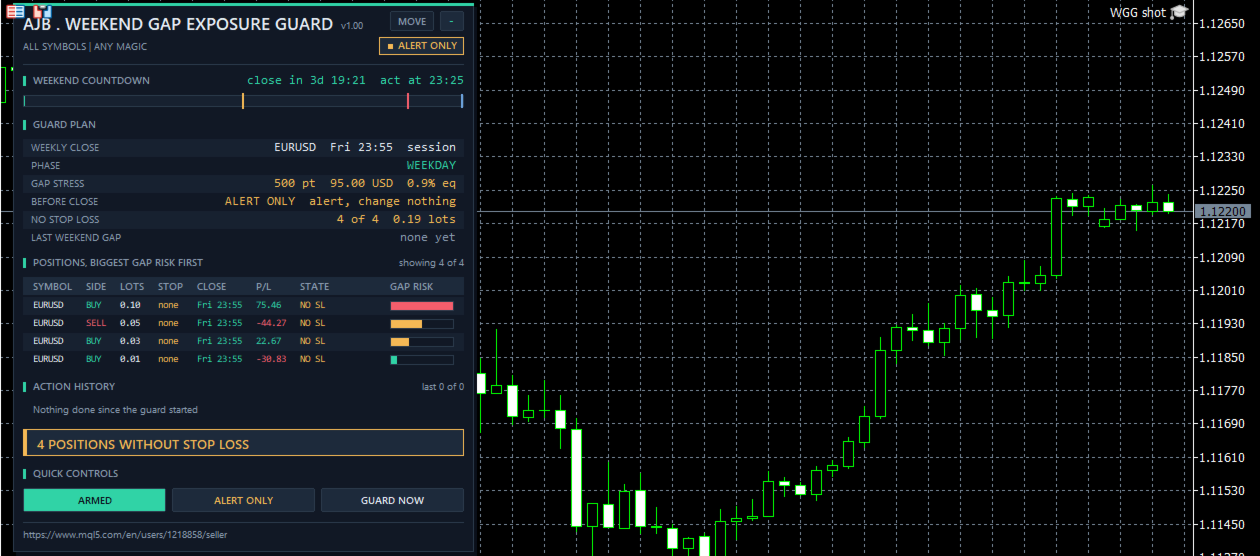
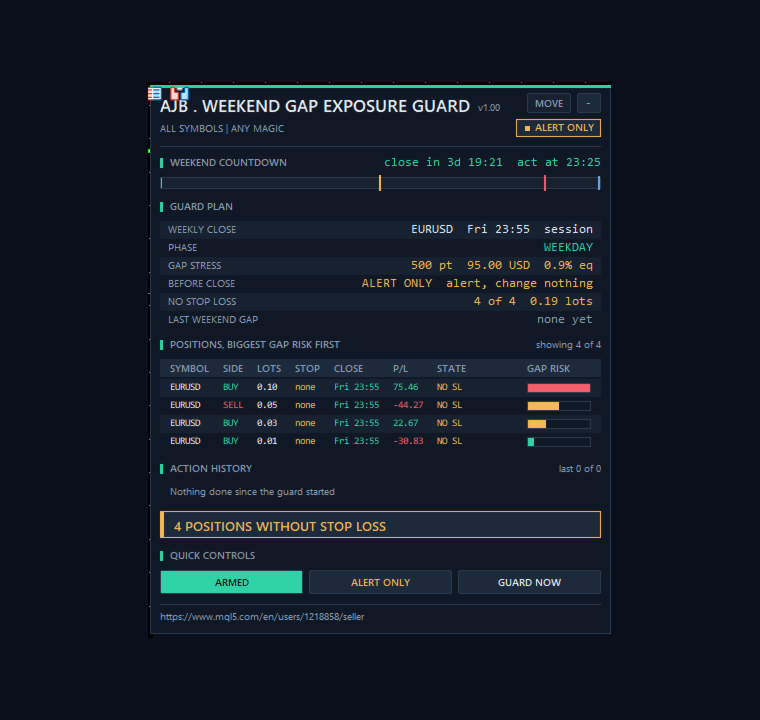
- GAP STRESS row: what a gap of N points against every open position would cost, in money and percent of equity.
- WEEKEND COUNTDOWN bar on the panel with the warning and action markers, so you see at a glance how close the deadline is.
- Not a grid, no martingale, no averaging, no DLLs, no web requests, no extra files.
START HERE
Attach it to one chart, for example EURUSD H1. One copy guards every symbol of the account unless you limit it. Keep the defaults (broker sessions, Friday, warn 120 minutes and act 30 minutes before the close, mode 1 with a stop 300 points from the price, Monday restore on). Leave it in mode 0 for the first Friday if you want to see what it would do; switch to mode 1, 2 or 3 and turn on Algo Trading when the plan on the panel matches what you would do yourself.
Why weekend gaps hurt more than normal losses
A stop loss is an order, not a promise of a price. From Friday's close to Sunday night's open the market is shut, but the world keeps moving: elections, central bank remarks, geopolitical news. When trading resumes, price can open far away from Friday's last quote. A stop that sat 40 pips away is then filled at the first available price, which may be 100 pips or more beyond it. Positions without any stop are worse still. The only real protection is to decide before the close what goes into the weekend and with how much size. This guard makes that decision on time, every Friday, even when you are not at the screen.
One Friday to Monday cycle
Warning. When the first symbol in scope enters the warning window, you get one message listing how many positions and lots are still open and when the guard will act. The panel turns amber.
Guard. In the action window each position in scope is handled once by your mode. Mode 1 sets a protective stop at your distance from the current price, or keeps your own stop when it is already tighter; the guard stop is set once and never trailed. Mode 2 closes your percentage and, if you want, puts the protective stop on the rest; a position too small to split gets the stop instead. Mode 3 closes the position. Mode 0 only alerts.
Monday resume. On the first fresh quote of the new week the guard reports the gap of each guarded position in points, positive or negative for that position, and, if the guard stop is still in place, puts your original stop back (or removes the stop if there was none). If the price has already passed the original level, the guard stop stays and you get one message. The chart symbol's own gap is shown in the LAST WEEKEND GAP row even without open positions.
Safety patterns inside
Before any send it checks that Algo Trading is allowed, that the symbol is tradable, that its trade session is open and that the last quote is no older than 5 minutes. A refused send is retried with a growing pause up to 2 minutes, with one alert after a set number of failures. If the broker refuses the filling mode, the next allowed one is tried at once. Right before each send the position is selected again and its symbol and magic are checked again. The stop distance respects the broker's stops and freeze levels. Per-position memory (warned, guarded, original stop, guard stop, Friday price) is kept in GlobalVariables whose keys contain the chart symbol and the magic filter, so a terminal restart over the weekend does not lose the Monday restore and two copies on different charts never share a key.
Inputs, every one explained
WEEKEND CLOSE
InpCloseSource = Broker trade session. Takes the end of the last session of the chosen day for each symbol from the broker. Fixed server time uses the hour and minute below for every symbol.
InpLastDay = Friday. The last trading day of your broker's week (Thursday or Saturday for unusual schedules).
InpFixedHour = 23, InpFixedMinute = 55. The fixed close in server time; also used when a symbol publishes no session.
InpMinutesBefore = 30. The guard acts this many minutes before the close.
InpWarnMinutes = 120. The warning comes this many minutes before the close. 0 turns it off; it must be larger than InpMinutesBefore.
ACTION
InpMode = 1. 0 alert only, 1 add or tighten a protective stop, 2 partial close, 3 full close.
InpSLPoints = 300. Distance of the protective stop from the current price, in points (never closer than the broker allows).
InpPartialPct = 50. Mode 2: percent of the volume that is closed, rounded down to the lot step.
InpSLOnRest = true. Mode 2: also put the protective stop on the remaining volume.
InpSkipCovered = false. Modes 2 and 3: leave positions alone whose own stop is already at least as close as InpSLPoints.
InpStressPoints = 500. Gap size used for the GAP STRESS estimate and the GAP RISK bars; display only.
MONDAY RESUME
InpRestoreSL = true. Put the original stop loss back when the new week opens, if the guard stop is still there.
InpReportGap = true. Report the gap of each guarded position on Monday.
EXECUTION
InpSlippagePoints = 30. Maximum slippage on a close. InpFailAlertAt = 3. One alert after this many failed attempts on one position.
FILTER - WHICH POSITIONS ARE GUARDED
InpSymbolScope = All symbols, or the chart symbol only. InpMagicFilter = Any magic, only manual trades (magic 0), or only the magic number InpMagic.
ALERTS
InpAlertPopup = true. Pop-up alert. InpAlertPush = false. Push notification to the MetaTrader app on your phone (enable it in the terminal options).
PANEL
ShowPanel = true. PanelX = 12, PanelY = 15: offset from the top left corner; the MOVE button drags it. PanelFontSize = 9. MaxTableRows = 6, MaxHistoryRows = 4. On a short chart the panel drops its least important rows first.
STRATEGY TESTER DEMO
InpTesterDemo = true. In the Strategy Tester only: from Wednesday to Friday morning one demo position per 6-hour slot on the chart symbol, no stop loss, at most 4 open, margin checked times 1.5 before every order, closed after 6 days, stopped after a 20 percent balance loss. This code never runs on a live or demo chart.
The panel
WEEKEND COUNTDOWN: a bar that fills during the last hours before the nearest weekly close, with an amber marker at the warning time and a red one at the action time. GUARD PLAN: weekly close and its source, phase, the mode and its details, positions without a stop, gap stress, last weekend gap, last action, Algo Trading on or off, the two windows, the Monday resume setting, failed sends, totals and positions in scope. POSITIONS, BIGGEST GAP RISK FIRST: symbol, side, lots, stop distance in points, time to the close, profit, state and a gap risk bar. States include NO SL, WARNING, ADD SL, SL OK, SL SET, PART CLOSE, CLOSING, COVERED, ALERTED, WEEKEND SL ON, WAIT OPEN, MONDAY RESUME, NO WEEKEND, MARKET SHUT and RETRY. ACTION HISTORY keeps every warning, stop, close, gap and restore with server time. QUICK CONTROLS: ARMED or PAUSED, a mode button that cycles the four modes, and GUARD NOW, which applies the current mode at once, for example before a holiday. The right side of the chart stays clear.
What it cannot do
It cannot stop a gap. A stop loss can still be filled beyond its level at the open; the guard decides what size and which stop go into the weekend, nothing more. Only mode 3 removes the gap risk completely.
It knows the broker's weekly sessions, not public holidays. Before an early close, press GUARD NOW or use the fixed time.
It only works while it runs: with the terminal off, Algo Trading off or the market already shut nothing is sent. Keep the terminal running, for example on a VPS. History and totals reset on restart; the per-position memory does not.
What was and was not tested
Tested in the Strategy Tester on a hedging account, 1 to 30 June 2026, H1, 1-minute OHLC, deposit 10000, leverage 100, four runs, four weekends each. EURUSD mode 1: 16 demo positions, 4 warnings, 16 protective stops set once each (never trailed), 16 Monday gap reports from -135 to +80 points and 16 original stops restored. EURUSD mode 0: 4 warnings, 16 alerts, nothing changed, 16 gap reports. EURUSD mode 2: 16 partial closes of 50 percent, 16 stops on the rest, 16 restores. XAUUSD mode 3: 12 positions closed before the close, nothing left over the weekend (the demo stopped at its own 20 percent budget in week 3, as designed). No send failed and no journal error appeared. On a live demo chart the panel ran in alert-only mode beside 4 open EURUSD positions without stops and changed nothing.
Not tested at the time of writing: real sends on a live or demo broker, a netting account, retries after a broker refusal, a filling mode refusal, the fixed close time, Thursday or Saturday as the last day, symbols that trade at the weekend, chart symbol scope, magic filters, InpSkipCovered, the GUARD NOW button, pop-up and push alerts, and a terminal restart over the weekend. These paths exist in the code and are described by design. Please try them on a demo account with your own broker first.
Try it in the Strategy Tester
Choose Weekend Gap Exposure Guard, EURUSD or XAUUSD, H1, a month that contains several weekends, visual mode, and press Start. Fast-forward to Friday evening and watch the countdown fill, the stops appear, and the Monday report come in.
If the guard saved you from a weekend gap, or you think it should handle a case differently, an honest review on the product page helps other traders decide and tells me what to improve next.