 MetaTrader 5
 エキスパート
 インディケータ
 ライブラリ
ライブラリ
 ユーティリティ
 ウィジェット
 ルール
ルール
YouTubeにあるマーケットチュートリアルビデオをご覧ください
ロボットや指標を購入する
仮想ホスティングで
EAを実行
EAを実行
ロボットや指標を購入前にテストする
マーケットで収入を得る
販売のためにプロダクトをプレゼンテーションする方法
MetaTrader 4用取引ユーティリティ - 11
 以下はMetaTrader4での外国替取引を簡素化する取引プログラムです。以下のリストのユーティリティにカーソルを合わせて、説明と目的をご覧ください。
スクリプトは、1つのストップロスと5つの異なるテイクプロフィットで5つの売り注文を開きます。 そして、4つの指値注文(販売)を行います。 デフォルトでは、次のパラメータが設定されています。 すべての未処理の注文の損失を停止-120ピップ 1注文で利益を得る(ロット0.1)-30ピップ 他の4つの注文(ロット0.04)で利益を取ります-50、90、140、200ピップ。
指値注文のストップロスは、現在の価格(注文時)から135-140ピップスです。 各指値注文の距離は20ピップです。 マイクロマーチンゲールを使用したロットサイズ-0.04、0.05、0.06、0.08。
指値注文の場合、自動削除は2日後に設定されます。 このアドバイザーを使用して、募集中のポジションをサポートできますhttps://www.mql5.com/en/market/product/56277
開始する前に、独自のパラメーターまたはパラメーターを設定するためのウィンドウを使用してスクリプトを注文できます。 個人的には、パラメータ確認ウィンドウなしでスクリプトを実行すると便利だと思います。
MT5のスク
FREE

The new version of the trading panel, which now has the ability to separately close Buy and Sell orders, display targets for all orders on the chart, as well as the ability to use the panel to trade with brokers working on the FIFO rule. Also, the new version adds option buttons for separate management of open orders.
It has a convenient visualized interface and intuitive control without a lot of additional tabs to which traders have to be distracted and switch their attention. Thanks to this,
FREE

Utility for order reversal. Closes orders on the chart on which it is launched and opens orders with the opposite direction instead of them. Has a simple and intuitive graphical interface. It is also possible to automatically reverse newly opened orders. MT5 version of the utility - https://www.mql5.com/en/market/product/74770 If you like this utility, take a look at my other products - https://www.mql5.com/en/users/nina_yermolenko/seller
FREE

A simple and useful Current Price Panel, which displays magnified current Bid, Ask prices and spread, movable anywhere on chart window using the mouse. Also provides an option to have as text at a static location showing bid or ask price along with spread, shown at any location on the chart. Allows display as pips or points along with spread highlighted in distinct color if it crosses the threshold point for the previous 100 ticks. Includes an option to show or hide the last digit (pipette) of t
FREE

this EA draws vertical lines on the chart, either consecutive or alternating lines, depending on the input settings. Since vertical lines often represent time events, timing is important in trading.
StartTime = D'2025.03.12 23:00'; // Starting point (time and date) NumberOfLines = 10; // Total number of lines to draw IntervalCandles = 1; // Interval in candles (must be > 0) IntervalMinutes = 30; // Interval in minutes (0 to disable) Directi
FREE

Simple and lightweight utility for automatically synchronizing the symbol of multiple charts Synchronization in both directions, regardless of which chart you change the symbol on Quickly activate or deactivate the synchronization of individual charts at the touch of a button Create multiple synchronization groups by assigning different event IDs Themes for bright and dark chart layouts
FREE

FOREXBOB AUTO CLOSER is a very handsome tool for manual traders who doing :- Scalping Correlation Hedging Those who use averaging methods etc. As this utility tool will help you by closing all your running trades when the universal floating P/L reaches a certain value that you will put in inputs. You may enable and disable the alert message on your mobile phone when auto closer close all the running deals on specified profit. You may add any message you want in notification. This tool consid
FREE

If you like trading by candle patterns and want to reinforce this approach by modern technologies, this script is for you. In fact, it is a part of a toolbox, that includes a neural network engine implementing Self-Organizing Map (SOM) for candle patterns recognition, prediction, and provides you with an option to explore input and resulting data. The toolbox contains: SOMFX1Builder - this script for training neural networks; it builds a file with generalized data about most characteristic pric
FREE

Trade Entry Journal is your ultimate solution for streamlining trade entries and journaling. Designed specifically for forex traders, this powerful tool automates the tedious tasks of calculating lot sizes, placing trades, and documenting your trading activities. Say goodbye to manual entries and focus on making smarter trading decisions. Key Advantages: Automated Lot Size Calculation : Calculate the perfect lot size based on your stop loss level and risk amount. The lot size will be adjusted t
FREE

The only drawdown guardian that stops your other EAs from digging you deeper. PropMarshal monitors your account equity in real time and instantly closes all positions the moment a drawdown or profit target threshold is breached. But it doesn't stop there — it closes every chart on your platform too, cutting off any other Expert Advisors before they can open new trades and compound the damage. The Problem PropMarshal Solves Most prop firm traders run multiple EAs across multiple charts. When
FREE

Stop and Reverse Martingale EA is an expert advisor that integrates the following inputs within it: Start lot size Lot multiplier Take profit distance in points Take profit distance in points *this input is a stop loss, is misspelled within the code of the EA Magic number A and B Start cycle with round number The distance of round number Daily maximum orders per cycle and close all Daily loss (maximum orders per cycle when this last order hit the stop loss the EA close all orders in the same m
FREE

Advisor Information: EG Connection Alert FREE every hour sends simple push notifications about the presence of a terminal connection to the server.
The utility will be useful to you if automated trading is carried out on a remote machine and there is no possibility to constantly check the operation of the terminal. Just install the adviser on any chart with any timeframe. You will receive notifications about the connection every hour. If no notifications are received, the terminal should be chec
FREE

It is a tool to create TRAILING STOP ORDERS. Either BUY and/or SELL After creating stop orders, it will start to trail stop orders step by step. After stop order open, this time it will folllow the buy and/or sell order with TStop with TStep from the TStop Start point. It can help you to catch the perfect price to enter the market. Inputs are Stop Type : Buy Stop - Sell Stop - Both Repeat : How many times to create stop orders after closing opened one. Points Multiplyer : Multiply all point
FREE

Close All SELL Orders for MT4 script - closes absolutely all orders, whether pending or market ones.
Orders are closed at the current profit/loss indicators at the time of closing.
The script is suitable for moments when you need to quickly close all orders at the current indicators.
The script is very easy to use, just drag the script onto the chart and it will do its job.
Add me as a friend, I have many other useful products.
FREE

Close All BUY Orders for MT4 script - closes absolutely all orders, whether pending or market ones.
Orders are closed at the current profit/loss indicators at the time of closing.
The script is suitable for moments when you need to quickly close all orders at the current indicators.
The script is very easy to use, just drag the script onto the chart and it will do its job.
Add me as a friend, I have many other useful products.
FREE

Spread Alert はスプレッドを監視し、スプレッドが通常よりも高い場合 は警告を発し 、設定したしきい値を超えている場合は 警告を発します 。 特徴:
スプレッドが正常 か、通常 よりも高い か 、アラートをトリガーし たかによって、 3つの異なる色を選択 します
カスタムサウンド を設定できる オプションのサウンドアラート (.wavファイルである必要があります)
ラベルにカーソルを合わせると、 記録された最低のスプレッド 、 スプレッド警告 、 アラートピップ 、および スプレッドステータス がツールチップに表示されます。
パラメーター:
名前
説明
サウンドアラート アラートのしきい値に達したときにサウンドファイルを再生します アラートサウンドファイル(.wavファイルである必要があります) アラートが鳴ったときに再生されるwavファイル
アラートサウンドオフ開始(ブローカーアワー) サウンドアラームがミュートされる開始時間
アラートサウンドオフエンド(ブローカーアワー) サウンドアラームがミュート解除される終了時間
アラートピップ 価格が満たすか超える必要があるピップ
FREE

L'indicatore / Utilità Chart Clear è uno strumento essenziale per i trader che desiderano un grafico pulito, leggibile e professionalmente organizzato su Meta Trader 4. Una volta installato, modifica automaticamente l'aspetto del grafico senza richiedere alcun settaggio manuale, rendendolo immediatamente più chiaro e facile da analizzare.
Caratteristiche Principali: Grafico pulito e professionale: Sfondo bianco per una migliore leggibilità Candele verdi per i movimenti rialzisti e ros
FREE

EXTREME PRICE ACTION DASHBOARD
Make your trades professionally using advanced statistics and price action. Manages 29 pairs simultaneously. It has Buy and Sell buttons, close buy and close sell separately for each pair. Stop Gain and Stop Gain programmable in Pips automatically. Dynamically calculates 5 regions where statistically the most assertive sales and 5 more assertive shopping regions are found. Indicates the total lots, buy balance and sell balance for each pair. Change the graph's t
FREE

This EA is a small aid, suitable for all who like to trade on smartphones or tablets. The EA is placed on a chart and monitors all markets (multicurrency). No matter where you are, as long as you have internet, you can trade with it. Open position, set stop, and the EA automatically creates a TP in the previously set ratio (1:1, 1:2 etc.) to the stop. This is a very convenient feature that helps you manage your trades better. Ideal for trading on mobile devices. Whether you are on the bus or in
FREE

Stop journaling your trades by hand. Let them journal themselves. Every serious trader knows the truth: the traders who review their trades outperform the ones who don't. And almost nobody actually does it — because manually logging every entry, exit, SL, TP, and P&L into a spreadsheet is tedious enough that it quietly dies after week two. War Room Journal kills that excuse. This is the official connector between your MetaTrader terminal and the War Room trading journal on Telegram (by @Ash_TheT
FREE

Advisor-assistant for those who like trading on Fibonacci levels. Automatically finds manually plotted Fibonacci Lines on the chart, and opens an order when the levels are broken. The Expert Advisor has 4 customizable levels and the ability to turn them off as unnecessary.
Parameters: Lot - order volume (lot); Requote - price slippage; Magic - individual number for all EA orders, works only with own orders; Name Fibo - set initial name of Fibonacci lines; Level parameters are ide
FREE

Have you ever wanted to back-test a strategy but never wanted to risk real money? And the thought of using a demo account is exhausting as real time markets develop your skills slowly. This utility will help you develop your strategy faster and will help determine if the strategy works long-term by simulating real trading through back-tests. This will save you time as you can back-test strategies from previous price data. In order to set an sl during the backtest you have to click on the sl b
FREE

オンラインチャートだけでなく、ストラテジーテスターでも動作しますので、無料デモから動作を確認できます。(build 1353) how to run the FREE DEMO => https://www.mql5.com/en/blogs/post/749299
チャート下に表示されるテキストボックスから、Discordに投稿するツールです。 w/Imgのボタンからは、チャート画像も送ることができます。
チャートに線やマーク、コメントなどを書いても、その画像が投稿されます。
使い方は簡単。 メッセージを入力し、SENDボタンでメッセージの投稿、w/IMGボタンでメッセージ+画像の投稿を行うことができます。 どんな使い方ができるか、人それぞれですが、Discordでコミュニケーションをされている方であれば、チャート画像を一発送信できるので便利だと思います。
*DiscordのWEBHOOKをパラメタに設定しますので、取得する必要があります。
*WebRequest を使用しています
ストラテジーテスターでも動作を確認できますので、無料デモをお試しください。
FREE

この製品は、手動で開かれた各取引、特にそれが接続されているチャート上で自動ストップロスを設定できるように設計されていることに注意してください。 未決注文に関しては、未決注文が有効化された後にのみストップロスが設定されます。 希望のストップロスをポイント単位で設定するには、InpStopLossPoints パラメーターを使用できます。
この商品はGBPUSDなどの通貨ペアのみでテストされていることに注意してください。 他のシンボルでも機能する可能性がありますが、テストされていないため、目的に応じて機能するかどうかを判断するのはあなた次第です。 この製品にはいかなるクレームや権利も与えられないため、実際の口座ではなくデモ口座で製品をテストすることをお勧めします。
この製品を使用するかどうかは完全にお客様の判断によるものであり、弊社ではいかなる保証も提供できません。 この MT4 エキスパートには、開かれたすべての取引ではなく、適用されるチャートに基づいて作業する追加機能が組み込まれました。
Google翻訳
FREE

クイックシンボルはパネルタイブインジケーターで、シンボル名がクリック可能なボタンとして機能し、タイムフレームもクリック可能なボタンとして機能しています。このインジケーターの主な目的は高速ペアの閲覧です。パネル自体には非表示/表示ボタンがあり、トレーダーの邪魔をしません。高速な取引時間とバグのないパフォーマンスにより、あらゆるタイプのトレーダーにとって最も手に入るツールです。
使い方 :
「欲しいペア」をクリックするだけで、操作中のチャート上でペアが直接開きます。時間枠を変更するには、希望する時間枠のボタンをクリックするだけです。
=============================================================
FREE
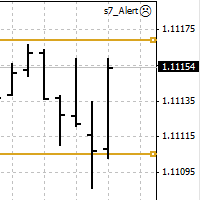
An Expert Advisor. A channel breakthrough signal. Attach two horizontal lines to a chart: one for the upper channel line, name it < Up > the other one for the lower border, name it < Dn >
Settings: sound = true - play a sound notification alert = true - show a dialog box containing user data comment = true - show a comment in the upper left corner of the chart print = false - print a message to the Experts log repet = 3 - number of times the sound file is played.
FREE

Простая утилита MQLTA Draw Grid поможет вам нарисовать сетку на вашем графике. Она полезна при изучении графика и моделирования сетки.
Как она работает? Утилита будет создавать горизонтальные линии в зависимости от заданных параметров
Как использовать этот инструмент Установите индикатор на график, выбрав параметры по умолчанию. Выберите начальную точку, значения минимума и максимума диапазона и стиль. В появившейся графической панели вы сможете создавать и удалять сетку, а также изменять неко
FREE

The Parabolic SAR Trailing Stop will trail the Stop Loss price of your selected orders following the PSAR indicator, so you don't have to worry about having to change it manually.
How does it work? The Expert Advisor sets and moves the Stop Loss price of the selected orders following the value of the PSAR Indicator. You can filter the Orders by Symbol Comment Magic Number Buy/Sell
Parameters PSAR Step - The Step of the PSAR PSAR Max Step - The Max Step of the PSAR PSAR Shift - The Shift of the
FREE

Real-time spread tracking and monitoring software
Displays spread values in form of histograms on current timeframe of chart Convenient for analyzing spread changes, as well as for comparing trading conditions of different brokers By placing on desired chart, the spread changes at different trading times are displayed
Additionally Fully customizable Works on any instrument Works with any broker
FREE

What is a tool ? Used for monitoring profit summary in your portfolio, by setting profit target. The tool will automatically close all open orders. When the profits meet the target set. How to use Place the tool on any currency pair, any timeframe and set profit target. Easy... Currency Pair : Any Timeframe : Any Input Parameter Summary profit for auto close all orders ($) Meaning : Input your profit target here. Visit my products Target Profit Magic Target Profit All The Profit Tracker Currenc
FREE

This indicator is designed to provide all useful information about symbol, account, positions and profit. It is developed for improving trader's money management.
Parameters Calc can be divided to separate blocks. Each block is possible to hide, set its own color and other properties. Block symbol: This block displays information about actual SPREAD, POINT VALUE (in deposit currency for 1 lot), SWAP LONG and SHORT. Show symbol info - display/hide this block Color of symbol info - color of this
FREE

Risk Panel Pro (MT4) Risk Panel Pro is a Tool for MetaTrader 4 that automates placing Stop Loss and Take Profit based on a percentage of the account balance. It is a trade management utility; it does not provide trading signals and does not guarantee any profit. Main functions Auto-apply SL/TP on new orders using balance-based risk (default: SL 2%, TP 4%). Switch Automatic mode off to manage SL/TP manually. One-click buttons to apply SL or TP to existing positions at any time. Close Chart : clo
FREE

The Equity Curve indicator is a simple and helpful tool that shows the development of the equity curve in real time. For precision measurement, it should be used in a separate window with a period of M1.
Main features The indicator shows the development of the equity curve in real time. High precision on the minute chart. High-speed calculation. Available for MT4 and MT5. Please visit the Equity Curve indicator product page for the input and output parameters settings.
FREE

AutoOrderModifyFree は「購入したEA」など、ソースコードが公開されていないEAの制御を可能にしたツールです。(裁量トレードの制御も可能です) 「購入したEAを稼動させているがストップの設定が無い」とか、「トレーリング・ストップの設定が無い」場合などで、そのEAに損切り設定やトレーリングストップ機能を適用して使う場合に特に有効です。 また、裁量トレードで「ストップやリミット」を入れるのが面倒な場合や、トレーリング・ブレイクイーブンを自動的にやって欲しい場合にも使えます。 AutoOrderModifyFreeは 口座内にあるすべてのポジションを制御します が、制御するポジションを指定したい場合や、EA毎に設定を変えたい場合、複数ポジションを合算して制御したい場合には AutoOrderModifyEA Pro というFree版には無い機能を多数盛り込んだ製品がありますので、そちらをご覧ください。 AutoOrderModifyProの機能・特徴 自動で損切り(StopLoss)や利食い(TakeProfit)を入れます。 自動でトレイリング・ストップを実行します。
FREE
The VR Close orders script is designed to close positions in the terminal at a profit or loss mark set by the trader. The program is written as a script and can work together on the same chart with any other indicators and expert advisors. The program has a simple visual panel and is easy to configure with the mouse. With this program's help, the trader can automatically close positions and delete orders depending on the conditions set. There is often a situation when you need to close position
FREE

PL Graph Visualizer は、アカウントの損益をリアルタイムにグラフで表示するユーティリティです。
グラフは通貨ペア別やマジックナンバー別に見ることができ、ポジションごとの損益の推移が一目でわかります。 このツールは、ここにある統合決済ツールと組み合わせて使用すると、その機能をさらに強化できます。
https://www.mql5.com/en/market/product/116884
リアルタイムのグラフには口座全体の損益だけでなく、複数の通貨ペアの損益状況も表示されるため、トレーダーは詳細な変化を瞬時に把握することができ、意思決定を支援し、より効率的な取引を行うことができます。
リアルタイムの損益の可視化により、取引戦略を強化します。
このツールはリアルタイムでチャートを生成するため、チャートを閉じたり、時間足を変更したり、MT4を再起動したりすると、最新のデータからチャートが再生成されます。
より詳細な情報:
https://www.mql5.com/en/blogs/post/757410
FREE

Rick FX Academy Professional Trading Template MT4 Upgrade your MetaTrader 4 workspace with a clean and professional trading template designed for Forex, Gold, and Silver traders. The Rick FX Academy Professional Trading Template provides a modern black trading environment that helps traders focus on price action, market structure, and technical analysis. Designed for manual traders, strategy developers, and EA users who want a professional chart setup without spending hours customizing MT4. Feat
FREE

Odie Trade Manager EA is a simple semi-automatic (two in one) assistant for a manual trader, when having a losing trade the EA begins its work in the form of a martingale or hedging (recovery zone) to leave it in breakeven or positive, it depends on its configuration.
For professional traders and gamblers .
Adapt it to your strategy, MANAGE YOUR RISK CORRECTLY and all your operations will be positive.
TEST ON STRATEGY TESTER WITH YOU STRATEGY AND CREATE YOUR SET FILE AND... GOODBYE LOSSES.
FREE

LMBF Order Manager Hub LMBF Order Manager Hub is the free execution companion for compatible LMBF trading indicators on MetaTrader 4. MetaTrader 4 allows only one Expert Advisor on a chart, while a chart can host several indicators. This utility lets compatible LMBF indicators send confirmed order requests to one shared Expert Advisor. The manager can be attached to one chart while client indicators run on the same chart or on other open charts in the same MT4 terminal. The manager is an executi
FREE

Simply Trailing Stop is a simple Expert Advisor that automatically trails stop on the chart that has been activated. It can be used as a complement to orders placed manually or through another expert advisor that does not perform a trailing stop, you only have to activate it in a new chart, not in the same one in which you already have your expert advisor but it will not work. You can see more of my products here: www.mql5.com/en/users/joaquinmetayer/seller
FREE

EAsynRightNow - Professional Trading Expert Advisor for manual trading with advanced functionality
EAsyRightNow is a multifunctional trading Expert Advisor for MetaTrader 4, featuring a Trading Panel with a user-friendly interface and extensive trading position management capabilities. Perfect for scalping, it works on all timeframes.
Key Features
1. Trading Modes
- Single Orders: Management of one trading position
- Multiple Orders: Ability to open multiple orders in the same direction
- M
FREE
Special Trailing Sl is a automatic trailing stop_loss. first It will try to free risk your trade then save the profits. first step is to move the SL 50 points below current price for long trades , and 50 points above current price for short trades.First step will happen when the trade get to minimum profit per point. second step : SL will follow the current price with a dynamic distance. This trailing stoploss has been used in my products.
FREE

一键平仓小工具,可以针对买单、卖单和挂单进行批量操作,可以操作当前图表订单和所有订单,简单高效。 第一行第一个按钮是关闭当前图表 品种 所有买单,第二个按钮是关闭当前图表品种的所有卖单,第三个按钮是关闭当前图表 品种 的所有订单; 第二行 第一个按钮是删除当前图表 品种 所有买单挂单,第二个按钮是 删除 当前图表品种的所有卖单 挂单 ,第三个按钮是 删除 当前图表 品种 的所有 挂单 ; 第三行第一个按钮是关闭所有 品种的全部买单,第二个按钮是关闭所有 品种的全 卖单,第三个按钮是关闭所有 品种的全部订单; 第四行第一个按钮是删除所有 品种全部买单挂单 ,第二个按钮是 删除 全部品种 的全部卖单挂单 ,第三个按钮是删除 全部品种 的全部挂单 。 希望此程序能对您有用
FREE

Account Info EA It is a tool that presents on the graph all the positions of the account, and specific information concerning the positions, but also the account. It enables the user to have an image of his account at a glance. Use like any expert advisor. You can't attach it in the same chart with other expert advisor. It does not have the ability to open or manage positions. You can attach it on any chart and any timeframe.
FREE

Virtual Trailing Stop Start, Trailing Stop and Trailing Step with TakeProfit and Stoploss Virtual Lines And Sound Alerts are included. Brake brokers limitation. You can put even 1 point trailing stops and take profit levels. Best EA for protecting your profits and scalping. MT5 version of this product in on the way. Point Multiplyer 1 means 1 point. You can adjust Multiplier point.
FREE

Virtual Assistant MINI VIRTUALL ASSISTANT = MAKE YOUR TP AND SL VIRTUAL! Tool meant to control your stop loss and take profit by converting them to virtual SL/TP (with support for TRAILING) Convert all SL and TP to virtual so your exits on trades are hidden from your broker!
Run this EA on any graph, choose 1MIN timeframe (VA is autosaving data only on new bar detected, so graph TF equals to VA autosave period) !!! When using virtual trade exits, stable connection is needed for order executi
FREE

This MQL4 code is a custom indicator that draws multiple colored rectangles on a chart, spaced apart by a defined pip distance, and projected into the future. Here's a brief breakdown: Purpose: Draws several horizontal rectangles (zones) starting from a specified price. Rectangles are spaced apart vertically by a pip distance. Colors alternate between FirstColor and SecondColor . Rectangles can be drawn behind candles and optionally filled. Each rectangle extends into the future for a specified
FREE

The indicator shows support and resistance levels as horizontal lines. It shows the highs and lows of former days, weeks and month in every chart.
How to work with support and resistance levels show the EA Limit Scalper and the Universal Moving Average Expert Advisor (UniMA EA) .
When the tip of the coursor is on a line (mouseover) it shows the real value of the level and which high or low is shown, see explanation below.
The indicator must be installed like an expert advisor ! To se
FREE

If you execute or test an Expert Advisor on a laptop, personal computer or a VPS, you may face the situation when Internet connection is lost and the EA stops. Of course, this utility ( Disconnect Alerts ) will not help you restore the Internet connection, but it will gather the information and will send an alert to you about when and how long your terminal was without access to the Internet and did not actually work. After receiving such a notification, you can check your trades or think about
FREE

Why do you need this script? If you place lots of orders and re-calculate your risk for every order you placed, you definitely need such a script. This script places one or (optional) two different orders with the following script inputs.
Utility parameters Operation Type - "Buy","Sell","Buylimit","Selllimit","Buystop","Sellstop" Price - Entry price of the order(s). Stop Loss - Stop Loss of the order(s). Take Profit 1 - Take Profit of the first order. Take Profit 2 - Take Profit of the second o
FREE

Layering — Build Profit in Measured Steps
Layering helps you grow and protect a position by placing additional trades at equal, defined distances as the market moves. It's a structured layering approach designed to secure the account and bank profit as each take-profit is reached.
What it does for you Measured layering: trades are added at equal distances you define — no guesswork. Account protection built in: the layering logic is designed to secure your account as it works. Profit-locking: a
FREE

Handle orders for different magic -1 for all magic, 0 for manual orders, 1-XXXXXX for EAs For example, if you want to control orders from EA with magic 3333, your manual orders, type 0;3333 Close on exact time, example. close order every XX:15 --> Close all on 00:15, Close all on 11:15, Close all on 12:15... Close on Loss, close the loss for single order, close the loss for the whole magic number.
Parameters Description (-1 for all magic)(0 for manual orders)
List of the magic to check - 0;1;2
FREE

The main purpose of this expert advisor is to protect your hardly gained profits. Once the market goes in your favor, with amount of specified pips [configured via EA inputs], the EA will do the following: Move the Stop-loss of the profitable positions to Breakeven. Lock in some profits, i.e put the SL above/below your entry with specified pips Will close part of position, % of lots, once the EA was triggered. By default, the "Move to Breakeven EA" will modify all opened positions on the termi
FREE

A simple script that can delete all the drawing objects on a chart, or just the objects of a specific type.
Settings:
DeleteObjectsOfType By default the value will be blank which means ALL drawing objects on the chart will be deleted. If you only wish to delete specific types of drawing object, change this setting to the type of object to delete. For example, Fibonacci Retracement, Text, Label or Trend Line.
Please see the demonstration video for more information.
FREE

This is an **MT4 Indicator called “Elsna Dashboard”**, designed as a **monitoring dashboard**. Its main functions are:
**1. Dashboard Display**
* Shows key account info:
* Balance & Equity * Floating Profit/Loss * Floating Pips * Number of open trades * Spread * Total lot size * Duration of the oldest trade * Automatically positions and color-codes these values.
**2. Trade Alerts**
* Plays a sound when a trade opens or closes.
**3. History Recording**
* Records balance an
FREE

Expert Info: Pin = 0 --> Manual Trade" TralingStop = 0 --> Traling Stop Off " Sell & buy --> Open Order " C-All --> Close All Order" C-Buy --> Close Buy Order" C-Sell --> Close Sell Order Input Parameter: input Name_ = " ----- Gooinsta Army Simple ----- "; input Pin = 0.0; input Resiko = _Medium; input min_Lot = 0.01; input max_Lots = 1.0; input Slipage = 3; input double Target = 1050; input maxorders = 100; input TralingStop = 10; input End = " ----- Salam Profit Konsisten ----- ";
FREE

FX Live — Stats Export
Works only with https://fxlive.trading
Monitor all your MetaTrader accounts from a single dashboard, in real time, across every broker. FX Live Stats Export is an utility, not a trading robot. It never opens, modifies or closes a position. It reads your account and sends the data to your private FX Live dashboard, so you can follow every account you own from one place — on your computer or your phone — without switching between MetaTrader terminals.
WHAT IT DOES Atta
FREE

For more info, questions and problems join to discord.gg/reitakfx
Very informative and detailed tool for your account. - pairs, number of trades, lot size, profit, lose, nett p/l, net pips - profit growth chart
Instalation : - open chart and delete every other indicator on it - put this report on chart
Setting : - magic number - filters (comment, symbols, currencies) - date (today, week, month custom) - Start / End date (this is for custom date) - report type (open - only active trades wi
FREE

• OrderInfo • Created by gyurix
Introduction
Are you tired of not knowing exactly how much can your orders win or lose and the complexity of figuring it out? With using this script you can get all of that information instantly.
Features Shows your open orders current • P&L •,• stop lose • and • take profit • levels Shows your pending orders and open positions potential wins and loses in your • accounts currency • for: the current market price your stop lose levels price your take profit leve
FREE

This is the Free Version of "Quick Copier MT4" (Please check : https://www.mql5.com/en/market/product/34184) This free version is available to be used within 2 hours only, and it has limited features. Please also check this product at fxina.hostingerapp.com.
"Quick Copier" is designed to copy trading without any complicated settings. It copies master orders faster than "Just Copier". The copy can be done in one PC. One EA can be set as master (provider) or slave (receiver). The receiver lot ca
FREE

Saved your Account Margin for multiple Trades Trading Robot Closing all second open Trades automatic Closing Trades that reached max. Lot Trading Robot built to avoid:
-Stop multiple Trades -Save overtrading -Hold Strategy -max. Lot -Prop conform
-long Account holding -Prop Firm Account holder - Robot allow one Trade per Symbol -Stop loosing by click multiple Times Trade Button -Robot needs to be Set on every Symbol that will be saved - no Settings configure OneRule OneFunktion Set on Chart
FREE

ある MT5 または MT4 アカウントから別の MT4 アカウントに取引量をコピーするためのシンプルなユーティリティ。 ネッティング口座とヘッジ口座の間で任意の組み合わせでポジションをコピーできます。デフォルトでは、同じボリュームを持つすべての一致するシンボルによって開かれたポジションがコピーされます。シンボル名が異なる場合、またはコピーされたポジションのボリュームが異なる場合、またはすべてのポジションをコピーする必要がない場合は、この 投稿 で説明されている設定で目的の動作を指定できます。この製品は、将来のリリースで機能を拡張します。 バージョン 2.0 までは、この製品は無料です。 インストール順序:
送信者アカウントの端末で、Expert Advisor を送信者モードで起動します。 受信者アカウントのターミナルで、Expert Advisor を受信者モードで起動し 、以前に起動した送信者の 1 つを選択して、そこからポジション ボリュームをコピーします。
FREE

Rhino PDF Trade Report — MT4 の取引履歴を PDF に出力
MetaTrader 4 の口座履歴を、ワンクリックで印刷にそのまま使える PDF 取引 レポート に変換します。スクリプトを実行し、期間または取引数を選ぶだけで、投資家への提出、プロップファーム申請への添付、税理士への提出、あるいは売買記録としての保管に使える書類が手に入ります。
内容
1 ページ目 — パフォーマンス概要
純損益、取引数、 勝率 、 プロフィットファクター 、期待値、合計ロット数 対象取引の累積損益を示す 資産曲線 勝ち / 負け および 買い / 売り の内訳 曜日別の成績 — 実際に利益が出ている曜日が一目で分かります 銘柄別の成績 — 得意な銘柄と苦手な銘柄をランキング表示
2 ページ目以降 — 取引明細一覧
決済済みの取引を 1 件 1 行で表示します:
ポジションの チケット番号 約定時刻 と 決済時刻 銘柄と売買方向(BUY / SELL、色分けと上下マーカー付き) ロット数、 エントリー価格 、 決済価格 ストップロス と テイクプロ
FREE

Very usefull expert advisor for ichimoku kinko hyo indicator. this expert advisor will notify you whenever there is a cross over/below the clouds or tenken sen /kijun crossing. All Ichimoku traders know the importance and valuable signals when crosses done below or above the clouds or tenkan and kijun crosses. Now you will be alerted quickly to make benefits from the markets This will help you to be alerted for possible trade action. it will simplify your chart observation and be notified wtith
FREE

DG Equity Monitor is a useful tool that keeps track of the daily transactions made on the account. The EA automatically and instantly closes all the trades running based on two conditions: 1. If the daily profit target is hit. 2. If the maximum drawdown is reached. An alert is sent immediately one of the above conditions are met.
Parameters: Show Account Info -Choose whether or not to display the Account Info on the chart.
Show Pop Up Alert -Show alert on chart when either condition 1 or 2 are
FREE

This is a technical indicator that put on strategy tester the buttons of the expert adviser "Control adora". Usually when applied the controladora to the strategy tester, the buttons do not appear and therefore its functions (like directly buy, sell, close orders or place stop loss indicator) can't be used. But now you can if have the Manual Backtest indicator. If you don't have Control adora, you can get it from here . This indicator get on the chart the buttons that can be of use in strategy t
FREE

Supports manual bi-directional orders. Once in floating profit, the system automatically executes partial take-profit based on set parameters, moves the stop-loss to the entry price (breakeven), and continues to hold the remaining position. Fully compatible with Teacher Zhang's trading system. Ideal for those with slower reaction times, seniors, beginners, and students in retraining. The full version features fully adjustable parameters.
FREE

PendingOrderActivator manages pending orders in the forex market in a continuous cycle.
The user must configure the duration of the orders, stop loss levels, take profit levels, and the MagicNumber.
The expert advisor automatically places pending orders based on the distance from the current price and deletes them when the opposite order is triggered.
When an order is activated, the bot will take a break until the user reconfigures it or changes the timeframe, at which point the bot will reactiv
FREE

The scripts adds order tracing icons in the chart window. Trace orders are similar to the standard terminal tracing. Icons are added for both closed orders and current (market) orders. The Days of history to check parameter means the depth of the order history to be traced (number of days). If the parameter value = 0, all orders in the available history will be traced.
FREE

The panel displays the list of all orders (market and pending) along with their details, including magic numbers and commentaries. The panel can be moved around the chart. For market orders, the profit listed includes the associated commission and swaps. There aren't any important input parameters, but you can control the panel's initial location via them.
FREE
MetaTraderマーケットは自動売買ロボットとテクニカル指標を販売するための最もいい場所です。
魅力的なデザインと説明を備えたMetaTraderプラットフォーム用アプリを開発するだけでいいのです。マーケットでプロダクトをパブリッシュして何百万ものMetaTraderユーザーに提供する方法をご覧ください。

取引の機会を逃しています。
- 無料取引アプリ
- 8千を超えるシグナルをコピー
- 金融ニュースで金融マーケットを探索