MilojicaAI
- Experts
-
Dragan Drenjanin
 🔴 I miei prodotti su MQL5 → https://www.mql5.com/en/users/drgandra/seller
 - Versione: 1.9
- Aggiornato: 2 aprile 2026
- Attivazioni: 5
MilojicaAI is a versatile Expert Advisor (EA) designed for MetaTrader 5 (MT5), offering automated trading through three independent signal modules: DEMA, TRIX, and Bollinger Bands. This guide provides clear instructions on how to effectively use the EA, ensuring optimal performance while maintaining simplicity.
Key Features
-
Three Signal Modules: Choose or combine DEMA, TRIX, and Bollinger Bands for entry and exit signals, each with customizable parameters like period, weight, and price series.
-
Order Types: Supports market orders.
-
Trailing Stop: Optional moving average-based trailing stop to secure profits dynamically.
-
Risk Management: Fixed lot sizing for controlled risk, with customizable stop-loss and take-profit levels.
-
Signal Thresholds: Adjustable thresholds for opening (Signal_ThresholdOpen, default: 30) and closing (Signal_ThresholdClose, default: 10) positions. These values, ranging from 0 to 100, determine the signal strength required to open or close a position, allowing precise control over trade entry and exit.
Recommended Setup
-
Timeframes: MilojicaAI performs exceptionally well on higher timeframes (H6 and above), as validated through extensive testing. These timeframes reduce noise and enhance signal reliability.
-
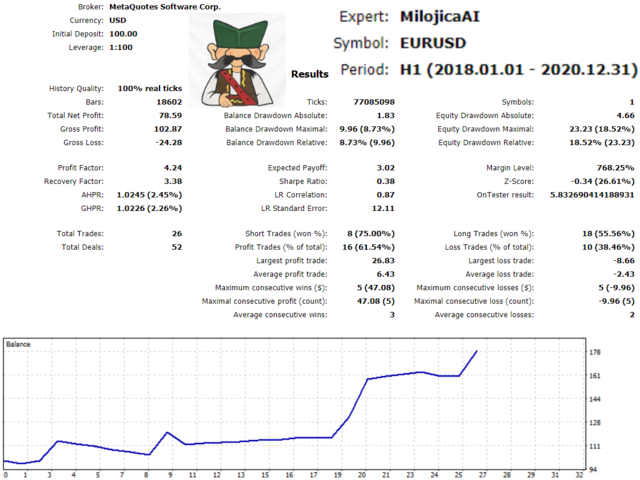
Currency Pairs: The EA is compatible with multiple currency pairs. To identify the best pairs, use the MT5 Strategy Tester and evaluate performance based on:
-
Profit Factor: Measures profitability relative to losses.
-
Sharpe Ratio: Assesses risk-adjusted returns.
-
Drawdown (DD): Ensures acceptable risk levels. A list of recommended pairs is generated within the Strategy Tester based on these metrics.
-
-
VPS (Virtual Private Server): For uninterrupted operation and minimal latency, run MilojicaAI on a reliable VPS. This ensures the EA remains active 24/5, responding to market conditions in real-time.
-
Magic Number: Set a unique Expert_MagicNumber (default: 21) for each instance/chart to avoid conflicts between multiple EAs or manual trades. This is critical for proper trade identification and management.
Risk Management
-
Lot Size: Adjust the Money_FixLot_Lots (default: 0.01) to match your account size and risk tolerance. Start with a conservative lot size and test thoroughly in the MT5 Strategy Tester.
-
Stop Loss/Take Profit: The default settings for Signal_StopLevel and Signal_TakeLevel are 0, as the EA relies on the signal threshold mechanism (0–100 range) for position management. Users can set specific stop loss and take profit levels in points if desired, but the threshold-based exit rules often suffice for dynamic trade closure.
-
Testing: It is strongly recommended to test the EA on a demo account for an extended period before deploying it on a live account. Use the Strategy Tester to optimize settings for your preferred currency pairs and timeframe.
How to Use MilojicaAI
-
Installation:
-
Download and install the MilojicaAI.ex5 file in the MT5 platform under MQL5/Experts.
-
Attach the EA to a chart (H6 or higher recommended) via the MT5 Navigator.
-
-
Configuration:
-
Signal Modules: Enable/disable DEMA, TRIX, or Bollinger Bands via the activate_ settings. Adjust periods, weights (0–10), and price series for each module.
-
Trailing Stop: Enable Activate_MA_Trailing and customize the MA period, method, and applied price for dynamic stop adjustments.
-
Thresholds: Adjust Signal_ThresholdOpen (default: 30) and Signal_ThresholdClose (default: 15) to control the signal strength required for opening and closing positions. Higher values make the EA more selective, while lower values allow more frequent trades.
-
-
Testing:
-
Run the EA in the MT5 Strategy Tester to identify optimal currency pairs and settings. Focus on high profit factor, Sharpe ratio, and low drawdown.
-
Use visual mode in the tester to observe trade execution and refine parameters.
-
Test extensively on a demo account to ensure reliability before transitioning to live trading.
-
-
Live Trading:
-
Deploy the EA on a VPS for continuous operation.
-
Monitor performance regularly and adjust settings as market conditions change.
-
Best Practices
-
Start Small: Begin with a demo account to familiarize yourself with the EA’s behavior and ensure stable performance over time.
-
Risk Awareness: Automated trading carries risks. Ensure your risk management settings align with your financial goals.
-
Regular Optimization: Periodically retest the EA in the Strategy Tester to adapt to evolving market conditions.
-
Unique Magic Number: Always verify that the Expert_MagicNumber is unique for each chart to prevent trade conflicts.
Why Choose MilojicaAI?
MilojicaAI combines robust signal-based trading with user-friendly customization, making it suitable for both novice and experienced traders. Its strength lies in its adaptability across currency pairs and higher timeframes, backed by rigorous testing and optimization within MT5.
For further support or inquiries, visit Dragan Drenjanin’s MQL5 profile.
- Platform type: MT5
- Account type: Hedge
- By purchasing this software, you reserve the right to own new, upgraded versions of the robot, which will appear continuously at certain time intervals.
WARNING: I sell all my products only via the MQL5 website. If you see it somewhere else, be aware of the scam.
My Links
Installation Guide
- For detailed instructions on purchasing and installing a trading robot from the MQL5 Market, please refer to the following article: https://www.mql5.com/en/articles/498
- How to Test a Trading Robot Before Buying: https://www.mql5.com/en/articles/586