ATRTrailStop
- Indicatori
- Versione: 1.3
- Attivazioni: 5

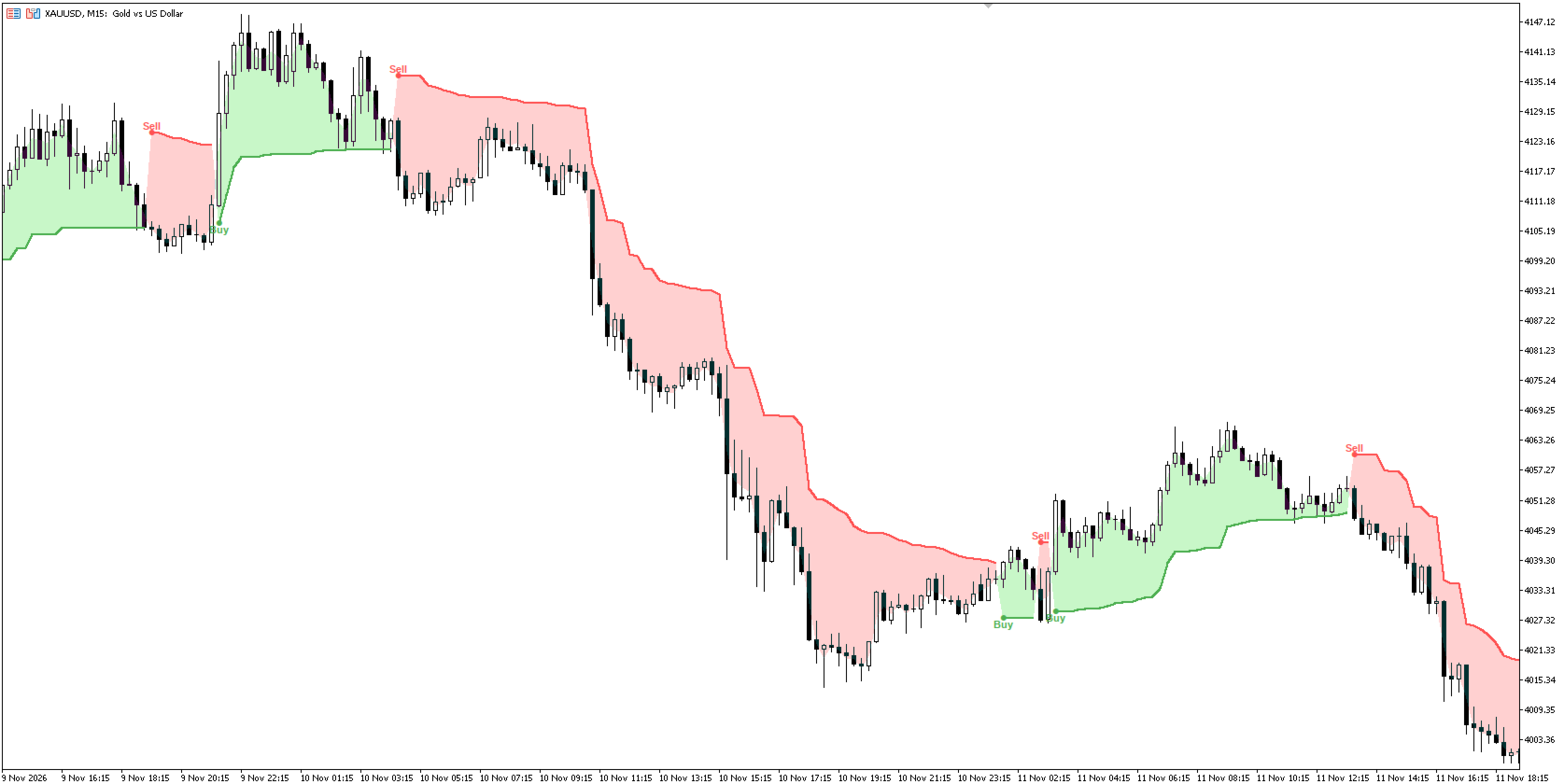
ATR Trail Stop is an indicator that builds a volatility-based trailing stop under the price in an uptrend and above the price in a downtrend. When the price closes beyond the opposite stop, the trend state flips and a Buy or Sell signal is drawn.
How it works
- The stop distance is ATR Multiplier × ATR(ATR Period) .
- Long stop = highest value over the period minus the distance. Short stop = lowest value over the period plus the distance.
- The stops only move in the direction of the trend (they ratchet) while price stays on the right side of them.
- The state flips to Long when price rises above the short stop, and to Short when price falls below the long stop.
- Buy/Sell signals are confirmed on bar close and are not redrawn afterwards. The forming bar can optionally be shown (it may disappear before the bar closes).
Features
- Long stop (green) and short stop (red) lines, with gaps between states.
- Buy/Sell dots and text labels at the moment of direction change.
- Optional state fill between the average price (O+H+L+C)/4 and the active stop.
- Alerts on the closed bar, once per signal: popup, sound, push, email.
- Incremental calculation, fast on long history. No DLL, no external requests.
Inputs
- ATR Period – ATR length and extremum window (default 22).
- ATR Multiplier – stop distance in ATR (default 3.0).
- Use Close Price for Extremums – use closes instead of highs/lows (default on).
- Show Buy/Sell Labels, Show state fill (on/off), Show signals on the forming bar, Labels history depth.
- Colors – long/short line colors, fill base colors and fill opacity.
- Alerts – popup, sound, push notification, email.
Recommendations for use
- Start with the defaults (22 / 3.0) and adjust for your symbol and timeframe. Smaller multiplier (2–2.5) gives earlier but more frequent flips; larger (3.5–4) gives fewer flips and wider stops. Test on history before use.
- Use it as a trailing stop. In a long position, move the stop to the green line after each closed bar; in a short, to the red line. Account for spread and the broker's minimum stop distance.
- Trend markets work best. In ranges the state flips often. Add a trend filter (a higher-timeframe direction, a moving average, or market structure) and skip signals against it.
- Work on closed bars. Wait for the bar to close before acting on a signal.
- Position size from the stop. The distance to the stop is a ready risk measure: size the position so that a stop-out costs an amount you accept.
- Prefer H1 and higher for cleaner signals; on very low timeframes noise and spread dominate.
- Fill colors. MT5 has no real transparency for indicator fills, so the fill is the chosen color blended with your chart background. Change the base colors and Fill opacity, % in the Inputs tab (the Colors tab does not control the fill). Reattach the indicator after changing the chart background.
Notes
- The indicator is a visual tool and does not guarantee any result. Trading involves risk of loss.
- Results depend on symbol, timeframe and parameters.