Naked Position Stop Guard
- Utilità
-
AL MOOSAWI ABDULLAH JAFFER BAQER
 To trade successfully we need to go through the proven path that others had gone and reached!
Here are 17 quotes from such successful investors:
1- Limit your size in any position so that fear does not become the prevailing instinct guiding your judgment.
Joe Vidich - Versione: 1.0
- Attivazioni: 5
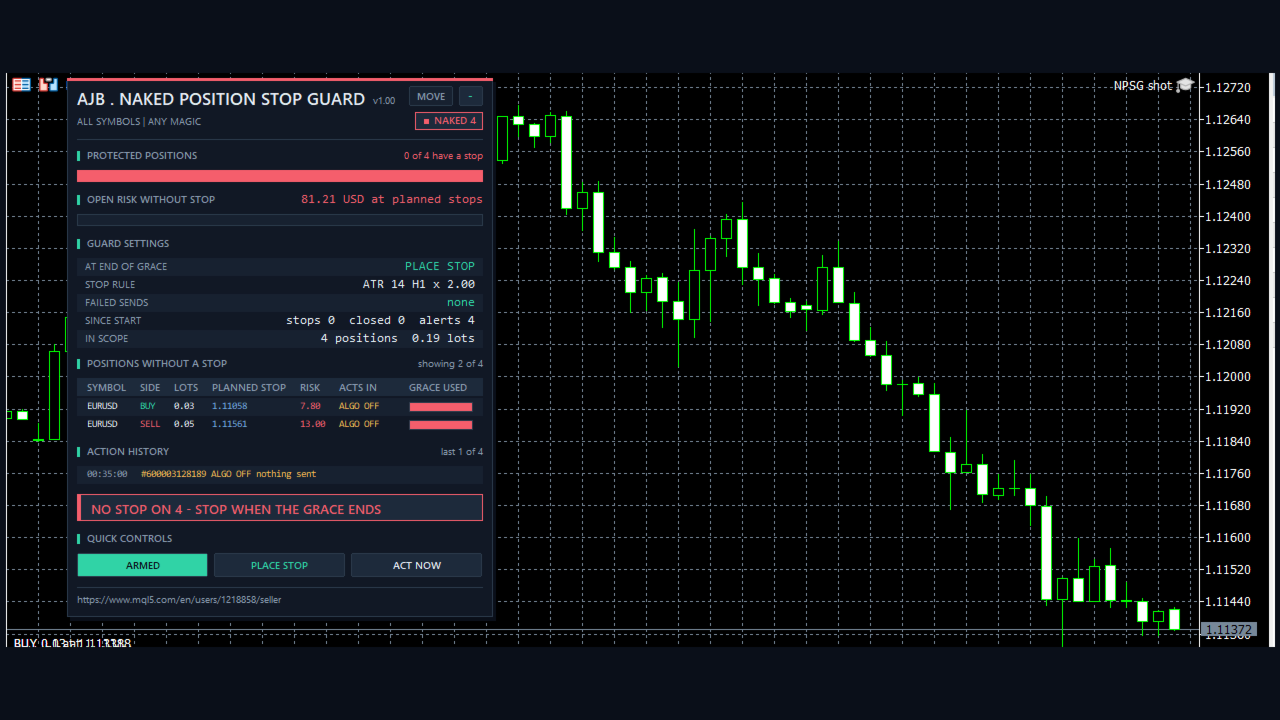
Watch it work before anything else: load Naked Position Stop Guard in the Strategy Tester with visual mode on. Small demo positions open without a stop, the countdown runs down on the panel, and the stop appears the moment the grace period ends.
A POSITION WITHOUT A STOP HAS NO LIMIT AT ALL.
Naked Position Stop Guard is a utility Expert Advisor for MetaTrader 5. It finds no entries and takes no trades for you. It watches your open positions, and any position still without a stop loss after your grace period gets an emergency stop from the rule you chose. If you prefer, it closes the position instead, or only tells you. A position that already has a stop is never modified, so your stop is never widened, tightened or moved.
At a glance
• Grace period in seconds, timed from the moment the position opened.
• Three stop rules: fixed points, ATR x factor, or a percent of the balance risked per position.
• Three reactions when the grace ends: place the stop, close the position, or alert only.
• The panel shows the exact stop it plans for each position and the money at risk at that stop, before anything is sent.
• Respects the broker stops level and freeze level, normalises to the tick size, and skips closed sessions and disabled symbols.
• Failed sends are retried with a growing pause, from 5 seconds up to 5 minutes.
• Optional take profit, added only together with the emergency stop and only when the position has none.
• Symbol scope (all or chart) and magic filter (any, manual only, one number).
• Reacts on the trade event, with a one second timer behind it as a safety net.
• Not a grid, no martingale, no averaging, no DLLs, no web requests, no extra files. It never opens a trade outside the Strategy Tester.
QUICK START
Attach it to one chart of any symbol, for example EURUSD H1, and turn on Algo Trading. One copy is enough, because the default scope is all symbols of the account. The defaults give a position 60 seconds, then place a stop at 2 x ATR(14) H1 from the open price. If you would like to look first, press the PLACE STOP button twice so it reads ALERT ONLY, and read the PLANNED STOP column for a few days. Press it again when the numbers look right to you.
Why this exists
Stops go missing in ordinary ways. A one-click trade from the phone. An Expert Advisor that sets its stop a moment after entry, and sometimes does not. A stop deleted for a moment and never put back. A rejected modification that nobody read in the journal. Nothing looks wrong on the chart, and the position simply sits there with no limit, sometimes through a news release or a whole night. This guard does one small job: it notices, and it does not forget.
What sets it apart
You see the plan first. Each row shows the stop price that would be sent right now and what that stop would cost, so an emergency stop is never a surprise and alert-only mode tells you something useful.
Existing stops are off limits. The only change it makes is on a position whose stop is zero. It selects the position again just before sending, and any take profit already there goes back unchanged.
A removed stop counts too. If a position had a stop while the guard was watching and the stop disappears, the grace period starts from that moment, not from the old open time, and the history records it.
The time lives on the position. The grace is read from the position's own open time, so by design a restart needs no saved state: a position that ran past its grace while the terminal was off is handled at the first pass after the guard starts.
It stays out of the way. If the stop rule would land too close to the market or on the wrong side of it, the stop goes to the nearest legal price instead, and the history marks it NEAREST.
How one position is handled
1. See. A new deal or position change triggers a pass, and the timer runs one every second anyway.
2. Check. Positions outside your scope are ignored. A position with a stop is counted as protected and left alone.
3. Plan. For a position without a stop, the distance comes from your rule, is measured from the open price or the market, is pushed out to the legal minimum if needed, and is rounded to the tick size, away from price.
4. Wait. The countdown runs on the panel. While it runs nothing is sent.
5. Act. At zero the guard checks that trading is allowed, the session is open and quotes are fresh, then places the stop, closes, or alerts.
6. Record. The action goes to the history on the panel and to the journal, with an alert if you asked for one.
Inputs, every one explained
WHEN - GRACE PERIOD
InpGraceSec = 60. Seconds a position may stay without a stop, from 0 to 604800. Give an Expert Advisor that sets its stop after entry enough time to do so.
InpMode = Place the emergency stop. Close the position closes it at market instead. Alert only changes nothing.
STOP RULE
InpRule = ATR x factor. The other choices are a fixed distance in points and a percent of the balance.
InpAnchor = From the open price. The distance is measured from the open price, so the planned loss stays the same however long the position waited. From the market price measures from the current price, which also means the loss already floating comes on top of it.
InpStopPoints = 500. Distance for the fixed rule. Points differ a lot between symbols, so with all symbols in scope ATR or percent usually fits better.
InpAtrPeriod = 14, InpAtrTF = H1, InpAtrFactor = 2.0. ATR is calculated from closed bars of that timeframe, then multiplied by the factor.
InpRiskPercent = 1.0. Percent of the balance one position may lose at its stop, from the anchor, before slippage, swap and commission. Each position is sized alone, so several positions add up.
InpBufferPoints = 10. Extra points kept beyond the broker minimum distance. When the broker reports a stops level of zero, the current spread is used as the minimum.
OPTIONAL TAKE PROFIT
InpAddTP = false. When true, a take profit is sent together with the emergency stop if the position has none. A position that already has a stop gets nothing.
InpTPRatio = 2.0. Take profit distance as a multiple of the stop distance, from the same anchor.
FILTER - WHICH POSITIONS ARE IN SCOPE
InpSymbolScope = All symbols. Chart symbol only watches the chart symbol alone.
InpMagicFilter = Any magic. Only manual trades means magic 0. Only the magic number watches one Expert Advisor.
InpMagic = 0. The number used by that last choice.
ALERTS
InpAlertPopup = true. Pop-up alert in the terminal.
InpAlertPush = false. Push notification to the MetaTrader app. Push must be enabled in the terminal options.
InpFailAlertAt = 3. Alert once when a position has failed this many attempts.
PANEL
ShowPanel = true. Show or hide the panel. The guard keeps working with the panel hidden.
PanelX = 12, PanelY = 15. Offset from the top left corner. The MOVE button lets you drag the panel.
PanelFontSize = 9. Base font size.
MaxTableRows = 5, MaxHistoryRows = 4. Rows in the two tables. On a small chart the panel hides its least important rows first, nearest action stays on top.
STRATEGY TESTER DEMO
InpTesterDemo = true. Only in the Strategy Tester: positions of the minimum volume open once an hour after a margin check, usually without a stop, and every fourth one with its own far stop to show it is left alone. On a deposit too small for the minimum volume the demo is skipped, so no trades appear. It opens no new position once the balance is 20 percent down. This never runs on a live or demo account chart.
The panel
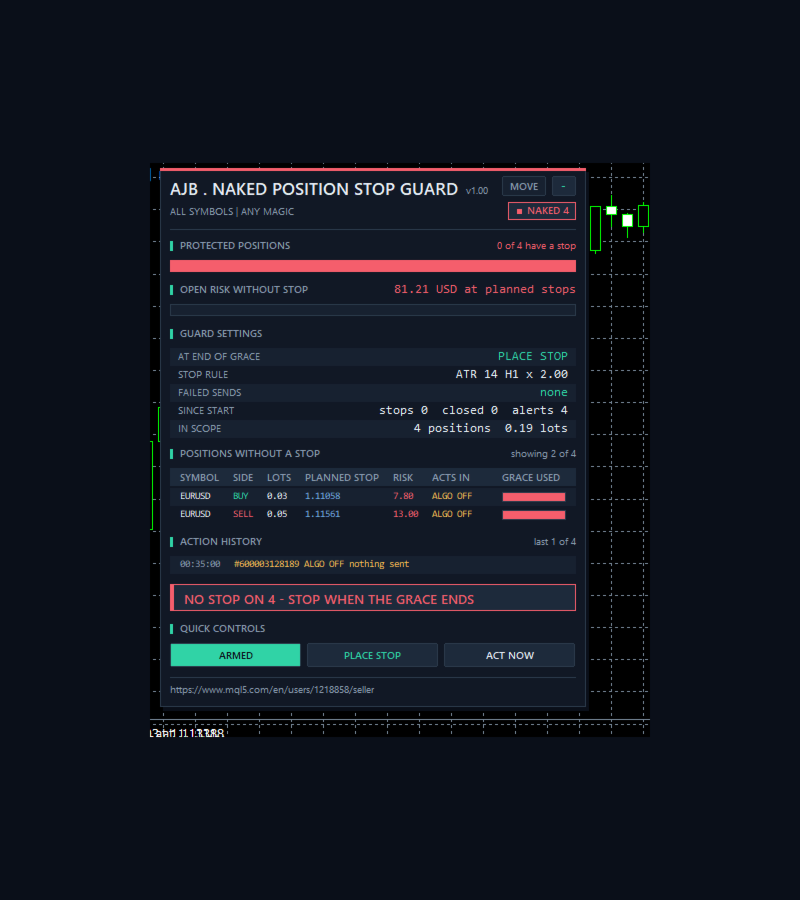
PROTECTED POSITIONS shows how many positions have a stop, with a green and red bar. OPEN RISK WITHOUT STOP adds up the money lost if every planned stop were hit, and the bar below it counts down to the next action. GUARD SETTINGS shows the reaction, stop rule, failed sends, totals since the start, positions in scope, the floating result of unprotected positions and your grace settings. POSITIONS WITHOUT A STOP lists symbol, side, lots, planned stop, risk, the countdown or a state, and how much of the grace is used. States are PAUSED, OVERDUE, ALGO OFF, TRADE OFF, MARKET SHUT, FROZEN and RETRY. ACTION HISTORY keeps the latest actions with their server time. QUICK CONTROLS: ARMED or PAUSED switches everything off and on, the mode button steps through PLACE STOP, CLOSE and ALERT ONLY, and ACT NOW skips the remaining grace once. Nothing is drawn on the right side of the chart, and in a non-visual backtest no panel is drawn at all.
How to use it well
Set the grace longer than the slowest Expert Advisor you run needs to set its own stop, or it will find a stop already there, which may not be the one it wanted. If a strategy deliberately runs without stops, such as a grid or a hedge, keep it out of scope with the magic filter, because the guard cannot tell a forgotten stop from a chosen absence. Close mode is the strict choice, and it ends the trade for real. Percent risk suits mixed symbols, ATR suits a single volatile one, fixed points suits one symbol you know. Keep the terminal running, for example on a VPS, because the guard acts only while it runs.
Good to know
A stop limits nothing during a gap. A stop loss is an order that fills at the next available price, so it can slip well past its level on news, at the weekend open or in thin markets. This guard reduces the time a position spends without a stop. It does not make your trading safe and it cannot promise any result. A tight stop can also take you out of a position that would have recovered, and that is a real cost of the setting you choose.
If a position has already lost more than the rule allows, the stop can only go near the market, so the realised loss can be larger than the rule. Percent risk ignores slippage, swap and commission. While Algo Trading is off the guard only alerts and sends nothing. While the terminal is off nothing is watched. On a closed market it waits for the session, so a position can stay without a stop for that time. If the broker keeps refusing, the failure shows in red and the guard keeps retrying.
The history, totals, PAUSED and any mode changed by button are kept in memory and return to the input values after a restart. After a restart a removed stop can only be timed from the open time, so such a position may be handled at once.
On a hedging account each position is handled alone. On a netting account the merged position is the one position that gets the stop, by design.
What was and was not tested
Testing was done in the Strategy Tester on a hedging account, on EURUSD H1 and XAUUSD H1, with all three stop rules, all three reactions and the optional take profit, without a failed send and without a change to any existing stop. Not tested at the time of writing: a real terminal restart, a netting account, a real or demo broker with the guard sending live, the retry after a broker refusal, a removed stop, a freeze level above zero, pop-up and push alerts, and the panel buttons. These paths exist in the code and are described here by design. Please try them on a demo account with your own broker before you depend on them.
Try it in the Strategy Tester
Choose Naked Position Stop Guard, any symbol, H1, a deposit of a few hundred or more, visual mode, and press Start. Watch the countdown, then the stop on the chart. Then switch the rule, set a very small distance to watch the NEAREST case, or choose close mode, and compare.
If Naked Position Stop Guard caught a position you had forgotten, or you see something it should do better, an honest review on the product page helps other traders decide and tells me what to improve next.