Currency Stack Guard
- Utilità
-
AL MOOSAWI ABDULLAH JAFFER BAQER
 To trade successfully we need to go through the proven path that others had gone and reached!
Here are 17 quotes from such successful investors:
1- Limit your size in any position so that fear does not become the prevailing instinct guiding your judgment.
Joe Vidich - Versione: 1.0
- Attivazioni: 5
Prove it to yourself first: run Currency Stack Guard in the Strategy Tester with visual mode on, watch a demo position open above the cap and see it cut back within the cap a moment later, with the exact lots removed printed in the journal.
THREE TRADES CAN STILL BE ONE BET.
Currency Stack Guard is a utility Expert Advisor for MetaTrader 5. It looks for no entries and opens no trades for you. It breaks every position in scope into the currencies it really holds, adds them up, and shows how much of your account rides on each currency. Set a cap, and a new position that pushes a currency over it is trimmed back, closed or simply reported, a few seconds after it appears. Positions you already held are reported and never touched.
At a glance
• Every position is split into base and profit currency legs, so a long EURUSD counts as long EUR and short USD.
• Net exposure per currency in account money and in percent of equity, updated once per second.
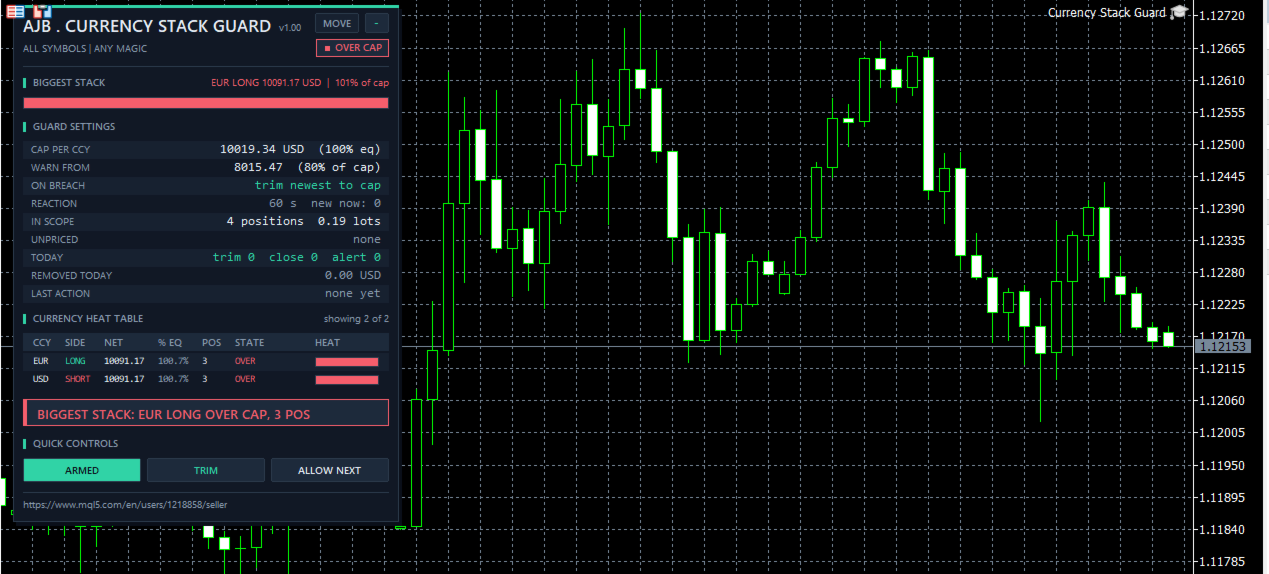
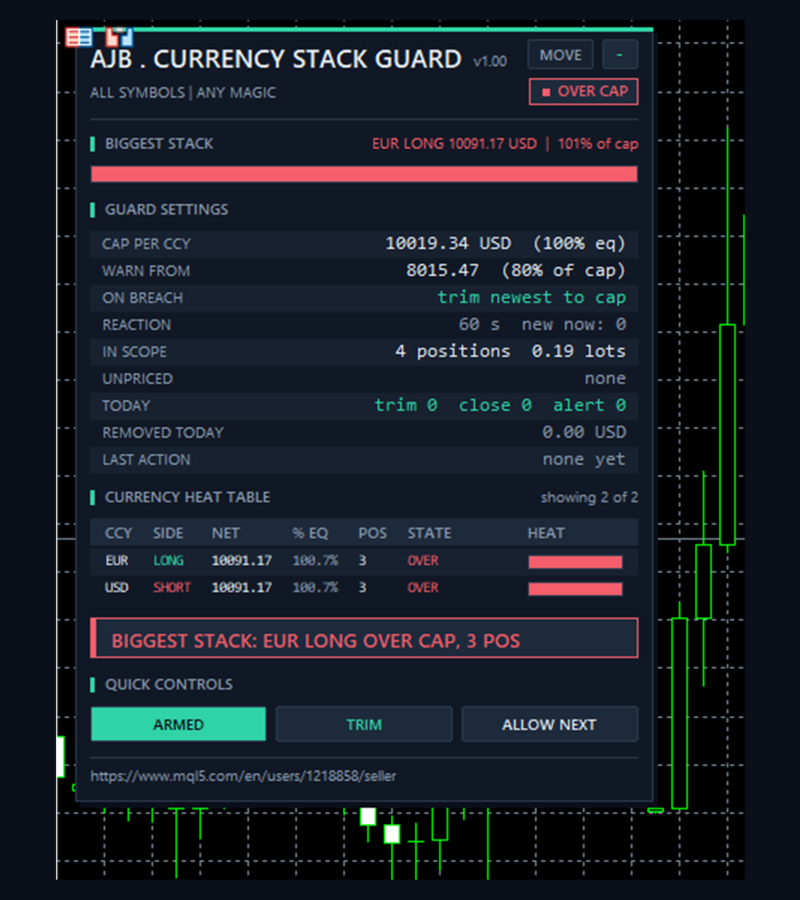
• Currency heat table sorted by stack size, with a bar per currency and the number of positions feeding each stack.
• Biggest stack headline with its share of the cap, so the main risk is the first thing you read.
• Cap as a fixed amount, as a percent of equity, or both; the lower one applies.
• Three reactions for a new position over the cap: trim it back, close it, or alert only.
• Warning at a chosen percent of the cap, before the limit is reached.
• One click controls: PAUSED, ALERT ONLY and ALLOW NEXT for one deliberate exception.
• Exposure removed today, a running money total of what the guard took off.
• Metals, crypto and indices handled by a clear, documented rule; anything that cannot be priced is skipped and shown.
• Not a grid, no martingale, no averaging, no DLLs, no web requests, no extra files.
QUICK START
Attach it to one chart of any symbol, for example EURUSD H1, and turn on Algo Trading. One copy is enough, because the default scope is all symbols of the account. The default cap is 100 percent of equity per currency, with a warning at 80 percent of that and the trim reaction. The panel immediately shows your biggest stack and the heat table. Anything already open when the guard starts counts as older and is only reported, so attaching it can never cut an existing trade. Before you rely on it, press the action button once to work in ALERT ONLY for a few days and find a cap that suits how you trade.
Why currency stacks matter
A trading platform lists symbols, but the market moves currencies. Buy EURUSD, buy EURGBP and sell USDJPY and the terminal shows three separate tickets in three separate markets. Underneath, you are long EUR twice and short USD on one side while long USD on the other. A dollar headline or an ECB comment then moves several of your trades together, and a loss you had sized as three small risks arrives as one big one. Per-trade stop losses and lot limits cannot see this, because each trade looks fine alone. Currency Stack Guard measures the thing that actually moves your account: the net amount on each currency.
What is new and different here
Heat table instead of a position list. Currencies are ranked by net size, each with side, money, percent of equity, the state OK, NEAR or OVER, and a bar that fills towards the cap. You read the concentration of the account in one look.
Stack count. The POS column says how many positions feed each stack in its current direction, which shows whether a large number comes from one honest trade or from several trades that quietly repeat each other.
New position rule. The guard separates what you already hold from what has just been added. Only the newest offender inside the reaction window is ever changed, and only as far as needed. Older positions are reported. On a netting account, where trades merge into one position, only the volume that was just added can be removed.
Warning before the wall. At your chosen percent of the cap, an alert names the currency, the side and the number of positions, so the next trade can be reconsidered before it is placed.
ALLOW NEXT. When you mean to go over the cap once, for a trade you have thought through, one click lets the next offending position stand, and the guard is strict again after it.
How one new position is handled
1. Scan. Once per second all positions in scope are read and split into legs. Each leg is valued in account money.
2. Sum. Legs are netted per currency and sorted, biggest first.
3. Recognise. A ticket not seen before is new from that moment. Positions found when the guard started are older.
4. Compare. If a currency is above the cap and a new position feeds that same direction, the newest such position is chosen. If it feeds two currencies over the cap, the larger excess decides.
5. React. Trim works out the lots that must go, rounds the volume that stays down to the volume step so the stack really ends within the cap, and closes the rest. If what stays would be below the minimum volume, the whole position is closed. Close removes it completely. Alert only changes nothing. A rejected close is tried again every few seconds while the window is open.
6. Record. The action is counted in TODAY, its money goes to REMOVED TODAY, it appears as LAST ACTION, in the journal and, if enabled, as a pop-up or push notification.
How legs and money are calculated
A symbol whose base and profit currencies are both known and different gives two legs: a buy is long the base and short the profit currency, a sell the opposite. This covers forex, and also XAUUSD or BTCUSD, where XAU and BTC simply appear in the table like a currency. Any other symbol, such as an index or share quoted in one currency, is one leg in its profit currency, long for a buy and short for a sell. The value of a position is volume times price times the tick value per tick size of the broker, so the conversion to account money is the one your broker already applies. Both legs of a pair carry the same value. If the broker gives no usable tick value and the symbol is not quoted in your account currency, the position is not guessed: it is skipped, counted under UNPRICED and named on the panel. Unpriced positions are not part of the totals and are never changed.
Inputs, every one explained
CURRENCY CAP (0 = rule off)
InpCapMoney = 0. Largest net stack allowed per currency, in account currency. 0 switches this rule off.
InpCapPct = 100. Largest net stack per currency as a percent of current equity. It moves with your equity, so it fits any deposit. With both rules active the lower one applies. With both at 0 the guard only reports.
InpWarnPct = 80. A warning is sent when a stack reaches this percent of the cap, and the currency turns to NEAR. Each level alerts once and is ready again after the stack falls about 5 percent below it. 0 switches it off.
InpCountAccount = true. Also cap the account currency. A dollar stack on a dollar account is still a real bet on the dollar against other currencies, so it is on by default. Switch it off to ignore that currency completely, including single-leg symbols quoted in it.
REACTION - WHAT HAPPENS TO A NEW POSITION OVER THE CAP
InpAction = Trim. Trim cuts the newest offending position back to within the cap. Close removes it completely. Alert only changes nothing.
InpReactionSec = 60. How long a position counts as new, in seconds, from 1 to 86400. Inside this window it can be trimmed or closed. Afterwards it is older and only reported, so normal price movement in an old trade never leads to a cut.
FILTER - WHICH POSITIONS ARE IN SCOPE
InpSymbolScope = All symbols. All symbols is the natural choice because stacks form across symbols. Chart symbol only limits both the calculation and the reaction to the chart symbol.
InpMagicFilter = Any magic. Any magic includes manual and Expert Advisor positions, Only the magic number includes one Expert Advisor, Only manual trades includes positions with magic 0. Excluded positions are not counted.
InpMagic = 0. The number used when the filter is set to Only the magic number.
ALERTS
InpAlertPopup = true. Pop-up alert in the terminal for warnings, breaches and actions.
InpAlertPush = false. Push notification to the MetaTrader app on your phone. Push must be enabled in the terminal options.
PANEL
ShowPanel = true. Show or hide the panel. The guard keeps working with the panel hidden.
PanelX = 12 and PanelY = 15. Offset from the top left corner of the chart. The MOVE button lets you drag the panel anywhere.
PanelFontSize = 9. The base font size. The panel reduces it automatically when the chart is too small, so it always fits.
MaxTableRows = 6. How many currencies the heat table lists. The rest are counted below it.
STRATEGY TESTER DEMO
InpTesterDemo = true. Only in the Strategy Tester: when nothing is open, a buy on the chart symbol is opened, sized at about one and a half times the cap and never above 30 percent of the free margin, so the trim can be watched with a single symbol. What remains is closed after six hours, and the demo repeats at most once a day. On a very small deposit where the minimum volume does not fit, or at low leverage, the demo is skipped or may stay under the cap. This never happens on a live or demo account chart.
The panel
BIGGEST STACK names the largest net currency with its money and percent of the cap, above a bar that turns amber near the cap and red over it. GUARD SETTINGS lists the cap, the warning level, the reaction, the window and how many positions are new right now, positions and lots in scope, unpriced positions, today's trims, closes and alerts, the exposure removed today and the last action. CURRENCY HEAT TABLE ranks currencies with side, net money, percent of equity, stack count, state and bar. The banner gives the situation in one sentence. QUICK CONTROLS: ARMED or PAUSED stops or resumes all reactions and alerts, the action button switches to ALERT ONLY and back, ALLOW NEXT lets one offending position stand. The minus button folds the panel to its header.
How to use it well
Begin in ALERT ONLY and watch your normal trading for a few days; the heat table will show what your real stacks look like. Set the cap a little above your usual biggest stack, so the guard stops the unusual trade and not the everyday one. Traders with several Expert Advisors can leave the scope on all symbols and any magic, because the point is the total picture. If an Expert Advisor opens a basket of trades in one burst, remember that the newest position is the one trimmed, so expect the last one to be reduced. Check that this Expert Advisor can live with a position being cut. Keep the terminal running, for example on a VPS, because the guard acts only while it runs.
Good to know
The cap measures notional exposure, the full value of a position, not the money at risk to a stop loss, and it does not consider correlation between different currencies. Net means offsetting: a long EUR and a short EUR cancel out in the total. Because a percent cap follows equity and prices move, a stack can drift over the cap with no new trade; that is reported but nothing is closed. If a position feeds one stack over the cap but offsets another, trimming it can make the second stack larger, and that stack is reported. A trim or close is a market order, so slippage and spread apply, and it can realise a loss. The guard never opens trades outside the Strategy Tester, never moves stops or targets, never touches pending orders and never reopens what it closed. If Algo Trading is off it only alerts. If the broker rejects a close, the failure shows in red on the panel and is written to the journal. Settings and counters live in memory, so after a restart all open positions count as older.
Try it in the Strategy Tester
Choose Currency Stack Guard, any symbol, visual mode and press Start. You will see the demo position push both currencies of the pair to OVER, then the trim bring the stack back within the cap, with REMOVED TODAY going up and the lots in the journal. Change the cap, switch the reaction to close or alert only, and compare what happens.
If Currency Stack Guard shows you a stack you did not know you had, an honest review on the product page helps other traders decide, and tells me what to improve next.