Blitz Scalper MT5
- Experts
- Versione: 1.1
- Attivazioni: 11

Blitz Scalper MT5 is a rule-based Expert Advisor designed for XAUUSD / Gold, built to identify short-term trading opportunities while maintaining structured risk and trade management.
Rather than continuously entering the market, Blitz Scalper waits for its required conditions to align before opening a position.
The EA analyses completed candles, market direction, momentum, volatility, price behaviour and higher-timeframe context before allowing a trade.
If the setup is incomplete, Blitz Scalper stays out.
It is designed for traders who want an automated Gold strategy with defined entries, automatic position sizing and built-in protection — without martingale or averaging into losing trades.
For new users, the recommended first step is to test Blitz Scalper MT5 using the free MQL5 Market demo inside MetaTrader 5 Strategy Tester.
At a Glance
- Platform: MetaTrader 5
- Market: XAUUSD / Gold
- Strategy Style: Short-Term / Scalping
- Strategy Timeframe: M15
- Chart Timeframe: Any
- Position Sizing: Risk-Based
- Stop Loss: Automatic
- Breakeven: Yes
- Trailing Management: Yes
- Market Filters: Yes
- News Protection: Yes
- Account Protection: Yes
- Martingale: No
- Averaging Into Losses: No
- Recommended Account Type: Hedging
For the clearest visual representation of the strategy, attaching Blitz Scalper to an M15 Gold chart is recommended.
Selective Gold Scalping
Blitz Scalper is designed around selective execution.
It does not open a trade simply because price moves quickly or because one technical condition changes.
Before an entry is allowed, the EA evaluates multiple parts of the current market environment.
These can include:
- Current price direction
- Trend conditions
- Momentum
- Volatility
- Recent price structure
- Higher-timeframe confirmation
- Spread conditions
- Existing account exposure
- Configured risk limits
A trade is opened only when the complete internal setup is valid.
This allows Blitz Scalper to remain inactive during conditions that do not match its rules.
Closed-Candle Entry Logic
Blitz Scalper evaluates its main strategy conditions using completed candle information.
This helps prevent entries from being triggered purely by temporary movement inside an unfinished candle.
Once a candle has closed, the EA evaluates whether the current market conditions satisfy its entry model.
If they do, Blitz Scalper can prepare and execute the trade automatically.
If they do not, it waits for another setup.
Trading frequency therefore changes naturally with market conditions.
Some periods may produce several opportunities, while other periods may produce very few.
Automated Trade Management
After entering a position, Blitz Scalper manages the trade according to its configured rules.
Trade management can include:
- Initial Stop Loss
- Risk-based position sizing
- Breakeven protection
- Dynamic trailing
- Profit protection
- Maximum open-position control
- Total account-risk limits
The objective is to manage an open trade systematically rather than relying on manual intervention after every entry.
Stop Loss protection remains active regardless of whether the trade eventually reaches its intended target.
No Martingale
Blitz Scalper does not use martingale.
Position size is not increased after a losing trade in an attempt to recover previous losses.
The EA also does not continuously add larger positions against an adverse market move.
Any additional position logic is based on the EA's configured trade-management rules and is not designed as loss-recovery averaging.
This distinction is important when evaluating automated strategies.
Risk-Based Position Sizing
Blitz Scalper can calculate position size according to the selected account-risk settings.
Instead of requiring the same fixed lot size on every account, position sizing can adapt according to factors such as:
- Account equity
- Selected risk percentage
- Stop Loss distance
- Broker minimum lot size
- Symbol specifications
This makes it possible to test the EA using different account sizes while keeping risk settings proportional.
Actual position size can still vary between brokers because XAUUSD contract specifications are not identical everywhere.
Account Protection
A valid trading setup does not automatically mean a new position must be opened.
Blitz Scalper also checks its configured risk and protection rules before allowing additional exposure.
Protection features can include:
- Daily equity protection
- Maximum account drawdown protection
- Basket risk limits
- Maximum open positions
- Maximum trades per day
- Loss cooldown
- Margin protection
- Spread protection
- Trading-condition checks
When one of these limits blocks trading, Blitz Scalper can reject an otherwise valid entry.
The protection system therefore operates separately from the strategy's entry logic.
News Protection
Gold can react aggressively around major economic announcements.
Blitz Scalper can use the native MetaTrader 5 Economic Calendar to restrict new entries around high-impact USD events.
Examples include:
- CPI
- Non-Farm Payrolls
- Federal Reserve announcements
- Major interest-rate decisions
- Other high-impact USD releases
The protection window can be configured by the user.
During a restricted news period, new entries can be blocked while existing positions continue receiving normal Stop Loss, breakeven and trailing management.
Friday Protection
Blitz Scalper also includes optional Friday trading protection.
The EA can restrict new positions as the Gold trading week approaches its broker-reported session close.
Existing Blitz Scalper positions can also be closed before the end of the trading session according to the configured settings.
This is designed to reduce unwanted exposure around:
- Reduced Friday liquidity
- Wider spreads
- Weekend gaps
- Market closing conditions
Friday protection settings can be adjusted by the user.
Spread and Execution Filters
Scalping strategies can be sensitive to execution conditions.
For this reason, Blitz Scalper can check current spread and other trading conditions before sending a new order.
A setup may therefore be rejected when market execution conditions fall outside the configured limits.
Actual results can vary depending on:
- Broker
- Spread
- Commission
- Slippage
- Execution speed
- Liquidity
- Historical data quality
- Gold contract specifications
- VPS latency
An ECN or RAW spread account is generally recommended for testing short-term Gold strategies.
Broker Compatibility
Blitz Scalper trades the Gold instrument of the chart it is attached to.
This means broker-specific symbol names can generally be used without changing the EA.
Examples include:
- XAUUSD
- XAUUSDm
- XAUUSD.a
- GOLD
- GOLD#
Attach the EA to your broker's equivalent Gold symbol.
Because brokers use different contract sizes, spreads, commissions and minimum lot requirements, always test Blitz Scalper using the same broker environment you intend to trade.
Setup
Recommended starting configuration:
- Symbol: XAUUSD / Gold equivalent
- Timeframe: M15
- Platform: MetaTrader 5
- Account Type: Hedging
- Broker: ECN / RAW spread preferred
- VPS: Recommended for continuous operation
Blitz Scalper can remain attached to another chart timeframe, but M15 is recommended when you want the chart to visually match the strategy logic.
Restart and VPS Recovery
Blitz Scalper is designed to continue managing its own positions after common MetaTrader interruptions.
Examples include:
- MT5 restart
- Windows restart
- VPS restart
- Temporary connection loss
After restarting, the EA checks the broker's current live position state before continuing its management logic.
The broker's live position information takes priority over outdated locally stored information.
A VPS is recommended if Blitz Scalper is intended to operate continuously.
Available Settings
Depending on the selected configuration, user-adjustable options can include:
- Risk percentage
- Maximum positions
- Maximum daily trades
- Daily equity protection
- Maximum equity protection
- Basket risk
- Loss cooldown
- Spread protection
- Margin protection
- News protection
- Friday protection
- Alerts
- Push notifications
- Trade-management settings
The entry system itself remains rule-based while the main risk and protection controls remain configurable.
How To Test Blitz Scalper
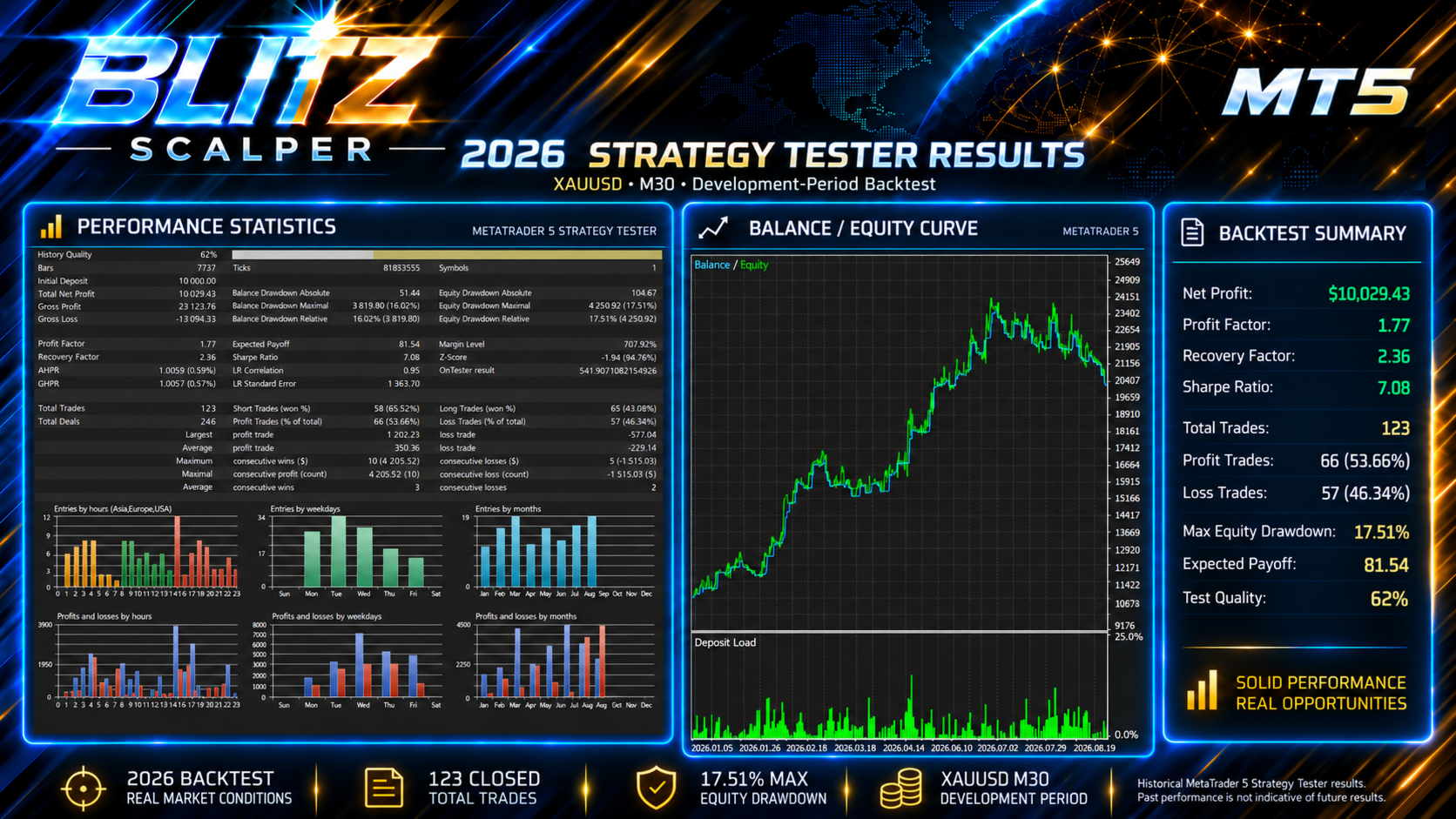
Before using the EA with live funds, test it in MetaTrader 5 Strategy Tester.
Recommended process:
- Select your broker's Gold symbol.
- Use M15.
- Select your intended risk settings.
- Include realistic spread and commission conditions.
- Run the test over different market periods.
- Review drawdown as well as profit.
- Check individual losing periods.
- Forward-test on demo using the same broker.
Do not evaluate Blitz Scalper only by its final balance.
Also review:
- Maximum drawdown
- Trading frequency
- Consecutive losses
- Position sizes
- Exposure
- Spread sensitivity
- Recovery periods
- Trade management
- Behaviour during volatile markets
Built for Automated Gold Trading
Blitz Scalper is designed for traders who want Gold setups identified, executed and managed automatically while maintaining clear account-level controls.
The EA handles:
Analyse → Filter → Enter → Protect → Manage
It does not require the trader to manually watch every candle for a possible entry.
At the same time, the strategy remains selective.
When market conditions do not satisfy the rules, Blitz Scalper waits.
Important
Blitz Scalper MT5 is an automated trading system.
It does not guarantee:
- Profit
- A specific win rate
- A fixed number of trades
- A specific monthly return
- A maximum future drawdown
Historical or backtested performance does not guarantee future results.
Differences in broker conditions, spread, commission, slippage, execution speed, liquidity, historical data and Gold contract specifications can materially affect performance.
Trading leveraged financial products involves substantial risk and can result in loss of capital.
Always test the EA using your own broker, symbol and intended risk settings before considering live trading.
For product questions and support, use the MQL5 product comments or MQL5 messaging system.