AurexBreakoutEngine

AurexBreakoutEngine 

Systematic breakout trading with disciplined automated risk and trade management.

OVERVIEW

AurexBreakoutEngine is a fully automated Expert Advisor for MetaTrader 5 designed for systematic breakout trading, automated execution, risk management and position management.

The EA continuously evaluates market conditions according to its internal rules and can automatically execute and manage trades without requiring constant chart monitoring.

KEY FEATURES

  • Fully automated MetaTrader 5 Expert Advisor
  • Systematic breakout opportunity detection
  • Multi-layer market-condition validation
  • Automated trade execution
  • Automatic Stop Loss and Take Profit management
  • Optional Break-Even protection
  • Optional ATR-based trailing stop
  • Automated risk management
  • Fixed-lot option
  • Maximum lot-size protection
  • Daily trading protection
  • Consecutive-loss protection
  • Drawdown protection
  • Broker-aware order and volume handling
  • Execution safeguards
  • No martingale
  • No grid
  • No averaging down
  • No DLL required

RECOMMENDED MARKET

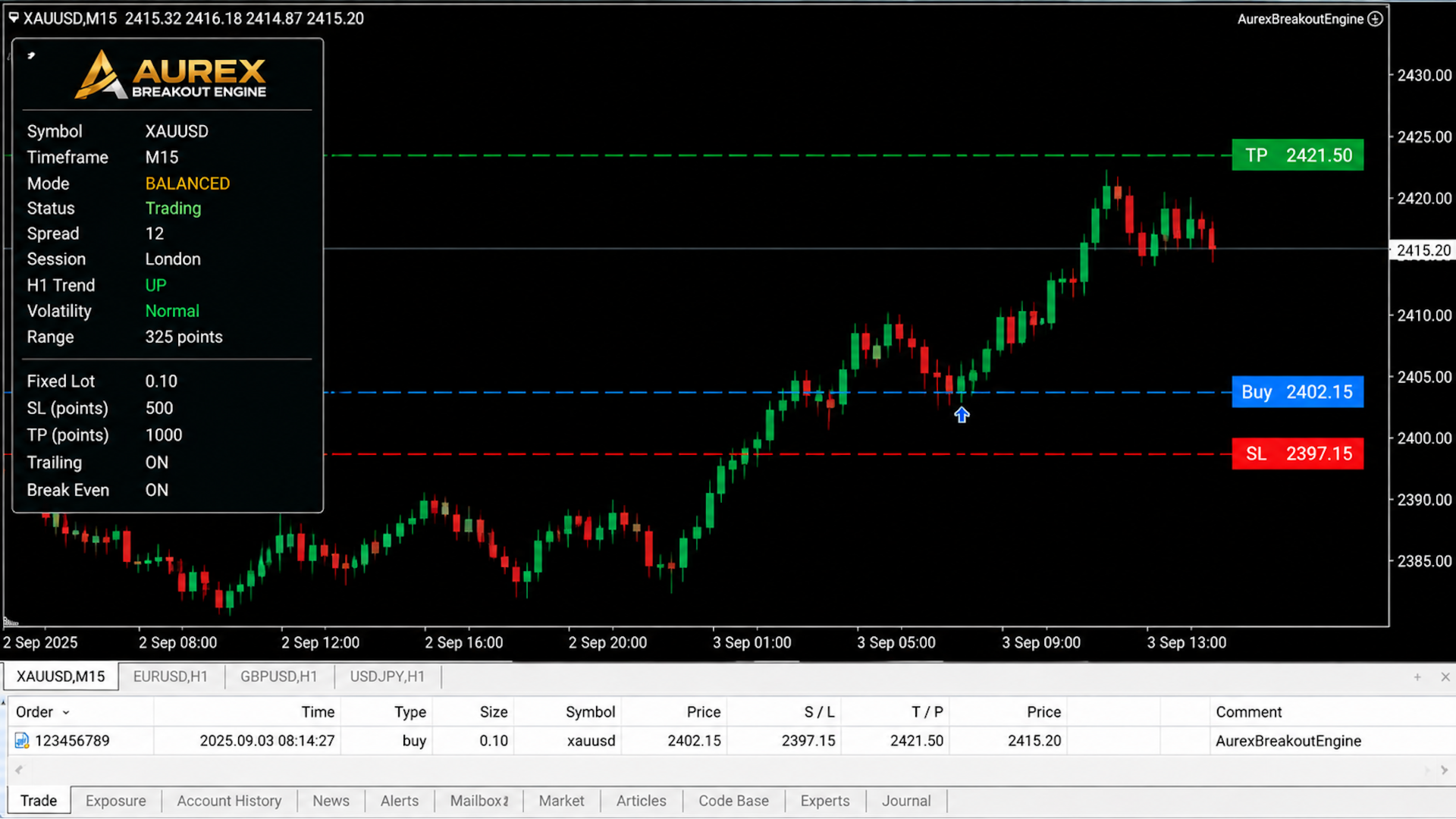
XAUUSD (Gold) is the primary recommended symbol for AurexBreakoutEngine.

The EA can also be used on other broker-supported symbols. However, trading behavior can vary between instruments because spreads, liquidity, volatility, contract specifications and broker conditions are different.

For the intended setup, XAUUSD is recommended.

RECOMMENDED TIMEFRAME

M15 (15-minute) is the primary recommended timeframe.

The EA may be attached to other supported MT5 timeframes, but trading frequency and behavior can differ. Users should independently test other timeframes before live deployment.

RECOMMENDED STARTING CAPITAL

A starting balance of approximately $1,000 or more is recommended for comfortable operation.

This is a recommendation, not a mandatory minimum. Smaller accounts may be supported depending on broker leverage, contract specifications, minimum lot size, margin requirements and available free margin.

Always evaluate the EA using your own broker's conditions before trading with real funds.

TRADING MODES

SAFE A more conservative operating profile designed to place greater emphasis on controlling exposure and reducing trading activity.

BALANCED The recommended default mode, designed to provide a balanced approach between trading opportunities and risk control.

AGGRESSIVE A higher-exposure profile intended for traders who are comfortable with greater potential drawdown and increased trading activity.

Higher-risk modes can result in larger losses and drawdowns. Choose the operating mode according to your account size and personal risk tolerance.

RECOMMENDED SETUP

Symbol: XAUUSD Timeframe: M15 Starting Capital: $1,000+ recommended Trading Mode: BALANCED Fixed Lot: Disabled / automatic risk management Break-Even: Enabled ATR Trailing: Enabled

The appropriate account size depends on broker leverage, contract specifications, margin requirements, risk settings and market conditions.

RISK MANAGEMENT

AurexBreakoutEngine includes multiple risk-management and exposure-control mechanisms designed to help maintain disciplined trading.

These include position-size controls, daily trading protection, consecutive-loss protection, drawdown protection and broker-aware execution safeguards.

Risk-management features help control exposure but cannot eliminate market risk or guarantee against losses.

AUTOMATED TRADE MANAGEMENT

Once a position is opened, AurexBreakoutEngine can automatically manage the trade using its internal management profile.

Depending on the selected settings, this can include:

  • Stop Loss management
  • Take Profit management
  • Break-Even protection
  • ATR-based trailing protection
  • Position management safeguards

The proprietary calculation methods and internal parameters used by the EA are not exposed through the customer interface.

SIMPLE CUSTOMER INTERFACE

AurexBreakoutEngine is designed to keep configuration simple.

Customers can control the main operating and money-management options without needing to configure the EA's internal trading methodology.

Available customer settings include:

  • Trading Mode
  • Use Fixed Lot Size
  • Fixed Lot Size
  • Maximum Lot Size
  • Enable Break-Even
  • Enable ATR Trailing

The internal trading parameters remain managed automatically by the EA.

IMPORTANT INFORMATION

AurexBreakoutEngine is trading software and is not financial advice.

Trading forex, gold and other leveraged financial instruments involves substantial risk. Losses can occur, including the loss of some or all of the trading capital.

No profit, return or performance is guaranteed.

Past testing and historical results do not guarantee future performance.

Before using the EA on a live account, test it on a demo account under your own broker's conditions. Make sure you understand your broker's leverage, contract specifications, margin requirements and trading conditions.

Only use capital you can afford to lose.

AurexBreakoutEngine is designed as a systematic trading tool. The final trading results will depend on market conditions, broker conditions, account settings and other factors outside the control of the software


Altri dall’autore
MagicSand EA MT5 – Advanced Multi-Layer Risk Management for Gold & Forex MagicSand EA MT5 is a professional Expert Advisor designed for traders who value stability, automation, and advanced risk management. Built natively for MetaTrader 5, it supports both Hedging and Netting account types while providing a comprehensive suite of configurable safety features. The EA is designed with performance, reliability, and account protection in mind, making it suitable for personal traders, VPS deployment
Best Tested Pairs :-  Step Index (Also can use on other pairs which spread is lowest) How does the Magic Storm work The Magic Storm will commence only if the Initial Trade becomes a losing trade. In case the initial trade is a profitable one, or has been closed by the trader there is no need for the Magic Stormto be initiated. Let’s assume that the initial trade was a 1 lot buy trade with Recovery Zone Range Pips is 50 and Recovery Zone Exit Pips is 150 pips. The take profit for this tr
Simple setting Attach Magic SL TP Trailing to single fresh chart and to manage all orders please set SL TP 0 for other Expert advisor . This is Free, if you found this useful please give feedback and 5 STAR (if you need more function on this please feel free do DM) Chart Selection :- if select all chart then EA will manage all chart or if select single chart then EA will manage current chart only Choose Trailing Method :- you can select trailing method how you want to trail Choose SL & TP M
FREE
Requirements Hedging account! EA work with any brokerage conditions EA should run on a VPS continuously Information Working symbol EUR, USD, GBP, GOLD, any pair Working Timeframe: M15/M30/H1 Min deposit: $500 (1 Pair) Min leverage 1:500      MM = TRUE (Automatic lot calculation according to your risk) MM = FALSE (No Automatic lot calculation)  Risk = Risk % will work if your Auto Lot is True  Lot Size= If MM is False then your manual lot will work        Multiplier  = Multiplier lot siz
MagicSand Expert Advisor Overview MagicSand is a professional automated trading Expert Advisor designed for MetaTrader 4. It provides a wide range of configurable settings, allowing traders to customize trade management, money management, trading sessions, and risk protection according to their own preferences. The EA includes multiple independent trading modules, advanced position management, and comprehensive safety features while remaining simple to configure. Live Signal https://www.mql5.com
Description for EA Magic Choice                                             EA is based on RSI, Support and Resistance indicator.                     Minimum 500 USD Time Frame H1-H4 Pair : XAUUSD, GBPUSD, EURUSD, AUDUSD, NZDUSD,  (usd pair is best) Note:- XAUUSD (if pair name is GOLD then news filter will not work) 1000usd for XAUUSD Standard Account SETTING Trade Buy :- EA will take trades buy only Trade Sell :- EA will take trades sell only New Series :-After successfully close
Magic Win
Reni
4 (2)
Magic Win Professional Automated Trading Expert Advisor for MetaTrader 4 Magic Win is a professional automated Expert Advisor developed exclusively for MetaTrader 4 , designed to provide intelligent trade management, advanced risk control, and reliable automated trading across multiple financial instruments. Built for stability, efficiency, and long-term automated operation, Magic Win continuously monitors market conditions and manages trades using a proprietary trading methodology while maintai
Magic Max
Reni
3.67 (3)
Magic Max EA, works  with Supply Demand Zones with all Currency pairs / Gold and with all timeframes. Timeframe: (H1 or H4) EURUSD, GBPUSD, AUDUSD, USDCAD, USDCHF, NZDUSD, GOLD Timeframe: (M1 To H1) STEP INDEX, V10,V50,V75 , V100, Boom and Crash (You can select Trade mode according to Trend or for few pair like Boom500/1000 only BUY, C500/1000 only sell) Trade Mode = Both                     = Buy                    = Sell Hidden SL TP = False (if its true your set traget dollar function
MAGIC BC TRADER 10 copy 49$ Next Price 99 Last Price 500$ Magic BC Trader can be work with any pair and broker BEST BROKER EXNESS (Pro Account) BEST PAIRS BOOM 500 - BOOM 1000 - CRASH 500 - CRASH 1000 EURUSD - AUDUSD - GBPUSD - NZDUSD OPBUY : TRUE/FALSE ) if true then EA will open BUY trades OPSELL : TRUE/FALSE ) if true then EA will open SELL trades LOTS    : set your starting lot size INDICATOR SETTING :- can be control from setting or you can let it default if you dont know about MA In
Requirements Hedging account! EA work with any brokerage conditions EA should run on a VPS continuously Information Working symbol EUR, USD, GBP, GOLD, STEP INDEX, V10 (1s) any pair STANDARD ACCOUNT Working Timeframe: H1 Min deposit: $500 (1 Pair) Min leverage 1:500  CENT ACCOUNT Working Timeframe: M15/M30 Min deposit: $500 CENT (4 Pair) Min leverage 1:500  Setfile for currency Here Setting for DARK MAGIC MT5     MM = TRUE (Automatic lot calculation according to your risk) MM = FALSE (
Tested Pairs            -EURUSD, -GBPUSD            -STEP INDEX  (M1) How Magic Hedge works control the support/resistance indicator.  It's best to leave them in default EnableFilter_SR  StopSell_SR     Martingale: So when the market goes against the trade by MartingaleInitiateThresh points, the martingale is initiated.  Every  MartingaleDistance against the trade will cause a martingale position to be posted, and if the martingale group enters a profit of MartingaleProfit points, the group
Magic Win MT5 For Set Files  click here  Recommended Settings For the first setup, we recommend using the default EA settings. The main settings you may want to adjust are: 1. Lot Sizing LotSizingMethod Choose how the EA calculates trade volume. LotSizingValueFixed Used when Fixed Lot sizing is selected. Example: 0.01 = 0.01 lot per initial trade. MaximumLot Sets the maximum lot size the EA can use. For beginners, use a small lot size and test on a demo account first. 2. Symbols Symbols E
Filtro:
Nessuna recensione
Rispondi alla recensione