Dynamic Twin Filter
- Indicatori
- Versione: 1.0
- Attivazioni: 5

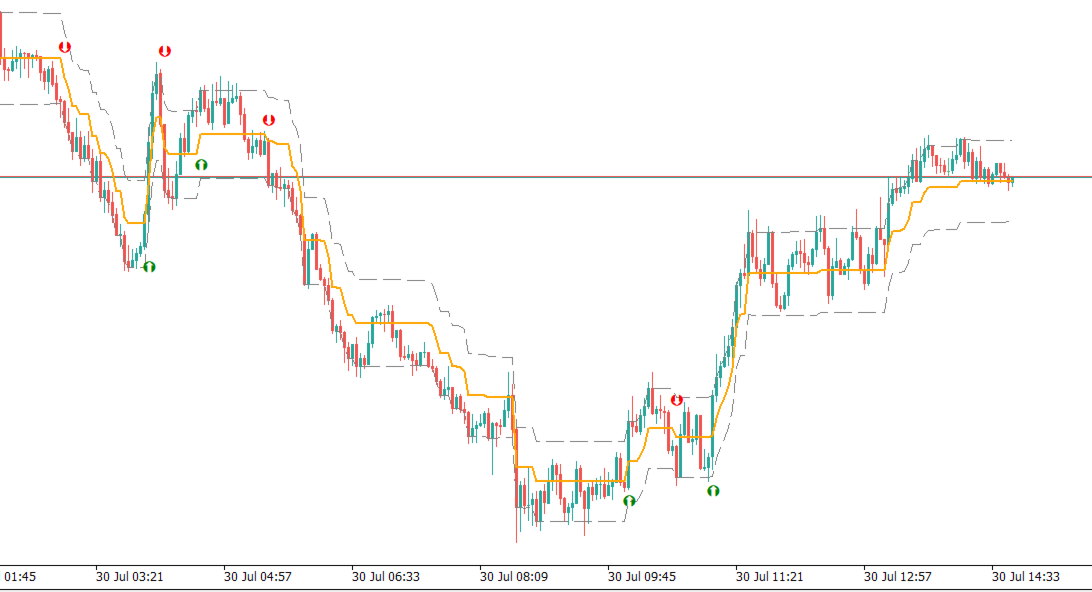
The Dynamic Twin Filter is an advanced volatility and trend-following indicator designed to help traders identify high-probability market directions. By utilizing a unique "Twin" engine approach, it calculates two separate moving average-based ranges (Fast and Slow) to create a highly responsive dynamic price channel.
Unlike traditional moving averages that lag significantly, the Dynamic Twin Filter adapts to absolute price differences and smooths them out. This allows it to quickly shift focus when a genuine breakout occurs, while remaining completely flat during choppy, low-volatility ranges—keeping you out of false signals.
✨ Key Features:
- Dual-Speed Filtering: Combines Fast and Slow volatility measurements to perfectly balance sensitivity and reliability.
- Non-Repainting Signals: The indicator plots Long and Short arrows only on completely closed candles. Signals are final and do not repaint.
- Dynamic Support & Resistance Bands: Optionally display the upper and lower range bands to visualize current market volatility and dynamic stop-loss levels.
- EA & Automation Ready: Built with highly optimized code and strictly defined data buffers, making it perfect for smooth backtesting and easy iCustom() integration in Expert Advisors.
- Multi-Asset & Multi-Timeframe: Works seamlessly across Forex, Crypto, Indices, and Metals on any timeframe.
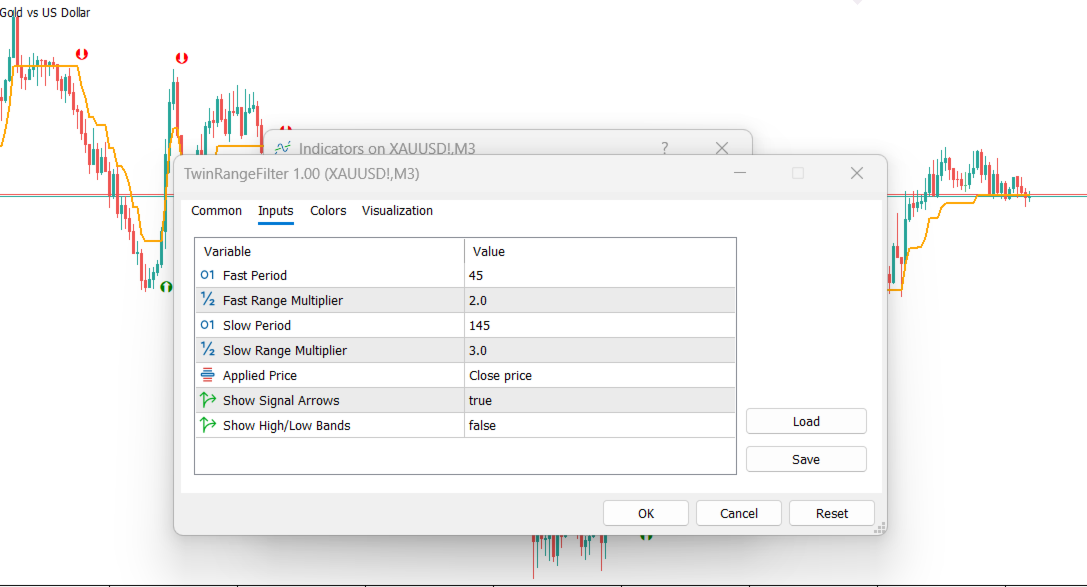
⚙️ Input Parameters:
- Fast Period & Range Multiplier: Controls the short-term reactivity of the filter. Lower values make the indicator more sensitive to recent price action.
- Slow Period & Range Multiplier: Controls the long-term baseline. Higher values ensure you stay on the right side of the macro trend.
- Applied Price: Choose which price data to feed into the algorithm (Close, Open, High, Low, etc.).
- Show Signal Arrows: Toggle the visual buy/sell entry arrows on the chart.
- Show High/Low Bands: Toggle the outer volatility bands (useful for manual stop-loss placement or take-profit targets).
💡 How to Trade:
- Entry (Long): Enter a buy position when the Green arrow appears and the price breaks above the central filter line.
- Entry (Short): Enter a sell position when the Red arrow appears and the price breaks below the central filter line.
- Stop Loss: Place your stop loss slightly beyond the opposite High/Low band or the most recent swing low/high.
- Exit: Ride the trend until an opposite signal appears, or exit at your predefined risk-to-reward target.