Basket Trend Pullback Pro
- Experts
- Versione: 13.17
- Attivazioni: 10

Overview
BTP Pro (Basket Trend Pullback) is a fully automated trading robot that continuously monitors the market and opens trades only when conditions are favorable. The EA analyzes market structure across two timeframes to identify the overall trend direction, then patiently waits for the right moment when price temporarily moves against the trend — a pullback — before entering a position in the direction of the main trend.
Once a trade is open, the EA manages it intelligently: if the market moves further against the position, it adds additional positions at calculated intervals to improve the average entry price. When the combined position reaches your profit target, all trades are closed automatically. The EA then resets and waits for the next opportunity.
Everything runs automatically, 24 hours a day, 5 days a week. You do not need to watch the screen or manually manage any trades.
What Makes BTP Pro Different
✔ Multi-timeframe analysis — uses both the bigger picture and the current chart to make better decisions
✔ 4-layer entry confirmation — trades are only opened when multiple independent conditions align, reducing false signals
✔ Adaptive risk control — the EA automatically adjusts its behavior when market conditions become dangerous
✔ Basket management — all related positions are managed as one unit, closed together at the right moment
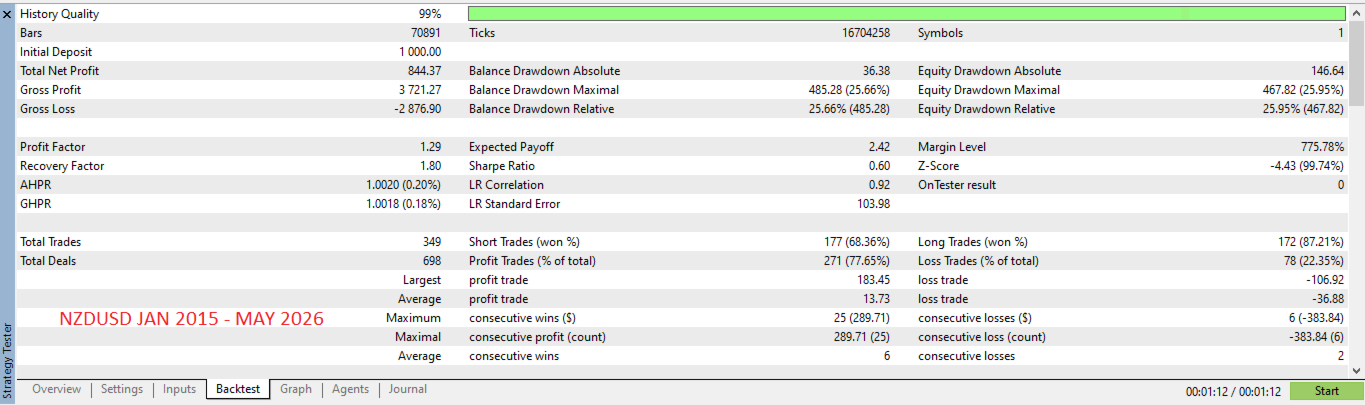
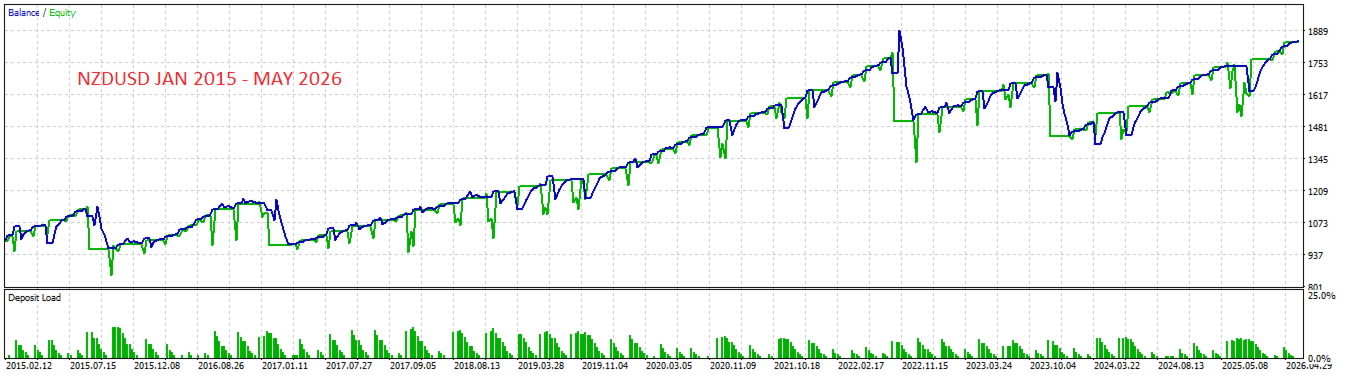
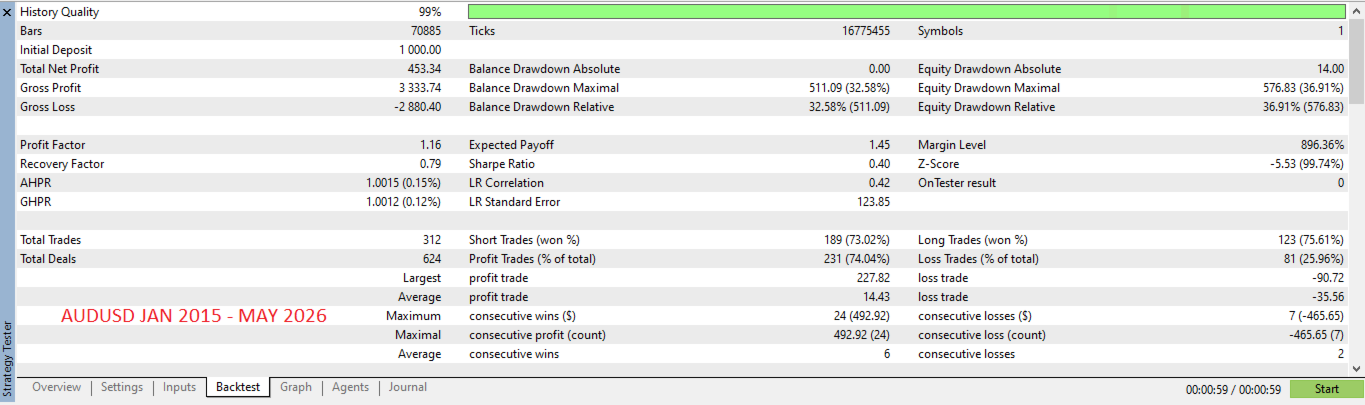
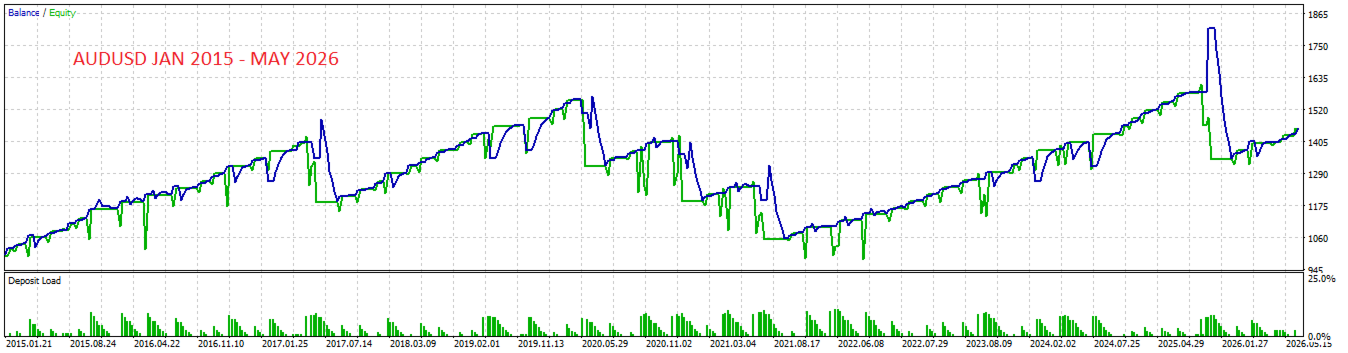
✔ Proven across 11+ years — backtested on real historical data from January 2015 to May 2026
Built-In Protection Features
BTP Pro includes multiple layers of protection to keep your capital safe:
| Protection Feature | What It Does For You |
| 🎯 Automatic Basket Close | Locks in profit automatically — no need to watch the screen |
| 🛡️ Emergency Drawdown Exit | Closes all positions if account loss exceeds your set limit — capital protected |
| 📊 Adaptive Position Control | Automatically reduces risk when market conditions become unfavorable |
| 📰 News Event Filter | Skips new entries around major economic announcements — avoids spike risk |
| 🔁 Recovery Position | Places a balancing position during large floating losses to reduce exposure |
| 🔢 Auto Magic Number | Runs on multiple pairs simultaneously without any position conflicts |
Recommended Currency Pairs
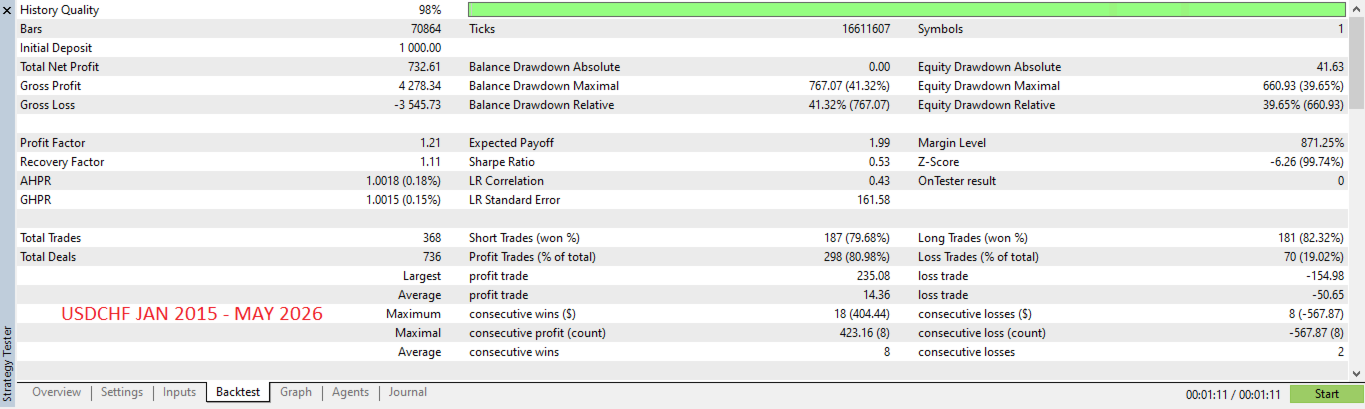
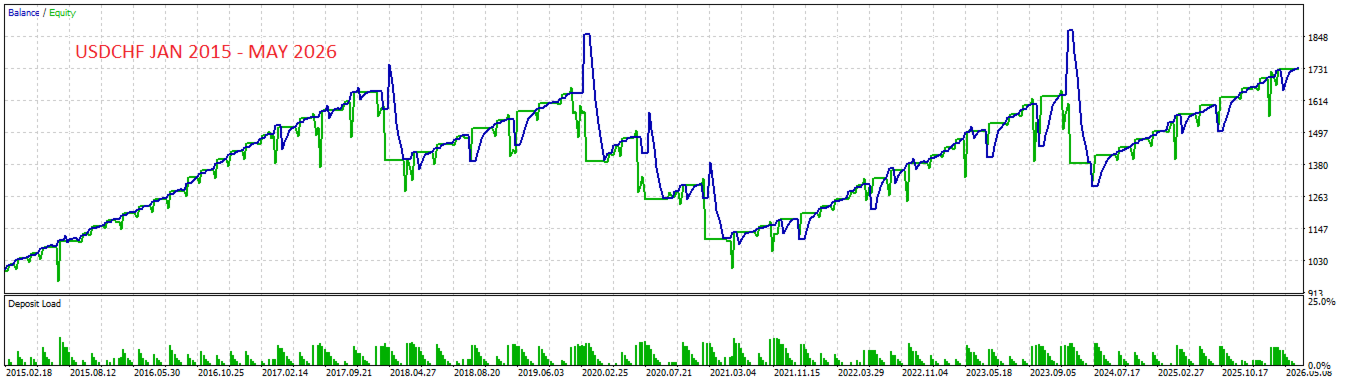
The following results are from an 11-year backtest (January 2015 to May 2026) using high-quality historical data (98–99% quality). Results are shown per pair:| Pair | Net Profit | PF | Sharpe | DD Max | Verdict |
| NZDUSD | +$844 | 1.29 | 0.60 | 25.66% | ⭐ Best |
| USDCHF | +$732 | 1.21 | 0.53 | 41.32% | ✅ Good |
| AUDUSD | +$453 | 1.16 | 0.40 | 32.58% | ✅ Good |
Not recommended for this EA: GBPUSD, GBPJPY — strong trending behavior conflicts with the pullback averaging approach.
Getting Started — 3 Simple Steps
| Step 1 | Step 2 | Step 3 |
| 📂 Install EA
Copy the EA file to your MT5 Experts folder and restart the platform | 📈 Attach to Charts
Open H1 charts for NZDUSD, USDCHF, AUDUSD and drag the EA onto each | ▶️ Enable AutoTrading
Click the AutoTrading button in MT5 — EA starts working immediately |
Requirements & What You Get
| Category | Detail |
| Platform | MetaTrader 5 (MT5) |
| Account Type | Hedge (NOT netting) — required |
| Timeframe | H1 (1 Hour chart) — attach and forget |
| Recommended Pairs | NZDUSD, USDCHF, AUDUSD |
| Minimum Deposit | $1,000 USD per pair ($3,000 for all 3 pairs) |
| Broker Type | ECN / RAW Spread recommended (IC Markets, Pepperstone, FP Markets) |
| VPS Recommended | Yes — for 24/5 uninterrupted operation |
| Setup Time | Under 5 minutes — attach EA, set to default, done |
| Updates | Free lifetime updates included |
Frequently Asked Questions
Is this a martingale EA?
BTP Pro v13 uses a controlled averaging approach with a fixed, conservative lot sequence. Unlike pure martingale systems, the lot size does not multiply exponentially, and position count is capped with adaptive controls that limit risk during unfavorable market conditions.
What is the minimum deposit?
Minimum $1,000 USD per currency pair. If you plan to run all 3 recommended pairs simultaneously, a balance of $3,000 or more is recommended for comfortable margin levels.
Which broker should I use?
Any MT5 broker with hedge account support works. ECN brokers with tight spreads (such as IC Markets, Pepperstone, or FP Markets) are recommended for best results. Avoid brokers with spreads above 20 points on major pairs.
How much time do I need to manage this EA?
Almost none. Once attached and running on a VPS, the EA operates fully automatically. A quick daily check (2–3 minutes) to verify it is running is sufficient.
Can I run it on multiple pairs at the same time?
Yes — this is the recommended approach. Attach one EA instance to each H1 chart. The Auto Magic Number feature ensures each pair runs independently without any interference.
Risk Disclaimer
| ⚠ Please Read Before Purchasing
Forex trading involves substantial risk of loss and is not suitable for all investors. Past performance — including backtest results — does not guarantee future results. The use of an averaging strategy means that during strong trending markets, the EA may experience significant floating drawdowns before the position recovers.
• Never trade with money you cannot afford to lose • Always test on a demo account before using real funds • Maximum drawdown observed in backtest: 41.32% — be prepared for this possibility • A VPS is strongly recommended to avoid interruptions
By purchasing this EA, you acknowledge that you understand the risks involved in automated forex trading. |