Stop Loss Manager for MT4

Stop Loss Manager - Gestione del Rischio con Precisione

Materiali aggiuntivi e istruzioni

Manuale completo - Versione MT4 - Versione MT5


Non permettere mai più che un'operazione vincente si trasformi in una perdita.

Provalo gratis: una versione di valutazione di 14 giorni è disponibile sul nostro sito web.

Stop Loss Manager è una gestione del rischio professionale e automatica per MetaTrader. Nel momento in cui apri un'operazione, applica uno stop loss intelligente e lo segue utilizzando cinque metodi collaudati. Riduci il rischio, mantieni il pieno controllo e blocca i tuoi guadagni, in modo completamente automatico.

Cosa offre: Rilevamento e gestione automatica dello stop loss per tutte le operazioni manuali utilizzando cinque metodi di trailing professionali collaudati: Market Trailing (basato sulle candele recenti), ATR Trailing (regolato alla volatilità), Parabolic SAR Trailing (seguimento della tendenza), Fix Distance Trailing (distanza costante in pip) e Breakeven Trailing (protezione del prezzo di ingresso).

Principali vantaggi:

  • Rileva automaticamente le nuove posizioni e imposta istantaneamente gli stop loss iniziali

  • Protegge il capitale di trading da perdite catastrofiche durante eventi di mercato imprevisti

  • Elimina le decisioni emotive automatizzando la gestione del rischio

  • Gestisce tutte le operazioni sul simbolo corrente indipendentemente da come sono state aperte

Come funziona: Collega Stop Loss Manager a qualsiasi grafico e opera normalmente. L'applicazione rileva automaticamente ogni operazione che apri e applica immediatamente una gestione intelligente dello stop loss basata sul metodo di trailing selezionato. Funziona perfettamente con le operazioni aperte da dispositivi mobili. Compatibile con tutti i timeframe, coppie di valute e broker.

Metodi di trailing

Puoi scegliere tra cinque metodi di trailing professionali, ciascuno adatto a uno stile di trading diverso:

  • Market Trailing: Segue le candele più recenti, utilizzando i prezzi di apertura e chiusura delle candele precedenti insieme allo spread per decidere dove posizionare lo stop loss. Dispone anche di una logica di ritiro intelligente che può dare all'operazione più spazio quando le condizioni di mercato lo consentono - questo accade tipicamente durante fasi di esagerazione del mercato, quando il prezzo si è esteso troppo in una direzione. Due impostazioni di buffer - un valore fisso in pip e un valore basato sullo spread - consentono di regolare con precisione lo spazio dell'operazione. Adatto al day trading e allo swing trading dinamici.

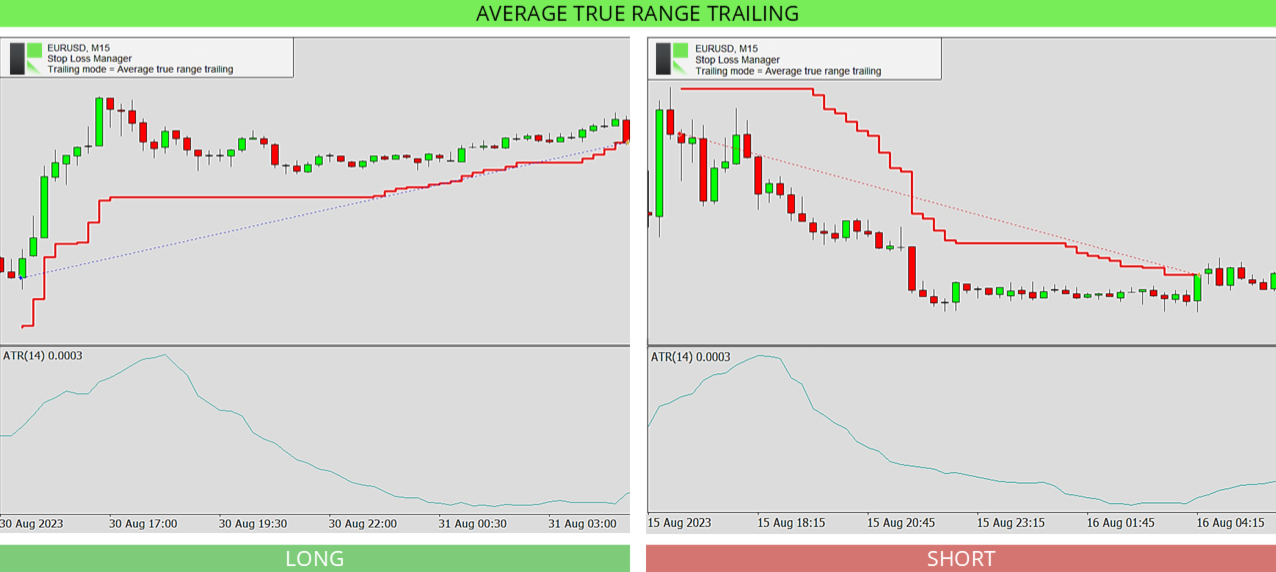
  • ATR Trailing: Utilizza l'indicatore Average True Range per impostare la distanza dello stop loss in base alla volatilità attuale del mercato. Si imposta il periodo ATR (predefinito 14) e un moltiplicatore (predefinito 4.5). Quando il mercato si muove di più, lo stop loss viene mantenuto più lontano; quando è calmo, rimane più vicino. Utile per proteggere i profitti nei mercati volatili.

  • Parabolic SAR Trailing: Segue l'indicatore Parabolic SAR, che posiziona punti sopra o sotto il prezzo per mostrare la direzione del trend. Si impostano i valori di passo e massimo, e lo stop loss segue questi punti man mano che il trend continua. Su timeframe più elevati i punti possono essere più lontani dal prezzo, quindi lo stop loss potrebbe sembrare muoversi meno spesso.

  • Fix Distance Trailing: Mantiene lo stop loss a una distanza costante dal prezzo corrente. Man mano che il prezzo si muove a tuo favore, lo stop loss lo segue e blocca i profitti mantenendo la stessa distanza impostata. La distanza può essere regolata direttamente sul grafico.

  • Breakeven Trailing: Sposta lo stop loss al prezzo di ingresso una volta che l'operazione raggiunge un livello di profitto stabilito (la posizione di breakeven, predefinito 150), in modo che l'operazione non possa più trasformarsi in una perdita. Si utilizza al meglio insieme a un take profit o con supervisione manuale.

Parametri di input

Le impostazioni sono semplici. Si sceglie prima il metodo di trailing, poi si regolano solo i valori appartenenti a quel metodo. I valori predefiniti sono preottimizzati e pronti all'uso.

  • Stop loss trailing mode: Seleziona il metodo di trailing da utilizzare - Market Trailing, ATR Trailing, Parabolic SAR Trailing, Fix Distance Trailing o Breakeven Trailing. Le impostazioni sottostanti si applicano solo al metodo scelto.

  • Market buffer fix: Per Market Trailing. Un buffer fisso in pip aggiunto allo stop loss per dare all'operazione spazio extra. Predefinito 14.0.

  • Market buffer spread: Per Market Trailing. Un buffer aggiuntivo basato sullo spread corrente, in modo che lo stop loss si adatti a spread più ampi o più stretti. Predefinito 6.0.

  • ATRS period: Per ATR Trailing. Il numero di candele utilizzato per misurare la volatilità con l'indicatore Average True Range. Predefinito 14.

  • ATRS multiplier: Per ATR Trailing. Quante volte il valore ATR viene utilizzato per la distanza dello stop loss. Un numero più alto mantiene lo stop loss più lontano. Predefinito 4.5.

  • PSAR step: Per Parabolic SAR Trailing. Il passo (accelerazione) dell'indicatore Parabolic SAR. Un passo maggiore fa sì che lo stop loss segua il prezzo più da vicino. Predefinito 0.02.

  • PSAR maximum: Per Parabolic SAR Trailing. L'accelerazione massima dell'indicatore Parabolic SAR. Predefinito 0.2.

  • Breakeven position: Per Breakeven Trailing. Di quanto l'operazione deve avanzare in profitto prima che lo stop loss venga spostato al prezzo di ingresso. Predefinito 150.

Domande frequenti

Devo fare una configurazione particolare o avere esperienza per usare Stop Loss Manager?

No. Viene fornito con impostazioni predefinite preottimizzate che funzionano bene nella maggior parte delle condizioni di mercato, quindi puoi collegarlo a un grafico e iniziare subito. I trader più esperti possono regolare con precisione ogni valore.

Funziona con le operazioni che apro manualmente?

Sì. Rileva automaticamente ogni operazione aperta sul simbolo corrente e applica il metodo di stop loss scelto, indipendentemente da come è stata aperta l'operazione.

Da quale metodo di trailing dovrei iniziare?

Market Trailing è una buona scelta per cominciare. Segue le candele recenti e le impostazioni predefinite si adattano alla maggior parte delle situazioni. Puoi passare a un altro metodo in qualsiasi momento.

Posso cambiare il metodo di trailing mentre un'operazione è aperta?

Il metodo di trailing viene impostato all'avvio dell'applicazione. Per utilizzare un metodo diverso, cambia l'impostazione e riavvia l'applicazione. Questo mantiene la gestione delle tue operazioni coerente.

Posso usarlo nel tester di strategia?

Sì. Stop Loss Manager funziona nel tester di strategia di MetaTrader, che è un ottimo modo per vedere come funziona ogni metodo di trailing prima di utilizzarlo su un grafico live. Poiché non puoi eseguire operazioni manuali nel tester, l'applicazione apre automaticamente operazioni di test in entrambe le direzioni - long e short - ogni 50 barre, in modo da poter osservare come il metodo selezionato le gestisce. Per la migliore esperienza, imposta la modalità di modellazione su "Ogni tick" e sposta il cursore della velocità al secondo livello più veloce.

Cosa succede se la mia connessione internet cade?

Stop Loss Manager funziona direttamente all'interno di MetaTrader e continua a operare, ma si raccomanda una connessione stabile affinché le modifiche allo stop loss raggiungano il tuo broker senza ritardi.

Quali mercati e timeframe sono supportati?

Tutti. Stop Loss Manager funziona su ogni coppia di valute, simbolo, timeframe e broker.

Hai bisogno di aiuto?

Per un supporto dettagliato e personalizzato, contattaci attraverso il nostro profilo o lascia un commento qui.

Altri nostri prodotti

Sviluppiamo una gamma di strumenti di trading ed Expert Advisor per MetaTrader. Sfoglia tutti i nostri prodotti qui.


Prodotti consigliati
H4 GBPUSD Trend Scalper is a trend signal scalper The EA trades according to the trend strategy using original built-in indicator for opening and closing orders. The external inputs for limiting trading on Fridays and Mondays are available. The purpose of the strategy is to use the current trend with the most benefit. According to the results of testing and working on demo and real accounts, the best results achieved by using the Н4 timeframe on the GBP/USD pair Works on MetaTrader 4 Build 971+
Expert Advisor for MT4 Useful utility MUST have for all traders.  With 1 click button, you're able to close all your open positions. Its come with a warning pop up notification when you click to close all your trades, to avoid an accident press the button. Just press 'Yes' to confirm or 'No' to cancel it. The expert will close all your open positions no matter what pairs you currently open or directions. Just attach the expert on 1 of your chart, and you're good to go.
Virtual Exchange Reserve Equity Monitor In an environment where exchanges offer increasingly high leverage ratios, it is all the more important for traders to tightly regulate their level of equity .  This software is designed to be run in the background on any virtual private server that can run Meta Trader 4/5.  It implements basic equity control functions ahead of the broker---allowing users to set their own equity trailing stop, an equity limit to lock-in a certain profit margin, and a unive
FREE
MRPHN Overdosed EA
Affifuddin Bin Mohd Hazam
MRPHN Overdosed is a trend-following Expert Advisor built for XAUUSD , powered by a custom Supertrend indicator : iMRPHN (included for free). It combines simplicity and flexibility, offering optional Martingale logic, configurable risk settings, and time-based trading filters — ideal for traders who prefer a set-and-forget approach. Tested on :  XAUUSD Strategy : Trend-following using iMRPHN indicator Trade Timing Control : User-defined trade start & end time Take Profit / Stop Loss : Fully con
很多交易者亏钱,不是因为判断方向错了。 是因为行情动的时候手慢了。是因为手滑点错了手数。是因为新闻数据一出来, 三笔盈利的单子还没来得及平,全部回吐了。 Apex Trade Manager Pro 就是为了解决这些问题而做的。 这是一款适用于 MetaTrader 4 和 MetaTrader 5 的可视化交易面板。它挂在 图表上,把所有常用操作——平仓、减仓、设止损、开单——都变成一个按键的 事情。不用翻菜单,不用等弹窗,不会手忙脚乱。 --- 功能说明 一键全平 一个按钮关掉当前品种所有持仓。按钮上实时显示总浮动盈亏,让你在按下去 之前就知道自己在什么位置。 分批减仓 直接从面板关掉每笔持仓的50%或80%仓位。想落袋一部分利润但不想完全出场 的时候,这个比去终端一笔一笔操作快得多。 按类型分开平仓 只平多单、只平空单、只平盈利的、只平亏损的,各有独立按键。不用在终端 里翻找,不用逐笔选择。 一键移至保本 行情往你方向走了,按一下保本键,所有盈利持仓的止损立刻移到各自的开仓 价。亏损的单子不受影响。 批量修改止损止盈 输入点数,按键,所有持仓同时更新。也可以
Note: After installation, please go to Tools>Options>Expert Advisors and add https://porsaj.com to 'Allow WebRequest for listed URL'. Still Problem?! Please check Internet connection! An economic calendar in the context of forex refers to a tool or resource that provides information about upcoming economic events, indicators, and data releases that can potentially impact the financial markets, particularly the foreign exchange market. It helps traders stay informed about key economic announce
THIS EA WILL PROTECT YOUR ACCOUNT IN MANY WAYS  KEY FEATURES ARE :  1. CLOSE ALL TRADES IN ONE CLICK. 2. CLOSE ALL TRADES WHEN INPUT MENTIONED LOSS LIMIT REACH. 3. CLOSE ALL TRADES WHEN INPUT MENTIONED PROFIT LIMIT REACH. 4. IF REVERSE MODE IS ON THIS EA WILL TAKE OPPOSITE TRADES IF YOUR OTHERS EA MAKES LOSS OR MANUAL TRADING ALSO IF YOU ARE GETTING ALWAYS LOSS THEN YOU CAN SWITCH ON REVERSE MODE SO IT WILL TAKE OPPOSITE TRADES WHENEVER ANY TRADES PLACED IN YOUR ACCOUNTS. 5. FIX LOT SIZE 6. STOP
TradePilot
Hossein Khalil Alishir
TradePilot Expert Advisor (EA) for MetaTrader 4 TradePilot is a professional and user-friendly Expert Advisor (EA) for MetaTrader 4 (MT4) . It simplifies automated trading , risk management , and trade execution using a smart trading panel . Perfect for beginners and experienced traders looking for a reliable trade manager EA with automated lot size calculation . Key Advantages User-Friendly Trading Panel: Customizable panel with buttons and hotkeys. Smart Risk Management: Supports percen
RiskManager
Roman Zhitnik
5 (4)
The Expert Advisor is a risk manager helping users to control their trading. In the settings, it is possible to specify the parameters at which the risk manager force closes the opened trades and closes the terminal as well, if it is needed to prevent opening trades on emotions, which do not correspond to the trading strategy. Risk Manager settings Check limit to close - check the equity limit Limit to close (account currency)   - equity limit that is checked when  Check limit to close is activ
Expert candle finder for forex in MetaTrader 4 Expert candle finder is one of the practical trader assistant experts that is used in the forex financial market, this expert accurately identifies the candlestick patterns on the price chart as a signal, all the found candles. informs you. This expert is run on your Meta trader platform and in a very precise way, it examines all the currency pairs that are in your watch list and every currency pair that had a professional and good candlestick patt
The purpose   of this utility is to manage one or more subwindow in the same chart by opening and closing them through a button or the keyboard keys How it works: If you want to handle more than one subwindow you need to reinstall the indicator . In this case some setups has to be customized onlu in the last subwindow installed and others setups in the installed subwindow during the first time installation. They are denoted in the input rispectively as ' LW ' and ' IW '. First of all install
Margin Call Shield – Defend Your Margin on Your Terms Margin Call Shield   is a tool for MetaTrader 4 traders who want to decide for themselves which open positions are closed during margin call situations before the platform does so automatically based on its internal rules. By default, the broker or platform decides which positions to close, often using undisclosed algorithms. Margin Call Shield lets you set this order according to your own strategy. Why Was Margin Call Shield Created? In a  
Vizzion
Joel Protusada
Vizzion is a fully automated scalping Expert Advisor that can be run successfully using GBPJPY currency pair at H1 timeframe. Very Important This Expert Advisor can not run with any EAs in the same account. As part of the money management plan, it calculates and monitors the Margin Level % and assumes that all open trades are created by it. If you want an Expert Advisor that trades in a daily basis, this EA is not for you because using this requires a patience to wait for a few days or weeks on
This PORTFOLIO of 3 strategies has been developed, tested and traded live on DAX H1 timeframe. Multiple EAs traded together will lead to a BIGGER PROFITS and SMOOTHER EQUITY CURVE. 3 not correlated EAs logics for DAX H1 timeframe merged to a single strategy. Very SIMPLE STRATEGIES with only FEW PARAMETERS. Every trade has his own logic for STOP LOSS. To catch the profits every strategy uses different approach - some has TAKE PROFIT, some uses TIME BASED EXITS or PROFIT TRAILING. EA has been back
This PORTFOLIO of 3 strategies has been developed, tested and traded live on DAX M30 timeframe. Multiple EAs traded together will lead to a BIGGER PROFITS and SMOOTHER EQUITY CURVE. 3 not correlated EAs logics for DAX M30 timeframe merged to a single strategy. Very SIMPLE STRATEGIES with only FEW PARAMETERS.  Every trade has his own logic for STOP LOSS. To catch the profits every strategy uses different approach - some has TAKE PROFIT, some uses TIME BASED EXITS or PROFIT TRAILING. EA has been
Trade Monitor Pro
Valery Sorrentino
DOWNLOAD VERSIONE DEMO QUI TradeMonitorPro è uno strumento potente progettato per aiutarti a monitorare e gestire efficacemente le tue attività di trading nel mercato forex. Questo EA offre una serie di utili funzionalità che ti consentono di tenere traccia dei tuoi trade aperti, dei guadagni e delle perdite flottanti giornaliere (drawdown flottante) , nonché dei livelli di margine e del volume di lotti aperti. Per un corretto conteggio del "Trading Volume" abilitare lo storico completo nel ter

This is a Semi Automated OTE EA based on the free teachings of ICT. One of the biggest challenges in trading is related to executing and managing trades. After analyzing charts, draw an OTE Fibonacci and turn on the EA. It will automatically execute orders based on the Fibonacci level of your placement and protect any open positions when in profit. Please review the documentation that accompanies this product. *PLUS VERSION REMOVES LOT SIZE LIMIT THAT IS IN THE FREE VERSION* Auto Lot Calculat
Harvest GOLD
Sayan Vandenhout
Harvest GOLD USES THE TREND WAVE INDICATOR AND IT CAN IDENTIFY THE BEGINNING AND THE END OF A NEW WAVE TREND MOVEMENT. AS AN OSCILLATOR, THE INDICATOR IDENTIFIES THE OVERBOUGHT AND OVERSOLD ZONES. IT WORKS GREAT TO CATCH THE SHORT TERM PRICE REVERSALS AND USES A MARTINGALE STRATEGY TO CLOSE ALL TRADES IN PROFIT. USE DEFAULT SETTINGS ON H1 OR HIGHER TIME FRAME ON ANY PAIR FOR MORE ACCURATE TRADES WHY THIS EA : Smart entries calculated by 3 great strategies The EA can be run on even a $30000
PyramidExpert
Joel Protusada
P Y R A M I D   E X P E R T    This Forex utility is a complex exit strategy and order management tool that executes four trading methods; scalping, pyramid style, hedging, and scaling method to close trades with a profit.           V E R Y  I M P O R T A N T     This is not a stand alone expert advisor. Use it with your own volatility-based strategy. Once you found the currency pair to trade, you can just attach this tool to the chart of the chosen pair and it will do the
Gyroscopes
Nadiya Mirosh
Gyroscope        professional forex expert   (for EURUSD, GBPUSD, USDJPY, AUDUSD, USDCHF, EURGBP, EURJPY, NZDUSD, USDCAD, EURCHF, AUDJPY, CADJPY pairs)   alyzing the market using the Elliot Wave Index. Elliott wave theory is the interpretation of processes in financial markets through a system of visual models (waves) on price charts. The author of the theory, Ralph Elliott, identified eight variants of alternating waves (of which five are in the trend and three are against the trend). The mov
EA Gold EZIndy
Mr Kraisit Chompungam
Advantages of EA Gold EZIndy: You get profit from trading every day It can work with other EAs and trading systems The EA has a trading panel that allows the trader to open trades manually. All trades, opened through the trading panel, are managed by the EA and are closed with profit automatically How to set up EA Gold EZIndy: Simply add the EA to the XAUUSD 4H chart and activate the auto-trading function in the Expert Advisor and in the MetaTrader terminal To activate the news filter, you n
Close_All_Trades_with_TP_SL is a reliable and efficient MQL4 Expert Advisor designed to simplify and automate trade management for all open positions on your MT4 account. This EA is especially useful for traders who open multiple trades quickly or use high-frequency strategies where manual TP/SL placement becomes difficult and time-consuming. The primary purpose of the EA is to ensure that every open trade—whether Buy or Sell—always has a predefined Take Profit (TP) and Stop Loss (SL) applied. M
FREE
This system is very simple.. It uses a martingale grid hedging style strategy by increasing lot sizes and grid levels. The open order step and volume can be both fixed and dynamic. The EA is easily customizable. The EA does not use a stop loss and all positions close when the chart move back from trend and arrive last grid level. Recommended :   pairs : Side way pairs is very good for this system.                                 Time frame : not important.                                Deposit
Revenge Trading Protector
Konstantinos Kalaitzidis
5 (1)
Revenge Trading Protector è uno strumento semplice ma efficace per i trader che possono cadere vittime del vendetta trading. Essendo io stesso un day trader, capisco l'aspetto psicologico del vendetta trading e il desiderio di coprire le perdite. Quindi, ho sviluppato questo strumento (che utilizzo anch'io) per essere sicuro al 100% di poter rimanere paziente dopo una perdita e non prendere decisioni di trading irrazionali. Quando subisci una perdita, Revenge Trading Protector EA ti impedisce
This is the EA tool "VS Martin" (VSMT) that I developed and have been using. Now I share it with users in need. Function: Automate trading according to the user's preset Martingale trading sequence. The tool can monitor market changes in real time and automatically adjust prices according to the set profit target to achieve maximum profit and exit trades in time. The entire Martingale execution process does not require manual intervention. Advantages: 1.     Users can customize the Martingale t
Auto Fibo Pro m
DMITRII GRIDASOV
Indicatore "Auto FIBO Pro" Crypto_Forex: è un ottimo strumento ausiliario nel trading! - L'indicatore calcola e posiziona automaticamente sul grafico i livelli di Fibo e le linee di tendenza locali (colore rosso). - I livelli di Fibonacci indicano le aree chiave in cui il prezzo può invertirsi. - I livelli più importanti sono 23,6%, 38,2%, 50% e 61,8%. - Puoi usarlo per lo scalping di inversione o per il trading di zone grid. - Ci sono molte opportunità per migliorare il tuo sistema attuale usa
Expert Advisor: Breakout_Recovery_V2    Version: 2.3    Symbol: XAUUSD    Timeframe: M15 (recommended)    Strategy Type: Breakout + Smart Recovery (Bi-directional Martingale)    Platform: MetaTrader 4 (MT4) Description: Breakout_Recovery_V2 is a smart trading system that detects real breakout opportunities and uses a controlled recovery mechanism (martingale) when the market moves against the initial entry. Features: *Real breakout entry logic using a custom supply/demand
Magic Grid
Aliaksandr Charkes
4.54 (28)
Magic Grid is an indicator-free advisor that uses a grid strategy. The strategy is based on automatic reopening of grid pending orders, after closing their market positions (by Take-Profit, Stop-Loss or manually). Pending orders are placed with a specified step from the initial prices, which can be entered manually or generated automatically ( one time at the beginning of the trade ). The robot can trade on any time frame, on any currency pair, on several currency pairs, and on any number of di
FREE
Remote Trade Copier   is an advanced tool designed for efficiently copying trades between accounts in both   local   and   remote   modes. It allows for lightning-fast order replication from a master account to a slave account. In local mode, trades are copied instantly, while in remote mode, the copying process takes a second.  In new version, in remote mode , the copy operation can be performed with a delay of milliseconds or zero . After purchase, ask how to activate it MT4 Version (Only Loc
BreakEven Grid Utility for MT4 BreakEven Grid is a powerful utility for manual trade management on the MetaTrader 4 platform. It provides a convenient on-screen panel with buttons to help you manage your open positions with a single click.  Features: Set BE+Profit: Automatically sets Take Profit to breakeven + desired profit in pips or money. Close BUY/SELL: Instantly close all Buy or Sell orders for the current symbol. Close +$/-$/Old/New: Close only profitable, losing, oldest or newest tra
Gli utenti di questo prodotto hanno anche acquistato
Unlimited Trade Copier Pro
Vu Trung Kien
3.86 (7)
Unlimited Trade Copier Pro is a tool to copy trade remotely to multiple MT4, MT5 and cTrader accounts at different computers/locations over internet. This is an ideal solution for you if you are a signal provider and want to copy your trades to other receivers globally on your own rules. One provider can copy trades to multiple receivers and one receiver can get trade from multiple providers as well. The provider can even set the subscription expiry for each receiver, so that receiver will not b
Crystal Trade Manager PRO – Sistema Avanzato di Gestione del Rischio e Controllo delle Operazioni per MT4 Versione Gratuita: https://www.mql5.com/en/market/product/150632 Panoramica Crystal Trade Manager PRO (CTM) è uno strumento professionale progettato per la gestione del rischio, il controllo delle operazioni e l’automazione avanzata su MetaTrader 4. È ideato per i trader che richiedono un'esecuzione disciplinata, una forte protezione del capitale e un sistema di controllo affidabile. Il sist
The FFx Hidden Manager panel will help you to manage easily your orders directly on the chart. Below all features described: TP, SL and TrailingStop are hidden Each order has its own lines on chart Drag & Drop any line to change the TP/SL as per your need Option to move automatically the SL line at breakeven when TP #1 is reached Option to choose the TP/SL type (by pips or price) Option to choose the TrailingStop type (by pips, MA, Fractals, PSAR or ATR) Define which order(s) you want to manage
FFx Risk Calculator
Eric Venturi-Bloxs
FFx Risk Calculator panel will help you to calculate very easily your trades size, SL or the risk directly on the chart. All features are described below: Option to select which parameter to calculate: Risk, Stop Loss or Lot Size The panel will show if the lot size is allowed according to the current account free margin Button to maximize/minimize the panel Drag and Drop the panel anywhere on the chart How to use it? Select the parameter you want to be calculated. It will be based on the 2 other
News Trader Pro
Vu Trung Kien
4.38 (16)
News Trader Pro is a unique robot that allows you to trade the news by your predefined strategy. It loads every piece of news from several popular Forex websites. You can choose any news and preset the strategy to trade it, and then News Trader Pro will trade that news by selected strategy automatically when the news comes. News release gives opportunity to have pips since the price usually has big move at that time. Now, with this tool, trading news becomes easier, more flexible and more exciti
FFx Watcher PRO
Eric Venturi-Bloxs
The FFx Watcher PRO is a dashboard displaying on a single chart the current direction of up to 15 standard indicators and up to 9 timeframes. It has 2 different modes: 1. Watcher mode: Multi Indicators User is able to select up to 15 indicators to be displayed User is able to select up to 9 timeframes to be displayed 2. Watcher mode: Multi Pairs User is able to select any number of pairs/symbols User is able to select up to 9 timeframes to be displayed This mode uses one of the standard indicat
Transaction Repeater Full
Alexandr Bryzgalov
5 (4)
Copies transactions between MT4 terminals. Possibilities: quick copy start minimum processor load direct and reverse (reverse) copying. copying Take Profit and Stop Loss levels copying deferred and their changes copy transactions one to many copy trades many to one local copy only Attention: The product is designed for copying trades only within a single computer or VPS with access to the desktop. The product will not work on the built-in Virtual Hosting of the terminal. We will help you set up
Elliott Wave Counter è un pannello per il markup manuale rapido e intuitivo delle onde di Elliott. Si può selezionare un colore e un livello di segni. Sono inoltre disponibili funzioni per la rimozione dell'ultimo markup e dell'intero markup effettuato dallo strumento. Il markup viene eseguito con un clic. Fai clic cinque volte: ottieni cinque onde! Elliott Wave Counter sarà un ottimo strumento sia per i principianti che per gli analisti professionisti delle onde di Elliott. Guida all'installazi
If you wish to draw Support and Resistance lines, view: daily market opening, classical pivot levels, Fibonacci pivot levels, trend lines, Fibonacci levels, the remaining time to candle closing, and current spread. If you seek to place your orders with the exact lot that meets your desired stop loss risk. If you wish to do all this and more with just one click, then this is the perfect tool to use. This tool will allow you to feel more relaxed when deciding to open orders, as well as predicting
Unlimited Binary Options Copier Remote is a powerful tool to copy binary options trades remotely between multiple accounts at different locations over internet. This is an ideal solution for signal provider, who want to share his binary options trades with the others globally on his own rules. One provider can copy trades to unlimited receivers and one receiver can get trade from unlimited providers as well. The provider can set the subscription expiry for each receiver, so that receiver will no
Telegram Publisher Agent   è un componente aggiuntivo che consente ai trader di inviare segnali ai propri canali e gruppi Telegram in tempo reale. Con messaggi personalizzabili, schermate di grafici e altre funzionalità, lo strumento aiuta i trader a condividere le loro intuizioni e strategie di trading con i loro follower. Lo strumento presenta anche un bellissimo design con interruttore a tema chiaro e scuro, offrendo agli utenti un'esperienza di trading estetica e funzionale. Telegram Publish
如果产品有任何问题或者您需要在此产品上添加功能,请联系我 Contact/message me if you encounter any issue using the product or need extra feature to add on the base version. There is Demo version of this panel Dashboard Babon Scalping System Demo in my product list, please try it out to get familiar with all functionalities for free, LINK . This system basically utilizes TDI, Heiken Ashi Trend, Price Trend on H1 time-frame and TMA on H1&H4 time-frame to generate the trend (big picture). Then the system will zoom in to genera
Pairs Trade
Oleg Pechenezhskiy
The Pairs Trade indicator is a utility for semi-automatic pair trading. It allows combining the charts of two arbitrary instruments, even if the schedules of their trading sessions are different. It displays a spread chart in the form of a histogram with an overlaying moving average. It calculates the swap that will be charged for the synthetic position (in the deposit currency). It is possible to set a level for automatic opening of a synthetic position on the spread chart (analogous to the 'se
Corporate Report
Pavel Verveyko
5 (1)
The script displays info about the share's corporate reports and dividends. The data is downloaded from   investing.com : Report date Profit per share (EPS) Revenue Market capitalization Amount of dividends Date of payment of dividends Dividend income The product cannot be tested in the tester (since it is not possible to receive data from the Internet). Before launching:  Add 2   URL   https://ru.investing.com/earnings-calendar/Service/getCalendarFilteredData  and   https://ru.investing.com/di
This Stacker EA will: Automatically set Stop loss on a new order Automatically set Take profit on a new order Stack (or open up to 4 additional orders at the same time) when a new order is placed, the SL/TP can be preset individually for each order. Provides a transparent replacement for the standard 1-click trading buttons in MetaTrader 4 (1 click still works and SL/TP will automatically be set as well as Stacking). Automatically calculate lot order size according to preset risk management perc
FXFledgling Exit Tool is a complete risk management tool that analyzes both the open trades and the direction of the pair of open trades. As long as the suggested entry and lotsizing management presented here is followed strictly, you will have a high chance (but no guarantee) of surviving the trade. What It Does It is used as an exit tool. It helps the trader to manage any manual trade that he transacted. It does the following: Trail Stop Dynamic Stop Loss - a calculated stop-loss that changes
Crypto Market Pro
Daniil Kurmyshev
5 (1)
New opportunities for analyzing cryptocurrency in the usual MetaTrader 4. For example : We select the symbol of the cryptocurrency and attach any indicators, Expert Advisors or scripts. Startup Mode View cryptocurrency; Data collection. Capabilities Work as with a standard currency chart; Automatic update of open charts; Selection of individual cryptocurrency for updating; Selection of individual timeframes for updating; Work on the desired timeframes; Open charts do not affect the work of Cry
Telegram Notify
Kin Hang Tan
1 (1)
Notify Telegram is a utility that bridge your MetaTrader4 trading activities to your Telegram chat/channel. It will help you to monitor your MetaTrader4 actions such as placing trade, modifying order's TP/SL, closing trades etc and send a notification message to your dedicated Telegram chat/channel. It does not execute any trade on your MetaTrader4 account. It can be useful for monitoring EA performance or providing signal to your Telegram channel/group subscribed. Parameters Token ="" - enter
Easy Strategy Builder
Gheis Mohammadi
5 (3)
The  Easy Strategy Builder (ESB)  is a " Do It Yourself " solution that allows you to create a wide range of the automated trading strategies without any line of codes. This is the world’s easiest method to automate your strategies that can be used in STP, ECN and FIFO brokers. No drag and drop is needed. Just by set conditions of your trading strategy and change settings on desired values and let it work in your account. ESB has hundreds of modules to define unlimited possibilities of strategi
Telegram ChartSnap is an utility tool to bridge your MetaTrader 4 activities to your Telegram chat/group/channel. It will screen shot your MetaTrader 4 chart and send it to your dedicated Telegram chat/group/channel through a Telegram bot. The whole process will keep repeating based on a time cycle that predetermined by the user. It is a convenient tool for those who like to get access to their favorite system/dashboard that only available at MetaTrader Desktop. Beside that, trader can easily s
Fibonacci Expansion and Retracement Analysis Fibonacci retracing and extended line tools for the MT4 platform, ideal for traders who use the DiNapoli point trading method and the Golden Section trading The main function: 1. You can draw multiple sets of Fibonacci retracements directly, and the relationship between important return points is clear at a glance. 2. Can draw Fibonacci extensions 3. The Fibonacci foldback and extension of the line can be moved left and right for easy observation
Risk manager x2
Andrii Malakhov
Советник риск-менеджер с огромным арсеналом возможностей защиты вашего депозита. Для инвесторов, которые решили передать капитал в доверительное управление. Когда у трейдера нет доступа к настройкам - нивелирует торговые риски. А также для трейдеров, которые осознали необходимость стороннего контроля за их торговлей для улучшения торговых результатов.  Для максимальных результатов - должен стоять на отдельном VPS сервере и у трейдера не должно быть возможности менять настройки в торговый период.
Grid Hero War Pad
Chock Hwee Ng
3.4 (5)
Grid Hero War Pad is a  GRAPHICAL MANUAL TRADER version of the original Grid Hero EA, designed and created for ADVANCED TRADERS who are experienced in plotting their own market entries. It is coded using ADVANCED GRAPHICAL INTERFACE programming, that combines the power of discretionary trading with Grid Hero algorithm in the form of a graphical console with button-click easy execution. It allows you to execute trades manually using Market Orders and Pending Orders, and then automatically uses th
The advantage of using this EA This EA directly updates takeprofit and stop losses that are still empty in a manual order Parameters Multiplier: Multiplier value of the previous transaction Distance: Distance hedging from the previous order Takeprofit: take profit taken from the last price + the value of this column We recommend that you do not add more than one manual transaction in the same pair martingale hedging | manual hedging | hedging manual | hedging lot | best robot | best ea
MirrorEA
Eugenio Bravetti
The new version of  MirrorSoftware 2021  has been completely rewriten and optimized.  This version requires to be loaded only on a single chart because  it can detect all actions on every symbol and not only the actions of symbol where it is loaded. Even the  graphics and the configuration mode  have been completely redesigned. The MirrorSoftware is composed of two components (all components are required to work):  MirrorController  (free indicator): This component must be loaded into the MASTER
Open charts
Maksim Slovakov
Скрипт открывает графики по всем инструментам находящимся в окне "Обзор рынка" и по желанию может задать для всех графиков один шаблон. Так-же можно удалить все графике открытые в терминале Мт4. В скрипте имеются следующие настройки: "Таймфрейм" по умолчанию M30;             (Можно поставить свой: M1, M5, M15, M30, H1, H4, D1, W1, MN.) "Задержка" по умолчанию "0";                  (Задержка перед открытием следующего графика в миллисекундах.) "Шаблон" по умолчанию "True";                (True=пр
По факту вы выставляете виртуальные Buy Stop и Sell Stop которые срабатывают после закрытия свечи. Данный помощник позволяет заранее выставить уровень Stop Loss и Take Profit. Так-же имеется демо режим для предварительного расчёта параметра риск/прибыль. Помощник имеет следующие настройки "Лот" по умолчанию "0.01" "Проскальзывание" по умолчанию "60"        (Значение в пунктах) "Номер Ордера" по умолчанию "0"               (Магический номер ордера) "Цвет Комментариев" по умолчанию "Black"  "Шрифт
TFA Trade Manager
TFA Global Pte. Ltd.
(8th Feb 2019 Launch Promo: $97/lifetime just for 1 day! Price goes to $180/lifetime in 24 hours!) The TFA Trade Manager helps you easily manage your trades with an intelligent vertical "bars" system. You easily now easily click + drag your entry, stop loss, take profit, breakeven, partial profit and trailing stop with a few simple mouse clicks. You can also easily calculate the risk you wish to allocate to each trade by telling the trade manager your desired risk %, lot size or $dollars to risk
Quantized Trend
Oleg Pechenezhskiy
This utility automatically draws the trend channel on the price chart. For the time interval from the specified date to the current bar, the drawn channel is almost optimal. Placing the beginning of the channel at a more distant historical price extremum, you get a visualization of a longer-term trend. Channel slope is not a continuous value, but takes one of discrete values (in AxB format, where A is the number of price points (points), and B is the number of timeframes). This program works ONL
--------------Welcome to use [MQL5 Signal Analyze Master]------------------  Function: Draw order tracks of MQL5 MT4 and MT5 signal on MT4 chart. [Using guide] 1.Use it as Experts. 2.Download history record from MQL5 signal(MT4 signal or MT5 signal).  3.Paste history record file below "MQL4/Files/" 4.Load [Signal Analyze Master] on the symbol chart what you want to analyze. 5.Paste the history record file name to parameter 'FileName' 6.Select  SignalType  match the history you download on MT4
Altri dall’autore
Second Timeframe - Analisi Professionale Multi-Timeframe Materiali aggiuntivi e istruzioni Manuale completo   -   Versione MT4   -   Versione MT5 Guarda il quadro generale e il tuo punto di ingresso in un unico grafico. Second Timeframe è uno strumento di analisi multi-timeframe per MetaTrader, estratto dalla suite Meta Extender. Sovrappone un timeframe superiore direttamente sul grafico attivo, così puoi seguire il trend principale e cronometrare ingressi precisi allo stesso tempo, senza mai
FREE
Stop Loss Manager - Gestione del Rischio con Precisione Materiali aggiuntivi e istruzioni Manuale completo   -   Versione MT4   -   Versione MT5 Non permettere mai più che un'operazione vincente si trasformi in una perdita. Provalo gratis: una versione di valutazione di 14 giorni è disponibile sul nostro   sito web . Stop Loss Manager è una gestione del rischio professionale e automatica per MetaTrader. Nel momento in cui apri un'operazione, applica uno stop loss intelligente e lo segue utiliz
FREE
Chart Analyzer - Analisi Avanzata della Struttura del Mercato Materiali aggiuntivi e istruzioni Manuale completo   -   Versione MT4   -   Versione MT5 Visualizza istantaneamente la struttura del mercato, senza tracciare una singola linea. Chart Analyzer è un potente strumento di analisi di mercato in tempo reale per MetaTrader, tratto dalla suite Meta Extender. Legge il grafico al posto tuo e rivela i livelli di supporto e resistenza, le fasi di swing e la struttura del trend che contano, così
FREE
Price Alert - Sistema Professionale di Notifica Prezzi Materiali aggiuntivi e istruzioni Manuale completo   -   Versione MT4   -   Versione MT5 Non perdere mai più un livello di prezzo importante. Price Alert è uno strumento professionale di notifica dei prezzi per MetaTrader, tratto dalla suite Meta Extender. Imposta avvisi personalizzati illimitati e ricevi notifiche istantanee tramite pop-up sul grafico, e-mail e notifica push mobile nel momento in cui il prezzo raggiunge il tuo livello, co
FREE
MT5 Tick Data - Dati storici reali dei tick Materiali aggiuntivi e istruzioni Manuale completo   -   Versione MT4   -   Versione MT5 Cerchi dati reali di tick per convalidare e fare backtesting dei tuoi expert advisor e indicatori? Li hai trovati! Il nostro pacchetto MT5 Tick Data, disponibile sul nostro sito web, ti fornisce dati storici genuini di tick per MetaTrader 5, in modo che i test della tua strategia vengano eseguiti in condizioni reali di mercato con spread reali e variabili invece
FREE
Second Timeframe - Analisi Professionale Multi-Timeframe Materiali aggiuntivi e istruzioni Manuale completo   -   Versione MT4   -   Versione MT5 Guarda il quadro generale e il tuo punto di ingresso in un unico grafico. Second Timeframe è uno strumento di analisi multi-timeframe per MetaTrader, estratto dalla suite Meta Extender. Sovrappone un timeframe superiore direttamente sul grafico attivo, così puoi seguire il trend principale e cronometrare ingressi precisi allo stesso tempo, senza mai
FREE
Chart Analyzer - Analisi Avanzata della Struttura del Mercato Materiali aggiuntivi e istruzioni Manuale completo   -   Versione MT4   -   Versione MT5 Visualizza istantaneamente la struttura del mercato, senza tracciare una singola linea. Chart Analyzer è un potente strumento di analisi di mercato in tempo reale per MetaTrader, tratto dalla suite Meta Extender. Legge il grafico al posto tuo e rivela i livelli di supporto e resistenza, le fasi di swing e la struttura del trend che contano, così
FREE
Closing Assistant - Gestione di più operazioni con un solo clic Materiali aggiuntivi e istruzioni Manuale completo   -   Versione MT4   -   Versione MT5 Chiudi qualsiasi gruppo di operazioni con un solo clic, esattamente quando conta di più. Closing Assistant è uno strumento di gestione delle operazioni rapido e con un solo clic per MetaTrader, estratto dalla suite Meta Extender. Quando il mercato si muove e ogni secondo è prezioso, esci dalle operazioni istantaneamente per direzione o per per
FREE
Price Alert - Sistema Professionale di Notifica Prezzi Materiali aggiuntivi e istruzioni Manuale completo   -   Versione MT4   -   Versione MT5 Non perdere mai più un livello di prezzo importante. Price Alert è uno strumento professionale di notifica dei prezzi per MetaTrader, tratto dalla suite Meta Extender. Imposta avvisi personalizzati illimitati e ricevi notifiche istantanee tramite pop-up sul grafico, e-mail e notifica push mobile nel momento in cui il prezzo raggiunge il tuo livello, co
FREE
Inspector - Monitoraggio in Tempo Reale di Performance e Drawdown Materiali aggiuntivi e istruzioni Manuale completo   -   Versione MT4   -   Versione MT5 Sapete esattamente come state operando, in tempo reale. Inspector è un monitor di performance e drawdown in tempo reale per MetaTrader, tratto dalla suite Meta Extender. Tiene traccia dei vostri risultati in ogni periodo di tempo man mano che si verificano. Cosa offre:   Calcolo e monitoraggio continui in tempo reale delle vostre performance
FREE
Closing Assistant - Gestione di più operazioni con un solo clic Materiali aggiuntivi e istruzioni Manuale completo   -   Versione MT4   -   Versione MT5 Chiudi qualsiasi gruppo di operazioni con un solo clic, esattamente quando conta di più. Closing Assistant è uno strumento di gestione delle operazioni rapido e con un solo clic per MetaTrader, estratto dalla suite Meta Extender. Quando il mercato si muove e ogni secondo è prezioso, esci dalle operazioni istantaneamente per direzione o per per
FREE
Inspector - Monitoraggio in Tempo Reale di Performance e Drawdown Materiali aggiuntivi e istruzioni Manuale completo   -   Versione MT4   -   Versione MT5 Sapete esattamente come state operando, in tempo reale. Inspector è un monitor di performance e drawdown in tempo reale per MetaTrader, tratto dalla suite Meta Extender. Tiene traccia dei vostri risultati in ogni periodo di tempo man mano che si verificano. Cosa offre:   Calcolo e monitoraggio continui in tempo reale delle vostre performance
FREE
MT5 Tick Data - Dati storici reali dei tick Materiali aggiuntivi e istruzioni Manuale completo   -   Versione MT4   -   Versione MT5 Cerchi dati reali di tick per convalidare e fare backtesting dei tuoi expert advisor e indicatori? Li hai trovati! Il nostro pacchetto MT5 Tick Data, disponibile sul nostro sito web, ti fornisce dati storici genuini di tick per MetaTrader 5, in modo che i test della tua strategia vengano eseguiti in condizioni reali di mercato con spread reali e variabili invece
FREE
Stop Loss Manager - Gestione del Rischio con Precisione Materiali aggiuntivi e istruzioni Manuale completo   -   Versione MT4   -   Versione MT5 Non permettere mai più che un'operazione vincente si trasformi in una perdita. Provalo gratis: una versione di valutazione di 14 giorni è disponibile sul nostro   sito web . Stop Loss Manager è una gestione del rischio professionale e automatica per MetaTrader. Nel momento in cui apri un'operazione, applica uno stop loss intelligente e lo segue utiliz
FREE
Signova Premium - Trading swing forex automatizzato su 19 simboli Materiali aggiuntivi e istruzioni Manuale completo   -   Versione MT4   -   Versione MT5 Basato su una strategia del dipartimento di trading tedesco di una grande banca d'investimento, ora adattata per i trader al dettaglio. Basso rischio per progettazione: al livello di rischio predefinito, il rischio medio per operazione è circa lo 0,75% del tuo conto. Provalo gratis: una versione di valutazione di 60 giorni è disponibile sul
Signova Standard - Trading Forex automatizzato su 14 simboli in swing trading Materiali aggiuntivi e istruzioni Manuale completo   -   versione MT4   -   versione MT5 Costruito su una strategia del dipartimento di trading tedesco di una grande banca d'investimento, ora adattato per i trader retail. Basso rischio per design: al livello di rischio predefinito, il rischio medio per trade è di circa lo 0,75% del tuo conto. Provalo gratis: una versione di valutazione di 60 giorni è disponibile sul
Signova Light - Trading Forex Swing Automatizzato su 4 Simboli Materiali aggiuntivi e istruzioni Manuale completo   -   Versione MT4   -   Versione MT5 Strategia sviluppata nel dipartimento di trading tedesco di una grande banca d'investimento, ora adattata per i trader al dettaglio. Basso rischio per design: al livello di rischio predefinito, il rischio medio per operazione è di circa lo 0.75% del tuo conto. Provalo gratis: una versione di valutazione di 60 giorni è disponibile sul nostro   s
MT5 Tick Data - Dati storici reali dei tick Materiali aggiuntivi e istruzioni Manuale completo   -   Versione MT4   -   Versione MT5 Cerchi dati reali di tick per convalidare e fare backtesting dei tuoi expert advisor e indicatori? Li hai trovati! Il nostro pacchetto MT5 Tick Data, disponibile sul nostro sito web, ti fornisce dati storici genuini di tick per MetaTrader 5, in modo che i test della tua strategia vengano eseguiti in condizioni reali di mercato con spread reali e variabili invece
Expert Advisor Builder - Crea strategie di trading automatizzate senza programmare Materiali aggiuntivi e istruzioni Manuale completo   -   Versione MT4   -   Versione MT5 Trasforma la tua idea di trading in una strategia funzionante, senza scrivere una sola riga di codice. Provalo gratuitamente: una versione di valutazione di 14 giorni è disponibile sul nostro   sito . L'Expert Advisor Builder permette a chiunque di creare strategie di trading completamente automatizzate per MetaTrader, senza
Meta Extender - Vedi di più, fai trading meglio. Oltre 20 widget di trading professionali Materiali aggiuntivi e istruzioni Manuale completo   -   versione MT4   -   versione MT5 Vedi di più, fai trading meglio. Un toolkit che potenzia l'intero tuo MetaTrader. Provalo gratuitamente: una versione di valutazione di 14 giorni è disponibile sul nostro   sito web . Il Meta Extender è un'applicazione all-in-one all'interno del grafico che aggiunge oltre 20 widget di trading professionali direttament
Stop Loss Manager - Gestione del Rischio con Precisione Materiali aggiuntivi e istruzioni Manuale completo   -   Versione MT4   -   Versione MT5 Non permettere mai più che un'operazione vincente si trasformi in una perdita. Provalo gratis: una versione di valutazione di 14 giorni è disponibile sul nostro   sito web . Stop Loss Manager è una gestione del rischio professionale e automatica per MetaTrader. Nel momento in cui apri un'operazione, applica uno stop loss intelligente e lo segue utiliz
Meta Extender - Vedi di più, fai trading meglio. Oltre 20 widget di trading professionali Materiali aggiuntivi e istruzioni Manuale completo   -   versione MT4   -   versione MT5 Vedi di più, fai trading meglio. Un toolkit che potenzia l'intero tuo MetaTrader. Provalo gratuitamente: una versione di valutazione di 14 giorni è disponibile sul nostro   sito web . Il Meta Extender è un'applicazione all-in-one all'interno del grafico che aggiunge oltre 20 widget di trading professionali direttament
Signova Premium - Trading swing forex automatizzato su 19 simboli Materiali aggiuntivi e istruzioni Manuale completo   -   Versione MT4   -   Versione MT5 Basato su una strategia del dipartimento di trading tedesco di una grande banca d'investimento, ora adattata per i trader al dettaglio. Basso rischio per progettazione: al livello di rischio predefinito, il rischio medio per operazione è circa lo 0,75% del tuo conto. Provalo gratis: una versione di valutazione di 60 giorni è disponibile sul
Signova Standard - Trading Forex automatizzato su 14 simboli in swing trading Materiali aggiuntivi e istruzioni Manuale completo   -   versione MT4   -   versione MT5 Costruito su una strategia del dipartimento di trading tedesco di una grande banca d'investimento, ora adattato per i trader retail. Basso rischio per design: al livello di rischio predefinito, il rischio medio per trade è di circa lo 0,75% del tuo conto. Provalo gratis: una versione di valutazione di 60 giorni è disponibile sul
Signova Light - Trading Forex Swing Automatizzato su 4 Simboli Materiali aggiuntivi e istruzioni Manuale completo   -   Versione MT4   -   Versione MT5 Strategia sviluppata nel dipartimento di trading tedesco di una grande banca d'investimento, ora adattata per i trader al dettaglio. Basso rischio per design: al livello di rischio predefinito, il rischio medio per operazione è di circa lo 0.75% del tuo conto. Provalo gratis: una versione di valutazione di 60 giorni è disponibile sul nostro   s
Expert Advisor Builder - Crea strategie di trading automatizzate senza programmare Materiali aggiuntivi e istruzioni Manuale completo   -   Versione MT4   -   Versione MT5 Trasforma la tua idea di trading in una strategia funzionante, senza scrivere una sola riga di codice. Provalo gratuitamente: una versione di valutazione di 14 giorni è disponibile sul nostro   sito . L'Expert Advisor Builder permette a chiunque di creare strategie di trading completamente automatizzate per MetaTrader, senza
MT5 Tick Data - Dati storici reali dei tick Materiali aggiuntivi e istruzioni Manuale completo   -   Versione MT4   -   Versione MT5 Cerchi dati reali di tick per convalidare e fare backtesting dei tuoi expert advisor e indicatori? Li hai trovati! Il nostro pacchetto MT5 Tick Data, disponibile sul nostro sito web, ti fornisce dati storici genuini di tick per MetaTrader 5, in modo che i test della tua strategia vengano eseguiti in condizioni reali di mercato con spread reali e variabili invece
Filtro:
Nessuna recensione
Rispondi alla recensione