Stop Loss Manager for MT4

  • 유틸리티
  • FEATrading OÜ
    FEATrading OÜ
    FEA Trading - 프로처럼 거래하세요
    FEA Trading에 오신 것을 환영합니다. 전문적인 MetaTrader 솔루션을 위한 신뢰할 수 있는 파트너입니다. 소프트웨어 개발 분야에서 거의 10년에 가까운 경험을 바탕으로, 독일 엔지니어링 품질이 뒷받침된 철저하게 테스트된 트레이딩 도구를 제공합니다.
    💰 저희 웹사이트에서 구독하시면 MQL5 Market 가격 대비 30% 절약할 수 있습니다.
  • 버전: 3.101
  • 활성화: 5

Stop Loss Manager - 정밀한 리스크 관리

추가 자료 및 지침

완전한 매뉴얼 - MT4 버전 - MT5 버전


수익 거래가 다시는 손실로 바뀌지 않도록 하십시오.

무료로 체험하세요: 당사 웹사이트에서 14일 평가 버전을 이용할 수 있습니다.

Stop Loss Manager는 MetaTrader를 위한 전문적인 자동 리스크 관리 도구입니다. 거래를 시작하는 순간 지능적인 손절매를 적용하고 다섯 가지 검증된 방법으로 이를 추적합니다. 완전 자동으로 리스크를 최소화하고 완전한 제어를 유지하며 수익을 확보하십시오.

제공 기능: 다섯 가지 검증된 전문 트레일링 방법을 사용하여 모든 수동 거래의 손절매를 자동으로 감지하고 관리합니다: Market Trailing(최근 캔들 기반), ATR Trailing(변동성 조정), Parabolic SAR Trailing(추세 추종), Fix Distance Trailing(일정 pip 거리), Breakeven Trailing(진입 가격 보호).

주요 이점:

  • 새로운 포지션을 자동으로 감지하고 즉시 초기 손절매를 설정

  • 예기치 못한 시장 이벤트 발생 시 거래 자금을 치명적인 손실로부터 보호

  • 리스크 관리를 자동화하여 감정적인 의사결정 배제

  • 어떻게 개설되었든 현재 심볼의 모든 거래를 관리

작동 방식: Stop Loss Manager를 아무 차트에나 연결하고 평소대로 거래하십시오. 애플리케이션은 개설되는 모든 거래를 자동으로 감지하고 선택한 트레일링 방법을 기반으로 즉시 지능적인 손절매 관리를 적용합니다. 모바일 기기에서 개설된 거래와도 원활하게 작동합니다. 모든 타임프레임, 통화 쌍, 브로커와 호환됩니다.

트레일링 방법

서로 다른 거래 스타일에 적합한 다섯 가지 전문 트레일링 방법 중에서 선택할 수 있습니다:

  • Market Trailing: 가장 최근의 캔들을 추적하며, 이전 캔들의 시가와 종가 및 스프레드를 사용하여 손절매 위치를 결정합니다. 또한 시장 상황이 허용할 때 거래에 더 많은 여유를 줄 수 있는 스마트 되돌림 로직을 갖추고 있습니다 - 이는 일반적으로 가격이 한 방향으로 너무 멀리 뻗어나간 시장 과장 국면에서 발생합니다. 고정 pip 값과 스프레드 기반 값이라는 두 가지 버퍼 설정을 통해 거래에 허용되는 여유 공간을 세밀하게 조정할 수 있습니다. 빠르게 움직이는 데이 트레이딩과 스윙 트레이딩에 적합합니다.

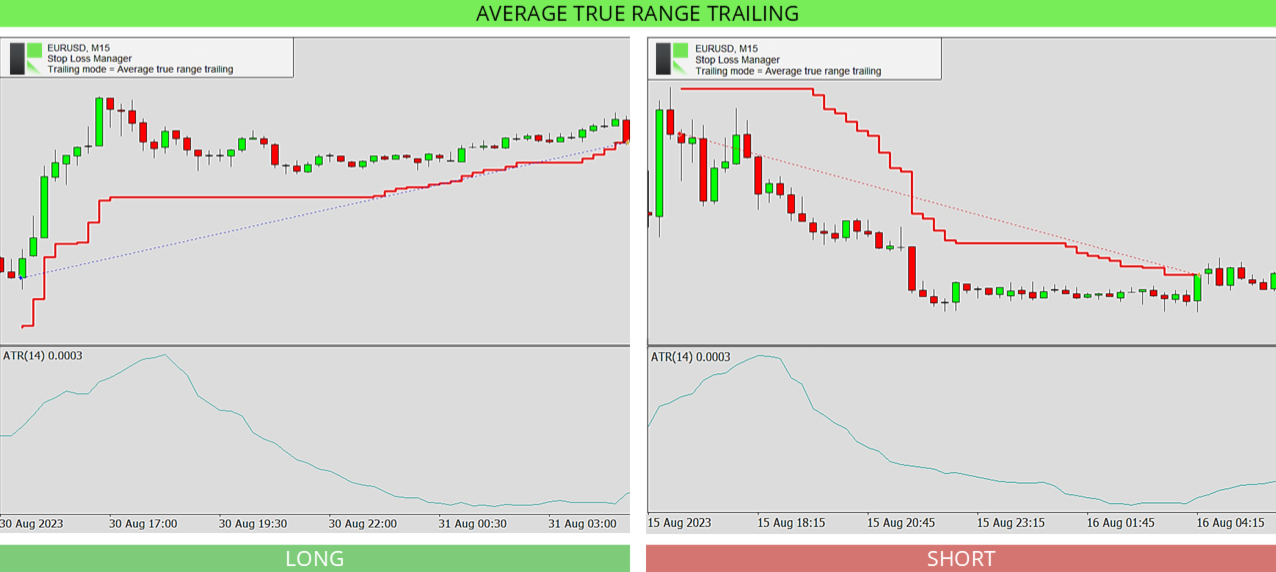
  • ATR Trailing: Average True Range 지표를 사용하여 현재 시장 변동성에 따라 손절매 거리를 설정합니다. ATR 기간(기본값 14)과 승수(기본값 4.5)를 설정합니다. 시장이 더 많이 움직일수록 손절매는 더 멀리 유지되고, 시장이 조용할 때는 더 가까이 유지됩니다. 변동성 높은 시장에서 수익을 보호하는 데 도움이 됩니다.

  • Parabolic SAR Trailing: 추세 방향을 보여주기 위해 가격 위나 아래에 점을 배치하는 Parabolic SAR 지표를 추적합니다. 스텝과 최대값을 설정하면 추세가 지속되는 동안 손절매가 이 점들을 따라갑니다. 상위 타임프레임에서는 점들이 가격에서 더 멀리 위치할 수 있어 손절매가 덜 자주 이동하는 것처럼 보일 수 있습니다.

  • Fix Distance Trailing: 손절매를 현재 가격으로부터 일정한 거리에 유지합니다. 가격이 유리한 방향으로 움직이면 손절매도 함께 이동하여 수익을 확보하면서 동일한 설정 거리를 유지합니다. 거리는 차트에서 직접 조정할 수 있습니다.

  • Breakeven Trailing: 거래가 설정된 수익 수준(브레이크이븐 포지션, 기본값 150)에 도달하면 손절매를 진입 가격으로 이동시켜 거래가 더 이상 손실로 전환될 수 없도록 합니다. 테이크 프로핏과 함께 사용하거나 수동 감독과 함께 사용하는 것이 가장 좋습니다.

입력 파라미터

설정은 간단합니다. 먼저 트레일링 방법을 선택한 다음 해당 방법에 속한 값만 조정합니다. 기본값은 사전에 최적화되어 있으며 바로 사용할 수 있습니다.

  • Stop loss trailing mode: 사용할 트레일링 방법을 선택합니다 - Market Trailing, ATR Trailing, Parabolic SAR Trailing, Fix Distance Trailing 또는 Breakeven Trailing. 아래 설정은 선택한 방법에만 적용됩니다.

  • Market buffer fix: Market Trailing용. 거래에 추가 여유를 주기 위해 손절매에 추가되는 고정 pip 버퍼. 기본값 14.0.

  • Market buffer spread: Market Trailing용. 손절매가 더 넓거나 좁은 스프레드에 적응할 수 있도록 현재 스프레드를 기반으로 한 추가 버퍼. 기본값 6.0.

  • ATRS period: ATR Trailing용. Average True Range 지표로 변동성을 측정하는 데 사용되는 캔들 수. 기본값 14.

  • ATRS multiplier: ATR Trailing용. 손절매 거리에 ATR 값을 사용하는 배수. 숫자가 클수록 손절매가 더 멀리 유지됩니다. 기본값 4.5.

  • PSAR step: Parabolic SAR Trailing용. Parabolic SAR 지표의 스텝(가속도). 스텝이 클수록 손절매가 가격을 더 가까이 따라갑니다. 기본값 0.02.

  • PSAR maximum: Parabolic SAR Trailing용. Parabolic SAR 지표의 최대 가속도. 기본값 0.2.

  • Breakeven position: Breakeven Trailing용. 손절매가 진입 가격으로 이동하기 전에 거래가 수익 측으로 얼마나 이동해야 하는지. 기본값 150.

자주 묻는 질문

Stop Loss Manager를 사용하기 위해 설정이나 경험이 필요합니까?

아니요. 대부분의 시장 상황에서 잘 작동하는 사전 최적화된 기본 설정이 제공되므로 차트에 연결하고 바로 시작할 수 있습니다. 경험이 많은 트레이더는 모든 값을 세밀하게 조정할 수 있습니다.

수동으로 개설한 거래에도 작동합니까?

예. 현재 심볼에서 개설하는 모든 거래를 자동으로 감지하고 거래가 어떻게 개설되었는지와 무관하게 선택한 손절매 방법을 적용합니다.

어떤 트레일링 방법으로 시작해야 합니까?

Market Trailing이 시작하기에 좋은 선택입니다. 최근 캔들을 따라가며 기본 설정이 대부분의 상황에 적합합니다. 언제든지 다른 방법으로 전환할 수 있습니다.

거래가 열려 있는 동안 트레일링 방법을 변경할 수 있습니까?

트레일링 방법은 애플리케이션이 시작될 때 설정됩니다. 다른 방법을 사용하려면 설정을 변경하고 애플리케이션을 재시작하십시오. 이를 통해 거래 관리의 일관성을 유지할 수 있습니다.

전략 테스터에서 사용할 수 있습니까?

예. Stop Loss Manager는 MetaTrader 전략 테스터에서 실행되며, 이는 라이브 차트에서 사용하기 전에 각 트레일링 방법이 어떻게 작동하는지 확인하는 좋은 방법입니다. 테스터에서 수동 거래를 할 수 없기 때문에 애플리케이션은 50개 바마다 long과 short 양방향으로 테스트 거래를 자동으로 개설하여 선택한 방법이 거래를 어떻게 관리하는지 확인할 수 있습니다. 최상의 경험을 위해 모델링 모드를 "매 틱"으로 설정하고 속도 슬라이더를 두 번째로 빠른 수준으로 이동하십시오.

인터넷 연결이 끊어지면 어떻게 됩니까?

Stop Loss Manager는 MetaTrader 내부에서 직접 실행되며 계속 작동하지만, 손절매 변경 사항이 지연 없이 브로커에 전달되도록 안정적인 연결이 권장됩니다.

어떤 시장과 타임프레임이 지원됩니까?

모두 지원됩니다. Stop Loss Manager는 모든 통화 쌍, 심볼, 타임프레임, 브로커에서 작동합니다.

도움이 필요하십니까?

상세하고 개인적인 지원을 위해 당사 프로필을 통해 언제든지 문의하시거나 여기에 댓글을 남겨주십시오.

다른 제품들

MetaTrader를 위한 다양한 거래 도구와 전문가 어드바이저를 개발합니다. 여기서 모든 제품을 둘러보십시오.


추천 제품
H4 GBPUSD Trend Scalper is a trend signal scalper The EA trades according to the trend strategy using original built-in indicator for opening and closing orders. The external inputs for limiting trading on Fridays and Mondays are available. The purpose of the strategy is to use the current trend with the most benefit. According to the results of testing and working on demo and real accounts, the best results achieved by using the Н4 timeframe on the GBP/USD pair Works on MetaTrader 4 Build 971+
Expert Advisor for MT4 Useful utility MUST have for all traders.  With 1 click button, you're able to close all your open positions. Its come with a warning pop up notification when you click to close all your trades, to avoid an accident press the button. Just press 'Yes' to confirm or 'No' to cancel it. The expert will close all your open positions no matter what pairs you currently open or directions. Just attach the expert on 1 of your chart, and you're good to go.
Virtual Exchange Reserve Equity Monitor In an environment where exchanges offer increasingly high leverage ratios, it is all the more important for traders to tightly regulate their level of equity .  This software is designed to be run in the background on any virtual private server that can run Meta Trader 4/5.  It implements basic equity control functions ahead of the broker---allowing users to set their own equity trailing stop, an equity limit to lock-in a certain profit margin, and a unive
FREE
MRPHN Overdosed EA
Affifuddin Bin Mohd Hazam
MRPHN Overdosed is a trend-following Expert Advisor built for XAUUSD , powered by a custom Supertrend indicator : iMRPHN (included for free). It combines simplicity and flexibility, offering optional Martingale logic, configurable risk settings, and time-based trading filters — ideal for traders who prefer a set-and-forget approach. Tested on :  XAUUSD Strategy : Trend-following using iMRPHN indicator Trade Timing Control : User-defined trade start & end time Take Profit / Stop Loss : Fully con
很多交易者亏钱,不是因为判断方向错了。 是因为行情动的时候手慢了。是因为手滑点错了手数。是因为新闻数据一出来, 三笔盈利的单子还没来得及平,全部回吐了。 Apex Trade Manager Pro 就是为了解决这些问题而做的。 这是一款适用于 MetaTrader 4 和 MetaTrader 5 的可视化交易面板。它挂在 图表上,把所有常用操作——平仓、减仓、设止损、开单——都变成一个按键的 事情。不用翻菜单,不用等弹窗,不会手忙脚乱。 --- 功能说明 一键全平 一个按钮关掉当前品种所有持仓。按钮上实时显示总浮动盈亏,让你在按下去 之前就知道自己在什么位置。 分批减仓 直接从面板关掉每笔持仓的50%或80%仓位。想落袋一部分利润但不想完全出场 的时候,这个比去终端一笔一笔操作快得多。 按类型分开平仓 只平多单、只平空单、只平盈利的、只平亏损的,各有独立按键。不用在终端 里翻找,不用逐笔选择。 一键移至保本 行情往你方向走了,按一下保本键,所有盈利持仓的止损立刻移到各自的开仓 价。亏损的单子不受影响。 批量修改止损止盈 输入点数,按键,所有持仓同时更新。也可以
Note: After installation, please go to Tools>Options>Expert Advisors and add https://porsaj.com to 'Allow WebRequest for listed URL'. Still Problem?! Please check Internet connection! An economic calendar in the context of forex refers to a tool or resource that provides information about upcoming economic events, indicators, and data releases that can potentially impact the financial markets, particularly the foreign exchange market. It helps traders stay informed about key economic announce
THIS EA WILL PROTECT YOUR ACCOUNT IN MANY WAYS  KEY FEATURES ARE :  1. CLOSE ALL TRADES IN ONE CLICK. 2. CLOSE ALL TRADES WHEN INPUT MENTIONED LOSS LIMIT REACH. 3. CLOSE ALL TRADES WHEN INPUT MENTIONED PROFIT LIMIT REACH. 4. IF REVERSE MODE IS ON THIS EA WILL TAKE OPPOSITE TRADES IF YOUR OTHERS EA MAKES LOSS OR MANUAL TRADING ALSO IF YOU ARE GETTING ALWAYS LOSS THEN YOU CAN SWITCH ON REVERSE MODE SO IT WILL TAKE OPPOSITE TRADES WHENEVER ANY TRADES PLACED IN YOUR ACCOUNTS. 5. FIX LOT SIZE 6. STOP
TradePilot
Hossein Khalil Alishir
TradePilot Expert Advisor (EA) for MetaTrader 4 TradePilot is a professional and user-friendly Expert Advisor (EA) for MetaTrader 4 (MT4) . It simplifies automated trading , risk management , and trade execution using a smart trading panel . Perfect for beginners and experienced traders looking for a reliable trade manager EA with automated lot size calculation . Key Advantages User-Friendly Trading Panel: Customizable panel with buttons and hotkeys. Smart Risk Management: Supports percen
RiskManager
Roman Zhitnik
5 (4)
The Expert Advisor is a risk manager helping users to control their trading. In the settings, it is possible to specify the parameters at which the risk manager force closes the opened trades and closes the terminal as well, if it is needed to prevent opening trades on emotions, which do not correspond to the trading strategy. Risk Manager settings Check limit to close - check the equity limit Limit to close (account currency)   - equity limit that is checked when  Check limit to close is activ
Expert candle finder for forex in MetaTrader 4 Expert candle finder is one of the practical trader assistant experts that is used in the forex financial market, this expert accurately identifies the candlestick patterns on the price chart as a signal, all the found candles. informs you. This expert is run on your Meta trader platform and in a very precise way, it examines all the currency pairs that are in your watch list and every currency pair that had a professional and good candlestick patt
The purpose   of this utility is to manage one or more subwindow in the same chart by opening and closing them through a button or the keyboard keys How it works: If you want to handle more than one subwindow you need to reinstall the indicator . In this case some setups has to be customized onlu in the last subwindow installed and others setups in the installed subwindow during the first time installation. They are denoted in the input rispectively as ' LW ' and ' IW '. First of all install
Margin Call Shield – Defend Your Margin on Your Terms Margin Call Shield   is a tool for MetaTrader 4 traders who want to decide for themselves which open positions are closed during margin call situations before the platform does so automatically based on its internal rules. By default, the broker or platform decides which positions to close, often using undisclosed algorithms. Margin Call Shield lets you set this order according to your own strategy. Why Was Margin Call Shield Created? In a  
Vizzion
Joel Protusada
Vizzion is a fully automated scalping Expert Advisor that can be run successfully using GBPJPY currency pair at H1 timeframe. Very Important This Expert Advisor can not run with any EAs in the same account. As part of the money management plan, it calculates and monitors the Margin Level % and assumes that all open trades are created by it. If you want an Expert Advisor that trades in a daily basis, this EA is not for you because using this requires a patience to wait for a few days or weeks on
This PORTFOLIO of 3 strategies has been developed, tested and traded live on DAX H1 timeframe. Multiple EAs traded together will lead to a BIGGER PROFITS and SMOOTHER EQUITY CURVE. 3 not correlated EAs logics for DAX H1 timeframe merged to a single strategy. Very SIMPLE STRATEGIES with only FEW PARAMETERS. Every trade has his own logic for STOP LOSS. To catch the profits every strategy uses different approach - some has TAKE PROFIT, some uses TIME BASED EXITS or PROFIT TRAILING. EA has been back
This PORTFOLIO of 3 strategies has been developed, tested and traded live on DAX M30 timeframe. Multiple EAs traded together will lead to a BIGGER PROFITS and SMOOTHER EQUITY CURVE. 3 not correlated EAs logics for DAX M30 timeframe merged to a single strategy. Very SIMPLE STRATEGIES with only FEW PARAMETERS.  Every trade has his own logic for STOP LOSS. To catch the profits every strategy uses different approach - some has TAKE PROFIT, some uses TIME BASED EXITS or PROFIT TRAILING. EA has been
DOWNLOAD FREE DEMO VERSION FROM HERE **TradeMonitorPro Expert Advisor** The TradeMonitorPro Expert Advisor is a powerful tool designed to help you effectively monitor and manage your trading activities in the forex market. This EA offers a range of useful features that allow you to keep track of your open trades, floating daily gains and losses (floating drawdown), as well as margin levels and the volume of open lots. For a correct counting of the Trading Volume, enable the complete history in
This is a Semi Automated OTE EA based on the free teachings of ICT. One of the biggest challenges in trading is related to executing and managing trades. After analyzing charts, draw an OTE Fibonacci and turn on the EA. It will automatically execute orders based on the Fibonacci level of your placement and protect any open positions when in profit. Please review the documentation that accompanies this product. *PLUS VERSION REMOVES LOT SIZE LIMIT THAT IS IN THE FREE VERSION* Auto Lot Calculat
Harvest GOLD
Sayan Vandenhout
Harvest GOLD USES THE TREND WAVE INDICATOR AND IT CAN IDENTIFY THE BEGINNING AND THE END OF A NEW WAVE TREND MOVEMENT. AS AN OSCILLATOR, THE INDICATOR IDENTIFIES THE OVERBOUGHT AND OVERSOLD ZONES. IT WORKS GREAT TO CATCH THE SHORT TERM PRICE REVERSALS AND USES A MARTINGALE STRATEGY TO CLOSE ALL TRADES IN PROFIT. USE DEFAULT SETTINGS ON H1 OR HIGHER TIME FRAME ON ANY PAIR FOR MORE ACCURATE TRADES WHY THIS EA : Smart entries calculated by 3 great strategies The EA can be run on even a $30000
P Y R A M I D   E X P E R T    This Forex utility is a complex exit strategy and order management tool that executes four trading methods; scalping, pyramid style, hedging, and scaling method to close trades with a profit.           V E R Y  I M P O R T A N T     This is not a stand alone expert advisor. Use it with your own volatility-based strategy. Once you found the currency pair to trade, you can just attach this tool to the chart of the chosen pair and it will do the
Gyroscopes
Nadiya Mirosh
Gyroscope        professional forex expert   (for EURUSD, GBPUSD, USDJPY, AUDUSD, USDCHF, EURGBP, EURJPY, NZDUSD, USDCAD, EURCHF, AUDJPY, CADJPY pairs)   alyzing the market using the Elliot Wave Index. Elliott wave theory is the interpretation of processes in financial markets through a system of visual models (waves) on price charts. The author of the theory, Ralph Elliott, identified eight variants of alternating waves (of which five are in the trend and three are against the trend). The mov
EA Gold EZIndy
Mr Kraisit Chompungam
Advantages of EA Gold EZIndy: You get profit from trading every day It can work with other EAs and trading systems The EA has a trading panel that allows the trader to open trades manually. All trades, opened through the trading panel, are managed by the EA and are closed with profit automatically How to set up EA Gold EZIndy: Simply add the EA to the XAUUSD 4H chart and activate the auto-trading function in the Expert Advisor and in the MetaTrader terminal To activate the news filter, you n
Close_All_Trades_with_TP_SL is a reliable and efficient MQL4 Expert Advisor designed to simplify and automate trade management for all open positions on your MT4 account. This EA is especially useful for traders who open multiple trades quickly or use high-frequency strategies where manual TP/SL placement becomes difficult and time-consuming. The primary purpose of the EA is to ensure that every open trade—whether Buy or Sell—always has a predefined Take Profit (TP) and Stop Loss (SL) applied. M
FREE
This system is very simple.. It uses a martingale grid hedging style strategy by increasing lot sizes and grid levels. The open order step and volume can be both fixed and dynamic. The EA is easily customizable. The EA does not use a stop loss and all positions close when the chart move back from trend and arrive last grid level. Recommended :   pairs : Side way pairs is very good for this system.                                 Time frame : not important.                                Deposit
Revenge Trading Protector
Konstantinos Kalaitzidis
5 (1)
복수 거래 수호자(Revenge Trading Protector)는 복수 거래의 피해자가 될 수 있는 거래자를 위한 간단하지만 효과적인 도구입니다. 나 자신도 데이 트레이더이기 때문에 복수 트레이딩의 심리적 측면과 손실을 보상하려는 욕구를 이해합니다. 그래서 나는 손실 후에도 인내심을 갖고 비합리적인 거래 결정을 내리지 않을 수 있다는 것을 100% 확신하기 위해 (나 자신도 사용하는) 이 도구를 개발했습니다. 손실을 입으면 Revenge Trading Protector EA는   원하는 시간이 경과할 때까지  다른 주문   (지정 주문, 중지 주문 또는 시장 실행 주문) 을 열지 못하게 합니다.   예를 들어 오전 10시 45분에 손실을 보고 30분의 휴식 시간을 설정한 경우 오전 11시 15분 이전에 설정한 모든 주문은 EA에 의해 즉시 취소됩니다. 다시 허용되면 경고 알림을 받게 됩니다.   30분이 경과하기 전에 거래를 시도하면 각각 알림을 받게 됩니다. 추가 기능
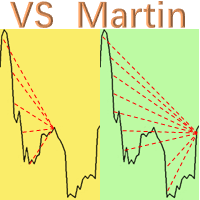
This is the EA tool "VS Martin" (VSMT) that I developed and have been using. Now I share it with users in need. Function: Automate trading according to the user's preset Martingale trading sequence. The tool can monitor market changes in real time and automatically adjust prices according to the set profit target to achieve maximum profit and exit trades in time. The entire Martingale execution process does not require manual intervention. Advantages: 1.     Users can customize the Martingale t
Auto Fibo Pro m
DMITRII GRIDASOV
"Auto FIBO Pro" Crypto_Forex 지표 - 거래에 유용한 보조 도구입니다! - 지표는 자동으로 Fibo 수준과 로컬 추세선(빨간색)을 계산하여 차트에 배치합니다. - Fibonacci 수준은 가격이 반전될 수 있는 주요 영역을 나타냅니다. - 가장 중요한 수준은 23.6%, 38.2%, 50%, 61.8%입니다. - 역전 스캘핑이나 존 그리드 거래에 사용할 수 있습니다. - Auto FIBO Pro 지표를 사용하여 현재 시스템을 개선할 수 있는 기회도 많습니다. - Info Spread Swap Display가 있습니다. 현재 Spread와 Swap이 부착된 외환 쌍을 표시합니다. - 디스플레이에는 계정 잔액, 자본 및 마진도 표시됩니다. - 차트의 어느 모서리에서나 Info Spread Swap Display를 찾을 수 있습니다. 여기를 클릭하여 고품질 트레이딩 로봇과 지표를 확인하세요! 이것은 이 MQL5 웹사이트에서만 제공되는 오리지널 제품입니다.
Expert Advisor: Breakout_Recovery_V2    Version: 2.3    Symbol: XAUUSD    Timeframe: M15 (recommended)    Strategy Type: Breakout + Smart Recovery (Bi-directional Martingale)    Platform: MetaTrader 4 (MT4) Description: Breakout_Recovery_V2 is a smart trading system that detects real breakout opportunities and uses a controlled recovery mechanism (martingale) when the market moves against the initial entry. Features: *Real breakout entry logic using a custom supply/demand
Magic Grid
Aliaksandr Charkes
4.54 (28)
Magic Grid is an indicator-free advisor that uses a grid strategy. The strategy is based on automatic reopening of grid pending orders, after closing their market positions (by Take-Profit, Stop-Loss or manually). Pending orders are placed with a specified step from the initial prices, which can be entered manually or generated automatically ( one time at the beginning of the trade ). The robot can trade on any time frame, on any currency pair, on several currency pairs, and on any number of di
FREE
Remote Trade Copier   is an advanced tool designed for efficiently copying trades between accounts in both   local   and   remote   modes. It allows for lightning-fast order replication from a master account to a slave account. In local mode, trades are copied instantly, while in remote mode, the copying process takes a second.  In new version, in remote mode , the copy operation can be performed with a delay of milliseconds or zero . After purchase, ask how to activate it MT4 Version (Only Loc
BreakEven Grid Utility for MT4 BreakEven Grid is a powerful utility for manual trade management on the MetaTrader 4 platform. It provides a convenient on-screen panel with buttons to help you manage your open positions with a single click.  Features: Set BE+Profit: Automatically sets Take Profit to breakeven + desired profit in pips or money. Close BUY/SELL: Instantly close all Buy or Sell orders for the current symbol. Close +$/-$/Old/New: Close only profitable, losing, oldest or newest tra
이 제품의 구매자들이 또한 구매함
Unlimited Trade Copier Pro is a tool to copy trade remotely to multiple MT4, MT5 and cTrader accounts at different computers/locations over internet. This is an ideal solution for you if you are a signal provider and want to copy your trades to other receivers globally on your own rules. One provider can copy trades to multiple receivers and one receiver can get trade from multiple providers as well. The provider can even set the subscription expiry for each receiver, so that receiver will not b
Crystal Trade Manager PRO – MT4 고급 리스크 및 트레이드 관리 시스템 무료 버전: https://www.mql5.com/en/market/product/150632 개요 Crystal Trade Manager PRO(CTM)는 MetaTrader 4를 위한 전문급 거래 실행 및 리스크 관리 유틸리티입니다. 엄격한 실행, 견고한 자본 보호, 그리고 똑똑한 자동화를 필요로 하는 트레이더를 위해 설계되었습니다. 본 시스템은 계좌 리스크를 관리하고, 자본(EQ)을 보호하며, 일일 제한을 적용하고, SL/TP를 자동으로 설정하며, 전문급 기능을 갖춘 초고속 원클릭 트레이딩 패널을 제공합니다. Prop Firm 챌린지, 데이트레이딩, 스캘핑, 포트폴리오 매니저에게 최적화되어 있습니다. MT5 버전도 제공됩니다. 주요 기능 1. 고급 리스크 및 드로우다운 보호 기능 하루 드로우다운을 1%~70% 범위에서 설정 가능 설정한 한도를 초과할 경우 모든 포지션 즉시 종료 조건
The FFx Hidden Manager panel will help you to manage easily your orders directly on the chart. Below all features described: TP, SL and TrailingStop are hidden Each order has its own lines on chart Drag & Drop any line to change the TP/SL as per your need Option to move automatically the SL line at breakeven when TP #1 is reached Option to choose the TP/SL type (by pips or price) Option to choose the TrailingStop type (by pips, MA, Fractals, PSAR or ATR) Define which order(s) you want to manage
FFx Risk Calculator panel will help you to calculate very easily your trades size, SL or the risk directly on the chart. All features are described below: Option to select which parameter to calculate: Risk, Stop Loss or Lot Size The panel will show if the lot size is allowed according to the current account free margin Button to maximize/minimize the panel Drag and Drop the panel anywhere on the chart How to use it? Select the parameter you want to be calculated. It will be based on the 2 other
News Trader Pro
Vu Trung Kien
4.38 (16)
News Trader Pro is a unique robot that allows you to trade the news by your predefined strategy. It loads every piece of news from several popular Forex websites. You can choose any news and preset the strategy to trade it, and then News Trader Pro will trade that news by selected strategy automatically when the news comes. News release gives opportunity to have pips since the price usually has big move at that time. Now, with this tool, trading news becomes easier, more flexible and more exciti
FFx Watcher PRO
Eric Venturi-Bloxs
The FFx Watcher PRO is a dashboard displaying on a single chart the current direction of up to 15 standard indicators and up to 9 timeframes. It has 2 different modes: 1. Watcher mode: Multi Indicators User is able to select up to 15 indicators to be displayed User is able to select up to 9 timeframes to be displayed 2. Watcher mode: Multi Pairs User is able to select any number of pairs/symbols User is able to select up to 9 timeframes to be displayed This mode uses one of the standard indicat
Transaction Repeater Full
Alexandr Bryzgalov
5 (4)
Copies transactions between MT4 terminals. Possibilities: quick copy start minimum processor load direct and reverse (reverse) copying. copying Take Profit and Stop Loss levels copying deferred and their changes copy transactions one to many copy trades many to one local copy only Attention: The product is designed for copying trades only within a single computer or VPS with access to the desktop. The product will not work on the built-in Virtual Hosting of the terminal. We will help you set up
Elliott Wave Counter는 Elliott 파동의 빠르고 사용자 친화적인 수동 마크업을 위한 패널입니다. 색상과 마크 수준을 선택할 수 있습니다. 도구에서 만든 마지막 마크업과 전체 마크업을 제거하는 기능도 있습니다. 한 번의 클릭으로 마크업이 이루어집니다. 5번 클릭 - 5개의 웨이브가 있습니다! Elliott Wave Counter는 Elliott 파동의 초보자와 전문 분석가 모두에게 훌륭한 도구가 될 것입니다. Elliott Wave Counter 설치 및 입력 가이드 당신이 얻고 싶다면       EA 추가 URL(   http://autofxhub.com   ) MT5 터미널에 대한   알림   (스크린샷 참조). MT4 버전   https://www.mql5.com/en/market/product/14016 MT5 버전   https://www.mql5.com/en/market/product/15081 일반 입력: 웨이브 유형 버튼:   이 버튼을 사용하면 차트
If you wish to draw Support and Resistance lines, view: daily market opening, classical pivot levels, Fibonacci pivot levels, trend lines, Fibonacci levels, the remaining time to candle closing, and current spread. If you seek to place your orders with the exact lot that meets your desired stop loss risk. If you wish to do all this and more with just one click, then this is the perfect tool to use. This tool will allow you to feel more relaxed when deciding to open orders, as well as predicting
Unlimited Binary Options Copier Remote is a powerful tool to copy binary options trades remotely between multiple accounts at different locations over internet. This is an ideal solution for signal provider, who want to share his binary options trades with the others globally on his own rules. One provider can copy trades to unlimited receivers and one receiver can get trade from unlimited providers as well. The provider can set the subscription expiry for each receiver, so that receiver will no
Telegram Publisher Agent는   거래자가 Telegram 채널 및 그룹에 실시간으로 신호를 보낼 수 있는 추가 기능입니다. 사용자 정의 가능한 메시지, 차트 스크린샷 및 기타 기능을 통해 이 도구는 트레이더가 트레이딩 통찰력과 전략을 팔로워와 공유할 수 있도록 도와줍니다. 이 도구는 또한 밝고 어두운 테마 스위치가 있는 아름다운 디자인을 특징으로 하여 사용자에게 미적 및 기능적인 거래 경험을 제공합니다. Telegram 게시자 에이전트는 모든 거래를 채널 및 그룹의 신호로 게시하도록 설계되었습니다. 거래를 제공하기만 하면 Telegram 게시자 에이전트가 버튼 클릭 한 번으로 거래 채널이나 그룹에 거래 신호를 보내는 모든 어려운 작업을 수행합니다. 텔레그램 게시자 에이전트       설치 및 입력 가이드 EA 추가 URL ( http://autofxhub.com ) MT4/MT5 터미널(스크린샷 참조) 에 대한 알림을 받으려면 . MT4 버전   https://ww
如果产品有任何问题或者您需要在此产品上添加功能,请联系我 Contact/message me if you encounter any issue using the product or need extra feature to add on the base version. There is Demo version of this panel Dashboard Babon Scalping System Demo in my product list, please try it out to get familiar with all functionalities for free, LINK . This system basically utilizes TDI, Heiken Ashi Trend, Price Trend on H1 time-frame and TMA on H1&H4 time-frame to generate the trend (big picture). Then the system will zoom in to genera
Pairs Trade
Oleg Pechenezhskiy
The Pairs Trade indicator is a utility for semi-automatic pair trading. It allows combining the charts of two arbitrary instruments, even if the schedules of their trading sessions are different. It displays a spread chart in the form of a histogram with an overlaying moving average. It calculates the swap that will be charged for the synthetic position (in the deposit currency). It is possible to set a level for automatic opening of a synthetic position on the spread chart (analogous to the 'se
Corporate Report
Pavel Verveyko
5 (1)
The script displays info about the share's corporate reports and dividends. The data is downloaded from   investing.com : Report date Profit per share (EPS) Revenue Market capitalization Amount of dividends Date of payment of dividends Dividend income The product cannot be tested in the tester (since it is not possible to receive data from the Internet). Before launching:  Add 2   URL   https://ru.investing.com/earnings-calendar/Service/getCalendarFilteredData  and   https://ru.investing.com/di
This Stacker EA will: Automatically set Stop loss on a new order Automatically set Take profit on a new order Stack (or open up to 4 additional orders at the same time) when a new order is placed, the SL/TP can be preset individually for each order. Provides a transparent replacement for the standard 1-click trading buttons in MetaTrader 4 (1 click still works and SL/TP will automatically be set as well as Stacking). Automatically calculate lot order size according to preset risk management perc
FXFledgling Exit Tool is a complete risk management tool that analyzes both the open trades and the direction of the pair of open trades. As long as the suggested entry and lotsizing management presented here is followed strictly, you will have a high chance (but no guarantee) of surviving the trade. What It Does It is used as an exit tool. It helps the trader to manage any manual trade that he transacted. It does the following: Trail Stop Dynamic Stop Loss - a calculated stop-loss that changes
Crypto Market Pro
Daniil Kurmyshev
5 (1)
New opportunities for analyzing cryptocurrency in the usual MetaTrader 4. For example : We select the symbol of the cryptocurrency and attach any indicators, Expert Advisors or scripts. Startup Mode View cryptocurrency; Data collection. Capabilities Work as with a standard currency chart; Automatic update of open charts; Selection of individual cryptocurrency for updating; Selection of individual timeframes for updating; Work on the desired timeframes; Open charts do not affect the work of Cry
Telegram Notify
Kin Hang Tan
1 (1)
Notify Telegram is a utility that bridge your MetaTrader4 trading activities to your Telegram chat/channel. It will help you to monitor your MetaTrader4 actions such as placing trade, modifying order's TP/SL, closing trades etc and send a notification message to your dedicated Telegram chat/channel. It does not execute any trade on your MetaTrader4 account. It can be useful for monitoring EA performance or providing signal to your Telegram channel/group subscribed. Parameters Token ="" - enter
The  Easy Strategy Builder (ESB)  is a " Do It Yourself " solution that allows you to create a wide range of the automated trading strategies without any line of codes. This is the world’s easiest method to automate your strategies that can be used in STP, ECN and FIFO brokers. No drag and drop is needed. Just by set conditions of your trading strategy and change settings on desired values and let it work in your account. ESB has hundreds of modules to define unlimited possibilities of strategi
Telegram ChartSnap is an utility tool to bridge your MetaTrader 4 activities to your Telegram chat/group/channel. It will screen shot your MetaTrader 4 chart and send it to your dedicated Telegram chat/group/channel through a Telegram bot. The whole process will keep repeating based on a time cycle that predetermined by the user. It is a convenient tool for those who like to get access to their favorite system/dashboard that only available at MetaTrader Desktop. Beside that, trader can easily s
Fibonacci Expansion and Retracement Analysis Fibonacci retracing and extended line tools for the MT4 platform, ideal for traders who use the DiNapoli point trading method and the Golden Section trading The main function: 1. You can draw multiple sets of Fibonacci retracements directly, and the relationship between important return points is clear at a glance. 2. Can draw Fibonacci extensions 3. The Fibonacci foldback and extension of the line can be moved left and right for easy observation
Советник риск-менеджер с огромным арсеналом возможностей защиты вашего депозита. Для инвесторов, которые решили передать капитал в доверительное управление. Когда у трейдера нет доступа к настройкам - нивелирует торговые риски. А также для трейдеров, которые осознали необходимость стороннего контроля за их торговлей для улучшения торговых результатов.  Для максимальных результатов - должен стоять на отдельном VPS сервере и у трейдера не должно быть возможности менять настройки в торговый период.
Grid Hero War Pad
Chock Hwee Ng
3.4 (5)
Grid Hero War Pad is a  GRAPHICAL MANUAL TRADER version of the original Grid Hero EA, designed and created for ADVANCED TRADERS who are experienced in plotting their own market entries. It is coded using ADVANCED GRAPHICAL INTERFACE programming, that combines the power of discretionary trading with Grid Hero algorithm in the form of a graphical console with button-click easy execution. It allows you to execute trades manually using Market Orders and Pending Orders, and then automatically uses th
The advantage of using this EA This EA directly updates takeprofit and stop losses that are still empty in a manual order Parameters Multiplier: Multiplier value of the previous transaction Distance: Distance hedging from the previous order Takeprofit: take profit taken from the last price + the value of this column We recommend that you do not add more than one manual transaction in the same pair martingale hedging | manual hedging | hedging manual | hedging lot | best robot | best ea
MirrorEA
Eugenio Bravetti
The new version of  MirrorSoftware 2021  has been completely rewriten and optimized.  This version requires to be loaded only on a single chart because  it can detect all actions on every symbol and not only the actions of symbol where it is loaded. Even the  graphics and the configuration mode  have been completely redesigned. The MirrorSoftware is composed of two components (all components are required to work):  MirrorController  (free indicator): This component must be loaded into the MASTER
Open charts
Maksim Slovakov
Скрипт открывает графики по всем инструментам находящимся в окне "Обзор рынка" и по желанию может задать для всех графиков один шаблон. Так-же можно удалить все графике открытые в терминале Мт4. В скрипте имеются следующие настройки: "Таймфрейм" по умолчанию M30;             (Можно поставить свой: M1, M5, M15, M30, H1, H4, D1, W1, MN.) "Задержка" по умолчанию "0";                  (Задержка перед открытием следующего графика в миллисекундах.) "Шаблон" по умолчанию "True";                (True=пр
По факту вы выставляете виртуальные Buy Stop и Sell Stop которые срабатывают после закрытия свечи. Данный помощник позволяет заранее выставить уровень Stop Loss и Take Profit. Так-же имеется демо режим для предварительного расчёта параметра риск/прибыль. Помощник имеет следующие настройки "Лот" по умолчанию "0.01" "Проскальзывание" по умолчанию "60"        (Значение в пунктах) "Номер Ордера" по умолчанию "0"               (Магический номер ордера) "Цвет Комментариев" по умолчанию "Black"  "Шрифт
TFA Trade Manager
TFA Global Pte. Ltd.
(8th Feb 2019 Launch Promo: $97/lifetime just for 1 day! Price goes to $180/lifetime in 24 hours!) The TFA Trade Manager helps you easily manage your trades with an intelligent vertical "bars" system. You easily now easily click + drag your entry, stop loss, take profit, breakeven, partial profit and trailing stop with a few simple mouse clicks. You can also easily calculate the risk you wish to allocate to each trade by telling the trade manager your desired risk %, lot size or $dollars to risk
Quantized Trend
Oleg Pechenezhskiy
This utility automatically draws the trend channel on the price chart. For the time interval from the specified date to the current bar, the drawn channel is almost optimal. Placing the beginning of the channel at a more distant historical price extremum, you get a visualization of a longer-term trend. Channel slope is not a continuous value, but takes one of discrete values (in AxB format, where A is the number of price points (points), and B is the number of timeframes). This program works ONL
--------------Welcome to use [MQL5 Signal Analyze Master]------------------  Function: Draw order tracks of MQL5 MT4 and MT5 signal on MT4 chart. [Using guide] 1.Use it as Experts. 2.Download history record from MQL5 signal(MT4 signal or MT5 signal).  3.Paste history record file below "MQL4/Files/" 4.Load [Signal Analyze Master] on the symbol chart what you want to analyze. 5.Paste the history record file name to parameter 'FileName' 6.Select  SignalType  match the history you download on MT4
제작자의 제품 더 보기
Second Timeframe - 전문적인 멀티 타임프레임 분석 도구 추가 자료 및 사용 안내 전체 매뉴얼   -   MT4 버전   -   MT5 버전 하나의 차트에서 큰 그림과 진입 시점을 동시에 확인하세요. Second Timeframe은 Meta Extender 패키지에서 추출한 MetaTrader용 멀티 타임프레임 분석 도구입니다. 상위 타임프레임을 활성 차트에 직접 오버레이하여 창을 전환하지 않고도 큰 추세를 추적하면서 정밀한 진입 타이밍을 동시에 잡을 수 있습니다. 제공 기능:   창을 전환하지 않고 상위 타임프레임 데이터를 활성 차트에 직접 오버레이하여 확인할 수 있습니다. 이 독립형 위젯은 기본 차트와 동시에 두 번째 타임프레임을 표시하여 한눈에 완전한 시장 상황을 파악할 수 있게 해줍니다. 주요 이점: 상위 타임프레임에서 추세를 분석하고 하위 타임프레임에서 진입을 조율하여 추세에 역행하는 거래를 방지 기본 타임프레임 표시를 켜거나 꺼서 상위 타임프레임 구조에만
FREE
Chart Analyzer - 고급 시장 구조 분석 추가 자료 및 안내 전체 매뉴얼   -   MT4 버전   -   MT5 버전 선 하나 그리지 않고 시장 구조를 즉시 파악하세요. Chart Analyzer는 Meta Extender 제품군에서 추출한 MetaTrader용 강력한 실시간 시장 분석 도구입니다. 차트를 대신 읽어주며 중요한 지지·저항 수준, 스윙 단계, 추세 구조를 드러내어 현재 가격이 어디에 위치하는지 항상 정확히 알 수 있습니다. 제공 기능:   지지·저항 수준, 스윙 단계(ZigZag), 시장 구조, 되돌림 수준에 대한 대화형 실시간 분석. 지지/저항선, 상대 변화율이 표시된 스윙 극값, 변동성 감지 등 다양한 표시 옵션으로 중요한 가격 수준과 시장 단계를 차트에 직접 시각화합니다. 주요 이점: 수동 드로잉 없이 주요 지지·저항 수준 자동 감지 각 시장 움직임 사이의 스윙 단계 및 변화율 확인 현재 시장 단계, 되돌림 수준, 추세 구조를 즉시 분석 애플리케이
FREE
Chart Analyzer - 고급 시장 구조 분석 추가 자료 및 안내 전체 매뉴얼   -   MT4 버전   -   MT5 버전 선 하나 그리지 않고 시장 구조를 즉시 파악하세요. Chart Analyzer는 Meta Extender 제품군에서 추출한 MetaTrader용 강력한 실시간 시장 분석 도구입니다. 차트를 대신 읽어주며 중요한 지지·저항 수준, 스윙 단계, 추세 구조를 드러내어 현재 가격이 어디에 위치하는지 항상 정확히 알 수 있습니다. 제공 기능:   지지·저항 수준, 스윙 단계(ZigZag), 시장 구조, 되돌림 수준에 대한 대화형 실시간 분석. 지지/저항선, 상대 변화율이 표시된 스윙 극값, 변동성 감지 등 다양한 표시 옵션으로 중요한 가격 수준과 시장 단계를 차트에 직접 시각화합니다. 주요 이점: 수동 드로잉 없이 주요 지지·저항 수준 자동 감지 각 시장 움직임 사이의 스윙 단계 및 변화율 확인 현재 시장 단계, 되돌림 수준, 추세 구조를 즉시 분석 애플리케이
FREE
Price Alert - 전문 가격 알림 시스템 추가 자료 및 안내 전체 매뉴얼   -   MT4 버전   -   MT5 버전 중요한 가격 수준을 다시는 놓치지 마세요. Price Alert는 Meta Extender 스위트에서 제공되는 MetaTrader용 전문 가격 알림 도구입니다. 무제한 맞춤 알림을 설정하고 가격이 설정한 수준에 도달하는 순간 차트 팝업, 이메일, 모바일 푸시 알림으로 즉시 통보받으세요. 화면 앞을 떠나도 안심할 수 있습니다. 제공 기능:   특정 가격 수준에 도달했을 때 즉시 알려주는 맞춤형 가격 알림을 무제한으로 생성할 수 있습니다. 각 알림에는 개인 메모를 포함한 이름을 붙일 수 있어 모든 차트에서 여러 지지·저항 수준, 돌파 지점, 주요 매매 구간을 손쉽게 관리할 수 있습니다. 주요 혜택: 중요한 가격 움직임을 절대 놓치지 않도록 차트 알림, 이메일, 모바일 푸시 알림으로 통보받기 차트를 지속적으로 보지 않아도 지지·저항 수준을 손쉽게 모니터링 돌파
FREE
Stop Loss Manager - 정밀한 리스크 관리 추가 자료 및 지침 완전한 매뉴얼   -   MT4 버전   -   MT5 버전 수익 거래가 다시는 손실로 바뀌지 않도록 하십시오. 무료로 체험하세요: 당사   웹사이트 에서 14일 평가 버전을 이용할 수 있습니다. Stop Loss Manager는 MetaTrader를 위한 전문적인 자동 리스크 관리 도구입니다. 거래를 시작하는 순간 지능적인 손절매를 적용하고 다섯 가지 검증된 방법으로 이를 추적합니다. 완전 자동으로 리스크를 최소화하고 완전한 제어를 유지하며 수익을 확보하십시오. 제공 기능:   다섯 가지 검증된 전문 트레일링 방법을 사용하여 모든 수동 거래의 손절매를 자동으로 감지하고 관리합니다: Market Trailing(최근 캔들 기반), ATR Trailing(변동성 조정), Parabolic SAR Trailing(추세 추종), Fix Distance Trailing(일정 pip 거리), Breakeven Tr

FREE
Stop Loss Manager - 정밀한 리스크 관리 추가 자료 및 지침 완전한 매뉴얼   -   MT4 버전   -   MT5 버전 수익 거래가 다시는 손실로 바뀌지 않도록 하십시오. 무료로 체험하세요: 당사   웹사이트 에서 14일 평가 버전을 이용할 수 있습니다. Stop Loss Manager는 MetaTrader를 위한 전문적인 자동 리스크 관리 도구입니다. 거래를 시작하는 순간 지능적인 손절매를 적용하고 다섯 가지 검증된 방법으로 이를 추적합니다. 완전 자동으로 리스크를 최소화하고 완전한 제어를 유지하며 수익을 확보하십시오. 제공 기능:   다섯 가지 검증된 전문 트레일링 방법을 사용하여 모든 수동 거래의 손절매를 자동으로 감지하고 관리합니다: Market Trailing(최근 캔들 기반), ATR Trailing(변동성 조정), Parabolic SAR Trailing(추세 추종), Fix Distance Trailing(일정 pip 거리), Breakeven Tr

FREE
Closing Assistant - 클릭 한 번으로 다중 거래 관리 추가 자료 및 안내 전체 매뉴얼   -   MT4 버전   -   MT5 버전 필요한 바로 그 순간, 클릭 한 번으로 원하는 거래 그룹을 모두 청산하세요. Closing Assistant는 Meta Extender 제품군에서 추출한 MetaTrader용 빠른 원클릭 거래 관리 도구입니다. 시장이 움직이고 매 초가 중요할 때, 긴 거래 목록을 찾아 헤매지 않고도 방향별 또는 성과별로 즉시 포지션을 청산할 수 있습니다. 제공 기능:   방향(매수/매도) 또는 성과(수익/손실)별로 정렬된 여러 거래를 클릭 한 번으로 동시에 청산합니다. 두 가지 범위 옵션 중 선택하세요: 현재 심볼의 거래 또는 모든 MetaTrader 거래 - 어떤 포지션을 즉시 청산할지 완전히 제어할 수 있습니다. 주요 이점: 매 초가 중요한 빠른 시장 환경에서 대량 청산 실행 급격한 반전 시 수익 실현을 위해 모든 수익 거래 청산 드로우다운 제한을
FREE
Inspector - 실시간 성과 및 드로다운 모니터링 추가 자료 및 사용 설명서 전체 매뉴얼   -   MT4 버전   -   MT5 버전 실시간으로 자신의 거래 현황을 정확히 파악하세요. Inspector는 Meta Extender 스위트에서 추출한 MetaTrader용 실시간 성과 및 드로다운 모니터입니다. 모든 시간대의 거래 결과를 실시간으로 추적합니다. 주요 기능: 여러 시간대에 걸친 거래 성과, 드로다운 및 핵심 통계를 지속적으로 실시간 계산하고 모니터링합니다. Inspector는 일간, 주간, 월간, 연간 성과에 대한 종합적인 지표를 표시하여 거래 결과를 항상 최신 상태로 파악할 수 있게 합니다. 주요 이점: 현재 거래 성과와 드로다운 수준을 즉각적으로 인식 다양한 시간대에 걸친 절대적 및 상대적 결과 추적 기간 자동 초기화 (매일 자정, 매주 일요일 등) 선택적 거래 보호 - 성과 또는 드로다운 한도에 도달하면 자동으로 신규 거래 차단 세션 동안 수많은 포지션을 관
FREE
Price Alert - 전문 가격 알림 시스템 추가 자료 및 안내 전체 매뉴얼   -   MT4 버전   -   MT5 버전 중요한 가격 수준을 다시는 놓치지 마세요. Price Alert는 Meta Extender 스위트에서 제공되는 MetaTrader용 전문 가격 알림 도구입니다. 무제한 맞춤 알림을 설정하고 가격이 설정한 수준에 도달하는 순간 차트 팝업, 이메일, 모바일 푸시 알림으로 즉시 통보받으세요. 화면 앞을 떠나도 안심할 수 있습니다. 제공 기능:   특정 가격 수준에 도달했을 때 즉시 알려주는 맞춤형 가격 알림을 무제한으로 생성할 수 있습니다. 각 알림에는 개인 메모를 포함한 이름을 붙일 수 있어 모든 차트에서 여러 지지·저항 수준, 돌파 지점, 주요 매매 구간을 손쉽게 관리할 수 있습니다. 주요 혜택: 중요한 가격 움직임을 절대 놓치지 않도록 차트 알림, 이메일, 모바일 푸시 알림으로 통보받기 차트를 지속적으로 보지 않아도 지지·저항 수준을 손쉽게 모니터링 돌파
FREE
MT5 Tick Data - 실제 과거 틱 데이터 추가 자료 및 안내 전체 매뉴얼   -   MT4 버전   -   MT5 버전 전문가 어드바이저와 지표를 검증하고 백테스트하기 위한 실제 틱 데이터를 찾고 계신가요? 여기 있습니다! 당사 웹사이트에서 제공하는 MT5 Tick Data 패키지는 MetaTrader 5를 위한 진짜 과거 틱 데이터를 제공하여, 추정 가격이 아닌 실제 시장 조건과 실제 변동 스프레드로 전략 테스트를 실행할 수 있습니다. 틱 데이터 다운로드 센터에서 데이터를 내려받고 원클릭 인스톨러를 사용해 원하는 MetaTrader 5에 직접 설치하세요. 약 10분이면 됩니다. 전문가 어드바이저와 지표는 변경 없이 작동하며, 실제 틱을 사용하기 때문에 MetaTrader는 최고의 모델링 품질을 달성합니다. 주요 이점: 26개 심볼, 2003년부터 20년 이상의 과거 데이터. 외환, 지수, 금속, 에너지, 암호화폐 포함 낮음, 보통, 높음 스프레드 프로필을 갖춘 실제
FREE
Second Timeframe - 전문적인 멀티 타임프레임 분석 도구 추가 자료 및 사용 안내 전체 매뉴얼   -   MT4 버전   -   MT5 버전 하나의 차트에서 큰 그림과 진입 시점을 동시에 확인하세요. Second Timeframe은 Meta Extender 패키지에서 추출한 MetaTrader용 멀티 타임프레임 분석 도구입니다. 상위 타임프레임을 활성 차트에 직접 오버레이하여 창을 전환하지 않고도 큰 추세를 추적하면서 정밀한 진입 타이밍을 동시에 잡을 수 있습니다. 제공 기능:   창을 전환하지 않고 상위 타임프레임 데이터를 활성 차트에 직접 오버레이하여 확인할 수 있습니다. 이 독립형 위젯은 기본 차트와 동시에 두 번째 타임프레임을 표시하여 한눈에 완전한 시장 상황을 파악할 수 있게 해줍니다. 주요 이점: 상위 타임프레임에서 추세를 분석하고 하위 타임프레임에서 진입을 조율하여 추세에 역행하는 거래를 방지 기본 타임프레임 표시를 켜거나 꺼서 상위 타임프레임 구조에만
FREE
Closing Assistant - 클릭 한 번으로 다중 거래 관리 추가 자료 및 안내 전체 매뉴얼   -   MT4 버전   -   MT5 버전 필요한 바로 그 순간, 클릭 한 번으로 원하는 거래 그룹을 모두 청산하세요. Closing Assistant는 Meta Extender 제품군에서 추출한 MetaTrader용 빠른 원클릭 거래 관리 도구입니다. 시장이 움직이고 매 초가 중요할 때, 긴 거래 목록을 찾아 헤매지 않고도 방향별 또는 성과별로 즉시 포지션을 청산할 수 있습니다. 제공 기능:   방향(매수/매도) 또는 성과(수익/손실)별로 정렬된 여러 거래를 클릭 한 번으로 동시에 청산합니다. 두 가지 범위 옵션 중 선택하세요: 현재 심볼의 거래 또는 모든 MetaTrader 거래 - 어떤 포지션을 즉시 청산할지 완전히 제어할 수 있습니다. 주요 이점: 매 초가 중요한 빠른 시장 환경에서 대량 청산 실행 급격한 반전 시 수익 실현을 위해 모든 수익 거래 청산 드로우다운 제한을
FREE
Inspector - 실시간 성과 및 드로다운 모니터링 추가 자료 및 사용 설명서 전체 매뉴얼   -   MT4 버전   -   MT5 버전 실시간으로 자신의 거래 현황을 정확히 파악하세요. Inspector는 Meta Extender 스위트에서 추출한 MetaTrader용 실시간 성과 및 드로다운 모니터입니다. 모든 시간대의 거래 결과를 실시간으로 추적합니다. 주요 기능: 여러 시간대에 걸친 거래 성과, 드로다운 및 핵심 통계를 지속적으로 실시간 계산하고 모니터링합니다. Inspector는 일간, 주간, 월간, 연간 성과에 대한 종합적인 지표를 표시하여 거래 결과를 항상 최신 상태로 파악할 수 있게 합니다. 주요 이점: 현재 거래 성과와 드로다운 수준을 즉각적으로 인식 다양한 시간대에 걸친 절대적 및 상대적 결과 추적 기간 자동 초기화 (매일 자정, 매주 일요일 등) 선택적 거래 보호 - 성과 또는 드로다운 한도에 도달하면 자동으로 신규 거래 차단 세션 동안 수많은 포지션을 관
FREE
MT5 Tick Data - 실제 과거 틱 데이터 추가 자료 및 안내 전체 매뉴얼   -   MT4 버전   -   MT5 버전 전문가 어드바이저와 지표를 검증하고 백테스트하기 위한 실제 틱 데이터를 찾고 계신가요? 여기 있습니다! 당사 웹사이트에서 제공하는 MT5 Tick Data 패키지는 MetaTrader 5를 위한 진짜 과거 틱 데이터를 제공하여, 추정 가격이 아닌 실제 시장 조건과 실제 변동 스프레드로 전략 테스트를 실행할 수 있습니다. 틱 데이터 다운로드 센터에서 데이터를 내려받고 원클릭 인스톨러를 사용해 원하는 MetaTrader 5에 직접 설치하세요. 약 10분이면 됩니다. 전문가 어드바이저와 지표는 변경 없이 작동하며, 실제 틱을 사용하기 때문에 MetaTrader는 최고의 모델링 품질을 달성합니다. 주요 이점: 26개 심볼, 2003년부터 20년 이상의 과거 데이터. 외환, 지수, 금속, 에너지, 암호화폐 포함 낮음, 보통, 높음 스프레드 프로필을 갖춘 실제
FREE
Signova Premium - 19개 심볼 자동화 외환 스윙 트레이딩 로봇 추가 자료 및 사용 설명 전체 매뉴얼   -   MT4 버전   -   MT5 버전 대형 투자은행의 독일 트레이딩 부서에서 개발한 전략을 기반으로 개인 트레이더에 맞게 적용했습니다. 설계 자체가 저위험: 기본 위험 수준에서 평균 거래 위험은 계좌 잔고의 약 0.75%입니다. 무료 체험: 60일 평가판이 당사   웹사이트 에서 제공됩니다. Signova Premium은 MetaTrader용 자동화 외환 거래 로봇입니다. 실행 후 최대   19개의 외환 심볼 을 자율적으로 거래하며, 고정 스탑로스 및 테이크프로핏으로 포지션을 개설, 관리, 청산합니다. 한 번 설정하면 나머지는 시스템이 처리합니다. 백테스팅 및 실거래 Signova는 IC Markets의 실제 틱 데이터와 실제 변동 스프레드를 사용하여 5년 기간에 걸쳐 테스트되었으며, 테스트 조건을 실거래에 최대한 가깝게 유지했습니다. 전체 백테스트 보고서는
MT5 Tick Data - 실제 과거 틱 데이터 추가 자료 및 안내 전체 매뉴얼   -   MT4 버전   -   MT5 버전 전문가 어드바이저와 지표를 검증하고 백테스트하기 위한 실제 틱 데이터를 찾고 계신가요? 여기 있습니다! 당사 웹사이트에서 제공하는 MT5 Tick Data 패키지는 MetaTrader 5를 위한 진짜 과거 틱 데이터를 제공하여, 추정 가격이 아닌 실제 시장 조건과 실제 변동 스프레드로 전략 테스트를 실행할 수 있습니다. 틱 데이터 다운로드 센터에서 데이터를 내려받고 원클릭 인스톨러를 사용해 원하는 MetaTrader 5에 직접 설치하세요. 약 10분이면 됩니다. 전문가 어드바이저와 지표는 변경 없이 작동하며, 실제 틱을 사용하기 때문에 MetaTrader는 최고의 모델링 품질을 달성합니다. 주요 이점: 26개 심볼, 2003년부터 20년 이상의 과거 데이터. 외환, 지수, 금속, 에너지, 암호화폐 포함 낮음, 보통, 높음 스프레드 프로필을 갖춘 실제
Expert Advisor Builder - 코딩 없이 자동 트레이딩 전략 만들기 추가 자료 및 사용 설명서 전체 매뉴얼   -   MT4 버전   -   MT5 버전 단 한 줄의 코드도 작성하지 않고 트레이딩 아이디어를 실제 작동하는 전략으로 바꾸세요. 무료로 체험하세요: 14일 평가판이 당사   웹사이트 에서 제공됩니다. Expert Advisor Builder를 사용하면 누구든지 프로그래밍 없이 MetaTrader용 완전 자동 트레이딩 전략을 만들 수 있습니다. 사용하기 쉬운 비주얼 빌더에서 전략을 설계하면, 이 애플리케이션이 MetaTrader 내에서 24시간 자동으로 실행합니다. 제공 기능:   자동 트레이딩 전략을 만들고, 테스트하고, 실행하는 완전한 방법입니다. 클릭으로 추가하는 간단한 컴포넌트를 사용하여 지표, 패턴, 진입 규칙, 청산 규칙, 위험 설정을 선택합니다. 각 전략은 일반 텍스트 모듈 파일로 저장되며, 이 애플리케이션에 불러오면 MetaTrader가 선택
Meta Extender - 더 많이 보고, 더 잘 거래하세요. 20개 이상의 전문 트레이딩 위젯 추가 자료 및 지침 전체 매뉴얼   -   MT4 버전   -   MT5 버전 더 많이 보고, 더 잘 거래하세요. MetaTrader 전체를 업그레이드하는 하나의 툴킷. 무료로 체험해보세요: 14일 평가판이   웹사이트 에서 제공됩니다. Meta Extender는 MetaTrader 차트에 직접 20개 이상의 전문 트레이딩 위젯을 추가하는 올인원 차트 내 애플리케이션입니다. 스마트한 포지션 사이징, 원클릭 리스크 관리, 자동 패턴 인식, 멀티 타임프레임 분석, 고급 거래 자동화를 모두 하나의 사용하기 쉬운 도구에서 제공하며, 표준 MetaTrader가 할 수 없는 것을 실현합니다. 제공 내용:   차트에 직접 내장된 완전한 트레이딩 툴킷. Meta Extender는 분석, 주문 배치, 리스크 관리, 성과 추적, 거래 자동화를 표준 MetaTrader에서는 사용할 수 없는 강력한 기능
Stop Loss Manager - 정밀한 리스크 관리 추가 자료 및 지침 완전한 매뉴얼   -   MT4 버전   -   MT5 버전 수익 거래가 다시는 손실로 바뀌지 않도록 하십시오. 무료로 체험하세요: 당사   웹사이트 에서 14일 평가 버전을 이용할 수 있습니다. Stop Loss Manager는 MetaTrader를 위한 전문적인 자동 리스크 관리 도구입니다. 거래를 시작하는 순간 지능적인 손절매를 적용하고 다섯 가지 검증된 방법으로 이를 추적합니다. 완전 자동으로 리스크를 최소화하고 완전한 제어를 유지하며 수익을 확보하십시오. 제공 기능:   다섯 가지 검증된 전문 트레일링 방법을 사용하여 모든 수동 거래의 손절매를 자동으로 감지하고 관리합니다: Market Trailing(최근 캔들 기반), ATR Trailing(변동성 조정), Parabolic SAR Trailing(추세 추종), Fix Distance Trailing(일정 pip 거리), Breakeven Tr
Meta Extender - 더 많이 보고, 더 잘 거래하세요. 20개 이상의 전문 트레이딩 위젯 추가 자료 및 지침 전체 매뉴얼   -   MT4 버전   -   MT5 버전 더 많이 보고, 더 잘 거래하세요. MetaTrader 전체를 업그레이드하는 하나의 툴킷. 무료로 체험해보세요: 14일 평가판이   웹사이트 에서 제공됩니다. Meta Extender는 MetaTrader 차트에 직접 20개 이상의 전문 트레이딩 위젯을 추가하는 올인원 차트 내 애플리케이션입니다. 스마트한 포지션 사이징, 원클릭 리스크 관리, 자동 패턴 인식, 멀티 타임프레임 분석, 고급 거래 자동화를 모두 하나의 사용하기 쉬운 도구에서 제공하며, 표준 MetaTrader가 할 수 없는 것을 실현합니다. 제공 내용:   차트에 직접 내장된 완전한 트레이딩 툴킷. Meta Extender는 분석, 주문 배치, 리스크 관리, 성과 추적, 거래 자동화를 표준 MetaTrader에서는 사용할 수 없는 강력한 기능
Signova Premium - 19개 심볼 자동화 외환 스윙 트레이딩 로봇 추가 자료 및 사용 설명 전체 매뉴얼   -   MT4 버전   -   MT5 버전 대형 투자은행의 독일 트레이딩 부서에서 개발한 전략을 기반으로 개인 트레이더에 맞게 적용했습니다. 설계 자체가 저위험: 기본 위험 수준에서 평균 거래 위험은 계좌 잔고의 약 0.75%입니다. 무료 체험: 60일 평가판이 당사   웹사이트 에서 제공됩니다. Signova Premium은 MetaTrader용 자동화 외환 거래 로봇입니다. 실행 후 최대   19개의 외환 심볼 을 자율적으로 거래하며, 고정 스탑로스 및 테이크프로핏으로 포지션을 개설, 관리, 청산합니다. 한 번 설정하면 나머지는 시스템이 처리합니다. 백테스팅 및 실거래 Signova는 IC Markets의 실제 틱 데이터와 실제 변동 스프레드를 사용하여 5년 기간에 걸쳐 테스트되었으며, 테스트 조건을 실거래에 최대한 가깝게 유지했습니다. 전체 백테스트 보고서는
Expert Advisor Builder - 코딩 없이 자동 트레이딩 전략 만들기 추가 자료 및 사용 설명서 전체 매뉴얼   -   MT4 버전   -   MT5 버전 단 한 줄의 코드도 작성하지 않고 트레이딩 아이디어를 실제 작동하는 전략으로 바꾸세요. 무료로 체험하세요: 14일 평가판이 당사   웹사이트 에서 제공됩니다. Expert Advisor Builder를 사용하면 누구든지 프로그래밍 없이 MetaTrader용 완전 자동 트레이딩 전략을 만들 수 있습니다. 사용하기 쉬운 비주얼 빌더에서 전략을 설계하면, 이 애플리케이션이 MetaTrader 내에서 24시간 자동으로 실행합니다. 제공 기능:   자동 트레이딩 전략을 만들고, 테스트하고, 실행하는 완전한 방법입니다. 클릭으로 추가하는 간단한 컴포넌트를 사용하여 지표, 패턴, 진입 규칙, 청산 규칙, 위험 설정을 선택합니다. 각 전략은 일반 텍스트 모듈 파일로 저장되며, 이 애플리케이션에 불러오면 MetaTrader가 선택
MT5 Tick Data - 실제 과거 틱 데이터 추가 자료 및 안내 전체 매뉴얼   -   MT4 버전   -   MT5 버전 전문가 어드바이저와 지표를 검증하고 백테스트하기 위한 실제 틱 데이터를 찾고 계신가요? 여기 있습니다! 당사 웹사이트에서 제공하는 MT5 Tick Data 패키지는 MetaTrader 5를 위한 진짜 과거 틱 데이터를 제공하여, 추정 가격이 아닌 실제 시장 조건과 실제 변동 스프레드로 전략 테스트를 실행할 수 있습니다. 틱 데이터 다운로드 센터에서 데이터를 내려받고 원클릭 인스톨러를 사용해 원하는 MetaTrader 5에 직접 설치하세요. 약 10분이면 됩니다. 전문가 어드바이저와 지표는 변경 없이 작동하며, 실제 틱을 사용하기 때문에 MetaTrader는 최고의 모델링 품질을 달성합니다. 주요 이점: 26개 심볼, 2003년부터 20년 이상의 과거 데이터. 외환, 지수, 금속, 에너지, 암호화폐 포함 낮음, 보통, 높음 스프레드 프로필을 갖춘 실제
필터:
리뷰 없음
리뷰 답변