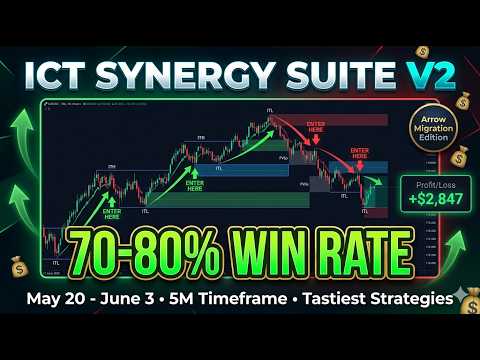
ICT Synergy Suite


ICT Synergy Suite- Simple Trading Guide

This guide explains how to use the ICT Master v1.0 indicator in a very simple way.
1. Best Timeframes- For scalping: M1 or M5- For intraday trading: M15 or M30- For swing trading: H1 or H4
Recommended: Keep Adaptive Strength turned ON.


 2. Main Parts of the Indicator
- Structure Arrows:  Red arrow above price = bearish area  Lime arrow below price = bullish area
- Enter Here Signals:  Orange arrow up = possible buy opportunity  Blue arrow down = possible sell opportunity
- Order Blocks and FVGs:  Blue color zones = Bullish zones  Red color zones = Bearish zones  Green = Bullish FVG  Red = Bearish FVG  Gray = old mitigated zones
- Killzones:  Colored boxes showing London, New York and other sessions  Best trading during London and New York sessions
- Dashboard:  Shows trend on M15, H1, H4, Daily and Weekly timeframes


 3. Simple and High Probability Trading Strategy
Setup (Recommended):
For Buy Trade:1. Higher timeframe dashboard shows BULL2. A blue Bull Order Block or green Bull FVG is formed3. Orange Enter Here arrow appears near or inside that same bullish zone4. It happens during London or New York session
For Sell Trade:1. Higher timeframe dashboard shows BEAR2. A red Bear Order Block or red Bear FVG is formed3. Blue Enter Here arrow appears near or inside that same bearish zone4. During active London or New York session
This combination gives strong confluence because the Enter Here arrow appears together with a same direction zone.


4. How to Enter and Exit
- Enter the trade when the Enter Here arrow appears and price is near a same direction Order Block or FVG- Stop Loss: Follow the red SL line shown by the indicator- Take Profit: Follow TP1 and TP2 lines shown by the indicator- Minimum risk to reward ratio: 1:2


5. Important Rules
- Always check the dashboard first for higher timeframe direction- Only trade when Enter Here arrow and same direction zone (OB or FVG) match- Trade mainly during London and New York sessions- Risk maximum 1 percent of your account on one trade- Avoid trading during high impact news


6. Best Tips
- Fresh unmitigated zones work better than old ones- If the Enter Here arrow appears but there is no matching zone, it is safer to skip the trade- Keep your chart clean by turning off features you dont use- Practice on demo account first


7. Simple Example
Buy Example:- Dashboard on H4 and Daily shows BULL- Price comes back to a blue Bull Order Block- Orange Enter Here arrow appears on the same blue zone- You enter buy trade
This method helps you take higher probability trades by combining two strong signals.
Trade safely and with discipline.

Altri dall’autore
OBFVG Auto Draw
Nawal Kishor Yadav
OB + FVG Zones Pro This indicator automatically finds Order Block and Fair Value Gap zones on your chart and draws them as rectangles. It works on any symbol and any timeframe from M1 to D1. You can attach it to a chart and it will start drawing zones immediately without any manual configuration. What the indicator draws An Order Block is a price area where a strong move began. The indicator looks for a three-candle pattern: a base candle, a strong impulse candle, and a confirmation candle movin
FREE
Sweep Liquidity
Nawal Kishor Yadav
Liquidity Sweep Pro v3.2 — Smart Money Liquidity Detection Professional indicator designed to detect institutional liquidity sweeps in real time. Identifies Buy-Side Liquidity (BSL) and Sell-Side Liquidity (SSL) sweeps with automatic Strong and Weak classification. Main Features: • Real-time detection of BSL and SSL sweeps • Strong vs Weak sweep classification based on wick ratio, body close, and volume • Built-in quality filters:    - Wick Ratio Filter (adjustable for Strong & Weak)    - Vo
FREE
ICT Structure Labels — STH / STL / ITH / ITL Professional ICT market structure indicator that automatically identifies and labels Short Term Highs (STH), Short Term Lows (STL), Intermediate Term Highs (ITH), and Intermediate Term Lows (ITL) on the chart. How It Works The indicator detects fractal swing points and classifies them according to true ICT methodology: - STH — Short Term High - STL — Short Term Low   - ITH — Intermediate Term High (higher than both neighboring swing highs) - ITL —
FREE
Candle Time PNL
Nawal Kishor Yadav
Combined Candle Timer & Trade Visualizer This indicator combines three powerful tools into one clean package: Candle Timer – Displays remaining time until the current candle closes, positioned near the current price. Floating P/L Panel – Real-time floating profit and loss display for all open positions (or current symbol only). The panel is draggable and automatically resizes. Trade Line Visualizer – Automatically draws a clear dotted line from trade entry to current price (for open trades)
FREE
Dynamic Killzones
Nawal Kishor Yadav
ICT Dynamic Killzones — Custom Timezone Edition This indicator draws ICT-style killzone session boxes on your chart, along with the Previous Day High and Previous Day Low levels. It is designed to work on M1, M5, and M15 timeframes. Sessions Covered The indicator supports the following trading sessions, each with its own configurable color and label: Asia Session London Session New York Session London Close Session One optional Custom Session Each session is drawn as a colored box (filled or bor
FREE
ICT Trend
Nawal Kishor Yadav
Smart Structure— ICT Multi-Timeframe Structure Indicator ICT Structure Labels v7 is a professional tool designed to clearly visualize market structure using Internal Highs (ITH) and Internal Lows (ITL). The indicator automatically detects swing points and helps traders see the market structure in a clear and objective way. It displays Internal Structure Labels (ITL & ITH), high-probability "Enter Here" arrows with an improved tall stem design, HTF Stop Loss levels, and HTF Take Profit 1 & TP2
Filtro:
Nessuna recensione
Rispondi alla recensione