Gold Spread Monitor MT5
- Indicatori
-
Hoai Nam Trinh
 INIZIA DA QUI - MAPPA DEGLI STRUMENTI GOLD ALGO LAB
Non sai quale strumento MT5 si adatta meglio al tuo processo di trading su XAUUSD? - Versione: 1.10
- Aggiornato: 5 giugno 2026
- Attivazioni: 20
The question most Gold traders forget to ask
You check the chart. Structure looks clean. Candle confirms. You are ready to press Buy or Sell.
But what is the spread right now?
| Current price: $39 - increases by $10 after every 20 purchases until reaching the final price of $89. Next price: $49. Complete Buyer Kit: 34 Professional Resources included at no additional cost. MT5 Presets, PDF Guides, Checklists, Mindmaps, Reference Cards, and Excel Workbooks - built from 8 years of developing structured XAUUSD trading workflows. After purchase, please message me via MQL5 inbox. Your complete Buyer Kit will be delivered within 24 hours. |
On XAUUSD, spread is not background noise. It is part of your real entry cost, and it changes. During rollover, around major news releases, at session opens, or when liquidity thins out, spread on Gold can quietly double or triple without any warning on your chart. For a scalper entering at 0.30 lot, the difference between a 15-point spread and a 60-point spread is real money lost before the trade even starts.
Most traders only notice this after the fact, when they wonder why their entries never look as clean in real trading as they did in their analysis.
Gold Spread Monitor MT5 is built to fix that. It puts the spread picture directly on your chart, in a format that actually means something before you click.
What you see on the panel
The panel runs as a chart indicator with no chart clutter and no separate window. Everything is updated in real time, refreshed on a configurable timer.
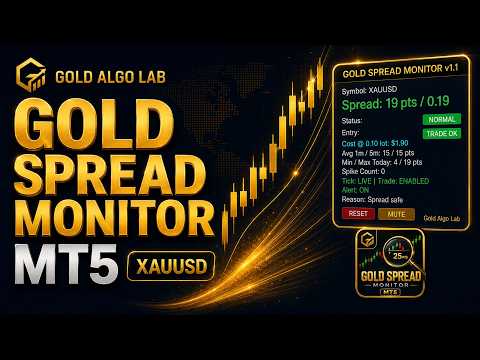
The large spread display at the top shows the current spread in points and as a price distance. So instead of just seeing "17", you see "17 pts / 0.17". This matters on XAUUSD because price distance gives you an immediate sense of where your actual entry is versus the price you are looking at.
Directly below that, the cost preview shows the estimated spread cost in dollars for your chosen lot size. This is the number that most traders have never seen displayed live on their chart. When spread widens to 50 points during NY open, the panel shows you exactly what that costs at your trading size, calculated from broker symbol data in real time.
The Status badge tells you the current spread condition: NORMAL, HIGH, DANGER, or SPIKE. SPIKE is a separate state that compares current spread against the 5-minute rolling average. A spread that is technically below the Danger threshold but is three times higher than it was two minutes ago is flagged as a SPIKE, not a NORMAL.
The Entry badge gives you a simple pre-entry filter: TRADE OK, WAIT, or BLOCK. This is not a buy or sell signal. It reflects the current spread and execution environment. TRADE OK means conditions are acceptable based on your thresholds. WAIT means spread is elevated or unstable. BLOCK means spread is dangerous, tick data is stale, trading is unavailable on the symbol, or the optional rollover guard is active.
Below the badges, the panel shows Avg 1m and Avg 5m spread, Min and Max spread recorded today, and the Spike Count with the time of the last spike. These numbers give you session context that a single spread reading cannot give you alone.
The bottom row shows tick status (LIVE or STALE), trade mode status (ENABLED, LONG ONLY, SHORT ONLY, CLOSE ONLY, DISABLED), alert status, and a plain-text reason explaining the current panel condition.
The RESET button clears all statistics cleanly. Useful at the start of a new session or after an abnormal spread event you do not want contaminating the rest of the day. The MUTE button silences alerts directly from the panel without touching the inputs.
How the spread cost is calculated
The spread cost display is one of the more technically involved parts of this version.
XAUUSD symbols vary across brokers. Contract size, tick value, account currency, and symbol naming all affect how spread cost translates into actual dollars. The tool runs three separate cost calculation methods and selects the most reliable result based on cross-check logic. When OrderCalcProfit and contract-size cost agree closely, it prefers the OrderCalcProfit result. When they diverge significantly, it falls back to contract-size calculation, which is more stable for Gold symbols across different broker configurations.
There is also an optional commission field. If you are on an ECN or Raw account with a fixed per-lot commission, you can enter that value and the panel will include it in the total cost estimate alongside spread cost.
The displayed cost is an estimated reference. Real trading cost includes slippage, liquidity variation, and broker-specific execution differences that no panel-based tool can fully account for. What this gives you is a live estimate that is far more actionable than reading spread in points alone.
A more detailed explanation of broker execution cost differences is available here: https://www.mql5.com/en/blogs/post/769009
Key inputs explained
Warn Spread Points and Danger Spread Points define the thresholds where the panel transitions between NORMAL, HIGH, and DANGER states. Default values are a starting point. Every broker behaves differently, and XAUUSD spread on a Raw ECN account is not the same as on a Standard account, even at the same broker.
Preview Lot sets the lot size used for cost estimation on the panel. This should match your typical trading size.
Commission Per Lot USD is optional. If your broker charges a commission on XAUUSD, entering that value here gives you a more complete cost estimate.
Spike Multiplier controls when the SPIKE state triggers. At the default value of 2.0, a spread that is more than twice the 5-minute average is flagged as a spike. You can increase this to make the detection less sensitive.
Stale Tick Seconds determines how long without a new tick before the panel marks the tick as STALE and blocks the entry status. Default is 30 seconds.
Rollover Guard is an optional time filter based on broker server time. When enabled, it automatically activates the BLOCK state during the configured time window. This is useful for traders who want a hard rule against entering during the daily rollover period when Gold spreads tend to be most unpredictable.
Alert options include popup, sound, push notification to MT5 mobile, and email. Each channel is separately toggled. There is also a Back to Normal alert that fires when spread recovers from an elevated condition, which can be useful for traders waiting for conditions to improve before entering.
A practical workflow
Before entering a Gold trade, attach the panel to your chart and set your Warn and Danger thresholds based on what you know about your broker's typical XAUUSD spread.
When you are ready to trade, check the Entry badge first. TRADE OK means conditions are acceptable. WAIT or BLOCK means something about the current spread environment suggests waiting. Look at the Reason text at the bottom of the panel to understand why.
Look at the cost line. If the spread cost at your intended lot size looks disproportionately high relative to your target profit, that is useful information before pressing the button.
Use RESET at the start of each session or whenever you want a clean read on the day's spread behavior.
Use MUTE when you need to silence alerts temporarily without changing your settings.
Gold Spread Monitor MT5 is especially useful for manual Gold traders, scalpers, and intraday traders who care about execution quality and want a clearer view of spread conditions before committing to a position.
What this tool does not do
It does not open trades, close trades, modify orders, or manage positions. It does not generate buy or sell signals. It does not run an automatic strategy. There is no grid, no martingale, and no implied profit guarantee of any kind.
It is a decision-support panel. What you do with the information is entirely your call.
Product Guide
Want to understand this tool before adding it to your workflow?
Every Gold Algo Lab product includes a comprehensive MQL5 Product Guide covering real trading scenarios, workflow, limitations, FAQs, and practical usage.
👉 Read the full guide here: https://www.mql5.com/en/blogs/post/772036
Not sure where this tool fits in your trading process?
Each Gold Algo Lab tool is built to solve one specific part of the trading workflow. The Gold Algo Lab Tool Map shows how our MT5 tools connect across 6 practical stages for XAUUSD traders: market context, setup selection, risk planning, trade execution, position management and account protection.
→ Gold Algo Lab Tool Map: Where to Actually Start With MT5 Tools for XAUUSD
https://www.mql5.com/en/blogs/post/771930
You do not need every tool. Start with the stage where your process breaks down most often, then build your workflow one layer at a time.
Risk disclaimer
Trading financial markets involves significant risk. Spread monitoring helps you understand execution conditions more clearly, but it cannot remove market risk, replace a trading strategy, or guarantee trading results. Spread cost estimates are calculated from broker symbol data and should be treated as references, not guaranteed figures. Actual execution cost will vary depending on broker, account type, liquidity, and market conditions.
Always test on a demo account first. Adjust the thresholds to match your broker and your trading style before using this tool alongside a live account.
Gold Algo Lab builds practical, risk-first MT5 tools for serious XAUUSD traders, shaped by 8 years of developing and trading real systems to help traders identify clearer setups, manage risk with greater confidence and execute with more discipline.