LofiBoy CSM
- Indicatori
- Versione: 1.0
- Attivazioni: 8

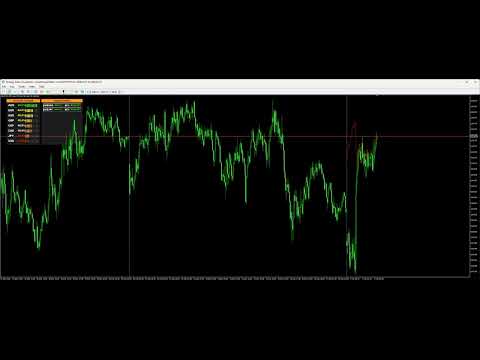
# LofiBoy CSM - Pure Price Action Currency Strength Meter
**Stop guessing which pair to trade. Let the market tell you where the money is flowing.**
LofiBoy CSM is not your average currency strength meter. While traditional meters rely on lagging indicators like RSI, Stochastic, or MACD that introduce noise and delay, **LofiBoy CSM uses a proprietary Pure Price Action algorithm**. It analyzes the direct candle positioning of the 8 major currencies to reveal the true, raw momentum of the market in real-time.
This tool automatically scans the entire Forex market (28 major pairs) to identify strong trends and filter out ranging, low-probability setups. Now featuring a Smart Alert System, it ensures you never miss a move—without keeping you glued to the screen 24/7.
### 🌟 Why LofiBoy CSM?
* **No Lag, No Noise:** Unlike oscillator-based meters that react slowly, our Price Action logic detects momentum the instant a candle starts pushing highs or lows.
* **Trend Hunter:** Automatically highlights pairs with strong directional bias (>80% strength) and filters out choppy, ranging markets that eat up your equity.
* **Volatility Detector:** Instantly see which currencies are moving aggressively, helping you catch high-volatility breakout moves before the crowd.
* **Universal Compatibility:** Whether you are a Scalper, Day Trader, or Swing Trader, this tool adapts to your style. It acts as the perfect filter for your existing trading system (SMC, Price Action, or Indicator-based).
### 🔔 Smart Alert System & Notifications
We've turned this analytical tool into a full-fledged signal generator:
* **Instant Notifications:** Receive alerts via Pop-up on your terminal or Push Notification to your MT5 mobile app the moment a pair hits "Strong Buy" (>80%) or "Strong Sell" (<20%).
* **Do Not Disturb (Time Filter):** Value your sleep? Set specific Server Start & End Hours (e.g., 08:00 to 20:00). The indicator will silently monitor the market overnight and only buzz you during your active trading sessions.
* **Summary Reports:** Alerts include a clear list of all active signals and the exact server time, giving you a complete market snapshot in one glance.
### 📊 Dashboard Breakdown
**Left Panel (Raw Currency Strength):**
* Displays the individual strength of the 8 Majors (EUR, USD, GBP, etc.).
* *Note: This is the raw power of the single currency.*
**Right Panel (Pair Signal List):**
* Displays the Top 10 signals from the 28 Forex pairs.
* *Crucial Detail:* The percentage shown here is a **Composite Score** derived from the difference between the two currencies in the pair.
* *Example:* If EUR is 80% (Strong) and USD is 20% (Weak), the EURUSD pair score will reflect a high probability Buy setup.
***
### ⚙️ Indicator Parameters & Settings
Simple, powerful, and easy to use. We removed unnecessary complexity so you can focus on trading.
**1. Data & Calculation**
* **`CalcPeriod`**: Choose the timeframe for the strength calculation.
* **Daily (Default)**: Best for **Scalping**. Captures the immediate, short-term momentum of the current trading session.
* **Weekly**: Best for **Intraday Trading**. Filters out the daily noise and shows the true direction of the week.
* **Monthly**: Best for **Swing / Position Trading**. Reveals the major trend on higher timeframes.
* **`Prefix` / `Suffix`**: If your broker uses non-standard symbol names (e.g., `EURUSD.m` or `EURUSDpro`), simply add `.m` or `pro` here so the indicator can recognize the pairs.
**2. Visual Customization**
* **`Corner`**: Move the dashboard to any of the 4 corners of your chart.
* **`X_Distance` / `Y_Distance`**: Fine-tune the exact position (pixels) to fit your screen perfectly.
* **`FontType` / `FontSize`**: Adjust the text style for better readability on 4K monitors or laptops.
* **`PanelColor` / `BorderColor` / `FontColor`**: Fully customizable colors to match your dark or light chart templates.
**3. Alert Management**
* **`InpAlertPop`**: Enable/Disable the MT5 desktop popup alert with sound.
* **`InpAlertPush`**: Enable/Disable push notifications to your mobile MT5 app.
* **`InpAlertStartHour` / `InpAlertEndHour`**: Define your "Active Hours" (Server Time).
* *Example:* Set `8` to `20` to only receive alerts during the London and New York sessions.
* *Sleep Mode:* Alerts outside this window are automatically suppressed.
**4. Interaction**
* **`InpClickOpen`**: If `true`, clicking a symbol name in the signal list will instantly open a new chart for that pair.
* **`InpNewChartTF`**: Choose the timeframe for the newly opened chart (e.g., M15, H1).
* **`InpTemplate`**: Automatically apply your favorite template (e.g., "SMC_Setup") to the new chart.
*(Note: The logic for "Strong Signal" is hard-coded to strict Price Action levels: **>80% for BUY** and **<20% for SELL**, ensuring only high-probability setups are shown.)*
***
### 🚀 Key Features
* **One-Click Navigation:** Simply click any symbol in the signal list to instantly open a new chart with your default template.
* **Developer Friendly:** Exposes `iCustom` buffers for all currency strengths and top signals, allowing you to easily build EAs or auto-trading bots based on this logic.
* **Strict Filtering:** Automatically ignores exotic pairs, gold (XAU), and indices to focus purely on the 28 standard Forex pairs for maximum stability.
### 🛠️ How to Backtest
LofiBoy CSM is fully compatible with the Strategy Tester!
* **Mode:** You must use "Every tick" or "Every tick based on real ticks".
* **Data:** The indicator needs historical data for all 28 pairs to calculate strength accurately.
* *Note:* When starting a backtest for the first time, it may take a moment to download the required history for all pairs. Please be patient.
***
## 🎁 EXCLUSIVE BONUS: FREE Telegram Bridge EA! 🎁
**(LofiBoy Telegram Real-Time Notification System)**
### 🚫 Are You Tired of Missing Trades?
* 😫 **MT5 App Notifications Failing?** You wait for a signal, but your phone stays silent.
* 🐌 **Delayed Alerts?** The price has already moved 20 pips before you get the notification.
* 📉 **TradingView User?** You prefer analyzing on TradingView but need the power of MT5 indicators?
**We have the solution!** Every purchase of LofiBoy CSM now comes with a **FREE, dedicated Telegram Bridge EA** that solves these problems instantly.
### 🔥 Why This Bridge is a Game-Changer:
1. **⚡ Instant Delivery:** Bypasses the slow MT5 mobile app. The moment a signal appears, your Telegram buzzes. **Zero delay.**
2. **📊 Consolidated Reports:**
* **Smart Rate Limiting:** The EA groups signals into one clean message every minute (adjustable). No more spamming your phone with 50 alerts in 10 seconds.
* Get a full **"Market War Report"** in a single glance.
3. **👀 Visual Power (Double Layer Bars):**
* **Signal Layer:** See the exact intensity of the signal (e.g., 92% Sell 🟥 vs 83% Buy 🟩).
* **Heatmap Layer:** See the overall strength of all 8 currencies at the bottom of the message.
### 👇 What You Will See on Your Phone:
🚀 **LofiBoy Signal Report** 🚀
**Time:** 2026.02.18 14:30
**Top Opportunities:**
`--------------------`
**NZDUSD** 🔴 **SELL** 92%
🟥🟥🟥🟥🟥🟥🟥🟥🟥⬜
**USDJPY** 🟢 **BUY** 83%
🟩🟩🟩🟩🟩🟩🟩🟩⬜⬜
📊 **Market Heatmap**
`--------------------`
**USD** 🟩🟩🟩🟩🟩🟩🟩🟩⬜⬜ **85%**
**JPY** 🟨🟨🟨🟨🟨⬜⬜⬜⬜⬜ **50%**
...
***
### 🛠️ EASY SETUP GUIDE (3 Minutes)
Setting up your personal signal bot is fast and free. Follow these steps:
#### **Step 1: Create Your Bot (Get Token)**
1. Open Telegram and search for **`@BotFather`** (The official bot creator).
2. Click **Start** and type: `/newbot`
3. Give your bot a **Name** (e.g., `MyLofiSignals`).
4. Give your bot a **Username** (Must end in 'bot', e.g., `LofiTrader_bot`).
5. BotFather will give you an **API Token** (e.g., `123456:ABC-DEF1234ghIkl...`).
👉 **Copy this Token** and paste it into the EA setting: `InpBotToken`.
#### **Step 2: Get Your ID (Get Chat ID)**
1. Open Telegram and search for **`@userinfobot`** (or `@getmyid_bot`).
2. Click **Start**. It will reply with your numeric **ID** (e.g., `12345678`).
👉 **Copy this ID** and paste it into the EA setting: `InpChatID`.
3. **IMPORTANT:** Go back to the bot you created in Step 1 and click **Start** (or send a "Hello" message) to activate it!
#### **Step 3: Allow WebRequest in MT5**
For the EA to send messages to the internet, you must enable this setting:
1. In MT5, go to **Tools** -> **Options** (or press `Ctrl+O`).
2. Click the **Expert Advisors** tab.
3. Check the box: ✅ **Allow WebRequest for listed URL**.
4. Click the green `+` icon and add this exact URL:
5. Click **OK**.
**✅ You are ready! Attach the EA to your chart and enjoy professional-grade alerts.**
***
**Don't fight the trend. Trade with the flow.**
**Download LofiBoy CSM today and upgrade your market vision.**