
Sentinel EA MT5
- Experts
-
Evren Caglar
 Sono un trader proprietario con una dimensione del fondo di +1,7 milioni sotto la mia gestione.
 - Versione: 5.7
- Aggiornato: 13 settembre 2026
- Attivazioni: 20
Sentinel EA v5.2 — Multi-Pair Portfolio Trading with Account-Level Risk Controls
"Stationary feature engineering is at its peak"
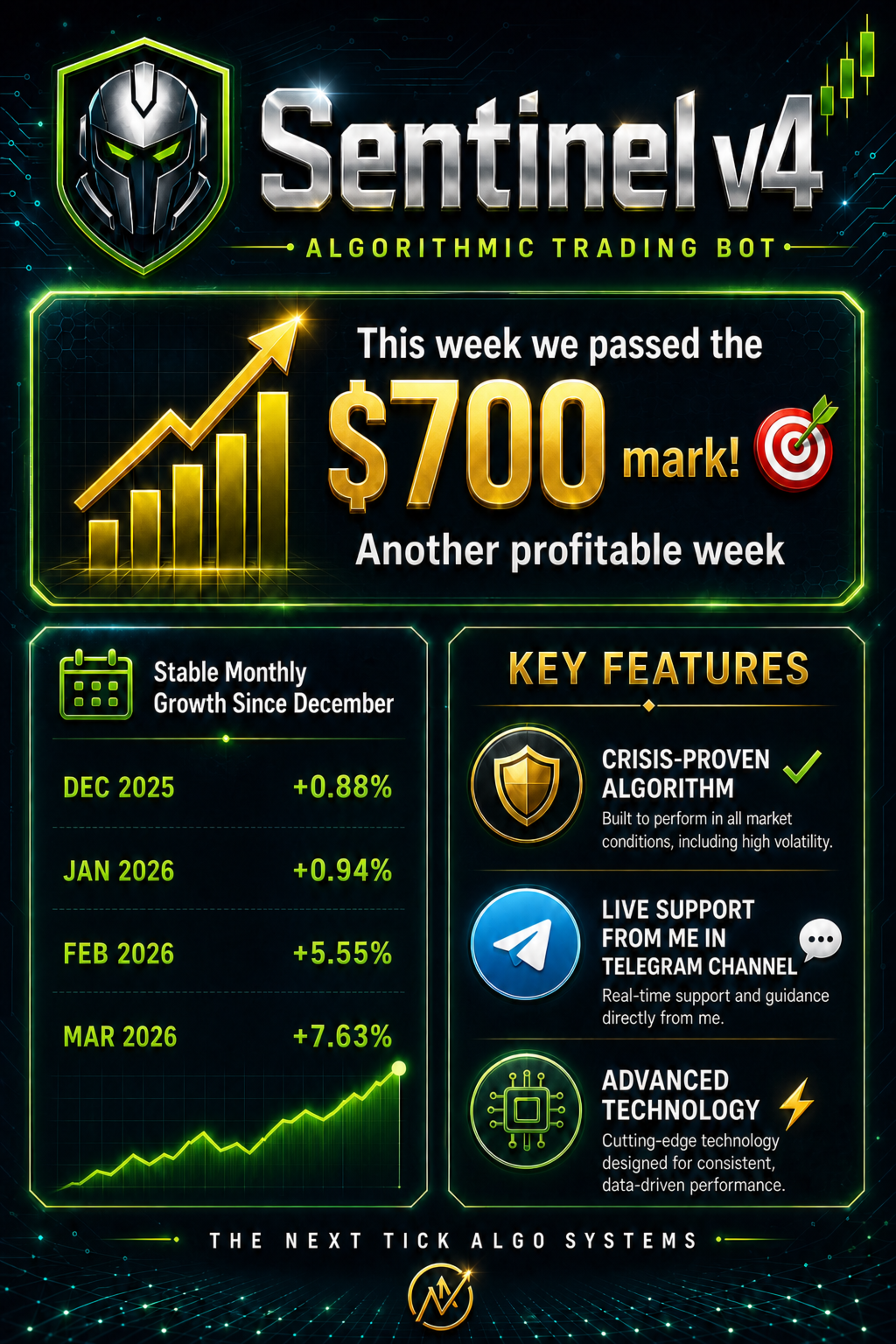
Sentinel is a multi-pair portfolio Expert Advisor for MetaTrader 5. It combines selective multi-timeframe trade entries, controlled individual and account-level risk control features.
It is not designed to chase every market movement or continuously open new trades. A new automated entry is permitted only when the market setup, execution conditions, available margin and portfolio basket limits all agree.
Public live monitoring
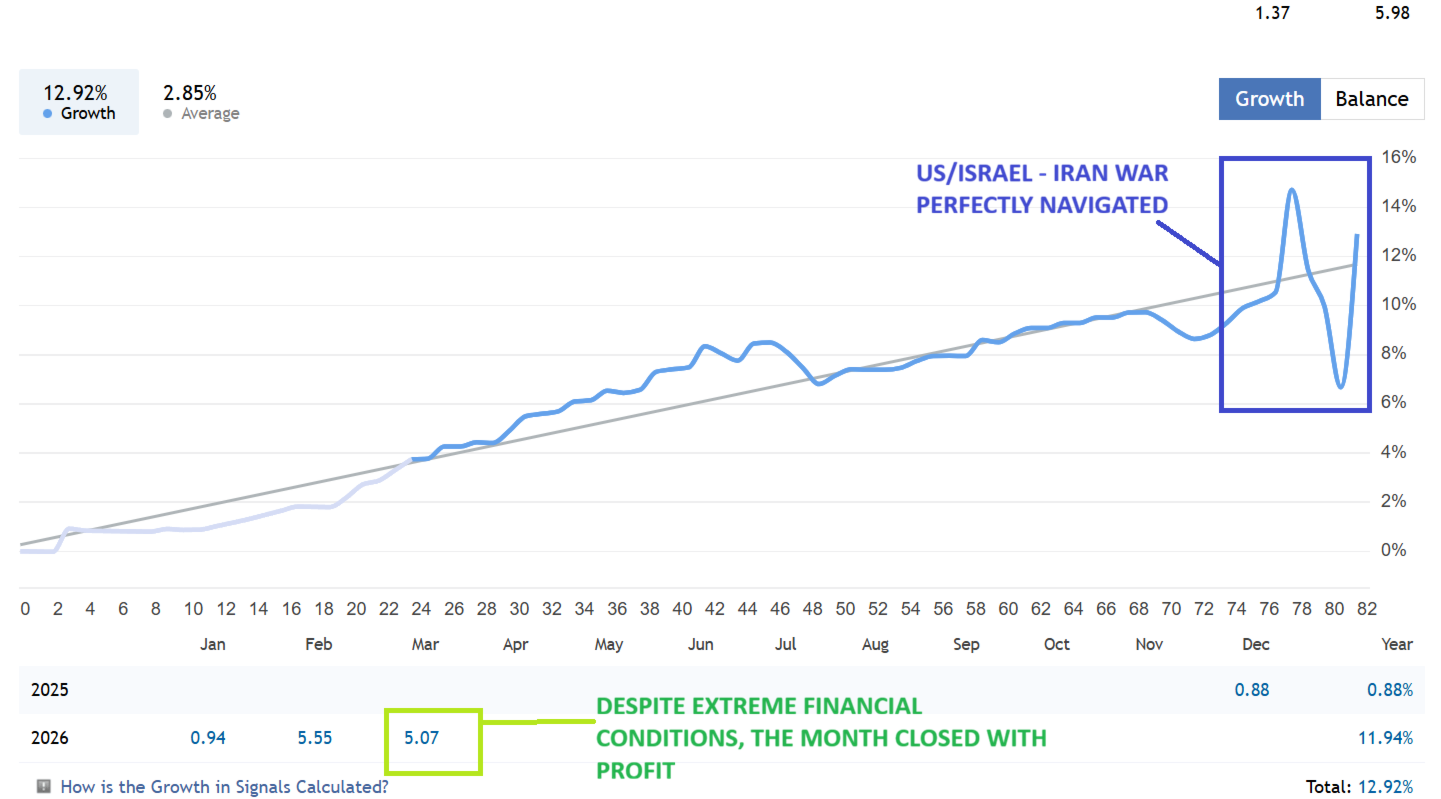
Sentinel is connected to a publicly accessible live MQL5 signal.
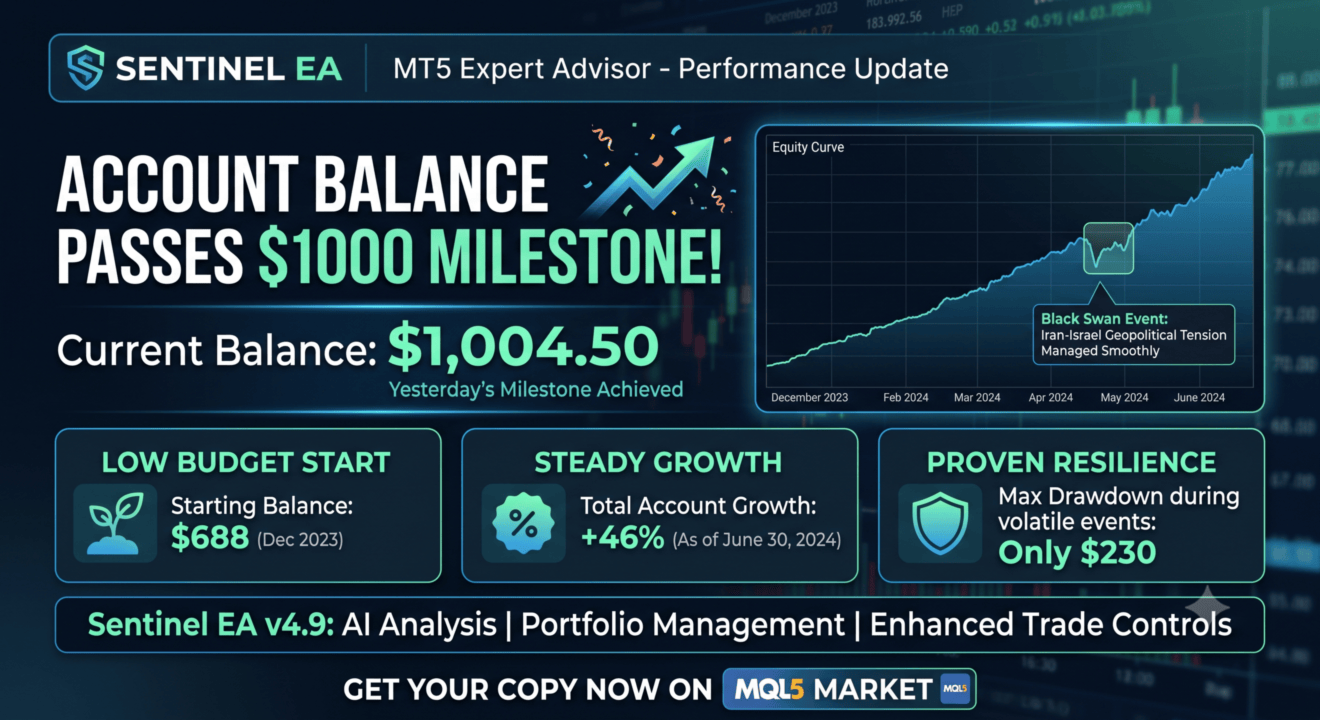
As of 21 August 2026, the public live signal recorded:
- Public monitoring history: 36+ weeks
-
Initial deposit: $688.70
-
Current balance: $1,113.67
-
Current equity: $1,111.97
-
Net profit: +$424.97
-
Maximum balance drawdown: $55.39 (7.01%)
-
Maximum equity drawdown: $272.67 (36.70%)
-
Public live signal: View Sentinel’s live MQL5 signal
One chart manages up to seven pairs
Attach Sentinel to one EURUSD M5 chart it can then monitor and trade the following portfolio:
Core pairs
-
EURUSD
-
GBPUSD
-
AUDCAD
-
EURCAD
-
NZDCAD
Optional pairs
-
CADJPY
-
EURGBP
The pair-specific live configurations are embedded in the EA. You do not need to load a separate set file or open every symbol on every chart.
Development and validation
When we analyse the top-selling MQL5 EAs, we notice a recent trend: developers tend to shorten the required optimisation and testing periods of their EAs. This is actually a dangereous practice.
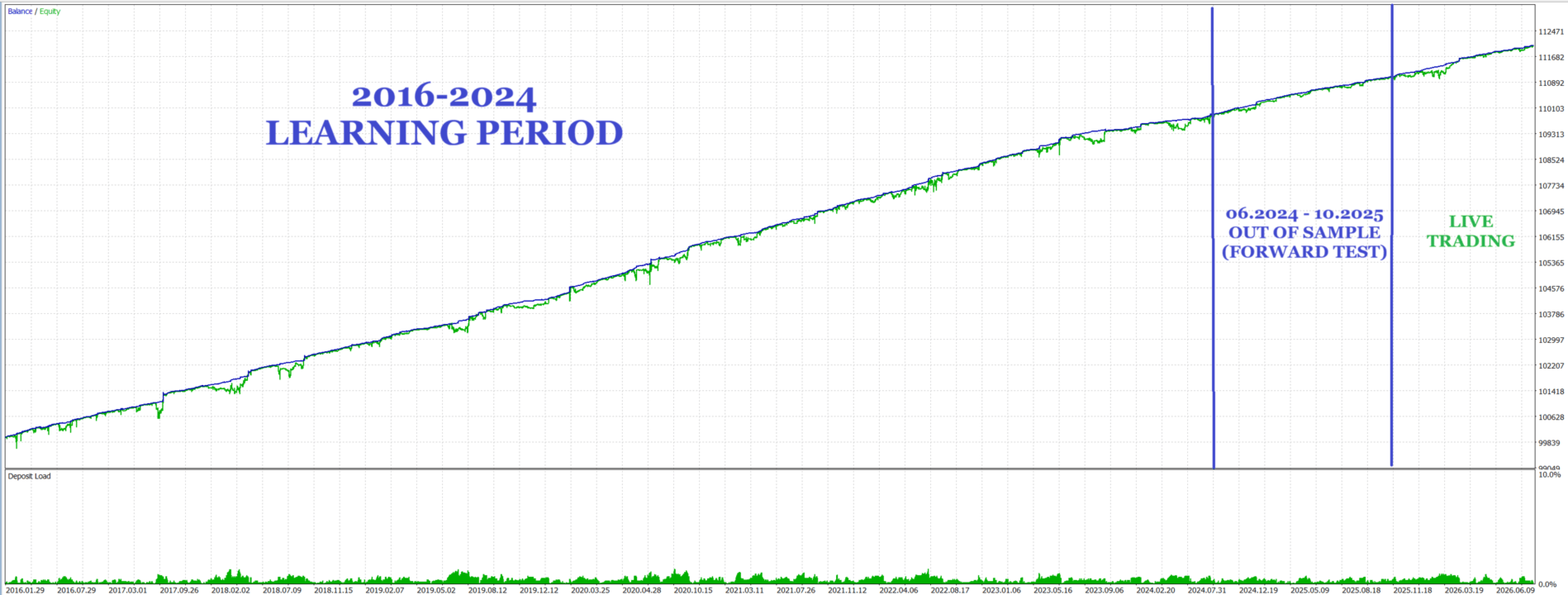
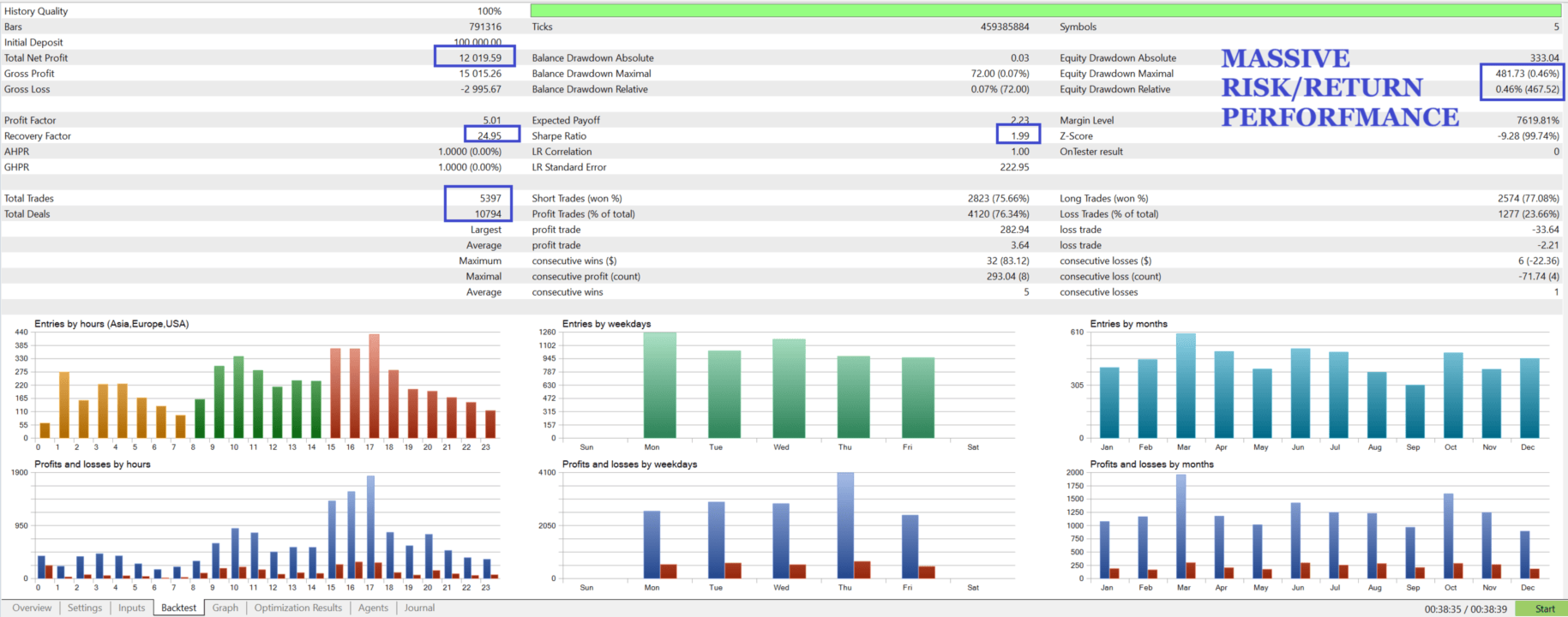
In algorithmic trading, however, a 10-year backtest is the gold standard for validation. In Sentinel, we follow this gold standard of backtesting — and that is why live results so closely follow the backtests.
Sentinel’s configurations were developed using approximately eight years of high quality historical market data covering different volatility environments.
More than 2.5 years of data were reserved for out-of-sample evaluation. The development process also included:
-
Multi-period backtesting
-
Out-of-sample testing
-
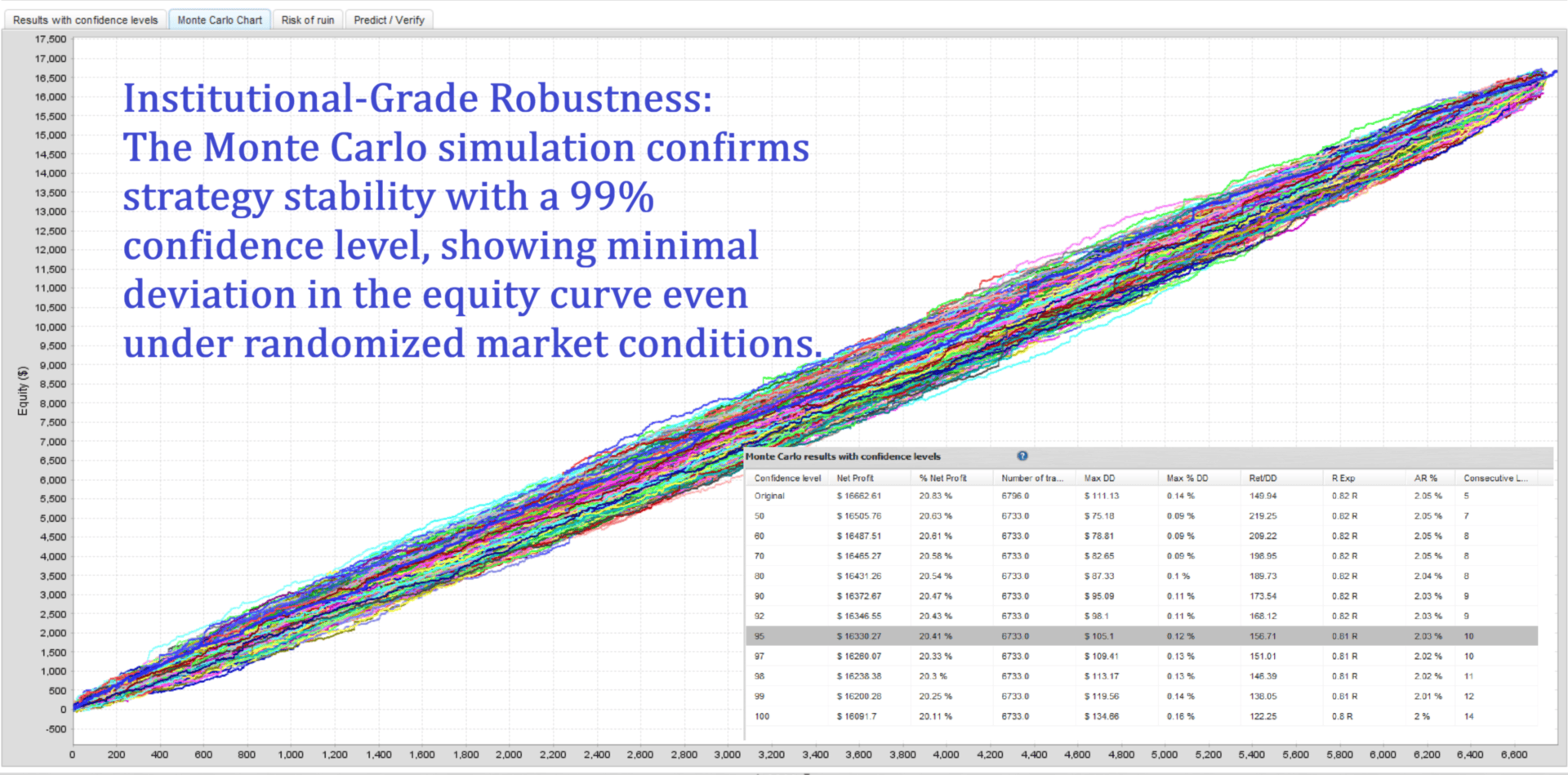
Monte Carlo robustness analysis
-
Manual inspection of trade entries and exits
-
Live-account monitoring
-
Broker and execution-condition testing
Professionally Developed and Pre-Optimized
Optimizing a multi-pair trading system is a demanding process that can take days or even weeks. Incorrect data, unsuitable parameters or excessive curve-fitting can produce misleading results and expose an account to unnecessary risk.
Sentinel’s pair-specific configurations have already been developed through extensive historical testing, out-of-sample validation and robustness analysis. You do not need to perform complex optimization yourself.
Simply confirm your broker’s symbol names and adjust the lot sizes and portfolio limits to match your risk tolerance. Sentinel’s tested trading logic and pair-specific settings are already embedded and ready to use.
Hybrid Grid: Entry First, Management Second
When grid systems spread among retail MQL5 EAs in the early 2020s, many were built on weak entries, aggressive lot multiplication, loose risk limits and thin optimisation. The blow-ups that followed damaged the reputation of every grid-based approach.
Sentinel was built to separate those functions. A directional engine qualifies the opportunity first. Only then can the grid act as a controlled management layer — not as a way to rescue a poor entry.
Even a structurally sound trade can move against its expected direction through volatility, liquidity sweeps or sudden whipsaws. Sentinel’s Hybrid Grid is designed to absorb those temporary dislocations while limiting spacing, position count, free margin and portfolio exposure.
The first position opens with adaptive take-profit and stop-loss protection. As price structure develops, Sentinel decides whether to accept the stop or activate controlled basket management.
Qualified entry first. Intelligent grid management second. Portfolio protection throughout.
If you want it tighter for the Market description, cut the history paragraph and keep the last three. If this is a landing-page section, add one specific risk rule after “portfolio exposure” so the promise is measurable.
Global Portfolio Guard
The Global Portfolio Guard coordinates risk across the complete Sentinel portfolio.
Even if several configured pairs generate signals simultaneously, Sentinel can restrict the number of active baskets. This helps reduce—but cannot completely eliminate—the risk of correlated exposure across USD, EUR and CAD pairs.
Depending on your configuration, the Portfolio Guard can monitor:
-
Maximum number of active baskets
-
Floating portfolio profit and loss
-
Account equity
-
Portfolio drawdown
-
Available free margin
-
Monetary or percentage-based portfolio limits
When a configured portfolio equity threshold is reached, Sentinel can issue instructions to close all Sentinel-managed baskets. Actual closing prices remain subject to broker execution, available liquidity, spread and slippage.
Transparent Decision State Engine
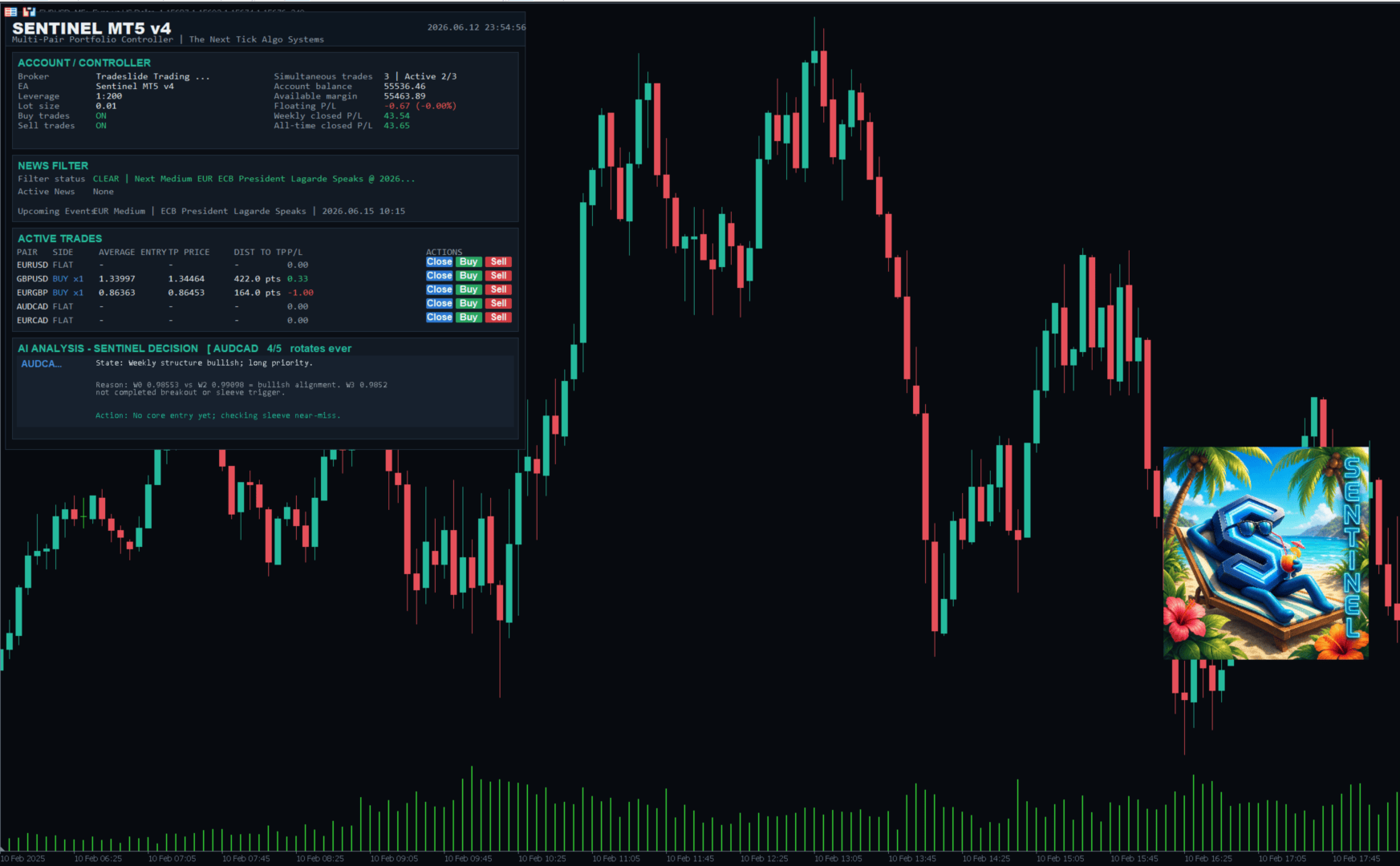
Sentinel displays its current operating state directly on the dashboard.
The panel can show:
-
State — Scanning, Managing Basket, News Blocked or Waiting for History
-
Reason — why a potential trade was accepted or rejected
-
Action — what the EA is currently monitoring or preparing to do
This allows the user to understand Sentinel’s current behaviour without searching through the terminal journal.
Manual control from the dashboard
Sentinel can operate automatically, but the user always retains direct control.
Each portfolio pair includes its own Buy, Sell and Close controls.
Buy and Sell
A manual Buy or Sell instruction opens a market position on the selected pair. After entry, Sentinel manages the position using its normal basket-management framework, including:
-
Stop-loss and take-profit management
-
Break-even logic
-
Exit-after-bars logic
-
Grid management, when enabled
-
Portfolio basket limits
Manual entries intentionally bypass the automated entry filters, news filter, master Buy/Sell switches and daily automated-trade limit.
They still respect the configured Global Portfolio Guard active-basket limit.
Close
The Close control closes all open positions on the selected symbol.
Important: This can include positions opened manually or by another Expert Advisor on the same symbol. Use this control only when you intend to flatten the complete symbol exposure.
Layered safeguards
Sentinel includes multiple configurable protection layers:
-
Portfolio equity stop-loss
-
Portfolio equity take-profit
-
Monetary or percentage-based protection modes
-
Maximum active-basket limit
-
High-impact economic-news filter
-
Spread and rollover protection
-
Abnormal execution-condition checks
-
Daily automated-entry limit
-
Master Buy and Sell switches
-
Free-margin validation before every order request
-
Unsupported-symbol protection
-
Broker symbol-prefix and suffix handling
The economic-news filter uses an online ForexFactory/FairEconomy calendar feed. Internet and WebRequest access may need to be authorised in MetaTrader 5 as explained in the setup guide.
Requirements
-
Platform: MetaTrader 5
-
Controller chart: EURUSD M5
-
Account type: Raw-spread or ECN account recommended
-
Leverage: 1:100 or higher recommended
-
Connection: VPS strongly recommended for continuous 24/5 operation
-
News filter: Internet/WebRequest access required
-
Symbols: Broker prefixes and suffixes must be detected correctly
How to backtest
Use the following standard configuration:
-
Symbol: EURUSD
-
Timeframe: M5
-
Testing model: Every tick or every Tick Based on Real Ticks
-
Settings: Pre-loaded / Ready -to -go
-
Period: Min 3 years backtest is recommended.
Make sure that sufficient historical data are available for every enabled portfolio symbol.
Because Sentinel performs multi-symbol calculations, a long real-tick backtest can be computationally intensive. If testing the complete history is too slow, begin with the most recent four to five years.
Backtest results can vary between brokers because of differences in spreads, commissions, swaps, contract specifications, execution and available historical data.
Documentation
-
Setup guide, documentation and set files: Open the Sentinel user guide
Risk disclosure
Sentinel is trading software, not a guaranteed-income product.
The Global Portfolio Guard and other safeguards are designed to limit exposure according to the user’s configuration. They cannot guarantee protection against every market event, broker failure, execution delay, disconnection, slippage or gap.
Past live or backtested performance does not guarantee future results. Use only risk capital, select settings appropriate for your account and monitor the system regularly.
Sentinel Trading Algorithm v5.2
Developed by The Next Tick Algo Systems — Made in Germany





























I have been running Sentinel EA on a live account for about a month now, mostly on default settings, and so far my impressions are positive. The EA behaves consistently, position sizing is sensible and I have not seen any erratic behaviour or unexpected drawdowns. What really stands out is the developer. Evren is very open to suggestions, responds quickly and always takes the time to explain how the bot works and why it does what it does. You can clearly see the EA is being actively developed and improved, which gives a lot of confidence for the long term.