THV Gold M1 Scalper MT5
- Experts
-
Trong Khanh Phan
 About Me:
I am a professional trader and MQL5 developer with years of experience creating automated trading systems and indicators for the global trading community. My focus is on building reliable, efficient, and easy-to-use tools for traders of all levels. - Versione: 4.5
- Aggiornato: 7 maggio 2026
- Attivazioni: 10
Hi Traders,
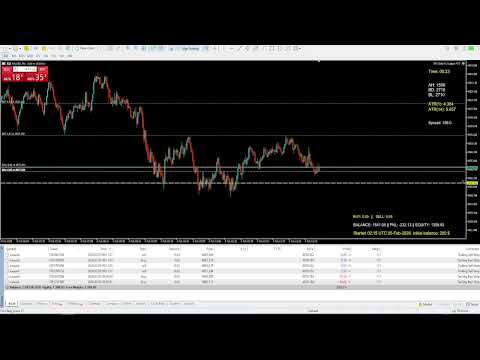
If you are a GOLD scalper looking for a high-performance Expert Advisor with simple and clear settings, this EA is a great choice. It is optimized for scalping GOLD on the M1 timeframe
The EA applies smart hidden scalping logic designed to capture quick profits when the market volatility is sufficient. By accumulating small profits consistently, your account can grow steadily over time
Why this EA?
No complicated analysis, no complicated setup. Only simplicity and effectiveness that really matters
How to use:
* Recommend to use the EA with commission-free or lowest possible commission Account types. Low and stable spread & good slippage brokers || Timeframe: M1 || Minimum initial balance: 200 USD
* Highly recommend to run backtest and run on Demo A/c to find your best inputs before going live
* When you run backtests: these values are highly affect the results: Min ATR value, Close all with floating loss, Net profit target value, Max lot size per trade
* Backtest your EA in as different A/C types as possible: Standard, ECN, Raw, Zero,..with the same settings and compare the results
Parameters:
- Turn the EA on: True (if = False -> the EA will not work)
- Min ATR to allow trades: Set min ATR(14) value to allow trades (recomend to set min = 3 on M1 TF)
- Close all if ATR below minimum: True -> If the ATR(14) drops below the Min ATR value -> EA will close all open positions (recomend to set it = True)
- Max Buy lots: set the max buy volume allowed. If = 0 -> no lots limit for Buy. If = -1 -> Disable Buy
- Max Sell lots: set the max sell volume allowed. If = 0 -> no lots limit for Sell. If = -1 -> Disable Sell
***Note: You can set equal values or different values for Max buy lots and Max sell lots or only Buy, only sell depending on your style
- Close all when floating loss reaches this amount: True -> EA will close all open positions (input a positive value. E.g: 500 means your PNL = - 500). If = 0 -> diasble this logic
- Net profit target for basket closure: Input the net profit value you want the EA to close basket of winning trades with a biggest losing trade (the higher the better, take into acount your broker commissions)
- Profit close Timer in seconds: Input value in seconds. The EA will search for and close winning trades every this intervals. If = 0 -> disable this function
- Add trades when in profit (Average-based): True -> Add more trades in the same direction if that direction is in profit (from average price)
- Add trades from best price (Extreme-based): True -> Add more trades in the same direction if that direction is in profit (from the best price: From lowest buy price or highest sell price)
- Enable lot scaling based on account balance: True = Scaling the lot size based on A/c balance. False = No scaling
- Max lot size per trade: Set the maximum allowed lot size for a single trade after lot scaling
- Enable equity peak trailing protection: If True -> EA monitors the peak equity for trailing
- Start trailing when equity reaches this level: Input the Equity level from which you want the EA starts the trailing logic. If = 0, the trailing will not work. If > 0 and peak equity is less than the input value, trailing is not activated
- Percentage drop allowed from peak equity: Input the percentage value. If the drop is >= this percentage, the EA will close all trades. If = 0, the trailing will not work (recommend >=30)
- Stop trading after equity trailing stop is hit: True -> If the equity trailing is trigged -> EA will close all positions and stop trading. False -> after closing all trades, the EA will trade right again if all conditions met
- Equity Stop (stop loss threshold): input equity value at which the EA will close all open positions and stop trading. Set = 0 to disable this feature (no stop loss)
- Equity Target (total take profit threshold): input equity value at which the EA will close all open positions and stop trading. Set = 0 to disable this feature (no maximum target)
***Note:
+ When the EA is running and there are opened losing trades, do not deposit more money to your A/c as the EA may close all open trades at loss
+ If the Equity Stop or Equity Target is reached, the EA will stop trading. For the the EA to continue to trade, the user should manually reset the Equity Stop or Equity Target values
That’s all — simple and comfortable.
Happy trading!