AMD Indicator Accuracy Filter
- Indicatori
- Versione: 5.20
- Attivazioni: 5

Automate your ICT Analysis with the Accumulation, Manipulation, and Distribution (AMD) Indicator.
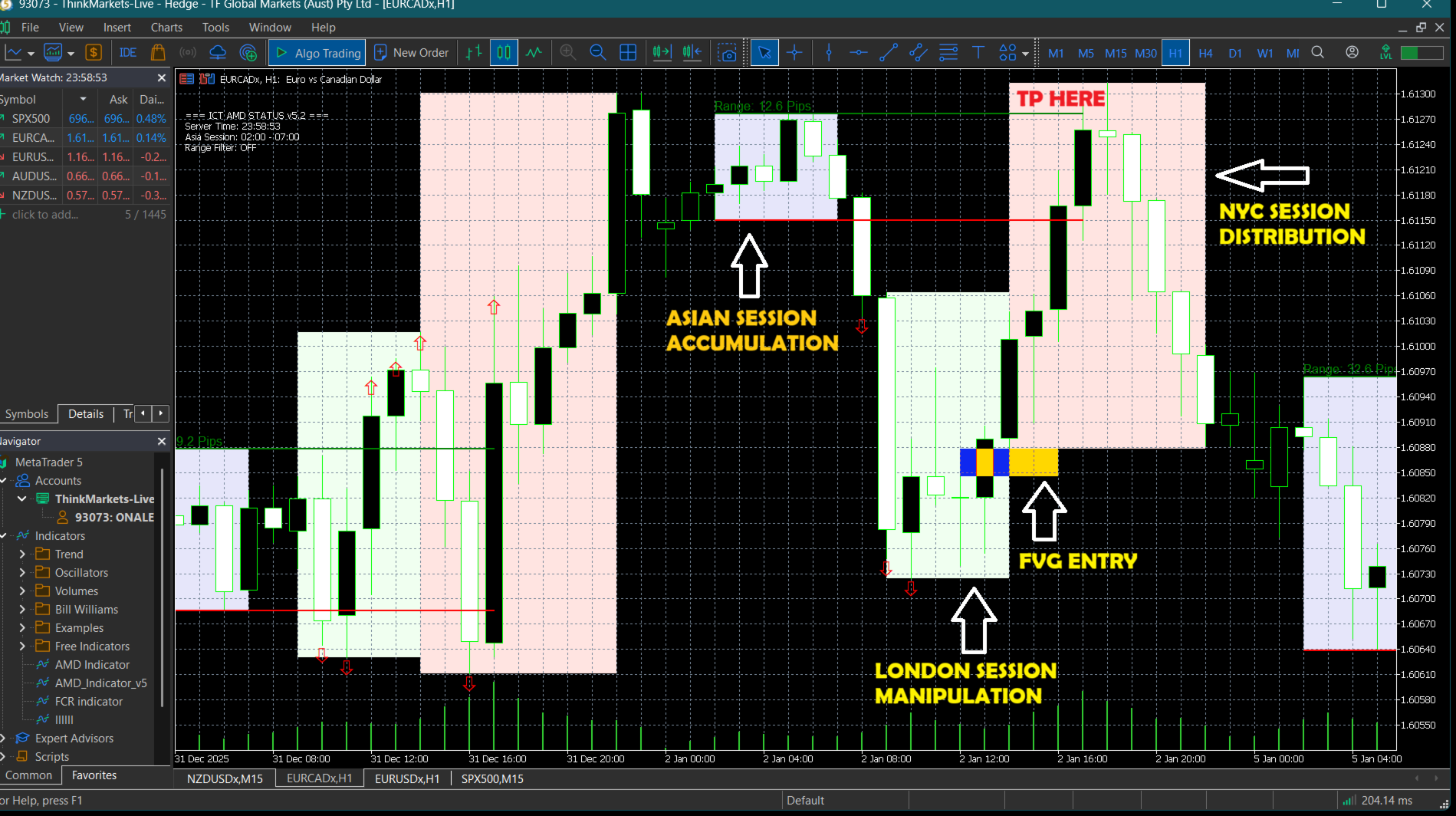
This advanced trading tool is designed for Smart Money Concepts (SMC) traders who want to automate the tedious process of marking up charts. It automatically identifies the Asian Range (Accumulation), detects Liquidity Sweeps (Manipulation), and signals high-probability reversals confirmed by Fair Value Gaps (Distribution).
Stop staring at the charts waiting for a sweep. Let the indicator alert you when the setup is ready.
Key Features
-
Automated Session Boxes: Visualizes Asia, London, and New York sessions with fully customizable times and colors.
+2 -
Liquidity Sweep Detection: Automatically detects when price runs the Asian High or Low (Manipulation phase) and places an arrow on the chart.
-
FVG Entry Signals: After a sweep, the indicator waits for a Fair Value Gap (FVG) to form, confirming the reversal before signaling an entry.
+1 -
Smart Range Filter: Includes a built-in filter to ignore "bad" or over-extended Asian ranges (e.g., >40 pips), keeping you out of low-probability setups.
-
Multi-Alert System: Never miss a trade with instant alerts via Pop-up, Mobile Push Notification, and Sound.
-
Clean Charts: Automatically manages drawing objects to keep your chart clean and focused.
How It Works (The AMD Logic)
-
Accumulation: The indicator draws the Asian Session box (default 02:00 - 07:00).
-
Manipulation: It waits for price to break (sweep) the Asian High or Low. It tracks the sweep in real-time.
-
Distribution: Once the liquidity is taken, the logic looks for a shift in market structure confirmed by a Fair Value Gap (FVG).
-
Signal: When the FVG closes, an entry box is drawn and an alert is sent.
-
Entry: Option A - Immediately when the yellow box is show. Option B - Limit Order on the entry of the yellow box.
-
Exit: Opposite side of the Asian Session or use 1:2 RRR. REFER TO THE ATTACHED SCREENSHOT!
Settings & Inputs
-
--- Asia / Strategy Session ---
-
Asia Start/End: Set the time for your accumulation range.
-
KillZone Start: Time when the indicator starts hunting for entries.
-
-
--- Range Filter ---
-
Filter Bad Ranges: Enable/Disable filtering of large ranges.
-
Max Range Pips: The maximum size allowed for the Asian range.
-
-
--- Visuals (London/NY) ---
-
Session Times: Configure start/end times for London and New York visual boxes.
-
Colors: Fully customizable colors for boxes, liquidity lines, and FVG entries.
-
-
--- Strategy Logic ---
-
One Trade Per Day: Option to stop searching after the first valid FVG entry is found.
-
Min Gap Size: Minimum size (in points) for a valid FVG.
-
Recommendations
-
Timeframe: Optimized for M15 and H1 intraday trading.
-
Assets: Works best on volatile pairs like EURUSD, GBPUSD, XAUUSD (Gold), and Indices (US30/NAS100).
-
Broker Time: Default settings are optimized for brokers on GMT+2/GMT+3 (Server Time).
Installation
-
Purchase and download the indicator.
-
Refresh your Navigator window in MT5.
-
Drag "AMD Indicator Accuracy Filter" onto your chart.
-
Ensure "Allow DLL imports" is checked in common settings (standard for market tools).
-
Wait for the next session to begin!