Crash300 Centurion Pro
- Indicatori
- Versione: 2.8
- Attivazioni: 5

Crash300 Centurion Pro — Smart Spike-Zone Engine for MT5 (Crash 300)
Crash300 Centurion Pro is a precision spike-zone indicator built for the Crash 300 Index on MT5. It detects the classic 3-bar spike pattern, draws a supply/demand zone for it, projects a precise entry line, and alerts you only when it matters—on the last closed bar and from now on (no historical spam). A slim, transparent panel shows Zones and a live Hit-Rate % from your chosen TP/SL assumptions.
Centurion Pro does not trade for you. It’s a decision-support tool designed for traders who want clean structure, disciplined entries, and minimal chart clutter.
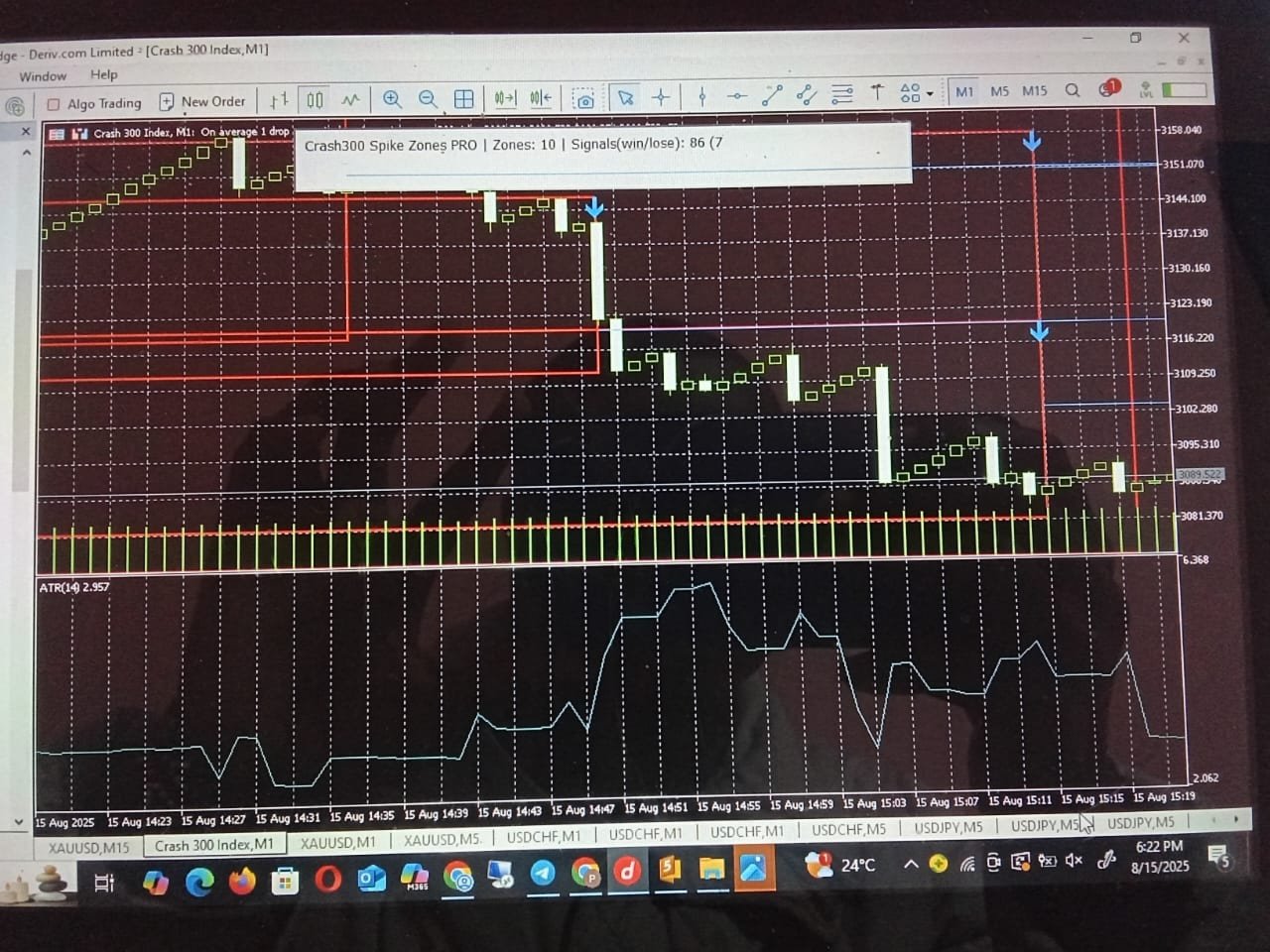
TIP: IF GET AN ARROW FACING DOWN, IT IS TIME TO ENTER A SELL, if the market still buys and touches the green line, it is time to exit and wait for another signal (but in most cases, crashes will happen before touching the green line)
Sometimes you will get an arrow on the crash itself, that means that other crashes are likely to come within the zone (note that the red rectangles are spike zones and crashes happen within these zones) and you can hold and wait for other spikes.
N/B The detection is based on real time algorithm and the strategy tester will/may not show the arrows in the continuous market, but I guarantee that once you purchase, you will notice the difference (it has a very high win rate, which you can check on the panel)
N/B Check the Win rate for different time frame frames to determine which frame is okay, I recommend using M1
What it does
- Finds bearish spikes (red-green-red) and bullish spikes (green-red-green) with body-to-range validation.
- Draws the zone (3-bar range), an entry line (mid-bar open/close or mid-price), and a large call-out arrow so you never miss it.
- Tracks mitigation: when price returns to the entry line, the long line is replaced by a fixed segment at the touch bar (and you can receive an alert).
- Optional expiry: un-touched entry lines can auto-expire after N bars (with an alert, if enabled).
- Transparent panel shows Zones and Hit-Rate % (based on your quick TP/SL/back-scan settings).
Why traders like it
- Clarity – Zones are clean and labeled (BULL/BEAR + Entry price).
- Discipline – Alerts trigger on closed bars by default; you can enable forming-bar alerts if you prefer.
- Signal quality – ATR/HTF/Volume filters help you ignore weak spikes.
- No repaint (default behavior) – Signals and alerts are anchored to the last closed bar.
- Low footprint – Optimized drawing and object naming; easy on CPU and multi-chart friendly.
Unique features (you won’t find all of these together elsewhere)
- Forward-only alerting: “Only from now” blocks historical spam when you attach the indicator.
- Smart zone merging: De-duplicates overlapping zones by price/time tolerance so the chart stays readable.
- Mitigation visuals: Live entry line becomes a fixed segment exactly to the touch candle—no guesswork.
- Transparent, minimal panel: Always visible, corner-anchored; shows just Zones and Hit-Rate %.
- Arrow alerts: The moment a qualifying spike arrow is plotted on the last closed bar, you can get Alert / Push / Email.
- Selectable entry model: Middle bar Open, Close, or Mid-price of the 3-bar range.
- Strategy-tester friendly hit-rate: Quick TP/SL forward scan to estimate situational performance.
- Namespaced objects: Consistent prefixes for boxes/lines/labels/arrows—handy if you integrate with your EA or dashboards.
- No DLLs and no external libraries.
Advanced capabilities
- ATR regime gate (current or higher timeframe): require minimum ATR (points) to validate a spike.
- HTF trend filter: EMA(5/20) (user-selectable) on a higher timeframe to align spikes with broader trend.
- Volume anomaly check: Simple Z-score filter to keep only unusually active spikes (optional for synthetic symbols).
- Entry-line expiry: Auto-convert untouched lines to a fixed “Expired” line after N bars (with alert).
- Configurable merging tolerance: In points; control how aggressively nearby zones are consolidated.
- Per-symbol, per-chart isolation: Object names include symbol/timeframe/chartID so multiple charts don’t clash.
What you’ll see on the chart
- Red rectangle = Spike zone (drawn behind candles).
- Blue horizontal line = Entry line, extending right until mitigated/expired.
- Big blue arrow = Zone call-out at creation.
- Small plot arrows = Buy/Sell spike on the signal bar (last of the 3 bars).
- Panel (top corner) = Zones: N Hit-Rate: X.X%.
Alerts & notifications
- Signal (arrow) alerts on the last closed bar (default).
- Mitigation alert when price touches the entry line.
- Expiry alert when an entry line times out (optional).
- Delivery: Alert, optional Push, optional Email.
Tip: Want real-time alerts before the bar closes? Set AlertClosedBarOnly = false.
Inputs (key groups)
Visuals
- Colors/widths/styles for Zone, Entry line, Labels, Big arrow
- LabelZones (true/false), ZoneLabelFontSize
- EntryLineExtendBars, LineExpireBars (0 = never)
Detection
- MinBodyPct (e.g., 0.55)
- Enable Bear/Bull spike families
- EntryMode = Open/Close/Mid-price
- MergeTolerancePts (zone consolidation)
Filters
- UseATRFilter, ATR_TF, ATR_Period, ATR_MinPoints
- UseHTFTrend, HTF, MA_Fast, MA_Slow, MA_Method, MA_Price
- UseVolAnomaly, VolWindow, VolZ
Alerts / Panel / Stats
- DrawArrows
- AlertOnSignal, AlertOnMitigate, Push, Email
- AlertClosedBarOnly (default: true), AlertOnlyFromNow (default: true)
- StatsBars, StatsLookAhead, TP_Points, SL_Points
- Panel position & style: corner, X/Y, font size, color
Recommended usage (Crash 300)
- Timeframes: M1–M15.
- Start with defaults: MinBodyPct=0.55, MergeTolerancePts=200, ATR_MinPoints=10.
- Add HTF trend (e.g., M5 EMAs 5/20) once you’re familiar with the zones to reduce counter-trend spikes.
- Use the panel’s hit-rate as a situational reference, not as a guarantee.
Strategy Tester (how to evaluate quickly)
- Attach to Crash 300 Index in MT5 Strategy Tester (Indicator mode).
- Set TP_Points / SL_Points and StatsLookAhead to match your plan.
- Scroll through signals—panel updates Hit-Rate % for the test range.
What it does not do
- It does not place or manage orders (use your own EA or manual trading).
- It does not guarantee profits. Past hit-rate on the panel is not future performance. Always forward-test.
Compatibility & performance
- Platform: MetaTrader 5 (MT5).
- Symbol focus: Crash 300 Index (also usable on related synthetic indices with adjusted parameters).
- Low CPU usage; safe for multiple charts.
- No DLLs, no external libraries.
Support
Questions or tuning help? Message me on MQL5 and share:
- Timeframe + a screenshot
- Your key inputs (MinBodyPct, ATR/HTF settings, TP/SL)
- What you want to optimize (more/less zones, stricter trend, etc.)
Summary
Crash300 Centurion Pro gives you a clean, rule-based spike zone map with disciplined alerts and a minimal hit-rate panel. It’s built for traders who want structure, not noise—so you can focus on execution, risk, and consistency.