Momentum Guardian
- Utilitaires
- Version: 2.36
- Activations: 10

Stop Donating Profits to Execution Delays, Spread Spikes, and Emotional Over-Trading
Every experienced trader knows that the hardest part of trading isn't finding a setup—it is executing with mathematical precision under pressure. In fast-moving markets like Gold (XAUUSD), NAS100, US30, and major Forex pairs, fumbling with MetaTrader 5's native order window, miscalculating lot sizes, entering during an unnoticed spread spike, or taking one emotional trade past your daily drawdown limit can wipe out weeks of disciplined gains.
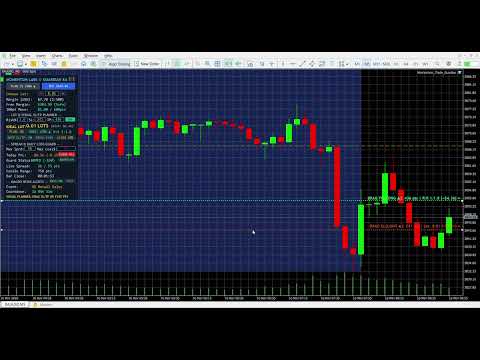
Momentum Guardian is an institutional-grade on-chart Execution HUD, Visual Trade Planner, and Automated Risk-Protection Engine built by traders, for traders. It replaces slow manual calculations and emotional guesswork with a sleek, zero-lag command center right on your chart.
Why Serious Day Traders, Scalpers & Prop-Firm Traders Use Momentum Guardian
-
Interactive Drag-and-Drop Visual SL/TP Planner: Click PLAN: ON to spawn live, draggable Stop Loss (Orange) and Take Profit (Green) lines directly on your chart. As you drag the lines to key market structure, the HUD dynamically calculates your exact point distance, live Risk-to-Reward ratio (R:R), and exact dollar risk and reward before you ever risk a cent. Features two-way elastic chart auto-zoom and strict broker stop-level clamping so your orders are never rejected for "Invalid Stops."
-
Anti-"Fat Finger" Smart Direction Lock: When planning a Long setup (MODE: LONG ▲), the SELL button automatically locks and dims (PLAN IS LONG ▲)—and vice versa for Short setups—making it physically impossible to accidentally click the wrong execution button during high-speed market volatility.
-
1-Click Dynamic Equity Lot Calculator: Set your desired Risk% (e.g., 1.0%) and watch your IDEAL LOT update on every tick as you adjust your Stop Loss. Click the green USE button to instantly lock the exact calculated lot size into your execution box.
-
Prop-Firm Daily Loss Hard-Stop (Account Protector): Define your maximum daily loss cap in your account currency ($, €, £, ¥). Momentum Guardian continuously tracks your net Today PnL—including closed deals, floating profit/loss, swaps, and ECN entry/exit commissions. The millisecond your daily drawdown hits your cap, the EA automatically closes all open positions, cancels pending orders, and locks the BUY/SELL buttons (LOCKED TODAY) so you never breach a Prop-Firm daily drawdown rule.
-
Automated Spread Lockout Guard: Protects you from hidden broker spread widening during rollover, session opens, and news spikes. If the live spread exceeds your custom Max Sprd threshold, execution buttons automatically lock (LOCKED SPREAD) until spreads normalize.
-
True Effective Leverage, Margin & Stop-Out Guard (SO<SL!): Powered by native MQL5 margin calculation, the HUD displays exact required Margin, true symbol-specific effective leverage (e.g., 1:500 on Gold, 1:200 on FX), remaining Free Margin, and exact dollar value per 100pt Move. If a wide Stop Loss would trigger a broker margin stop-out before reaching your SL line, the HUD flashes a critical SO<SL! warning prior to entry.
-
Live Bar-Close Countdown Timer & Candle Volatility Meter: Stop guessing when the current candle will close. The HUD features a real-time, second-by-second Bar Close countdown timer (HH:MM:SS) alongside a live Candle Range meter measuring the current bar's High-to-Low expansion in points—giving M1, M5, M15, and H1 price-action traders exact candle-close confirmation timing.
-
Tiered Macro News Countdown & 5m/1m Multi-Channel Alerts: Connects directly to the native MetaTrader 5 Economic Calendar to scan upcoming High-Impact macro events for your chart's currencies. Tier-1 market movers (CPI, NFP, FOMC, Rate Decisions, Fed Chair speeches) are highlighted in Crimson Red and standard High-Impact releases in Gold, with automated Desktop Audio Popups and Mobile Push Notifications at 5 minutes and 1 minute prior to release.
- Automated Session Killzones & PDH/PDL Liquidity Levels: Automatically maps Asian (Deep Navy Blue), London (Royal Purple), and New York (Emerald Teal) session boxes behind your candlesticks on timeframes M1 through H1. The width of each box spans the exact session start-to-end window, while the top and bottom edges dynamically lock onto the exact Session High and Session Low in real time—making it effortless to spot Asian range breakouts and London/NY liquidity sweeps. Also plots Gold dashed horizontal lines at the Previous Day High (PDH) and Previous Day Low (PDL) (all colors and server times are 100% customizable).
-
1-Click Active Trade Management: Includes AUTO SL/TP (automatically attaches protective SL/TP to unprotected trades, including orders placed from your phone), 1-click BREAK-EVEN (+customizable profit buffer), 1-click CLOSE 50% partial profit taking, and instant CLOSE ALL liquidation.
How to Activate & Use in MetaTrader 5 (60-Second Quick-Start Guide)
-
Attach to Your Chart: After downloading from the MQL5 Market, open your MT5 Navigator panel (Ctrl + N), expand Expert Advisors > Market, and drag Momentum Guardian onto any chart (XAUUSD, EURUSD, NAS100, US30, BTCUSD, etc.).
-
Enable Both Algo Trading Switches (Important): In the popup window that appears, click the Common tab, check the box for [x] Allow Algo Trading, and click OK. Next, make sure the main Algo Trading button on your top MT5 toolbar is turned GREEN (verify that the small graduation cap icon in the top-right corner of your chart is Blue).
-
Plan & Execute Your Trade: Click PLAN: OFF on the HUD to switch it to PLAN: ON. Drag the Orange (SL) and Green (TP) lines to your desired levels on the chart, or click MODE: LONG / SHORT to flip direction. Click the green USE button to load your Ideal Lot size, then click BUY or SELL for instant protected execution.
-
Customize Risk Live on Chart: You can type directly into the Chosen Lot, Risk%, SL, TP, Max Sprd, and Max Loss boxes right on the chart HUD at any time—changes apply automatically within 1 second. Click [-] in the top-right corner of the panel whenever you wish to minimize the HUD.
Customizable Settings Overview (Inputs Tab)
-
1. Execution, Spread Lock & Daily Hard-Stop: Toggle Auto-Pair Profile adaptation (auto-calibrates SL, TP, and Spread defaults for Gold, Forex, Indices, or Crypto), set starting Lot Size, Lot [+/-] step size, default Max Spread limit, and Daily Loss Hard-Stop enforcement.
-
2. Visual Planner, Smart SL/TP & Risk Calculator: Toggle Auto-Attach SL/TP for unprotected trades, set default Risk %, starting SL/TP points, and Break-Even profit buffer points (+pips locked on Break-Even).
-
3. Macro News Countdown & 5m/1m Alerts: Toggle native MT5 Economic Calendar scanning, Desktop Audio Popups, Mobile Push Notifications, custom manual event overrides, and HUD refresh speed (250ms default).
-
4. HUD Position & Session Killzones: Choose any screen corner to dock the HUD (Top-Left, Top-Right, Bottom-Left, Bottom-Right) with custom X/Y pixel offsets, toggle native MT5 One-Click hiding, and customize Asian, London, and New York session box times, colors, and Previous Day High/Low (PDH/PDL) lines.