ZZ Trend
- Indicateurs
-
arvadis GmbH
 We have been active in FX trading since 2005, with a consistent focus on execution quality and measurable results.
 - Version: 1.0
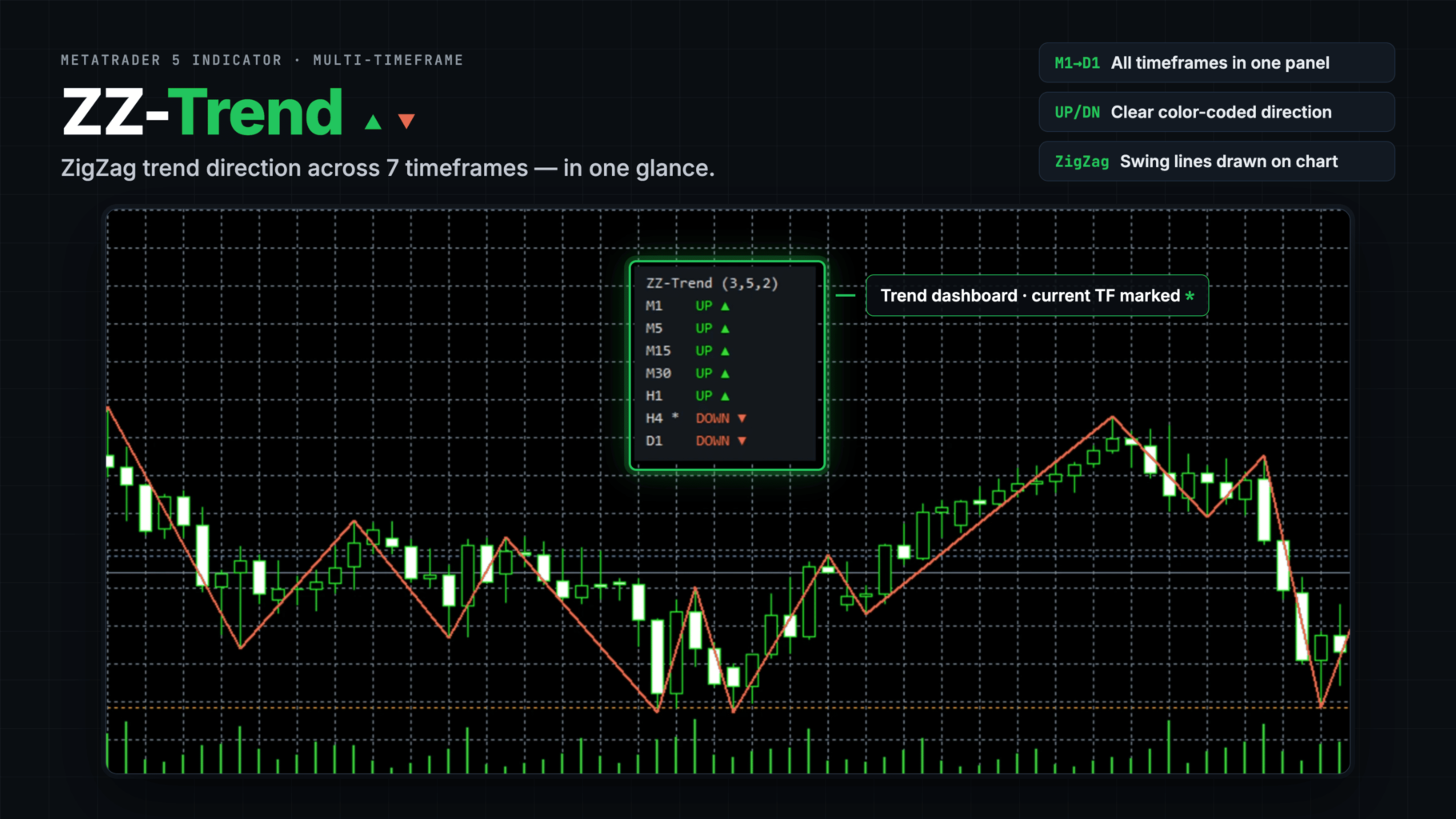
ZZ Trend shows the market-structure trend of up to eight timeframes in one small panel, so you can check M1 to D1 without switching charts. On the chart itself it draws the ZigZag and the two price levels that decide the current trend. The indicator does not place trades.
How the trend is decided
A market trends up while it makes higher highs and higher lows: each pullback holds above the previous swing low and each new push breaks the previous swing high. It trends down while it makes lower highs and lower lows. The trend changes when this structure breaks, for example when price in an uptrend falls through the last swing low.
ZZ Trend finds the swing highs and lows with a standard ZigZag (Depth, Deviation, Backstep) and applies this rule. When price breaks above the last swing high the trend is UP; when it breaks below the last swing low it is DOWN. While price stays between the two levels, the last break remains in force. If a single wide bar breaks both levels, its close against the midpoint of the two swings decides.
Moving averages and similar tools average past prices, so they turn some bars after the move has started. This rule does not average anything. By default the trend changes on the tick where price crosses the swing level, and both levels are drawn on the chart, so you can see in advance where the trend will turn. If you prefer confirmation, the trend can instead wait until a bar closes beyond the level.
Using it
A common way to read the panel is to take the direction from the higher timeframes and look for entries on a lower timeframe when it turns the same way. The chart's own timeframe is marked with an asterisk in the panel. The panel can be dragged anywhere on the chart and updates in real time; higher timeframes also refresh once per second when no ticks arrive. The indicator is an aid for reading market structure, not a buy or sell signal on its own.
Input parameters
Timeframes. Eight rows, each with an on/off switch and a timeframe. Defaults are M1, M5, M15, M30, H1, H4 and D1 switched on, and W1 switched off.
ZigZag. Depth (12) is the number of bars a swing high or low must dominate; higher values give fewer, larger swings and a slower trend. Deviation (5) is the minimum move in points before a new swing can start. Backstep (3) is the minimum number of bars between two swings. Values outside the valid range (Depth at least 2, Backstep at most Depth minus 1) are corrected automatically, and the panel title shows the values in use. Bars scanned per panel timeframe (500) sets the history used for each panel row. Chart bars to calculate (3000) sets the history used for the chart ZigZag and the buffers; 0 means all bars.
Trend. Break counts on the open bar (true) makes the trend change as soon as price crosses a level; set it to false to wait for a bar close beyond the level. Keep the last break direction (true) keeps the trend while price is between the levels; when false, the panel shows three dots instead.
Chart. Switches for the ZigZag line (colored by the current trend) and for the swing high and swing low level lines, plus the colors of the two levels.
Panel. Show or hide the panel, allow dragging, the starting corner and offsets, font and font size, and the colors for title, UP, DOWN, no trend and the background.
Notes
For Expert Advisors, buffer 0 holds the ZigZag (swing price on swing bars, 0 elsewhere) and buffer 1 holds the trend of the chart timeframe per bar (+1 up, -1 down, 0 none). As with every ZigZag, the newest swing point can still move while its leg is forming, for example a swing low moves down if price makes a new low before turning. Older swings do not change. An Expert Advisor should therefore use the value of the current bar rather than backtest on the history of the buffer.
When a timeframe is used for the first time, its row shows three dots for a moment while the terminal loads its history. Use one copy of the indicator per chart. Questions and suggestions are welcome in the comments or by private message.