Auger Panel

  • Utilitaires
  • Ramez Daher
    Ramez Daher
    • Founder & Lead Developer à  AUGER Trading Technologies
    • Liban
    • 170
    Founder & Developer of AUGER | Algorithmic Trading Systems & AI Research
    Passionate about building intelligent trading technology that combines algorithmic strategies, technical analysis, automation, and AI-assisted market research.
  • Version: 1.61
  • Activations: 5
Auger Panel

Manual Trading, Risk Management and Position Management for MetaTrader 5

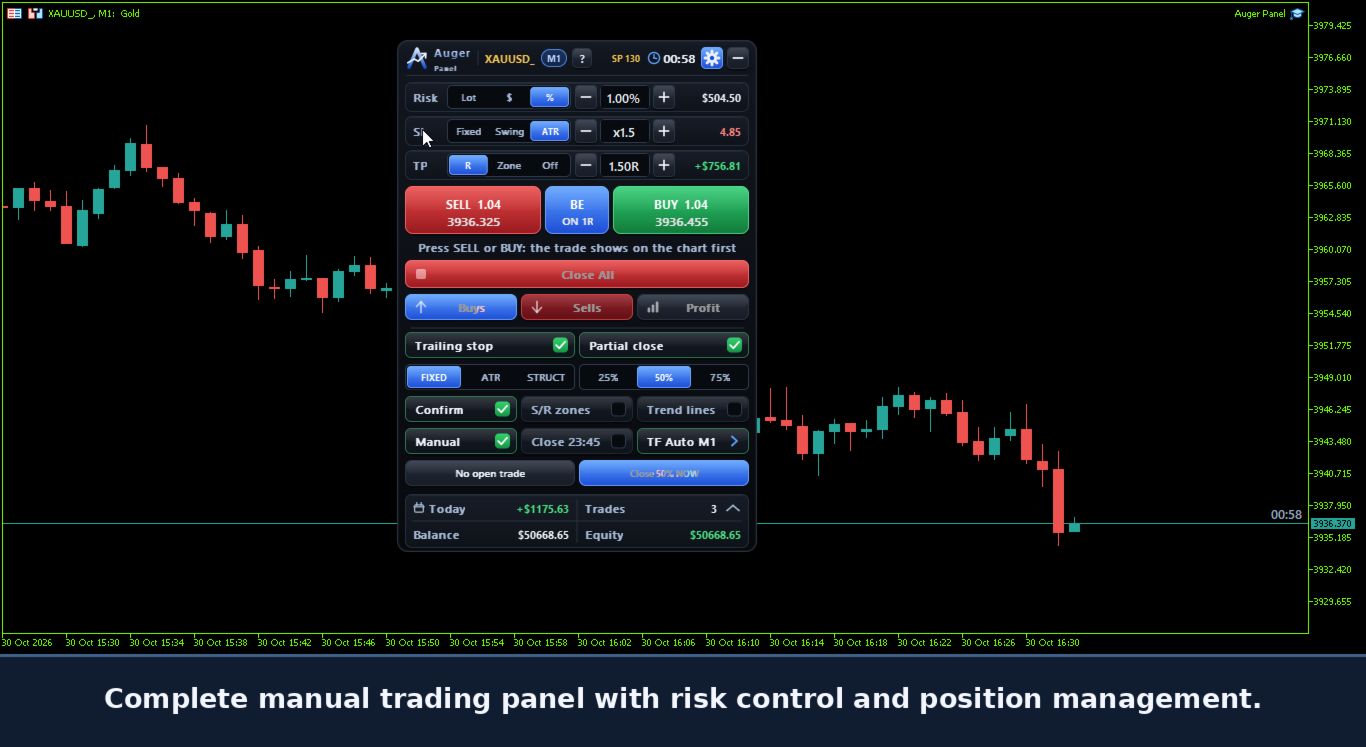
Auger Panel is a manual trading and position management utility designed to make trading from MetaTrader 5 charts more organized and convenient.

It combines order preparation, risk calculations, trade management, chart analysis and customizable visual controls within a single interface.

Traders can open positions manually, review order parameters before execution, manage existing positions and optionally manage eligible trades opened from the MetaTrader 5 mobile application.

1. Manual Trading and Order Confirmation

- Manual BUY and SELL trading controls.
- Optional two-step order confirmation.
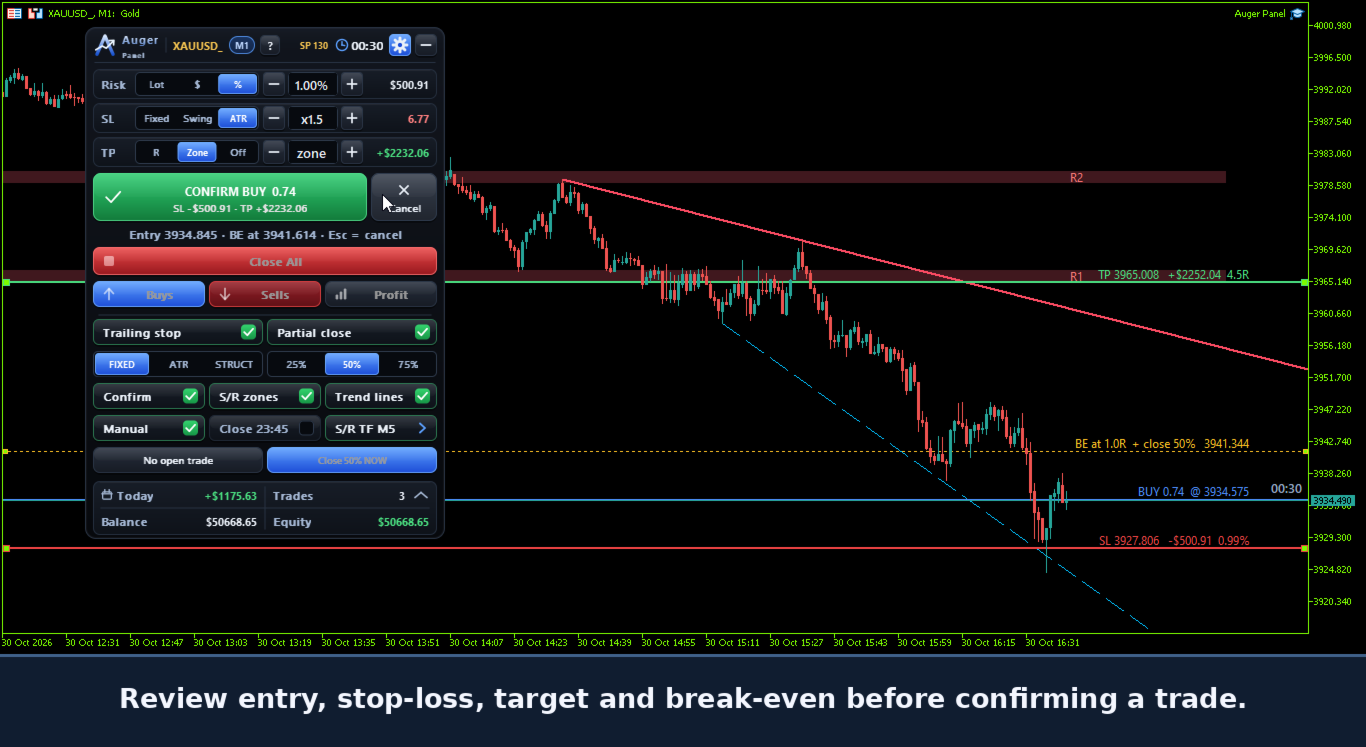
- Preview of Entry, Stop Loss and Take Profit before opening a position.
- Estimated monetary risk and potential target values.
- Adjustable order parameters before confirmation.
- Convenient lot-size adjustment controls.
- Market orders executed only after the trader's action.

Auger Panel does not independently open trades based on automated signals.

2. Flexible Risk Management

Choose between three position-sizing methods:

- Fixed Lot: manually select the trading volume.
- Risk Percentage: calculate position size using a percentage of account balance.
- Money Risk: calculate position size using a specified monetary amount.

Additional risk controls include:

- Stop Loss methods: Fixed, Structure/Swing and ATR.
- Take Profit methods: Risk/Reward, Zone and Off.
- Configurable risk/reward parameters.
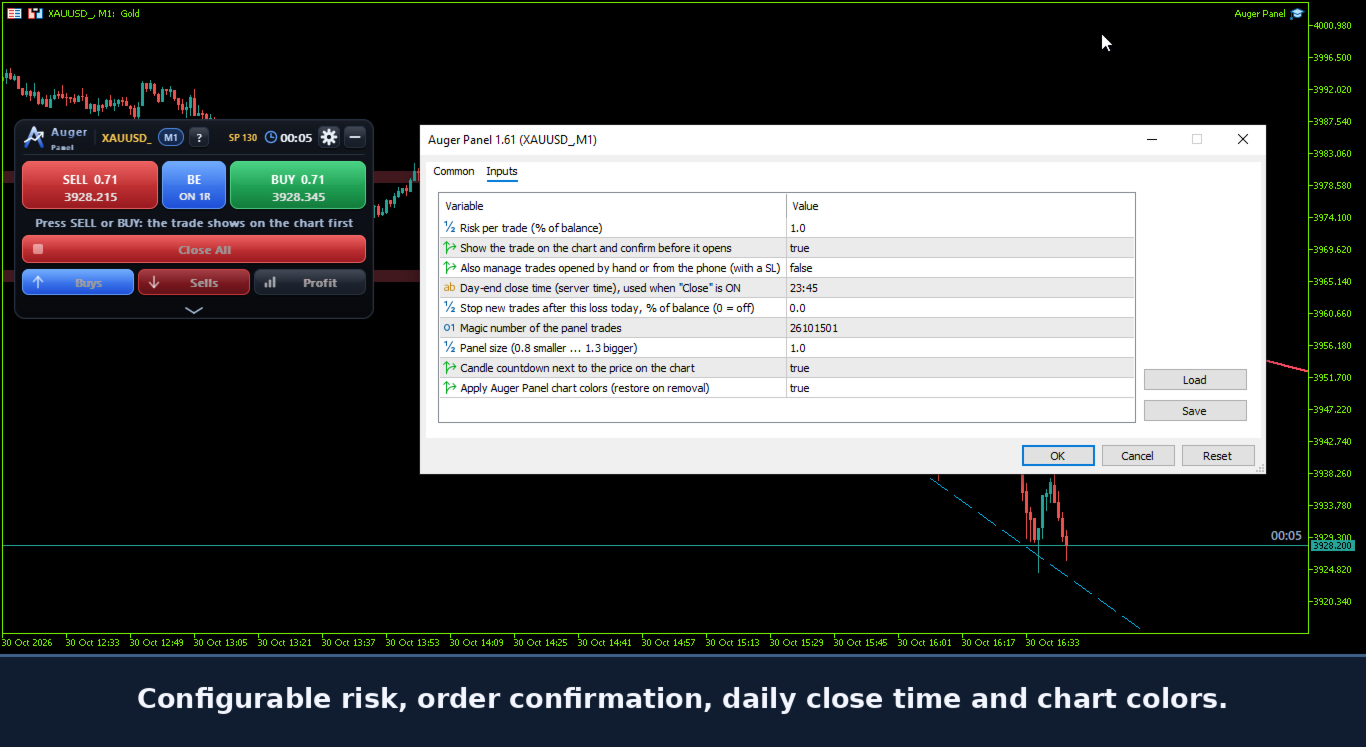
- Optional daily loss limit to stop new entries.
- Configurable Magic Number.
- Broker-aware volume and price calculations.

3. Interactive Chart-Based Trade Management

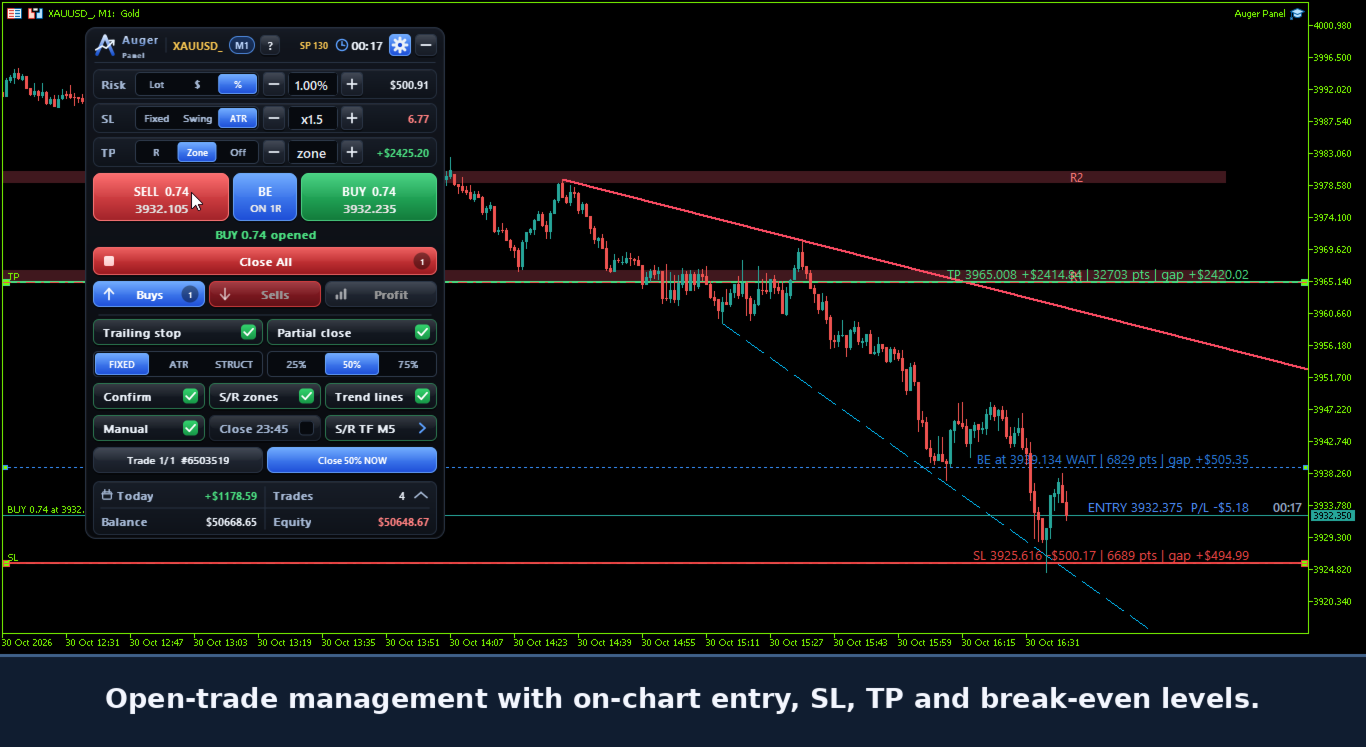
Auger Panel displays trade levels directly on the MetaTrader 5 chart.

- Entry price.
- Stop Loss price.
- Take Profit price.
- Break-Even activation level.
- Dynamic price-distance information.
- Estimated monetary distance and risk information where applicable.

Dragging Trade Levels

Before execution, supported preview levels can be adjusted on the chart.

After execution:

- The executed Entry price remains fixed.
- Existing Stop Loss levels can be dragged to new valid prices.
- Existing Take Profit levels can be dragged to new valid prices.
- The Break-Even activation line can be repositioned for supported positions.
- Stop Loss and Take Profit modifications are submitted to the broker for confirmation.

Adjustments remain subject to market conditions, available quotes and broker stop/freeze-level restrictions.

4. Break-Even and Trailing Stop

Auger Panel provides configurable trade-management functions.

Break-Even Management

- Automatic Stop Loss adjustment when configured conditions are reached.
- Adjustable Break-Even activation.
- Optional positive offset beyond the entry price.
- Supported on-chart Break-Even trigger adjustment.

Trailing Stop Management

- Fixed Distance trailing.
- ATR-based trailing.
- Structure-based trailing.
- Configurable activation and movement conditions.
- Stop adjustments designed to avoid unnecessarily increasing an existing position's risk.

These management functions operate through the running desktop MT5 terminal.

5. Partial Closing and Position Controls

Auger Panel provides tools for managing open positions.

- Partial Close: 25%, 50% or 75%.
- Close All positions.
- Close Buy positions.
- Close Sell positions.
- Close Profitable Positions.
- Optional automatic partial-close management.
- Optional position management after partial closing.
- Configurable daily position closing time.

Execution depends on broker conditions, minimum lot size, lot step and account type.

6. Mobile Trading with Desktop Management

Open eligible trades from your smartphone and let Auger Panel manage them from your computer.

Auger Panel can manage eligible positions opened directly from the official MetaTrader 5 mobile application.

When the desktop panel is active and manual trade management is enabled, supported mobile-opened positions on the same trading account and symbol can be managed using the panel's configured rules.

Supported functions include:

- Break-Even management.
- Fixed, ATR or Structure trailing-stop management.
- Automatic partial closing when enabled and applicable.
- Stop Loss adjustments according to the configured management logic.

An eligible externally opened position must have a valid initial Stop Loss for risk-based management. Existing Take Profit orders remain subject to the broker and the trader's settings.

Requirements for Mobile-Opened Trade Management

- The computer must remain powered on.
- Desktop MetaTrader 5 must remain running and connected.
- Auger Panel must remain active on the relevant chart.
- Manual trade management must be enabled.
- The mobile and desktop terminals must use the same trading account.
- The position must satisfy the panel's management conditions.

The panel itself does not run inside the mobile application.

If the desktop terminal or panel stops operating, desktop-based Break-Even, trailing and automatic partial-close management will also stop. Stop Loss and Take Profit orders already accepted by the broker remain subject to the broker's execution rules.

7. Trend, Support and Resistance

Auger Panel includes chart analysis tools for manual trading decisions.

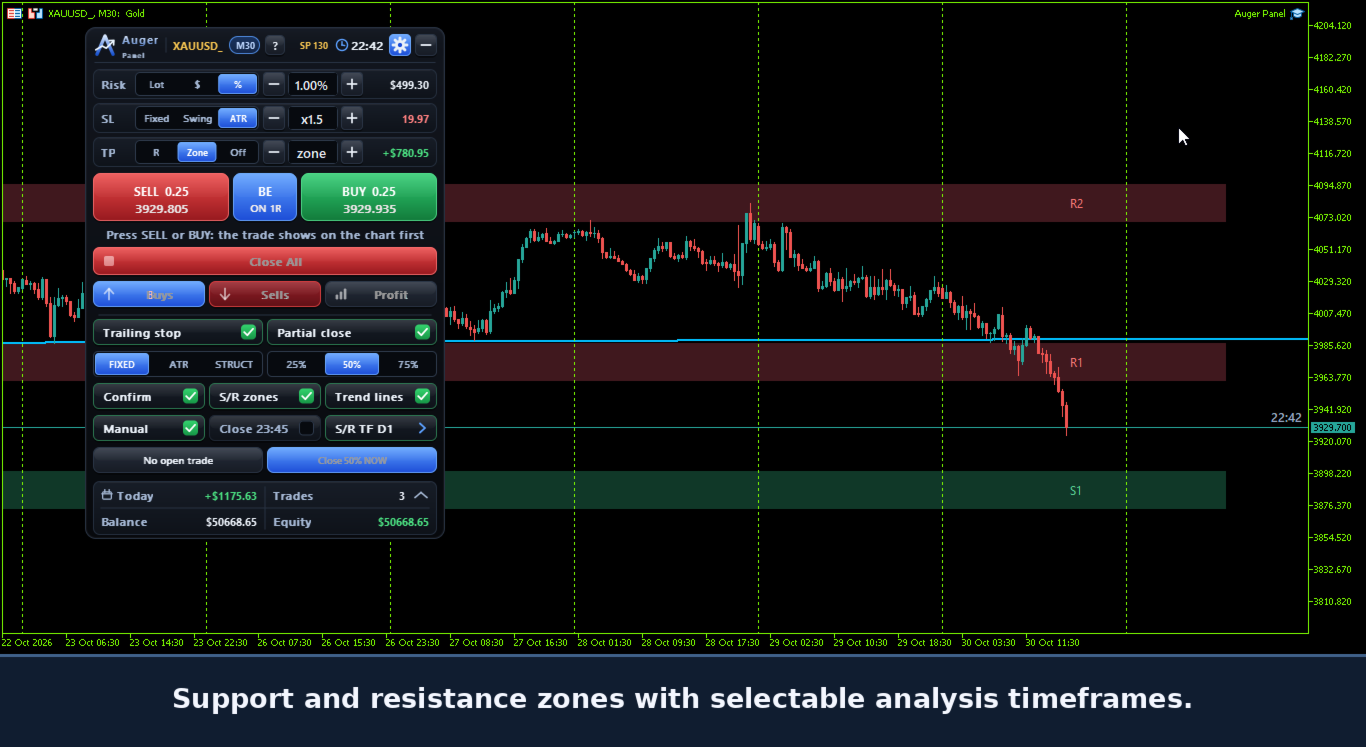
- Automatic Support and Resistance zones.
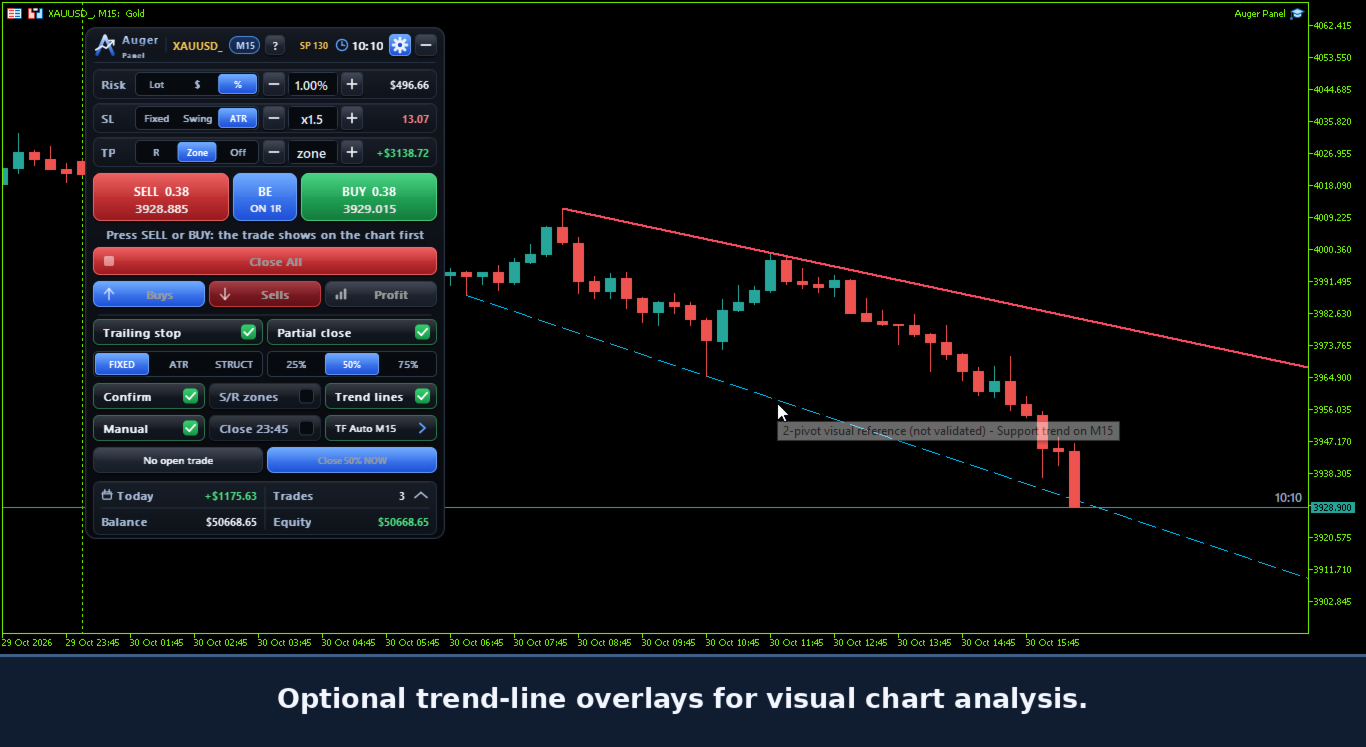
- Trend-line visualization.
- Selectable analysis timeframes.
- Optional visibility controls.
- Dynamic updates of supported analysis elements.

The tools are intended to assist chart interpretation, not to guarantee trading signals or outcomes.

8. Timeframe and Market Information

- Active chart symbol displayed on the interface.
- Current chart timeframe displayed on the chart.
- Current timeframe displayed on the trading panel.
- Selectable analysis timeframes for supported tools.
- Current spread information.
- Candle closing countdown.
- Dynamic display updates.

9. Automatic Chart Appearance

Auger Panel includes an optional coordinated chart appearance.

- Dark chart background.
- Teal bullish candles.
- Red bearish candles.
- Contrasting price-scale colors.
- Reduced visual clutter.
- Coordinated colors for trading levels and analytical tools.
- Option to enable or disable automatic chart styling.
- Restoration of previously saved chart appearance when the panel is removed under supported conditions.

The appearance settings are designed to improve chart readability while keeping trading levels visible.

10. Account and Trading Statistics

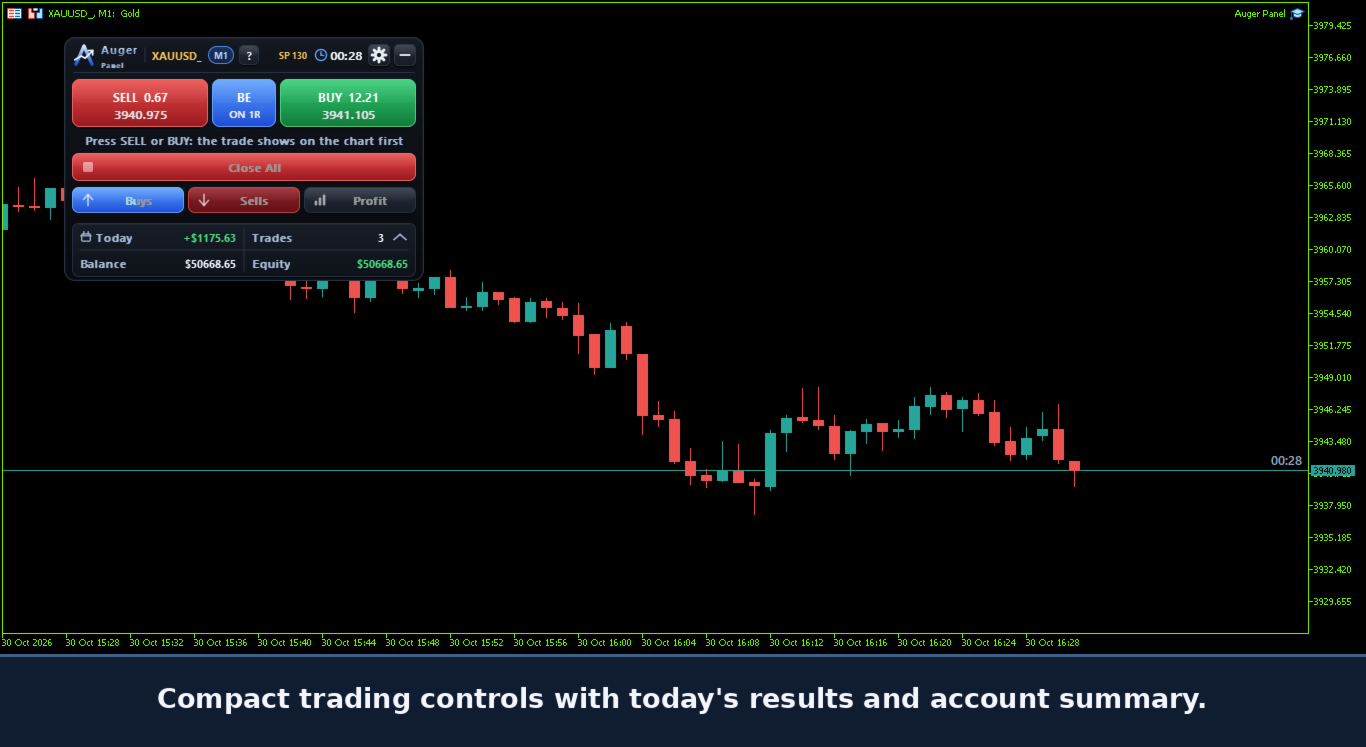
Auger Panel displays useful trading information, including:

- Account Balance.
- Account Equity.
- Today's trading result.
- Today's trade count.
- Current spread.
- Trade-management status.

These elements help traders monitor activity without repeatedly opening additional terminal windows.

11. Customizable Trading Interface

- Movable on-chart trading panel.
- Expandable and collapsible sections.
- Compact display mode.
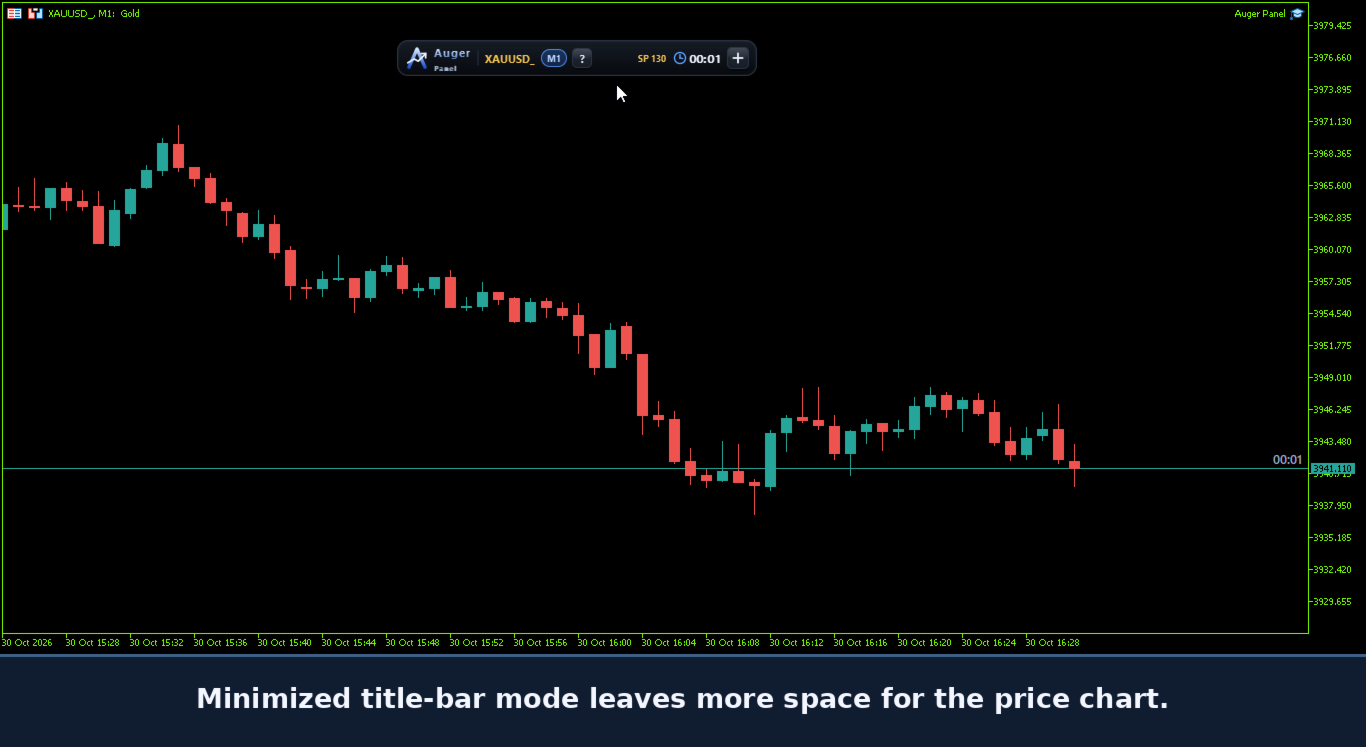
- Minimized panel mode.
- Adjustable panel size.
- Organized trading and management controls.
- Optional chart tools.
- Configurable trade-management settings.
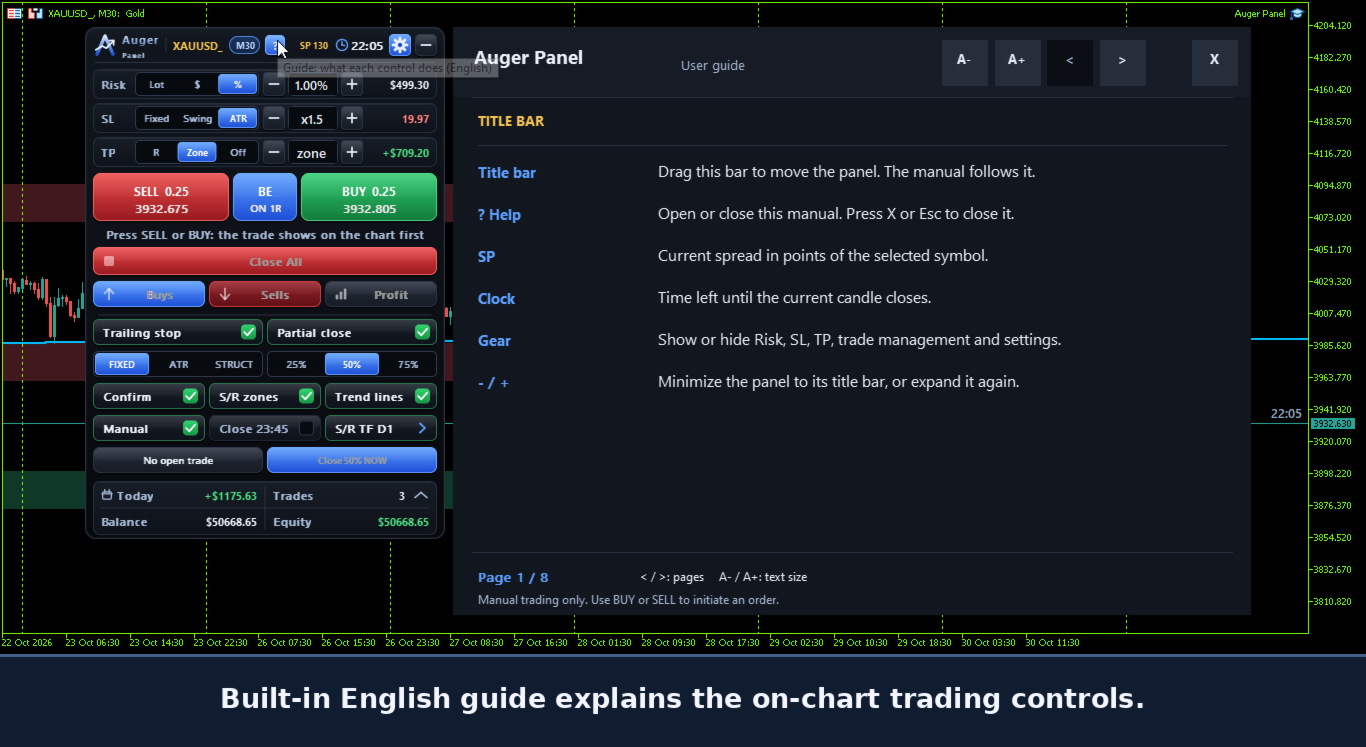
- Built-in English user guide.

The interface is designed for traders who prefer direct visual control from the chart.

12. Getting Started

1. Install Auger Panel in MetaTrader 5.
2. Attach it to a chart.
3. Enable algorithmic trading permissions for the panel's order and position-management operations.
4. Configure risk, Stop Loss and Take Profit preferences.
5. Select the desired Break-Even, trailing and partial-close settings.
6. Use BUY or SELL to prepare a manual trade.
7. Review the order preview when confirmation is enabled.
8. Confirm the trade and manage supported levels directly from the chart.
9. Optionally enable manual trade management to manage eligible positions opened outside the panel, including from MT5 Mobile.

Testing on a demo account before live trading is recommended.

Important Information

Auger Panel is a manual trading and trade-management utility. It does not generate independent automated entry signals or guarantee profits.

Trading involves financial risk. Order execution, position modifications, trailing stops, partial closing and other trading operations depend on broker specifications, account permissions, market conditions and MetaTrader 5 connectivity.

Desktop-based automatic trade management requires the desktop terminal and panel to remain active.

Past results and visual examples do not guarantee future trading performance.
Produits recommandés
HedgeSafe Trade Assistant Un panneau de trading manuel pour MetaTrader 5 centré sur la maîtrise du risque. HedgeSafe aide à préparer, valider et gérer une opération directement sur le graphique avant de cliquer sur BUY ou SELL. HedgeSafe n'est ni un service de signaux, ni un outil de prévision, ni un robot IA, ni une stratégie automatique. Il ne choisit pas la direction et ne promet aucun profit. Chaque décision reste sous le contrôle du trader. Fonctions principales Calcul du lot selon un pourc
Symbol Manager for MT5
Taras Slobodyanik
5 (3)
Symbol Manager or Grid Manager, designed to group orders into one position (by Symbol or by Magic Number). This utility will be useful to multi-currency traders (many EAs), who can have multiple orders on several pairs. You will be able to see the total number of lots, the total profit, and set virtual stop loss and virtual take profit. To set a real TP (or SL), you must first set the virtual value, and then enter the command in this cell: "set". If you want to set real TP/SL for all orders at
Bastion is a monitor-and-close-only risk manager for prop-firm traders. It watches your account against your firm's daily-loss and maximum-drawdown limits in real time and force-closes your open positions BEFORE you cross a line. It never opens a trade of its own, so it stays fully within the tools allowed by FTMO, FundedNext, The5ers, FTUK and FXIFY. Why traders fail challenges A large share of failed evaluations end on a single daily-loss breach: a moment of inattention, a news spike, one tra
JMM Trade Panel MT5 JMM Trade Panel MT5 est un outil d’exécution et de gestion des trades pour MetaTrader 5. Il permet d’ouvrir des positions Buy et Sell directement depuis le graphique, d’ajuster rapidement le volume, de suivre les paniers de positions et de gérer les trades selon le Magic Number et les symboles sélectionnés. Manuel utilisateur complet :  Télécharger Fonctionnalités principales Boutons Buy, Sell et Close All sur le graphique. Fermeture en un clic de toutes les positions gérée
Trade Manager DaneTrades
Levi Dane Benjamin
4.13 (31)
Trade Manager pour vous aider à entrer et sortir rapidement des transactions tout en calculant automatiquement votre risque. Y compris des fonctionnalités pour vous aider à éviter le sur-trading, le trading de vengeance et le trading émotionnel. Les transactions peuvent être gérées automatiquement et les mesures de performances du compte peuvent être visualisées dans un graphique. Ces fonctionnalités rendent ce panneau idéal pour tous les traders manuels et contribuent à améliorer la plateforme
Breakevan Utility
Jose Luis Thenier Villa
BreakEvan Utility  Is a simple tool in a panel with this utilities: This utility will draw a Golden Line in the chart applied showing the breakeven price, considering all the positions opened for that specific symbol. Also the information panel shows: Balance Breakeven Price for that chart Force Breakeven (for that symbol) as ON/OFF Force Breakeven Global (takes into account all trades opened) as ON/OFF Total Lots opened for Symbol Total Lots opened Global And two buttons: Force Breakeven: Whe
Trade Copilot - Panneau semi-automatique de gestion du risque pour l'Or (XAUUSD) et tout instrument Trade Copilot est un panneau de trading semi-automatique conçu pour les traders manuels qui souhaitent la discipline d'un EA sans renoncer au contrôle de leurs propres entrées. Vous décidez de la direction et du niveau ; le panneau calcule automatiquement la taille du risque, place le stop-loss, gère le take-profit et protège la position. FONCTIONNALITÉS PRINCIPALES - Calcul du lot basé sur le
INTRODUCTORY LAUNCH OFFER: $139 • Exclusive introductory price for the first 10 copies only. • Price will be permanently adjusted to $279 after the first 10 activations. • Next price step: $199 -> Final price: $279. Fortress Risk Manager is an institutional-grade, all-in-one Capital Protection and Risk Management Cockpit built natively for MetaTrader 5. Engineered specifically for prop firm challenge accounts, funded trader programs, and discipl
DDKiller Pro
Njaratahiry Michael Randrianiaina
Arrête de faire sauter ton compte. Une bonne fois pour toutes. DDKiller Pro est le gardien du risque MT5 qui tourne silencieusement sur ton graphique et coupe le trading dès qu'une limite est atteinte — que tu passes un challenge prop firm ou que tu gères ton propre compte CFD. Le problème que tout trader connaît : Tu fixes tes règles. Tu les enfreins quand même. Un trade de vengeance. Une position surleviéragée. Une session qui efface un mois de gains. DDKiller Pro retire cette décision de tes
Prop Calculator Assistant Ne cramez plus vos comptes de Prop Firm à cause d'erreurs de calcul. Laissez l'Assistant gérer le risque pour vous. Prop Calculator Assistant est le panneau de gestion de transactions ultime, conçu spécifiquement pour les traders passant des challenges (FTMO, etc.) ou gérant des capitaux financés. Il remplace le calcul mental et le déplacement manuel des ordres par une interface visuelle de précision qui vous maintient strictement dans vos règles. Ceci n'est pas un bot
GGP Trade Copier MT5
Mohammadmahmood Pirayeh
GGP Trade Copier  EA is an automatic trading bot that can help traders automatically replicate the trading strategies and operations from one trading terminal to others by experiencing exceptionally fast trade copying system. Its easy-to-use setup allows you to copy trades between multiple MetaTrader terminals on the same Windows computer or Windows VPS with lightning-fast copying speeds of under 0.5 seconds. The software supports multiple trading varieties, including Forex, commodities, stocks
GOM Trade Manager
Wannapach Chinnaprapa
GOM Trade Manager helps you execute trades the way you want it. Works on all instruments Forex, Commodities, & Crypto. It helps you with lot calculations, spread addition and balance calculations so you can just focus on actual trading. For full automatic planned management, stackable triggers and spread widening protection >> check out GOM Trade Manager Pro . ------------------------------------------NOTABLE FEATURES------------------------------------------ You set everything based on bid
FREE
Trade Assistant 38 in 1
Makarii Gubaydullin
4.91 (23)
Outil multifonctionnel : Calculateur de Lot, Ordres Grid, Ratio R/R, Gestionnaire de Trades, Zones d'Offre et de Demande, Price Action et bien plus Version Démo   |   Manuel d'Utilisation L'Assistant de Trading   ne fonctionne pas dans le testeur de stratégies : vous pouvez télécharger la   Version Démo ICI  pour tester l' utilitaire . Contactez-moi   pour toute question  / idée d'amélioration / en cas de bug détecté Si vous avez besoin d'une version MT4, elle est disponible ici Simplifiez, acc
Local Copy Trader Utility - Professional Copy Trading System Overview Local Copy Trader Utility is the complete solution for mirroring trades between MetaTrader 5 accounts. With both Master and Slave functionality in one powerful Expert Advisor, it delivers reliable, lightning-fast trade copying with zero external dependencies. Perfect for managing multiple accounts, following trading signals, or transferring trades between brokers, this system ensures your positions stay perfectly synchronized
Overview Mirror Signals EA is a powerful monitoring Expert Advisor that automatically sends real-time Telegram notifications for all important trade events on your MetaTrader 5 account. It is engineered specifically for signal providers , trade-copier operators , auditors , educators , and professional trading services that require immediate, detailed, and reliable reporting. Everything from entries, exits, SL/TP changes, comment changes, trailing stop activations, pending order modifications
Overview Mirror Signals Service EA (Text only)   is a powerful monitoring Expert Advisor that automatically sends   real-time Telegram notifications   for all important trade events on your MetaTrader 5 account. It is engineered specifically for   signal providers ,   trade-copier operators ,   auditors ,   educators , and   professional trading services   that require immediate, detailed, and reliable reporting. Everything from   entries, exits, SL/TP changes, comment changes, trailing sto
Easy Trade Executor est un outil de calcul rapide de la taille de position, d’exécution des ordres et de gestion des trades pour MT5. Placez les niveaux Open Price, Stop Loss et Take Profit directement sur le graphique, obtenez automatiquement la taille de position appropriée et ouvrez des trades avec un risque maîtrisé en seulement quelques clics. Pourquoi choisir Easy Trade Executor ? Easy Trade Executor a été conçu pour les traders qui veulent aller au-delà du simple calcul du risque et gére
Truvana Trend Campaign Manager EA (TCM) Advanced Basket Management & Profit Locking Tool for Trend Traders Short Description Turn strong trends into managed campaigns. Truvana TCM is a professional trade management EA designed for traders who already know how to identify trends and execute entries. The EA automatically manages basket expansion, validates risk before adding positions, and locks profits using a broker-side Basket Stop Price (BSP). No martingale. No grid recovery. No signal genera
Un seul EA au lieu d'une dizaine d'outils : assistant de trading, gestion du risque et 17 indicateurs dans un seul panneau. Posez-le sur le graphique — tout l'essentiel est à portée de main.   Prix de lancement : les 20 premières copies à 49$, ensuite 99$. -50%, maintenant seulement.   TRADEZ EN UN CLIC Le lot se calcule tout seul à partir du risque en % du solde — fini les calculatrices. Stop fractal sur n'importe quelle UT ou manuel, take profit selon le R:R, clôtures partielles TP1/TP2/TP3, b
Fast execution utility for manual traders. Drag-and-drop visual trading, split take-profits, and single-ticket management system. Speed, Precision, and Risk Control. KAB Trade Manager is built for traders who need to execute fast but keep risk tight. It integrates all essential tools into floating, collapsible windows. Core Functions: Instant Order Execution:   Market and Pending orders with automatic Lot sizing based on SL distance. Focus Ticket Manager:   A dedicated window to monitor and mana
Recovery Manager Panel MT5 is a manual order management panel for traders who want to manage open positions directly from the chart in a clearer and more organized way. This tool is not a signal robot. It does not predict market direction, generate entry signals, or trade automatically based on market forecasts. Instead, it helps traders work with positions that are already open. You can calculate possible recovery lot sizes, view estimated target levels on the chart, and use available floating
Discipline you don't have to hold by willpower. Account Shield controls the risks on your account — per trade, per day, in total, drawdown, stops, overtrading, trading after a loss — and helps stop you before a bad moment becomes a lost account. Own account or prop firm (15 firm presets included). Never opens trades by itself. Why Most accounts are not lost to bad analysis. They are lost to a moment: the daily loss counted on equity, the stop set a minute late, the fourth trade after two losses,
Trading Utility for Forex Currency Pairs Only not for Gold  Functions Auto Lot Calculation based on Risk Auto stoploss  Auto TakeProfit Breakeven Auto Close Half % Close in percentage with respect to the PIPs Pending Orders BuyLimit Sell Limit with distances BuyStop Sell Stop    with distances Trading Informations Risk in percentage For Multiple trades Combine Takeprofit and Combine Stoplosses
RiskStack is a trade panel for MetaTrader 5 for manual traders who want the correct lot size and a clear Stop Loss and Take Profit on every trade. You choose the risk in percent, place the SL and TP by typing a price or dragging a line, and click BUY or SELL. The panel calculates the lot, sends the order and keeps managing it from the same window. By default every click opens one order. If you trade with several entries, set the number of layers (2 to 20) and RiskStack splits the same total risk
Product Name: Smart Switch Dashboard STOP WASTING SECONDS. SECONDS COST MONEY. Are you losing trades because you're fumbling through the Market Watch? Is your workspace messy and slowing you down? In trading, Speed is everything. If you aren't organized, you are losing money to traders who are. Smart Switch Dashboard is not just a tool—it is your COMMAND CENTER . Designed for serious Scalpers and Day Traders who demand Speed, Precision, and Zero Lag. DOMINATE YOUR WORKFLOW 1. ULTRA-FAST SY
Trade Insight Pro Trade Insight Pro is an advanced trading performance analytics utility for MetaTrader 5. It transforms your MT5 trading history into clear and useful performance statistics directly on the chart. The utility is designed for traders who want to understand their historical results in greater detail, identify performance patterns, compare BUY and SELL behavior, and review their trading activity using objective data. Trade Insight Pro does not generate trading signals and does
Trade Copier Local MT5 is a fast local trade copier for copying trades between multiple MT4 and MT5 accounts. One EA works in both Master and Slave modes. Simply select the required Copier Mode and use the same product on your MetaTrader terminals. Copy trades between: • MT5 → MT5 • MT5 → MT4 • MT4 → MT5 • MT4 → MT4 Perfect for: • Trading multiple accounts at once • Linking multiple trading accounts • Personal account mirroring • Signal providers • Account managers • Prop trading setups #
Equity Sculper EA
Christopher Calmerin
Put your trading profits to work. Equity Sculptor EA is an MT5 trade-management tool that uses new closed profits to gradually reduce losing positions across your account. Account-wide management: All symbols and magic numbers, including manual trades. Two funding modes: Rescue Wallet or Legacy Balance. Flexible settings: Customize profit allocation, trim size and trade selection. Clear dashboard: View your funds, performance and configurations. Persistent tracking: Saved accounting continues af
Trading Manager — votre panneau pour exécuter et gérer vos trades avec le risque sous les yeux Trading Manager est un assistant de trading manuel qui réunit tout le processus dans un panneau sur le graphique. Vous choisissez la direction et le risque, placez le stop loss et le take profit, et le panneau calcule le lot et vous montre la perte au stop et le gain à l'objectif avant l'envoi de l'ordre. Ensuite, vous gérez une ou plusieurs positions depuis le même tableau. C'est vous qui décidez quan
Protect your funded accounts and personal capital with military-grade precision. This utility continuously monitors your floating equity against your daily starting balance. The moment your custom drawdown threshold is breached, it instantly liquidates all open positions, deletes pending orders, and completely unloads from the chart. Stop revenge trading and never fail a prop firm evaluation due to a margin breach again.
FREE
Les acheteurs de ce produit ont également acheté
Trade Assistant MT5
Evgeniy Kravchenko
4.43 (216)
It helps to calculate the risk per trade, the easy installation of a new order, order management with partial closing functions, trailing stop of 7 types and other useful functions. Additional materials and instructions Installation instructions - Application instructions Line function -   shows on the chart the Opening line, Stop Loss, Take Profit. With this function it is easy to set a new order and see its additional characteristics before opening.   Risk management  - The risk calculation
Bienvenue sur Trade Manager EA, l’outil ultime de gestion des risques conçu pour rendre le trading plus intuitif, précis et efficace. Ce n’est pas seulement un outil d’exécution d’ordres ; c’est une solution complète pour la planification des trades, la gestion des positions et le contrôle des risques. Que vous soyez débutant, trader expérimenté ou scalpeur ayant besoin d’une exécution rapide, Trade Manager EA s’adapte à vos besoins, offrant une flexibilité sur tous les marchés, des devises et i
Farmed Hedge Yield Farming | All Markets (Manual - Hybrid - Semi/Automated EA) VERIFIED TRADING RESULTS - Farmed Hedge Yield Axi Copy:  https://www.mql5.com/en/signals/2356376 - Farmed Hedge Yield Exn Copy:   https://www.mql5.com/en/signals/2356404 - Farmed Hedge Yield V Copy:  https://www.mql5.com/en/signals/2357156 IMPORTANT NOTICE: FarmedHedge is a MANUAL-FOCUSED TRADING UTILITY ,not a fully automated EA. Results shown on this Signal include manual trades and overall strategic management.
Telegram to MT5 Multi-Channel Copier   copie automatiquement les signaux de trading de vos canaux Telegram et Discord directement vers MetaTrader 5. Pas de bots, pas d'extensions de navigateur, pas de copie manuelle. Un signal arrive sur Telegram ou Discord et l'EA ouvre le trade dans votre terminal en quelques secondes. Et avant de copier un canal, le backtester intégré vous montre ce que ce canal aurait fait sur votre compte. Le produit comprend deux composants : une application Windows qui éc
TradePanel MT5
Alfiya Fazylova
4.88 (172)
Trade Panel est un assistant commercial multifonction. L'application contient plus de 50 fonctions de trading pour le trading manuel et permet d'automatiser la plupart des tâches commerciales. Instructions d'utilisation : https://www.mql5.com/fr/blogs/post/762589 Version d'essai de l'application pour un compte démo : https://www.mql5.com/fr/blogs/post/762644 Comment installer l'application : https://www.mql5.com/fr/blogs/post/762645 Comment tester l'application en mode visuel : https://www.mql5.
News Trade EA MT5
Konstantin Kulikov
4.55 (11)
Je voudrais vous présenter un robot efficace que j'utilise depuis plusieurs années. Il peut être utilisé en mode semi-automatique, comme en mode totalement automatique. >>> Chat <<< Le programme comporte des paramètres souples pour le commerce sur les nouvelles du calendrier économique. Il est impossible de le vérifier dans le testeur des stratégies. Ce qu’il faut, c’est le travail réel. Téléchargez la dernière archive des paramètres : https://www.mql5.com/en/blogs/post/747929 Surveillance des
Copiez les signaux Telegram avec vos propres règles de trading Telegram to MT5 Signal Trader copie automatiquement les signaux de trading au format texte provenant de canaux et de groupes Telegram publics et privés vers MetaTrader 5. Gérez plusieurs fournisseurs et comptes MT5 depuis une seule application de bureau, avec des paramètres de risque et de trading propres à chaque fournisseur . Aucun bot Telegram ni configuration d'API n'est nécessaire pour copier les signaux. Connectez-vous simpleme
================================================================================ POC BREAKOUT - V20.72. Full Professional Grade Toolkit ================================================================================ POC Breakout is a full MetaTrader 5 trading dashboard for discretionary traders who want breakout signals, Point of Control (POC) context, volume profiles, order flow, market structure, news, alerts, and advanced trade planning in one professional workspace. Attached directly to you
The product will copy all telegram signal to MT5 ( which you are member) , also it can work as remote copier.  Easy to set up, copy order instant, can work with almost signal formats, image signal,  s upport to translate other language to English Work with all type of channel or group, even channel have "Restrict Saving Content", work with  multi channel, multi MT5 Work as remote copier: with signal have ticket number, it will copy exactly via ticket number. Support to backtest signal. How to s
EA Overfitter
Stephen J Martret
5 (3)
That backtest looks great. But will it still be making money tomorrow, next week, next month? EA Overfitter re-runs your EA on 100 price histories it has never seen. One score tells you if the edge is real. A backtest tells you what an EA did on one price history — the one that happened to occur. What you cannot tell from it is how much of that result was the strategy and how much was the particular path. EA Overfitter answers that. It builds up to 100 synthetic price histories your EA has n
Power Candles Strategy Scanner - Outil de recherche de configurations multi-symboles à optimisation automatique Le Power Candles Strategy Scanner utilise le même moteur d'auto-optimisation que celui qui alimente l'indicateur Power Candles, pour chaque symbole de votre Market Watch, en parallèle. Un panneau vous indique quels symboles sont statistiquement négociables à l'instant, quelle stratégie est la plus performante pour chacun, la paire Stop Loss / Take Profit optimale, et vous alerte dès qu
Anchor Trade Manager
Kalinskie Gilliam
5 (8)
Your EAs cannot see each other, but Anchor can. Anchor gives you one place to coordinate your EAs, manage risk, and decide when trading is allowed. It works alongside the trading bots you already use without any changes to them. The Problem One EA opens a trade. Then another starts trading. The next thing you know, you wake up to multiple grids built across your account. Each EA may be doing exactly what it was designed to do, but together they can place far more risk on your account than you in
Trade Indicator Assistant   is a powerful MT5 utility designed to turn indicators into automated trading systems. Its main feature is the ability to automatically detect an indicator’s   BUY and SELL signal buffers , without requiring you to know the buffer numbers, search through indicator settings, or modify the indicator source code. Bonus Indicator:   After purchasing Trade Indicator Assistant, contact me to receive   Trade Signal Pro   completely free as a bonus indicator. [Download Demo V
Prochaine mise à jour — Version 2.52 bientôt disponible ! [NOUVEAU] Préparez-vous à découvrir 4 nouvelles fonctionnalités majeures conçues pour améliorer votre analyse du marché et votre flux de travail de trading Nous faisons passer l’analyse du marché au niveau supérieur avec 4 nouvelles fonctionnalités conçues pour répondre à vos besoins en trading. Découvrez : 1. TRADE OVERVIEW DASHBOARD 2. CONFLUENCE AT ZONE 3. STRONG & WEAK HIGH/LOW 4. OTE 1. TRADE OVERVIEW DASHBOARD Un tableau de bord qu
MT5 to Telegram Signal Provider est un utilitaire facile à utiliser et entièrement personnalisable qui permet l'envoi de signaux spécifiés vers un chat, un canal ou un groupe Telegram, transformant ainsi votre compte en fournisseur de signaux. Contrairement à la plupart des produits concurrents, il n'utilise pas d'importations DLL. [ Démonstration ] [ Manuel ] [ Version MT4 ] [ Version Discord ] [ Canal Telegram ]  New: [ Telegram To MT5 ] Configuration Un guide utilisateur étape par étape est
DrawDown Limiter
Haidar Lionel Haj Ali
5 (23)
DrawDown Limiter v5.0 — Contrôleur avancé de protection de compte DrawDown Limiter v5.0 est un contrôleur de protection de compte côté client conçu pour surveiller votre compte de trading et réagir automatiquement lorsque les limites configurées de risque, de profit, d’actualités, de planification, de rollover ou de nombre de positions sont atteintes. Il peut surveiller les opérations manuelles, les stratégies automatisées, plusieurs Expert Advisors, les ordres en attente et les positions ouvert
RETAILBERG FOOTPRINT CHART PRO — Order-Flow Workspace for MetaTrader 5 Version 7.00  |  Professional System  |  31 tools  |  One chart A full 150-page illustrated User Manual is included. Please read the full manual to understand this feature packed footprint chart elements and ui. https://www.mql5.com/en/blogs/post/777982 DEMO / STRATEGY TESTER — PLEASE READ FIRST
Assistant de trading sur graphique et panneau de gestion des risques Outil complet sur graphique avec Stop Loss (SL) & Take Profit (TP) multi-mode (ATR, R:R, points, devise du compte), analyses en temps réel et calendrier économique Ergotick Trade Manager est un panneau de trading professionnel tout-en-un conçu pour les traders discrétionnaires, les candidats aux challenges de prop firms et les scalpeurs. Il regroupe le calcul automatique et instantané de la taille des lots, des configurations m
Master Your Trading Discipline   Stop losing your hard-earned gains to overtrading and emotional decisions. The Discipline Tool is your ultimate trading assistant, ensuring strict risk management in real-time. Key Protection Features: Advanced Drawdown Defense : Automatically halts trading if your daily drawdown exceeds a preset threshold (percentage or dollar amount). Real-Time Equity Lock : Safeguard profits by referencing peak equity, ensuring drawdown stays within control. Hard Profit Target
Dealer Panel
Mian Rameez Ali
Dealer's Panel No signal decides anything here — a hand does. One click, and the panel calculates what's underneath: lot size from risk, target from a 30-step balance ladder that remembers exactly how far an account has climbed. Toggle between market and pending without touching an input field. Set a stop, and the take-profit can write itself — a fixed share of the balance, translated into price with no arithmetic left for the trader to get wrong. One trade live at a time; it won't let a seco
My Chart Generator
Trade The Volume Waves Single Member P.C.
5 (1)
What if your chart adapted to the market instead of the clock?   THE PROBLEM IT SOLVES   Instead of trying to find the best indicator that fits your timeframe chart, build a chart and find the most appropriate indicator.   My Chart Generator is a MetaTrader 5 background service that builds  live, fully historical three types of custom charts :1. Range/Volume Balanced chart, 2.  Range/Volume Absorption chart and 3. Constant Volume chart from any symbol — Forex pairs, crypto, indices, commodities,
Auto DCA EA
Truong Giang Hoang
5 (1)
All new interface and function Add telegram notify (you have to get Telegram bot API and chat ID). With this ea, you can earn 10-40% even more profit/month! 1. This EA is used to automatically take profit or DCA your orders on MT5 according to the parameters you set. You can enter first order on your phone or MT5 terminal on your computer and it automatically take profit or DCA your orders. 2. Enter buy/sell limit-stop price * Buy limit price/ Sell limit price/ Buy stop price/ Sell stop price:
AlgoRadar
Stephen J Martret
5 (4)
AlgoRadar is an on-chart analytics dashboard for MT5 that aggregates Expert Advisor performance across multiple accounts, brokers, and platforms, including both MT4 and MT5 data, into a single live view on your MT5 chart. All analysis runs from the chart interface, with no external applications or manual report processing required. EA Analysis and Ranking For traders running multiple Expert Advisors, AlgoRadar provides a consolidated view of each EA's performance across accounts. Active EAs a
REVDEN AI Desk : pilotez votre trading depuis une seule conversation avec votre propre IA, sur le contexte de marché de REVDEN Imaginez piloter votre trading depuis une seule conversation. REVDEN AI Desk l'apporte dans MetaTrader 5 : vous demandez à votre propre IA comment elle lit le marché, et elle répond à partir du contexte complet de REVDEN sur les symboles que vous tradez, avec leur état, leur profil de risque et les publications à venir. Ses propositions arrivent avec entrée, stop, object
PRO LOCAL TRADE COPIER MT5 — ALL-IN-ONE MASTER & SLAVE EDITION ============================================================== Pro Local Trade Copier MT5 is an institutional-grade, ultra-low-latency trade duplication utility engineered for professional traders, prop firm challenge traders, and multi-account managers operating on the same PC or Windows VPS. Unlike traditional copiers that require separate Master and Slave files or complex external DLL configurations, Pro Local Trade Copier MT5
Grid Manual MT5
Alfiya Fazylova
4.74 (23)
Grid Manual est un panneau de trading permettant de travailler avec une grille d'ordres. L'utilitaire est universel, possède des paramètres flexibles et une interface intuitive. Il fonctionne avec une grille d'ordres non seulement dans le sens des pertes, mais aussi dans le sens de l'augmentation des profits. Le commerçant n'a pas besoin de créer et de maintenir une grille d'ordres, l'utilitaire le fera. Il suffit d'ouvrir une ordre et "Grid Manual" créera automatiquement une grille de ordres po
Quant AI Agents
Ho Tuan Thang
5 (1)
Quant AI Agents are independent trading Expert Advisors. Instead of trading using a fixed strategy like other conventional EAs, Quant AI Agents   is a   multi-agent AI trading framework   that turns natural-language strategy prompts into live.  WANT THE SAME RESULTS AS MY LIVE SIGNAL?   Use the exact same brokers I do:   IC MARKETS , IC TRADING   .  Unlike the centralized stock market, Forex has no single, unified price feed.  Every broker sources liquidity from different providers, creating un
EasyInsight AIO MT5
Alain Verleyen
4.92 (12)
EASY Insight AIO – La solution tout-en-un pour un trading intelligent et sans effort Présentation Imaginez pouvoir analyser l’ensemble du marché — Forex, Or, Crypto, Indices et même Actions — en quelques secondes, sans aucune analyse manuelle de graphiques, sans installation complexe ni configuration d’indicateurs. EASY Insight AIO est votre outil d’exportation ultime, prêt à l’emploi, pour un trading alimenté par l’IA. Il fournit une vue d’ensemble du marché dans un fichier CSV propre — prêt
Trader Evolution
Siarhei Vashchylka
5 (7)
" Trader Evolution " - A utility designed for traders who use wave and technical analysis in their work. One tab of the utility is capable of money management and opening orders, and the other can help in making Elliott wave and technical analysis. Manual (Be sure to read before purchasing) | Version for MT4 Advantages 1. Trading in a few clicks. Immediate and pending orders are available in the panel 2. Money management. The program automatically selects the appropriate lot size 3. Simplifies
YuClusters
Yury Kulikov
4.93 (43)
Attention: You can view the program operation in the free version  YuClusters DEMO .  YuClusters is a professional market analysis system. The trader has unique opportunities to analyze the flow of orders, trade volumes, price movements using various charts, profiles, indicators, and graphical objects. YuClusters operates on data based on Time&Sales or ticks information, depending on what is available in the quotes of a financial instrument. YuClusters allows you to build graphs by combining da
Filtrer:
Aucun avis
Répondre à l'avis