TrendGuard Pro Auto EA
- Experts
- Version: 1.1
- Mise à jour: 20 octobre 2026
- Activations: 10

TrendGuard Pro Auto EA is a fully automated trend-following Expert Advisor built on the TrendGuard Pro signal engine. It enters when the Supertrend flips and the confirmation filters agree, protects every trade with an ATR stop loss, can bank profits in steps at TP1 / TP2 / TP3, lets winners run with an ATR trailing stop, and exits on the opposite signal. It trades the chart symbol, or a whole portfolio of symbols from one chart, and is controlled from an interactive on-chart dashboard.
Signal engine
- Supertrend (ATR period and multiplier) is the trigger: a buy when the trend flips up, a sell when it flips down, evaluated on closed bars only (no repainting, no intrabar signals).
- Three signal modes: Supertrend only, Supertrend + EMA (fast EMA above/below slow EMA), and Supertrend + all enabled filters.
- Up to 12 confirmation filters, each with its own switch and settings: fast/slow EMA, trend EMA stack (50/100/200), EMA slope, RSI (with optional overbought/oversold exclusion), ADX strength and DI direction, volume above its average, daily VWAP side, Bollinger middle band or breakout, MACD histogram (with optional strict divergence), smart candle (body ratio and close direction), and the higher-timeframe trend filter.
- Higher-timeframe trend filter: trades only in the direction of the Supertrend on a higher timeframe (e.g. H4 for H1 signals), using closed higher-timeframe bars only, so it never repaints.
- The signals are identical to the TrendGuard Pro indicator with the same settings, so you can check every trade of the EA on the indicator's chart.
- Signal timeframe is an input, so the EA can trade H1 signals while the chart shows any timeframe.
Single symbol or portfolio
- Leave Symbols empty to trade the chart symbol, or enter a list such as XAUUSD,USDJPY,USDCAD,JP225 to trade them all from one chart, each with its own signal engine.
- Broker suffixes are found automatically (".a", "m", ".pro", ...), and a fully tradable variant is preferred over a close-only one.
- Max open positions per symbol and in total, and an optional max number of new trades per day, keep portfolio exposure under control.
Money management
- Risk % per trade: the lot size is calculated from the stop-loss distance so a stopped trade loses the chosen percentage of the balance. Or use a fixed lot.
- Lots respect the broker's minimum, maximum, step and total volume limit, plus an optional max lot per trade.
- Free margin is checked before every order, and the volume is reduced or the trade skipped instead of sending an order that would be rejected.
Exits and partial take profits
- ATR stop loss on every trade, and an optional final ATR take profit (0 = let the trade run).
- TP1 / TP2 / TP3: close a chosen share of the position at TP1 and TP2 (e.g. 50% at 1.5 x ATR, 25% at 3 x ATR) and let the rest run to the final take profit, the trailing stop or the opposite signal. Optionally move the stop to breakeven as soon as TP1 is reached. Works on hedging and netting accounts; the TP1 / TP2 levels of open positions are drawn on the chart.
- ATR trailing stop, optional breakeven with a lock-in profit (e.g. entry + 0.2 x ATR), close on opposite signal, optional time exit after N bars.
- Stops respect the broker's stop and freeze levels; modifications are sent only when the stop actually improves.
Account protection and filters
- Daily loss limit (% of equity): no new trades for the rest of the day once it is reached, and optionally close the EA's open positions.
- Daily profit target (%): lock in a good day by closing the EA's positions and pausing until the next day.
- Max equity drawdown (% from the equity peak): closes the EA's positions and switches auto trading off until you switch it back on.
- News filter: no new trades a set number of minutes before and after high-impact (or medium and high) releases of the symbol's currencies, from the built-in MT5 economic calendar; the next event is shown on the dashboard. (Live trading only; the Strategy Tester has no calendar.)
- Friday close: close everything and stop new entries from a chosen hour on Friday, so no position is held over the weekend.
- Max spread filter, trading-hours window (server time), allowed direction (buy and sell, buy only, sell only).
- Trading-session check: a signal that arrives while the market is closed (for example at the daily break) is traded at the re-open if the trend still holds.
- Clear journal messages and a paused status on the panel when Algo Trading, the account or the symbol does not allow trading.
Interactive dashboard
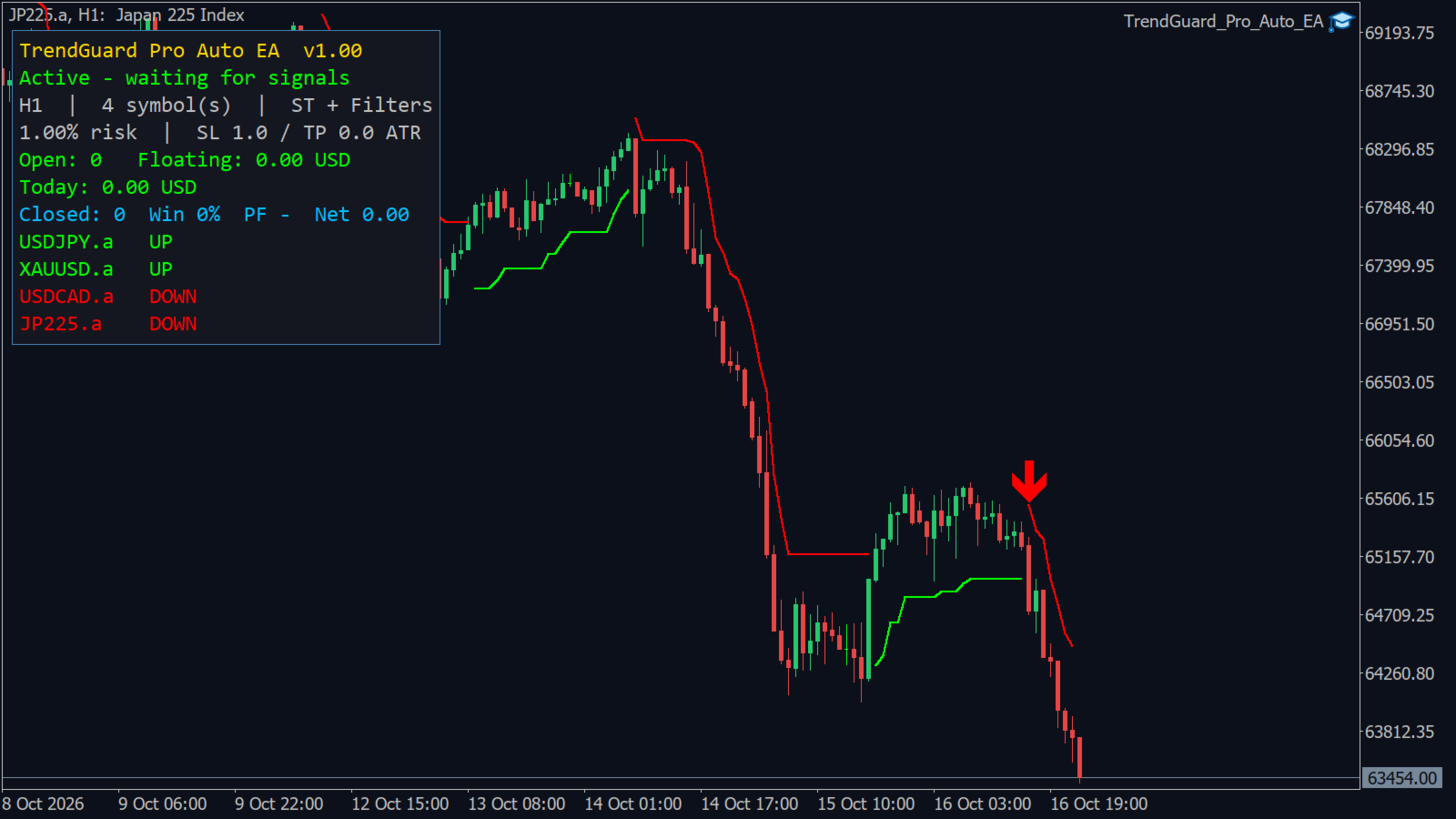
- Dark, DPI-aware panel in the TrendGuard Pro style with collapsible sections and a minimize button; drag it anywhere, its position and layout are remembered per chart.
- Buttons: AUTO ON / OFF (stop or resume new entries, open positions stay managed), CLOSE ALL, CLOSE BUY, CLOSE SELL (each asks for a confirming second click).
- Status line that says why the EA is waiting (paused, daily limit, trading hours, news, max trades, Algo Trading off).
- Account: balance, equity, floating P/L, today's equity change, drawdown from the peak, trades today.
- Symbols: Supertrend direction (and higher-timeframe direction) of every traded symbol with its open position and P/L.
- Performance of this EA (by magic number): trades, win rate, profit factor, best / worst trade, today's closed result; a position closed in parts counts as one trade.
- Protection: usage of every limit (daily loss, daily target, drawdown, spread, hours, Friday close, news, trades per day). Strategy: the active signal and exit settings.
- Supertrend line and buy/sell arrows drawn on the chart symbol.
- Optional popup and push notifications when a trade opens.
Default settings and presets
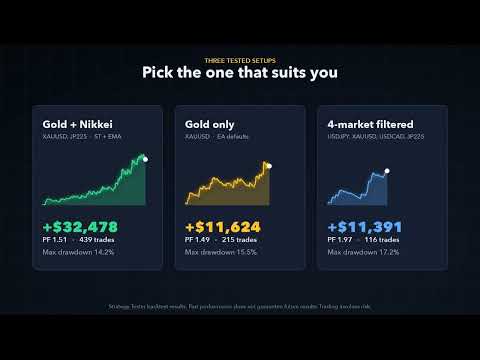
The defaults come from a two-year Strategy Tester study (October 2024 to October 2026, 18 symbols, M5 to H4, all signal modes, parameters picked on the first year and checked on the second): H1 signals, Supertrend + EMA, Supertrend multiplier 2.0, stop loss 1.0 x ATR, no fixed take profit, 3.0 x ATR trailing stop, 1% risk per trade. These settings worked best on gold (XAUUSD) and on the Nikkei 225 index; they did not work on every market (most FX pairs and US indices lost with them), so test your own symbols in the Strategy Tester before trading them.
- Gold + Nikkei portfolio (best tested setup): Symbols = XAUUSD,JP225, all other inputs default; attach to any chart (e.g. XAUUSD H1). Two-year test with real ticks, 10,000 USD, 1% risk: net profit +32,478 USD, profit factor 1.51, 439 trades, maximal equity drawdown 14.2%; profitable in both years.
- Gold only: attach the EA to an XAUUSD chart with default settings. Same test: +11,624 USD, profit factor 1.49, 215 trades, drawdown 15.5%.
- Four-market filtered portfolio: Symbols = USDJPY,XAUUSD,USDCAD,JP225, Signal Mode = Supertrend + All Enabled Filters. Fewer, more selective trades: +11,391 USD, profit factor 1.97, 116 trades, drawdown 17.2%.
Recommendations
- Use a hedging or netting account; one magic number per EA instance (change it when you run several instances on the same account).
- Start on a demo account. Use a VPS for continuous operation.
- 1% risk per trade or less; with a portfolio, consider the total risk of all open positions.
Trading involves risk. Backtest results are based on historical data and do not guarantee future results.