DeltaForge TradeControl

DeltForge TradeControl

Professional Manual Trading & Position Management Panel for MetaTrader 5

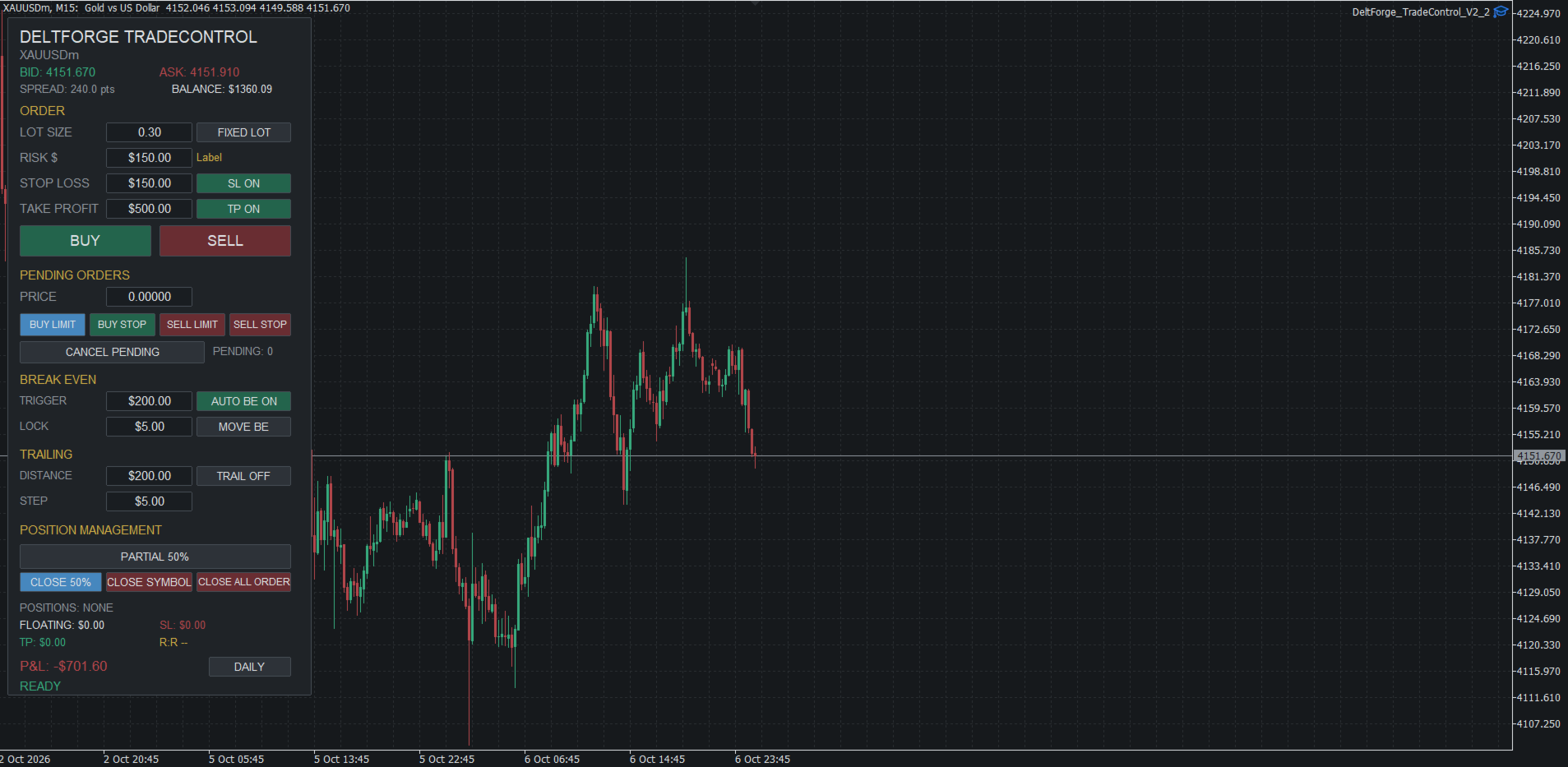
DeltForge TradeControl is a manual trading panel designed for discretionary traders who want to execute and manage positions directly from the chart.

The trader decides when and where to trade. TradeControl provides the execution, risk configuration and position-management controls.

Trading

TradeControl provides direct manual execution for:

  • Buy
  • Sell
  • Buy Limit
  • Buy Stop
  • Sell Limit
  • Sell Stop

The panel allows the trader to configure trade parameters directly on the chart.

Risk Management

Three operating modes are available:

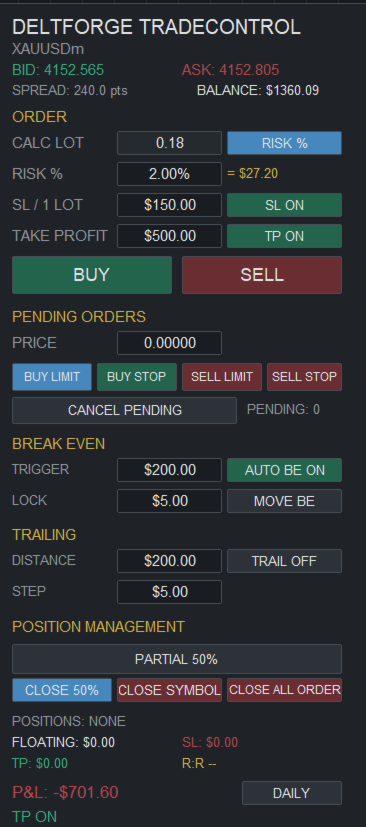
Fixed Lot

Enter the desired trading volume manually.

Risk $

Define the monetary amount to risk and allow the panel to calculate the required volume from the configured stop-loss distance.

Risk %

Define the percentage of account balance to risk.

For example, a 1% risk setting on a $10,000 balance corresponds to a $100 risk amount.

Stop Loss and Take Profit

Stop Loss and Take Profit can be configured using monetary values rather than requiring the trader to manually calculate price distances.

The panel converts the selected monetary values into the corresponding price levels for the selected volume.

Position Management

TradeControl provides direct management of open positions, including:

  • Break-even
  • Automatic break-even
  • Trailing stop
  • Partial close
  • Close current symbol positions
  • Close all open positions
  • Pending-order cancellation

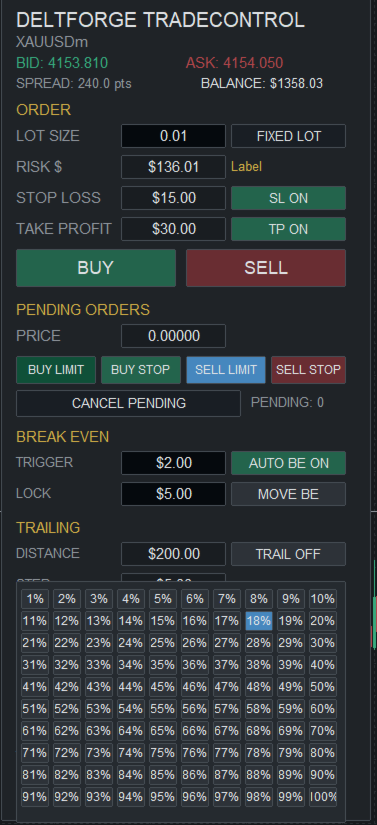
Partial Close

Select the desired percentage first, then execute the partial close separately.

The panel supports percentage-based position reduction while respecting the broker's available trading-volume rules.

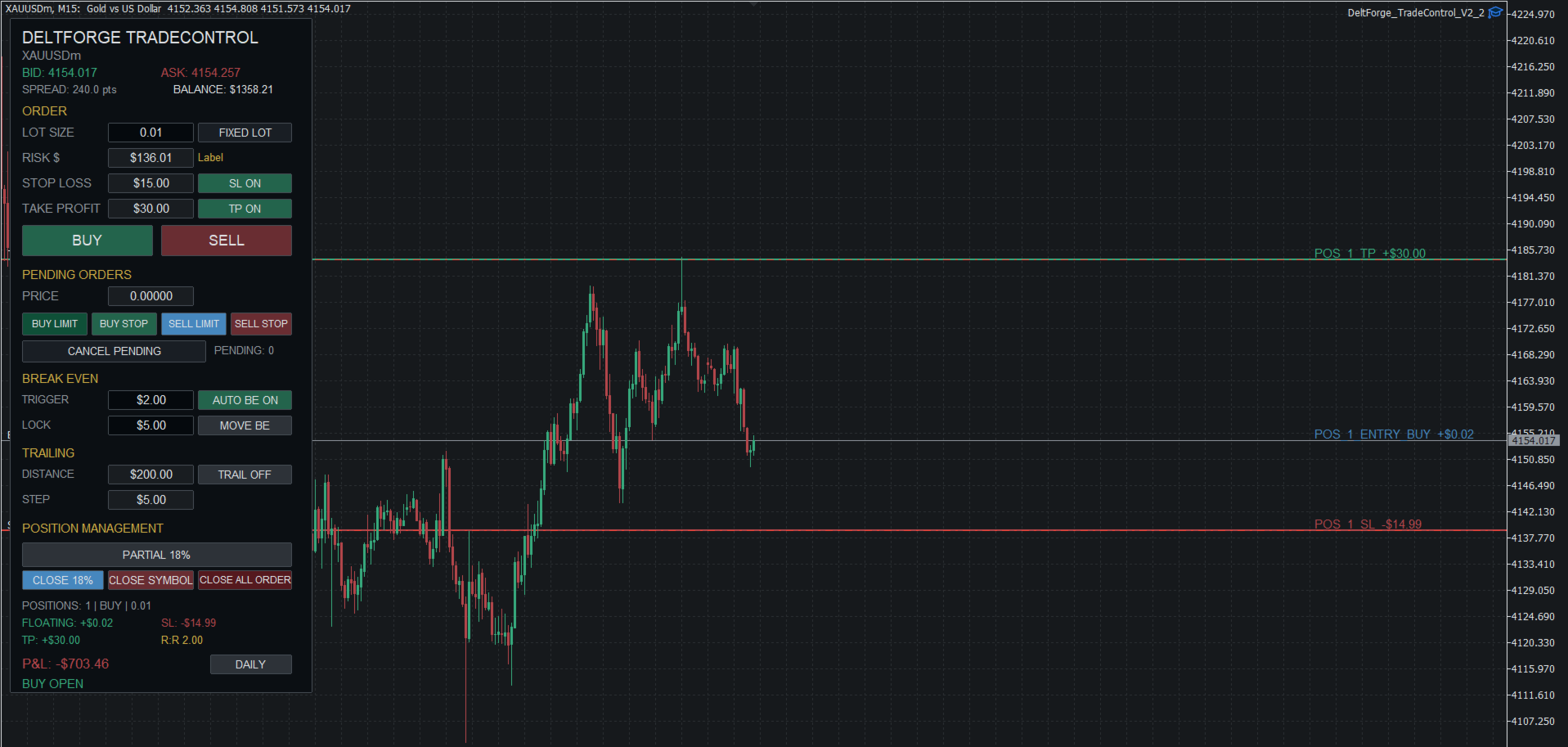
Visual Trade Levels

Open positions are displayed with visual:

  • Entry
  • Stop Loss
  • Take Profit

levels.

Stop Loss and Take Profit levels can be adjusted directly from the chart.

P&L Monitoring

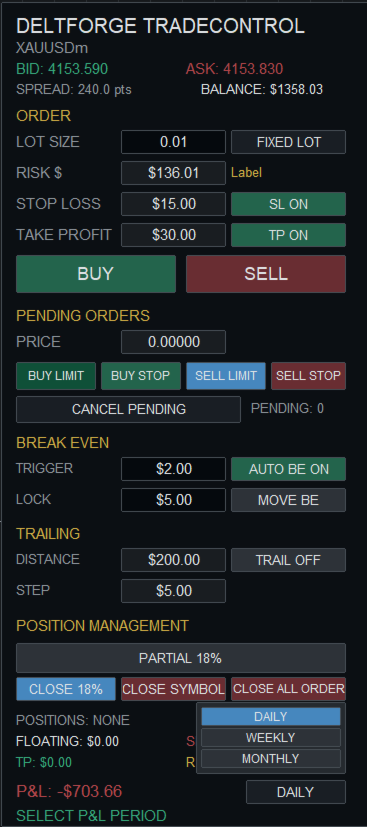
TradeControl separates current-symbol floating P&L from account-wide P&L.

Floating

Displays the floating result for the current chart symbol.

P&L

Displays the account-wide result, including positions across different symbols.

The P&L view supports:

  • Daily
  • Weekly
  • Monthly

periods.

Account Information

The panel also displays the current account balance so that risk settings can be evaluated without leaving the chart.

Multi-Symbol Workflow

TradeControl can be attached to different instruments and used as a manual execution and position-management interface.

The panel does not generate trading signals.

The trader remains responsible for the trading decision, position size and risk.

Core Features

  • Manual Buy and Sell execution
  • Fixed Lot mode
  • Risk $ mode
  • Risk % mode
  • USD-based Stop Loss
  • USD-based Take Profit
  • Manual Break Even
  • Automatic Break Even
  • Trailing Stop
  • Partial Close
  • Close Current Symbol
  • Close All Orders
  • Pending Order Management
  • Account-wide P&L
  • Daily P&L
  • Weekly P&L
  • Monthly P&L
  • Current-symbol Floating P&L
  • Account Balance display
  • Visual Entry / SL / TP levels
  • Draggable SL / TP levels
  • Multi-position management
  • Editable values directly on the chart

Usage instructions

Fixed Lot Mode

  1. Select FIXED LOT.
  2. Enter the desired lot size.
  3. Set SL and TP monetary values.
  4. Enable or disable SL/TP as required.
  5. Press BUY or SELL.

Risk $ Mode

  1. Select RISK $.
  2. Enter the desired monetary risk.
  3. Configure the SL amount/distance.
  4. TradeControl calculates the required volume.
  5. Review the displayed parameters.
  6. Execute the trade.

Risk % Mode

  1. Select RISK %.
  2. Enter the desired percentage.
  3. Review the calculated monetary risk.
  4. Configure SL/TP.
  5. Execute the trade.

Break Even

Configure the break-even trigger and lock value, then use the break-even control to move the position's stop.

Trailing

Configure the trailing distance and step, then enable trailing.

Partial Close

  1. Open the PARTIAL selector.
  2. Select the required percentage.
  3. Press CLOSE PARTIAL.

Selecting a percentage does not itself close the position.

Close Symbol

Press CLOSE SYMBOL to close open positions for the current chart symbol.

Close All Order

Press CLOSE ALL ORDER to close the open positions managed by the panel's account-level close function.

Pending Orders

Use the pending-order controls to select the order type, set the pending price and place or cancel pending orders.


Important

TradeControl is an execution and trade-management tool.

It does not guarantee profits and does not provide investment advice.

Broker minimum volume, volume increments, stop-distance requirements, trading permissions, symbol specifications and execution conditions may affect whether an order is accepted.

Always test the product on a demo account before using it with real funds.


Risk Disclaimer

DeltForge TradeControl is a manual trading execution and position-management tool.

It does not provide investment advice, trading signals or guaranteed trading results.

Trading financial markets involves substantial risk of loss. The trader is solely responsible for all trading decisions, position sizes, orders and account risk.

Actual order execution depends on the broker, trading account, symbol specifications, available liquidity, spread, market conditions, minimum volume, volume step, stop-distance requirements and other trading conditions.

The product should be tested on a demo account before being used with real funds.
Produits recommandés
RADAH Dashboard is an advanced performance analytics utility for MetaTrader 5, designed to transform your account history into a clear, organized and interactive trading performance overview. It does not open, modify or close trades. Its purpose is exclusively analytical, allowing you to review the performance of the entire account, a specific symbol, or a strategy identified by its Magic Number. Chart View Visualize your trading performance through an integrated balance/equity performance c

FREE
Protect your funded accounts and personal capital with military-grade precision. This utility continuously monitors your floating equity against your daily starting balance. The moment your custom drawdown threshold is breached, it instantly liquidates all open positions, deletes pending orders, and completely unloads from the chart. Stop revenge trading and never fail a prop firm evaluation due to a margin breach again.
FREE
Grid Trading EA is a semi-automated one-click trading EA for both Normal Trading and Grid/Martingale Trading . Normal Trading Simply click Buy or Sell directly from the chart. The EA will automatically manage trades by: Setting Stop Loss and Take Profit Managing Trailing Stop Grid / Martingale Trading (For Hedging Account Type Only) When Grid Trading mode is enabled, the EA will automatically open additional grid orders at specified distances while increasing the lot size based on your settings.
Position Sizer PROP
Lazaro Farias Do Espirito Santo
Position Sizer PROP Stop putting your challenge at risk because of wrong lot sizing, forgotten limits, or unclear exposure before sending the next order. In PROP Firm challenges, many traders do not fail only because of poor entries. Risk management mistakes also matter: oversized lots, poorly calculated risk, daily drawdown breaches, excessive exposure, or lack of control over account rules. After approval, the challenge continues. Keeping the account active requires discipline, operational co
This is a common, simple and easy to use but effective tool to manage trading risks for all traders. It also help trader places stop loss and take profit levels at the same time the order is filled. How to set the expert advisor's parameters to support your trading style? Lots size. Fixed lots size - For traders who prefered to trade with fixed lots size, they can input the lots size in 'User lots' menu in the expert advisor's properties. The input value should be from the 'Minimum Volume' to th
THIS RISK MANAGER WILL HELP YOU IN YOUR DAILLY TRADING, BY CALCULATING THE RISK AND THE LOTS, AND SET STOPLOSS, AND TAKE PROFIT, AND CAN CLOSE TRADES FOR YOU. RISK PERCENTAGE CASHRISK LOTS STOPLOSS TAKE PROFIT SELL AND BUY BUTTONS LOSE IN PROFIT BUTTON WICH WILL CLOSE ALL TRADES IN PROFIT SET BY THE USER CLOSE ON PROFIT BUTTON WICH WILL CLOSE ALL TRADES WHEN THE EQUALITY IS IN PROFIT SET BY THE USER AS WELL CLOSE TRADES BUTTON
Advanced Risk Return Tool
Felipe Monteiro Rodrigues
Advanced Risk Return Tool est un utilitaire visuel de planification et de gestion du Risque/Rendement pour MetaTrader 5. L'outil permet de créer et de gérer des structures d'Achat et de Vente directement sur le graphique, en positionnant visuellement les niveaux d'Entrée, d'Objectif et de Stop , tout en affichant le ratio Risque/Rendement, les distances en pips, le volume et les valeurs financières. Les structures sont interactives et peuvent être ajustées directement à la souris. Principales Fo
FREE
️ Trade Manager oneclick  ( Reverse Trade,  Partial Close,  Breakeven, Close All Running Trade )   control – Smart Manual Trade Control for MT5 Trade Manager oneclick control is a powerful yet lightweight trade management utility built for manual traders who want precise control over their open positions — directly from the MT5 chart. This EA does not open or close trades automatically based on any strategy. It simply provides one-click management tools to handle your running trades efficient
FREE
LT Round Numbers MT5
Thiago Duarte
4.86 (21)
Round numbers (or key levels) is an amazing strategy. These numbers are strong support and resistance levels. So what this indicator does is draw horizontal lines on the chart to help you find these levels. Configurations: Key levels in pips - distance between the lines. Color -   lines color. Style -   lines style. Width -  lines width. Display at background -  draw lines in front or back of candles. Selectable -  turn on or off the option to select the lines. Lines identification -  identifica
FREE
Slime Risk manager
Paul Odhiambo Ouma
Professional Risk Manager Dashboard.   An advanced position sizing and trade management assistant designed for manual traders. It calculates precise lot sizes based on your chosen risk parameters, helping you protect your account equity while aiming for consistent returns. The tool includes built-in psychological safeguards to encourage disciplined trading behavior, as well as daily profit monitoring to help you lock in gains. It serves as a powerful visual decision-support tool for implementing
Quick Trade Panel Pro
Nicolas Olivier Menetrey
5 (1)
Panel de trading one-click avec gestion automatique du lot et du risque Quick Trade Panel Pro est un panneau de trading intuitif conçu pour les traders qui veulent exécuter leurs ordres rapidement tout en gardant un contrôle total sur leur risque. Fonctionnalités principales Calcul automatique de la taille du lot en fonction d'un pourcentage de votre marge disponible Stop Loss configurable en points, appliqué automatiquement à chaque trade Lot verrouillé pendant une série de trades pour garanti
FREE
Barak Mega EA
Jorge Jovanny Hernandez Maldonado
BARAK MEGA EA  is a fully automated trading Expert Advisor designed for traders who demand total control, strategic flexibility, and advanced risk management within a single system. This EA functions as a true strategy builder , allowing you to combine multiple technical indicators and custom rules to adapt to any market, asset, or timeframe. Unlike traditional robots with fixed logic, BARAK MEGA EA features a modular architecture where every component can be independently enabled, disabled, and
FREE
Overtrading Stopper MT5 1. Overview Overtrading Stopper MT5 is a MetaTrader 5 utility EA that helps discretionary traders follow their own trading rules. You can set rules in advance, such as: how many times you may trade today, how many consecutive losses should make you stop, how many minutes to pause after a loss, and how to avoid entering several trades in rapid succession. When a configured limit or condition is reached, the EA displays the reason for the protection state on the chart. Depe
FREE
ConsistencyGuard
Vanessa Cristina Ribeiro Dos Anjos
Version 7.04 Mise à jour majeure axée sur le renforcement de la discipline en day trading et la protection du compte. • Mode Post-Session Review avec une durée configurable de 0 à 60 minutes. • Après avoir effectué le nombre d'opérations autorisé, le trader peut laisser MetaTrader 5 ouvert afin d'analyser les graphiques, prendre des captures d'écran et compléter son journal de trading. • Toute tentative d'effectuer une nouvelle opération après avoir atteint la limite quotidienne déclenche la pro
FREE
Swing Points Pro v2 – Enhanced Highs and Lows Indicator with Push Notifications Overview : The Swing Points Pro v2 indicator is a powerful and reliable tool designed to help traders identify critical swing highs and lows on their charts. Whether you trade Forex, Stocks, or Crypto, this updated version provides advanced features to enhance your market analysis, with real-time push notifications for key market movements. Key Features : Accurate Swing Identification : Pinpoints major swing highs a
FREE
Introducing the  Precision Data Extractor: ATR , an MQL5 utility crafted for traders, analysts and quants who need accurate historical data to build robust datasets. This tool lets you selectively pull historical price and indicator data—  Average True Range  ( ATR )—from  multiple timeframes  and  periods , then stores it in a  CSV  format, making it easy to feed into  machine learning models ,  trading algorithms , or  in-depth market analyses . Compatible with  Forex ,  Stocks , and  Commodit
NHK Local Time Scale NHK Local Time Scale displays your PC/local time directly on the MT5 chart , alongside the broker's native chart time. The trader can easily compare both time zones for any candle. Benefits for Traders: Quickly convert Broker Time ↔ Local/PC Time . Helps accurately set News Stop/News Filter times. Makes London, New York, Asian and other trading sessions easier to identify in your local time. Helps verify that EA session and news time settings are correct. Reduces mistakes ca
FREE
EA Agulhada do Didi
Devscode Desenvolvimento de Softwares LTDA
Cet Expert Advisor a été développé pour automatiser les opérations de trading sur MetaTrader 5 en utilisant la logique de l’indicateur Didi Index comme base pour l’identification des points d’entrée. L’EA exécute toutes les opérations directement sur le graphique de manière automatique, selon les règles et paramètres définis par l’utilisateur. Le concept du robot repose sur une logique d’entrée et de gestion objective, permettant au trader de suivre clairement l’exécution des opérations, sans in
FREE
Voici NAS100 Auto SL and TP Maker pour MT5 : Ne manquez plus jamais le réglage du StopLoss et du TakeProfit avec notre NAS100 Auto SL and TP Maker, un assistant indispensable pour les traders qui naviguent sur le marché du Nasdaq 100 sur MetaTrader 5. Cet outil est conçu pour ceux qui recherchent une solution transparente pour automatiser la gestion des niveaux de StopLoss et TakeProfit. Caractéristiques principales : Automatisation sans effort : Surveille automatiquement les transactions sur
FREE
Gerenciador de ordens manuais
Rodrigo Oliveira Malaquias
Robot Manual Order Manager is a tool that allows you to automatically include Stop Loss, Breakeven, Take Profit and partials in open trades. Be it a market order or a limit order. Besides, it automatically conducts your trade, moving your stop or ending trades, according to the parameters you choose. To make your operations more effective, the Manual Orders Manager Robot has several indicators that can be configured to work on your trade. Among the options you can count on the features: Conducti
XBOOT BOLETA PRO Professional Manual Trading Panel for MetaTrader 5 XBOOT Boleta Pro is a complete trading panel designed for traders who execute manual trades and want greater speed, organization, and control during every trading session. More than a standard Buy and Sell panel, XBOOT Boleta Pro combines powerful trading tools into a single interface, helping traders analyze the market, manage risk, execute orders, and monitor trading performance without leaving the chart. Its purpose is to sim
AlgoRadar
Stephen J Martret
5 (4)
AlgoRadar is an on-chart analytics dashboard for MT5 that aggregates Expert Advisor performance across multiple accounts, brokers, and platforms, including both MT4 and MT5 data, into a single live view on your MT5 chart. All analysis runs from the chart interface, with no external applications or manual report processing required. EA Analysis and Ranking For traders running multiple Expert Advisors, AlgoRadar provides a consolidated view of each EA's performance across accounts. Active EAs a
================================================================ MATRIX CONDITION MONITOR Live Trade Condition Panel for MetaTrader 5 Fully Automatic -- Works with ALL Matrix EAs ================================================================ NEVER MISS A TRADE SETUP AGAIN Matrix Condition Monitor is a free utility that attaches to any chart and automatically checks all 10 trade conditions in real time -- showing you exactly why a trade will or will not open, and alerting you the moment ever
FREE
GOM Trade Manager
Wannapach Chinnaprapa
GOM Trade Manager helps you execute trades the way you want it. Works on all instruments Forex, Commodities, & Crypto. It helps you with lot calculations, spread addition and balance calculations so you can just focus on actual trading. For full automatic planned management, stackable triggers and spread widening protection >> check out GOM Trade Manager Pro . ------------------------------------------NOTABLE FEATURES------------------------------------------ You set everything based on bid
FREE
Apex Point
Marco Engstermann
Apex Point is a trend-following indicator for MetaTrader 5, transforming complex market data into signals for traders. It displays blue dots for uptrends, red dots for downtrends, and yellow crosses at potential reversals, helping users identify momentum shifts quickly. Key features include a confirmation system requiring multiple bars (default: 3) to validate changes, reducing false signals; dynamic ATR-based offsets for adaptive trailing, with instant ratcheting in the trend direction and smo
FREE
This tool will assist all those who trade the forex market manually. It will help them in a sense that it will calculate the required margin in order to initiate a trade. This calculator is so simple to use that a  that the user only inputs only 2 pieces of information. which are   Price   and   Lot size   the trader wishes to take. All other information needed to calculate the calculator will work it out by itself. It will run or calculate  on the current opened chart. As the name suggest it's
Equity Master Stop v2 MT5
Frank William Jr Colbert
Trading tool combining a sophisticated equity stop-loss, dynamic take-profit management (Breakeven & Trailing), and symbol-group-based closing logic. It is a complete risk management and trade supervision tool. Features: All features of `Equity Master Stop v1` (floating profit/loss limits, exit protection, skip hours). Take-Profit Override: Can force a TP on any order to lock in a `MAX_FLOATING_PROFIT`. Step Breakeven: Locks in increasing amounts of profit as a trade moves favorably (e.g., aft
Account Monitor Pro — Your Ultimate Trade Statistics Hub Account Monitor Pro is a professional information dashboard designed for traders who combine Expert Advisors (EAs) and manual trading. The indicator separates statistics in real-time based on your Magic Number, allowing you to clearly see who is driving the profit: the algorithm or yourself. Key Features: Split Monitoring: Instant separation of "Robot" positions (by Magic Number) and "Manual" trades. Multi-language Support: 11 languages in
FREE
QuickTrade Panel – Fast Execution & Smart Risk Management The QuickTrade Panel is a professional trading utility for MetaTrader 5 that makes order execution faster, safer, and easier. It allows traders to place market and pending orders directly from the chart while automatically managing position size based on their risk settings. Key Features Interactive On-Chart Panel: Easily adjust Lot Size, Risk %, Stop Loss (SL), Take Profit (TP), and Pending Order Distance without opening EA settings. Sma
Telegram2MT5 Signal Copier — Automatisez la copie de vos signaux Telegram directement dans MetaTrader 5 Avec Telegram2MT5 Signal Copier, chaque signal que vous recevez sur Telegram est exécuté instantanément et automatiquement sur votre compte MetaTrader 5. Rapide, fiable et entièrement personnalisable. Téléchargez le fichier Windows Bridge APP et le tutoriel   Le fichier bridge est nécessaire pour connecter le panneau Web local à l’EA MT5  Compatible avec Windows 10 & Windows 11 — 64 bits — ai
Les acheteurs de ce produit ont également acheté
Trade Assistant MT5
Evgeniy Kravchenko
4.43 (216)
It helps to calculate the risk per trade, the easy installation of a new order, order management with partial closing functions, trailing stop of 7 types and other useful functions. Additional materials and instructions Installation instructions - Application instructions - Trial version of the application for a demo account Line function -   shows on the chart the Opening line, Stop Loss, Take Profit. With this function it is easy to set a new order and see its additional characteristics bef
Bienvenue sur Trade Manager EA, l’outil ultime de gestion des risques conçu pour rendre le trading plus intuitif, précis et efficace. Ce n’est pas seulement un outil d’exécution d’ordres ; c’est une solution complète pour la planification des trades, la gestion des positions et le contrôle des risques. Que vous soyez débutant, trader expérimenté ou scalpeur ayant besoin d’une exécution rapide, Trade Manager EA s’adapte à vos besoins, offrant une flexibilité sur tous les marchés, des devises et i
Local Trade Copier EA MT5
Juvenille Emperor Limited
4.94 (149)
Local Trade Copier EA MT5 est un copieur de trades rapide et flexible permettant de copier et de gérer des trades entre plusieurs comptes MetaTrader 5 sur le même ordinateur Windows ou Windows VPS. Il combine la synchronisation locale des trades avec des contrôles côté Receiver pour la taille des lots, la gestion du risque, le filtrage des trades, le mappage des symboles, la gestion des trades et la protection du compte. Configurez vos terminaux Transmitter et Receiver en environ 1 minute et co
Telegram to MT5 Multi-Channel Copier   copie automatiquement les signaux de trading de vos canaux Telegram et Discord directement vers MetaTrader 5. Pas de bots, pas d'extensions de navigateur, pas de copie manuelle. Un signal arrive sur Telegram ou Discord et l'EA ouvre le trade dans votre terminal en quelques secondes. Et avant de copier un canal, le backtester intégré vous montre ce que ce canal aurait fait sur votre compte. Le produit comprend deux composants : une application Windows qui éc
================================================================================ POC BREAKOUT - V20.72. Full Professional Grade Toolkit ================================================================================ POC Breakout is a full MetaTrader 5 trading dashboard for discretionary traders who want breakout signals, Point of Control (POC) context, volume profiles, order flow, market structure, news, alerts, and advanced trade planning in one professional workspace. Attached directly to you
TradePanel MT5
Alfiya Fazylova
4.88 (170)
Trade Panel est un assistant commercial multifonction. L'application contient plus de 50 fonctions de trading pour le trading manuel et permet d'automatiser la plupart des tâches commerciales. Instructions d'utilisation : https://www.mql5.com/fr/blogs/post/762589 Version d'essai de l'application pour un compte démo : https://www.mql5.com/fr/blogs/post/762644 Comment installer l'application : https://www.mql5.com/fr/blogs/post/762645 Comment tester l'application en mode visuel : https://www.mql5.
Copiez les signaux Telegram avec vos propres règles de trading Telegram to MT5 Signal Trader copie automatiquement les signaux de trading au format texte provenant de canaux et de groupes Telegram publics et privés vers MetaTrader 5. Gérez plusieurs fournisseurs et comptes MT5 depuis une seule application de bureau, avec des paramètres de risque et de trading propres à chaque fournisseur . Aucun bot Telegram ni configuration d'API n'est nécessaire pour copier les signaux. Connectez-vous simpleme
Power Candles Strategy Scanner - Outil de recherche de configurations multi-symboles à optimisation automatique Le Power Candles Strategy Scanner utilise le même moteur d'auto-optimisation que celui qui alimente l'indicateur Power Candles, pour chaque symbole de votre Market Watch, en parallèle. Un panneau vous indique quels symboles sont statistiquement négociables à l'instant, quelle stratégie est la plus performante pour chacun, la paire Stop Loss / Take Profit optimale, et vous alerte dès qu
Grid Manual MT5
Alfiya Fazylova
4.73 (22)
Grid Manual est un panneau de trading permettant de travailler avec une grille d'ordres. L'utilitaire est universel, possède des paramètres flexibles et une interface intuitive. Il fonctionne avec une grille d'ordres non seulement dans le sens des pertes, mais aussi dans le sens de l'augmentation des profits. Le commerçant n'a pas besoin de créer et de maintenir une grille d'ordres, l'utilitaire le fera. Il suffit d'ouvrir une ordre et "Grid Manual" créera automatiquement une grille de ordres po
MT5 to Telegram Signal Provider est un utilitaire facile à utiliser et entièrement personnalisable qui permet l'envoi de signaux spécifiés vers un chat, un canal ou un groupe Telegram, transformant ainsi votre compte en fournisseur de signaux. Contrairement à la plupart des produits concurrents, il n'utilise pas d'importations DLL. [ Démonstration ] [ Manuel ] [ Version MT4 ] [ Version Discord ] [ Canal Telegram ]  New: [ Telegram To MT5 ] Configuration Un guide utilisateur étape par étape est
Welcome to ENTRY IN THE ZONE with SMC MULTI TIMEFRAME SPECIAL BENEFIT / FOR OUR MQL5 CUSTOMERS FREE ACCESS TO THE NEW TOOL  — COMING SOON — Learn more on our official website  : https://www.fableedge.net Entry In The Zone with SMC Multi Timeframe is a real-time market analysis tool based on Smart Money Concepts (SMC), designed to analyze market structure, price direction, and key trading zones. It supports both Single-Timeframe and Multi-Timeframe Analysis, providing a clearer view of overall ma
Footprint Chart Pro — Professional OrderFlow EA for MetaTrader 5 Version 6.34 | Professional tool for real traders | Institutional-Grade Visualization DEMO USERS - PLEASE SELECT EVERY TICK / REAL TICK WHEN TESTING AND YOU HAVE DOWNLOADED HISTORICAL DATA. IF YOU SEE A WAITING SCREEN AND IT IS NOT DOWNLOADING, IT MEANS YOU HAVE LOW HISTORICAL DATA. TRY 1 MIN AND 5 MIN FIRST ON 1 DAY DATA. ONE DAY DATA SHOULD BE THE NEWEST AND MOST CURRENT DATE. PLEASE WAIT UNTIL THE MARKET HAS ROLLED OVER PERIOD.
Signal Trading View to MT5 Pro
Mirel Daniel Gheonu
4.5 (2)
Signal TradingView to MT5 Pro Automator Exécution professionnelle instantanée entre TradingView et MetaTrader 5 Automatisez votre stratégie de trading avec le pont de communication le plus robuste entre les alertes TradingView et l'exécution réelle sur MT5. Conçu pour les traders qui exigent vitesse, flexibilité et une gestion des risques impeccable, cet Expert Advisor transforme tout message d'alerte en un ordre au marché ou à cours limité précis. POINTS FORTS ET AVANTAGES Moteur d'analyse univ
Copy your MT5 trades to Interactive Brokers You keep using MT5. Every order you open or close is sent to your IB account. In real time. No coding. No changes to your strategy or EA. Try it first Rent 1 month: $30. Test on a live or paper account. What it does Real-time copying: same direction, reverse, or one side only. Map any MT5 symbol to any IB symbol. Set a lot ratio for each. Forex, Futures, Stocks, CFDs, Metals and Crypto. Position sync: both accounts checked, any difference fixed. Optio
Exp COPYLOT CLIENT for MT5
Vladislav Andruschenko
3.97 (35)
Copieur professionnel de trades pour MetaTrader 5 Un copieur de trades rapide, professionnel et fiable pour MetaTrader . COPYLOT permet de copier des trades Forex entre les terminaux MT4 et MT5 avec prise en charge des comptes Hedge et Netting . La version MT5 de COPYLOT prend en charge : - MT5 Hedge → MT5 Hedge - MT5 Hedge → MT5 Netting - MT5 Netting → MT5 Hedge - MT5 Netting → MT5 Netting - MT4 → MT5 Hedge - MT4 → MT5 Netting Version MT4 Description complète + DEMO + PDF Comment acheter Comme
Trading Chaos Expert
Hennadii Stanilevych
5 (11)
This software has no equals in the world and represents a universal trade "console" covering trading signals, automated market entry, setting of Stop Loss and Take Profit, as well as Trailing Profit for multiple trades at the same time in a single open window. Intuitive control of the Expert Advisor in "three clicks" ensures a comprehensive use of all its functions on different computers, including tablets PCs. Interacting with additional signal indicators that mark the chart to give a real mark
Anchor Trade Manager
Kalinskie Gilliam
5 (9)
Your EAs cannot see each other, but Anchor can. Anchor gives you one place to coordinate your EAs, manage risk, and decide when trading is allowed. It works alongside the trading bots you already use without any changes to them. The Problem One EA opens a trade. Then another starts trading. The next thing you know, you wake up to multiple grids built across your account. Each EA may be doing exactly what it was designed to do, but together they can place far more risk on your account than you in
Farmed Hedge Yield Farming | All Markets (Manual - Hybrid - Semi/Automated EA) VERIFIED TRADING RESULTS - Farmed Hedge Yield Axi Copy:  https://www.mql5.com/en/signals/2356376 - Farmed Hedge Yield Exn Copy:   https://www.mql5.com/en/signals/2356404 - Farmed Hedge Yield V Copy:  https://www.mql5.com/en/signals/2357156 IMPORTANT NOTICE: FarmedHedge is a MANUAL-FOCUSED TRADING UTILITY ,not a fully automated EA. Results shown on this Signal include manual trades and overall strategic management.
The News Filter MT5
Leolouiski Gan
4.78 (23)
Ce produit filtre tous les conseillers experts et les graphiques manuels pendant les heures de publication des actualités, de sorte que vous n'avez pas à vous soucier des pics de prix soudains qui pourraient détruire vos configurations de trading manuelles ou les transactions entrées par d'autres conseillers experts. Ce produit est également livré avec un système de gestion des ordres complet qui peut gérer vos positions ouvertes et vos ordres en attente avant la publication de toute actualité.
Panneau de trading pour MetaTrader 5 — contrôle professionnel du trading en un clic depuis le graphique et le clavier Un panneau de trading avancé conçu pour les traders actifs, afin d’ouvrir, gérer et clôturer des positions bien plus rapidement qu’avec l’interface standard de MetaTrader. Cette solution s’adresse à ceux qui veulent contrôler positions, ordres en attente, profit global et exécution depuis un seul espace de travail professionnel. Il ne s’agit pas d’un simple utilitaire. C’est un
HINN MagicEntry Extra
ALGOFLOW OÜ
4.74 (19)
HINN MAGIC ENTRY – the ultimate tool for entry and position management! SIMPLE. FASTEST. INTUITIVE. MAX AUTOMATED. Place orders by selecting a level directly on the chart! full description   ::  demo-version  :: 60-sec-video-description Key features: - Market, limit, and pending orders - Automatic lot size calculation - Automatic spread and commission accounting - Unlimited partitial take-profits  - Breakeven and trailing stop-loss and take-profit  functions - Invalidation leves - Intuitive, a
Un seul achat. Tous mes indicateurs MT4 et MT5, disponibles aujourd’hui et publiés à l’avenir, sans frais supplémentaires. Contactez-moi après l’achat pour connaître la procédure de réception. Il est prévu d’augmenter le prix de 50$ toutes les 10 ventes, jusqu’à 999$. Le prix du Market au moment du paiement fait foi. Gardez l’indicateur auquel vous faites confiance. Automatisez les tâches qui l’entourent. Votre signal. Vos règles. Votre exécution. Vous utilisez déjà un indicateur MT5 fiable, ma
Trade Copier Ultimate
Janitha Sandaruwan Amaradasa Wickramasingha Arachchilage
5 (5)
Trade Copier Ultimate - Telegram to MT5 Signal Copier Trade Copier Ultimate automatically copies Telegram trading signals into MetaTrader 5. The EA can read signal messages, detect the symbol, order type, entry price, Stop Loss, Take Profit levels and selected update commands, then execute or manage the trade in MT5 using your lot and risk settings. It is more than a basic Telegram to MT5 copier. TCU also supports Bot API and user-account Bridge workflows, Discord signal routing, local MT5 to MT
Trade Indicator Assistant   is a powerful MT5 utility designed to turn indicators into automated trading systems. Its main feature is the ability to automatically detect an indicator’s   BUY and SELL signal buffers , without requiring you to know the buffer numbers, search through indicator settings, or modify the indicator source code. Bonus Indicator:   After purchasing Trade Indicator Assistant, contact me to receive   Trade Signal Pro   completely free as a bonus indicator. [Download Demo V
EA Overfitter
Stephen J Martret
5 (1)
That backtest looks great. But will it still be making money tomorrow, next week, next month? EA Overfitter re-runs your EA on 100 price histories it has never seen. One score tells you if the edge is real. A backtest tells you what an EA did on one price history — the one that happened to occur. What you cannot tell from it is how much of that result was the strategy and how much was the particular path. EA Overfitter answers that. It builds up to 100 synthetic price histories your EA has n
Trade Manager DaneTrades
Levi Dane Benjamin
4.23 (30)
Trade Manager pour vous aider à entrer et sortir rapidement des transactions tout en calculant automatiquement votre risque. Y compris des fonctionnalités pour vous aider à éviter le sur-trading, le trading de vengeance et le trading émotionnel. Les transactions peuvent être gérées automatiquement et les mesures de performances du compte peuvent être visualisées dans un graphique. Ces fonctionnalités rendent ce panneau idéal pour tous les traders manuels et contribuent à améliorer la plateforme
Quant Panel
Kevin Craig E Gittins
QUANT PANEL Independent per-algo analytics, protected MT5 history and professional PDF reporting Quant Panel is built for traders who run several Expert Advisors or strategies on one MT5 account and need to know how each algo is actually performing. Instead of treating the terminal as one combined portfolio, Quant Panel groups closed positions by EA comment or magic number and calculates every strategy independently. It gives you one clear dashboard for comparing algos, finding weak systems and
YuClusters
Yury Kulikov
4.93 (43)
Attention: You can view the program operation in the free version  YuClusters DEMO .  YuClusters is a professional market analysis system. The trader has unique opportunities to analyze the flow of orders, trade volumes, price movements using various charts, profiles, indicators, and graphical objects. YuClusters operates on data based on Time&Sales or ticks information, depending on what is available in the quotes of a financial instrument. YuClusters allows you to build graphs by combining da
Premium Trade Manager - Le panneau de trading avec un coach intégré Premium Trade Manager intègre un coach de trading directement dans votre graphique, avec un moteur d'exécution complet en dessous. Configurez le trade comme vous le faites toujours, puis laissez Max, votre coach de trading IA, analyser ce setup exact par rapport à votre compte en direct et vous donner un verdict clair avant de vous engager : le stop est-il discipliné, le risque est-il raisonnable, une publication à fort impact e
Astro Trade MT5
Indra Maulana
5 (8)
25% discount on the release of the tool: only for the next 3 buyers Send a message to receive a demo version. AstroTrade Trading Assistant AstroTrade is a comprehensive multi-functional trading utility developed for the MetaTrader 5 platform. It integrates essential tools for trade execution, risk management, and technical monitoring into a single unified interface. The application is designed to assist traders in managing their daily operations through a visual and structured environment. Vi
Filtrer:
Aucun avis
Répondre à l'avis