Trade Template Panel MT5

Trade Template Panel MT5

Spend less time entering order settings and more time assessing your trade.

Developed by an active trader, this panel is designed to make manual trading simpler and less repetitive. If you regularly use the same trade settings, entering your stop loss, take profit and volume for every order adds work and creates opportunities for input mistakes.

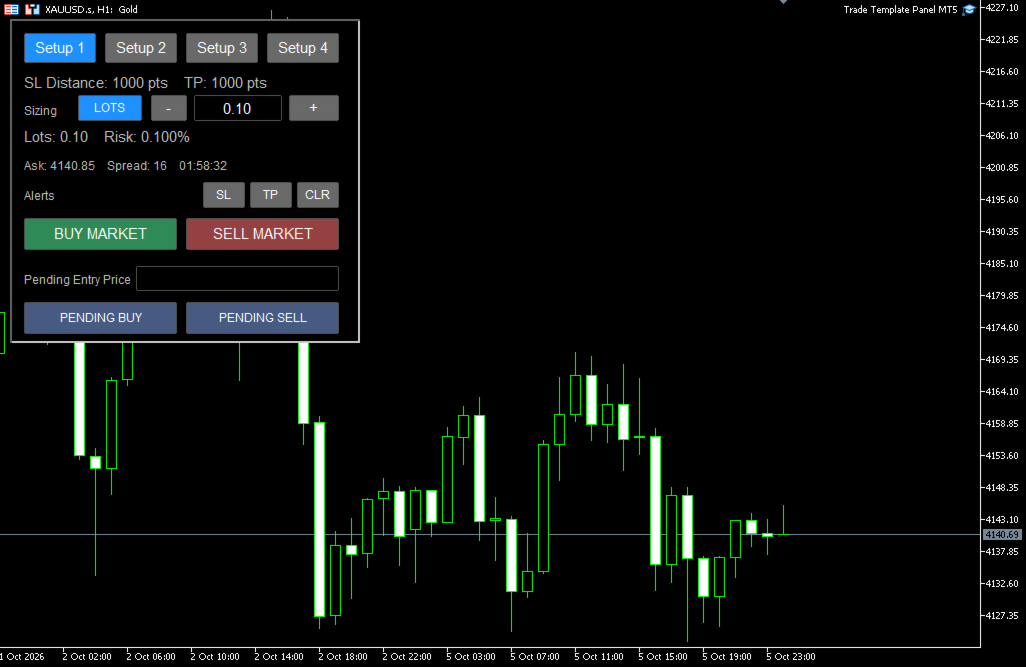
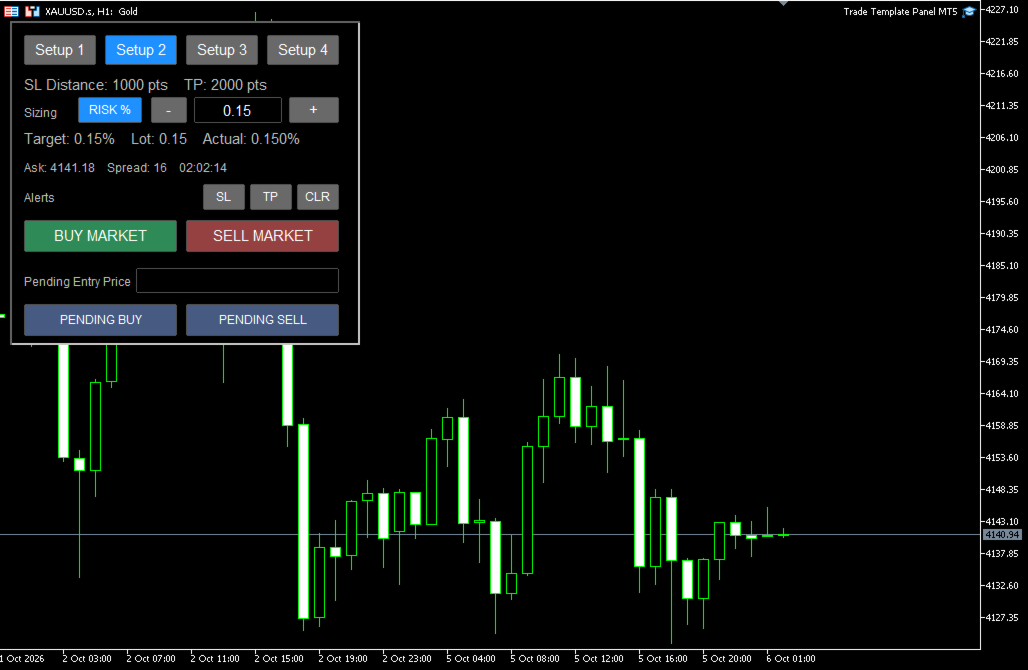
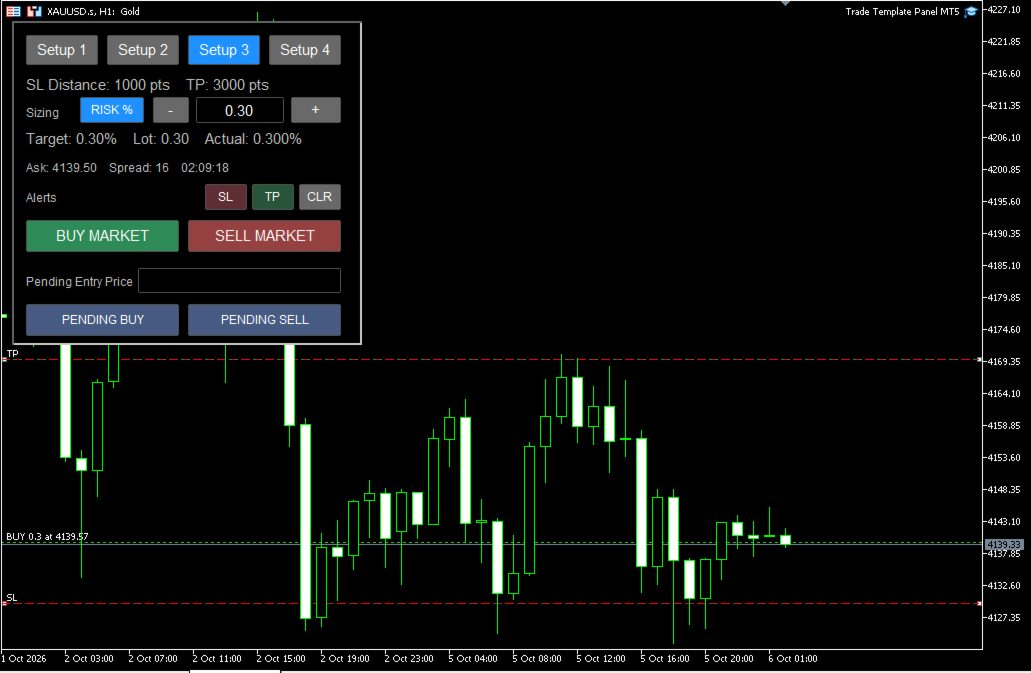
Trade Template Panel MT5 puts four customisable trade setups directly on your chart. Configure your usual settings, select the setup you need, and submit a market or pending order with calculated SL and TP levels.

You choose the entry, direction and risk. The panel does not generate signals or open trades automatically.


Quick User Guide — setup, sizing, orders and alerts

How it helps

  • Reduce repetitive entry: Reuse configured stop-loss, take-profit and sizing settings across trades.
  • Switch quickly between setups: Give each template its own label, target and sizing defaults.
  • Simplify position sizing: Choose fixed lots or let the panel calculate volume from an account-balance percentage-risk target.
  • Check estimated risk: See the calculated risk associated with the selected volume and stop distance.
  • Simplify pending orders: Enter your desired entry price and choose buy or sell. The panel selects the appropriate Stop or Limit order type.
  • Add execution checks: Use spread protection, duplicate-click protection and optional entry-distance restrictions.
  • Keep controls on the chart: Select templates, adjust sizing and manage price alerts from the panel.

Main features

Four reusable trade templates

Each setup has its own button label, stop-loss distance, take-profit settings and optional risk or lot-size override.

Use them for different targets, trading methods or risk levels. Selecting a setup restores its configured sizing default.

Fixed lots or percentage-risk sizing

Switch between LOTS and RISK % directly on the panel.

Percentage-risk sizing uses account balance, the selected stop distance, symbol tick information and broker volume restrictions. The panel displays requested and estimated actual risk.

Sizing can be adjusted temporarily using the + and − buttons or by editing the value directly.

Market and pending orders

Submit BUY MARKET or SELL MARKET orders using the selected template.

For pending orders, enter an absolute entry price and select Pending Buy or Pending Sell:

  • Buy above the current Ask: Buy Stop.
  • Buy below the current Ask: Buy Limit.
  • Sell below the current Bid: Sell Stop.
  • Sell above the current Bid: Sell Limit.

Pending SL and TP levels are calculated from the pending entry price.

Execution protection

Available controls include a market-order spread filter, an order cooldown, an optional existing-position restriction and a weekly cutoff for new submissions.

An optional reference-price feature measures how far a proposed entry is from your chosen reference in R. It can block entries beyond a configured adverse distance while allowing better prices.

Movable price alerts

Use a shared pair of SL and TP alert lines, with optional terminal popups, mobile push notifications and Journal messages.

The lines can be used independently as manual chart alerts or placed using live-position SL/TP levels.

Getting started

  1. Attach the panel to the required symbol chart and enable Algo Trading.
  2. Configure your trade templates and sizing defaults in EA Inputs.
  3. Select a template and choose LOTS or RISK %.
  4. Check the sizing, SL/TP settings and broker trading conditions.
  5. Submit a market order, or enter a Pending Entry Price and submit a pending order.

EA Inputs hold your configured defaults. Changes made directly on the panel are temporary for the current session. Selecting a template reloads its sizing default.

Input parameters

Sizing Defaults

  • Default Sizing Mode: Start in Fixed Lots or Risk Percent mode.
  • Default Risk %: Account-balance risk target in percentage mode. A value of 0.10 means 0.10%.
  • Default Fixed Lots: Starting volume in fixed-lot mode.
  • Risk +/- Step %: Adjustment per button press in percentage mode.
  • Lot +/- Step: Adjustment per button press in fixed-lot mode.
  • Actual Risk Decimal Places: Precision of the calculated risk display.
  • Strict Risk Sizing: Round percentage-based volume down where necessary to keep calculated entry-to-stop risk within the target. When disabled, a small built-in overshoot tolerance may permit a nearer valid volume.
  • Minimum Lot Handling: Block a trade below the broker minimum volume, or use the minimum with a warning. Using the minimum can exceed the requested risk.

Take Profit Mode

  • Take Profit Mode: Calculate TP as an R multiple of the configured SL distance, or use fixed TP points.

Setup 1–4

Each setup contains:

  • Enable Setup: Make the template available.
  • Setup Button Label: Text displayed on its button.
  • Stop Loss (points): SL distance in broker points.
  • TP (R multiple): Target used in R Multiple mode.
  • TP (points): Target distance used in Fixed Points mode.
  • Risk Override % (0 = default): Setup-specific percentage risk; 0 uses Default Risk %.
  • Lot Override (0 = default): Setup-specific fixed volume; 0 uses Default Fixed Lots.
  • Order Tag: Identifier optionally appended to the order comment.

The initial templates use a 1000-point SL with targets of 1R, 2R, 3R and 4R. Fixed-point TP defaults are 1000, 2000, 3000 and 4000 points.

These are example settings. Adjust them for your instrument, broker and trading method.

Execution Protection

  • Slippage / Max Deviation (points): Requested deviation for market execution; broker execution rules apply.
  • Maximum Spread (points, 0 = off): Block market-order submissions above this spread. This filter does not block pending-order placement.
  • Use Duplicate-Click Protection: Enable the order cooldown.
  • Order Cooldown (seconds): Interval between order submission attempts.
  • Block New Order if Position Exists: Block new submissions when any live position exists on the current symbol.

SL / TP Alerts

  • Enable SL/TP Alert Lines: Enable the chart alert feature.
  • Auto-Place Alert Lines: Allow placement from live-position SL/TP levels. Pending-order placement alone does not place these lines.
  • Enable Alerts After Entry: Enable alerts when a new live position is detected.
  • Disable Triggered Alert: Switch off an alert after it triggers.
  • Disable Both Alerts After Trigger: Switch off both alerts when either triggers.
  • Clear Alert Lines When No Position: Hide and disable the lines when no live position remains.
  • Select Alert Line When Created: Select a new line for dragging.
  • Alert Once Per Line: Prevent repeated notifications until the line is reset or moved.
  • Alert Line Width: Line thickness.
  • SL Alert Line Color: SL alert colour.
  • TP Alert Line Color: TP alert colour.
  • Popup Alert: Enable terminal popups.
  • Push Notification: Enable mobile notifications using your MT5 notification settings.
  • Print Alert to Journal: Write triggered alerts to the terminal log.

Advanced — Trading Rules

  • Enable New-Trade Cutoff: Block new market and pending-order submissions after the configured weekly cutoff.
  • Cutoff Day: Day the cutoff begins.
  • Cutoff Hour (server time): Broker-server hour, from 0 to 23.

The cutoff does not close positions, cancel existing pending orders or prevent those pending orders from triggering.

Advanced — Entry Distance

  • Enable Entry Distance Feature: Enable calculations against a reference price set on the panel.
  • Maximum Entry Distance (R): Maximum adverse distance from the reference, measured using the selected template’s configured SL distance. Better entries are allowed.
  • Block Orders Outside Max Distance: Reject submissions beyond the limit when a reference price is set.
  • Show Entry Distance Controls: Display the reference-price controls.

Panel Display

  • Show Server Time: Display broker-server time.
  • Use 1-Second Panel Refresh: Refresh displayed information once per second. Alert monitoring operates independently when enabled.
  • Spread Display Multiplier: Scale the displayed spread only; it does not change the spread filter.

Order Identification

  • Magic Number: Identifier assigned to panel orders.
  • Order Comment Prefix: Starting text for order comments.
  • Add Setup Tag to Order Comment: Append the selected template’s tag.

Panel Appearance

  • Panel X Position: Horizontal chart position.
  • Panel Y Position: Vertical chart position.
  • General Button Font Size: Normal button text size.
  • Main Info Font Size: Main information text size.
  • Small Info Font Size: Smaller status text size.
  • Buy / Sell Button Font Size: Market-order button text size.

Important operating notes

Broker points: All SL/TP distances use broker points, not universal pip values. The same point setting can represent very different price distances across symbols.

Price alignment and sizing: Order prices are aligned to the symbol’s permitted tick size. Percentage-risk sizing uses the final aligned entry-to-stop distance for submission. The panel preview can differ slightly from the submitted volume where alignment changes that distance.

Risk estimates: Calculations use broker-provided symbol information. Commission, swaps, slippage, gaps and execution conditions can cause actual losses to differ from calculated risk. Strict Risk Sizing does not guarantee a maximum realised loss.

Chart alerts: Moving or clearing alert lines does not modify a position’s actual SL or TP. Alerts are checked periodically and may miss brief movements between checks.

Multiple positions: There is one shared SL/TP alert pair per panel. Automatic position detection avoids selecting a position when multiple live positions exist on the symbol.

Terminal operation: The panel must remain running in MT5 for its controls and alerts to operate. Mobile push notifications require prior configuration in the terminal.

Trade management: The utility does not enforce an account-wide daily loss limit or automatically manage exits. You remain responsible for entries, risk settings, open positions and pending orders.
Produits recommandés
Core function Intelligent transaction management one-click opening and closing operation, which supports user-defined lots to set multiple closing modes: all closing, closing by direction and closing by profit and loss status. Professional risk control, real-time risk monitoring and spread control to avoid high-cost trading environment. Visual control panel has an intuitive graphical interface, and all functions can be operated with one button to display position information, profit and loss sta
FREE
PositionMap Pro — Account Overview Panel for MT5 A real-time panel that groups all open positions by symbol and shows Buy lots, Sell lots and net profit/loss directly on your chart — the whole account at a glance. Instead of counting lots symbol by symbol in the Terminal tab, PositionMap Pro groups everything automatically. You instantly see how much exposure you have on each symbol, split by direction. Panel example Symbol Buy Lot Sell Lot Net P/L EURUSD 0.50 — +12.30 XAUUSD — 1.00 −45.00 GBPUS
FREE
GDS RiskLab TradeDesk Free Manual Trading Desk and Risk-Control Utility for MetaTrader 5 GDS RiskLab TradeDesk is a free chart-based utility for traders who want a cleaner manual trading workspace in MetaTrader 5. It is designed as a simple execution-support and risk-control panel. The goal is to keep the trading process more organized: review the chart, plan the trade, keep risk visible and execute manually with more structure. This tool does not generate buy or sell signals. It does not predic
FREE
Apex Point
Marco Engstermann
Apex Point is a trend-following indicator for MetaTrader 5, transforming complex market data into signals for traders. It displays blue dots for uptrends, red dots for downtrends, and yellow crosses at potential reversals, helping users identify momentum shifts quickly. Key features include a confirmation system requiring multiple bars (default: 3) to validate changes, reducing false signals; dynamic ATR-based offsets for adaptive trailing, with instant ratcheting in the trend direction and smo
FREE
Click Trading
Jawad Tauheed
5 (2)
One Click Trading – Auto TP SL Developer TraderLinkz Version 1.00 Category Utility What it does Adds missing TP and SL to your manual trades and pending orders Sets them once per ticket Lets you move TP and SL afterward Works on hedging and netting accounts Scans on every tick and reacts on trade events Why you want it You place faster entries You get consistent risk and exit targets You reduce fat finger errors You keep full manual control Quick start Attach the EA to any chart Keep TP and SL e
FREE
FiT Panel Pro
Thonglak Janyakorn
Overview FiT Panel Pro is a professional-grade trade management panel designed for MetaTrader 5 traders who demand speed, precision, and full control over their trades. Built with a modern dark-theme UI, it combines one-click execution with advanced risk management, visual SL/TP drag lines, automatic Fibonacci-based levels, and comprehensive order management — all in a single, compact panel. Whether you are a scalper, day trader, or swing trader, FiT Panel Pro gives you the edge you need to exec
FREE
DDKiller Pro
Njaratahiry Michael Randrianiaina
Arrête de faire sauter ton compte. Une bonne fois pour toutes. DDKiller Pro est le gardien du risque MT5 qui tourne silencieusement sur ton graphique et coupe le trading dès qu'une limite est atteinte — que tu passes un challenge prop firm ou que tu gères ton propre compte CFD. Le problème que tout trader connaît : Tu fixes tes règles. Tu les enfreins quand même. Un trade de vengeance. Une position surleviéragée. Une session qui efface un mois de gains. DDKiller Pro retire cette décision de tes
Basic Theme Builder MT5
Mehran Sepah Mansoor
5 (2)
Basic Theme Builder : Simplifiez la personnalisation de vos graphiques Transformez votre expérience de trading avec l'indicateur Basic Theme Builder , un outil polyvalent conçu pour simplifier la personnalisation de l'apparence de vos graphiques sur MetaTrader 5. Cet indicateur intuitif offre un panneau facile à utiliser qui vous permet de passer d'un thème à l'autre et de changer les schémas de couleurs en toute simplicité, améliorant ainsi l'apparence visuelle et la fonctionnalité de votre en
FREE
Account Monitor Pro — Your Ultimate Trade Statistics Hub Account Monitor Pro is a professional information dashboard designed for traders who combine Expert Advisors (EAs) and manual trading. The indicator separates statistics in real-time based on your Magic Number, allowing you to clearly see who is driving the profit: the algorithm or yourself. Key Features: Split Monitoring: Instant separation of "Robot" positions (by Magic Number) and "Manual" trades. Multi-language Support: 11 languages in
FREE
Trade assistant pro v8
Ahmed Mohammed Bakr Bakr
2 (1)
FREE FREE FREE Trade Assistant MT5 – Professional Trading & Risk Management Panel Trade Assistant MT5 is an advanced trading panel designed to help traders execute orders faster, safer, and more professionally . It simplifies manual trading by combining smart order management , precise risk control , and one-click execution , making it ideal for both beginners and advanced traders. This tool does not trade automatically . Instead, it empowers you with full control while applying professional-gra

FREE
Price Magnet — Price Density and Attraction Levels Indicator Price Magnet is a professional analytical tool designed to identify key support and resistance levels based on statistical Price Density. The indicator analyzes a specified historical period and detects price levels where the market spent the most time. These zones act as “magnets,” attracting price action or forming a structural base for potential reversals. Unlike traditional Volume Profile tools, Price Magnet focuses on price-time d
CosmiCLab SMC FIBO CosmiCLab SMC FIBO is a professional trading indicator designed for traders who use Smart Money Concepts (SMC), market structure analysis and Fibonacci retracement levels. The indicator automatically detects market swings and builds Fibonacci levels based on the latest impulse movement. It also identifies market structure changes such as BOS (Break of Structure) and CHOCH (Change of Character), helping traders understand the current market direction. CosmiCLab SMC FIBO also pr
ZumikoFx Trading Stats
Michal Piotr Kochanski
ZumikoFX Trading Stats - Professional Account Dashboard Overview ZumikoFX Trading Stats is a comprehensive, real-time account monitoring dashboard designed for serious traders who need complete visibility of their trading performance. This indicator displays all crucial trading statistics in an elegant, easy-to-read panel positioned in the top-right corner of your chart. Key Features Complete Account Monitoring Balance & Equity - Real-time account status with current balance and equity includ
FREE
HedgeSafe Trade Assistant Un panneau de trading manuel pour MetaTrader 5 centré sur la maîtrise du risque. HedgeSafe aide à préparer, valider et gérer une opération directement sur le graphique avant de cliquer sur BUY ou SELL. HedgeSafe n'est ni un service de signaux, ni un outil de prévision, ni un robot IA, ni une stratégie automatique. Il ne choisit pas la direction et ne promet aucun profit. Chaque décision reste sous le contrôle du trader. Fonctions principales Calcul du lot selon un pourc
This indicator is especially for the binary trading. Time frame is 1 minutes and exp time 5 or 3 minutes only. You must be use martingale 3 step. So you must put lots size is 10 % at most. You should use Mt2 trading platform to connect with my indicator to get more signal without human working. This indicator wining rate is over 80% but you may get 100% of profit by using martingale 3 step. You should use MT2 Trading Platform to connect meta trader platform and binary platform . You can get mt2
FREE
Protect your funded accounts and personal capital with military-grade precision. This utility continuously monitors your floating equity against your daily starting balance. The moment your custom drawdown threshold is breached, it instantly liquidates all open positions, deletes pending orders, and completely unloads from the chart. Stop revenge trading and never fail a prop firm evaluation due to a margin breach again.
FREE
Painel de Trading Pro
Dedial Pereira Da Silva
TradePanel Pro - Manual Trading Panel with Grid, Trailing, and Targets  "Complete manual trading panel for MT5: grid, trailing stop, smart breakeven, daily targets and risk management in one click." TradePanel Pro is a professional manual trading panel for MetaTrader 5, built for traders who want speed, organization and automatic position protection — without juggling multiple tools or complex setups. Everything you need lives in a single panel: one-click buy/sell, point-based stops and targe
Here's how to use the BTC_PriceAlert.mq5 indicator in MetaTrader 5: What it does It's a custom indicator (not an EA) for BTCJPY that draws horizontal alert lines on your chart and fires a notification when price touches your specified upper or lower target. It checks the high/low of each bar (wick touches count, not just closes). Install the indicator Copy BTC_PriceAlert.mq5 into your MT5 data folder under MQL5/Indicators (File > Open Data Folder in MetaEditor or MT5). Compile it in MetaEditor
FREE
Introducing   Order Blocks Breaker , a brand-new way to identify and leverage order blocks in your trading strategy. After developing multiple order block tools with unique concepts, I’m proud to present this tool that takes things to the next level. Unlike previous tools,   Order Blocks Breaker   not only identifies order blocks but also highlights   Breaker Order Blocks —key areas where the price is likely to retest after a breakout. MT4 -  https://www.mql5.com/en/market/product/124101/ This t
Position Size Caculator
Nguyen Van Chien
5 (3)
Calculating the volume of orders every time you create an order is an extremely important thing in risk management Let this tool simplify your work! ----------------------------------------------------- How to use? Attach the indicator to the chart and set its parameters:  Risk size in %  or money and Risk Reward Ratio. Click on the ON button and locate the horizontal line to your would-be StopLoss level. Options: Click on the Pending/Instant button to locate the horizontal line  to your would-b
FREE
Dynamic Candle Timer
Channaphat Yamuangmorn
Overview The Dynamic Candle Timer is a lightweight and efficient utility designed for MetaTrader 5. Unlike traditional candle timers that remain static in the corner of the chart, this indicator dynamically attaches to the current Bid price line. This allows traders to monitor the remaining candle time directly at the point of action, enhancing focus during fast-paced market movements. It is highly suitable for day traders and scalpers operating on XAUUSD, Forex, Crypto, or Indices. Key Feature
FREE
FibRetrace Zones Zones de retracement de Fibonacci du dernier swing FibRetrace Zones est le compagnon visuel gratuit de l'Expert Advisor FibRetrace. Il trace les niveaux de retracement de Fibonacci et met en évidence la zone de pullback du dernier swing, pour que vous voyiez où s'alignent les entrées sur retracement — avant de trader. La zone est codée par couleur selon la direction : vert pour les configurations haussières, rouge pour les configurations baissières. Fonctionne sur tous les symbo
FREE
GDS Renko Pip ST - Fixed Brick Renko Chart Tool for MetaTrader 5 GDS Renko Pip ST is a Renko chart tool for MetaTrader 5 designed for traders who want to build and study fixed brick Renko movement using a practical pip or point-based setup. The purpose of this tool is simple: create a cleaner Renko structure so the trader can observe direction, brick runs, pullbacks, support and resistance behavior without normal candle noise. This is not a signal indicator and it does not predict the market. It
Equity monitor
Vasiliy Pritchin
Equity monitor This is a simple means change informer. I wrote it for myself, maybe someone will need it... 1. Displays the change in funds for the day. Every day, when the terminal is first launched, it remembers the current funds and monitors changes throughout the day. 2. The first day of the month, well remembers the money and, within months, to monitor changes. 3. Well, it displays the profit of the open position. To work, you need to create 4 global variables: gvarEqityDay , gvarEq
FREE
The indicator detects and displays М. Gartley's Butterfly pattern. The pattern is plotted by the extreme values of the ZigZag indicator (included in the resources, no need to install). After detecting the pattern, the indicator notifies of that by the pop-up window, a mobile notification and an email. The pattern and wave parameters are displayed on the screenshots. The default parameters are used for demonstration purposes only in order to increase the amount of detected patterns. Parameters z
Stamina HUD
Michele Todesco
STAMINA HUD – Advanced Market & Trend Dashboard (MT5) STAMINA HUD   is a professional   market information panel   designed for traders who want   clarity, speed, and control   directly on the chart. It provides a   clean heads-up display (HUD)   with essential market data and   multi-timeframe trend direction , without cluttering the chart or generating trading signals. What STAMINA HUD Shows   Current Price   Spread (in real pips)   Today High–Low range (pips)   Average D
FREE
Read-only analytics for accounts running several EAs. Groups your closed trades by magic number and measures how much of their combined risk actually cancels out. Free measurement edition. The monitoring and alerting edition is Portfolio Command Desk:  https://www.mql5.com/en/market/product/188884 The problem You run five Expert Advisors. Each backtest looked fine on its own. But the account does not trade five systems, it trades one portfolio, and no report in MetaTrader tells you how those sys
FREE
L'Indice Directionnel Moyen (ADX) Scanner Multidevises MT5 est un indicateur de trading avancé conçu pour analyser simultanément plusieurs paires de devises. Il bénéficie aux traders cherchant à améliorer leur processus de prise de décision en fournissant des signaux en temps réel basés sur l'Indice Directionnel Moyen, permettant une analyse efficace des tendances du marché. Cet outil simplifie l'expérience de trading en facilitant l'identification de la force des tendances et du mouvement direc
GOM Trade Manager
Wannapach Chinnaprapa
GOM Trade Manager helps you execute trades the way you want it. Works on all instruments Forex, Commodities, & Crypto. It helps you with lot calculations, spread addition and balance calculations so you can just focus on actual trading. For full automatic planned management, stackable triggers and spread widening protection >> check out GOM Trade Manager Pro . ------------------------------------------NOTABLE FEATURES------------------------------------------ You set everything based on bid
FREE
Risk Panel VIP v5
Saeed Hatam Mahmoudi
Risk Panel VIP (MT5) Risk Panel VIP is a professional tool for MetaTrader 5 designed for fast, disciplined execution. It calculates position size from your balance risk and places Stop Loss / Take Profit accordingly. This is a trade management utility; it does not provide trading signals and does not guarantee any profit. Main functions Draggable Stop Line : place the stop on chart; the panel auto-calculates lot size from your configured risk % of balance (default 2%, editable). Context-aware a
Les acheteurs de ce produit ont également acheté
Trade Assistant MT5
Evgeniy Kravchenko
4.43 (216)
It helps to calculate the risk per trade, the easy installation of a new order, order management with partial closing functions, trailing stop of 7 types and other useful functions. Additional materials and instructions Installation instructions - Application instructions - Trial version of the application for a demo account Line function -   shows on the chart the Opening line, Stop Loss, Take Profit. With this function it is easy to set a new order and see its additional characteristics bef
Bienvenue sur Trade Manager EA, l’outil ultime de gestion des risques conçu pour rendre le trading plus intuitif, précis et efficace. Ce n’est pas seulement un outil d’exécution d’ordres ; c’est une solution complète pour la planification des trades, la gestion des positions et le contrôle des risques. Que vous soyez débutant, trader expérimenté ou scalpeur ayant besoin d’une exécution rapide, Trade Manager EA s’adapte à vos besoins, offrant une flexibilité sur tous les marchés, des devises et i
Local Trade Copier EA MT5
Juvenille Emperor Limited
4.94 (149)
Local Trade Copier EA MT5 est un copieur de trades rapide et flexible permettant de copier et de gérer des trades entre plusieurs comptes MetaTrader 5 sur le même ordinateur Windows ou Windows VPS. Il combine la synchronisation locale des trades avec des contrôles côté Receiver pour la taille des lots, la gestion du risque, le filtrage des trades, le mappage des symboles, la gestion des trades et la protection du compte. Configurez vos terminaux Transmitter et Receiver en environ 1 minute et co
Telegram to MT5 Multi-Channel Copier   copie automatiquement les signaux de trading de vos canaux Telegram directement vers MetaTrader 5. Pas de bots, pas d'extensions de navigateur, pas de copie manuelle. Un signal arrive sur Telegram et l'EA ouvre le trade dans votre terminal en quelques secondes. Et avant de copier un canal, le backtester intégré vous montre ce que ce canal aurait fait sur votre compte. Le produit comprend deux composants : une application Windows qui écoute vos canaux Telegr
================================================================================ POC BREAKOUT - V20.72. Full Professional Grade Toolkit ================================================================================ POC Breakout is a full MetaTrader 5 trading dashboard for discretionary traders who want breakout signals, Point of Control (POC) context, volume profiles, order flow, market structure, news, alerts, and advanced trade planning in one professional workspace. Attached directly to you
Strategy Ledger Pro
Abdullah Uygar Tuna
5 (8)
Désormais disponible en français. Strategy Ledger Pro est un panneau d'analyse de compte en lecture seule pour MetaTrader 5. Il sépare les résultats du compte par Expert Advisor, stratégie, symbole et numéro magic, pour que vous voyiez ce que chacun apporte réellement. Le panneau est disponible en 11 langues : English, Français, Deutsch, Español, Italiano, Português, Русский, Türkçe, 中文, 日本語 et 한국어. Avant de télécharger la démo. Le Market exécute la démo de tout produit payant uniquement dans l
TradePanel MT5
Alfiya Fazylova
4.88 (170)
Trade Panel est un assistant commercial multifonction. L'application contient plus de 50 fonctions de trading pour le trading manuel et permet d'automatiser la plupart des tâches commerciales. Instructions d'utilisation : https://www.mql5.com/fr/blogs/post/762589 Version d'essai de l'application pour un compte démo : https://www.mql5.com/fr/blogs/post/762644 Comment installer l'application : https://www.mql5.com/fr/blogs/post/762645 Comment tester l'application en mode visuel : https://www.mql5.
Copiez les signaux Telegram avec vos propres règles de trading Telegram to MT5 Signal Trader copie automatiquement les signaux de trading au format texte provenant de canaux et de groupes Telegram publics et privés vers MetaTrader 5. Gérez plusieurs fournisseurs et comptes MT5 depuis une seule application de bureau, avec des paramètres de risque et de trading propres à chaque fournisseur . Aucun bot Telegram ni configuration d'API n'est nécessaire pour copier les signaux. Connectez-vous simpleme
Grid Manual MT5
Alfiya Fazylova
4.73 (22)
Grid Manual est un panneau de trading permettant de travailler avec une grille d'ordres. L'utilitaire est universel, possède des paramètres flexibles et une interface intuitive. Il fonctionne avec une grille d'ordres non seulement dans le sens des pertes, mais aussi dans le sens de l'augmentation des profits. Le commerçant n'a pas besoin de créer et de maintenir une grille d'ordres, l'utilitaire le fera. Il suffit d'ouvrir une ordre et "Grid Manual" créera automatiquement une grille de ordres po
MT5 to Telegram Signal Provider est un utilitaire facile à utiliser et entièrement personnalisable qui permet l'envoi de signaux spécifiés vers un chat, un canal ou un groupe Telegram, transformant ainsi votre compte en fournisseur de signaux. Contrairement à la plupart des produits concurrents, il n'utilise pas d'importations DLL. [ Démonstration ] [ Manuel ] [ Version MT4 ] [ Version Discord ] [ Canal Telegram ]  New: [ Telegram To MT5 ] Configuration Un guide utilisateur étape par étape est
Power Candles Strategy Scanner - Outil de recherche de configurations multi-symboles à optimisation automatique Le Power Candles Strategy Scanner utilise le même moteur d'auto-optimisation que celui qui alimente l'indicateur Power Candles, pour chaque symbole de votre Market Watch, en parallèle. Un panneau vous indique quels symboles sont statistiquement négociables à l'instant, quelle stratégie est la plus performante pour chacun, la paire Stop Loss / Take Profit optimale, et vous alerte dès qu
Footprint Chart Pro — Professional OrderFlow EA for MetaTrader 5 Version 6.34 | Professional tool for real traders | Institutional-Grade Visualization DEMO USERS - PLEASE SELECT EVERY TICK / REAL TICK WHEN TESTING AND YOU HAVE DOWNLOADED HISTORICAL DATA. IF YOU SEE A WAITING SCREEN AND IT IS NOT DOWNLOADING, IT MEANS YOU HAVE LOW HISTORICAL DATA. TRY 1 MIN AND 5 MIN FIRST ON 1 DAY DATA. ONE DAY DATA SHOULD BE THE NEWEST AND MOST CURRENT DATE. PLEASE WAIT UNTIL THE MARKET HAS ROLLED OVER PERIOD.
HINN MagicEntry Extra
ALGOFLOW OÜ
4.74 (19)
HINN MAGIC ENTRY – the ultimate tool for entry and position management! SIMPLE. FASTEST. INTUITIVE. MAX AUTOMATED. Place orders by selecting a level directly on the chart! full description   ::  demo-version  :: 60-sec-video-description Key features: - Market, limit, and pending orders - Automatic lot size calculation - Automatic spread and commission accounting - Unlimited partitial take-profits  - Breakeven and trailing stop-loss and take-profit  functions - Invalidation leves - Intuitive, a
Signal Trading View to MT5 Pro
Mirel Daniel Gheonu
4.5 (2)
Signal TradingView to MT5 Pro Automator Exécution professionnelle instantanée entre TradingView et MetaTrader 5 Automatisez votre stratégie de trading avec le pont de communication le plus robuste entre les alertes TradingView et l'exécution réelle sur MT5. Conçu pour les traders qui exigent vitesse, flexibilité et une gestion des risques impeccable, cet Expert Advisor transforme tout message d'alerte en un ordre au marché ou à cours limité précis. POINTS FORTS ET AVANTAGES Moteur d'analyse univ
Welcome to ENTRY IN THE ZONE AND SMC MULTI TIMEFRAME  SPECIAL BENEFIT / FOR OUR MQL5 CUSTOMERS FREE ACCESS TO THE NEW TOOL  — COMING SOON — Learn more on our official website  : https://www.fableedge.net Entry In The Zone and SMC Multi Timeframe is a real-time market analysis tool based on Smart Money Concepts (SMC), designed to analyze market structure, price direction, and key trading zones. It supports both Single-Timeframe Analysis and Multi-Timeframe Analysis, providing a clearer view of th
Trade copier MT5
Alfiya Fazylova
4.61 (56)
Trade Copier est un utilitaire professionnel conçu pour copier et synchroniser les commandesentre les comptes de trading. Les commandes sont copiées du compte/terminal du fournisseur vers le compte/terminal du destinataire, qui sont installés sur le même ordinateur ou vps. Avant d'acheter, vous pouvez tester la version démo sur un compte démo. Version démo ici . Instructions complètes ici . Principales fonctionnalités et avantages: Prend en charge la copie des commandes MT5> MT5, MT4> MT5, MT5>
Copy your MT5 trades to Interactive Brokers You keep using MT5. Every order you open or close is sent to your IB account. In real time. No coding. No changes to your strategy or EA. Try it first Rent 1 month: $30. Test on a live or paper account. What it does Real-time copying: same direction, reverse, or one side only. Map any MT5 symbol to any IB symbol. Set a lot ratio for each. Forex, Futures, Stocks, CFDs, Metals and Crypto. Position sync: both accounts checked, any difference fixed. Optio
Exp COPYLOT CLIENT for MT5
Vladislav Andruschenko
3.97 (35)
Copieur professionnel de trades pour MetaTrader 5 Un copieur de trades rapide, professionnel et fiable pour MetaTrader . COPYLOT permet de copier des trades Forex entre les terminaux MT4 et MT5 avec prise en charge des comptes Hedge et Netting . La version MT5 de COPYLOT prend en charge : - MT5 Hedge → MT5 Hedge - MT5 Hedge → MT5 Netting - MT5 Netting → MT5 Hedge - MT5 Netting → MT5 Netting - MT4 → MT5 Hedge - MT4 → MT5 Netting Version MT4 Description complète + DEMO + PDF Comment acheter Comme
Trading Chaos Expert
Hennadii Stanilevych
5 (11)
This software has no equals in the world and represents a universal trade "console" covering trading signals, automated market entry, setting of Stop Loss and Take Profit, as well as Trailing Profit for multiple trades at the same time in a single open window. Intuitive control of the Expert Advisor in "three clicks" ensures a comprehensive use of all its functions on different computers, including tablets PCs. Interacting with additional signal indicators that mark the chart to give a real mark
Anchor Trade Manager
Kalinskie Gilliam
5 (9)
Your EAs cannot see each other, but Anchor can. Anchor gives you one place to coordinate your EAs, manage risk, and decide when trading is allowed. It works alongside the trading bots you already use without any changes to them. The Problem One EA opens a trade. Then another starts trading. The next thing you know, you wake up to multiple grids built across your account. Each EA may be doing exactly what it was designed to do, but together they can place far more risk on your account than you in
Farmed Hedge Yield Farming | All Markets (Manual - Hybrid - Semi/Automated EA) VERIFIED TRADING RESULTS - Farmed Hedge Yield Axi Copy:  https://www.mql5.com/en/signals/2356376 - Farmed Hedge Yield Exn Copy:   https://www.mql5.com/en/signals/2356404 - Farmed Hedge Yield V Copy:  https://www.mql5.com/en/signals/2357156 IMPORTANT NOTICE: FarmedHedge is a MANUAL-FOCUSED TRADING UTILITY ,not a fully automated EA. Results shown on this Signal include manual trades and overall strategic management.
The News Filter MT5
Leolouiski Gan
4.78 (23)
Ce produit filtre tous les conseillers experts et les graphiques manuels pendant les heures de publication des actualités, de sorte que vous n'avez pas à vous soucier des pics de prix soudains qui pourraient détruire vos configurations de trading manuelles ou les transactions entrées par d'autres conseillers experts. Ce produit est également livré avec un système de gestion des ordres complet qui peut gérer vos positions ouvertes et vos ordres en attente avant la publication de toute actualité.
Gardez l'indicateur auquel vous faites confiance. Automatisez les tâches qui l'entourent. Vous disposez déjà d'un indicateur MT5 fiable, mais vous devez encore surveiller le graphique, attendre un signal, calculer le lot, passer l'ordre et gérer chaque position à la main ? Stratiora Signal Engine MT5 relie ces étapes. Il transforme les signaux Buy et Sell de buffers compatibles en un processus automatisé complet : entrée, calcul du volume, Stop Loss, Take Profit, filtres, gestion des positions
Trade Copier Ultimate
Janitha Sandaruwan Amaradasa Wickramasingha Arachchilage
5 (5)
Trade Copier Ultimate - Telegram to MT5 Signal Copier Trade Copier Ultimate automatically copies Telegram trading signals into MetaTrader 5. The EA can read signal messages, detect the symbol, order type, entry price, Stop Loss, Take Profit levels and selected update commands, then execute or manage the trade in MT5 using your lot and risk settings. It is more than a basic Telegram to MT5 copier. TCU also supports Bot API and user-account Bridge workflows, Discord signal routing, local MT5 to MT
Trade Indicator Assistant   is a powerful MT5 utility designed to turn indicators into automated trading systems. Its main feature is the ability to automatically detect an indicator’s   BUY and SELL signal buffers , without requiring you to know the buffer numbers, search through indicator settings, or modify the indicator source code. Bonus Indicator:   After purchasing Trade Indicator Assistant, contact me to receive   Trade Signal Pro   completely free as a bonus indicator. [Download Demo V
EA Overfitter
Stephen J Martret
5 (1)
That backtest looks great. But will it still be making money tomorrow, next week, next month? EA Overfitter re-runs your EA on 100 price histories it has never seen. One score tells you if the edge is real. A backtest tells you what an EA did on one price history — the one that happened to occur. What you cannot tell from it is how much of that result was the strategy and how much was the particular path. EA Overfitter answers that. It builds up to 100 synthetic price histories your EA has n
Telegram To MT5 Ultra
Mirel Daniel Gheonu
5 (5)
Telegram To MT5 — Copieur de signaux Transformez les appels de trading de vos canaux Telegram en véritables ordres MT5 — automatiquement, sur autant de comptes que vous le souhaitez, avec le risque et les règles entièrement sous votre contrôle. Telegram To MT5 relie les canaux VIP / de signaux que vous suivez déjà sur Telegram à votre terminal MetaTrader 5. Une application de bureau compagnon gratuite lit les messages (même des canaux qui bloquent les bots), et cet Expert Advisor les exécute sur
Quant Panel
Kevin Craig E Gittins
QUANT PANEL Independent per-algo analytics, protected MT5 history and professional PDF reporting Quant Panel is built for traders who run several Expert Advisors or strategies on one MT5 account and need to know how each algo is actually performing. Instead of treating the terminal as one combined portfolio, Quant Panel groups closed positions by EA comment or magic number and calculates every strategy independently. It gives you one clear dashboard for comparing algos, finding weak systems and
Trade Manager Panel Pro MT5
VividMind Digital Solutions
5 (6)
Envoyez-moi un message après l’achat pour recevoir le kit complet du manuel + un essai de 3 jours de l’API OpenAI pour tester les fonctionnalités d’IA + un autre cadeau bonus Le prix actuel est un tarif promotionnel limité pour la mise à jour du relancement d’août — sécurisez votre édition maintenant avant l’augmentation du prix. Prochain prix : $340 C’est complètement différent de tous les panneaux de trading que vous avez pu essayer ou voir sur le marché. C’est l’un des panneaux de trading al
YuClusters
Yury Kulikov
4.93 (43)
Attention: You can view the program operation in the free version  YuClusters DEMO .  YuClusters is a professional market analysis system. The trader has unique opportunities to analyze the flow of orders, trade volumes, price movements using various charts, profiles, indicators, and graphical objects. YuClusters operates on data based on Time&Sales or ticks information, depending on what is available in the quotes of a financial instrument. YuClusters allows you to build graphs by combining da
Filtrer:
Aucun avis
Répondre à l'avis