Prop Trade Manager Starter Panel
- Utilitaires
-
Amedeo Nustriani
 MQL5 / MQL4 developer. I build exactly what the specification says, and I
test it before I hand it over.
WHAT I BUILD
- Expert Advisors for MT4 and MT5, single or multi-symbol
- Custom indicators, scripts, panels
- MT4 to MT5 conversion, TradingView (Pine) logic rebuilt in MQL5 - Version: 1.0
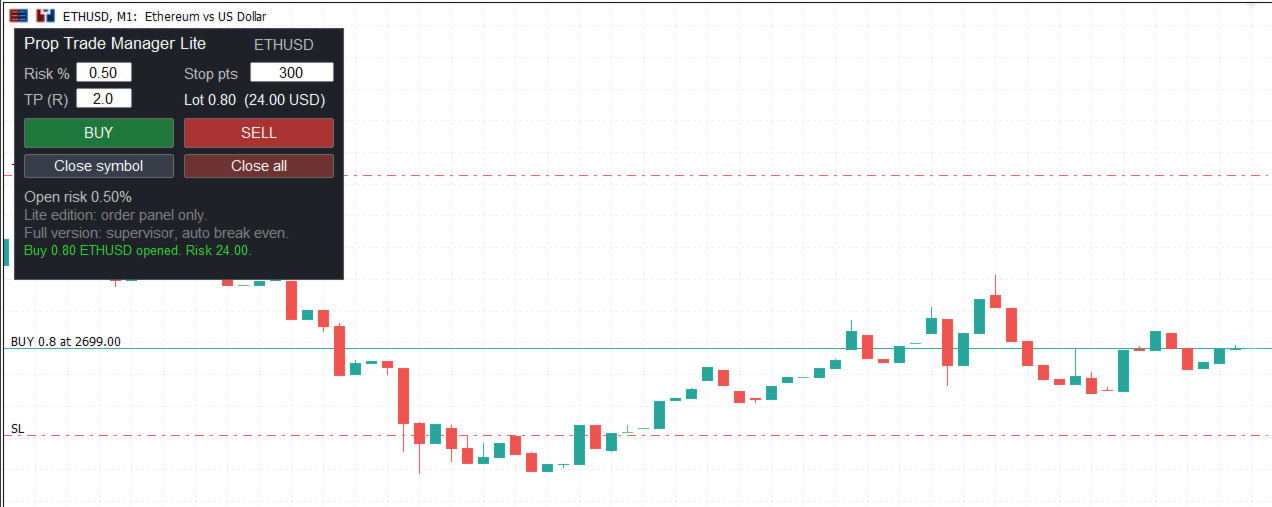
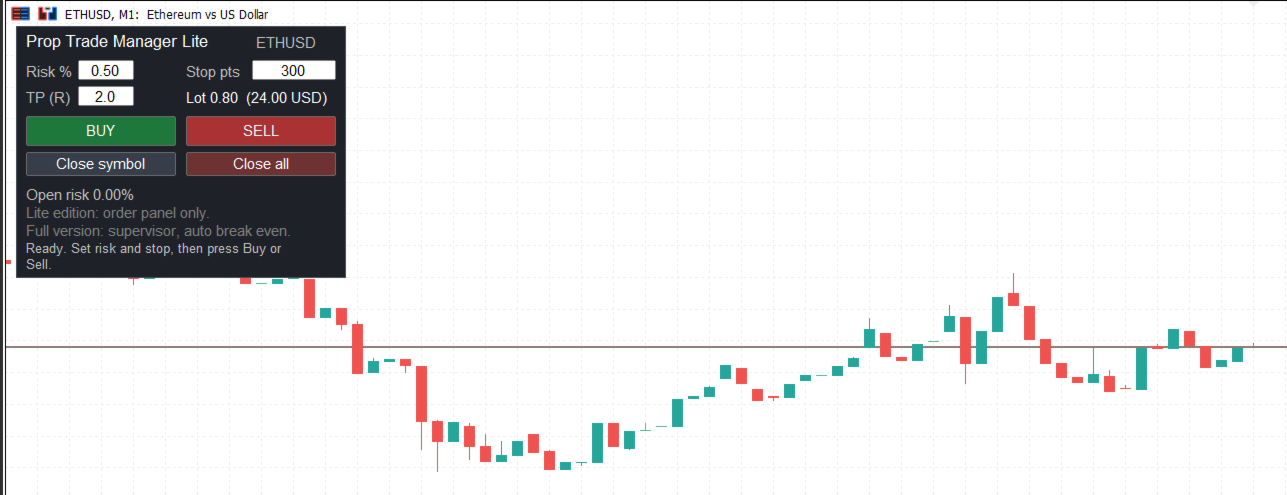
Prop Trade Manager Starter Panel is a free one-click order panel for MetaTrader 5. You choose how much to risk and how far the stop loss is, and it calculates the lot size for you. Press Buy or Sell and the order goes out with stop loss and take profit already set. It works on any symbol: forex, gold, indices and crypto.
WHAT IT DOES
- Order panel on the chart with Buy and Sell buttons.
- Lot size calculated from your risk % (of the balance) and your stop loss distance in points, using the tick value of the symbol. The lot size and the money you risk are shown live in the panel before you press the button.
- You can change Risk %, Stop points and Take profit directly in the panel, without opening the inputs window.
- The take profit is a multiple of the stop distance (for example 2R means a take profit at twice the stop distance). Set 0 for no take profit.
- Close symbol: closes the open positions of the symbol on the chart.
- Close all: closes all the positions of the account.
- Messages in the panel tell you what happened: order opened with the risk, stop too close to the price, algo trading off, order failed with the reason.
WHAT IT DOES NOT DO
- It gives no signals and never opens a trade by itself. A position is opened only when you press Buy or Sell.
- It does not limit your total risk, it does not block orders after a daily loss, it does not move the stop to break even and it does not trail. Those are in the full version.
- Risk is calculated from the stop loss. Slippage, gaps and spread can make the real loss bigger.
HOW TO USE IT
1. Attach it to the chart of the symbol you want to trade. Enable Algo Trading in the terminal.
2. Set Risk %, Stop points and TP (R) in the panel. Check the lot size shown.
3. Press Buy or Sell.
INPUTS
Risk per trade (% of balance), Stop loss distance (points), Take profit (multiple of the stop distance), Magic number of orders opened by the panel, Maximum slippage (points), Panel X and Y position, Font size.
This is the free edition. The full version, Prop Trade Manager Risk Panel and Supervisor, refuses a new order when the total open risk or the risk of a group of correlated markets would go over your limit, blocks new orders after your daily loss limit, and moves the stop to break even, closes part of the position and trails the stop for you.
More tools from the same author.
Prop Trade Manager Positions Dashboard (free) shows every open position and the total risk of your account in one table. Liquidity Sweep Marks Swing Highs and Lows (free) marks the highs and lows where price takes the liquidity and closes back. Find them in the Market: open my profile and press "More from author".
DISCLAIMER
This is a trade utility. It is not financial advice and it does not guarantee any result. Trading leveraged products carries a high risk of loss. You are responsible for your own account and for every order you send.