VolatilityPro
- Indicateurs
-
Musa Khunarikov
 📊 Trader Professionnel depuis 2014 (plus de 10 ans d'expérience). 💱 Marchés : Forex, Actions, MOEX, Métaux.
💻 Développeur MQL4-MQL5. Spécialisation : Analyse du Volume, Analyse des Clusters, Footprints, Delta, Profil de Volume.
🧠 Expérience & Approche : - Version: 1.10
- Mise à jour: 14 novembre 2026
⚠️ This is a FREE version of the tool.
Developed by a practicing trader with 12 years of live trading experience (verified tax records, 51 Finam certificates).
Looking for professional trading solutions (Volume Profile, SMC, Risk Manager)?
👉 Author's full lineup of PRO indicators: https://www.mql5.com/en/users/musa1994/seller
🌐 Official website and portfolio: https://developer-mql4-mql5.netlify.app/
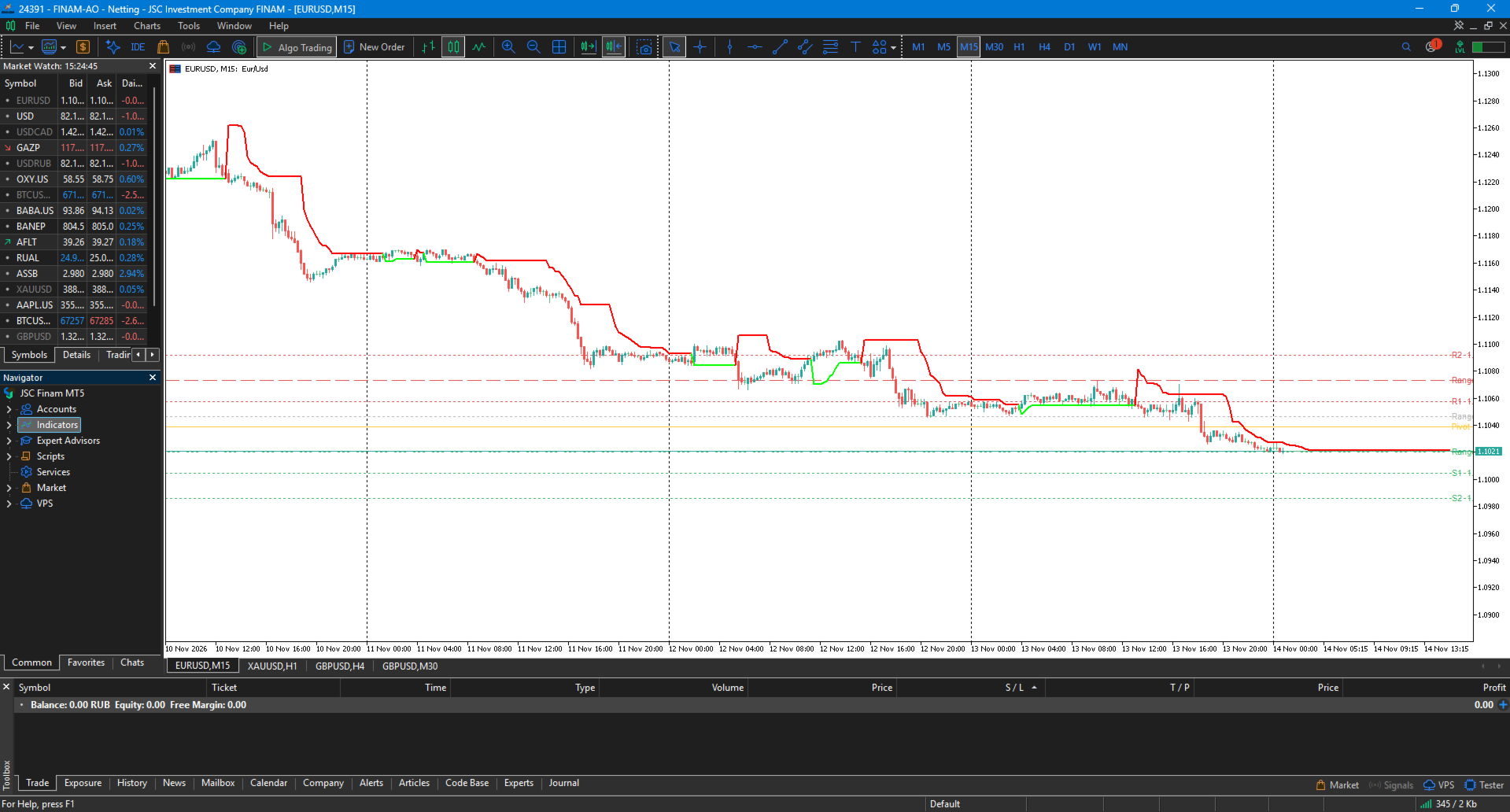
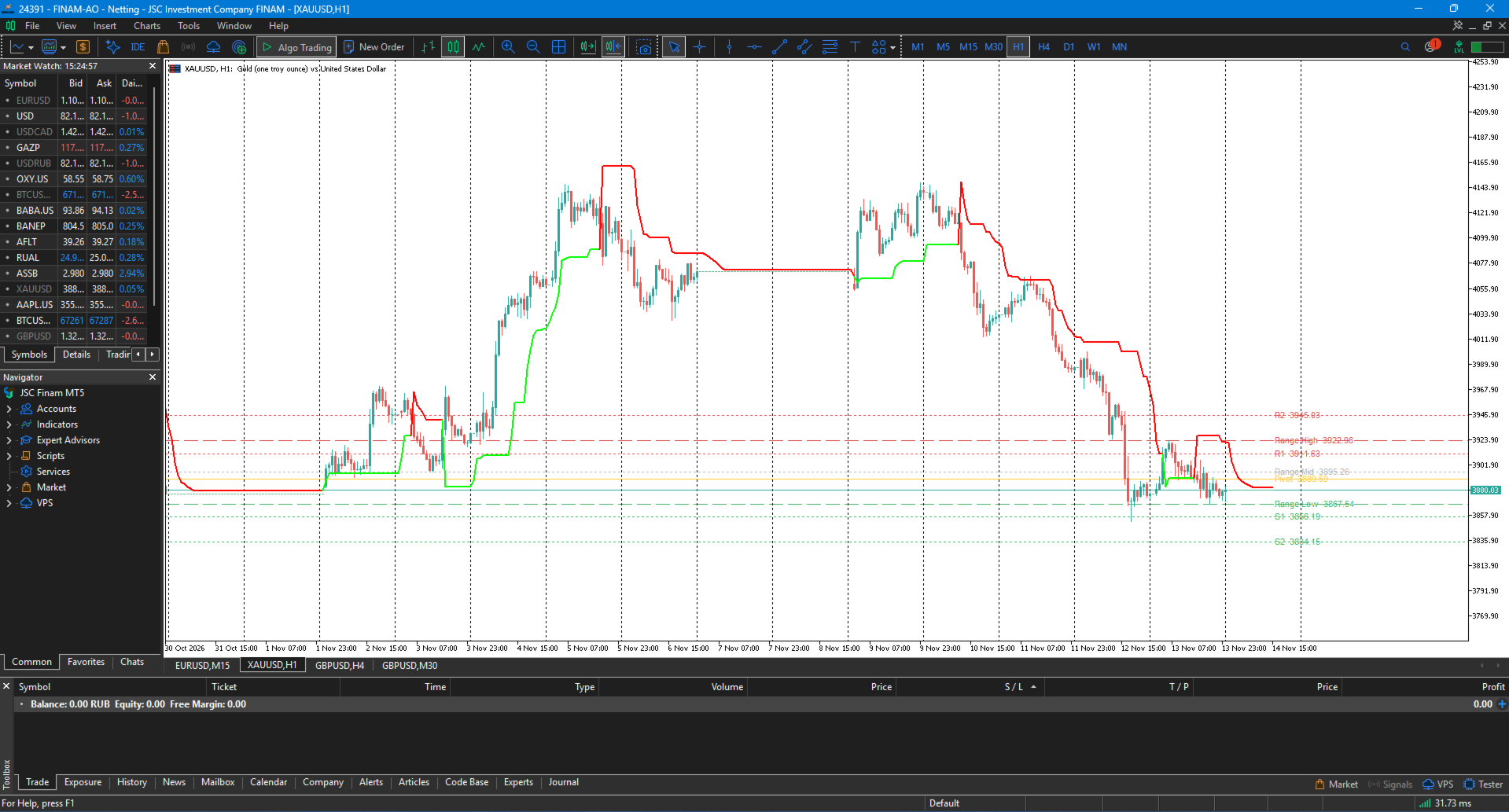
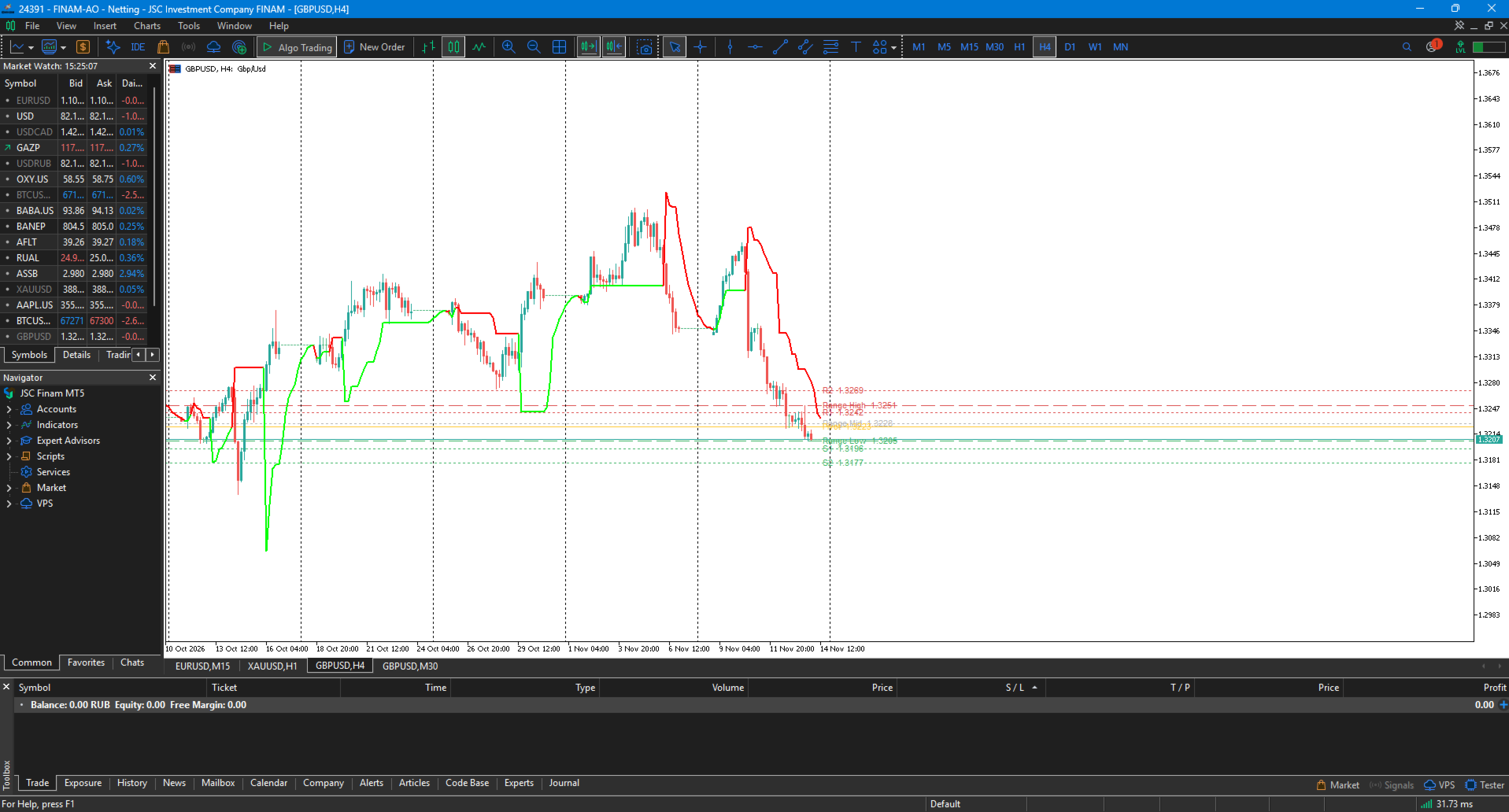
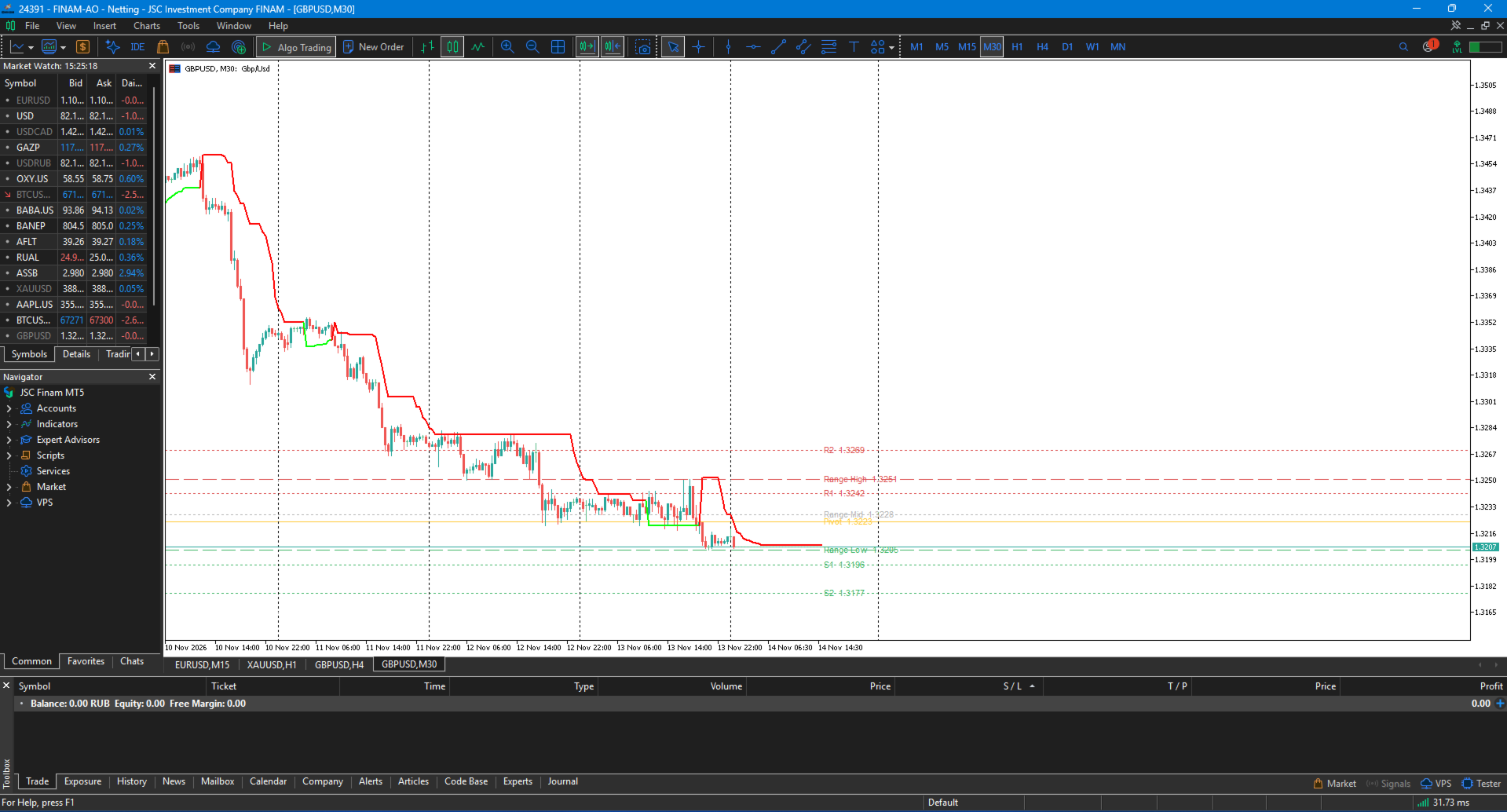
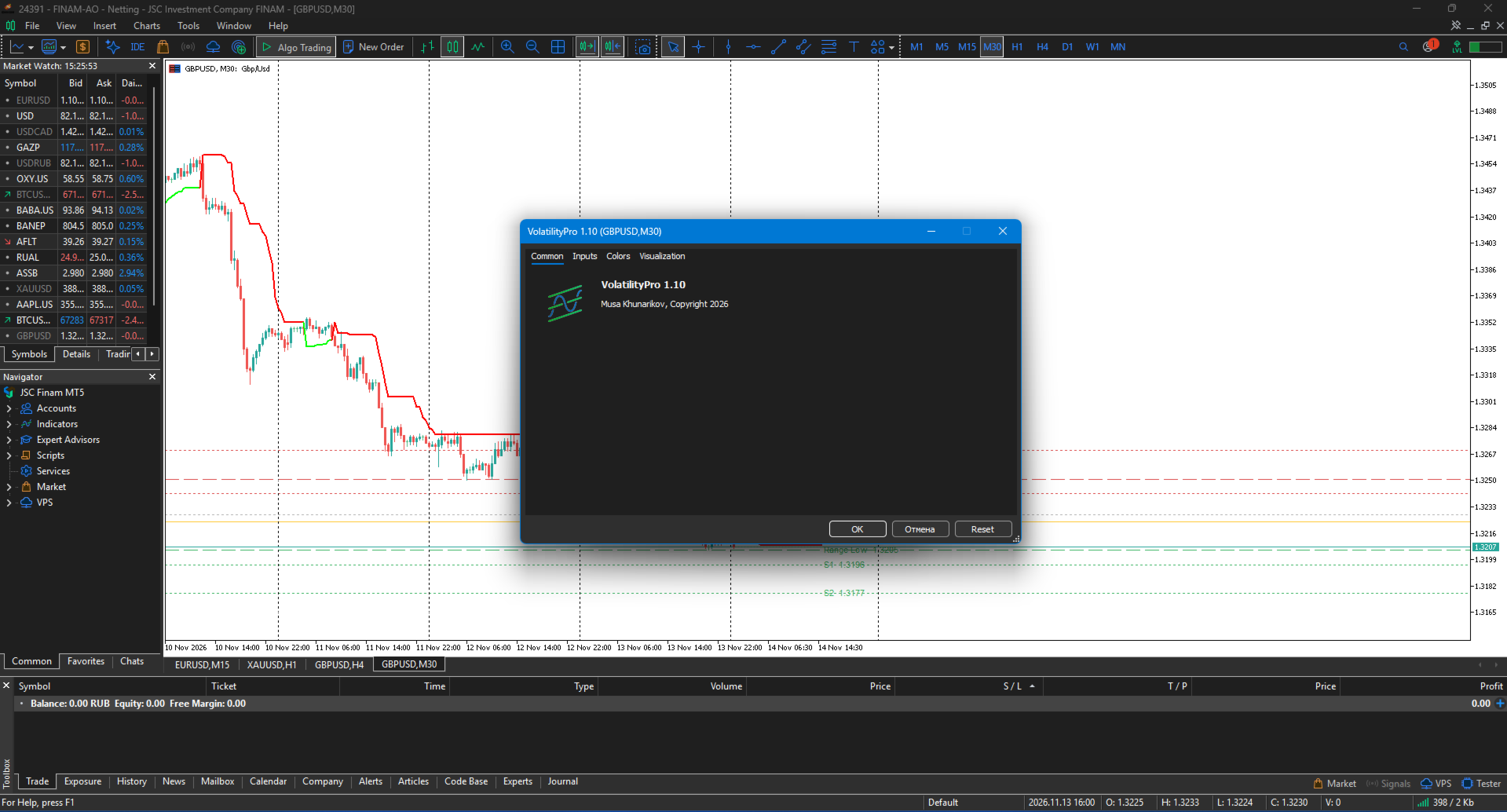
VolatilityPro is an indicator for MetaTrader 5 that combines three tools in one:
Adaptive Supertrend — an adaptive trend line
Daily Range — yesterday's High/Low range
Pivot Points — classic R1, R2, S1, S2 levels
The indicator is distributed free of charge. Full version with no functional limitations.
🎯 What the indicator shows
1. Adaptive Supertrend
Green line in an uptrend, red in a downtrend. The difference from a standard Supertrend is the adaptive ATR, which adjusts to current market volatility.
Implemented with DRAW_COLOR_LINE — a coloured line whose colour changes on the flip bar.
2. Daily Range
Yesterday's levels:
🔴 Range High — yesterday's high
🟢 Range Low — yesterday's low
⚪ Range Mid — the midpoint of the range (50%)
3. Pivot Points
Classic levels:
🟡 Pivot — the central point
🔴 R1, R2 — resistance levels
🟢 S1, S2 — support levels
✨ Key features
📈 Adaptive Supertrend
A standard Supertrend uses a fixed ATR multiplier. VolatilityPro adjusts ATR relative to its own average over the last 50 bars:
High volatility → widens the band → fewer false flips
Low volatility → narrows the band → faster reaction
The adaptation ratio is clamped to 0.5–2.0 so a single volatility spike does not distort the band.
🧮 Calculation without forward reference
ATR is computed strictly from the current bar and the preceding bars. The adaptive mode averages ATR values of past bars. Values on history and in real time are identical — you can verify this: note the values on the last closed bars, switch the timeframe and switch back, they will match exactly.
Values on closed bars do not change. The currently forming bar is recalculated on every tick, which is normal behaviour for any indicator that uses the close price.
📊 Three tools in one
No need to install Supertrend, Daily Range and Pivot Points separately. Everything in one file — fewer objects on the chart, cleaner analysis. Each layer toggles independently.
🎯 Automatic levels
Daily Range and Pivot Points are calculated from yesterday's daily bar (D1). Updated once per day. If D1 history is not yet loaded, the indicator retries on the next bar — the levels will not stay empty for the rest of the day.
🔔 Closed-bar alerts
Supertrend flip — trend direction change
Range break — break of yesterday's High/Low
Pivot break — break of R1/S1
All alerts are evaluated on the last closed bar. This eliminates notifications that cancel themselves a minute later when price returns.
The 60-minute cooldown applies separately to each symbol + timeframe pair. An alert on M5 does not suppress an alert on H1.
⚙️ Flexible settings
ATR period and multiplier
Adaptive ATR (on/off)
Colours and styles of all lines
Disabling any component
Separate enable for each alert type
🛠 Installation — MetaTrader 5
The indicator is installed by the terminal itself. Nothing needs to be compiled.
1. Open MetaTrader 5 and go to the Market tab in the bottom panel.
2. Find VolatilityPro using search.
3. Click Install — the terminal downloads and activates the file automatically.
4. Open Navigator (Ctrl+N) — the indicator appears in the list of Market products.
5. Drag it onto the chart of your instrument.
Free Market products are downloaded through the client terminal only.
📊 Recommended settings
Instrument | ATR Period | ATR Multiplier
EURUSD, GBPUSD | 10 | 3.0
XAUUSD | 10 | 2.5
BTCUSD | 14 | 3.5
US500, NAS100 | 10 | 3.0
Timeframes:
M5–M15 — scalping and intraday
H1–H4 — swing trading
D1 — medium-term trading
📌 Trading scenarios
1. Supertrend as a direction filter
Supertrend green → consider longs only
Supertrend red → consider shorts only
2. Daily Range break
Price closes above Range High → possible move up toward R1, R2
Price closes below Range Low → possible move down toward S1, S2
3. Working from Pivot Points
Bounce up from Pivot confirmed by a close → long, stop below Pivot
Bounce down from Pivot confirmed by a close → short, stop above Pivot
4. Combining all three layers
Supertrend green + price above Range Mid + close above Range High → aligned long scenario
Supertrend red + price below Range Mid + close below Range Low → aligned short scenario
5. Range Mid as a sentiment filter
Price above Mid — buyers hold control
Price below Mid — sellers hold control
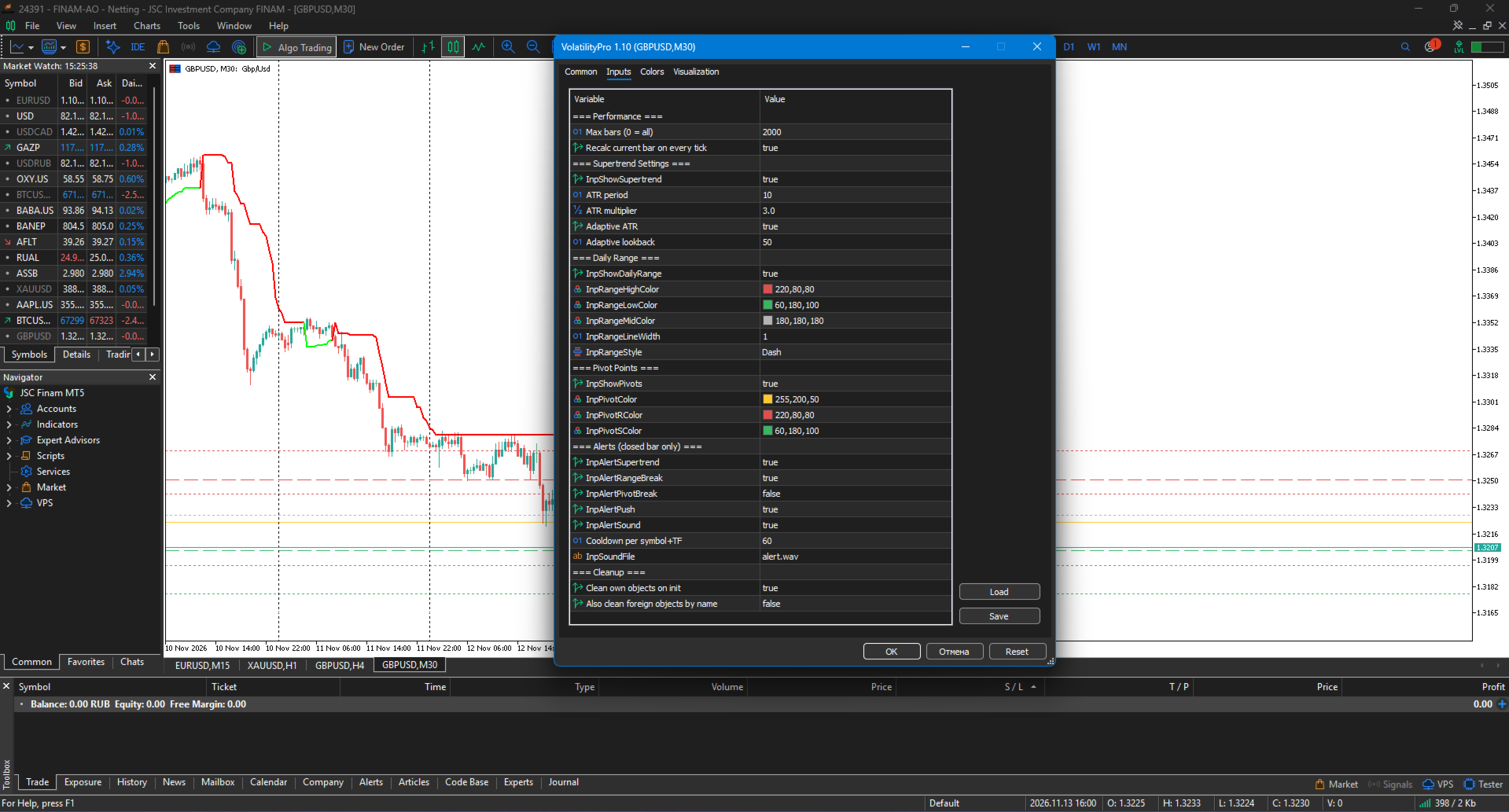
⚙️ Indicator parameters
Parameter | Description | Default
InpMaxBars | Maximum bars to calculate (0 = all) | 2000
InpRecalcOnTick | Recalculate the line on the current bar on ticks | true
InpShowSupertrend | Show the Supertrend line | true
InpAtrPeriod | ATR period | 10
InpAtrMultiplier | ATR multiplier | 3.0
InpAdaptiveAtr | Adaptive ATR | true
InpAdaptiveLookback | Averaging period for adaptive ATR | 50
InpShowDailyRange | Show Daily Range | true
InpRangeHighColor | Range High line colour | 220,80,80
InpRangeLowColor | Range Low line colour | 60,180,100
InpRangeMidColor | Range Mid line colour | 180,180,180
InpRangeLineWidth | Daily Range line width | 1
InpRangeStyle | Daily Range line style | STYLE_DASH
InpShowPivots | Show Pivot Points | true
InpPivotColor | Pivot colour | 255,200,50
InpPivotRColor | R1, R2 colour | 220,80,80
InpPivotSColor | S1, S2 colour | 60,180,100
InpAlertSupertrend | Alert on direction change | true
InpAlertRangeBreak | Alert on Range break | true
InpAlertPivotBreak | Alert on Pivot break | false
InpAlertPush | Push notifications to phone | true
InpAlertSound | Sound alert | true
InpAlertCooldownMin | Pause between alerts, min (per symbol+TF) | 60
InpSoundFile | Sound file name | alert.wav
InpCleanOwnObjects | Remove own objects on init | true
InpCleanForeign | Remove other indicators' objects by name | false
InpCleanForeign is disabled by default. Enable it only if labels from older versions remain on the chart and you are sure they do not belong to your other tools.
📋 Implementation notes
Pure MQL5 — no DLL, no external dependencies
ATR without forward reference — history and real-time values match
Values on closed bars are stable
Coloured line via DRAW_COLOR_LINE
Works on any instrument: Forex, metals, indices, crypto
All timeframes from M1 to MN
Alert cooldown separate per symbol and timeframe
True Range and ATR computed once into buffers — no recalculation inside nested loops
Daily Range recalculated once per day
Only own objects with the VP_ prefix are removed by default
⚠️ Important notice
VolatilityPro is an analysis tool, not a trading system. The indicator does not issue buy or sell signals — it shows trend direction and key levels.
Using the indicator does not guarantee profit. All trading decisions and risk management are made by the trader.
🏆 About the developer
Musa Khunarikov — practicing trader with 12 years of live-account experience (Forex, stocks, MOEX, metals). Specialisation: volume analysis, cluster analysis, delta, volume profile.
Services: EA, indicator and panel development, trading system audit.
📞 Support
Questions and bug reports — in the product comments section. Confirmed bugs are fixed within 48 hours.